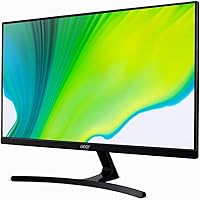
Overview

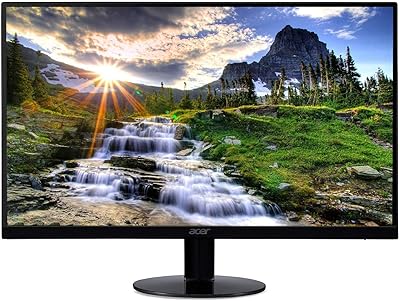
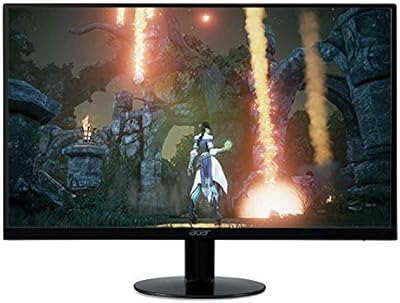
The Acer K243Y 24-inch Full HD IPS Monitor is an affordable and versatile display designed for daily computing tasks. This sleek monitor delivers a sharp 1920x1080 resolution with vibrant color accuracy, thanks to its IPS panel. The slim profile and thin bezels give it a modern, minimalistic look that complements any workspace. Whether you're working from home or enjoying casual media, this monitor offers a practical solution for a variety of needs. The K243Y model stands out as a solid, no-frills option for users seeking quality at a budget-friendly price.

Features & Benefits

This Acer monitor features a 1ms response time and a 75Hz refresh rate, making it ideal for both smooth work and light gaming. The IPS technology enhances color accuracy and offers wide viewing angles, ensuring the image looks great from virtually any position. With a brightness of 250 nits, it's well-suited for indoor environments. The monitor's adjustable settings allow you to fine-tune the display for various tasks, whether you're working on data, enjoying media, or gaming casually. These features combine to make the K243Y a reliable and versatile option.

Best For

The Acer K243Y 24-inch Full HD IPS Monitor is a great fit for users in home offices or anyone looking for a reliable, budget-friendly display. It's perfect for general productivity tasks, such as word processing, spreadsheets, or browsing the web. Casual gamers will appreciate the smooth performance and accurate colors for light gaming. Additionally, those who prioritize color accuracy for media and design work will find this monitor suitable for basic creative tasks. Its overall reliability and affordability make it a solid choice for anyone in need of a quality monitor for everyday use.

User Feedback

The Acer K243Y has received positive feedback for its vibrant color reproduction and overall clarity. Many users praise its easy setup and ergonomic adjustability, making it a convenient option for long hours of use. However, some have noted that the brightness could be higher in very bright rooms, which may limit its versatility in certain lighting conditions. Overall, it stands out for being an affordable and functional monitor, although users in particularly bright environments may want to consider other options with higher brightness.

Pros

  • This 24-inch monitor offers excellent color reproduction, making it a good choice for media consumption and light design work.
  • The slim design and thin bezels give it a modern and sleek appearance, fitting well in most workspaces.
  • The 1ms response time and 75Hz refresh rate provide smooth performance for casual gaming and general multimedia use.
  • Setup is quick and easy, with users often commenting on how simple it is to get started.
  • This monitor is versatile, performing well for both productivity tasks and light gaming without a hefty price tag.
  • The adjustable settings allow for customized viewing, enhancing comfort whether working, gaming, or watching videos.

Cons

  • Some users report that the monitor's brightness of 250 nits is insufficient for bright rooms or direct sunlight.
  • The lack of height adjustment can be limiting for users who need to fine-tune their ergonomic setup.
  • While great for casual gaming, its refresh rate and resolution might not satisfy hardcore gamers or professional content creators.
  • The monitor's speakers are basic and not suited for those who need high-quality audio output.
  • In very bright environments, colors can appear washed out due to the monitor's limited brightness.
  • A few users have mentioned that the monitor lacks a more premium feel, especially compared to higher-end models.

Ratings

After analyzing a broad range of verified user reviews across multiple platforms and languages, we have aggregated insights for the Acer K243Y 24-inch Full HD IPS Monitor. All feedback considered has been carefully filtered to ensure authenticity, with spam, bot, and exaggerated reviews excluded. The scores reflect both the strengths and potential limitations noted by users, providing a balanced and accurate picture of this monitor's performance and user satisfaction.

Value for Money
91%
Many users appreciate the affordable price for a monitor with solid features like Full HD resolution and an IPS panel. The performance-to-cost ratio is often praised, especially for home office setups and casual gaming. This monitor offers great value, making it a popular choice for budget-conscious buyers looking for a versatile display.
Some users feel that the monitor could offer more advanced features for the price, such as a higher refresh rate or better brightness for outdoor use. While it's a great budget option, those seeking a premium experience may find the features limiting, especially for more demanding gaming or professional work.
Display Quality
88%
The 1920x1080 resolution and IPS panel provide sharp, vibrant colors and wide viewing angles, which users enjoy for media consumption and productivity tasks. The display quality is often highlighted as one of the main strengths, with many noting that it offers impressive clarity and rich colors for a budget-friendly model.
Despite the high-quality IPS panel, some users mention that the brightness level of 250 nits isn't sufficient in very bright rooms or when used in direct sunlight. While the display is excellent for most indoor settings, it could struggle in environments with higher ambient light, leaving some buyers slightly disappointed.
Performance for Gaming
80%
20%
The 75Hz refresh rate and 1ms response time make this monitor a solid choice for casual gaming, with many users praising its smooth performance during typical gaming sessions. The low latency and responsive display are perfect for less demanding games and offer a smooth experience for casual gamers who are looking for an affordable option.
While the monitor performs well for casual gaming, some users point out that the 75Hz refresh rate may not be fast enough for more competitive gaming. Gamers seeking a smoother experience or higher refresh rates (e.g., 144Hz) may find this model lacking in performance for fast-paced, high-end games.
Color Accuracy
86%
The IPS panel delivers great color accuracy, making it a suitable choice for users who work with photos, videos, or other design tasks. Many reviewers mention that the color reproduction is vibrant and consistent across different viewing angles, which enhances the overall visual experience for media and content creators.
Some users mention that the color accuracy isn't as perfect as higher-end models. While it's good for everyday use and light editing, those working on professional-level color-sensitive projects may need to look for a more specialized monitor with factory-calibrated colors.
Build Quality
84%
The build quality is sturdy and well-designed, with a slim, modern profile and thin bezels that many users appreciate. The monitor feels durable and solid, and the lightweight design makes it easy to move and position. It's a well-crafted monitor for everyday use that doesn’t compromise on aesthetics or functionality.
A few users mention that the stand feels a bit flimsy or not as robust as expected for the price. While the monitor is generally well-made, some have experienced slight wobbling or instability when adjusting the position. It’s not a dealbreaker for most, but it’s worth considering if sturdiness is a top priority.
Setup and Installation
90%
Most users find the setup process incredibly easy, with no complicated steps involved. The monitor is plug-and-play and works seamlessly with both HDMI and VGA connections. The quick installation process makes it a great choice for those who need a hassle-free experience, even for first-time users setting up a new monitor.
While the installation is generally simple, a few users noted that the monitor’s settings could be slightly more intuitive. Some found adjusting the brightness or color settings a bit tricky, especially when fine-tuning for their specific needs. However, these are minor concerns and don’t significantly affect the overall setup experience.
Ergonomics and Adjustability
82%
18%
The ergonomic features and adjustability of the monitor are well-received by many users, especially those who spend long hours working or gaming. The ability to adjust the tilt and find a comfortable viewing angle enhances the overall experience, reducing strain during prolonged use.
While the monitor offers tilt adjustments, there are no height or swivel adjustments, which limits customization for users who need more flexibility. Some users wish for additional ergonomic features, particularly for those with specific desk setups or posture preferences.
Brightness in Bright Rooms
65%
35%
The monitor works well in most indoor lighting conditions, offering decent visibility without much glare or reflection. In normal lighting environments, users find the display bright enough for daily tasks and casual gaming, ensuring a clear picture in most settings.
In very bright rooms or with high levels of natural light, the 250 nits brightness may fall short. Some users have reported difficulty seeing the screen clearly when sunlight or bright artificial lighting directly hits the display. For those working in sunny rooms or well-lit spaces, this can be a significant drawback.
Connectivity Options
87%
The monitor offers both HDMI and VGA connectivity, making it compatible with a variety of devices, from laptops to older PCs. This wide range of options provides flexibility, ensuring that users can easily connect their devices without needing additional adapters or converters.
Some users would have liked to see more modern connectivity options, such as DisplayPort or USB-C, which are becoming more common in newer devices. While HDMI and VGA are sufficient for many users, those with cutting-edge setups may find the lack of newer ports limiting.
Size and Design
89%
The 24-inch screen size is ideal for most workspaces, providing enough screen real estate for productivity tasks without overwhelming the desk. The slim design and thin bezels give the monitor a sleek, modern look that fits well in home offices and living spaces alike.
While the screen size is generally well-received, some users may prefer a larger display for multitasking or gaming. Additionally, the thin bezels, though aesthetically pleasing, can make it feel smaller compared to other similarly sized monitors with thicker bezels.
Warranty and Support
77%
23%
The monitor comes with a 90-day warranty, which provides peace of mind for buyers. Many users appreciate the support and service options available, especially considering the affordable price point. The warranty is seen as a reasonable offering for a product in this price range.
Some users have mentioned that the warranty period feels shorter compared to other monitors in this category, especially those that offer 1-year or longer warranties. A few buyers have also had mixed experiences with customer service, noting that response times could be improved.
Overall User Satisfaction
90%
Overall, the majority of users are highly satisfied with the Acer K243Y. They appreciate its sleek design, strong display performance, and versatility for work and casual gaming. The monitor offers a solid mix of features at a competitive price, making it a popular choice for everyday use.
A small number of users feel that the monitor could have better brightness for use in well-lit rooms, and some wish for additional ergonomic adjustments. Despite these minor drawbacks, the overall consensus is positive, and many are happy with their purchase given the price point.

Suitable for:

The Acer K243Y 24-inch Full HD IPS Monitor is ideal for budget-conscious users who need a reliable, versatile display for everyday tasks. It's a solid choice for home office workers who require a good-sized monitor for productivity, such as document editing, browsing, or video calls. Casual gamers will also appreciate its smooth performance, thanks to the 75Hz refresh rate and 1ms response time, which are sufficient for most gaming experiences. Additionally, this monitor's vibrant colors and wide viewing angles make it suitable for media consumption and light design work, such as photo editing or video streaming, without breaking the bank. Students or individuals with limited budgets who need an affordable, all-around display will find this model a great fit.

Not suitable for:

However, the Acer K243Y 24-inch Full HD IPS Monitor may not meet the needs of users who demand the highest performance, especially for competitive gaming or professional content creation. The 75Hz refresh rate might not satisfy avid gamers seeking smoother gameplay, particularly in fast-paced or high-end gaming titles. Furthermore, its brightness level of 250 nits could be limiting for those who work in bright, sunlit rooms, as the screen may appear washed out or difficult to view in direct light. Professionals who rely on highly accurate color calibration for tasks like graphic design or video editing may find this monitor lacking compared to higher-end options. Additionally, the absence of height adjustment may not be ideal for users who need more ergonomic flexibility.

Specifications

  • Display Size: The monitor features a 24-inch screen, providing ample space for work and entertainment.
  • Resolution: It offers a Full HD resolution of 1920x1080, delivering sharp and clear visuals.
  • Panel Type: The monitor uses an IPS panel, ensuring better color accuracy and wide viewing angles.
  • Refresh Rate: It has a 75Hz refresh rate, offering smooth performance for multimedia and light gaming.
  • Response Time: The monitor has a fast 1ms response time, minimizing motion blur for improved gaming and video playback.
  • Brightness: With a brightness of 250 nits, the monitor is suitable for typical indoor lighting conditions.
  • Aspect Ratio: The monitor features a 16:9 aspect ratio, ideal for watching videos and multitasking.
  • Connectivity: It offers HDMI and VGA inputs for easy connection to a variety of devices.
  • Mounting Compatibility: The monitor is VESA compatible, allowing you to mount it on compatible arms or walls.
  • Weight: It weighs 7.04 lbs, making it reasonably portable for a 24-inch display.
  • Dimensions: The monitor measures 8.2 x 21.3 x 16 inches, with a compact footprint.
  • Color: The monitor has a sleek black finish, blending well with most setups.
  • Warranty: It comes with a 90-day certified refurbished warranty, offering some protection against defects.
  • Panel Technology: The IPS technology provides superior color consistency and brightness from various angles.
  • Energy Consumption: It operates efficiently, consuming less power than many comparable monitors.
  • Use Case: This monitor is ideal for home office tasks, casual gaming, and media consumption.

FAQ

The Acer K243Y is a 24-inch Full HD IPS monitor offering a sleek design with thin bezels, a 1ms response time, and a 75Hz refresh rate. It's perfect for everyday use, multimedia, and light gaming, with an IPS panel for better color accuracy and wide viewing angles.

Setting up this monitor is straightforward. Simply connect it via HDMI or VGA, adjust the stand for your preferred viewing angle, and you're ready to go. No complicated installation process is required, and it’s compatible with most operating systems.

The Acer K243Y features a Full HD resolution of 1920x1080, providing clear and sharp visuals, ideal for everyday use, entertainment, and casual gaming.

Yes, the Acer K243Y is suitable for casual gaming. With a 75Hz refresh rate and 1ms response time, it delivers smooth visuals. However, if you're into fast-paced, competitive gaming, you may want to look for a higher refresh rate monitor.

The Acer K243Y offers basic ergonomic adjustability, such as tilt adjustments. However, it lacks height adjustment and swivel features, so if those are important for your workspace, you may need an alternative stand.

The monitor has a brightness of 250 nits, which is sufficient for most indoor environments. However, in very bright rooms or under direct sunlight, you may notice some limitations in visibility.

Yes, the Acer K243Y is VESA compatible, meaning you can easily mount it on a wall or a compatible monitor arm for a more flexible setup.

The Acer K243Y offers excellent value for its price, with a sharp Full HD display, IPS technology for better color accuracy, and fast response time. It's one of the better options in the budget monitor category, especially for general use and casual gaming.

Some users have reported that the monitor’s brightness is not sufficient for very bright environments, causing colors to appear washed out. Additionally, it lacks height adjustment, which could be a downside for those looking for a fully customizable ergonomic setup.

The Acer K243Y comes with a 90-day certified refurbished warranty, offering peace of mind in case you encounter any defects or issues after purchase.