


Overview

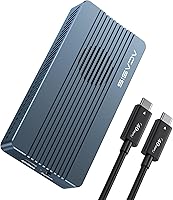
The ACASIS TBU405 Pro M.2 NVMe SSD Enclosure enters a competitive market where budget brands are increasingly fighting for space alongside established names — and it does so with a legitimately compelling pitch. ACASIS, sold under the FREEGENE brand, sits in the value-premium tier: not the cheapest option on the shelf, but nowhere near the top either. The standout addition over earlier models is a built-in cooling fan, which you actually have to switch on manually — something many buyers miss at first. The dual-chip setup (JHL7440 + RTL9210) underpins its stability. One honest caveat: hitting peak 40Gbps throughput requires a USB4 or Thunderbolt 4 port on your host machine. Without that, you will still get solid speeds, just not the headline number.

Features & Benefits

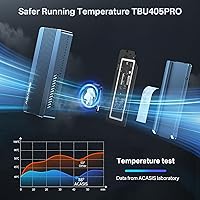
The TBU405 Pro's interface support is genuinely broad — USB4, Thunderbolt 3 and 4, and all the way down to USB 2.0 — so it won't become useless if you switch machines. The active cooling fan is the real differentiator here. Passive enclosures throttle under sustained read/write loads; this NVMe enclosure stays cooler under pressure, which matters when offloading large video files or running long backups. It accepts all four NVMe form factors (2230 through 2280), so you're not locked into one SSD size. The aluminum shell with its venting holes manages heat from both sides. At under 4 inches long, it slips into a jacket pocket easily. Up to 8TB of SSD capacity is supported — though the SSD is sold separately, which is worth noting before checkout.

Best For

This 40Gbps enclosure is an obvious pick for creative professionals — video editors working off an M1 or M2 Pro/Max MacBook who need fast external storage without carrying a bulky drive. It also suits power users who want Thunderbolt-class performance without the cost of a full docking station. Travelers will appreciate the compact build; it genuinely fits in a coat pocket. If you already own a spare M.2 NVMe SSD, dropping it into this enclosure makes strong economic sense compared to buying a pre-built portable drive. Windows and Linux users also get reliable compatibility across USB 3.x host ports, making the TBU405 Pro a cross-platform workhorse rather than a Mac-only accessory.

User Feedback

The TBU405 Pro carries a 3.5-star average, and that number tells a nuanced story. Satisfied buyers consistently highlight real-world transfer speeds — particularly those pairing high-end NVMe drives with Thunderbolt 4 MacBooks, who report reads well above 2,500 MB/s. Critics flag two recurring issues: achieving advertised peak speeds depends heavily on cable quality and host port generation, and the fan — while effective — produces a noticeable hum in quiet rooms. A handful of users have also hit driver or recognition hiccups on certain Windows setups. Build quality gets mixed marks; the aluminum shell feels solid but not quite flagship. Buyers who arrive with realistic expectations tend to leave satisfied; those expecting flawless plug-and-play across every device occasionally hit friction.

Pros

  • Genuine 40Gbps throughput is achievable when paired with a Thunderbolt 4 or USB4 host port.
  • The built-in cooling fan actively prevents thermal throttling during long, sustained transfers.
  • Supports all four common NVMe form factors, so you are not locked into one SSD size.
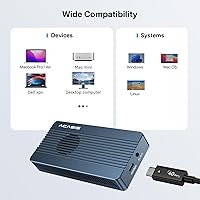
  • Broad interface compatibility means the enclosure stays useful across USB 3.0, 3.1, 3.2, and USB4 machines.
  • The aluminum alloy shell feels durable and helps passively wick heat even when the fan is off.
  • Pocket-sized dimensions make it one of the more genuinely portable enclosures at this speed tier.
  • Supports up to 8TB SSDs, so it scales well as storage needs grow.
  • Dual-chip control (JHL7440 + RTL9210) contributes to stable, consistent performance over time.
  • Compatible with macOS, Windows, and Linux, making it a flexible cross-platform tool.
  • Strong value proposition for users who already own a spare NVMe SSD and want to avoid paying for a pre-built drive.

Cons

  • SSD is not included, which catches some buyers off guard and adds to the total cost.
  • The cooling fan must be manually switched on each session — it does not activate automatically.
  • Fan noise is noticeable in quiet environments, which can be distracting during light workloads.
  • Peak speeds are heavily dependent on cable quality; the included cable may limit real-world performance.
  • Some Windows users report intermittent recognition issues, particularly on older or non-standard USB controllers.
  • The 3.5-star average rating reflects a meaningful portion of buyers who had compatibility or consistency problems.
  • Brand support and warranty service are less established compared to Plugable, OWC, or similar names.
  • Achieving the advertised 2,800 MB/s read speeds requires a specific host, SSD, and cable combination that many buyers will not have.
  • The fan switch placement is small and easy to overlook, leading to confusion when the fan does not run by default.
  • Not ideal for users on legacy Windows systems where driver conflicts have been reported by multiple reviewers.

Ratings

The scores below reflect an AI-driven analysis of verified global buyer reviews for the ACASIS TBU405 Pro M.2 NVMe SSD Enclosure, with spam, bot-generated, and incentivized feedback actively filtered out before any score was calculated. The results are intentionally unvarnished — where this enclosure genuinely impresses, the numbers show it, and where real users ran into friction, that is reflected too. Expect a candid picture of both what works well and what pushed the overall average down to a modest 3.5 stars.

Transfer Speed
83%
Users with Thunderbolt 4 MacBooks consistently report sustained reads above 2,600 MB/s, which holds up well even during extended video editing sessions. For that target audience, the real-world throughput matches the marketing claims closely enough to feel satisfying rather than misleading.
On USB 3.2 or older hosts, speeds drop sharply and buyers expecting headline numbers are often disappointed. A meaningful portion of negative reviews trace back to users who simply did not have a USB4 or Thunderbolt 4 port and felt misled by the advertised figures.
Thermal Management
78%
22%
The active cooling fan genuinely makes a difference during sustained workloads — users copying large video archives or running backup jobs report far less throttling compared to passive aluminum enclosures they had used previously. The vented aluminum shell also provides a decent baseline of passive cooling when the fan is switched off.
The fan must be enabled manually via a physical switch, which is not clearly documented and confuses a surprisingly large number of buyers. Several users only discovered this after reporting the fan as broken, and a few still ran hot sessions unknowingly with the fan off.
Build Quality
71%
29%
The aluminum alloy shell gives the TBU405 Pro a solid, premium feel that belies its relatively accessible price point. Most users note that it does not flex or creak under normal handling, and the finish holds up reasonably well through daily bag and pocket use.
Close inspection reveals some inconsistency in fit and finish — a few buyers noted minor misalignment on the end caps or slightly rough edges around the vent holes. It does not feel as precision-machined as competing enclosures from more established hardware brands.
Compatibility
67%
33%
Mac users on M1 and M2 machines report near-flawless out-of-the-box recognition, and the broad interface range from USB4 down to USB 2.0 means the enclosure can follow a user across machine upgrades without becoming obsolete. Linux compatibility is also solid for technically confident users.
Windows compatibility is noticeably patchier, with multiple reviewers encountering device recognition failures on machines with older Intel USB controllers. The troubleshooting path — updating chipset drivers, trying different ports — works eventually, but it is not the plug-and-play experience many buyers expect.
Portability
91%
At under 4 inches long and weighing roughly 300 grams with an SSD installed, this NVMe enclosure genuinely earns its travel-friendly label. Photographers and video editors who carry it in a coat pocket or small tech organizer consistently praise how little space it takes up without sacrificing capacity.
The integrated fan adds a small amount of bulk versus a pure passive design, and users with ultra-minimalist setups may notice the extra depth compared to slimmer enclosure models. It is still compact by any reasonable measure, but not the absolute thinnest option available.
Setup Experience
59%
41%
For experienced users who have installed M.2 SSDs before, the physical installation process is simple and takes only a few minutes with a small screwdriver. The enclosure accommodates all four common form factors, so sourcing a compatible drive is rarely an issue.
First-time buyers frequently run into two avoidable friction points: discovering the SSD is not included only after unboxing, and not realizing the fan switch must be manually engaged. The documentation bundled with the unit does not do enough to pre-empt either of these frustrations.
Fan Noise
62%
38%
The fan is effective enough at its job that most users who work in moderate-noise environments — a home office with background noise, a coffee shop — barely notice it during operation. It is not a loud unit by any objective measure.
In genuinely quiet environments like a late-night edit suite or a library, the low hum is consistently described as distracting. Users who do most of their heavy transfers in silence will likely end up leaving the fan off and accepting the thermal trade-off rather than tolerating the noise.
Cable & Accessory Quality
55%
45%
The included USB-C cable is functional for basic connectivity and sufficient for users whose host port tops out at USB 3.2 speeds. It gets the drive recognized without any extra purchases for the majority of everyday use cases.
Multiple reviewers discovered that the bundled cable was limiting their peak speeds and only hit advertised throughput after switching to a certified Thunderbolt 4 cable purchased separately. At this price tier, the expectation of a speed-matched cable is reasonable and the omission stings.
Value for Money
73%
27%
For Mac-centric power users who already own an NVMe SSD and need a fast portable enclosure with active cooling, the price-to-performance ratio is genuinely competitive. Getting close to 2,700 MB/s sustained write speeds for this outlay is difficult to match with comparable passive units.
For Windows users or anyone without a Thunderbolt port, the value equation weakens considerably since they will never access the speeds that justify the premium. Cheaper enclosures cap at the same USB 3.2 speeds and cost noticeably less, making the TBU405 Pro harder to recommend in those scenarios.
SSD Form Factor Support
88%
Supporting 2230, 2242, 2260, and 2280 drives is about as broad as the NVMe enclosure market gets, which means buyers can drop in drives pulled from older laptops, desktops, or standalone purchases without worrying about size conflicts. This alone saves a meaningful number of buyers from buying the wrong drive.
SATA M.2 drives are not supported, and the enclosure does not make this limitation explicit enough in its labeling. A handful of buyers who installed an M.2 SATA drive and saw zero activity reported it as a product fault before realizing the incompatibility.
Long-Term Reliability
66%
34%
Users who have owned the enclosure for six months or more and primarily use it on Mac systems report stable, consistent performance with no degradation in speeds or recognition reliability. The dual-chip design appears to contribute to steady behavior over time for this audience.
Longer-term reliability on Windows is less well-documented in user feedback, and a few users reported intermittent disconnection issues appearing after several months of daily use. The brand's customer support responsiveness also drew criticism from buyers who encountered post-purchase problems.
Thermal Throttling Resistance
76%
24%
With the fan running, the TBU405 Pro holds its top speeds notably longer than comparable passive enclosures during back-to-back large file transfers. Video editors moving 100GB+ rushes report consistent speeds throughout the transfer without the mid-job slowdowns that plague fanless designs.
With the fan switched off — which happens more often than it should, given the confusing switch mechanic — sustained workloads do produce throttling on par with passive units. The thermal advantage is entirely dependent on the fan being on, which is not guaranteed for every session.
Platform Versatility
69%
31%
The broad interface support means one enclosure can serve a MacBook at home, a Windows desktop at work, and a Linux server in a lab without any hardware changes. That flexibility has genuine long-term value for users who operate across mixed environments.
The practical experience across platforms is uneven enough that calling it truly universal would be an overstatement. Mac performance is the clear highlight, and Windows users in particular should temper their expectations around both peak speeds and setup simplicity.

Suitable for:

The ACASIS TBU405 Pro M.2 NVMe SSD Enclosure is a strong fit for creative professionals — video editors, photographers, and content creators — who work off a Thunderbolt 4 or USB4-equipped MacBook and need external storage that can keep pace with large file transfers without throttling mid-task. If you already own a spare M.2 NVMe SSD sitting unused in a drawer, this enclosure is one of the more cost-effective ways to put it to work as a fast portable drive. Travelers and mobile workers who prioritize a compact footprint will appreciate that the entire unit slips into a coat pocket without any fuss. It also makes practical sense for Windows and Linux users who want one enclosure that works reliably across USB 3.x and USB4 host ports as they upgrade machines over time. Anyone comfortable doing a simple one-time SSD installation and who understands that peak speeds are tied to their host port generation will get solid value here.

Not suitable for:

Buyers expecting a true plug-and-play experience with zero setup should look elsewhere — the TBU405 Pro requires you to source and install your own M.2 NVMe SSD separately, and the cooling fan must be manually switched on before use, neither of which is obvious from the packaging. If your laptop or desktop only has USB 3.0 or 3.1 ports, this 40Gbps enclosure will work but you will never come close to its headline speeds, making the price premium hard to justify over cheaper alternatives. Users on older Windows configurations have reported occasional driver and device recognition issues, so it is not the most reliable choice for mixed or legacy PC environments. Anyone who needs near-silent operation in a quiet office or studio setting may find the fan noise disruptive when it is running. Finally, buyers seeking a well-known, warranty-backed brand with established customer support channels may find the ACASIS/FREEGENE brand harder to deal with than more established competitors in this space.

Specifications

  • Model: This enclosure is manufactured by ACASIS under the FREEGENE brand and carries the model designation TBU405 Pro.
  • Interface: It supports USB4, Thunderbolt 3 and 4, USB 3.2, USB 3.1, USB 3.0, and USB 2.0, automatically negotiating the fastest speed supported by the connected host.
  • Max Speed: Peak theoretical throughput is 40Gbps, achievable only when connected via a USB4 or Thunderbolt 4 port with a compatible high-quality cable.
  • Controller Chip: A dual-chip design using the JHL7440 and RTL9210 controllers provides stable data handling and broad cross-platform compatibility.
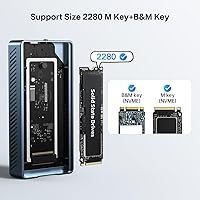
  • SSD Form Factors: The enclosure accommodates M.2 NVMe SSDs in 2230, 2242, 2260, and 2280 sizes; SATA M.2 drives are not supported.
  • Max Capacity: SSDs up to 8TB are supported, though actual compatibility may vary depending on the specific SSD model and firmware.
  • Cooling System: A built-in active cooling fan with dedicated manual switch is included; the fan does not activate automatically and must be turned on by the user before use.
  • Shell Material: The outer casing is constructed from aluminum alloy and features heat dissipation vents along the sides to assist passive airflow when the fan is off.
  • Dimensions: The unit measures 3.94 x 1.97 x 1.18 inches, making it compact enough to carry in a pocket or small tech pouch.
  • Weight: Without an SSD installed, the enclosure weighs approximately 0.3 kg (10.6 oz), which includes the aluminum shell and internal components.
  • Compatible Platforms: It works with macOS, Windows, and Linux operating systems, though driver support quality may vary across Windows configurations.
  • Compatible Devices: Verified compatible devices include M1 and M2 Pro and Max Mac computers and iPad Pro models with a Thunderbolt or USB4 port.
  • SSD Included: No SSD is included in the box; buyers must source and install their own M.2 NVMe drive separately before the enclosure is functional.
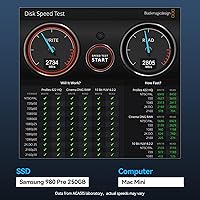
  • Benchmark Speeds: ACASIS reports read and write speeds of approximately 2,805 MB/s and 2,734 MB/s respectively, measured using a Samsung 980 EVO Plus on a MacBook Pro with Thunderbolt.
  • Connector Type: The host-side connector is USB-C, compatible with Thunderbolt 3, Thunderbolt 4, and USB4 ports via the included cable.

Related Reviews
ACASIS TB501 Pro M.2 NVMe SSD Enclosure
80%
91%
Transfer Speed Performance
88%
Build Quality & Materials
79%
Thermal Management & Cooling Fan
67%
Compatibility & Host Port Requirements
93%
Setup & Ease of Use
More
Satechi ST-EU4NPM USB4 M.2 NVMe SSD Enclosure

81%
86%
Transfer Speed Performance
91%
Build Quality & Materials
93%
Installation & Setup Ease
74%
Thermal Management
54%
Included Accessories & Cable
More
dockteck DH0002 M.2 NVMe/SATA SSD Enclosure

84%
88%
Transfer Speed (NVMe)
76%
SATA Drive Performance
83%
Build Quality
93%
Ease of Setup
79%
Thermal Management
More
ineo C2605-NVMe M.2 NVMe SSD Enclosure

77%
88%
Write Protection Reliability
79%
Transfer Speed Performance
82%
Thermal Management
61%
Fan Noise Level
76%
Build Quality & Materials
More
WAVLINK Dual-Bay NVMe M.2 SSD Cloner

75%
83%
Offline Cloning Reliability
78%
Transfer Speed
71%
Compatibility Range
76%
Build Quality
86%
Ease of Setup
More
Cable Matters USB4 40Gbps M.2 NVMe Enclosure

80%
88%
Data Transfer Performance
83%
Build Quality & Materials
79%
Thermal Management & Cooling
91%
Portability & Form Factor
74%
Compatibility Range
More
Plugable M.2 NVMe SSD Enclosure
87%
94%
Ease of Setup
92%
Data Transfer Speed
88%
Build Quality
90%
Port Compatibility
87%
Cooling & Thermal Management
More
GRAUGEAR 40Gbps M.2 NVMe SSD Enclosure
85%
93%
Speed & Performance
88%
Cooling Efficiency
91%
Ease of Installation
85%
Build Quality
75%
Compatibility with Older USB Interfaces
More
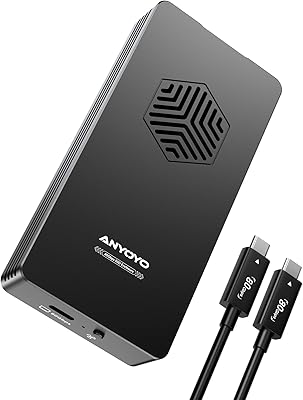
ANYOYO TB502Pro NVMe SSD Enclosure

78%
91%
Transfer Speed Performance
88%
Thermal Management
89%
Build Quality
86%
Thunderbolt 5 Compatibility
41%
TB3 Fallback Behavior
More
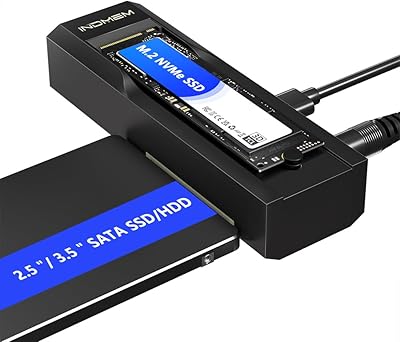
ORICO TCM2 M.2 NVMe SSD Enclosure
78%
83%
Transfer Speed
61%
Thermal Management
74%
Build Quality
91%
Ease of Installation
86%
Cable Bundle Quality
More

FAQ

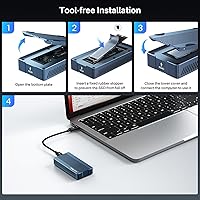
No, it does not. The enclosure ships as a bare unit — you need to purchase a compatible M.2 NVMe SSD separately and install it yourself. The installation is straightforward and requires only a small screwdriver, but it is an extra step and cost that buyers should factor in upfront.

A regular USB-C port will work fine for basic use — the enclosure automatically steps down to whatever speed your host port supports, including USB 3.0 and 3.1. That said, if your goal is hitting the advertised 40Gbps speeds, you specifically need a USB4 or Thunderbolt 3 or 4 port. On slower ports, throughput will be significantly lower.

The fan has a dedicated physical switch on the enclosure body that is off by default — it will not spin up automatically when you plug the drive in. You need to press that switch manually before or after connecting the enclosure. It is easy to miss, and quite a few buyers have assumed the fan was broken when it simply had not been switched on.

It produces a low but noticeable hum when running. In a quiet room it is audible, though not aggressively loud. If fan noise would bother you, the good news is you can leave it switched off during lighter workloads and only turn it on for long, sustained transfers where heat becomes a concern.

It should work at USB 3.x speeds on most Windows laptops with a standard USB-C or USB-A adapter, but compatibility is less consistent on Windows than on macOS. A small number of users with older or non-standard USB controllers have reported detection issues. If you hit a problem, updating your chipset drivers is usually the first troubleshooting step.

It supports the four most common M.2 NVMe sizes: 2230, 2242, 2260, and 2280. Just make sure your SSD is NVMe, not SATA — M.2 SATA drives will not work here because the controller and interface are NVMe-only.

Yes, iPad Pro models with a Thunderbolt port are listed as compatible. Keep in mind that actual transfer speeds on iPad will depend on the app and file system format, and you may need to format the SSD in a way that iPadOS can recognize, such as exFAT or APFS.

That benchmark was achieved on a MacBook Pro with a Thunderbolt 4 port, a Samsung 980 EVO Plus, and what is presumably a high-quality cable. In practice, your speeds will depend on all three of those variables — your host port, the specific SSD you install, and the cable you use. On a USB 3.2 Gen 2 port, for example, you would be capped around 1,000 MB/s regardless of the enclosure.

Open the enclosure by removing the screws on the base, slide your M.2 NVMe SSD into the slot at the appropriate angle, press it down, and secure it with the retention screw. Then close the case, connect it to your computer, and format the drive if it is new. The whole process typically takes under five minutes and does not require any special tools beyond a small Phillips screwdriver.

If you are connected via Thunderbolt 4 and using a fast NVMe SSD, it performs well enough for 4K editing workflows and even light 8K work with efficient codecs. The active cooling fan is a real advantage here because passive enclosures can throttle during the long, sustained reads that video editing demands. That said, for intensive 8K RAW workflows you would ideally want to test your specific SSD and software combination before relying on it for production use.