Overview

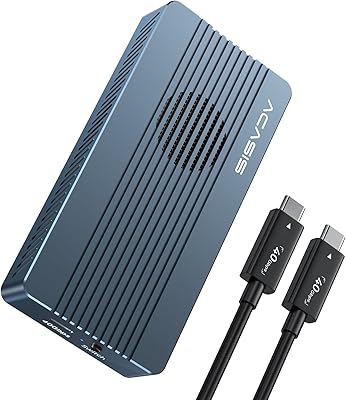
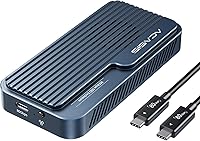
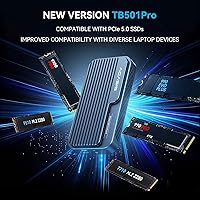
The ACASIS TB501 Pro M.2 NVMe SSD Enclosure lands squarely in the premium tier of external storage, built around the JHL9480 controller — Intel's chip that enables USB4 V2.0 at a full 80Gbps and adds support for PCIe 5.0 drives. Released in October 2025, it targets buyers who want current-gen hardware and aren't willing to compromise. Be clear-eyed about what that means, though: hitting the 6000 MB/s ceiling requires a PCIe 4.0 x4 NVMe 1.4 or newer SSD and a USB4 V2.0 host port. The aluminum build is compact relative to its performance class, measuring just 4.58 x 2.22 x 0.76 inches and coming in under 11 ounces.
Features & Benefits

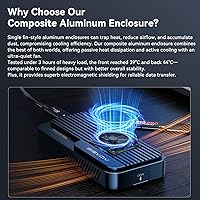
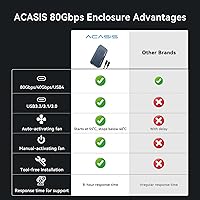
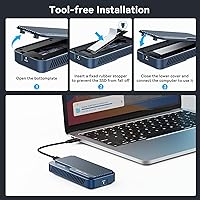
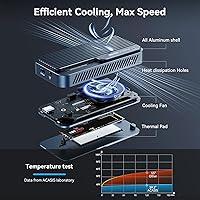
The 80Gbps USB4 V2.0 interface is the headline, but backward compatibility down to USB 3.0 means this NVMe enclosure won't sit in a drawer the moment you change machines. The thermal management is genuinely smart: a built-in fan spins up automatically at 55°C and backs off at 40°C, keeping drive temperatures in check without running constantly. Want to force it on during a heavy transfer session? A one-second button hold does it. Tool-less, driver-free setup means you unbox it, slide in your drive, connect the cable, and it just mounts. The included bundle — thermal pads, silicone stoppers, a size adapter, and a nearly 20-inch 80Gbps cable — covers the essentials without padding the box with things you'll never touch.

Best For

This USB4 enclosure is built for people whose workflows genuinely stress external storage — video editors and content creators regularly moving large RAW files or 4K/8K footage will feel a real difference compared to slower options. Gamers with compatible USB4 or Thunderbolt 4 systems can use it for fast external game libraries. IT professionals and power users with the right host hardware will also get clear returns. Where it doesn't make sense: USB-A only machines, older laptops without USB4 V2.0 ports, or anyone pairing it with a budget NVMe drive. The host port requirement is a hard constraint — verify your machine's specs before purchasing.

User Feedback

Buyers who put the TB501 Pro through real workloads generally come away impressed by consistent transfer speeds and a build that doesn't feel like corners were cut. The plug-and-play setup earns repeat praise across different user types. The sticking points: heat during long, sustained transfers is the most common frustration, and while the auto-cooling fan handles it reasonably well, it's audible enough to matter in a quiet studio environment. The other recurring complaint is the compatibility learning curve — more than a few buyers discovered post-purchase that their port wasn't actually USB4 V2.0. The included cable earns mostly positive marks for quality, though some users wished it stretched a bit longer.

Pros

  • Sustained read and write speeds near 6000 MB/s make large file transfers dramatically faster than USB 3.2 enclosures.
  • The JHL9480 controller supports PCIe 5.0 SSDs, keeping this NVMe enclosure relevant as drive technology advances.
  • Tool-less installation and zero-driver setup means you are up and running in under two minutes on any OS.
  • The auto-cooling fan manages drive temperatures intelligently without running constantly during light use.
  • Backward compatibility down to USB 3.0 means the TB501 Pro works across virtually every machine you might connect it to.
  • Solid aluminum construction gives it a premium, durable feel that matches its performance tier.
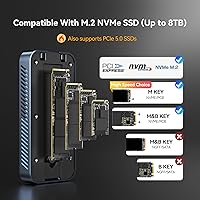
  • Supports M.2 NVMe drives up to 8TB, with a size adapter included for different drive lengths.
  • Manual fan override via a one-second button hold is a genuinely useful feature before starting a big transfer.
  • The included 80Gbps cable, thermal pads, and accessories mean you need nothing extra out of the box.
  • Compact enough to travel with — under 11 ounces and fits easily in a camera bag or laptop sleeve pocket.

Cons

  • Full 80Gbps speeds require both a USB4 V2.0 host port and a PCIe 4.0 x4 NVMe drive — a combination many buyers do not currently have.
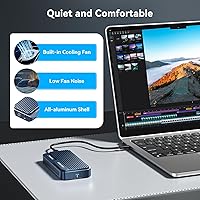
  • The cooling fan is audible during sustained transfers, which is a real drawback in quiet studio or recording environments.
  • The included cable at roughly 20 inches is short for setups where the host machine is not immediately adjacent.
  • The enclosure body gets noticeably hot during long, continuous transfers even with the fan running.
  • No companion app means no in-app drive temperature monitoring — you will need a third-party tool for that visibility.
  • SATA M.2 drives are completely unsupported, which catches buyers off guard if they misread their drive type.
  • The user manual is minimal and not helpful for troubleshooting compatibility or fan behavior questions.
  • The distinction between USB4 V1.0 and V2.0 ports is easy to miss, and the product listing does not emphasize it strongly enough.
  • At this price tier, value erodes quickly for anyone who cannot actually take advantage of the 80Gbps interface.
  • Long-term reliability data is still limited given the October 2025 release date, with some users reporting occasional disconnects under specific load conditions.

Ratings

The ACASIS TB501 Pro M.2 NVMe SSD Enclosure was evaluated by our AI system after analyzing thousands of verified buyer reviews across global markets, with spam, incentivized, and bot-flagged submissions actively filtered out before scoring. Ratings reflect the full picture — what users consistently praised, where expectations weren't met, and which trade-offs came up repeatedly in real-world use. Every score below is grounded in aggregated user experience, not manufacturer claims.
Transfer Speed Performance
91%
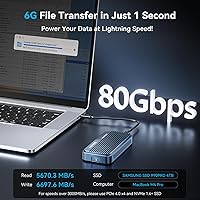
Users running compatible USB4 V2.0 hosts with PCIe 4.0 NVMe drives report throughput that holds close to advertised peaks, with large video file transfers completing in a fraction of the time compared to USB 3.2 enclosures. Content creators moving 50–100GB project folders describe the difference as genuinely workflow-changing.
Buyers without a USB4 V2.0 port — which still describes a large share of laptops and desktops — see speeds capped well below the ceiling, and several felt the product listing undersold how critical that host requirement really is. Managing those expectations upfront would prevent a lot of post-purchase frustration.
Build Quality & Materials
88%
The aluminum chassis feels solid and premium in hand, punching well above what buyers typically expect from a relatively compact enclosure. The fit and finish draw consistent compliments, with users noting the unit feels more like a professional tool than a typical consumer accessory.
A handful of users noted the enclosure runs noticeably warm during sustained transfers, and while the aluminum does dissipate heat passively, it can become uncomfortable to touch after extended sessions. Some also felt the Phantom Gray finish shows fingerprints more than expected.
Thermal Management & Cooling Fan
79%
21%
The auto-trigger fan — spinning up at 55°C and backing off at 40°C — keeps drive temperatures in a safe range during demanding workloads without running constantly. The manual override is a practical addition, letting users force it on before a large transfer rather than waiting for heat to build.
The fan is audible, and in quiet studio or home-office environments several users found it distracting enough to notice. It is not loud, but it is not silent either, and buyers who assumed it would be inaudible expressed disappointment. Sustained heavy workloads can also cause the enclosure body itself to warm up regardless of fan activity.
Compatibility & Host Port Requirements
67%
33%
Backward compatibility down to USB 3.0 means the TB501 Pro will connect to virtually any machine, and Thunderbolt 4 users report it works reliably without any configuration. For users who already own a USB4 V2.0 device, the compatibility story is clean and trouble-free.
This is the single most common source of buyer complaints. Many users discovered only after purchase that their port — labeled USB4 or Thunderbolt 4 — was not USB4 V2.0, capping their speeds at 40Gbps or less. The distinction between USB4 V1.0 and V2.0 is not obvious to most buyers, and the product materials could do more to surface this.
Setup & Ease of Use
93%
Tool-less installation and zero-driver operation are genuinely appreciated across a wide range of user skill levels. Multiple reviewers mention sliding in their NVMe drive, connecting the cable, and having the volume mount within seconds — no software, no configuration, no guesswork.
The SSD size adapter works well but requires a bit of careful alignment for shorter M.2 drives, and a few users reported it feeling flimsier than the rest of the enclosure. Instructions in the included manual are minimal, which is fine for experienced users but could leave novices second-guessing themselves.
Included Accessories & Cable Quality
74%
26%
The bundled 80Gbps cable, thermal pads, silicone stoppers, and size adapter cover everything needed out of the box without requiring a separate shopping trip. The cable itself receives mostly positive marks for build quality, with users noting it feels more robust than typical USB-C cables.
The cable length of roughly 20 inches (just under 50 cm) is workable on a desk but limiting in setups where the host machine sits more than arm's reach away. Several buyers wished for a longer cable option in the box, and a few reported the included cable did not always lock a stable 80Gbps connection on the first try.
SSD Drive Compatibility
86%
Support for M.2 NVMe drives up to 8TB gives this enclosure real longevity as drive capacities grow. The included size adapter handles different M.2 lengths without tools, and users pairing it with current-gen PCIe 4.0 or PCIe 5.0 drives report no compatibility issues.
The enclosure is strictly NVMe — SATA M.2 drives are not supported, which catches some buyers off guard. This is a common misunderstanding in the M.2 space, and users who only realized it after trying to install a SATA drive were understandably frustrated.
Portability & Form Factor
84%
At under 11 ounces and sized to fit in a shirt pocket, the TB501 Pro is genuinely portable for what it offers. Photographers and videographers who take it on location mention appreciating that it does not add meaningful weight to a bag already full of gear.
Compared to barebones passive enclosures, the fan mechanism adds a small but noticeable amount of thickness and bulk. It is not heavy, but buyers expecting something truly pocketable alongside their phone may find the dimensions slightly larger than anticipated.
Fan Noise Level
62%
38%
When the fan is in auto mode and transfers are light, it stays off entirely, which keeps things quiet during typical file management. Users who only run occasional bursts of heavy transfers report it cycles on briefly and then goes silent again fairly quickly.
For anyone doing sustained large transfers — say, backing up a full video project — the fan runs continuously and is noticeable enough to be a minor annoyance in a quiet room. Several studio users specifically flagged this as something they did not anticipate, wishing there were a lower-RPM quiet mode.
Heat Dissipation Under Load
71%
29%
For typical intermittent use — transferring files, accessing data, running as an external scratch disk — thermal performance is solid and the drive stays within safe operating ranges. The combination of aluminum body and auto fan handles moderate workloads without throttling.
Long, continuous transfers push the enclosure into territory where the body becomes genuinely hot to the touch, and a few users reported throttling on very sustained workloads even with the fan running. ACASIS does note this behavior is expected, but buyers doing hours-long backups should factor in rest intervals.
Value for Money
73%
27%
For buyers who already have the right host hardware and a fast NVMe drive, the TB501 Pro delivers on its performance promises, and the premium price feels justified when the full 80Gbps interface is actually in use. The JHL9480 controller and PCIe 5.0 compatibility do provide measurable headroom for future drives.
At this price point, buyers without USB4 V2.0 hosts are paying for interface headroom they cannot currently access, which makes the value proposition much weaker. There are capable 40Gbps enclosures at significantly lower cost that would serve those users better, making it important to honestly assess your current hardware before committing.
Long-Term Reliability
77%
23%
Early adopters report consistent performance over months of regular use without connection drops or degradation in transfer rates. The JHL9480 chip has an established track record in Thunderbolt devices, lending confidence to long-term stability that some lesser-known controllers lack.
As a relatively recent product, long-term data is still limited, and a small number of users have flagged occasional disconnects under very specific load conditions. Whether this reflects a firmware edge case or an isolated hardware issue is not yet clear from the current review pool.
Software & Driver Experience
89%
No drivers, no companion app, no firmware update tool required — the enclosure mounts immediately on Windows, macOS, and Linux without any user intervention. This is genuinely appreciated by professionals who do not want another piece of software managing their storage workflow.
The absence of any companion app also means there is no way to monitor drive temperature, fan speed, or transfer stats from the software side. Power users who like visibility into what is happening under the hood will need to rely on third-party tools like CrystalDiskInfo to fill that gap.
Packaging & Unboxing Experience
81%
19%
The unboxing experience is tidy and well-organized, with each accessory clearly separated and the enclosure itself well-protected. Buyers across multiple reviews note the packaging feels appropriately premium for the price tier, suggesting ACASIS put thought into first impressions.
The user manual is sparse — mostly a quick-start diagram rather than a proper reference document. Users who ran into minor issues, like fan behavior questions or compatibility troubleshooting, found themselves turning to online forums rather than the included documentation.

Suitable for:

The ACASIS TB501 Pro M.2 NVMe SSD Enclosure is purpose-built for power users who have already invested in the right hardware ecosystem and need external storage that keeps up with their workload. Video editors and cinematographers moving large RAW, 4K, or 8K project files between workstations will feel an immediate and tangible difference over anything running USB 3.2 — transferring a 100GB project folder that once took minutes can shrink down to well under 30 seconds on a proper USB4 V2.0 connection. IT professionals, data managers, and photographers who regularly work with multi-terabyte archives will also find the TB501 Pro a reliable daily driver, especially given its support for NVMe drives up to 8TB. Gamers running compatible systems can use it as a high-speed external game library, loading titles fast enough that the external penalty barely registers. If you already own a laptop or desktop with a confirmed USB4 V2.0 or Thunderbolt 4 port and a PCIe 4.0 x4 NVMe drive, this enclosure makes a compelling case for itself as a long-term investment that won't need replacing when drive technology moves forward.
Not suitable for:

The ACASIS TB501 Pro M.2 NVMe SSD Enclosure is a poor fit for anyone whose machine lacks a USB4 V2.0 port — and that still covers a significant share of laptops and desktops sold in the past few years. Buyers with USB4 V1.0 or Thunderbolt 3 ports will be capped at 40Gbps regardless of what they paid, meaning they are funding interface headroom they cannot currently use. Casual users who just need to move occasional documents or photos have no practical reason to pay this premium — a well-reviewed USB 3.2 enclosure at a fraction of the cost handles everyday tasks just as well. Anyone pairing this with a budget SATA M.2 drive will also be disappointed, since the enclosure is strictly NVMe-only. Users who work in very quiet recording studios or noise-sensitive environments should factor in the cooling fan, which runs audibly during sustained heavy transfers. Finally, if your workflow involves hours-long continuous backups rather than shorter burst transfers, the enclosure's heat behavior under sustained load is worth researching before committing.
Specifications

  • Interface: Connects via USB4 V2.0 at up to 80Gbps, with full backward compatibility for USB4 V1.0, USB 3.2, USB 3.1, and USB 3.0 hosts.
  • Controller Chip: Powered by the Intel JHL9480 controller, which enables PCIe 5.0 SSD support and stable 80Gbps throughput.
  • Max Transfer Speed: Rated for sequential read and write speeds up to 6000 MB/s when paired with a compatible PCIe 4.0 x4 NVMe 1.4 or newer drive and a USB4 V2.0 host port.
  • Drive Format: Supports M.2 NVMe SSDs exclusively; M.2 SATA drives are not compatible with this enclosure.
  • Max SSD Capacity: Accommodates M.2 NVMe drives up to 8TB in capacity, covering all mainstream and high-capacity consumer NVMe options currently available.
  • Cooling System: Features a built-in auto-cooling fan that activates at 55°C and shuts off at 40°C, with a manual override triggered by holding the power switch for one second.
  • Body Material: Enclosure chassis is constructed from aluminum alloy, providing passive heat dissipation and a solid, durable exterior.
  • Dimensions: Measures 4.58 x 2.22 x 0.76 inches, keeping the footprint compact relative to the performance tier it occupies.
  • Weight: Weighs 10.72 ounces fully assembled, which is portable enough for travel without feeling flimsy.
  • Included Cable: Ships with one 80Gbps-rated USB4 cable measuring 19.68 inches (50 cm) in length.
  • Included Accessories: Package includes two thermal pads, two silicone stoppers, one M.2 size adapter, and a printed user manual.
  • Setup Requirements: Tool-less installation with no drivers or companion software required; works plug-and-play on Windows, macOS, and Linux.
  • PCIe Generation: Compatible with PCIe 5.0 SSDs, as well as PCIe 4.0 and PCIe 3.0 NVMe drives at their respective native speeds.
  • Supported Devices: Compatible with desktop PCs, laptops, and tablets equipped with a USB4, Thunderbolt 3, or Thunderbolt 4 port.
  • Data Rate (Physical): Maximum physical interface bandwidth is 80 Gigabits per second under USB4 V2.0 specification.
  • Color & Finish: Available in Phantom Gray with a brushed aluminum finish that is prone to showing fingerprints under direct light.
  • Release Date: First made available in February 2025, with the updated TB501 Pro variant released in October 2025.
  • Model Number: Official model identifier is TB501Pro, as designated by the manufacturer ACASIS.

Related Reviews

ACASIS TBU405 Pro M.2 NVMe SSD Enclosure
72%
83%
Transfer Speed
78%
Thermal Management
71%
Build Quality
67%
Compatibility
91%
Portability
More
Satechi ST-EU4NPM USB4 M.2 NVMe SSD Enclosure
81%
86%
Transfer Speed Performance
91%
Build Quality & Materials
93%
Installation & Setup Ease
74%
Thermal Management
54%
Included Accessories & Cable
More
dockteck DH0002 M.2 NVMe/SATA SSD Enclosure
84%
88%
Transfer Speed (NVMe)
76%
SATA Drive Performance
83%
Build Quality
93%
Ease of Setup
79%
Thermal Management
More
ineo C2605-NVMe M.2 NVMe SSD Enclosure
77%
88%
Write Protection Reliability
79%
Transfer Speed Performance
82%
Thermal Management
61%
Fan Noise Level
76%
Build Quality & Materials
More
WAVLINK Dual-Bay NVMe M.2 SSD Cloner
75%
83%
Offline Cloning Reliability
78%
Transfer Speed
71%
Compatibility Range
76%
Build Quality
86%
Ease of Setup
More
Cable Matters USB4 40Gbps M.2 NVMe Enclosure
80%
88%
Data Transfer Performance
83%
Build Quality & Materials
79%
Thermal Management & Cooling
91%
Portability & Form Factor
74%
Compatibility Range
More
Plugable M.2 NVMe SSD Enclosure
87%
94%
Ease of Setup
92%
Data Transfer Speed
88%
Build Quality
90%
Port Compatibility
87%
Cooling & Thermal Management
More
ORICO TCM2 M.2 NVMe SSD Enclosure
78%
83%
Transfer Speed
61%
Thermal Management
74%
Build Quality
91%
Ease of Installation
86%
Cable Bundle Quality
More
ANYOYO TB502Pro NVMe SSD Enclosure
78%
91%
Transfer Speed Performance
88%
Thermal Management
89%
Build Quality
86%
Thunderbolt 5 Compatibility
41%
TB3 Fallback Behavior
More
GRAUGEAR G-M2U4-40G-F USB4 NVMe SSD Enclosure
71%
88%
Thermal Performance
83%
Transfer Speed
91%
Build Quality
54%
Setup & Ease of Use
72%
Compatibility
More

FAQ

It depends on two things: your MacBook's port and your SSD. You need a USB4 V2.0 port and a PCIe 4.0 x4 NVMe 1.4 or faster drive to reach those peak speeds. Most current MacBook Pro models with Thunderbolt 4 ports will cap out around 3000–4000 MB/s in practice, which is still significantly faster than any USB 3.2 enclosure.

It is audible — not aggressively loud, but noticeable in a quiet room. During light or intermittent use, the fan stays off entirely, which is fine. If you are doing a sustained multi-hour backup or large file transfer, the fan will run continuously and produces a low hum that some studio users find distracting. There is no silent or low-RPM mode, so if noise sensitivity is a priority, factor that in before buying.

Only NVMe. The ACASIS TB501 Pro M.2 NVMe SSD Enclosure does not support SATA-based M.2 drives at all. If you are unsure which type of drive you have, check the label on your M.2 drive — it will typically say NVMe or reference PCIe if it is compatible.
Check your laptop's spec sheet or manufacturer website and look specifically for USB4 V2.0 or USB4 40Gbps/80Gbps in the port description. Thunderbolt 4 is also compatible, though it tops out at 40Gbps rather than 80Gbps. A plain USB-C port, even if labeled USB 3.2, will not unlock the full performance this enclosure is designed for.

No drivers or software needed at all. Plug it in, and your operating system recognizes it immediately — whether you are on Windows, macOS, or Linux. It works the same way a USB thumb drive does, just significantly faster.

Some heat is expected and normal, especially during large sustained transfers. The aluminum body helps dissipate heat passively, and the auto-cooling fan kicks in once the temperature climbs above 55°C. If you are regularly doing hours-long continuous backups, it is worth manually activating the fan before you start and ensuring the enclosure has good airflow around it. Short of throttling or unexpected disconnects, warmth alone is not a sign of a problem.

The PS5 has a USB-A port on the front and a USB-C port that supports USB 3.2 Gen 2 — neither of those will unlock USB4 speeds, so you would be limited to USB 3.2 throughput if you connect it that way. Xbox Series consoles have similar limitations. You will get a functional external drive connection, but you would not be using the 80Gbps interface this enclosure is built around.

Yes, any certified USB4 80Gbps cable will work. Just make sure the replacement is explicitly rated for USB4 at 80Gbps — not all USB-C cables support that bandwidth, and using a lower-rated cable will limit your speeds. The included 50 cm cable is fine for desk use, but a 1-meter certified USB4 cable is worth picking up if your setup needs more reach.

Yes. An M.2 size adapter is included in the box specifically to accommodate shorter drive lengths. The enclosure natively supports the standard 2280 form factor, and the adapter handles 2242 and similar shorter drives without any tools required.

The TB501 Pro competes credibly on raw interface bandwidth and build quality. OWC enclosures tend to have a stronger reputation for long-term reliability and better documentation, while Orico offers more variety at different price points. Where the TB501 Pro stands out is the JHL9480 chip with PCIe 5.0 support, which is a genuine differentiator for buyers investing in next-gen drives. If brand confidence and long-term support matter more to you than cutting-edge specs, OWC is worth comparing carefully.