Overview

The AbleNet BIGtrack 2 Adaptive Trackball Mouse is one of those rare products built with a very specific purpose in mind: giving people with limited fine motor control a reliable, dignified way to use a computer. AbleNet has been a trusted name in assistive technology for decades, and this accessibility mouse reflects that depth of experience. Its defining physical traits are hard to miss — a large 3-inch trackball and oversized buttons that don't require precise hand placement. First available in 2004, it has quietly become a staple in therapists' offices and special education classrooms. If you're expecting a mainstream peripheral, this isn't it — and that's exactly the point.
Features & Benefits

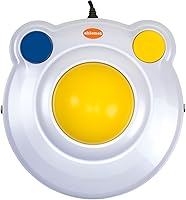
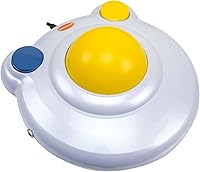
The 3-inch trackball is the centerpiece — it gives the user a wide rolling surface that forgives imprecise hand movements, which makes a real difference for someone with tremors or limited grip. The two large blue buttons are spaced generously and take minimal pressure to activate, cutting down on frustrating misclicks during everyday tasks like clicking links or opening files. A third button handles scrolling or right-click functions without any wrist rotation required. Setup is straightforward: plug in the USB cable and it works immediately on Windows, macOS, and Linux. An included PS/2 adapter extends compatibility to older institutional equipment. The weighted base keeps it planted on the desk without drifting during use.

Best For

This adaptive trackball earns its place in settings where accessibility isn't optional — think occupational therapy clinics, special education classrooms, and home workstations set up for family members with conditions like cerebral palsy or muscular dystrophy. Children and adults who struggle with the small, slippery surface of a standard mouse often find this a genuine turning point in their computer independence. Elderly users dealing with reduced grip strength or tremors tend to adapt to it quickly. Caregivers and educators appreciate that it's rugged enough for shared daily use without babying. If you've tried smaller consumer trackballs and found them just as frustrating, this is the step up that actually accounts for real motor challenges.

User Feedback

Buyers consistently praise how easy the setup is — caregivers who aren't particularly tech-savvy report having the BIGtrack 2 running within minutes, which matters a lot in home and classroom settings. Long-term durability also comes up often; several users mention years of heavy daily use with no hardware failures. That said, not everything is perfect. Cursor sensitivity on modern high-resolution displays can feel off out of the box, and adjusting pointer speed through OS settings is sometimes necessary. Some users find the third button's placement awkward depending on how they rest their hand. A few buyers also wish the cord were longer. Overall, most buyers feel they're getting a professional-grade tool for the investment.

Pros

  • The 3-inch trackball dramatically reduces the precision needed to control a cursor, helping users with tremors or spasticity navigate comfortably.
  • Plug-and-play USB setup works immediately on Windows, macOS, and Linux — no software downloads or IT support needed.
  • Oversized blue buttons are easy to locate and activate with minimal hand pressure, reducing misclicks during everyday tasks.
  • Weighted base keeps the device planted on the desk even during forceful or unsteady hand movements.
  • Built to last — many users report years of reliable daily use in clinics and classrooms without hardware failure.
  • Included PS/2 adapter extends compatibility to older institutional equipment, adding genuine flexibility for schools and therapy centers.
  • The bold yellow and blue color scheme makes the device easy to spot on a busy desk and feels approachable for younger users.
  • No batteries required — USB-powered operation means one less thing to manage for caregivers and educators.
  • Ranked among the top trackball devices on major retail platforms, reflecting consistent long-term buyer trust in the category.

Cons

  • Cursor sensitivity often needs manual OS-level adjustment on modern high-resolution displays, which is not documented in the included materials.
  • The cord length frustrates users in wheelchair setups or rooms where the computer sits at a distance from the user.
  • No wireless or Bluetooth version is available, limiting flexibility in environments where cable management is genuinely difficult.
  • The third button placement feels awkward for users with certain grip limitations, requiring an uncomfortable hand shift to reach.
  • The large footprint can be impractical for wheelchair tray setups or very small workstation surfaces.
  • Surface scuffing and visible wear develop over time, particularly in high-traffic shared-use environments.
  • The trackball socket collects debris faster than expected with heavy use, requiring regular cleaning to maintain smooth tracking.
  • Adult users in professional settings may find the bright children-oriented color scheme visually out of place on a home office desk.
  • Buyers unfamiliar with assistive technology pricing may find the cost surprising relative to standard consumer peripherals.

Ratings

The AbleNet BIGtrack 2 Adaptive Trackball Mouse has been evaluated by our AI system after deep analysis of verified global buyer reviews, with spam, bot-generated, and incentivized feedback actively filtered out. What follows reflects a balanced picture — the genuine strengths that make this accessibility mouse stand out in its category, alongside the real frustrations that buyers have experienced. Both sides are represented honestly so caregivers, educators, and users can make a fully informed decision.
Ease of Setup
93%
Buyers consistently describe the plug-and-play experience as genuinely painless. Caregivers with little technical background report getting a family member up and running in under five minutes, which matters enormously in home and classroom settings where IT support isn't always available.
A small number of users on older Linux distributions encountered minor driver recognition delays, though this was resolved through standard OS update procedures. The PS/2 adapter, while useful, has caused confusion for a handful of buyers unsure of its purpose.
Trackball Size & Usability
91%
The 3-inch ball is the defining advantage of this accessibility mouse. Users with tremors, spasticity, or reduced grip strength find that the wide rolling surface dramatically lowers the coordination required to move the cursor, making daily computer tasks far less exhausting and frustrating.
For users with very limited arm reach or those operating from a wheelchair tray, the overall footprint of the device can feel slightly large. A small number of buyers noted that the ball's resistance felt stiff initially before loosening with regular use.
Button Accessibility
88%
The two oversized blue buttons draw consistent praise for their size, spacing, and low activation force. Parents of children with cerebral palsy specifically mention that their kids can click reliably without needing to reposition their hand, which builds real confidence and independence during computer sessions.
The placement of the third button — used for scrolling or right-click functions — has divided users. Those with certain grip limitations find it hard to reach without shifting hand position, which partially undermines the otherwise inclusive button design.
Cursor Sensitivity & Precision
62%
38%
On standard-resolution displays and older monitors, cursor tracking feels intuitive and appropriately responsive for the target user group. Many occupational therapists report that the default sensitivity works well for controlled, deliberate movements in therapeutic exercises.
On modern high-resolution screens, the default cursor speed often feels sluggish or erratic without OS-level adjustments. Users and caregivers frequently need to manually tune pointer speed settings, which adds a setup step that is not documented clearly in the included materials.
Build Quality & Durability
89%
Long-term durability is one of the most praised aspects across user reviews. Multiple buyers report years of heavy daily use in classroom and clinic environments without any mechanical failure, which speaks directly to the robust construction needed in shared-use assistive technology settings.
The outer casing shows scuff marks and surface wear over time, particularly in high-traffic environments. A few users noted that the trackball itself can accumulate debris underneath if not cleaned regularly, which eventually affects smooth rolling performance.
Cord Length & Cable Management
57%
43%
The included USB cable is adequate for standard desk setups where the computer tower or USB hub sits nearby. For most home workstations, the cord reaches without requiring an extension.
In classroom and clinical environments where desktop computers are mounted under desks or placed at a distance, the cord length is frequently cited as too short. Several buyers have needed to purchase USB extension cables separately, which adds an unexpected cost and inconvenience.
Cross-Platform Compatibility
86%
Working natively across Windows, macOS, and Linux without any software installation is a genuine practical advantage. Institutions using mixed operating system environments — which is common in schools and therapy centers — can deploy this accessibility mouse without compatibility headaches.
While driver-free operation covers most scenarios, a few macOS users on recent operating system versions reported needing to grant additional accessibility permissions before the device functioned fully. This is an OS-level restriction rather than a hardware flaw, but it can confuse non-technical caregivers.
Stability & Desk Grip
83%
The weighted base keeps the device firmly planted during use, which is especially valuable for users whose hand movements may be forceful or unsteady. Caregivers note that it does not slide around even on smooth laminate desks, reducing interruptions during computer sessions.
On very glossy or highly polished surfaces, the base can still shift slightly during aggressive trackball rolling. Adding a non-slip mat underneath resolves this, but it is a minor additional consideration buyers should be aware of before setting up.
Value for Money
74%
26%
Within the specialized assistive technology market, this accessibility mouse is priced competitively relative to comparable adaptive input devices. Buyers who understand the niche consistently feel the build quality and longevity justify the investment, especially for institutional purchasers buying one device for long-term shared use.
For individual home buyers unfamiliar with assistive technology pricing, the cost can feel steep compared to standard consumer mice. A few reviewers expressed surprise that a wireless version is not available at this price tier, which limits flexibility in cable-sensitive environments.
Aesthetics & Visual Design
71%
29%
The bright yellow housing with blue buttons makes the device visually distinctive and easy to locate on a busy desk or classroom table. For children, the bold colors can make the device feel less clinical and more approachable, which helps with engagement during therapy sessions.
The color scheme is polarizing for adult users in professional or home office settings who prefer a more neutral appearance. Several adult buyers noted the design reads more as a children's device, which caused some hesitation — even though the ergonomics suit adults equally well.
Cleaning & Maintenance
66%
34%
The trackball lifts out with minimal effort, making routine cleaning accessible even for caregivers without technical skills. Keeping the ball and socket clean ensures consistent tracking performance over time, and the process takes only a couple of minutes.
Debris and dust accumulate under the trackball faster than many buyers expect, particularly in classroom environments. If cleaning is neglected for more than a few weeks of heavy use, tracking performance degrades noticeably, which can frustrate users who rely on the device for daily tasks.
Documentation & Included Materials
58%
42%
The included PS/2 adapter is a thoughtful addition that extends the device's usefulness in institutional settings with older equipment. Most plug-and-play users find the minimal documentation sufficient for basic setup.
The documentation does not adequately guide caregivers through cursor sensitivity adjustments on modern displays, which is one of the most common setup challenges. A printed quick-start card addressing OS-level pointer speed tuning would meaningfully reduce the friction new buyers experience.
Wireless Option Availability
41%
59%
The corded design guarantees there are no battery charging interruptions, which matters in therapeutic settings where device reliability during a session is non-negotiable. Users who have experienced wireless peripheral dropouts see the wired connection as a dependability advantage.
The absence of a wireless or Bluetooth version is a recurring point of frustration, particularly for users in wheelchair setups where cable management is genuinely difficult. At this price level, a significant portion of buyers feel a wireless variant should be available by now.

Suitable for:

The AbleNet BIGtrack 2 Adaptive Trackball Mouse is purpose-built for people whose hands simply do not cooperate with a standard mouse — and it delivers where it counts. Children and adults living with cerebral palsy, muscular dystrophy, essential tremors, or similar conditions affecting hand coordination are the clearest beneficiaries, as the oversized trackball forgives imprecise movements that would make a regular mouse unusable. Elderly users who have noticed their grip strength or fine motor control declining will also find this accessibility mouse a practical, low-frustration bridge back to comfortable computer use. Occupational therapists and special education teachers frequently keep one on hand as a shared classroom or clinic device, and the rugged build holds up well under that kind of rotating daily use. Caregivers setting up a workstation for a family member — often without much technical background — will appreciate how immediately it works after plugging in, with no software installation required across Windows, macOS, and Linux.
Not suitable for:

The AbleNet BIGtrack 2 Adaptive Trackball Mouse is a specialized assistive tool, and buyers outside its intended audience are likely to find it an awkward and costly fit. General consumers looking for a ergonomic or gaming trackball will find the sensitivity range limiting and the large physical footprint unnecessary for their needs. Users who work primarily on modern high-resolution displays should be prepared to manually adjust OS pointer speed settings, as the default calibration can feel sluggish on 4K or high-DPI screens without some initial tuning. Anyone hoping for a wireless setup will be disappointed — the wired-only design, combined with a cord that some users find shorter than ideal, creates real friction in wheelchair-mounted or cable-sensitive environments. If budget is the primary concern and the user has only mild motor difficulties, a mid-range consumer trackball may offer comparable usability at a lower price point. This is not a device to buy on a whim; it rewards buyers who have identified a genuine accessibility need and are purchasing with that specific purpose in mind.

Specifications

  • Brand: Manufactured by AbleNet, a company specializing in assistive technology products for individuals with disabilities.
  • Model Series: This device belongs to the Big Track 2 series, model number 12000006.
  • Trackball Size: The trackball measures 3 inches (7.6 cm) in diameter, providing a wide rolling surface for users with limited fine motor control.
  • Button Count: The device includes 3 buttons total: two large primary buttons and one additional button for scrolling or secondary click functions.
  • Button Color: All three buttons are blue, offering high visual contrast against the yellow and white housing for easy identification.
  • Housing Color: The outer casing is yellow and white, with blue buttons — a high-contrast color scheme designed to aid visual identification.
  • Dimensions: The device measures 10 x 8.5 x 5.4 inches, making it a notably large peripheral suited to flat desk or tray surfaces.
  • Weight: The unit weighs 1 pound, providing enough mass for a stable base without being difficult to reposition when needed.
  • Connectivity: Connects via USB with plug-and-play operation; a PS/2 adapter is included for compatibility with older institutional equipment.
  • Power Source: Powered entirely through the USB connection — no batteries or external power supply are required.
  • Compatible OS: Works natively with Windows, macOS, and Linux operating systems without requiring any additional driver installation.
  • Movement Detection: Uses trackball movement detection technology, where the ball itself is rolled by the user rather than moving the entire device across a surface.
  • Hardware Platform: Compatible with both PS/2 and USB hardware platforms, extending usability to a wide range of computer setups including older machines.
  • First Available: This product was first made available in July 2004, reflecting over two decades of presence in the assistive technology market.
  • Manufacturer: AbleNet, Inc. is the manufacturer and continues to actively produce and support this product line as of the current date.
  • Discontinuation Status: This product has not been discontinued by the manufacturer and remains an active part of AbleNet's assistive technology catalog.
  • Amazon Rating: The device holds a 3.9 out of 5 star rating based on 158 verified ratings on Amazon.
  • Category Rank: Ranked number 31 in the Computer Trackballs category on Amazon, indicating strong sustained demand within its specialized segment.

Related Reviews
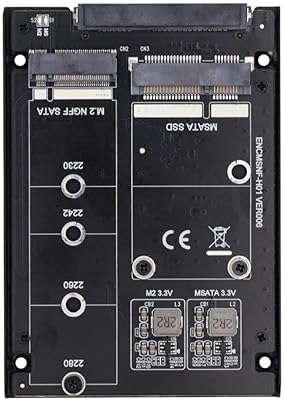
ChenYang MSATA & M.2 NGFF SATA to 2.5″ SATA JBOD Enclosure Adapter
83%
93%
Ease of Installation
85%
Build Quality
88%
Performance and Speed
74%
Compatibility
89%
Value for Money
More
seenda Wireless Trackball Mouse
78%
88%
Ergonomic Comfort
74%
Trackball Precision
86%
Multi-Device Connectivity
83%
Battery Life
71%
Build Quality
More
SABLUTE Wireless Trackball Mouse

74%
83%
Ergonomic Comfort
79%
Adjustable Tilt Base
86%
Multi-Device Connectivity
67%
Trackball Precision & Feel
74%
DPI Range & Customization
More
Kensington Orbit Trackball Mouse
77%
83%
Ergonomic Comfort
76%
Tracking Accuracy
61%
Scroll Ring Usability
88%
Build Quality & Durability
57%
Button Layout & Customization
More
Logitech Pebble Mouse 2 M350s
81%
94%
Portability
91%
Click Noise Reduction
88%
Multi-Device Switching
83%
Battery Life
78%
Build Quality
More
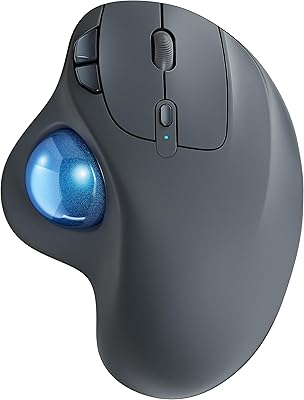
ELECOM Relacon M-RT1BRXBK Handheld Trackball
75%
83%
Ergonomics & Comfort
71%
Trackball Precision
68%
Bluetooth Connectivity
66%
Button Layout & Customization
61%
Learning Curve
More
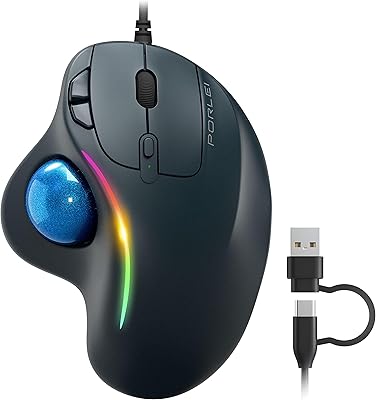
MicroPack V02 Trackball Wireless Mouse
76%
86%
Ergonomic Comfort
74%
Trackball Precision
61%
Build Quality
83%
Wireless Reliability
79%
Click Feel & Sound
More
ProtoArc EM04 Wireless Trackball Mouse
86%
88%
Ergonomics & Comfort
91%
Battery Life
84%
Ease of Use
89%
Connection Versatility
85%
Precision & Control
More
PORLEI TM550 Wireless Trackball Mouse
75%
88%
Ergonomic Comfort
84%
Trackball Size & Control
86%
Multi-Device Connectivity
73%
Battery Life
54%
DPI Adjustment Usability
More
ELECOM HUGE Wired Finger Trackball Mouse
80%
91%
Tracking Smoothness
88%
Ergonomic Comfort
63%
Learning Curve
86%
Build Quality
79%
Button Layout & Usability
More

FAQ

It works immediately after plugging in the USB cable — no software installation is needed on Windows, macOS, or Linux. For most users, the computer recognizes it within seconds and it is ready to use. The only situation where you might need to take an extra step is on recent versions of macOS, where you may need to grant accessibility permissions in System Settings before everything functions fully.

This is one of the more common frustrations buyers mention. The built-in USB cord works fine for standard desk setups where the computer is nearby, but for wheelchair-mounted trays or rooms where the tower sits further away, the length can fall short. A USB extension cable — available cheaply from most electronics retailers — solves the problem easily and does not affect performance.

It works well for both. The oversized trackball and large blue buttons are actually particularly well-suited to children, since the design does not demand precise hand placement. Many special education classrooms use it as a shared device for students of varying ages. The bright yellow and blue color scheme also tends to appeal to younger users, making it feel less intimidating than more clinical-looking devices.

The device does not have its own sensitivity dial, so adjustments are made through your computer's operating system. On Windows, go to Settings, then Bluetooth and Devices, then Mouse, and look for pointer speed. On macOS, open System Settings and go to Trackpad or Mouse settings. On Linux, the method varies by desktop environment. Users with high-resolution or 4K displays often need to bump the pointer speed up from the default.

Yes — a PS/2 adapter is included in the box specifically for this purpose. Many institutional environments, schools, and older workstations still rely on PS/2 connections, and AbleNet anticipated that by bundling the adapter rather than selling it separately. Simply connect the adapter to the cable before plugging in.

Cleaning is straightforward. Lift the ball out of the housing — it pops out with gentle pressure — and wipe both the ball and the inside of the socket with a soft, slightly damp cloth. Removing dust and debris from the rollers inside the socket is the most important step for maintaining smooth tracking. Doing this every couple of weeks in a busy classroom environment keeps performance consistent.

It works natively on macOS without any driver installation. Just plug it in and the computer recognizes it as a standard input device. Some users on newer macOS versions report needing to enable accessibility permissions for full functionality, but that is a one-time step that takes about thirty seconds to complete.

Not currently. This accessibility mouse is wired-only, which some buyers find limiting — particularly in wheelchair setups where cable routing can be awkward. The upside is that wired operation means no battery charging to manage and no risk of signal dropout during a therapy session or important task. If wireless is a hard requirement, you would need to look at other adaptive input devices, though comparable wireless options in this category are limited.

Very durable, based on long-term buyer feedback. Multiple users in clinical and classroom settings report using the same unit for several years without any mechanical failure. The weighted housing and robust construction hold up well under the kind of repeated daily use that would wear out a standard consumer peripheral quickly. It is one of the genuinely consistent strengths of this device across user reviews.

For users with tremors, the large button size and generous spacing make a real difference compared to a standard mouse. The buttons require only light pressure to activate, which means an unsteady hand is less likely to miss or double-click accidentally. That said, every person's condition is different — if possible, consulting with an occupational therapist about whether a trackball-based input device is the right fit for your relative's specific needs is always a good first step.

Where to Buy