Overview

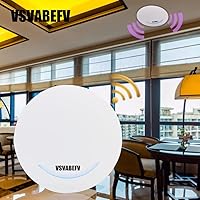
The VSVABEFV AP240 Dual-Band Wireless Access Point has been quietly filling a specific gap in the market since 2015 — a budget ceiling-mount AP that punches above its price class for small hospitality venues and compact office deployments. Unlike a standard desktop router, it sits flush overhead, out of the way, with a slim profile that blends into most ceilings without drawing attention. The dual-band 802.11ac design and built-in PoE support are the real draws here. Don't expect enterprise-grade throughput or bulletproof reliability — but if you need basic wireless coverage in a small hotel, dorm, or back office without spending a fortune, this ceiling access point makes a credible case for itself.
Features & Benefits

The AP240 covers both the 2.4GHz and 5GHz bands, giving connected devices a reasonable spread of bandwidth for everyday tasks — streaming, light browsing, video calls. The 5GHz band handles the heavier lifting, while the 2.4GHz side covers older or longer-range devices. Three power input options — standard PoE+, passive PoE, or a DC adapter — make deployment genuinely flexible, especially if you're dropping it into an existing wired network. The Yunlink cloud controller handles SSID, channel, and firmware management centrally, which sounds appealing but introduces a dependency on an external platform. Guest portal options like Facebook or SMS login are a practical touch for hospitality settings. The housing includes auto-reboot watchdog logic and basic surge protection, which helps in less controlled environments.

Best For

This PoE wireless AP fits most naturally into small-scale deployments where aesthetics and cable management actually matter. Think a boutique hotel corridor, a restaurant dining area, a dormitory hallway — places where a router sitting on a shelf looks wrong and ceiling coverage makes practical sense. It works well as a network dead zone fix, particularly when you already have a PoE switch in place and just need another coverage node. Budget-conscious IT managers in small offices will appreciate not having to rewire anything. The built-in captive portal with social login support adds real value for guest-facing setups. It is not the right tool for high-density corporate environments or large warehouses — the right-sized use case is modest, and that is perfectly fine.

User Feedback

With a 3.7-star average across 82 reviews, the AP240 tells an honest story — it works well for some buyers and frustrates others. Praise clusters around the clean ceiling installation experience and the convenience of PoE power, which genuinely simplifies setup if your switch supports it. On the flip side, the documentation is thin. Default login credentials are buried in the product listing rather than a proper manual, and the cloud management system can feel opaque without prior experience. A number of users report inconsistency in real-world range — the marketing figures are optimistic. The brand carries no meaningful support infrastructure compared to established names, so if something goes wrong post-purchase, self-reliance is essentially the plan. Know that going in.

Pros

  • Ceiling-mount design keeps cabling tidy and hardware out of sight in public or shared spaces.
  • Three power input options — PoE+, passive PoE, and DC — make it easy to fit into almost any existing setup.
  • Built-in captive portal with social login support is a genuine value-add for guest-facing deployments.
  • The slim, lightweight enclosure blends into standard commercial ceilings without looking out of place.
  • Yunlink cloud controller allows centralized SSID and firmware management across multiple units.
  • Fireproof ABS housing and watchdog auto-reboot add a useful layer of resilience for unattended installs.
  • Dual-band operation lets older devices stay on 2.4GHz while newer ones use the faster 5GHz band.
  • At its price point, the AP240 includes a surprisingly broad feature set compared to basic consumer extenders.

Cons

  • Setup documentation is thin and relies on credentials buried in the product listing rather than a proper guide.
  • Real-world range falls noticeably short of the figures stated in the marketing copy.
  • Cloud-dependent management introduces a platform dependency that could become a problem if the service changes.
  • Brand support infrastructure is minimal — expect little to no meaningful help if issues arise post-purchase.
  • The 3.7-star average across 82 ratings suggests inconsistent quality control that buyers should factor in.
  • Firmware and management interface have drawn complaints about stability and usability from less technical users.
  • No meaningful warranty or after-sales support track record compared to established networking brands.
  • Default login credentials being publicly listed in the product description is a minor but real security concern out of the box.

Ratings

The VSVABEFV AP240 Dual-Band Wireless Access Point has been scored by our AI rating engine after analyzing verified buyer reviews from global markets, with spam, incentivized submissions, and bot-generated feedback actively filtered out. These scores represent an honest cross-section of real ownership experiences — where this ceiling AP genuinely earns its place and where it consistently lets buyers down. Both sides of the picture are reflected with equal weight.
Value for Money
74%
26%
At its entry-level price, the AP240 packs in dual-band Wi-Fi 5, three power input options, and a guest captive portal — features that cost considerably more on brand-name hardware. For a small café owner or dorm administrator on a tight budget, the sheer feature count is hard to argue with at this tier.
The value calculation gets complicated once you factor in thin documentation and inconsistent reliability reported by a meaningful share of buyers. A unit that demands self-directed troubleshooting without a proper manual or responsive support can end up costing more in time than the initial savings justify.
Wireless Performance
61%
39%
In a single-room or short-corridor deployment — a small hotel room block or a compact office, for instance — the AP240 holds a reasonable connection for browsing, video calls, and standard streaming. The dual-band design helps by steering capable devices toward the less congested 5GHz channel.
Push it harder — more concurrent users, larger physical spaces, or walls with dense materials — and performance degrades noticeably. Several buyers report throughput that falls well below the advertised combined figure under real conditions, which is a common but frustrating gap at this price tier.
Installation Ease
77%
23%
The ceiling mounting process is one of this unit's genuine high points — the lightweight enclosure, included bracket, and snap-fit design make the physical install fast even for first-timers. Buyers with an existing PoE switch find the wiring especially clean, with a single ethernet cable running up to the ceiling.
The software side of installation is considerably less polished. Default credentials are buried in the product listing rather than a proper printed guide, and first-time access point users frequently report confusion navigating the initial web interface before the unit is broadcasting correctly.
Setup & Configuration
53%
47%
For experienced network administrators, the combination of FAT AP standalone mode and Yunlink cloud control gives useful flexibility — manage multiple units centrally or run a single AP locally without platform dependency. The guest authentication options are well-implemented once you get past the initial login hurdle.
Less experienced buyers frequently hit a wall with the Yunlink interface, which lacks clear onboarding and assumes familiarity with SSID management, channel selection, and VLAN concepts. The documentation does not bridge that gap, making initial configuration a genuinely frustrating experience for anyone new to managed access points.
Range Coverage
57%
43%
In open, unobstructed areas — a single-floor dining room, a guesthouse corridor, or a compact open-plan office — the AP240 provides adequate coverage for the environments it is realistically designed for. Mounted at ceiling height, it radiates signal downward and outward effectively in compact spaces.
The range figures in the marketing copy are consistently flagged as optimistic by real buyers. Multi-room or multi-floor environments frequently reveal signal drop-offs, and the unit should not be expected to blanket large open spaces like hotel floors or school hallways without additional access points filling the gaps.
PoE & Power Flexibility
82%
18%
Having three power input methods — standard 802.3af PoE+, passive PoE via the included adapter, and a DC barrel connector — means this ceiling access point integrates into almost any existing network setup without requiring new hardware purchases. For small businesses retrofitting coverage into older buildings, this flexibility is a genuine practical advantage.
The passive PoE adapter adds a small but real extra component to manage compared to a direct PoE switch connection. Some buyers also note that the DC adapter cable length can be limiting depending on ceiling installation location, requiring extension cable planning that is not mentioned in the documentation.
Build Quality
68%
32%
The fireproof ABS enclosure feels solid enough for a fixed ceiling installation, and the slim all-white design blends naturally into commercial ceiling tiles without drawing attention. The build is clearly engineered for low-maintenance deployment rather than frequent repositioning or handling.
At this price point, the plastics do not inspire long-term confidence, and some buyers report the mounting clip can feel slightly loose after repeated removal and reinstallation. It is a product designed to go up once and stay there — frequent repositioning reveals the limits of the construction.
Management Software
51%
49%
The Yunlink cloud platform does offer multi-unit management capabilities — centralized firmware updates, SSID control, and channel assignment from a single dashboard — which is a real convenience for IT managers handling several units across a property. The FAT AP fallback mode serves as a useful offline safety net.
The interface is dated and non-intuitive by modern standards, and cloud dependency means management access hinges on a third-party platform staying operational. Buyers familiar with Ubiquiti UniFi or TP-Link Omada will find this noticeably less polished in both design and day-to-day reliability.
Guest Network Features
79%
21%
The built-in captive portal with social login — Google, Facebook, SMS, or member-based access — is a genuinely practical feature for hospitality and café environments. Offering a guest login experience without a separate controller or an expensive license is a meaningful differentiator at this price point.
Configuring the captive portal requires navigating the Yunlink interface, which is not particularly user-friendly, and step-by-step documentation on the portal setup is thin at best. For buyers who are not technically confident, this feature can end up sitting unused simply because the setup path is unclear.
Multi-Device Handling
63%
37%
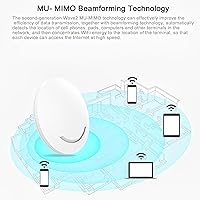
MU-MIMO support allows the AP to serve multiple devices simultaneously rather than sequentially, which helps in environments with a moderate number of connected clients doing similar tasks — light browsing, standard video, or IoT traffic. For small waiting rooms or compact office floors, this is workable.
The 80-user capacity claim is theoretical and should not drive purchasing decisions for genuinely busy venues. User reviews consistently suggest noticeable degradation beyond 20 to 25 simultaneously active devices, making this a poor fit for medium-density hospitality or conference environments without additional APs supplementing coverage.
Brand & Support
38%
62%
VSVABEFV has kept the AP240 listed and available since 2015, suggesting at least a baseline commitment to maintaining the product rather than abandoning it. The Yunlink ecosystem does provide periodic firmware updates, which is more continuity than a fully disposable product would offer.
As a low-recognition niche brand, VSVABEFV offers minimal visible after-sales support — no established community forum, no responsive ticket system, and no live assistance channel that buyers reliably report accessing. If a unit fails outside the return window, resolution options are severely limited compared to established networking brands.
Physical Design
81%
19%
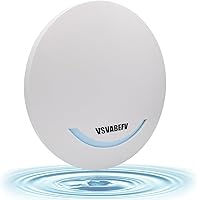
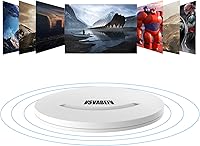
The slim, circular white form factor sits flush against standard ceiling tiles and is genuinely unobtrusive in commercial settings — exactly what you want from overhead networking hardware. At just over a pound, it stays securely in place with the included mounting bracket without needing additional reinforcement.
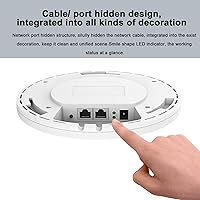
The all-white surface is prone to showing dust accumulation over time in ceiling environments that are not regularly cleaned — a minor but real consideration for long-term fixed installations. The ethernet port positioning also requires a bit of cable routing planning to avoid an awkward or visible drop angle.
Stability & Reliability
59%
41%
The built-in watchdog circuit that automatically reboots the unit on detecting a hang or failure is a meaningful safeguard for unattended ceiling deployments, especially in hospitality environments where a manual reboot is inconvenient. ESD and lightning protection add useful resilience for less controlled installation environments.
Despite the watchdog protection, a notable share of user reviews cite intermittent drops, firmware instability, and connectivity issues that required manual intervention beyond what an auto-reboot could resolve. For a product aimed at business environments, baseline consistency should be a given — and this ceiling access point does not always deliver it.
Documentation Quality
34%
66%
The product listing does surface the essential default login credentials and local access IP needed for initial setup, which is at least enough for a determined buyer to work through configuration without outside resources. It clears a low bar, but it does clear it.
Beyond that bare minimum, the included documentation is widely criticized as inadequate — the manual covers only surface-level steps and offers no meaningful guidance for troubleshooting, advanced configuration, or Yunlink portal setup. Buyers routinely resort to community forums and video tutorials for help, which should not be necessary for a product marketed at small business deployments.

Suitable for:

The VSVABEFV AP240 Dual-Band Wireless Access Point is a practical pick for anyone who needs overhead wireless coverage in a compact, real-world space without a big budget or a complex rewiring project. Small hospitality operators — think a guesthouse, a small café, or a budget hotel — will find the ceiling-mount form factor and built-in captive portal genuinely useful for serving guests without exposing the main network. If you already have a PoE-capable switch on your rack, deployment is as close to drop-in as this category gets. IT generalists managing a small office or dormitory floor will also appreciate the centralized Yunlink management, which lets you push firmware and adjust SSIDs without walking to each unit. Buyers who want social login guest authentication — Facebook, SMS, or Google — at a fraction of what enterprise gear costs will find this ceiling access point hits that specific need squarely.
Not suitable for:

Anyone expecting rock-solid reliability for a demanding or high-density environment should approach the AP240 with real caution. The 3.7-star average rating is not a fluke — it reflects a product that works acceptably in forgiving scenarios but struggles when expectations are high or the setup is complex. The cloud-dependent management system and thin documentation make it a poor fit for buyers without prior experience configuring access points, since troubleshooting largely falls on you. If your coverage area is large, your user count is substantial, or your business depends on consistent uptime, the honest answer is to spend more on a Ubiquiti UniFi or TP-Link EAP unit with better support infrastructure. Technically confident buyers who want a hands-off, warranty-backed experience from a recognized networking brand will find this PoE wireless AP falls short of that standard.

Specifications

  • Brand: Manufactured by VSVABEFV under the model designation AP240.
  • Wi-Fi Standard: Complies with 802.11a/n/ac (Wi-Fi 5), supporting both legacy and modern wireless clients.
  • Frequency Bands: Operates simultaneously on both 2.4GHz and 5.8GHz bands for true dual-band wireless coverage.
  • 2.4GHz Speed: Delivers up to 300Mbps on the 2.4GHz band, suited for legacy devices and longer-range connections.
  • 5GHz Speed: Delivers up to 900Mbps on the 5.8GHz band for bandwidth-intensive tasks on compatible modern devices.
  • Combined Speed: Total combined wireless throughput reaches up to 1200Mbps across both frequency bands under ideal conditions.
  • Form Factor: Designed as a ceiling-mounted access point for discreet overhead installation in commercial or residential spaces.
  • Dimensions: Measures 11.5 x 7.6 x 2.3 inches, offering a slim, low-profile build suited to standard ceiling installations.
  • Weight: Weighs 1.1 pounds, light enough for straightforward ceiling mounting without requiring heavy-duty hardware.
  • Housing Material: Constructed from fireproof ABS plastic rated for use across a range of indoor environments.
  • Power Options: Supports 802.3af PoE+, 48V Passive PoE, and a 12V/1A DC adapter, providing three flexible deployment paths.
  • Management: Configurable via the Yunlink cloud controller in FIT mode or independently in FAT AP mode for standalone operation.
  • Guest Auth: Supports captive portal authentication via Google, SMS, Facebook, and member-based login for guest network access control.
  • Technologies: Incorporates MU-MIMO, Beamforming, Mesh networking, Seamless Roaming, and Spectrum Navigation for improved multi-device performance.
  • Protections: Equipped with lightning protection, ESD shielding, and a watchdog circuit that triggers an automatic reboot on failure.
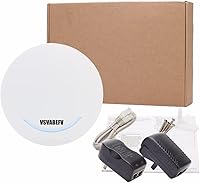
  • Included Items: Package contains the access point unit, a passive PoE adapter, a LAN/WLAN cable, and a basic user manual.
  • User Rating: Holds an average of 3.7 out of 5 stars based on 82 verified customer ratings.
  • Availability: Has been listed for purchase since October 2015, marking it as a mature and relatively long-running product design.

Related Reviews

MikroTik cAP ac Dual-Band Access Point
74%
47%
Ease of Setup
83%
Wireless Performance
78%
Build Quality
91%
CAPsMAN Integration
86%
PoE Output Functionality
More
TRENDnet TEW-821DAP AC1200 Dual Band Access Point
68%
67%
Wireless Performance
88%
PoE Installation
58%
Ease of Setup
49%
Management Interface
78%
Build Quality & Design
More
EnGenius EWS356-FIT Wi-Fi 6 Dual-Band Access Point
83%
91%
Wi-Fi Performance
89%
Ease of Setup
87%
Coverage Area
82%
Software and App Experience
90%
Security Features (WPA3)
More
Ubiquiti U6+
Ubiquiti U6+
80%
88%
Wireless Performance
54%
Setup & Configuration
84%
Range & Coverage
82%
Build Quality & Design
91%
PoE+ Implementation
More
BrosTrend AC1200 Dual-Band WiFi Access Point
76%
88%
Ease of Setup
71%
WiFi Signal Strength
74%
Connection Stability
81%
Build Quality & Design
76%
Dual-Band Performance
More
NETGEAR WAX615 Wireless Access Point
86%
91%
Performance
88%
Ease of Setup & Installation
93%
Coverage & Range
89%
Security Features
87%
App & Remote Management
More
EnGenius EAP350 N300 Wireless Access Point
68%
88%
Signal Range & Coverage
83%
Connection Stability
71%
Ease of Setup
52%
Admin Interface & Software
79%
Build Quality & Design
More
TP-Link EAP653 Wi-Fi 6 Access Point
83%
88%
Wireless Performance
79%
Setup & Installation
83%
Omada App & Controller Experience
91%
Build Quality & Design
84%
Range & Coverage
More
Cisco WAP4410N Wireless-N Access Point
71%
88%
Build Quality
91%
Long-Term Durability
58%
Wireless Performance
76%
PoE Implementation
62%
Ease of Setup
More
Asus RT-AC1200 Wireless Dual-Band Router
83%
85%
Wi-Fi Performance
91%
Ease of Setup
78%
Coverage Range
88%
Parental Controls
81%
Streaming & Gaming Performance
More

FAQ

No PoE switch required. The AP240 supports three power methods: a standard 802.3af PoE+ switch, the included 48V passive PoE adapter, or a 12V/1A DC power adapter. If you do not have a PoE switch handy, just use the included passive adapter and you are ready to go.

The VSVABEFV AP240 Dual-Band Wireless Access Point is manageable for a first-timer, but expect a learning curve. Initial login credentials are listed in the product description rather than a printed quick-start guide, and the Yunlink cloud controller adds flexibility but is not particularly intuitive out of the box. If you are comfortable with basic network settings and accessing a device via a browser-based IP address, you will get through it — just budget extra time for the first run.
The marketing leans toward optimistic range claims, so it helps to set grounded expectations. In a typical indoor environment with standard walls, expect reliable coverage across a single mid-sized room or a corridor — broadly comparable to a decent consumer router mounted at ceiling height. Open floor plans will perform well, but multiple thick walls or concrete floors between the AP and your devices will noticeably shrink the effective range.

Yes. The AP240 supports a FAT AP mode that lets it run as a fully standalone access point without any cloud dependency. This is worth knowing if you prefer local-only management or have concerns about relying on an external platform. FAT mode sacrifices the centralized multi-unit management features but works well for simple single-unit setups.

This is an access point, not a router — you still need a router or gateway device to handle your internet connection and DHCP. Think of the AP240 as the wireless layer that sits on top of your wired network, extending Wi-Fi coverage to a specific area. Your router handles the traffic routing; this ceiling access point handles the radio side.

The spec sheet suggests up to 80 simultaneous users, but that reflects theoretical capacity under ideal conditions, not everyday reality. In practice, expect smooth performance with roughly 15 to 25 actively connected devices for typical tasks like browsing and video streaming. Push beyond that with heavy concurrent usage, and you will start to feel the limitations of this price tier.

Yes, and it is one of the more genuinely useful features here. The AP240 supports captive portal authentication with social login options including Facebook, Google, and SMS verification, plus a member-based login system. For a small waiting room, guesthouse, or dining area, this is a practical alternative to sharing a Wi-Fi password and gives you a basic layer of access control.

For the most part, yes. As long as your router handles standard DHCP and your switch meets the 802.3af PoE specification, this ceiling access point will integrate without issue. There are no brand-specific compatibility locks to worry about. Just verify that your switch supports 802.3af or 802.3at output if you want to skip the included passive PoE adapter.

Those units have a clear advantage in firmware stability, documentation quality, long-term software support, and brand accountability. The honest trade-off is price — this PoE wireless AP is considerably cheaper. If you are a technically comfortable buyer on a tight budget and can tolerate a thinner support experience, it is a workable option. If uptime reliability, a polished management interface, or proper after-sales support matters to your use case, the TP-Link EAP or entry-level UniFi line is worth the higher investment.

The package includes the access point, a passive PoE adapter, a network cable, and a basic manual — along with a ceiling mounting plate and standard screws. Physical installation is straightforward: run your ethernet cable to the mounting location, connect the unit, attach the bracket to the ceiling, and click the AP into place. Most buyers find the physical install to be the easiest part of the whole process.