Overview

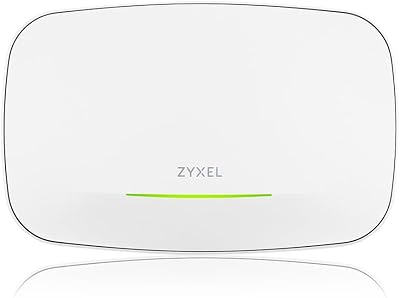
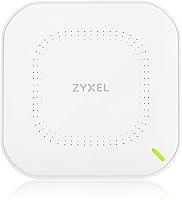
The Zyxel NWA50AX WiFi 6 Access Point sits in an interesting spot — capable enough for a small business deployment, yet accessible enough for a home power user who wants real wireless infrastructure rather than another consumer mesh box. One thing to get straight before buying: this is an access point, not a router. You still need a router and an internet connection feeding it. What you get in return is focused, reliable wireless coverage with AX1800 dual-band speeds, three distinct management paths (local web interface, mobile app, or Nebula cloud), and the choice to power it via PoE+ or a standard AC adapter — the latter ships in the box.
Features & Benefits

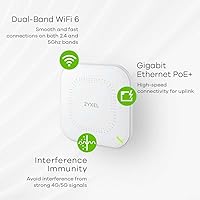
WiFi 6 brings tangible improvements when several devices are active at once. The NWA50AX uses 2x2 MU-MIMO on both bands, meaning it can communicate with multiple clients simultaneously rather than taking turns — a real difference in busy households or offices with video calls, smart TVs, and phones all running at once. Smart Mesh lets you add more access points without manually configuring static wireless links between them; the network figures it out. Clients also roam between APs without noticeable disconnection, which matters for voice calls and streaming. WPA3-PSK encryption and VLAN tagging round out the security side, letting you isolate guest traffic cleanly from your main network.

Best For

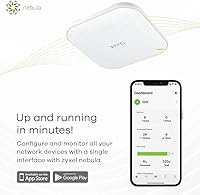
This access point makes the most sense for a few specific scenarios. If you run a small office with a PoE+ capable switch already installed, deployment is genuinely straightforward — plug in ethernet, done. It also fits well in larger homes where a single router leaves dead zones and you want a proper infrastructure solution rather than yet another consumer extender. IT-savvy users who want to centrally manage wireless across multiple sites will appreciate the Nebula cloud option. That said, buyers who have no interest in cloud dashboards can simply use the local web interface and ignore Nebula entirely — the hardware does not force you into any subscription.

User Feedback

Across 265 ratings averaging 4.3 stars, the picture is mostly positive but not without caveats. Buyers consistently highlight easy initial setup and stable long-term connectivity as standout qualities. The PoE+ support earns specific appreciation from network installers who find it cleaner than running separate power cables. On the critical side, the Nebula cloud platform frustrates some users — the free tier has limits that are not obvious upfront, and the mobile app occasionally misbehaves when syncing settings. A few reviewers mention the unit running warm during extended use, though none flag it as a reliability concern. Most complaints point at software rather than the hardware itself.

Pros

  • WiFi 6 handles a house full of devices without the slowdowns older APs suffer under load.
  • PoE+ support makes ceiling or wall mounting clean and cable-efficient in properly wired spaces.
  • AC adapter included in the box means you can deploy immediately without extra hardware purchases.
  • WPA3 encryption gives network administrators a meaningful security upgrade over legacy WPA2 setups.
  • Smart Mesh support lets you expand coverage by adding more APs without complex manual configuration.
  • VLAN tagging allows clean separation of guest and internal traffic, useful in both home and office contexts.
  • Three management options — local web, app, and cloud — give you flexibility that is rare at this price point.
  • Stable long-term connectivity earns consistent praise from users who have run this access point for months continuously.
  • Low-profile design with internal antennas suits client-facing spaces where visible antenna arrays look unprofessional.
  • Solid value compared to enterprise WiFi 6 APs offering similar cloud management at significantly higher prices.

Cons

  • Nebula cloud free tier has meaningful feature restrictions that are not obvious before purchase.
  • The mobile app regularly draws complaints about sync failures and unreliable remote management behavior.
  • Mounting hardware in the box is minimal and may require additional anchoring for secure wall installation.
  • Users without a PoE+ switch need a separate injector, adding unexpected cost to the deployment budget.
  • Older client devices can struggle with WPA3-only mode, requiring fallback configuration that adds setup time.
  • The unit runs noticeably warm during sustained use, which raises concerns in poorly ventilated or enclosed spaces.
  • Firmware update notifications are inconsistent, leaving some units on outdated software without the owner realizing it.
  • Documentation for advanced features like VLAN setup is thin, pushing less experienced users toward third-party guides.
  • Nebula cloud dashboard has a learning curve that frustrates buyers expecting a straightforward consumer-style interface.
  • Range at the far edges of larger or multi-story buildings can fall short without a second AP to compensate.

Ratings

The Zyxel NWA50AX WiFi 6 Access Point has been scored below by our AI system after analyzing verified buyer reviews from multiple global markets, with spam, bot-generated, and incentivized feedback actively filtered out. Scores reflect the honest distribution of real-world experiences — not just the highlights. Where users consistently ran into friction, that is reflected just as transparently as the genuine strengths.
Wireless Performance
83%
Most users report noticeably faster and more consistent speeds compared to older WiFi 5 access points, particularly in environments with 10 or more active devices. Streaming 4K video and running video calls simultaneously rarely causes the throughput drops that older APs struggled with.
A handful of users note that real-world speeds on the 2.4GHz band feel modest under heavy concurrent load, and the AX1800 rating can mislead buyers expecting router-class aggregate throughput. Range at the edges of larger buildings can also fall short of expectations.
Setup & Installation
88%
Getting this access point up and running via the local web interface takes most users under 15 minutes, even without prior networking experience. The included AC adapter means you do not need a PoE switch just to get started, which reduces the barrier for first-time AP buyers significantly.
Users who opt for the Nebula cloud setup path report a steeper learning curve, with the dashboard requiring more time to understand than the local interface. A few buyers mention that initial firmware updates can be confusing if the unit does not automatically prompt for them.
Nebula Cloud Management
61%
39%
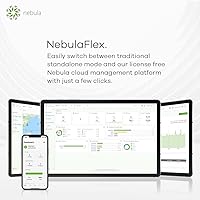
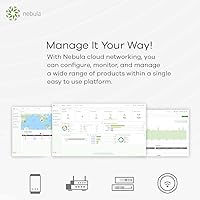
For users managing multiple access points across one or more locations, the Nebula cloud platform brings genuine value — centralized visibility and configuration in one dashboard saves real time compared to logging into each unit individually. Network admins with Zyxel-heavy environments find the ecosystem cohesive.
The free tier of Nebula is where frustration accumulates. Feature restrictions are not clearly communicated before purchase, and some buyers feel pushed toward a paid subscription to unlock functionality they assumed was standard. The mobile app also has a history of sync delays and occasional unresponsiveness that undermines confidence in remote management.
PoE+ & Power Flexibility
91%
Network installers and IT professionals specifically call out the PoE+ support as a deciding factor. In environments with a managed PoE+ switch already in the rack, deployment is clean — a single ethernet cable handles both data and power with no extra wall outlet needed nearby.
Buyers without an existing PoE+ switch need to either purchase a PoE+ injector separately or rely on the included AC adapter. The injector cost is not reflected in the product price, which can catch budget-conscious buyers off guard when building out a multi-AP installation.
Build Quality & Design
74%
26%
The unit feels solid for its weight class, with a low-profile form factor that mounts reasonably well on a ceiling or wall without dominating the room. Internal antennas keep the aesthetic clean, which matters in client-facing spaces like small offices or retail environments.
Mounting hardware included in the box is minimal, and a few users report that the mount feels less secure than expected on drywall without additional anchoring. The unit runs noticeably warm during extended operation, which does not appear to affect reliability but raises questions for some buyers about longevity in poorly ventilated spaces.
Multi-Device Handling
82%
18%
The MU-MIMO implementation holds up well in real household and small-office scenarios where smartphones, laptops, smart home devices, and tablets compete for airtime simultaneously. Users in open-plan offices with 15 to 20 devices report stable connections without the queuing lag common on older single-user MIMO APs.
Under extreme concurrent load — think 30-plus active clients in a dense environment — some users notice latency creeping up, suggesting the AX1800 class has a ceiling that heavier deployments can reach. For those scenarios, a higher-tier AP would serve better.
Roaming & Mesh Behavior
78%
22%
In multi-AP setups, clients moving between rooms hand off without the jarring disconnection typical of basic extender setups. Users with open floor plans — warehouses, long office corridors, larger homes — find the roaming noticeably smoother than consumer mesh systems at a similar price.
Smart Mesh configuration requires a bit of deliberate planning; some users expect it to be fully automatic out of the box but find they need to spend time aligning SSIDs and settings across units. Roaming responsiveness also depends on client device behavior, which is outside the AP's control but still generates complaints.
Security Features
86%
WPA3-PSK support is a meaningful upgrade over WPA2 in environments where wireless security is a genuine concern — small medical offices, legal practices, or any setting with sensitive data on the network benefit from the stronger handshake protocol. VLAN tagging adds a further layer for separating guest traffic cleanly.
WPA3 compatibility can create connection issues with older client devices that do not support the newer standard, requiring mixed-mode configuration. A few users found the VLAN setup documentation thin, needing to consult third-party guides to get proper traffic segmentation working.
Value for Money
85%
Relative to enterprise-tier access points that offer comparable cloud management and WiFi 6 support, the NWA50AX is considerably more accessible in price. For a home power user or small business owner, the feature-to-cost ratio is difficult to match in this specific category.
The value calculation shifts if you factor in a Nebula paid subscription for full cloud functionality, or the cost of a PoE+ injector if you lack a capable switch. What looks like a lean purchase price can grow once the full deployment cost is added up.
App Experience
57%
43%
The mobile app works well enough for basic status checks and simple configuration changes when you are away from a desktop. For users who primarily rely on the local web interface, the app is a convenient secondary option rather than a core workflow tool.
Recurring reports of sync failures, delayed status updates, and the app losing connection to managed units make it unreliable as a primary management tool. Several users abandoned the app in favor of the browser-based interface after experiencing repeated issues, which limits its practical utility.
Documentation & Support
63%
37%
Zyxel provides a reasonable base of online documentation, and the quick-start guide covers the most common local setup scenario adequately. Users who already have networking experience find the available resources sufficient to get up and running without calling support.
For less technical buyers, the documentation gap becomes a real obstacle — particularly around Nebula setup, VLAN configuration, and firmware management. Community forum support is inconsistent, and a few users report slow or unhelpful responses from official support channels when troubleshooting edge cases.
Firmware & Updates
71%
29%
Zyxel has maintained a reasonable update cadence for the NWA50AX, and users who stay current with firmware report improved stability and occasional feature additions. The update process via the local web interface is straightforward once you know where to find it.
Automatic update notifications are not always reliable, and some units sit on outdated firmware without the owner realizing it. A few users experienced configuration resets after a firmware update, which is a meaningful inconvenience in a business setting with custom network configurations.
Compatibility
79%
21%
Works reliably with the major router brands and switches on the market, and the standard-compliant 802.11ax implementation means most modern client devices connect without issue. Integration into existing Zyxel infrastructure, in particular, tends to be frictionless.
Older client devices — particularly legacy laptops and IoT hardware — occasionally struggle with WPA3-only mode, requiring fallback to mixed security settings. Users running non-Zyxel cloud management platforms cannot take advantage of the Nebula features, limiting appeal if you are already committed to a competing ecosystem.
Thermal Management
68%
32%
Under normal daily operation with moderate client counts, the unit maintains acceptable temperatures and shows no signs of thermal throttling. Users running it in open ceiling mounts or well-ventilated wall positions report no heat-related complaints over months of continuous use.
In enclosed spaces or inside network cabinets with limited airflow, the unit runs warmer than some buyers are comfortable with. There is no active cooling or thermal indicator, so users in hot climates or tight enclosures are left relying on their own judgment about safe placement.

Suitable for:

The Zyxel NWA50AX WiFi 6 Access Point is a strong fit for small business owners and IT-minded individuals who want infrastructure-grade wireless without the enterprise price tag. If you already have a router and a managed PoE+ switch in place, deployment is about as clean as it gets — one cable, no power outlet hunting, no fuss. Home office workers dealing with a growing pile of wireless devices will also benefit, since WiFi 6 handles concurrent connections more gracefully than the previous generation. The flexible management options are a genuine advantage: you can keep it simple with a browser-based local interface or scale up to Nebula cloud management if you are overseeing multiple sites. IT consultants and installers who need a dependable, mid-range AP they can drop into varied environments — with either PoE+ or AC power available — will find this access point quietly earns its place in their toolkit.
Not suitable for:

The Zyxel NWA50AX WiFi 6 Access Point is not the right choice if you are expecting a plug-and-play solution straight out of the box with no existing network infrastructure behind it — this is an access point, and it requires a functioning router to do anything useful. Buyers who want a single device to handle routing, switching, and wireless in one unit should look elsewhere, at something like a WiFi 6 mesh router system instead. If your goal is whole-home coverage managed entirely from a polished consumer app with minimal technical involvement, the Nebula ecosystem will likely frustrate you; it is built with IT professionals in mind, not casual users. Anyone expecting full cloud management features without a subscription should read the Nebula free tier terms carefully before committing. And if your building has 30-plus densely packed wireless clients or genuinely high-throughput demands, the AX1800 class will start showing its ceiling — a higher-tier AP would be a more appropriate investment.

Specifications

  • WiFi Standard: This access point operates on the 802.11ax (WiFi 6) standard, offering improved efficiency and throughput compared to the previous 802.11ac generation.
  • Speed Class: Dual-band AX1800 class, combining up to 574Mbps on the 2.4GHz band and up to 1201Mbps on the 5GHz band under ideal conditions.
  • MU-MIMO: 2x2 MU-MIMO is supported on both bands, allowing multiple client devices to transmit and receive data simultaneously rather than sequentially.
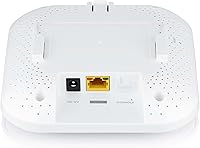
  • Ethernet Port: One 10/100/1000M Gigabit Ethernet port handles both network uplink and PoE+ power delivery through a single cable connection.
  • Power Input: Accepts PoE+ (802.3at standard) from a compatible switch or injector, with an AC power adapter also included in the retail package.
  • Security Protocol: Supports WPA3-PSK encryption alongside backward-compatible WPA2, providing stronger protection against brute-force and dictionary-based attacks.
  • VLAN Support: VLAN tagging is supported, enabling administrators to segment network traffic between guest, corporate, and other logical network groups.
  • Mesh Capability: Smart Mesh networking allows multiple NWA50AX units to form dynamic wireless links automatically, reducing the need for complex manual inter-AP configuration.
  • Management Options: Can be configured and monitored via a local web browser interface, the Zyxel Nebula mobile app, or the Nebula cloud management portal.
  • Operating System: Runs ZyNOS, Zyxel's proprietary network operating system, which underpins both local and cloud management functionality.
  • Antenna Type: Internal antennas are built into the unit, keeping the exterior profile clean and unobtrusive for ceiling and wall mounting scenarios.
  • Dimensions: The unit measures 9.06 x 6.18 x 2.4 inches, making it compact enough for discreet ceiling or wall installation in most indoor environments.
  • Weight: At 1.32 pounds, the access point is light enough to be supported by standard ceiling tile mounts or basic wall brackets without structural concerns.
  • Environment: Rated for indoor use only; not designed for outdoor deployment or exposure to rain, humidity extremes, or direct sunlight.
  • Frequency Bands: Operates simultaneously on both 2.4GHz and 5GHz bands, allowing clients to connect on whichever band best suits their range and speed requirements.
  • Release Date: The NWA50AX was first made available in July 2021, placing it squarely in the early mainstream wave of WiFi 6 access point hardware.
  • Included Contents: The retail package includes the access point unit and an AC power adapter; a PoE+ injector or switch is not included and must be sourced separately if needed.
  • Roaming Support: Supports 802.11r fast BSS transition, enabling client devices to hand off between multiple access points with minimal connection interruption during movement.

Related Reviews

Cudy AX3000 WiFi 6 Access Point
84%
89%
Performance & Speed
85%
Installation & Setup
91%
Reliability in High-Density Areas
76%
Compatibility with Devices
92%
Range & Coverage
More
BrosTrend AX3000 WiFi 6 Access Point
84%
87%
Performance
92%
Ease of Setup
85%
Signal Strength
90%
Device Support
80%
Build Quality
More
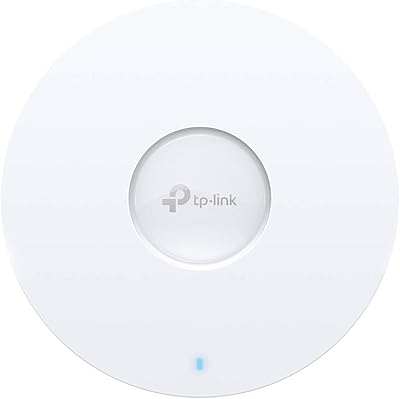
TP-Link EAP660 HD WiFi 6 Access Point
79%
88%
Wireless Performance Under Load
91%
Network Capacity & Device Density
84%
Omada SDN Integration
86%
2.5G Uplink Value
89%
PoE+ Installation Experience
More
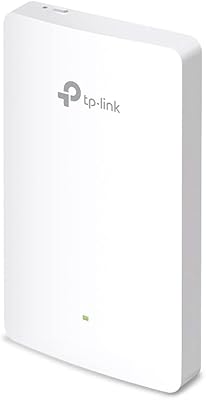
TP-Link EAP615-Wall AX1800 In-Wall Access Point
80%
91%
Ease of Installation
84%
Wi-Fi Performance
93%
Wired Port Versatility
88%
PoE Power & Pass-Through
79%
Omada SDN Integration
More
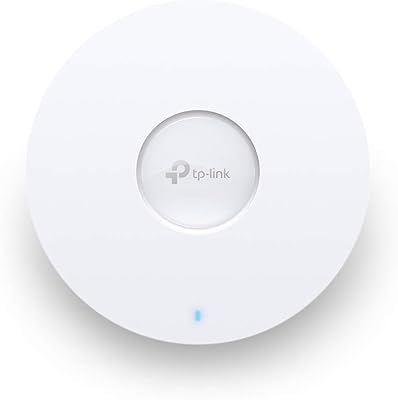
TP-Link EAP620 HD V3 WiFi 6 Access Point
85%
88%
Setup and Installation
91%
Performance in High-Density Environments
90%
WiFi Speed and Reliability
85%
Build Quality
89%
Powering Options (PoE+ and DC)
More
Zyxel NWA130BE WiFi 7 Access Point
77%
83%
Wireless Performance
74%
Setup & Initial Configuration
67%
Nebula Cloud Management
81%
Build Quality & Hardware Design
89%
PoE+ Implementation
More
TP-Link Omada EAP650-Outdoor WiFi 6 Access Point
87%
88%
Performance
94%
Build Quality/Durability
85%
Ease of Setup
90%
Range/Coverage
87%
Value for Money
More
TP-Link TL-WA3001 WiFi 6 AX3000 Wireless Gigabit Access Point
84%
88%
Performance
91%
Signal Range
82%
Ease of Setup
85%
Build Quality
89%
Value for Money
More
TP-Link EAP655-Wall WiFi 6 AX3000 Wall Plate Access Point
85%
88%
Overall Performance
91%
Wi-Fi Speed and Range
87%
Ease of Setup
85%
PoE Passthrough Flexibility
82%
Build Quality
More
Ubiquiti UniFi 6 Pro (U6-Pro)
80%
93%
Wireless Performance
89%
Range & Coverage
54%
Setup & Installation
78%
Value for Money
88%
Build Quality & Design
More

FAQ

You definitely need an existing router — this is a dedicated access point, not an all-in-one device. It handles wireless radio duties only; your router manages the internet connection, DHCP, and routing. Think of the NWA50AX as a wireless extension of your existing network, not a replacement for your router.

Both power the unit identically — the difference is purely about installation convenience. PoE+ delivers power through the same ethernet cable that carries your network data, so you only need to run one cable to the access point. The AC adapter is useful if you do not have a PoE+ switch or injector, since it lets you plug directly into a standard wall outlet. If you are ceiling-mounting in a location without a nearby power outlet, PoE+ is the cleaner solution.

Yes, absolutely. The local web interface gives you full control over the access point without any cloud account or subscription. Nebula is an optional layer, not a requirement. Many users set it up locally and never touch the cloud platform at all.

The free tier covers basic device management for a limited number of access points and offers a shorter data retention window for logs and analytics. Some advanced features — like detailed reporting, enhanced security policies, and extended historical data — require a paid Nebula Plus or Pro subscription. It is worth checking Zyxel's current Nebula licensing page before assuming everything is included for free, as the tiers have evolved since the product launched.

Yes. The Zyxel NWA50AX WiFi 6 Access Point connects to any router via a standard ethernet cable and works as a normal wireless AP regardless of the router brand. Nebula cloud management is a Zyxel-specific feature, but basic operation through the local web interface is entirely brand-agnostic.
In real-world conditions, most users run 15 to 25 active devices comfortably. The WiFi 6 MU-MIMO implementation helps manage concurrent connections more efficiently than older APs, but performance will degrade in very dense environments with 30-plus simultaneously active clients. For high-density scenarios, a higher-tier AP or multiple units in a mesh configuration would be more appropriate.

If you plan to use the AC adapter, nothing extra is needed — plug in the ethernet uplink to your router, connect the AC adapter to a wall outlet, and you are ready to configure. If you want to use PoE+, you will need a PoE+ capable switch (802.3at) or a standalone PoE+ injector, neither of which is included. A PoE+ injector typically costs between 15 and 30 dollars as a separate purchase.

Yes. The access point supports VLAN tagging, which lets you create a separate SSID for guests and keep that traffic isolated from your primary network. This is useful in both home and office environments where you want visitors to have internet access without being able to see internal devices like file servers or printers.

The mounting process is straightforward, but the included hardware is minimal — just a basic mounting bracket. On drywall or ceiling tiles, some users add their own anchors for a more secure fit. The unit is lightweight enough that a standard anchor and screw setup works fine in most cases.

It does run noticeably warm during extended use, which is fairly typical for access points in this category. As long as it is mounted in an open, ventilated space — like a ceiling or open wall surface — heat dissipation is adequate and users report stable long-term operation. Problems tend to arise only when the unit is placed in enclosed cabinets or spaces with restricted airflow, so avoid boxing it in.

Where to Buy