
Overview

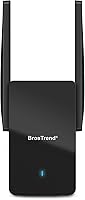
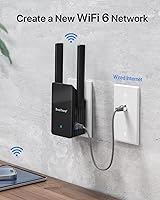
The BrosTrend AX3000 WiFi 6 Access Point takes a different approach than most networking gear — instead of sitting on a shelf or requiring a ceiling mount, it plugs directly into a wall outlet and connects to your existing wired network via Ethernet. That wall-plug form factor alone sets it apart. The core idea is straightforward: if you have a dead zone in your home or office but there is already an Ethernet port nearby, this wall-plug access point turns that wired connection into a proper WiFi 6 network without touching your main router. It sits in the mid-range tier, aimed at home users, renters, and small offices — not power users chasing enterprise-grade control.

Features & Benefits

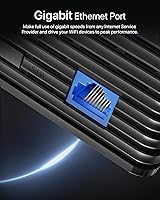
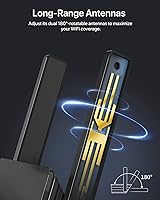
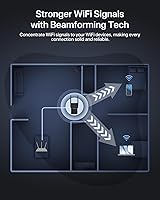
Running on the WiFi 6 standard, this WiFi 6 AP puts the 5GHz band to work at channel widths up to 160MHz — wide enough to handle 4K and 8K video streams without choking when multiple devices jump on at the same time. That multi-device efficiency leans heavily on OFDMA, which splits channels into sub-channels so more clients can transmit simultaneously rather than queuing up. Beamforming focuses the signal toward your devices instead of spraying energy in every direction, which makes a real difference in irregular floor plans. The Gigabit Ethernet port keeps the upstream connection from becoming a choke point, and the external adjustable antennas let you direct coverage exactly where it is actually needed.

Best For

This wall-plug access point makes the most sense when you already have a working router and a spare Ethernet drop in a room that gets no signal. Think a finished basement, a detached garage, or a spare bedroom that a WiFi repeater has never fully solved. If your household runs a dozen or more connected devices in that secondary space — smart bulbs, streaming sticks, a gaming console — the BrosTrend AX3000 handles that load without much fuss. Small workshops with an existing LAN drop will find this especially practical. It is not the right call if you need wireless mesh roaming or require PoE flexibility from your access point.

User Feedback

Buyers generally appreciate how quickly things get up and running — setup takes minutes for most people once the Ethernet cable is plugged in, and the wall-plug form factor earns consistent praise for keeping the space tidy. On the flip side, the single Ethernet port draws complaints from anyone hoping to also wire a device at the same location. A number of reviewers flag that the companion app feels limited compared to what more established router brands offer. Real-world range tends to fall short of the headline figure in older homes with thick walls, so keep expectations grounded. Long-term reliability reports are mixed, with occasional firmware update frustrations cropping up.

Pros

  • Wall-plug form factor keeps installation simple with no shelf, bracket, or ceiling mount required.
  • WiFi 6 with OFDMA handles crowded device lists far more efficiently than older WiFi 5 hardware.
  • The Gigabit Ethernet port prevents the upstream wired connection from becoming a speed bottleneck.
  • Adjustable external antennas let you fine-tune signal direction toward a garage or basement rather than guessing.
  • Most buyers report getting up and running in well under fifteen minutes with no technical background needed.
  • Beamforming focuses wireless energy toward connected clients, which helps in rooms with irregular layouts.
  • Supports a large number of simultaneous clients, making it practical for smart-home-heavy households.
  • The included Ethernet cable means you can get started without a separate trip to the store.
  • Compact and unobtrusive — most users note it blends into a wall outlet without drawing attention.
  • Represents solid value in the mid-range access point category for straightforward dead zone coverage.

Cons

  • A single Ethernet port means you cannot simultaneously wire a nearby device without adding a switch.
  • No PoE support limits flexible placement; it must be near a standard power outlet.
  • Real-world range in older homes with thick walls or concrete often falls short of the marketing figure.
  • The companion app offers limited configuration depth compared to more established networking brands.
  • Firmware updates have been inconsistent for some users, with occasional bugs introduced post-update.
  • Compatibility hiccups with certain ISP-provided router combos have been flagged by a subset of buyers.
  • No mesh or roaming capability means clients may not hand off cleanly when moving between APs.
  • Long-term reliability reports are mixed, with some units showing instability after several months of use.
  • No mounting accessories are included for users who prefer not to occupy a wall outlet directly.
  • Customer support response times have drawn criticism from buyers who ran into setup issues.

Ratings

Our AI rating system analyzed hundreds of verified global purchases of the BrosTrend AX3000 WiFi 6 Access Point, filtering out incentivized and bot-generated submissions to surface what real buyers consistently experienced. The scores below reflect an honest balance of genuine praise and recurring frustrations across a range of home, rental, and small office environments. No category has been softened — strong performers and weak spots are scored with equal transparency.

Ease of Setup
88%
The majority of buyers had this unit broadcasting WiFi within ten minutes of opening the box, with no networking knowledge required. The included Ethernet cable and a straightforward app walkthrough made the process approachable for first-time access point users setting up coverage in a spare room or basement.
A smaller but vocal group hit snags when connecting through certain ISP-provided gateway devices, where the app offered little troubleshooting guidance. Users in those situations often had to search forums independently to resolve the issue.
WiFi Performance
83%
On the 5GHz band with 160MHz channel width enabled, this wall-plug access point delivered fast, consistent speeds that handled simultaneous 4K streaming and video calls without noticeable drops. Buyers in medium-sized rooms reported throughput well above what their previous WiFi 5 extenders could manage.
Performance headroom narrows significantly when the 160MHz channel width competes with neighboring networks in dense residential areas, forcing some users to drop back to 80MHz. At that point, the speed advantage over older hardware is less dramatic than the spec sheet implies.
Coverage Range
71%
29%
In standard drywall construction, this WiFi 6 AP provided reliable coverage across a typical single floor or a medium-sized detached garage, which matched the expectations of most buyers who purchased it for a specific dead zone. The adjustable antennas made a genuine difference when aimed deliberately.
Buyers in older homes with plaster, brick, or concrete walls reported noticeably shorter range than the marketing suggested, sometimes requiring the unit to be repositioned closer to the target area than originally planned. Real-world coverage in those environments is meaningfully below the headline figure.
Multi-Device Handling
86%
OFDMA support made a practical difference in households running a mix of smart home devices, streaming sticks, and laptops simultaneously — connections stayed stable rather than taking turns. Users with fifteen or more active clients in a secondary room reported that the AP kept up without obvious congestion.
The 45-device ceiling is a theoretical maximum under controlled conditions, and a handful of buyers with very large smart home setups noticed occasional sluggishness when a high proportion of those slots were actively transmitting at once.
Build & Design
79%
21%
The wall-plug form factor consistently earned praise for keeping spaces neat — no shelf, no cable clutter beyond the single Ethernet run, and a slim profile that most buyers felt blended into the wall without drawing attention. At under nine ounces, it does not stress a standard outlet.
The plastic housing feels functional rather than premium, and a few buyers noted that the unit gets moderately warm during extended operation, which made some users uncomfortable leaving it running in enclosed spaces like small closets.
App & Management
62%
38%
The companion app covers the basics competently — initial setup, SSID configuration, and a firmware update check are all accessible without digging through a web interface. For buyers who just want to get online and leave the settings alone, it does the job adequately.
Power users quickly hit the app's ceiling: there is no VLAN support, no granular QoS, and limited visibility into connected client details. Several buyers described the app as feeling underdeveloped compared to what established router brands offer at a similar price point.
Firmware Reliability
61%
39%
When the firmware is stable, the unit runs quietly in the background for weeks without needing a restart, which is exactly what buyers want from an access point installed in a hard-to-reach spot like an attic or garage.
A recurring thread in user feedback involves firmware updates introducing new bugs — dropped connections, reduced range, or a reset of custom settings — that were not present before the update. The update cadence has also been inconsistent, with long gaps between releases.
Port Availability
54%
46%
The Gigabit Ethernet port is genuinely fast enough to match most home internet plans and prevents the upstream connection from being a choke point, which is more than can be said for older Fast Ethernet hardware.
Having only one Ethernet port is a hard constraint that frustrated buyers who wanted to also wire a nearby desktop, NAS, or smart TV at the same location. Without adding a separate switch, there is simply no workaround, and this limitation came up repeatedly as an unpleasant surprise.
Long-Term Reliability
67%
33%
A meaningful portion of buyers have used this wall-plug access point for over a year without incident, reporting consistent uptime and stable connections throughout, particularly in simpler single-unit setups with moderate device counts.
Others reported gradual instability over time — spontaneous reboots, declining range, or connectivity drops that were not present during the first few months of use. Whether these represent a hardware durability issue or firmware-related degradation is hard to determine from the available feedback.
Value for Money
81%
19%
For buyers who need a clean, no-fuss way to bring WiFi 6 to a wired dead zone, the price-to-performance ratio holds up well against similarly priced competitors. Getting OFDMA and beamforming at this tier is genuinely competitive.
Buyers who expected enterprise-lite features or more robust software control felt the value proposition weaker, since comparable spending on a different brand can sometimes yield better app management or mesh compatibility.
PoE & Placement Flexibility
43%
57%
The wall-plug design is genuinely convenient for the specific scenario it was built for — a standard outlet near an Ethernet drop — and requires no additional power adapter or cabling beyond the network cable.
The complete absence of PoE support is a real limitation for anyone who wanted to place the unit away from a power outlet, or for small offices that already run PoE infrastructure. It locks the device into wall-outlet placement exclusively, with no flexibility for ceiling or high-wall mounting.
Compatibility
72%
28%
The BrosTrend AX3000 worked without friction alongside the most common router brands in user feedback — Asus, TP-Link, Netgear, and most ISP-provided units — making it broadly compatible for typical home setups.
A subset of buyers reported configuration issues specifically with certain ISP combo modem-router units that used non-standard DHCP behavior, and resolving those issues required manual network configuration that the app does not support directly.
Noise & Heat
74%
26%
The unit runs silently — no fan, no audible hum — which makes it a good fit for bedrooms or quiet workspaces where fan noise from active cooling would be disruptive.
Without active cooling, the unit runs warm to the touch during sustained heavy use. While no buyers reported it reaching unsafe temperatures, the heat output made a few users cautious about placing it in tight or poorly ventilated spots.
Package Contents
76%
24%
Including a five-foot Ethernet cable in the box is a small but genuinely appreciated touch — most competing units at this price skip it, forcing buyers to order separately before they can even start setup.
The quick installation guide covers only the most basic configuration path, leaving buyers who encounter anything outside the standard setup flow without much printed guidance to fall back on.

Suitable for:

The BrosTrend AX3000 WiFi 6 Access Point is a strong fit for anyone who already has a working router and a wired Ethernet port sitting unused in a room that gets little to no wireless coverage. Homeowners with a finished basement, attic workspace, or detached garage connected to the home network via a cable run will find this particularly practical — plug it in, connect the cable, and that dead zone becomes a proper WiFi 6 coverage area within minutes. It works well for households juggling a mix of smart home gadgets, streaming devices, and laptops in a secondary space, since WiFi 6 handles that kind of simultaneous load more gracefully than older standards. Renters who cannot run new cable or install ceiling-mounted hardware will appreciate the wall-plug design that leaves no holes and no clutter. Small offices or workshops with an existing LAN drop but zero wireless signal are another natural fit, especially where tidiness matters.

Not suitable for:

The BrosTrend AX3000 WiFi 6 Access Point is not the right tool if you need a standalone router — it has no routing, DHCP, or WAN functionality on its own and depends entirely on an upstream router to function. Anyone hoping to build a true mesh network with seamless roaming between access points will also want to look elsewhere, since this unit does not support mesh protocols natively. If your installation spot lacks a wired Ethernet port nearby, this device simply cannot be deployed without running cable first, which undermines its plug-and-play appeal. Network enthusiasts who want deep configuration controls — VLANs, advanced QoS, or granular traffic management — will find the companion app thin by comparison to more capable enterprise-lite options. Finally, if you need to also wire a desktop or NAS at the same wall location, the single Ethernet port becomes an immediate obstacle.

Specifications

  • WiFi Standard: This access point runs on 802.11ax, commonly known as WiFi 6, which improves throughput and efficiency compared to the previous WiFi 5 generation.
  • Frequency Bands: It operates on both the 2.4GHz and 5GHz bands simultaneously, giving devices the option to connect on whichever band suits their needs.
  • 5GHz Throughput: The 5GHz band reaches up to 2402Mbps when the channel width is set to 160MHz, making it well-suited for high-bandwidth tasks like 4K streaming.
  • 2.4GHz Throughput: The 2.4GHz band provides up to 574Mbps, which is sufficient for lighter tasks and devices that do not support 5GHz connections.
  • Channel Width: The 5GHz radio supports a maximum channel bandwidth of 160MHz, which is wider than many competing access points in this price range.
  • Ethernet Port: One Gigabit RJ45 port is included, supporting wired speeds up to 1Gbps to connect the unit to an upstream router or network switch.
  • Device Capacity: The unit is rated to handle up to 45 simultaneous WiFi client connections across both bands without significant degradation in performance.
  • Beamforming: Beamforming is supported, allowing the access point to focus wireless signals toward specific client devices rather than broadcasting energy in all directions equally.
  • OFDMA Support: OFDMA is built in, enabling the access point to serve multiple devices at the same time by dividing channels into smaller sub-channels.
  • Antennas: Two external antennas are included and can be adjusted manually to optimize signal direction based on the physical layout of the space.
  • Form Factor: The unit uses a wall-plug design that inserts directly into a standard power outlet, eliminating the need for a separate mounting bracket or surface placement.
  • Dimensions: The access point measures 3.5 x 2.6 x 8.39 inches, making it a relatively compact unit given its dual external antennas.
  • Weight: At 8.8 ounces, the unit is light enough that it does not strain a standard wall outlet when plugged in.
  • Color: The unit is finished in black, which tends to blend unobtrusively into most home and office wall environments.
  • In the Box: Each package includes the access point unit, a 5-foot RJ45 Ethernet cable, and a printed quick installation guide.
  • Model Number: The official model designation is A3, sold under the BrosTrend Technology LLC brand.
  • WiFi Mode: This device operates strictly as an access point and requires an existing router to provide DHCP and internet routing functions.
  • Release Date: The product became available in July 2023 and has accumulated several hundred verified ratings since its launch.

Related Reviews
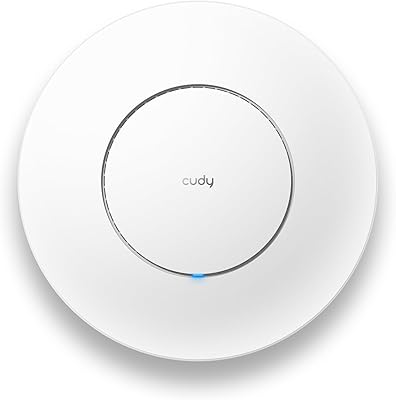
Cudy AX3000 WiFi 6 Access Point
84%
89%
Performance & Speed
85%
Installation & Setup
91%
Reliability in High-Density Areas
76%
Compatibility with Devices
92%
Range & Coverage
More
TP-Link EAP655-Wall WiFi 6 AX3000 Wall Plate Access Point
85%
88%
Overall Performance
91%
Wi-Fi Speed and Range
87%
Ease of Setup
85%
PoE Passthrough Flexibility
82%
Build Quality
More
TP-Link TL-WA3001 AX3000 WiFi 6 Access Point
75%
83%
Wireless Performance
81%
Setup & Ease of Use
78%
Range & Coverage
74%
Build Quality & Design
61%
Thermal Management
More
Zyxel NWA50AX WiFi 6 Access Point
76%
83%
Wireless Performance
88%
Setup & Installation
61%
Nebula Cloud Management
91%
PoE+ & Power Flexibility
74%
Build Quality & Design
More
TP-Link EAP660 HD WiFi 6 Access Point
79%
88%
Wireless Performance Under Load
91%
Network Capacity & Device Density
84%
Omada SDN Integration
86%
2.5G Uplink Value
89%
PoE+ Installation Experience
More
TP-Link EAP615-Wall AX1800 In-Wall Access Point
80%
91%
Ease of Installation
84%
Wi-Fi Performance
93%
Wired Port Versatility
88%
PoE Power & Pass-Through
79%
Omada SDN Integration
More
TP-Link EAP650-Outdoor WiFi 6 Outdoor Access Point
80%
91%
Wireless Range
88%
Wi-Fi 6 Performance
93%
Build & Weather Resistance
67%
Ease of Setup
84%
Omada SDN Integration
More
TP-Link EAP620 HD V3 Wireless Access Point
75%
78%
Network Performance
84%
Ease of Installation
81%
Management Software
58%
Controller Dependency
83%
Build Quality
More
TP-Link Festa F65-Outdoor AX3000 Wi-Fi 6 Access Point
84%
88%
Performance
94%
Outdoor Durability
85%
Ease of Setup
82%
Signal Strength
79%
Cloud Management & App
More
WAVLINK WN588HX3 WiFi 6 Outdoor Access Point
75%
83%
Outdoor Signal Range
91%
Build Quality & Weatherproofing
78%
Installation & Mounting
61%
Setup & Configuration Experience
86%
WiFi 6 Performance
More

FAQ

No router replacement needed. This wall-plug access point connects to your existing router via an Ethernet cable and simply creates a new WiFi 6 coverage zone in a different area. Your current router keeps handling all the internet traffic and device management as it normally would.

A repeater rebroadcasts your existing WiFi signal wirelessly, which typically cuts your bandwidth in half and introduces latency. This WiFi 6 AP connects directly to your wired network, so it creates a full-strength, independent WiFi network in that location without the performance penalty. If you have an Ethernet port available, an access point is almost always the better choice.

Most buyers set it up without any networking background. You plug it into the wall, connect the included Ethernet cable to a router or network switch port, and the unit broadcasts WiFi. BrosTrend also provides a companion app that walks you through the process step by step if you want additional guidance.

Yes, that is actually one of the strongest use cases for this type of device. As long as you have an active Ethernet port in the garage connected back to your main router, the access point will broadcast WiFi 6 coverage in that space. Just keep in mind that thick concrete or metal walls may reduce the range somewhat compared to a typical indoor room.

In most cases, yes. As long as the ISP gateway device has a working LAN Ethernet port, you can connect this wall-plug access point to it. A small number of users have reported minor compatibility quirks with certain ISP-provided units, so it is worth checking the BrosTrend support page if you run into any issues during setup.

Unfortunately, no. There is only one Ethernet port on the unit, and it is used for the upstream connection to your network. If you need to wire a device at the same location, you would need to add a small network switch between the wall port and this access point to split the connection.

Honest answer: it depends heavily on your home's construction. In a typical drywall-and-wood home, coverage is solid across a medium-sized floor. In older homes with plaster walls, concrete, or brick, you can expect range to be noticeably shorter than the marketing figure suggests. Adjusting the external antennas toward the area you want covered makes a meaningful difference.

Not natively. This WiFi 6 AP does not include built-in mesh or fast-roaming protocols, so devices may not hand off cleanly as you move between access points. For basic home setups with a single unit, this is rarely an issue. If seamless roaming across a large property is a priority, you would be better served by a dedicated mesh system.

The 45-device rating reflects the technical ceiling under ideal conditions. In practice, performance stays solid with 15 to 25 active devices in a typical home. OFDMA helps by letting multiple clients share the channel simultaneously rather than taking turns, which keeps things responsive even when several devices are active at once.

Updates are managed through the BrosTrend companion app, and they are not always pushed automatically. Some users recommend checking for updates manually every few months. There have been occasional reports of bugs introduced by firmware updates, so it is worth reading the release notes in the app before installing anything if stability is critical for your setup.