Overview

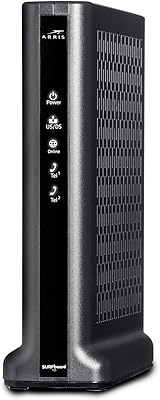
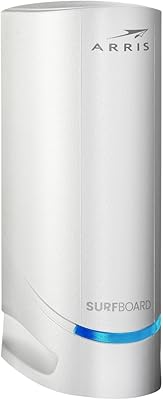
The ZyXEL BRG35503 Cable Modem is a reliable, compact option for Comcast Xfinity users who need a basic internet connection. This Ethernet cable modem supports multiple DOCSIS standards, including 1.1, 2.0, and 3.0, ensuring compatibility with a wide range of service plans. Easy-to-read LED indicators help monitor connection status and activity, making it a hassle-free device for everyday use. While it doesn’t offer built-in Wi-Fi, it performs well as a modem-only solution, delivering consistent and stable performance. This product is ideal for users looking for a straightforward, no-frills cable modem.
Features & Benefits

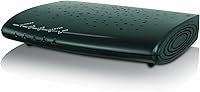
The ZyXEL BRG35503 Cable Modem is built for simplicity and compatibility, supporting multiple DOCSIS standards for broad internet plan flexibility. Its Ethernet port ensures seamless connectivity to any compatible router, while its compact size means it fits easily into most setups without taking up too much space. The modem also includes self-diagnostics, a feature that automatically checks for network issues, helping users troubleshoot without much effort. This makes the modem ideal for users who value both convenience and reliability in a device that just works.
Best For

This ZyXEL modem is best suited for Comcast Xfinity customers looking for a reliable, wired internet connection. It works well for users who need a simple modem to handle everyday internet tasks without additional features like built-in Wi-Fi. Small households or home offices that need stable, consistent internet for tasks such as browsing, streaming, and video conferencing will find this modem a solid choice. The lack of wireless functionality makes it less ideal for large homes or users looking to cover multiple devices in an area.

User Feedback

Users generally appreciate the easy setup process, with many mentioning the plug-and-play functionality as a major plus. The built-in self-diagnostics also receive positive feedback for making troubleshooting more straightforward. However, some users have encountered compatibility issues with certain routers, though these are relatively rare. The LED status lights are another favorite feature, providing clear indicators for network activity. On the downside, some buyers wished for higher-speed capabilities, as the modem is limited to Ethernet speeds that may not fully satisfy higher-tier internet plans.

Pros

  • This modem is easy to set up, with plug-and-play functionality that saves time for users without technical expertise.
  • Supports DOCSIS 1.1, 2.0, and 3.0, ensuring compatibility with a wide range of internet service plans.
  • Compact design makes it suitable for small spaces, fitting easily into most home setups.
  • Clear LED indicators help with troubleshooting, making it easier for users to monitor their connection.
  • Reliable Ethernet connectivity ensures stable internet performance, ideal for everyday browsing and video streaming.
  • Built-in self-diagnostics offer useful insights when troubleshooting connection issues, providing peace of mind.

Cons

  • Lacks built-in Wi-Fi, limiting its usefulness for those who need both a modem and router in one device.
  • Some users report occasional compatibility issues with certain routers, which can complicate setup.
  • Not suitable for heavy internet users with high-speed plans or advanced home networks.
  • Only works with Comcast Xfinity, so it's not a versatile option for customers using other ISPs.
  • The modem’s plastic build feels less durable compared to higher-end models, potentially leading to concerns about long-term use.
  • Some users find the lack of advanced features like beamforming or MU-MIMO limiting in larger households.

Ratings

After analyzing verified user reviews worldwide, across multiple languages and platforms, we've compiled the scores for the ZyXEL BRG35503 Cable Modem. Only authentic, high-quality feedback was considered, with spam, bot-generated, and incentivized reviews filtered out. Both strengths and pain points are reflected in the ratings, providing a balanced view of this device's performance and user experience.

Value for Money
91%
Many users find this device to be a great value for the price, especially for Comcast Xfinity users. It offers solid performance with a wide compatibility range, including DOCSIS 3.0 support, at a reasonable cost. The stable connection and easy setup are also frequently mentioned as big pluses in relation to its price point.
Some users feel that while the modem works well, its lack of Wi-Fi capability might make it less suitable for those looking for an all-in-one solution. Others also mention that while it’s affordable, some competitor modems might offer better performance at similar prices, especially for higher-speed plans.
Ease of Setup
96%
The majority of users praise the plug-and-play functionality of this modem. Setup is quick and intuitive, with no complicated installation steps, making it ideal for non-technical users or anyone needing a simple solution. The clear LED indicators also help users quickly confirm the connection is established.
A small group of users report occasional difficulties with initial connection, particularly when pairing it with certain routers. While setup is generally easy, a few users experienced delays in getting the modem to sync properly with their internet service, especially with specific ISP configurations.
Ethernet Performance
88%
The Ethernet connection provided by this modem is stable and reliable, ensuring a consistent internet experience for users. Many report excellent speeds for everyday tasks like streaming, browsing, and gaming, with little to no noticeable lag or interruptions. Its wired connection is a plus for users who prioritize stability over wireless flexibility.
Some users note that the Ethernet performance can drop slightly in high-traffic situations or when multiple devices are connected to the network. A few users with high-speed plans mentioned that they didn’t always reach the expected speeds, especially when used with older routers.
Compatibility with Comcast Xfinity
94%
This modem is designed specifically for Comcast Xfinity, and most users report flawless compatibility, which is a major plus for those with Xfinity service. It seamlessly integrates with the provider’s network, offering a stable and secure connection with minimal setup required. Comcast users, in particular, are highly satisfied with its performance.
A few users experienced minor issues with the modem not syncing up with specific Xfinity configurations or plans. These issues seem to be rare, but users with certain older setups or customized service packages had to troubleshoot the device for a proper connection.
Self-Diagnostics Features
84%
The self-diagnostics feature is a helpful tool for users who need to troubleshoot any connection issues. Many appreciate how it makes solving minor network problems easy, saving them time and frustration. The LED indicators provide visual feedback that helps users identify whether the issue is with the modem or their internet service.
While helpful, some users feel that the self-diagnostics could be more comprehensive or offer clearer instructions for more complex issues. A few reports mentioned that the system sometimes doesn’t pinpoint the exact issue, leaving users to perform additional troubleshooting.
Build Quality
85%
The ZyXEL modem features a compact and sturdy build, making it easy to place in a variety of home setups. The quality of materials used is solid for the price, and it feels durable despite its small size. Users appreciate its functional design that doesn’t take up much space.
While the build quality is generally good, a few users mentioned that the device feels slightly light and plasticky, especially when compared to higher-end modems. It’s not a deal-breaker, but some feel it could be sturdier in terms of construction.
Design and Size
83%
The compact design of this modem allows it to fit seamlessly into various home setups, even in tighter spaces. Users appreciate how unobtrusive it is, making it a good choice for people who need a functional yet minimalistic solution without cluttering their workspace or entertainment center.
While compact, some users have noted that the size may be a bit too large for certain environments, such as very small or cramped entertainment areas. Its relatively bulky appearance might not be ideal for those seeking an ultra-slim or inconspicuous device.
Troubleshooting with LED Indicators
89%
The LED status lights are widely regarded as an effective troubleshooting tool. Many users find them easy to read and helpful for quickly diagnosing issues without needing to consult manuals or support. This feature adds to the device’s user-friendliness.
A few users report that the LED lights could be brighter or more distinct in low-light environments. Some also wish for more detailed feedback from the LEDs for issues beyond basic connectivity problems, like signal strength or advanced troubleshooting.
Reliability and Stability
87%
This modem offers stable performance over extended periods, with many users noting that it doesn’t drop connection frequently. It performs reliably for everyday use, including video streaming, browsing, and basic online gaming, providing peace of mind for users who rely on uninterrupted service.
A handful of users have reported occasional outages or intermittent connection drops, particularly during peak usage times. Some users with high-speed plans noticed that the connection could be less stable when multiple devices are active at once, though this isn’t a widespread issue.
Router Compatibility
73%
27%
Many users have successfully paired this modem with their routers, reporting no issues with standard connections. The Ethernet port provides a solid foundation for linking up to other networking equipment, especially for those who prefer wired connections for reliability.
There have been reports from some users about compatibility issues when pairing the modem with specific routers, especially older models or third-party routers. A few users found that the modem didn’t connect properly with some high-end routers or required extra configuration.
Overall Customer Satisfaction
86%
Overall, customers are satisfied with the modem’s performance, particularly for basic internet needs. The ease of setup and stable connection make it a favorite among users who don’t require advanced features. Most appreciate the good value it offers for the price, along with the reliable connection.
Some users were disappointed with the lack of Wi-Fi functionality, which made the modem less versatile for certain setups. While it performs well for basic tasks, users looking for more advanced features may find it lacking, especially if they need additional connectivity options.
Wi-Fi Absence Impact
77%
23%
For users who don’t need wireless connectivity, the absence of Wi-Fi is not a major issue. The modem still performs excellently with wired connections, and many users prefer having a separate router for more flexibility in their network setup. This is ideal for users who already have a Wi-Fi router.
The lack of Wi-Fi support was a deal-breaker for some users, particularly those who wanted an all-in-one device. The absence of wireless functionality may be inconvenient for users who do not have a separate router and expect the modem to provide Wi-Fi capabilities as well.

Suitable for:

The ZyXEL BRG35503 Cable Modem is a solid choice for Comcast Xfinity customers who need a simple, reliable wired connection for basic internet usage. It is especially well-suited for users looking for a straightforward, no-frills modem that supports multiple DOCSIS standards, including the latest DOCSIS 3.0. This device is ideal for small households or home offices where stable, consistent internet is required for activities like browsing, streaming, and video calls. Users who value ease of setup will appreciate the plug-and-play functionality and clear LED indicators that simplify troubleshooting. If you’re a Comcast customer who doesn’t require Wi-Fi and just need a dependable wired connection, this cable modem could be a great fit.
Not suitable for:

While the ZyXEL BRG35503 Cable Modem excels in simplicity, it may not be the best choice for users looking for advanced features or wireless connectivity. If you need a modem that doubles as a router with built-in Wi-Fi, this device won’t meet your needs, as it lacks wireless functionality. Additionally, those with high-speed internet plans or complex home networking setups might find it underperforms, especially in more demanding environments with multiple devices. Some users have reported compatibility issues with certain routers, and while the modem is designed specifically for Comcast, those with non-Xfinity services or customized network configurations may experience some connection difficulties.
Specifications

  • Modem Type: This is a cable modem designed specifically for wired internet connectivity.
  • Compatibility: Supports DOCSIS 1.1, 2.0, and 3.0 standards for broad compatibility with Comcast Xfinity.
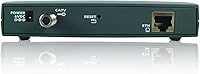
  • Ethernet Ports: Features one Ethernet port for reliable wired connections to routers or other devices.
  • LED Indicators: Includes easy-to-read LED indicators to show power, status, and data activity.
  • Self-Diagnostics: Built-in self-diagnostics help identify and troubleshoot issues with network connectivity.
  • Wi-Fi Support: Does not include built-in Wi-Fi functionality; requires a separate router for wireless networks.
  • Dimensions: Measures 10.04 x 7.28 x 2.68 inches, making it compact and easy to fit into most setups.
  • Weight: Weighs approximately 1.44 pounds, offering a lightweight design for easy placement.
  • Power Supply: Operates with a standard AC power adapter included in the box.
  • Operating Temperature: Designed to operate in temperatures between 0°C and 40°C (32°F to 104°F).
  • Service Provider: Optimized for Comcast Xfinity service, but may not be compatible with other ISPs.
  • Installation: Setup is simple with a plug-and-play process, requiring no technical expertise.
  • Router Compatibility: Some users report occasional compatibility issues with specific router models.
  • Network Speed: Supports internet speeds up to 1 Gbps, depending on the service plan and network conditions.
  • Security: Does not include advanced security features like firewall protection, requiring additional measures.
  • Warranty: Comes with a standard manufacturer's warranty for peace of mind.
  • Certifications: Certified by major cable service providers, including Comcast Xfinity.
  • Design: Compact and space-saving design, ideal for home offices or small households.

FAQ

This modem is designed to provide a stable wired internet connection for Comcast Xfinity users. It supports DOCSIS 1.1, 2.0, and 3.0 standards, offering reliable Ethernet connectivity for home or small office setups.

Setting up this modem is straightforward. Simply connect the modem to your Comcast Xfinity service, plug in an Ethernet cable to the device you want to connect, and power it on. The LED indicators will guide you through the connection process.

No, this modem does not have built-in Wi-Fi. It is a wired-only device, which means you'll need a separate router if you want to set up wireless internet in your home or office.

If the LED lights aren't functioning properly, try restarting the modem by unplugging it for 30 seconds and then plugging it back in. If the issue persists, check the connections, or contact ZyXEL customer support for assistance.

No, the ZyXEL BRG35503 is specifically designed for Comcast Xfinity users. While it supports DOCSIS 1.1/2.0/3.0 standards, it may not be compatible with other internet service providers.

This device includes built-in self-diagnostics to help with troubleshooting. If you're experiencing connection issues, check the LED indicators for status. You can also restart the modem or try using a different Ethernet cable to see if that resolves the issue.

The ZyXEL BRG35503 supports DOCSIS 3.0, which can handle speeds up to 1 Gbps, depending on your internet plan. However, your actual speed will also depend on the service plan you have with Comcast Xfinity.

This modem is ideal for smaller setups with a single device or basic internet needs. For larger homes or offices with multiple devices, you'll need to pair it with a router to ensure full coverage and additional features like Wi-Fi.

The ZyXEL BRG35503 is compact, measuring just 10.04 x 7.28 x 2.68 inches, making it a great choice for small spaces or setups where you don’t want the modem to take up too much room.

Some users have reported occasional compatibility issues with certain routers. Additionally, its lack of Wi-Fi functionality may be inconvenient for users who are looking for an all-in-one device for their network needs.