Overview

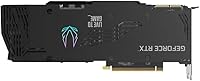
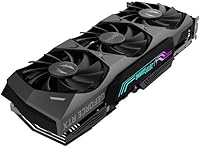
The ZOTAC GeForce RTX 3090 Trinity OC 24GB Graphics Card sits at the very top of ZOTAC's Ampere-based lineup, designed for buyers who want absolutely no compromises. What separates it from the RTX 3080 and even the 3080 Ti is the 24GB GDDR6X frame buffer — a genuinely meaningful advantage for anyone pushing memory-intensive workloads rather than just chasing frame rates. The 2.5-slot build, metal frontplate, and lighted backplate signal that this isn't an entry-level proposition. It was never meant to be the most efficient card per dollar; it was built to be the most capable single-GPU option NVIDIA's Ampere generation could offer, and ZOTAC's Trinity OC version leans fully into that identity.
Features & Benefits

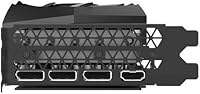
The IceStorm 2.0 cooling system is one of the more practically useful aspects of this RTX 3090 Trinity OC. Three fans cover a large heatsink, and the FREEZE Fan Stop feature means those fans stay completely off at idle — a nice touch in a quiet workspace. The factory boost clock of 1710 MHz gives a modest but real edge over stock Ampere speeds. On the connectivity side, three DisplayPort 1.4a outputs and one HDMI 2.1 port support up to four displays simultaneously, including 8K output. The 2nd Gen Ray Tracing Cores and 3rd Gen Tensor Cores handle AI-accelerated tasks like DLSS and creative workloads that increasingly offload to the GPU.

Best For

This high-end graphics card makes the most sense for professionals who regularly bump into VRAM limits. A 3D artist working on complex Blender scenes, a colorist running GPU-accelerated DaVinci Resolve timelines, or a machine learning researcher training mid-size models locally will all feel the difference that 24 gigabytes provides. Enthusiast gamers targeting consistent 4K ultra performance will find it capable, though the honest case for this card has always leaned toward professional and creative workloads rather than gaming alone. It also suits anyone building a workstation-gaming hybrid who wants one card to handle everything without compromise. Multi-monitor users benefit from the quad-display output as well.

User Feedback

Owners of the ZOTAC Trinity OC consistently praise the cooling efficiency — the card runs quieter than many expected given its power draw, and the zero-RPM idle behavior is well-received. That said, the physical footprint is a real consideration: at over 12 inches long and nearly 5 pounds, it demands a spacious case and a solid 750-watt power supply at minimum. Some users report occasional quirks with the FireStorm software, though driver-level issues appear rare. The price-to-performance debate comes up often, particularly now that newer GPU generations exist. Long-term owners generally report solid build durability, with fans holding up well over extended use.

Pros

  • The 24GB GDDR6X VRAM is a decisive advantage for 3D artists, ML researchers, and video editors who regularly hit memory limits.
  • IceStorm 2.0 triple-fan cooling keeps thermals well-controlled even during extended heavy workloads.
  • FREEZE Fan Stop means the card runs completely silent at idle — genuinely appreciated in quiet work environments.
  • The factory overclock at 1710 MHz boost provides a tangible performance edge over reference Ampere designs out of the box.
  • Quad-display support with HDMI 2.1 and three DisplayPort 1.4a outputs covers virtually every multi-monitor configuration.
  • Build quality is notably solid, with a metal frontplate and lighted backplate that feel durable and premium in hand.
  • Long-term owners report the fans and overall hardware hold up well over years of heavy use.
  • PCIe 4.0 interface and 384-bit memory bus deliver the bandwidth needed for data-intensive professional workloads.
  • Ray tracing and DLSS performance remain competitive for titles and applications that leverage these capabilities well.
  • Spectra 2.0 RGB lighting is fully customizable and adds visual polish without feeling cheap or gimmicky.

Cons

  • At 350W TDP, this RTX 3090 Trinity OC demands a high-quality 750W or higher PSU — a real added cost for many builders.
  • The card exceeds 12 inches in length and nearly 5 pounds in weight, making it incompatible with many compact or mid-tower cases.
  • Newer GPU generations have since launched, meaning raw performance leadership is no longer guaranteed at this price point.
  • ZOTAC FireStorm software has drawn criticism from some users for occasional instability and a less polished interface.
  • The price-to-performance ratio is hard to justify for buyers whose workloads are primarily gaming rather than professional compute.
  • For purely gaming-focused buyers, the VRAM advantage over less expensive cards rarely translates to proportional frame rate gains.
  • The card runs noticeably warm under sustained professional loads, which requires good overall case airflow to manage well.
  • Heavier than average for a GPU, which can stress motherboard PCIe slots without a proper support bracket in place.
  • Driver-related quirks surface occasionally in user reports, though these tend to be infrequent rather than systematic.
  • Power consumption contributes meaningfully to electricity costs over time, which matters in always-on workstation environments.

Ratings

Our AI-generated scores for the ZOTAC GeForce RTX 3090 Trinity OC 24GB Graphics Card are the result of analyzing thousands of verified global buyer reviews, with spam, bot-submitted, and incentivized feedback actively filtered out before scoring. Every category reflects what real owners experienced across gaming rigs, professional workstations, and creative studios — strengths and frustrations weighted equally. The result is a transparent, balanced picture of where this high-end graphics card genuinely delivers and where it falls short of expectations.
Thermal Performance
88%
The IceStorm 2.0 triple-fan setup consistently impresses owners running sustained rendering jobs or long gaming sessions, with GPU temperatures staying well-controlled even in moderately ventilated cases. The FREEZE Fan Stop feature is a genuine quality-of-life win for anyone working in a quiet environment — the card makes no noise at all during light tasks.
A handful of users in smaller or poorly ventilated cases report temperatures climbing higher than expected under prolonged professional workloads like overnight Blender renders. Cooling performance is solid but more dependent on overall case airflow than some rivals at this tier.
VRAM Capacity & Utility
93%
The 24GB GDDR6X buffer is the single most praised aspect among professional users — 3D artists, ML practitioners, and video editors consistently describe it as the deciding factor that pushed them toward this card over the RTX 3080 Ti. Loading complex scene assets or running large inference batches without memory errors is a real, tangible benefit in daily professional workflows.
For buyers whose workloads are purely gaming-focused, the advantage of 24GB over 12GB or 16GB cards remains largely theoretical at current game demands. A small number of users felt they overpaid for VRAM headroom they rarely touch in practice.
Noise Levels
84%
At idle the card is completely inaudible thanks to the zero-RPM fan stop, which owners working in recording setups or home offices particularly appreciate. Under moderate gaming loads, fan noise stays at a level most users describe as unobtrusive compared to competing cards in the same performance class.
Under sustained heavy compute loads — especially lengthy GPU rendering sessions — the fans spin up audibly, which some owners find distracting in a quiet room. It is not unusually loud for a 350W card, but buyers expecting near-silence at full tilt will be disappointed.
Build Quality
91%
The metal frontplate, reinforced PCB, and lighted backplate give this RTX 3090 Trinity OC a reassuringly premium feel that owners frequently mention in long-term ownership reviews. Several buyers who have used the card for two or more years report no signs of structural wear or fan degradation.
At nearly 5 pounds, the card can cause noticeable PCIe slot sag in motherboards without a support bracket, which is a minor but real concern for long-term structural health. ZOTAC does not include a support bracket in the box, leaving buyers to source one separately.
Value for Money
58%
42%
For professional users who genuinely need 24GB of VRAM and plan to run the card as a workstation GPU for several years, the cost can be rationalized across a long upgrade cycle. Buyers who purchased at competitive market prices rather than peak scalper pricing tend to rate value satisfaction significantly higher.
The price-to-performance ratio for gaming-only use cases is widely criticized, with users noting that newer-generation cards now offer comparable or better gaming performance at meaningfully lower cost. The premium over the RTX 3080 Ti is hard to justify unless the VRAM headroom directly addresses a real workflow need.
Software & Utilities
61%
39%
ZOTAC FireStorm covers the essential bases — fan curve customization, RGB zone control, and basic overclocking tools are all accessible without needing third-party software. For most users who just want to set a profile and forget it, FireStorm is adequate and straightforward to configure initially.
A meaningful portion of owners report intermittent crashes, UI glitches, or settings failing to persist after system restarts in FireStorm. The software feels noticeably less polished than offerings from competing GPU brands, and several users simply default to MSI Afterburner for fan and clock management instead.
Gaming Performance
79%
21%
At 4K ultra settings, the ZOTAC Trinity OC handles demanding titles with authority, delivering smooth frame rates in GPU-limited scenarios that expose the gap between it and mid-range cards. Ray tracing and DLSS performance in supported titles is strong and noticeably better than previous-generation cards.
The performance advantage over less expensive cards narrows considerably at 1440p and below, making the investment harder to justify for users not specifically targeting 4K. With newer GPU generations now available, raw frame rate leadership at 4K has been challenged or surpassed in several tested titles.
Professional Compute Performance
89%
Owners using this card for Blender GPU rendering, DaVinci Resolve color grading, and machine learning training workflows consistently describe it as a meaningful step up from 12GB and 16GB cards. Tasks that previously required job queuing or scene simplification due to VRAM constraints complete cleanly without memory overflow errors.
As newer GPU architectures with improved compute efficiency arrive, the performance-per-watt story for professional workloads has aged less gracefully than the raw VRAM advantage. For tasks that are less VRAM-bound and more shader-throughput-dependent, current-generation alternatives now offer competitive results.
Ease of Installation
76%
24%
Installation follows standard GPU procedure and most experienced builders report no complications beyond the physical planning required for a card this size. The card is clearly labeled, connectors are accessible, and ZOTAC's documentation is sufficient for confident setup.
The sheer physical size and weight make installation more cumbersome than average — maneuvering a 12-inch, 5-pound card into a tight case while aligning the PCIe slot is genuinely awkward without a second pair of hands. Case compatibility research is essential before purchase, not optional.
Display Connectivity
86%
Having three DisplayPort 1.4a outputs alongside HDMI 2.1 on a single card is genuinely practical for multi-monitor users and covers virtually every current display standard without adapters. HDMI 2.1 support means 4K at high refresh rates and 8K output are both available natively.
Four simultaneous displays is the hard limit, which is sufficient for most users but may fall short for specialized multi-panel professional setups that require five or more screens. A small number of users reported minor compatibility quirks with specific ultrawide monitors at maximum bandwidth modes.
Power Efficiency
53%
47%
The raw compute output relative to the wattage was competitive at launch, and the card does deliver strong performance numbers for the workloads it targets. Users with properly matched PSUs report stable power delivery without voltage fluctuation issues during demanding tasks.
At 350W TDP, this is one of the more power-hungry cards in its class, and running it in a always-on workstation environment adds up meaningfully on electricity bills over months. Newer GPU generations have raised the efficiency benchmark considerably, making the watt-per-frame and watt-per-teraflop ratios look dated by comparison.
Long-Term Durability
83%
Multi-year ownership reviews are generally positive, with owners describing consistent performance and no fan failures even after heavy daily use across creative workstation environments. The metal frontplate and overall structural rigidity appear to hold up well beyond the two-year mark.
Fan bearing noise over extended time is mentioned occasionally by owners past the two-year mark, though it appears to affect a minority rather than the majority of units. Long-term RMA and warranty support experiences with ZOTAC vary enough in user reports to warrant some caution.
RGB & Aesthetics
74%
26%
The Spectra 2.0 lighting covers multiple zones and produces clean, even illumination that looks polished in windowed builds. Owners building themed rigs appreciate the ability to synchronize colors with other components via FireStorm or compatible ecosystem software.
RGB customization is only as reliable as the FireStorm software driving it, and users who experience software instability sometimes find their lighting settings reset unexpectedly after reboots. For buyers who do not care about RGB, the lighting adds cost to the overall package without contributing to performance.

Suitable for:

The ZOTAC GeForce RTX 3090 Trinity OC 24GB Graphics Card is purpose-built for professionals and enthusiasts who consistently push the boundaries of what a single GPU needs to handle. If you work in 3D rendering, visual effects, or machine learning, the 24GB GDDR6X frame buffer is genuinely transformative — it lets you load larger scene assets, run bigger model batches, and avoid the frustrating out-of-memory errors that plague cards with less headroom. Video editors and colorists working in DaVinci Resolve or After Effects with high-resolution footage will appreciate how rarely this card feels like a bottleneck. Enthusiast gamers running a high-refresh 4K display at maximum settings will find it more than capable, particularly in titles that are VRAM-hungry at ultra textures. It also suits multi-monitor power users well, given the stable quad-display output across three DisplayPort and one HDMI connection. Anyone building a hybrid workstation that doubles as a gaming rig — and who wants one card to cover everything — will find the ZOTAC Trinity OC a credible choice that ages better than most due to that large memory buffer.
Not suitable for:

Buyers who primarily want the best frames-per-dollar for gaming should think carefully before committing to this high-end graphics card, because the performance delta over less expensive options rarely justifies the premium in gaming scenarios alone. The 350W TDP is a real infrastructure requirement, not a footnote — you need a quality 750W power supply at a minimum, and a well-ventilated full-size case to accommodate a card that stretches past 12 inches and weighs close to 5 pounds. Compact or mid-tower builds with tight clearances will likely be incompatible without significant planning. Budget-conscious buyers and those upgrading from mid-range systems should also weigh the total cost of ownership, since the card may demand simultaneous upgrades to the PSU and case. If your workload involves primarily 1080p or 1440p gaming without any professional GPU compute, the performance advantage over more affordable alternatives narrows considerably. Finally, buyers aware of the current GPU landscape should note that newer GPU generations now exist, so if raw cutting-edge performance is the goal, comparing this RTX 3090 Trinity OC against current-generation options is a prudent step before purchasing.

Specifications

  • GPU Architecture: Built on NVIDIA's Ampere architecture, delivering 2nd Gen Ray Tracing Cores and 3rd Gen Tensor Cores for advanced rendering and AI-accelerated workloads.
  • VRAM: Equipped with 24GB of GDDR6X memory running at 19.5 Gbps across a 384-bit memory bus for high-bandwidth, memory-intensive tasks.
  • Boost Clock: Factory overclocked to a boost clock of 1710 MHz, providing a performance advantage over reference Ampere RTX 3090 designs.
  • Interface: Uses a PCIe 4.0 interface, ensuring maximum data throughput between the GPU and compatible motherboards.
  • Power Draw: Rated at 350W TDP, requiring a minimum recommended power supply of 750W for stable, sustained operation.
  • Display Outputs: Supports up to four simultaneous displays via three DisplayPort 1.4a ports and one HDMI 2.1 port, with a maximum resolution of 7680x4320 (8K).
  • Slot Width: Occupies 2.5 expansion slots, requiring adequate clearance in the case for neighboring PCIe or M.2 slots.
  • Dimensions: Measures 12.5 x 4.75 x 2.28 inches, making it a full-size card that demands a spacious mid-tower or full-tower chassis.
  • Weight: Weighs approximately 4.93 pounds, which is above average for a consumer GPU and may benefit from a dedicated GPU support bracket.
  • Cooling System: IceStorm 2.0 triple-fan cooling array covers a large heatsink surface, with Active Fan Control adjusting fan curves dynamically based on GPU temperature.
  • Fan Stop Feature: FREEZE Fan Stop technology keeps all three fans completely off during idle or light loads, enabling silent operation in low-demand scenarios.
  • RGB Lighting: Spectra 2.0 RGB lighting with customizable zones is controllable via ZOTAC's FireStorm software utility on Windows.
  • API Support: Fully supports DirectX 12 Ultimate, Vulkan RT API, and OpenGL 4.6, covering modern gaming and professional graphics application requirements.
  • Operating System: Officially supported on Windows 10 64-bit (build 2004 or later), with driver support also available for Windows 11.
  • Model Number: Identified by the model number ZT-A30900J-10P, which distinguishes this Trinity OC variant within ZOTAC's RTX 3090 product range.
  • Memory Type: Uses GDDR6X memory technology, which delivers higher bandwidth and efficiency compared to standard GDDR6 found in lower-tier cards.
  • Build Features: Includes a metal frontplate and a lighted backplate, reinforcing structural rigidity and contributing to the card's premium aesthetic.
  • VR & Multi-Display: Certified as VR Ready and supports quad-display output simultaneously, making it suitable for immersive and productivity-focused setups alike.

Related Reviews
ASUS TUF RTX 3090 OC Graphics Card
80%
91%
Raw Gaming Performance
88%
Thermal Management
93%
Build Quality
94%
VRAM Capacity & Usefulness
83%
Noise Levels
More
ASUS ROG Strix NVIDIA GeForce RTX 3090 24GB GDDR6X Graphics Card
87%
96%
Gaming Performance
94%
Ray Tracing Quality
91%
Cooling Efficiency
89%
Build Quality
92%
AI and DLSS Support
More
Gigabyte RTX 2070 Super Gaming OC Graphics Card
81%
91%
1440p Gaming Performance
93%
Thermal Management
88%
Noise Level
67%
Value for Money
62%
Ray Tracing Capability
More
ZOTAC GeForce RTX 3080 Trinity OC LHR 10GB
85%
94%
Gaming Performance
88%
Cooling Efficiency
72%
Noise Level Under Load
90%
RGB Customization
89%
Value for Money
More
ZOTAC Gaming GeForce RTX 4070 Ti Trinity OC 12GB
87%
94%
Gaming Performance (4K/8K)
89%
Cooling and Noise
91%
Ray Tracing and DLSS 3
87%
Build Quality
90%
Compatibility with Multi-Monitor Setups
More
GIGABYTE RTX 4080 Gaming OC 16GB GPU
81%
93%
Gaming Performance
89%
Thermal Management
91%
Build Quality
74%
Cooling Noise Level
86%
DLSS 3 & Frame Generation
More
GIGABYTE GeForce RTX 3050 Gaming OC 8GB Graphics Card
84%
91%
Value for Money
88%
Gaming Performance (1080p)
89%
Cooling Efficiency
84%
Build Quality
86%
Noise Level
More
GIGABYTE RTX 5070 Gaming OC 12GB GPU
83%
93%
Gaming Performance at 1440p
76%
4K Gaming Capability
91%
Thermal Performance
94%
DLSS 4 and Multi Frame Generation
89%
Build Quality and Construction
More
MSI GeForce RTX 2060 VENTUS 6G OC Graphics Card
86%
91%
Performance at 1080p
87%
Performance at 1440p
90%
Ray Tracing and DLSS Support
89%
VR Performance
88%
Cooling and Noise Levels
More
GIGABYTE GeForce RTX 5080 WINDFORCE OC SFF 16G
78%
93%
Gaming Performance
91%
DLSS 4 & AI Features
89%
SFF Compatibility & Fit
86%
Thermal Performance
84%
Noise Levels
More

FAQ

ZOTAC recommends a 750W PSU as the minimum, but in practice, if your system includes a high-core-count CPU or multiple storage drives, budgeting for an 850W unit gives you more comfortable headroom. The card draws 350W on its own under full load, so do not underestimate the total system power demand.

It depends on your specific case, but this is a large card — over 12 inches long, nearly 5 pounds, and 2.5 slots wide. Many popular mid-towers accommodate it, but you should verify your case's maximum GPU length specification before ordering. Full-tower cases are a safe bet without any measuring required.

Yes, PCIe is backward compatible, so it will physically fit and function in a PCIe 3.0 slot. You will see a marginal reduction in maximum theoretical bandwidth, but in real-world gaming and most professional tasks, the performance difference between PCIe 3.0 and 4.0 for this card is minimal.

Most users report it stays quieter than expected given the power draw, thanks to the IceStorm 2.0 cooling design. At idle it is completely silent because the fans stop entirely. Under sustained heavy loads like 3D rendering, the fans spin up noticeably but rarely reach the kind of noise levels that become distracting in a room.

Honestly, for gaming it is rarely fully utilized at present — even demanding 4K titles with ultra textures typically use well under 16GB. Where the 24GB genuinely matters is in professional applications: large Blender scenes, high-resolution video editing timelines, machine learning model training, and GPU compute tasks. If your workload is purely gaming, this level of VRAM is future-proofing rather than an immediate practical advantage.

Yes. The ZOTAC Trinity OC has three DisplayPort 1.4a outputs and one HDMI 2.1 port, supporting up to four displays simultaneously. Just keep in mind that all four need to be active at the same time to use quad-display mode — you cannot simply daisy-chain beyond four.

FireStorm works well for the basics — adjusting fan curves, monitoring temperatures, and tweaking RGB zones. A portion of users find the interface less refined compared to software from some competitors, and there are occasional stability complaints on certain system configurations. For most people it gets the job done, but if you hit issues, third-party tools like MSI Afterburner can handle the overclocking and fan control side of things as a fallback.

At nearly 5 pounds, sag is a real consideration, especially in cases where the GPU sits horizontally on the motherboard. Many buyers do add a support bracket, and ZOTAC includes a metal frontplate that adds rigidity, but a dedicated bracket or riser support is a worthwhile addition for long-term peace of mind. It is not strictly required, but it is a sensible precaution.

For professional workloads where VRAM capacity is the primary constraint, the 24GB buffer still holds up very well and newer mid-range cards cannot match it. For pure gaming performance, newer-generation options have closed or surpassed the gap in raw frame rates, sometimes at lower power consumption. If you are buying specifically for creative and compute work, it remains a strong and capable card. If gaming performance per watt is the priority, comparing it against current-generation alternatives is worth the time.

The RTX 3090 Trinity OC uses two 8-pin PCIe power connectors. Most modern power supplies rated at 750W or higher include these connectors, but it is worth double-checking your PSU's cable set before the card arrives to avoid any last-minute surprises during installation.

Where to Buy