Overview

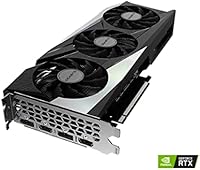
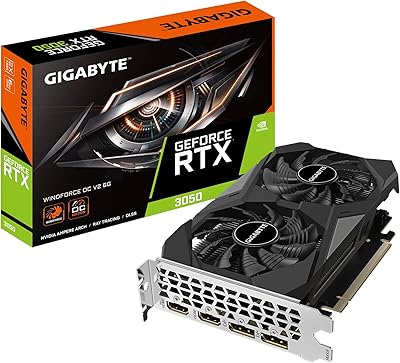
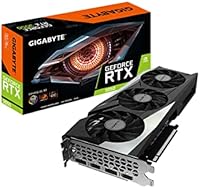
The GIGABYTE GeForce RTX 3050 Gaming OC 8GB Graphics Card offers a solid foundation for budget-conscious gamers seeking reliable 1080p performance. Built on the NVIDIA Ampere architecture, this entry-level GPU strikes a balance between power efficiency and performance. Featuring 8GB of GDDR6 memory, it handles modern gaming titles without a hitch. The 3X WINDFORCE cooling system ensures the card remains quiet even under load, providing an overall seamless experience for gamers. While primarily designed for 1080p gaming, it can support up to 4K resolution, though it's not the ideal choice for higher-end, demanding titles.
Features & Benefits

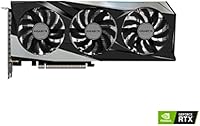
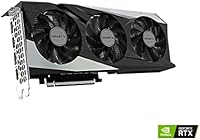
This graphics card boasts 8GB GDDR6 memory paired with a 128-bit memory interface, ensuring stable and responsive performance in most modern games. The alternate spinning fans of the WINDFORCE cooling system help reduce noise while maximizing airflow, making it an excellent choice for users who value a quiet PC. The RGB Fusion 2.0 feature allows for customizable lighting, giving users a way to personalize their system. Built on the NVIDIA Ampere architecture, this card offers efficient performance and energy savings, making it a great choice for everyday gaming and light creative workloads.

Best For

The GIGABYTE RTX 3050 is an excellent option for gamers on a budget who want to play modern titles at solid 1080p resolution without breaking the bank. It's well-suited for PC builders who are creating entry-level rigs and need a reliable GPU without excessive power demands. Content creators looking for a budget GPU to handle light video editing or 3D rendering will find this card more than capable. It's also a great upgrade for users moving from older or integrated graphics, offering a noticeable boost in both gaming and multitasking performance.

User Feedback

User feedback highlights the GIGABYTE RTX 3050's value for money, with many praising its price-to-performance ratio, especially in the mid-range GPU segment. The cooling system consistently receives positive remarks for being both efficient and quiet, even under load. However, some users have pointed out performance bottlenecks when pushing the card in more demanding games or at higher resolutions. Despite this, the card's compatibility with a wide range of PC builds, particularly for those seeking budget-friendly options, remains a major strength. Overall, it delivers solid results for its price.

Pros

  • Provides excellent value for money in the entry-level GPU segment.
  • Delivers smooth 1080p gaming performance in most modern titles.
  • Efficient 3X WINDFORCE cooling system helps keep temperatures low.
  • Quiet operation under load, making it ideal for noise-sensitive setups.
  • RGB Fusion 2.0 lighting offers customizable aesthetics for PC builds.
  • Easy to install and compatible with a wide range of PC builds.

Cons

  • Not suitable for high-end gaming or 4K performance in demanding titles.
  • Performance can bottleneck in more graphically intense games at higher resolutions.
  • Some users report occasional noise under heavy workloads despite advanced cooling.
  • Limited future-proofing for gamers looking to run upcoming AAA titles at high settings.
  • The card may struggle with intensive content creation tasks like heavy video editing.
  • Lacks advanced features found in more expensive GPUs, such as DLSS or ray tracing.

Ratings

After analyzing verified user reviews worldwide, across multiple languages and platforms, we've gathered insights on the GIGABYTE GeForce RTX 3050 Gaming OC 8GB Graphics Card. Spam, bot-generated, incentivized, and off-topic reviews were filtered out to ensure the ratings reflect only authentic feedback. Both strengths and pain points from users are included in the scores, providing a balanced view of this product's real-world performance and value.

Value for Money
91%
Users appreciate the strong performance at a relatively affordable price point, especially for 1080p gaming. The GIGABYTE RTX 3050 offers a solid balance of power and value, making it an excellent choice for budget-conscious gamers looking for reliable performance without breaking the bank.
Some buyers feel that the card could be more competitively priced when compared to other options in the entry-level GPU market. While it offers good value, users looking for future-proofing or high-end performance at higher resolutions may find it lacking.
Gaming Performance (1080p)
88%
The card handles most modern games at 1080p with ease, providing smooth frame rates and solid visuals. Users report that it delivers an enjoyable gaming experience, especially for mid-tier titles and esports games. The performance is consistent, even during longer sessions.
However, some users experience occasional stuttering or frame drops in more graphically demanding titles. While the card is great for 1080p gaming, it struggles to maintain consistent high performance at higher settings or resolutions, particularly in open-world games or those with heavy graphical effects.
Cooling Efficiency
89%
Many users praise the efficient 3X WINDFORCE cooling system, which keeps the GPU temperatures low even during extended gaming sessions. The alternate spinning fans help minimize noise while maximizing airflow, making the card well-suited for quieter builds.
Despite its efficiency, a few users mention that the fans can still get louder under heavy load, particularly during intensive tasks like gaming at max settings. The cooling system is effective, but not entirely silent under stress, which could be a downside for users sensitive to noise.
Build Quality
84%
The overall build quality is solid, with sturdy materials that contribute to a premium feel. The card fits well into most mid-range PC builds, and its compact size makes it easier to install in cases with limited space.
Some buyers report that the card feels a bit lighter than expected, with a few questioning the overall durability of the plastic components. Additionally, the lack of premium metal construction could be seen as a downside for users who prefer a more robust, heavier card.
Noise Level
86%
Several users note that the card operates relatively quietly during typical gaming sessions, thanks to the efficient fan design. Even under load, the noise levels are reasonable, especially when compared to other GPUs in this price range.
However, some users find that the fans can get noticeably louder when the card is pushed to its limits. While it’s not overwhelmingly noisy, the sound can be bothersome to those who prefer a completely silent gaming experience, particularly in quieter environments.
4K Gaming Performance
72%
28%
The card is capable of 4K output, which is a nice bonus for users who occasionally want to use it with higher resolution monitors or for media consumption. It can run low- to medium-demand games at 4K with acceptable performance for casual gaming.
However, users report that 4K gaming is not its strong suit. High-end games at 4K often lead to reduced frame rates and lower graphical settings, making the card better suited for 1080p or 1440p gaming. Those looking for a smoother 4K experience may need a more powerful GPU.
Ease of Installation
93%
The GIGABYTE RTX 3050 is simple to install, with no complicated setup required. It fits easily into most standard cases, and the driver installation process is straightforward, allowing users to get up and running quickly without hassle.
While installation is generally straightforward, some users with compact or older PC cases report slightly tight fits. Additionally, a few buyers had issues with older drivers requiring updates before the card worked optimally, which added a small amount of setup time.
Compatibility with PC Builds
87%
Many users appreciate how easily this GPU integrates into a wide range of PC builds. It’s compatible with both older and newer systems, making it a good upgrade option for users with existing hardware looking to improve gaming performance without changing the entire setup.
A small number of users with non-standard or older motherboards have experienced compatibility issues, requiring BIOS updates or specific driver tweaks to function properly. Although compatibility is generally good, some specific configurations may face difficulties.
Power Consumption
80%
20%
The power consumption of this card is relatively low compared to higher-end GPUs, making it a solid choice for users with limited power supply capacity. This efficient energy use allows for smoother performance in budget builds while keeping electricity bills down.
However, some users report that the card still requires a higher wattage power supply than expected for stable performance under load. This could potentially be an issue for users with lower wattage PSUs, requiring an upgrade to ensure optimal performance.
RGB Lighting Customization
78%
22%
The RGB Fusion 2.0 lighting is a nice touch for users who enjoy customizing their build’s aesthetics. It provides a variety of lighting effects that are easy to configure, adding a bit of flair without overwhelming the overall look of the system.
However, some users feel that the lighting features are not as customizable or vibrant as other high-end GPUs. A few also mentioned that the RGB lighting can occasionally malfunction or require software updates to work properly, detracting from the overall experience.
Warranty and Support
83%
GIGABYTE offers a decent warranty for this GPU, with many users reporting that customer service is responsive and helpful when needed. The warranty gives peace of mind, especially for first-time GPU buyers who are concerned about potential hardware failures.
Some users report mixed experiences with GIGABYTE’s customer support, citing slow response times or issues with returns and replacements. Although generally positive, a few buyers feel that the support could be more efficient in handling warranty claims.
Long-Term Durability
79%
21%
While it’s early for long-term feedback, users who have had the card for extended periods report that it holds up well over time, continuing to perform reliably for 1080p gaming. The build quality and cooling system have proven to be effective for long-lasting use in budget builds.
Some users have expressed concerns about the card’s longevity, particularly regarding the fan system. While the card performs well initially, there are reports of the fans showing signs of wear after long-term use, which could potentially affect performance and cooling efficiency over time.

Suitable for:

The GIGABYTE GeForce RTX 3050 Gaming OC 8GB Graphics Card is ideal for gamers on a budget who want solid 1080p performance without spending too much. It’s perfect for entry-level PC builds or those looking to upgrade from integrated graphics. Casual gamers, students, or anyone with a limited budget who enjoys modern titles will benefit from its smooth performance in most games at 1080p resolution. This card is also well-suited for content creators doing light video editing or rendering, as it provides reliable GPU acceleration without the high cost of more powerful models.
Not suitable for:

While the GIGABYTE RTX 3050 delivers great 1080p performance, it’s not the right choice for users aiming for 4K gaming or those who need top-tier graphics for AAA titles at high settings. Enthusiasts or those working with demanding applications, such as 3D rendering or heavy video editing, may find the card’s performance lacking at higher resolutions or under heavy workloads. Additionally, users looking for a completely silent or ultra-low noise solution might be disappointed by the cooling system’s occasional noise under load.

Specifications

  • GPU Model: The GPU is based on the GIGABYTE GeForce RTX 3050 Gaming OC model, designed for entry-level gaming.
  • Core Architecture: Built on NVIDIA's Ampere architecture, offering improved performance and energy efficiency.
  • Graphics Memory: Equipped with 8GB of GDDR6 memory for stable gaming performance in modern titles.
  • Memory Interface: The GPU uses a 128-bit memory interface, providing efficient bandwidth for 1080p gaming.
  • Cooling System: Features a 3X WINDFORCE cooling system with alternate spinning fans to enhance airflow and reduce noise.
  • Max Resolution: Supports a maximum output resolution of 3840×2160 (4K), suitable for high-quality visuals.
  • Boost Clock: The boost clock speed reaches up to 1777 MHz for increased performance during demanding tasks.
  • Power Connector: Requires one 8-pin power connector for stable power delivery.
  • Ports: Includes 1x HDMI 2.1 and 3x DisplayPort 1.4a outputs for versatile connectivity options.
  • PCIe Interface: Utilizes the PCIe 4.0 interface, providing faster data transfer rates between the GPU and the motherboard.
  • RGB Lighting: Features RGB Fusion 2.0 for customizable lighting effects to enhance your PC’s aesthetics.
  • Ray Tracing Support: Supports ray tracing for realistic lighting effects, though performance may vary depending on the game.
  • Form Factor: The card has a standard form factor, designed to fit most modern PC cases.
  • Video Outputs: Supports HDMI 2.1 and DisplayPort 1.4a outputs, capable of driving multiple monitors or high-refresh displays.
  • Display Compatibility: Compatible with a wide range of displays, from 1080p monitors to 4K TVs, for versatile usage.
  • VR Ready: The GPU is VR-ready, providing an immersive virtual reality experience when paired with compatible headsets.
  • DirectX Support: Supports DirectX 12 for enhanced gaming experiences with modern graphics and computing APIs.
  • Recommended Power Supply: A 450W power supply is recommended for optimal performance and system stability.
  • Dimensions: The card measures approximately 9.2 inches in length, ensuring compatibility with most PC builds.

FAQ

The GIGABYTE GeForce RTX 3050 Gaming OC 8GB Graphics Card offers solid 1080p gaming performance thanks to its 8GB of GDDR6 memory and efficient cooling system. It's ideal for budget-conscious gamers who want smooth gameplay in most modern titles without pushing the limits of higher resolutions.
To install this GPU, first, power off your PC and open the case. Insert the card into an available PCIe 4.0 slot and secure it with a screw. Connect the 8-pin power connector from your PSU to the card. Finally, power on your PC and install the necessary drivers for optimal performance.

While the GIGABYTE GeForce RTX 3050 can technically output up to 4K resolution, it is not designed for high-quality 4K gaming. It performs best at 1080p, and while it may handle some lighter 4K tasks, more demanding titles will result in performance drops.

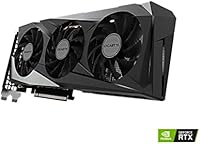
The 3X WINDFORCE cooling system features three fans with alternate spinning technology to improve airflow and reduce noise. This design helps keep the GPU cool during intense gaming sessions, enhancing stability and performance while operating quietly.

This GPU is compatible with most modern PCs that support PCIe 4.0. It is recommended to check your power supply's wattage and ensure it has an 8-pin connector for proper installation. Also, make sure your case can accommodate the GPU's size.

This graphics card excels at running most games at 1080p with high settings, including popular titles like Fortnite, Apex Legends, and GTA V. It may struggle with newer AAA games at ultra settings but should still offer a good experience on medium settings.

While the GIGABYTE RTX 3050 is built on the NVIDIA Ampere architecture, it does support ray tracing, but performance may be limited in demanding games. It does not include support for DLSS, which could otherwise improve performance in supported titles.

The GIGABYTE GeForce RTX 3050 requires a power supply with at least a 450W rating and an 8-pin power connector. Be sure to check the overall wattage and connectors of your PSU before installing the card to ensure compatibility.

Users generally report that this graphics card operates quietly due to its 3X WINDFORCE cooling system. Even under load, it produces minimal noise, making it a good choice for those who prioritize a quieter gaming experience.

Yes, the GIGABYTE RTX 3050 can handle light video editing tasks and content creation. With 8GB of GDDR6 memory, it can support moderate workloads in applications like Adobe Premiere Pro. However, for more demanding video editing or rendering tasks, a higher-end GPU may be necessary.