Overview

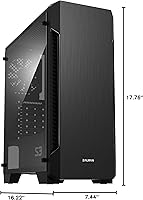
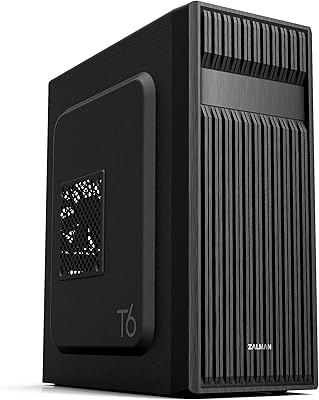
The Zalman S3 ATX Mid-Tower PC Case sits squarely in the budget-builder space, offering a windowed acrylic side panel at a price point where most competitors ship with a solid steel door. It has earned a 4.4-star rating from over 2,400 buyers and holds a top-100 rank in Computer Cases — not bad for an entry-level chassis. That said, this budget chassis is exactly what it is: a capable, no-frills starting point for someone building their first PC, not a showpiece for a high-end rig. Set expectations accordingly and it delivers solid value.
Features & Benefits

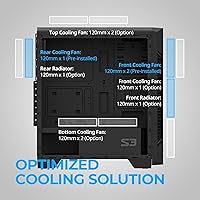
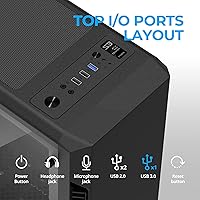
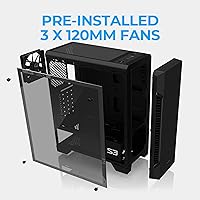
The full acrylic side panel is the headline feature here — you get a clear view of your components without paying the premium that tempered glass commands. Three 120mm fans come pre-installed, two pulling air in through the front and one exhausting at the rear, so you can post straight into a build without buying extras. The case supports up to eight fans total, and there is room for a front-mounted 120mm radiator if you decide to go that route later. Dust filters on the top and bottom are a practical addition, and the front I/O covers USB 3.0, two USB 2.0 ports, and audio jacks.

Best For

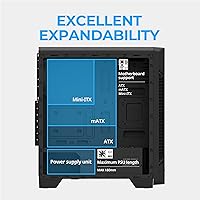
This mid-tower case makes the most sense for first-time builders who want their components visible but cannot justify spending more on a tempered glass alternative. It fits ATX, Micro-ATX, and Mini-ITX motherboards, which covers nearly every mainstream build configuration. GPU clearance tops out around 330mm, comfortably accommodating most mid-range graphics cards. Home-office and casual gaming builds are the sweet spot — situations where looking decent matters but you are not chasing maximum airflow or extreme thermals. Anyone wanting room to grow their cooling setup without committing to a bigger budget will also find the Zalman S3 a reasonable foundation.

User Feedback

Buyers consistently highlight how straightforward the assembly process is, which matters a lot for someone putting together their first build. The acrylic panel gets genuine compliments for its looks, though a fair number of owners caution that it scratches noticeably more easily than glass and requires careful handling. The more pointed criticism targets airflow: the solid front panel restricts intake compared to mesh-front cases at a similar price, which can push temperatures up under sustained load. Cable routing behind the motherboard tray is also described as tight for thicker cables. Overall, most buyers feel the value holds up well for a budget build.

Pros

  • Three 120mm fans come pre-installed, so your build has working airflow before you spend another dollar
  • The full acrylic side panel gives a clear view of your components at a price where most cases offer nothing
  • Supports ATX, Micro-ATX, and Mini-ITX boards, covering virtually every mainstream build configuration
  • Dust filters on both the top and bottom help keep the interior cleaner over time without extra cost
  • The hairline metallic front panel looks noticeably more refined than typical budget plastic designs
  • GPU clearance up to 330mm accommodates most popular mid-range graphics cards without any modifications
  • Up to eight total fan slots give real headroom for cooling upgrades as your build evolves
  • Assembly is straightforward enough that complete beginners report finishing their first build with minimal frustration
  • Four combined drive bays handle a practical mix of SSDs and mechanical storage for everyday use

Cons

  • The solid front panel restricts intake airflow meaningfully compared to mesh-front cases at the same price
  • Acrylic scratches easily and shows fingerprints quickly, requiring careful handling from day one
  • Cable routing space behind the motherboard tray is tight and struggles with thicker or modular PSU cables
  • Only one USB 3.0 port on the front I/O feels limiting when connecting external drives or peripherals regularly
  • No USB-C port is present, which is a noticeable gap compared to newer budget cases entering the market
  • Radiator support tops out at 120mm at the front, making meaningful liquid cooling configurations impossible
  • Stock fans become audible under load, and there is no bundled controller to manage their speed quietly
  • The acrylic panel can feel slightly flexed or misaligned on some units, requiring minor adjustment after unboxing

Ratings

The Zalman S3 ATX Mid-Tower PC Case scores below are generated by AI after analyzing thousands of verified global buyer reviews, with spam, bot activity, and incentivized feedback actively filtered out. This mid-tower case earns strong marks in several areas but also shows real limitations that budget-conscious builders should weigh carefully. Both the genuine strengths and the honest pain points are reflected in every score you see here.
Value for Money
83%
For builders trying to keep costs low without ending up with a flimsy shell, the Zalman S3 punches above its price bracket. The inclusion of three pre-installed fans and a windowed panel at this cost is something many competing cases simply do not offer, and buyers consistently acknowledge that.
A few buyers feel the savings show up in the details — particularly the acrylic panel and the tight rear cable space — and note that spending a little more opens up meaningfully better options. The value equation holds, but only if your expectations align with the budget tier.
Build Quality
71%
29%
The steel frame feels reasonably rigid for a case in this class, and most builders report that it holds together well during and after assembly. The front panel has a hairline metallic finish that reads as more polished than typical budget plastic.
The acrylic side panel is the obvious weak link — it flexes under light pressure and scratches if you are not careful handling or cleaning it. A few users also noted that some panel clips felt slightly misaligned out of the box, requiring minor adjustments.
Airflow & Cooling Performance
58%
42%
Three fans ready to go from the start means you are not buying extras just to get decent airflow for a basic build. For casual home-office use or low-to-mid-range gaming rigs that do not push thermal limits, temperatures stay acceptable without any modifications.
The solid front panel is the core problem here — it restricts intake airflow noticeably compared to mesh-front alternatives at similar price points. Builders running power-hungry CPUs or high-end GPUs will likely need to add fans and manage heat more actively than they would with a mesh design.
Ease of Assembly
86%
First-time builders repeatedly call out how intuitive the layout is, with clearly positioned standoffs, logical drive bay placement, and enough room inside the main chamber to maneuver. The pre-installed fans reduce the number of setup steps for beginners considerably.
Cable management behind the motherboard tray is described as tight, especially with thicker PSU cables or modular units that have bulkier connectors. Builders with larger hands may find routing cables through the limited rear space frustrating during their first build.
Acrylic Side Panel
67%
33%
The full acrylic panel gives a genuinely satisfying view of the build interior, and for buyers who want that visual without paying for tempered glass, it does the job well. Under case lighting, the clarity is solid and the overall effect looks good in a dim setup.
Acrylic scratches far more easily than glass, and several owners report visible marks just from routine cleaning or accidentally brushing it during a component swap. It also picks up fingerprints quickly, which means frequent wiping if aesthetics matter to you.
Cable Management
61%
39%
There are enough routing holes placed in sensible positions for a clean-looking build, and for straightforward setups with a non-modular PSU, most builders manage a reasonably tidy interior without much difficulty.
The gap behind the motherboard tray is genuinely narrow, and thicker cable bundles do not sit flush, making it hard to close the rear panel without some pressure. More experienced builders building with high-end components will likely find the space limiting.
Fan & Cooling Upgrade Potential
77%
23%
Supporting up to eight fans and offering a front 120mm radiator mount gives this chassis more headroom than its price suggests. Builders planning a staged upgrade path — starting with the stock fans and adding more later — will find the expansion options worth having.
The radiator support tops out at 120mm at the front, which is quite limited for anyone serious about liquid cooling. You can add fans, but the restricted front intake means additional fans offer diminishing returns unless the front panel design is worked around.
Dust Filtration
74%
26%
Having dust filters at both the top and bottom is a practical feature that many cases at this price omit entirely. For a desk build that runs for hours daily, the filters noticeably reduce how quickly dust accumulates inside the chassis.
The filters are basic in construction and can be awkward to remove cleanly for washing without bending the mesh slightly. There is no front filter covering the intake fans, which is a meaningful gap given that the front is a primary dust entry point.
I/O Port Accessibility
72%
28%
Having USB 3.0, two USB 2.0 ports, and dedicated audio jacks on the front panel covers the everyday needs of most users well. The port placement on the top edge of the front panel is easy to reach without crouching.
With only one USB 3.0 port, users who regularly connect external drives or fast-transfer devices may find themselves routing to the back of the machine more often than they would like. No USB-C is present, which is a noticeable omission compared to newer-generation budget cases.
GPU Compatibility
79%
21%
A 330mm GPU length limit covers most mainstream graphics cards sold today, including the majority of mid-range options from both major vendors. Builders putting together a solid 1080p or entry-level 1440p gaming rig are unlikely to run into clearance issues.
High-performance triple-fan GPUs from the current generation often exceed 330mm and will not fit. This is not a case for anyone planning to install a flagship graphics card, and buyers should measure their intended GPU before purchasing.
Motherboard Compatibility
88%
Supporting ATX, Micro-ATX, and Mini-ITX boards in a single chassis makes this mid-tower case highly flexible across a wide range of build types. Whether you are building compact or full-sized, the mounting layout accommodates the most common form factors without issue.
Extended ATX boards are not supported, which matters only for workstation-class or high-end enthusiast builds — an unlikely pairing with this chassis anyway. The ATX support is the realistic ceiling here, and it covers the vast majority of mainstream builders.
Storage Options
76%
24%
Four combined 3.5-inch and 2.5-inch drive bays give a reasonable amount of storage flexibility for a budget build. Builders running a primary SSD alongside one or two mechanical drives for bulk storage will have no trouble fitting their setup.
Four bays may feel limiting for anyone building a media server or NAS-adjacent home machine with multiple large drives. The mounting system is functional but not particularly elegant, and fitting drives into the lower bays can require some patience.
Aesthetics & External Design
78%
22%
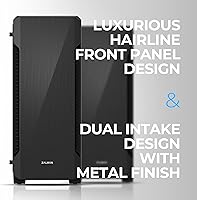
The hairline-finish front panel avoids the cheap-plastic look common in this price range and gives the case a cleaner, more composed appearance. It sits unobtrusively on a desk without drawing attention in the wrong way.
There is no RGB on the case itself, and the overall design is understated to the point of being plain if you prefer a more visually expressive build. The styling has not changed in several years, so it looks dated next to newer chassis with more dynamic front panel designs.
Noise Level
69%
31%
Under light loads the three stock fans run quietly enough that the case does not become a distraction in a home-office environment. At idle or during basic productivity tasks, most users report the system is acceptably quiet.
The stock fans ramp up audibly under load, and there is no fan controller in the box beyond the LED button. Builders sensitive to noise who plan to run demanding workloads will likely want to replace the stock fans with quieter aftermarket options fairly early.

Suitable for:

The Zalman S3 ATX Mid-Tower PC Case is built for first-time builders who want a decent-looking windowed chassis without stretching their budget to cover tempered glass alternatives. If you are putting together a home-office PC, a light gaming rig, or a general-purpose desktop and you want to actually see your components without spending extra, this mid-tower case hits that mark well. It supports ATX, Micro-ATX, and Mini-ITX motherboards, so it works across a wide range of standard build configurations without any compatibility headaches. Builders using mainstream mid-range graphics cards — most of which fall comfortably within the 330mm GPU clearance — will have no fitment issues. The three pre-installed fans also mean you can complete a fully functional build straight out of the box, which is a real advantage for anyone who finds the component selection process overwhelming enough without worrying about cooling extras.
Not suitable for:

The Zalman S3 ATX Mid-Tower PC Case is genuinely the wrong choice for anyone building a high-performance gaming or workstation machine where thermal management is a serious concern. The solid front panel creates a structural airflow limitation that no amount of added fans will fully resolve — if you are pairing this chassis with a power-hungry CPU and a top-tier GPU, temperatures will likely become a problem under sustained load. Builders planning to install a large triple-fan graphics card should also note that anything beyond 330mm in length will not fit. The acrylic side panel, while visually appealing at first, is not built for buyers who are particular about long-term appearance — it scratches easily and is difficult to keep spotless. Anyone who already owns or plans to buy a high-airflow mesh-front case at a similar price will almost certainly find this budget chassis a step backward in thermal performance. Experienced builders who care deeply about clean cable routing may also find the tight rear clearance more frustrating than it is worth.
Specifications

  • Form Factor: The case is a standard ATX mid-tower, compatible with ATX, Micro-ATX, and Mini-ITX motherboards.
  • Dimensions: The chassis measures 412 x 189 x 451 mm, giving it a compact footprint that fits comfortably on or under most desks.
  • Weight: The case ships at approximately 3.8 kg without components installed.
  • Side Panel: A full acrylic panel runs the length of the left side, providing an unobstructed view of the interior build.
  • Included Fans: Three 120mm fans come pre-installed: two mounted at the front as intake and one at the rear as exhaust.
  • Fan Support: The chassis can accommodate up to eight 120mm fans across the front, top, rear, and bottom positions.
  • Radiator Support: A single 120mm radiator can be mounted at the front of the case; no other radiator positions are supported.
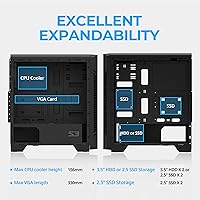
  • GPU Clearance: Graphics cards up to 330mm in length are supported without any bracket or drive bay removal required.
  • Drive Bays: Four universal bays support either 3.5-inch hard drives or 2.5-inch solid-state drives interchangeably.
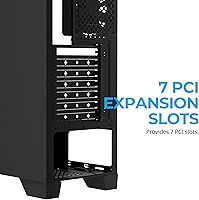
  • Expansion Slots: Seven rear expansion slots are available for graphics cards, capture cards, or other PCIe add-in boards.
  • Front I/O: The top-front I/O panel includes one USB 3.0 port, two USB 2.0 ports, a headphone jack, a microphone jack, a power button, a reset button, and an LED control button.
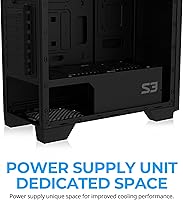
  • Power Supply: The PSU mounts at the bottom of the case in a dedicated shrouded bay, compatible with standard ATX power supplies.
  • Dust Filters: Removable dust filters are fitted at both the top ventilation area and the bottom PSU intake to reduce internal dust accumulation.
  • Front Panel Finish: The front panel features a hairline-textured metallic finish with dual vertical intake vents running along both sides.
  • Materials: The chassis is constructed from a combination of steel, plastic, and acrylic, with the side panel being fully acrylic rather than tempered glass.
  • CPU Cooler Height: The case supports CPU coolers up to approximately 155mm in height, covering most tower coolers in the mainstream segment.
  • PSU Clearance: Standard ATX power supplies up to around 160mm in depth fit without obstruction in the bottom-mount PSU bay.

Related Reviews

Zalman S2 ATX Mid-Tower PC Case
83%
88%
Cooling Performance
80%
Build Quality
85%
Ease of Setup
70%
Cable Management
92%
Value for Money
More
Zalman S4 Mid-Tower ATX PC Case
81%
88%
Airflow and Cooling
80%
Build Quality and Materials
92%
Ease of Installation
60%
Acrylic Panel Durability
70%
Cable Management
More
Zalman Chronix Mid Tower ATX PC Case
78%
88%
Aesthetic Design
74%
Build Quality
83%
Included ARGB Fans
86%
Cooling Potential
84%
Internal Clearance
More
Zalman i3 NEO ATX Mid Tower PC Case
80%
72%
Build Quality
88%
Value for Money
68%
Airflow Performance
91%
Aesthetics & Design
83%
Ease of Assembly
More
Zalman i3 ARGB Vision ATX Mid Tower Gaming PC Case
87%
89%
Cooling Performance
94%
Design & Aesthetics
87%
Ease of Installation
72%
Cable Management
90%
Build Quality
More
KEDIERS K4 ATX Mid Tower PC Case
80%
91%
Value for Money
93%
Aesthetic Design
74%
Build Quality
72%
Cooling Performance
84%
Ease of Assembly
More
SZSKYING ATX Mid-Tower PC Gaming Case
85%
92%
Cooling Performance
85%
Build Quality
88%
Aesthetic Design
74%
Cable Management
78%
Ease of Setup
More
darkFlash DS900 ATX Mid-Tower PC Case
84%
89%
Cooling Performance
88%
Build Quality
91%
Ease of Installation
85%
Design & Aesthetics
92%
Value for Money
More
SAMA S40 Mid Tower ATX PC Case
79%
88%
Airflow Performance
83%
Included Fan Quality
79%
Build Quality & Finish
92%
GPU Compatibility
61%
Cable Management
More
Zalman T6 ATX Mid Tower PC Case
71%
83%
Value for Money
67%
Build Quality
71%
Airflow & Cooling
79%
Interior Space & Layout
76%
Cable Management
More

FAQ

Yes, the Zalman S3 ATX Mid-Tower PC Case is designed to fit standard ATX boards, as well as the smaller Micro-ATX and Mini-ITX form factors. As long as your board follows standard ATX dimensions, installation is straightforward.
It comes with three 120mm fans pre-installed — two at the front pulling air in and one at the rear pushing air out. For a basic home-office or casual gaming build, that is enough to keep temperatures reasonable. If you are running a more powerful CPU and GPU combo, adding one or two extra fans to the top or bottom positions is worth considering.

It is acrylic, not tempered glass. The practical difference is that acrylic is lighter and less expensive, but it scratches more easily than glass and can pick up fine marks from cleaning cloths over time. If you are careful with it, it looks great — just avoid abrasive materials when wiping it down.

Graphics cards up to 330mm in length fit without any modifications. That covers the majority of mainstream mid-range GPUs currently on the market, but some high-end triple-fan cards exceed that length and will not fit, so measure your GPU before buying.

You can mount a single 120mm radiator at the front, which is enough for a basic all-in-one cooler on your CPU. However, larger radiators — 240mm or 360mm — are not supported, so this is not a practical choice if you are planning a serious custom water cooling loop or a larger AIO setup.

That concern is valid. The front panel uses a solid design with side vents rather than an open mesh, which does limit how freely air enters the case compared to mesh-front alternatives at a similar price. For low-to-mid power builds it is fine, but if you are running a high-end CPU or GPU under sustained load, you may notice higher temperatures than you would get in a comparable mesh-front chassis.

Most builders find the main chamber manageable, especially for a first build. The limitation is the space behind the motherboard tray — it is on the tighter side, and thicker PSU cables can be a challenge to tuck away neatly. If you are using a modular PSU and keeping only the cables you need, the job gets easier.

It primarily suits air cooling builds. You can install a 120mm AIO liquid cooler at the front, but beyond that the radiator mounting options are limited. The fan support across eight positions gives you solid flexibility for air cooling configurations without needing to invest in liquid cooling at all.

The filters at the top and bottom pull out without tools — you just slide or lift them free depending on the position. Rinsing them under tap water and letting them dry before reinstalling is all that is needed. Doing this every few weeks keeps airflow consistent and prevents dust from building up on your components.

It is one of the more beginner-friendly options in its price range. The interior layout is logical, the standoffs are clearly marked, and having fans already installed removes one variable from the build process. The acrylic window also makes it easier to visually check that everything is seated correctly during assembly, which is genuinely useful when you are doing it for the first time.

Where to Buy