Overview

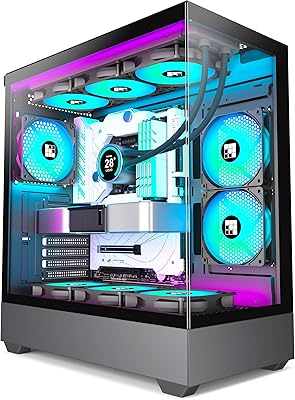
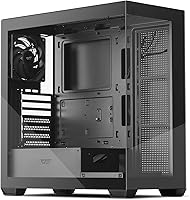
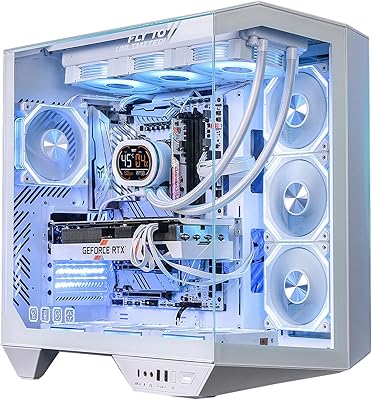
The darkFlash DS900 ATX Mid-Tower PC Case made a quiet entrance in late 2024, but it climbed to a top-35 ranking in Amazon's PC case category surprisingly fast, which is worth paying attention to. The central draw is its 270° panoramic glass design — tempered panels wrap the front and side to give your hardware maximum visibility. It's built for builders who want their rig to look the part without spending heavily. One thing to know upfront: this glass PC case ships with only one non-LED fan, and there is no RGB hub included in the box, so factor that into your planning.

Features & Benefits

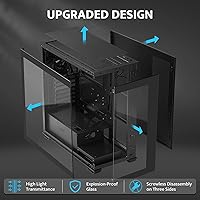
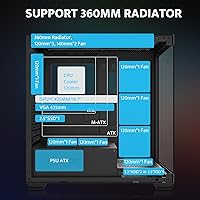
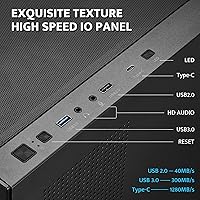
The dual tempered glass panels are the obvious highlight — they deliver a wide-open view of your components that you rarely get at this price tier. Practically speaking, the interior handles GPUs up to 425mm long and CPU coolers up to 170mm tall, so most modern hardware drops in without clearance drama. The top of the DS900 supports a 360mm radiator, genuinely useful if liquid cooling is in your plans. Magnetic dust filters at the top and a mesh panel filter cut down on long-term maintenance. The front I/O covers a Type-C port, USB 3.0, and USB 2.0, keeping modern connectivity accessible without reaching around back.

Best For

This mid-tower case makes the most sense for first-time builders who want their system to look impressive without committing to a premium enclosure. If you're installing a large GPU or planning a 360mm all-in-one cooler, the generous clearances and radiator support will spare you compatibility headaches. The wide glass panels also suit anyone going heavy on RGB components — there's real room for that lighting to show. Cable management is approachable enough that less experienced builders won't struggle. It also works well as a secondary rig or a home-office machine where visual presentation actually matters to the person sitting next to it.

User Feedback

With a 4.4-star average across nearly 300 ratings, buyers are largely satisfied — but the feedback tells a more layered story. Most praise focuses on the glass quality, which holds up better than skeptics expect at this price point, plus the spacious interior and strong overall value. Criticisms cluster around a few consistent themes: just one USB 3.0 port on the front panel feels limiting to many users, and some reported minor panel fit inconsistencies straight out of the box. A handful of reviewers also flag that the included accessories are leaner than expected — no RGB hub means sourcing your own fan controller if you plan a lighting-heavy build.

Pros

  • The 270° tempered glass panels deliver genuinely impressive component visibility that is rare at this price point.
  • Supports up to a 360mm top-mounted radiator, giving serious liquid cooling builds real room to breathe.
  • Fits ATX, Micro-ATX, and Mini-ITX motherboards, covering most common build configurations without compromise.
  • GPU clearance up to 425mm means even the largest current-generation cards install without drama.
  • Magnetic dust filters on the top and panel reduce long-term maintenance without adding complexity.
  • Front I/O includes a Type-C port, a meaningful inclusion that many budget cases still skip.
  • Cable management is approachable enough for less experienced builders to achieve a tidy result.
  • Anti-slip bottom feet and a bottom-mount PSU contribute to a stable, well-grounded footprint.
  • At its price tier, the overall value-to-feature ratio is hard to argue against for a display-focused build.
  • Climbed to a top-35 Amazon ranking in its category within months, reflecting strong early buyer satisfaction.

Cons

  • Only one fan is included in the box, so adequate airflow requires additional purchases right away.
  • No RGB hub is bundled, meaning a lighting-focused build needs extra hardware before anything glows.
  • Just one USB 3.0 port on the front panel feels limiting for users with multiple peripherals.
  • Some buyers have reported minor tempered glass panel alignment issues straight out of the box.
  • The single included fan is non-LED, offering no visual contribution to the build on its own.
  • No RGB controller means coordinating lighting across components requires sourcing a separate solution.
  • At 14 pounds, the DS900 is not particularly light for transport or LAN party use.
  • Side radiator support is capped at 240mm, which limits options for certain liquid cooling configurations.
  • Drive bay capacity is modest at two 3.5-inch and two 2.5-inch slots, which may constrain storage-heavy builds.

Ratings

The darkFlash DS900 ATX Mid-Tower PC Case scores below are generated by AI after systematically analyzing verified buyer reviews from global marketplaces, with spam, incentivized, and bot-flagged feedback actively filtered out before scoring. Each category reflects the honest consensus of real builders — from first-time assemblers to experienced enthusiasts — capturing both what this glass PC case does well and where it falls short. The ratings are intentionally transparent, so you can see exactly where the DS900 earns its praise and where it leaves something to be desired.

Build Quality
76%
24%
The tempered glass panels feel more substantial than buyers typically expect at this price tier, and the metal frame holds its shape without flex during installation. Most builders report that the overall construction gives a premium impression when the case is sitting on a desk fully built.
A consistent thread in user feedback involves minor panel alignment issues — some units arrive with glass that sits slightly off-square, which is frustrating when the entire visual identity of the case depends on those panels looking right. Quality consistency is not perfectly uniform across units.
Cooling Potential
83%
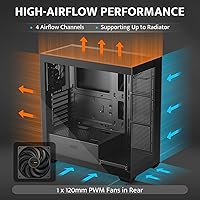
The DS900 has genuinely strong thermal headroom on paper: up to ten fan positions and a 360mm radiator slot at the top make it easy to configure a capable cooling setup for high-performance builds. Builders running all-in-one liquid coolers report excellent results once fans are properly populated.
The single included fan is the weak link — out of the box, airflow is inadequate for any serious gaming rig, and buyers who do not plan for additional fans right away often report higher-than-expected component temperatures. The case demands investment in extras before it performs to its potential.
Aesthetics & Visibility
91%
The 270° panoramic glass design is the DS900's strongest card, and buyers consistently say the real-world impact of that wide open view exceeds expectations. RGB components look genuinely spectacular through those panels, making the interior feel like a display rather than just a box.
The case ships with no lighting of its own — no LED fans, no RGB hub — so the visual payoff depends entirely on what the builder installs. Buyers who expect a glowing, lit-up system straight out of the box will be disappointed until they source and configure their own lighting solution.
Value for Money
88%
Measured against comparable glass mid-towers in the same price bracket, the DS900 offers an unusually wide feature set — Type-C I/O, 360mm radiator support, and dual tempered glass panels together at this price is not a given. Most buyers feel they got more than they paid for, which is why satisfaction rates skew high.
The value calculation changes slightly once you factor in the cost of additional fans and an RGB controller, both of which are essentially required to use the case the way it was clearly designed to be used. The base package is lean enough that total cost of ownership is higher than the sticker price suggests.
Cable Management
74%
26%
The bottom-mount PSU placement and the available routing channels behind the motherboard tray make cable organization more manageable than many budget cases allow. First-time builders particularly appreciate that achieving a reasonably tidy build does not require advanced techniques.
The space behind the motherboard tray is functional but not generous, and thicker cable bundles can be tricky to seat flush enough to close the back panel cleanly. Experienced builders accustomed to premium case cable management will notice the limitations quickly.
Front I/O
63%
37%
Having a Type-C port on the front panel is a meaningful feature at this price point, and the presence of both USB 3.0 and USB 2.0 covers most standard peripheral needs for everyday use. For a home office or casual gaming desk, the port selection is adequate.
The single USB 3.0 port is the most cited front I/O complaint across user reviews — in a world where external drives, controllers, and peripherals all compete for that connection, one port feels genuinely limiting. Builders who frequently hot-swap devices at the front of the case will find themselves reaching around to rear motherboard ports more often than they would like.
Fan Included
41%
59%
The included PWM fan is functional and properly mounted at the rear from the factory, so the case is at least operational for light tasks without any immediate additions. PWM control means it responds to motherboard fan headers without any extra setup.
A single non-LED fan in a case marketed on its visual appeal is a notable mismatch, and it is the most common source of buyer frustration in reviews. Users who did not read the fine print carefully feel misled when they open the box expecting a ready-to-impress build and find one quiet, invisible fan at the back.
Installation Experience
81%
19%
The spacious interior gives builders room to maneuver, which makes a real difference when seating large GPUs or routing thick power cables. Most first-time builders report that the process was less intimidating than expected, partly because the layout does not force awkward angles.
The documentation and included hardware are fairly minimal, and a handful of reviewers noted that standoff placement and panel removal could be clearer for complete beginners. Nothing is technically difficult, but a more thorough guide would reduce trial and error for new builders.
Dust Filtration
78%
22%
The magnetic top filter is a practical touch that makes regular maintenance fast — pull it off, tap it clean, snap it back. Having both a top magnetic filter and a mesh panel filter means the two main ingress points for dust are addressed without any added effort from the builder.
The filters cover the top and front reasonably well, but the bottom intake beneath the PSU shroud has more limited filtration, which can allow fine dust to accumulate around the power supply over time. Long-term dust management depends partly on the surface the case sits on.
Radiator Compatibility
84%
360mm radiator support at the top is a practical asset for builders who want high-performance liquid cooling without moving to a larger chassis, and user reports confirm that standard 360mm all-in-ones install cleanly. The side position adds a 240mm option for alternative cooling layouts.
Memory clearance is the key constraint — the manufacturer notes that RAM height must stay within 45mm for top radiator installations, and tall RAM kits with oversized heatspreaders can create genuine compatibility problems. Builders with high-profile memory should verify clearance before committing to a top-mounted 240 or 360mm radiator.
Storage Options
62%
38%
Two 3.5-inch HDD bays and two 2.5-inch SSD bays cover the essentials for a standard gaming or home-office build, and most users report the trays are simple to populate and secure.
For builders with larger storage needs — multiple drives for media, backups, or NAS-style setups — four drive positions is a hard ceiling that will feel restrictive. The DS900 is not designed for storage-heavy configurations, and there is no easy way to expand beyond what the chassis provides.
Noise Levels
67%
33%
With only one fan running at stock configuration, idle and light-load noise is very low, which suits home office environments where constant fan noise would be distracting. The PWM fan adjusts speed to workload, keeping things quieter during non-intensive tasks.
Once builders add multiple fans to bring temperatures under control during gaming, the noise floor rises considerably — the case has no integrated fan hub or noise-dampening material, so sound management is entirely dependent on the fans the builder chooses. Budget-tier fans in ten positions can produce a noticeable collective drone under load.
GPU Compatibility
87%
A 425mm maximum GPU length is generous and accommodates virtually all current-generation graphics cards, including triple-fan models from Nvidia and AMD that measure out at the longer end. Builders with flagship GPUs report straightforward installations with room to spare.
While length clearance is not an issue, very thick three-slot GPUs with tall coolers can feel snug relative to the side panel, and builders should verify their specific card's dimensions before assuming a perfect fit. Width and thickness matter alongside length in a glass-panel case where component proximity to the glass is visible.

Suitable for:

The darkFlash DS900 ATX Mid-Tower PC Case is a strong fit for first-time builders who want their system to look impressive without committing serious money to the enclosure itself. If your priority is showing off your components — especially a large GPU or a colorful set of RAM sticks — the wide panoramic glass panels make that easy to achieve. Builders planning a liquid-cooled system will also appreciate the genuine 360mm radiator support at the top, which is not a given at this price tier. The spacious interior handles GPUs up to 425mm long, so even flagship graphics cards slide in without a fight. It also works well for someone putting together a secondary rig or a home-office desktop where the build needs to look clean and considered without breaking the budget.

Not suitable for:

The darkFlash DS900 ATX Mid-Tower PC Case is not the right pick for builders who expect a fully outfitted, plug-and-play experience straight from the box. It ships with a single non-LED fan and no RGB hub, so anyone planning a lighting-heavy build needs to budget separately for controllers and additional fans — the case is RGB-ready, but it does none of that work for you. Power users who rely heavily on front-panel connectivity may find the single USB 3.0 port limiting, particularly in a multi-device workstation setup. If you need ultra-quiet operation from day one, one fan is not going to cut it without immediate upgrades. Buyers with strict quality consistency expectations should also be aware that some users have reported minor panel alignment issues, which can be frustrating when the glass presentation is the whole point of the build.

Specifications

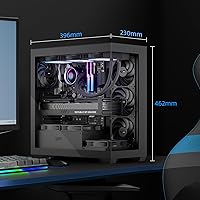
  • Form Factor: The DS900 is an ATX Mid-Tower case measuring 434 × 218 × 454mm, sized to fit comfortably on or under most desks.
  • Weight: The case weighs 14 pounds out of the box, which is typical for a dual tempered glass mid-tower at this size.
  • Motherboard Support: Compatible with ATX, Micro-ATX, and Mini-ITX motherboards, covering the vast majority of consumer desktop builds.
  • Panel Material: Both the side and front panels are constructed from high-strength tempered glass, providing durability alongside broad component visibility.
  • Included Fans: The case ships with one non-LED PWM fan pre-installed; no RGB fans or lighting hub are included in the package.
  • Fan Support: The chassis supports up to 10 fans total across rear, side, top, PSU shroud, and HDD bracket positions.
  • Top Radiator: The top of the case accepts radiators up to 360mm, accommodating most standard all-in-one liquid coolers on the market.
  • Side Radiator: The side panel position supports radiators up to 240mm for builders who prefer an alternative liquid cooling layout.
  • GPU Clearance: Maximum graphics card length is 425mm, which comfortably fits even the longest current-generation GPUs without modification.
  • CPU Cooler Height: Tall air coolers up to 170mm in height are supported, covering the majority of high-performance tower coolers.
  • PSU Clearance: The bottom-mounted power supply bay accommodates PSUs up to 220mm in length, suitable for most standard and modular units.
  • Front I/O: The front panel provides one Type-C port, one USB 3.0 port, and one USB 2.0 port alongside power, reset, LED, and HD audio connections.
  • Drive Bays: Storage capacity includes two 3.5″ HDD bays and two 2.5″ SSD bays, suitable for a modest but functional storage configuration.
  • Expansion Slots: Seven expansion slots are available, supporting multi-GPU setups or a mix of PCIe cards alongside a primary graphics card.
  • Dust Filtration: A magnetic dust filter sits on the top of the case and a mesh panel filter is included to reduce dust ingestion over time.
  • PSU Mount: The power supply mounts at the bottom of the case, helping lower the center of gravity and keeping PSU cables away from the motherboard area.
  • Bottom Feet: Anti-slip rubber feet on the base prevent the case from shifting on smooth desk or floor surfaces during use.
  • Color: The DS900 is available in black, with the dark frame complementing both the tempered glass panels and most component color schemes.

Related Reviews
darkFlash DRX70 ATX Mid-Tower PC Case

74%
83%
Value for Money
78%
Airflow Performance
89%
Ease of Assembly
67%
RGB Lighting
71%
Build Quality & Materials
More
Zalman S4 Mid-Tower ATX PC Case
75%
72%
Build Quality
88%
Value for Money
91%
Ease of Assembly
67%
Airflow Performance
63%
Cable Management
More
KEDIERS K4 ATX Mid Tower PC Case
80%
91%
Value for Money
93%
Aesthetic Design
74%
Build Quality
72%
Cooling Performance
84%
Ease of Assembly
More
Zalman S3 ATX Mid-Tower PC Case
74%
83%
Value for Money
71%
Build Quality
58%
Airflow & Cooling Performance
86%
Ease of Assembly
67%
Acrylic Side Panel
More
SZSKYING CMSVB-1 Mid-Tower PC Gaming Case

74%
91%
Value for Money
88%
Included Fans
86%
Aesthetics & RGB
61%
Build Quality
74%
Airflow Performance
More
SAMA S40 Mid Tower ATX PC Case
79%
88%
Airflow Performance
83%
Included Fan Quality
79%
Build Quality & Finish
92%
GPU Compatibility
61%
Cable Management
More
Zalman S2 ATX Mid-Tower PC Case

76%
88%
Airflow Performance
63%
Build Quality
91%
Value for Money
86%
Ease of Assembly
84%
Cooling Expandability
More
Vetroo AL800 Mid Tower ATX PC Case

76%
78%
Build Quality
84%
Tempered Glass Panel
76%
Airflow Performance
61%
Fan Included & Expandability
69%
Cable Management
More
FOIFKIN F1 Mid-Tower Gaming PC Case
74%
83%
Cooling Performance
74%
Build Quality
61%
Cable Management
88%
Tempered Glass Panel
86%
ARGB Lighting
More
Antec C5 ARGB
Antec C5 ARGB
84%
93%
Out-of-Box Value
88%
Build Quality
84%
Airflow & Thermal Performance
86%
Cable Management
91%
ARGB Lighting Quality
More

FAQ

No, it does not. The case ships with a single non-LED PWM fan, so there is no lighting out of the box. The chassis is built to support RGB fans and has room for up to ten total, but you will need to purchase fans and a separate RGB hub or controller if lighting is part of your plan.

Yes, the darkFlash DS900 ATX Mid-Tower PC Case is designed to support standard ATX boards, along with Micro-ATX and Mini-ITX. As long as your board falls within those form factors, installation should be straightforward.

Yes, a 360mm radiator fits in the top of the case. Just keep in mind that if your RAM sticks are particularly tall, you may run into clearance issues — the manufacturer notes that memory height should stay within 45mm for top radiator installations.

The DS900 supports graphics cards up to 425mm in length, which covers the overwhelming majority of current high-end GPUs. Check your specific card's length against that figure before buying, but most modern cards will have no problem.

One fan is genuinely not enough for a warm gaming system running a high-end GPU or CPU. You will want to add at least two or three more fans fairly quickly, especially if you are pushing the hardware hard. The case supports up to ten fans total, so there is plenty of room to build out a proper airflow configuration.

Buyers generally report that cable routing is easier than expected for this price range. There is enough space behind the motherboard tray to hide most cables, and the bottom-mount PSU position helps keep the main chamber looking clean. It is not on par with premium cases, but for a first or second build it is more than workable.

Most buyers report that the glass feels solid and holds up well during normal use. That said, tempered glass on budget cases can occasionally arrive with minor fit or alignment issues, which a small number of reviewers have flagged. Handle the panels carefully during installation and you should be fine.

The DS900 has two 3.5-inch HDD bays and two 2.5-inch SSD bays. That is enough for a typical gaming or home-office build, though if you are planning a large storage array with multiple drives, you may find the options limiting.

There is only one USB 3.0 port on the front panel alongside a Type-C and a USB 2.0 port, which some users find limiting — especially if you regularly plug in external drives or controllers at the front. It is a common trade-off at this price point, and most users adapt by relying more on rear motherboard ports.

It is genuinely a solid choice for a first build, particularly if you want the end result to look impressive. The interior is spacious, the installation process is accessible, and the panoramic glass means your work is on full display. Just go in knowing you will want additional fans and that there is no RGB hub included — factor those costs in before you finalize your parts list.