Overview

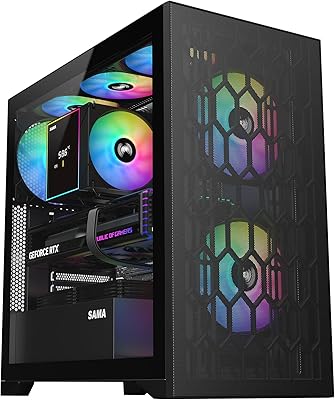
The SAMA S40 Mid Tower ATX PC Case launched in January 2025 and has already carved out a respectable position in a crowded segment, sitting at #361 in Computer Cases with a 4.6-star average from early buyers. That kind of traction in just a few months says something. This mid-tower pitches itself squarely at builders who want real airflow performance and a clean tempered glass aesthetic without stretching into premium territory. It is not a flagship chassis — you will not find tool-less panels or boutique finishing here — but as a value-focused mid-tower, it competes confidently against other mesh cases in its price range.
Features & Benefits

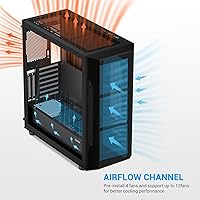
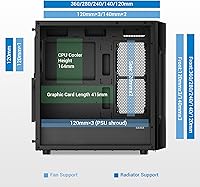
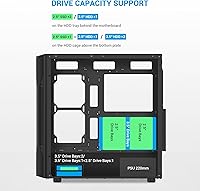
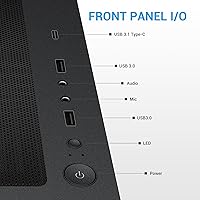
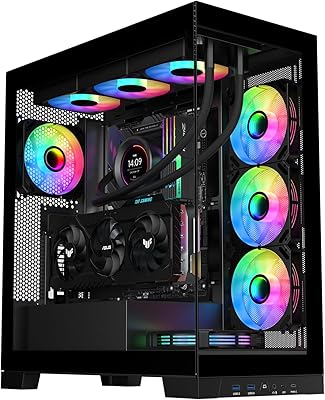
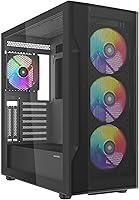
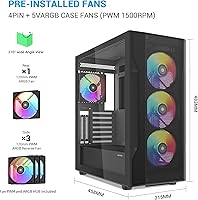
Four 120mm ARGB PWM fans come pre-installed, which means you get working airflow and lighting from the first boot — no separate fan purchases, no controller hunting. The large mesh front panel moves a serious volume of air, which matters when you are running high-TDP components. The S40 clears GPUs up to 415mm, so even a full-size RTX 4090 drops in without modification. Up top, the case accommodates a 360mm radiator if liquid cooling is on your roadmap. Front I/O covers USB-C, two USB 3.0 ports, and audio. Storage is flexible too — mix up to three HDDs and three SSDs in hybrid configurations for builders who need both speed and raw capacity.

Best For

This mesh ATX case is a natural fit for first-time builders who want a good-looking result without a complicated process. Pairing a power-hungry GPU with air cooling? The generous clearance and pre-loaded fans remove most of the thermal guesswork. It also works well for anyone building a dual-purpose rig — gaming one moment, editing or streaming the next — since the hybrid storage support keeps speed and capacity accessible in one enclosure. Budget-focused builders who would otherwise spend extra on ARGB fans will appreciate having them bundled in. If water cooling is eventually on the horizon, the top radiator mount keeps that path open without a case swap.

User Feedback

Buyers have responded positively overall, with consistent praise centering on included fan quality and thermal performance relative to what you would expect at this price point. The tempered glass panel earns favorable comments for clarity and sturdiness, and most builders find assembly manageable without major frustrations. That said, a few recurring concerns deserve mention. Cable management can feel tight — a common challenge in mesh cases that lack deep PSU shroud areas — and fans running at full PWM speed are audible enough to notice in a quiet room. PWM control helps significantly at partial loads, but noise-sensitive users should keep that in mind. On balance, the value-for-money sentiment from buyers is consistently strong.

Pros

  • Four ARGB PWM fans are included from the start, saving you the cost and hassle of sourcing cooling separately.
  • The mesh front panel delivers real thermal headroom for demanding GPUs under sustained gaming loads.
  • GPU clearance of up to 415mm means even the largest current-generation cards install without modification.
  • The tempered glass side panel is clear, sturdy, and makes ARGB lighting genuinely pop inside the chassis.
  • Front I/O covers USB-C, two USB 3.0 ports, and audio — everything most builders actually use daily.
  • Hybrid storage support for up to three HDDs and three SSDs in one enclosure is genuinely flexible for mixed workloads.
  • The top panel supports a 360mm radiator, keeping the door open for a liquid cooling upgrade later.
  • Nine PCIe expansion slots provide real headroom for multi-card or high-expansion builds without crowding.
  • Early buyer sentiment is strong, with a 4.6-star average reflecting broadly positive real-world build experiences.

Cons

  • The space behind the motherboard tray is shallow, making tidy cable routing with non-modular PSUs genuinely difficult.
  • No dust filter on the front mesh means the interior accumulates debris faster in dusty environments.
  • Fans running at full PWM speed are noticeable in quiet rooms — not ideal for noise-sensitive setups.
  • The thumbscrew side panel is slower to remove than a tool-less latch, which adds friction during multi-session builds.
  • ARGB synchronization with some motherboard headers requires an adapter that is not always clearly documented in the manual.
  • Some plastic trim pieces and front panel clips feel noticeably less refined than competing cases a price tier above.
  • Vertical GPU mounting is not supported out of the box, limiting display options for showcase-style builds.
  • Tall CPU air coolers may conflict with a top-mounted radiator, requiring compatibility checks before committing to liquid cooling.

Ratings

The SAMA S40 Mid Tower ATX PC Case earns its scores from AI-driven analysis of verified global buyer reviews, with spam, bot-submitted, and incentivized feedback actively filtered out before any score is calculated. What you see here reflects a transparent synthesis of real builder experiences — the genuine strengths that keep buyers satisfied and the friction points that show up repeatedly once a build is actually inside the chassis.
Airflow Performance
88%
The large mesh front panel makes a noticeable difference in sustained thermal performance, especially for builders running mid-to-high-end GPUs under extended gaming loads. Multiple users noted that component temperatures tracked lower than they expected from a case at this price tier.
Without a dust filter on the front mesh, fine particulates enter more freely than in filtered designs, which means more frequent internal cleaning for builders in dusty environments. The open mesh also does little to muffle noise coming from inside the chassis.
Included Fan Quality
83%
Four ARGB PWM fans included at this price point is genuinely uncommon, and buyers consistently report that the fans spin smoothly and produce decent static pressure for their size. The RGB output is vibrant enough that most builders skip adding a dedicated lighting kit entirely.
At full PWM speeds the fans are audible — not disruptive in a loud environment, but noticeable in a quiet room or late-night setup. A few buyers found the fan headers or included controller to be basic, leaving less granular speed control than premium alternatives offer.
Build Quality & Finish
79%
21%
The steel panels feel solid for the price bracket, and the tempered glass side panel consistently earns praise for its clarity and the absence of visible distortion. Most builders noted clean edges and no sharp burrs during assembly, which is not always guaranteed at this price tier.
Closer inspection reveals that some plastic trim pieces and front panel attachments feel less refined than competing cases a step above this price range. A small number of buyers reported minor panel fitment inconsistencies, particularly around the front mesh attachment points.
GPU Compatibility
92%
415mm of GPU clearance is genuinely generous and covers the longest current-generation cards without any bracket removal or modification. Builders slotting in large triple-fan GPUs reported comfortable installation with room to spare for cabling alongside the card.
With a very long GPU installed, routing cables behind the card to the front storage bays becomes noticeably tighter. This is partly a physical reality of fitting large modern GPUs into mid-tower enclosures, but it is worth planning around before the build begins.
Cable Management
61%
39%
The PSU shroud covers lower cable clutter well, and there are enough routing cutouts to manage a clean build if you take time to plan the layout before installing components. Modular PSUs help considerably here.
The depth behind the motherboard tray is on the shallower side, which makes routing thick ATX power cables tidy without bulging the back panel a genuine challenge. This is the most common frustration cited by buyers, particularly those using non-modular power supplies.
Tempered Glass Panel
84%
The side panel is genuinely clear glass rather than tinted acrylic, and buyers appreciate how well it showcases ARGB lighting and GPU aesthetics. The panel sits flush when properly seated and resists minor scratches better than acrylic alternatives.
The panel attaches with thumbscrews rather than a tool-less latch mechanism, which slows down repeated access during long build sessions. A few buyers noted the panel requires careful alignment before the screws catch, which can be fiddly solo.
Storage Flexibility
86%
Supporting up to three 3.5-inch HDDs and three 2.5-inch SSDs in hybrid configurations gives content creators and gamers alike real flexibility without needing an external enclosure. Builders running large game libraries alongside fast OS and scratch drives found the layout practical.
The drive trays themselves are functional but not particularly refined, and accessing rear-mounted drives once the GPU is installed requires some patience. Builders maxing out storage capacity may find cable organization inside the drive bay area becomes cluttered quickly.
Radiator Support
81%
19%
The top panel accepting a 360mm radiator is a meaningful upgrade path for builders who start with air cooling and plan to migrate to liquid cooling later without swapping the entire chassis. The mounting points align cleanly with standard 120mm fan spacing.
Tall CPU coolers can conflict with top-mounted radiators depending on the motherboard and cooler combination, so builders planning liquid cooling should verify clearance before purchasing. The case does not include any radiator mounting hardware beyond standard fan screws.
Front I/O Connectivity
87%
Having USB-C alongside two USB 3.0 ports and a combined audio jack on the front panel covers the connectivity needs of most modern peripherals and headsets without needing a rear-panel reach. The port placement is low on the top edge of the front panel, which is ergonomically sensible for a desk-mounted build.
There is only one USB-C port, and it does not support Thunderbolt, which limits its utility for builders using high-bandwidth external devices. Buyers who frequently swap multiple USB peripherals may wish for an additional USB-A port on the front panel.
Ease of Assembly
77%
23%
Most first-time builders reported finishing the build without consulting external guides, which speaks to an intuitive internal layout and clear standoff placement. The bottom-mounted PSU area is accessible and leaves enough room to connect cables before sliding the unit into position.
Routing all cables cleanly while keeping the glass side panel gap-free demands patience, particularly for builders new to modular cabling. A few users noted that standoff pre-installation was inconsistent with their specific motherboard layout, requiring minor adjustments.
Acoustic Performance
62%
38%
At low to medium PWM fan speeds the S40 is reasonably quiet for a mesh-forward design, and the PWM control does allow builders to find a balanced point between airflow and noise for everyday desktop use.
This is not a quiet case at full fan speed — the open mesh front does not absorb or redirect noise the way a solid or dampened panel would. Builders who prioritize near-silent operation will likely need to undervolt or replace the included fans and add acoustic considerations elsewhere.
Lighting & ARGB Integration
83%
The four ARGB fans produce consistent, even lighting across the front and interior, and the LED control button on the front panel lets buyers cycle effects without software. The visual result through the tempered glass is compelling for a mid-range build.
ARGB synchronization with motherboard software worked reliably for most buyers but required a proprietary header adapter for some boards, which was not always clearly documented in the included instructions. The lighting effects are limited compared to dedicated ARGB controllers.
Value for Money
91%
Buyers repeatedly describe this as one of the better all-in cost propositions in the mid-tower segment — four ARGB fans, tempered glass, USB-C front I/O, and wide GPU support bundled into a single purchase at a sub-premium price makes the math easy for budget-aware builders.
The value equation is strongest for buyers who are fine with the limitations around cable management and acoustics. Those who end up replacing fans or adding cable management accessories to compensate narrow the price gap with competing cases that include those features by default.
Dust Filtration
53%
47%
A bottom dust filter protects the PSU intake, which covers the most particle-prone intake point and is easily removed for cleaning. Builders in cleaner environments reported minimal internal dust accumulation over several weeks of use.
The front mesh panel has no dedicated dust filter, which is a meaningful omission for a high-airflow design. Builders in carpeted rooms or dusty home environments will find the interior accumulates debris faster than cases with filtered front intakes, adding to maintenance frequency.
Expansion & Upgrade Headroom
85%
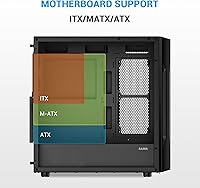
Nine PCIe slots total — seven standard plus two additional — give builders flexibility for multi-GPU setups, capture cards, or large PCIe expansion cards without running out of bracket space. ATX, Micro-ATX, and Mini-ITX motherboard support also means the chassis can outlast a board upgrade cycle.
The case does not include vertical GPU mounting support out of the box, which is a feature some enthusiast builders increasingly expect at this price tier. Expanding fan count beyond the four pre-installed units will require additional fan hubs or a motherboard with sufficient headers.

Suitable for:

The SAMA S40 Mid Tower ATX PC Case is a strong match for first-time builders who want a finished, good-looking system without sourcing fans, lighting, or additional accessories separately. If you are pairing a power-hungry GPU — including current long-card designs — with an air-cooled setup, the generous 415mm clearance and pre-loaded airflow fans make that combination straightforward from day one. It also works well for gamers who dual-purpose their rig for content creation, since the hybrid storage support lets you run a fast SSD alongside high-capacity HDDs without choosing one over the other. Budget-conscious builders who want ARGB aesthetics and a tempered glass window will find the included package genuinely hard to beat at this price tier. And if you are thinking about adding a liquid cooler down the line, the top panel radiator support means you can do that without replacing the chassis entirely.
Not suitable for:

The SAMA S40 Mid Tower ATX PC Case is not the right call for builders who prioritize near-silent operation — the open mesh front does not dampen fan noise, and at full PWM speeds the included fans are clearly audible in a quiet room. Experienced builders with non-modular power supplies or particularly thick cable runs will likely find the space behind the motherboard tray frustrating to work with, especially if a clean side-panel presentation matters to them. This mid-tower also lacks a front dust filter, which is a real maintenance concern for anyone building in a carpeted or dusty space. If vertical GPU mounting or tool-less panel access is on your checklist, the S40 does not offer either out of the box. Builders aiming for a boutique or high-end aesthetic finish — with premium cable management channels, refined plastic trim, and tight panel tolerances — will find that competing cases at a higher price tier offer noticeably more in those areas.
Specifications

  • Form Factor: The S40 is a mid-tower chassis compatible with ATX, Micro-ATX, and Mini-ITX motherboards.
  • Dimensions: The case measures 485 × 215 × 483mm (approximately 19.09 × 8.46 × 19.02 inches) for length, width, and height respectively.
  • Weight: The assembled unit weighs 18.26 pounds, which is typical for a steel mid-tower with tempered glass.
  • Side Panel: A full tempered glass side panel provides a clear view of internal components and installed lighting.
  • Pre-Installed Fans: Four 120mm ARGB PWM fans come installed from the factory, covering front intake and rear exhaust positions.
  • Max Fan Support: The chassis supports up to 12 fans in total across all available mounting positions.
  • Radiator Support: The top panel accommodates radiators up to 360mm in length, supporting standard 120mm fan spacing configurations.
  • GPU Clearance: Graphics cards up to 415mm in length are supported without bracket removal or modification.
  • CPU Cooler Height: Builders should verify CPU cooler height clearance independently if planning a top-mounted radiator, as tall towers may conflict.
  • PCIe Slots: Nine PCIe expansion slots are available in total — seven standard plus two additional positions for flexible card configurations.
  • Front I/O: The front panel includes two USB 3.0 ports, one USB Type-C port, and a combined HD audio jack.
  • Storage Support: The case supports up to three 3.5-inch HDDs and three 2.5-inch SSDs, with hybrid combinations also accommodated.
  • PSU Mounting: The power supply mounts at the bottom of the chassis in a dedicated shrouded compartment with a rear-facing intake.
  • Cooling Method: The case supports both air cooling and liquid cooling (AIO or custom loop) configurations.
  • Front Panel Material: The front intake panel uses an open mesh design to maximize airflow into the chassis.
  • Dust Filtration: A removable dust filter is located at the bottom PSU intake; the front mesh panel does not include a dedicated filter.
  • LED Control: A front-panel LED button allows users to cycle ARGB lighting effects without requiring motherboard software.
  • Release Date: The S40 became available in January 2025 and reached a top-400 ranking in Computer Cases within its first months on the market.

Related Reviews
SAMA 3509 ATX Mid Tower PC Case

74%
88%
Value for Money
74%
Build Quality
81%
Airflow & Cooling Performance
67%
Pre-installed Fan Quality
86%
Tempered Glass Panel
More
SAMA V60 Mid Tower PC Case
80%
93%
Out-of-Box Cooling Value
78%
Airflow Performance
91%
AIO & Radiator Flexibility
88%
Tempered Glass & Aesthetics
71%
Build Quality & Materials
More
SAMA NEVIEW 4503 Mid Tower PC Case
76%
91%
Value for Money
78%
Build Quality
83%
Airflow Performance
76%
ARGB Lighting
82%
Hardware Compatibility
More
darkFlash DS900 ATX Mid-Tower PC Case

84%
89%
Cooling Performance
88%
Build Quality
91%
Ease of Installation
85%
Design & Aesthetics
92%
Value for Money
More
KEDIERS K4 ATX Mid Tower PC Case
80%
91%
Value for Money
93%
Aesthetic Design
74%
Build Quality
72%
Cooling Performance
84%
Ease of Assembly
More
Zalman S2 ATX Mid-Tower PC Case
83%
88%
Cooling Performance
80%
Build Quality
85%
Ease of Setup
70%
Cable Management
92%
Value for Money
More
Zalman S3 ATX Mid-Tower PC Case
74%
83%
Value for Money
71%
Build Quality
58%
Airflow & Cooling Performance
86%
Ease of Assembly
67%
Acrylic Side Panel
More
Vetroo AL800 Mid Tower ATX PC Case
76%
78%
Build Quality
84%
Tempered Glass Panel
76%
Airflow Performance
61%
Fan Included & Expandability
69%
Cable Management
More
Zalman S4 Mid-Tower ATX PC Case

81%
88%
Airflow and Cooling
80%
Build Quality and Materials
92%
Ease of Installation
60%
Acrylic Panel Durability
70%
Cable Management
More
SZSKYING ATX Mid-Tower PC Gaming Case
85%
92%
Cooling Performance
85%
Build Quality
88%
Aesthetic Design
74%
Cable Management
78%
Ease of Setup
More

FAQ

Yes, the S40 supports GPUs up to 415mm in length, and most RTX 4090 models from major manufacturers fall within that range. You should still double-check your specific card model's listed length before ordering, but the vast majority of triple-fan 4090s will slot in cleanly.

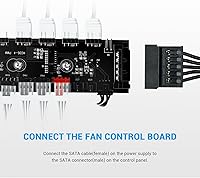
The four pre-installed fans use standard PWM headers, so they can connect to your motherboard fan headers directly if you have enough of them available. If your board is short on headers, a fan hub or splitter will be needed — that is true of most cases in this category and is not unique to this one.

No, the front mesh panel on this mid-tower does not include a dedicated dust filter. There is a removable filter at the bottom PSU intake, but the front is fully open mesh. If you are in a dusty environment, plan to clean the interior more regularly than you would with a filtered front panel.

This is honestly one of the more common complaints from builders who have used the S40. The gap behind the tray is on the shallower side, which works fine with a modular PSU and flat cables, but can be a real squeeze if you are using a non-modular unit with thick cable bundles. A modular or semi-modular PSU is strongly recommended.

Yes, the top panel supports radiators up to 360mm, which covers most standard AIO liquid coolers. The one thing to check is your CPU cooler height if you are running air cooling first and planning to swap later — tall tower coolers can sometimes conflict with top-mounted radiators depending on your specific motherboard layout.

At partial PWM speeds they are reasonably quiet and suitable for everyday use. At full speed, though, they are audible — this is an open mesh case with no acoustic dampening, so airflow takes priority over silence. If you are sensitive to fan noise, you will want to keep them below full speed or consider quieter aftermarket replacements later.

It supports all three form factors — ATX, Micro-ATX, and Mini-ITX. The standoff positions accommodate all of them, though as always with smaller boards in a mid-tower, you will have more empty space inside but no functional issues.

You can run up to three 3.5-inch HDDs and three 2.5-inch SSDs simultaneously if you want maximum capacity, or mix them in combinations like two HDDs and two SSDs depending on what your workflow demands. It is a flexible layout that suits builders who need both fast storage and bulk capacity in the same machine.

It is straightforward to remove, but it uses thumbscrews rather than a tool-less latch, so it takes a little longer than push-release designs. Most builders find it fine for occasional access, but if you are doing a lot of iterative testing during a build session, the repeated screwing and unscrewing can get a bit tedious.

The chassis supports up to 12 fans in total across all mounting positions — front, top, rear, and any additional spots depending on configuration. You will likely need a fan hub to handle that many connections, but the physical mounting space is there if you want to maximize airflow for a high-performance build.