

Overview

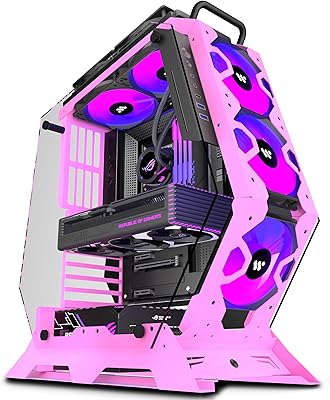
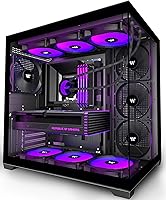
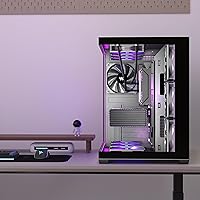
The KEDIERS K4 ATX Mid Tower PC Case sits in a sweet spot for builders who want their rig to look expensive without spending like it is. The defining feature is the 270° panoramic glass design — both the front and side panels are fully glazed, giving you an almost unobstructed view of everything inside. At this price tier, you'd normally expect to compromise somewhere, but the K4 supports ATX, Micro-ATX, and Mini-ITX motherboards without cutting corners on internal space. If you're putting together your first build or refreshing an older system, this glass-panel build is a genuinely compelling starting point.

Features & Benefits

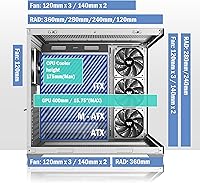
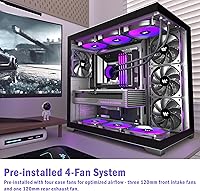
One thing that immediately sets the K4 apart from similarly priced competitors is that it ships with four 120mm fans already installed — three pulling air in from the front and one exhausting at the rear, saving you time and extra spend right out of the gate. Inside, there is room for GPUs up to 400mm long and CPU coolers reaching 175mm tall, covering the vast majority of popular hardware. The front I/O panel includes Type-C alongside standard USB ports and an audio jack, which feels genuinely modern for the price. Seven PCIe slots and dual radiator support mean you can upgrade this build considerably before ever needing a bigger enclosure.

Best For

This mid-tower case is an especially good fit for first-time PC builders who want to avoid the common trap of buying a cheap enclosure and immediately outgrowing it. The generous internal clearances mean a high-end GPU drops right in without forcing you into a full tower. It also works well for anyone doing a visual upgrade — swapping an old opaque box for something you'd actually want sitting on your desk. Home office users will appreciate how tidy the glass panels make a well-organized build look. If aesthetics matter to you as much as specs, the K4 earns its place at this price.

User Feedback

Early buyers of this glass-panel build are largely positive, with most praise pointing to the visual impact straight out of the box and a build process that does not require a manual on standby. The pre-installed fans are a recurring highlight — people appreciate not having to spend extra before powering on for the first time. That said, with under 50 reviews so far, it is worth treating the near-perfect rating as a promising early signal rather than a fully settled verdict. A handful of builders have noted that cable management space can feel tight depending on PSU cable bulk, which is a fair and practical concern worth keeping in mind.

Pros

  • Ships with four 120mm fans already installed, so you can power on without extra purchases right away.
  • Dual tempered glass panels on both the front and side give a near-panoramic interior view that looks premium for the price.
  • Fits GPUs up to 400mm long, covering virtually every current-generation graphics card without clearance anxiety.
  • Supports ATX, Micro-ATX, and Mini-ITX motherboards, making it flexible for a wide range of build configurations.
  • The front I/O includes a Type-C port alongside USB 3.0 and audio, which feels genuinely up to date for this price tier.
  • Seven PCIe slots and dual radiator support give real room to upgrade the build without replacing the case.
  • Dedicated HDD and SSD trays keep storage mounting tidy rather than leaving you improvising with zip ties.
  • Early buyer feedback points to a straightforward assembly experience, which matters a lot for first-time builders.
  • The 270-degree glass aesthetic delivers a display-worthy look that holds its own on any desk or gaming setup.

Cons

  • Cable management space behind the motherboard tray can feel tight, especially with bulkier PSU cable sets.
  • The included fans are a functional baseline, but noise levels and airflow quality have not been independently verified at load.
  • With under 50 reviews collected so far, the near-perfect rating is encouraging but not yet fully stress-tested by a large buyer pool.
  • Interior finishing and panel fitment tolerances may not match what you would find in cases at a higher price point.
  • PSU support is capped at 200mm, which could be a constraint for certain high-end power supplies.
  • Dust filter accessibility and ease of cleaning are not clearly documented, which matters for long-term maintenance.
  • The case ships in black only, limiting options for builders who want a white or alternative colorway interior.
  • Fan controller or RGB hub functionality is not included, so managing lighting or fan curves requires a separate solution.

Ratings

Our AI-generated scores for the KEDIERS K4 ATX Mid Tower PC Case are derived from analyzing verified buyer reviews worldwide, with spam, bot-submitted, and incentivized feedback actively filtered out before scoring. Each category reflects the honest consensus of real builders — first-timers and experienced hobbyists alike — so both the standout strengths and the genuine frustrations are represented transparently. With a growing but still modest review pool, scores lean on consistent sentiment patterns rather than sheer volume.

Value for Money
91%
Buyers consistently feel they are getting more than they paid for, particularly given the dual tempered glass panels and four pre-installed fans that competing cases at this tier rarely bundle together. For a first build especially, not having to immediately spend extra on fans or a separate optical showcase piece is a real financial win.
Enthusiasts with experience at higher price brackets will notice the gap in premium finishing details — things like brushed metal accents or tool-free panel releases that more expensive cases offer. The value equation is strong, but it does depend heavily on your baseline expectations.
Aesthetic Design
93%
The 270-degree panoramic glass coverage across the front and side panels is the K4's most celebrated feature, and buyers regularly describe the visual impact as punching well above the price point. The diamond-cut panel edges add a genuine sense of intentional styling that sets it apart from plain-box competitors.
The case ships in black only, which limits options for builders going for a white or minimalist light interior look. A small number of buyers also noted that the interior tray and frame color could feel slightly mismatched against premium RGB component lighting in certain configurations.
Build Quality
74%
26%
The steel chassis feels solid and holds its shape well during assembly, and the tempered glass panels arrived intact for the vast majority of buyers without flex or distortion. For a case at this price tier, the structural rigidity holds up to normal handling and transport without complaint.
Interior panel finishing and edge work show cost-cutting in places — sharp metal edges in cable routing areas and slightly inconsistent screw hole alignment have been flagged by careful builders. These are not dealbreakers for most users, but they are the clearest signs that this is not a premium-tier chassis.
Cooling Performance
72%
28%
Having four 120mm fans installed from the factory means the airflow baseline is genuinely functional on day one, which is ahead of most competitors that ship with just one or two fans. Casual gaming loads and everyday workloads are handled without thermal anxiety in typical room temperatures.
The included fans are not high-static-pressure or high-RPM units, and builders running thermally demanding hardware under sustained load may find the out-of-box setup insufficient without adding fans or upgrading to an AIO. Fan noise under load has not been widely characterized, which is a gap worth noting.
Ease of Assembly
84%
First-time builders repeatedly describe the internal layout as intuitive, with motherboard standoffs, storage trays, and expansion slots positioned logically for a clean install sequence. The broad component clearances — especially for GPUs and CPU coolers — reduce the guesswork that can make a first build stressful.
A handful of builders reported that panel alignment took more trial and error than expected, and the included hardware bag documentation is minimal. These are minor friction points, but someone building for the very first time without a guide may find certain steps less obvious than expected.
Cable Management
62%
38%
The case does include routing cutouts and a separate PSU shroud area, which gives you the basic infrastructure to run cables cleanly if you work methodically. Builders using slim or individually sleeved cable sets reported decent results with a bit of planning.
The clearance behind the motherboard tray is tighter than it should be for a case of these dimensions, and thick modular PSU cables in particular can make panel closure frustrating. This is arguably the most consistent practical complaint from experienced builders and the area where the K4 shows its price-class most clearly.
I/O Panel
86%
The inclusion of a Type-C port alongside USB 3.0 and USB 2.0 on the top panel feels genuinely current and practical for connecting modern peripherals, external drives, or controllers without reaching around the back. The LED toggle button is a small but appreciated addition for quickly switching lighting modes.
There is only a single USB 3.0 port, which can feel limiting if you regularly plug in multiple high-speed devices simultaneously. Buyers who use a lot of USB-A peripherals at the front may find themselves relying on rear motherboard ports more than anticipated.
Expansion Potential
88%
Seven PCIe slots, dual simultaneous radiator support, and capacity for up to ten 120mm fans mean the K4 can grow with a build rather than becoming a bottleneck the moment you upgrade components. This level of headroom is unusual and genuinely appreciated at this price point.
PSU support is capped at 200mm, which is sufficient for most standard ATX units but can restrict options if you are targeting a specific high-wattage power supply that runs longer. Builders planning extreme multi-GPU or custom loop setups may still find themselves outgrowing the case faster than the spec sheet suggests.
Dust Filtration
63%
37%
The case includes dust filter coverage on key intake areas, which helps reduce how quickly the interior accumulates dust during normal desktop use. Builders in dustier environments noted this was a meaningful inclusion that many similarly priced cases skip entirely.
Filter accessibility for routine cleaning is not straightforward — removing and reseating filters requires more disassembly than competing designs with magnetic or slide-out front filters. Long-term maintenance is workable but noticeably less convenient than what higher-tier cases offer.
Component Clearances
92%
A 400mm GPU limit, 175mm CPU cooler height, and 360mm radiator support cover nearly every realistic component combination a builder at this price point would consider. The generous clearances are one of the K4's most quietly impressive attributes, especially given its mid-tower footprint.
The bottom clearance for PSU cable egress can feel tight when combined with a large GPU installed in the primary slot, requiring some spatial planning during the build. This is a minor layout constraint rather than a hard limitation, but worth knowing in advance.
Glass Panel Quality
83%
The tempered glass on both the front and side panels is thick enough to feel substantial and arrived undamaged for the overwhelming majority of buyers, with no notable reports of stress cracks or warping out of the box. The clarity of the glass provides a genuinely vivid showcase of interior lighting.
The glass panels are not tool-free to remove, which adds friction during any internal access after the initial build. A few buyers also noted that fingerprints and smudges show prominently on the front glass panel under RGB lighting, requiring frequent wiping to maintain a clean appearance.
Fan Noise
69%
31%
At idle and light loads, the four included fans operate quietly enough that most users in a typical home or office environment would not find them intrusive. For casual gaming sessions and everyday desktop use, the noise floor stays in an acceptable range.
Under heavier system loads, the stock fans can become audible in a quiet room, and there is no integrated fan controller or hub included to manage speeds without a separate purchase or motherboard fan headers. Buyers sensitive to noise during sustained workloads may want to budget for quieter aftermarket replacements.
Storage Options
78%
22%
The inclusion of both HDD and SSD mounting trays out of the box means you do not need to improvise storage mounting with adhesive pads or zip ties, which is a common annoyance in budget cases. The trays are positioned to keep drives out of primary airflow paths while remaining reasonably accessible.
The total number of storage mounts is limited compared to workstation-oriented cases, and builders planning to run multiple HDDs alongside several SSDs may find the mounting options fill up faster than expected. Drive accessibility after the build is complete requires some disassembly in tight configurations.

Suitable for:

The KEDIERS K4 ATX Mid Tower PC Case is an excellent match for first-time builders who want a complete, ready-to-run enclosure without hunting down extra fans or adapters before powering on for the first time. If you are putting together a gaming rig on a sensible budget and care about how it looks sitting on your desk, the panoramic dual-glass design delivers visual impact that normally costs considerably more. Builders pairing this with a modern mid- to high-end GPU will appreciate that 400mm of clearance handles virtually every card on the market today without forcing an upgrade to a bulkier full tower. It also works well for home office setups where aesthetics matter — a clean, well-lit interior behind tempered glass looks genuinely sharp without any extra effort. Anyone stepping up from an old opaque box will notice the difference immediately.

Not suitable for:

Builders who push hardware to its thermal limits through heavy overclocking or extreme workloads may find that the four included 120mm fans, while a solid baseline, are not enough airflow on their own without supplementing with additional fans or a custom loop. The KEDIERS K4 ATX Mid Tower PC Case is also not the right pick for anyone who prioritizes cable management above all else — at this price point, the space behind the motherboard tray can feel tight, especially with thicker modular PSU cables. Enthusiasts who want premium build materials, tool-free panel mechanisms, or refined interior finishing comparable to cases at twice the price will likely feel the gap. If your PSU exceeds 200mm in length, you will need to verify fitment carefully before committing. Those building a compact or small-form-factor system should also look elsewhere, since the case is sized for standard ATX builds and up.

Specifications

  • Form Factor: The K4 is a mid-tower chassis compatible with ATX, Micro-ATX, and Mini-ITX motherboards.
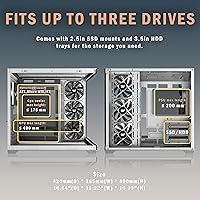
  • Dimensions: The case measures 16.54″ deep, 11.22″ wide, and 15.75″ tall.
  • Weight: The unit weighs approximately 15.77 pounds (7.17 kg) without components installed.
  • Panel Material: Both the front and side panels are constructed from tempered glass with diamond-cut edge detailing.
  • Chassis Material: The main frame and structural body are built from steel metal for rigidity and grounding.
  • Included Fans: Four 120mm fans come pre-installed: three front intake units and one rear exhaust unit.
  • Max Fan Support: The interior supports up to ten 120mm fans simultaneously across all available mounting positions.
  • Radiator Support: The case accommodates radiators up to 360mm and allows two radiators to be installed at the same time.
  • GPU Clearance: Graphics cards up to 400mm in length are supported without modification to the interior.
  • CPU Cooler Height: Tower CPU coolers with a maximum height of 175mm will fit within the chassis.
  • PSU Compatibility: Standard ATX power supplies up to 200mm in length are supported in the bottom-mounted PSU bay.
  • PCIe Slots: Seven expansion slots are available along the rear panel for graphics cards, capture cards, and other add-in boards.
  • Front I/O: The top I/O panel includes one Type-C port, one USB 3.0 port, one USB 2.0 port, HD Audio, a power button, reset button, and an LED toggle switch.
  • Storage Mounts: Dedicated trays for both 3.5″ HDDs and 2.5″ SSDs are included and pre-fitted in the chassis.
  • Color: The K4 is available in black only, with a dark interior finish.
  • Cooling Method: The case supports both air cooling with fans and liquid cooling with radiators up to 360mm.

Related Reviews
KEDIERS P6 Mid Tower ATX PC Case
75%
88%
Aesthetic Design
71%
Build Quality
84%
Included Fans & Lighting
78%
Airflow & Thermal Performance
81%
Radiator & Cooling Support
More
Zalman S4 Mid-Tower ATX PC Case
81%
88%
Airflow and Cooling
80%
Build Quality and Materials
92%
Ease of Installation
60%
Acrylic Panel Durability
70%
Cable Management
More
Zalman S3 ATX Mid-Tower PC Case
74%
83%
Value for Money
71%
Build Quality
58%
Airflow & Cooling Performance
86%
Ease of Assembly
67%
Acrylic Side Panel
More
SZSKYING ATX Mid-Tower PC Gaming Case
85%
92%
Cooling Performance
85%
Build Quality
88%
Aesthetic Design
74%
Cable Management
78%
Ease of Setup
More
darkFlash DS900 ATX Mid-Tower PC Case

84%
89%
Cooling Performance
88%
Build Quality
91%
Ease of Installation
85%
Design & Aesthetics
92%
Value for Money
More
Vetroo AL800 Mid Tower ATX PC Case
76%
78%
Build Quality
84%
Tempered Glass Panel
76%
Airflow Performance
61%
Fan Included & Expandability
69%
Cable Management
More
Zalman S2 ATX Mid-Tower PC Case
83%
88%
Cooling Performance
80%
Build Quality
85%
Ease of Setup
70%
Cable Management
92%
Value for Money
More
SAMA S40 Mid Tower ATX PC Case

79%
88%
Airflow Performance
83%
Included Fan Quality
79%
Build Quality & Finish
92%
GPU Compatibility
61%
Cable Management
More
Montech X5 ATX Mid-Tower Gaming PC Case
86%
88%
Build Quality
93%
Airflow & Cooling
87%
Aesthetics & Design
84%
Installation Ease
90%
GPU Compatibility
More
darkFlash DRX70 ATX Mid-Tower PC Case
74%
83%
Value for Money
78%
Airflow Performance
89%
Ease of Assembly
67%
RGB Lighting
71%
Build Quality & Materials
More

FAQ

It comes with four 120mm fans already installed — three mounted at the front as intake and one at the rear as exhaust. You do not need to buy any fans before powering on your build for the first time, which is a genuine convenience at this price tier.

Yes, in most cases it will. The interior supports GPUs up to 400mm in length, which covers the vast majority of current high-end cards including most RTX 40-series models. That said, it is always worth double-checking the specific length of your card against that 400mm limit before ordering.

Yes, the case supports radiators up to 360mm, and it can actually accommodate two radiators simultaneously if you plan to run both a CPU and GPU loop. Just plan your fan and radiator layout in advance so airflow directions do not work against each other.

Cable management is functional but not the K4's strongest point. The space behind the motherboard tray is workable for most builds, but if you are running a high-end modular PSU with thick cable sets, it can get snug. Using flat or individually sleeved cables will make a noticeable difference and save you frustration during the build.

Both the front panel and the left side panel are tempered glass, which is what gives the K4 its 270-degree panoramic view of the interior. The right side panel is a solid metal panel, which is standard for mid-tower cases in this class.

The maximum supported CPU cooler height is 175mm, which covers the majority of popular tower coolers including most 120mm and 140mm dual-tower designs. If you are running something like a Noctua NH-D15 or a particularly tall cooler, verify its exact height before assuming it will clear.

It supports all three form factors — ATX, Micro-ATX, and Mini-ITX. The mounting holes are pre-punched for all three standards, so you are not locked into a full-size ATX board if you prefer a smaller build.

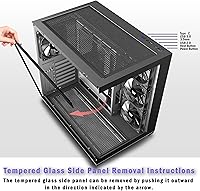
Both glass panels should detach via screws or thumbscrews at the edges, which is the standard mechanism for cases in this category. For cleaning, a microfiber cloth with a little isopropyl alcohol or a purpose-made screen cleaner works well and avoids scratching. Avoid abrasive materials that could dull the surface over time.

You have significant room to expand. The case supports up to ten 120mm fans in total across all mounting positions, so you can add more fans as your cooling needs grow or as your budget allows. If you decide to add an RGB fan kit down the line, there is plenty of space to work with.

It is actually one of the more beginner-friendly options at this price point. The pre-installed fans eliminate one early decision, the internal layout is straightforward, and early buyers have noted the assembly process is not particularly challenging. The generous GPU and cooler clearances also mean your component choices stay flexible rather than forcing you to research compatibility extensively before picking a case.