Zalman S4 Mid-Tower ATX PC Case

Overview
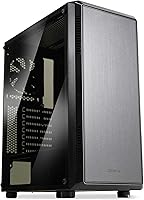
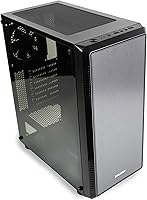
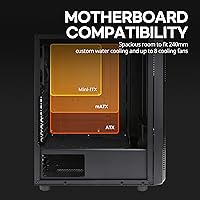
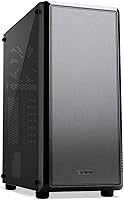
The Zalman S4 Mid-Tower ATX PC Case is a straightforward, no-frills enclosure aimed squarely at first-time builders and anyone putting together a functional home office or light gaming machine on a tight budget. The matte black finish and tinted acrylic side panel give it a cleaner look than you might expect at this price point. It accommodates ATX, mATX, and Mini-ITX motherboards, offering genuine flexibility for different build configurations. Go in with realistic expectations — this entry-level chassis is built to compete on value, not on the feature depth you would find stepping up to a premium mid-tower.
Features & Benefits
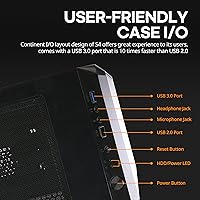
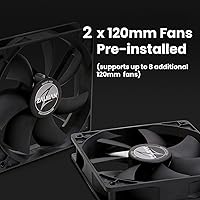
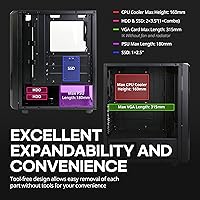
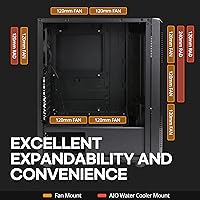
Out of the box, this mid-tower case ships with two 120mm fans — one up front pulling air in, one at the rear pushing it out. That is enough airflow to keep a modest build stable, though serious overclockers will want to add more; there is room for up to three additional fans across the front and top. The case handles GPUs up to 315mm long and CPU coolers up to 160mm tall, which covers most mainstream components comfortably. The bottom-mounted PSU keeps heat management tidy and makes cable routing more intuitive. Front panel access is practical: USB 3.0, two USB 2.0 ports, plus headphone and mic jacks sit right where you need them.
Best For
This entry-level chassis shines brightest in the hands of someone building their first PC who does not want to overcomplicate things. The interior is forgiving and the layout does not punish beginners. It is also a smart pick for a home office or casual gaming setup where spending extra on a premium windowed case does not make sense. Worth flagging for storage-heavy builders: drive bay options are limited to two 3.5-inch bays and one 2.5-inch SSD slot, so multi-drive setups will not fit neatly here. Liquid cooling enthusiasts should note that radiator support maxes out at 240mm up front — fine for a basic AIO, but not much beyond that.
User Feedback
Most buyers who have reviewed the Zalman S4 online come away satisfied, particularly praising easy assembly — the interior layout is intuitive and nothing feels unnecessarily fiddly. The tinted acrylic panel draws mixed opinions; people who like a subtle, smoked look tend to appreciate it, while others would have preferred clear tempered glass for a better view of their components. Cable management comes up in multiple reviews as workable but snug — not a dealbreaker, just something to plan around. A handful of buyers noted that some panels feel plasticky, which is fair at this price level. Actual defect reports are rare, and most criticisms reflect expectations rather than build quality failures.
Pros
- Broad motherboard support covers ATX, mATX, and Mini-ITX without any adapter gymnastics.
- Two fans are included straight out of the box, so basic airflow is ready on day one.
- The tinted acrylic side panel gives the build a finished look without adding to the cost.
- GPU clearance up to 315mm handles the vast majority of mainstream graphics cards on the market.
- CPU cooler height clearance of 160mm accommodates most popular tower coolers without issue.
- Bottom-mounted PSU placement makes cable routing noticeably tidier for beginners.
- The front panel includes USB 3.0, two USB 2.0, headphone and mic jacks — all the daily-use ports covered.
- Assembly is consistently praised as straightforward, even for first-time builders.
- Seven PCI expansion slots give reasonable room for future add-in cards.
- Reliable build quality and consistent shipping condition based on real buyer experiences.
Cons
- The acrylic side panel scratches more easily than tempered glass and can look hazy over time.
- Cable management channels and tie-down points are limited, making tidy builds harder to achieve.
- Only two 3.5-inch drive bays and one 2.5-inch slot leave very little room for storage expansion.
- Some panels and trim pieces have a noticeably plastic feel that undercuts the overall build quality impression.
- The two stock fans are functional but on the quieter-performance end — thermal headroom is modest.
- Radiator support maxes out at 240mm front and 120mm rear, cutting off most serious liquid cooling options.
- The front I/O lacks a USB-C port, which is an increasingly common gap on newer peripherals and devices.
- Fan dust filters are minimal, meaning more frequent manual cleaning is likely needed over time.
Ratings
The scores below for the Zalman S4 Mid-Tower ATX PC Case were generated by AI after analyzing verified purchase reviews from buyers worldwide, with spam, bot-submitted, and incentivized feedback actively filtered out. This entry-level chassis earns genuinely positive marks in several areas, though a few real pain points surfaced consistently enough to pull certain scores down. Both strengths and trade-offs are reflected honestly here — no category has been softened to make the product look better than it is.
Build Quality
Value for Money
Ease of Assembly
Airflow Performance
Cable Management
Side Panel Visibility
Storage Expandability
GPU Compatibility
Front Panel I/O
Cooling Upgrade Potential
Aesthetics & Design
Liquid Cooling Support
Shipping & Packaging
Motherboard Compatibility
Suitable for:
The Zalman S4 Mid-Tower ATX PC Case is a genuinely practical choice for anyone stepping into PC building for the first time and wanting a case that does not fight back. The interior layout is open and forgiving, which matters a lot when you are still learning how components fit together and where cables need to run. Budget-conscious builders putting together a home office machine or a light gaming rig will find it hits a useful balance between aesthetics and function — the tinted side panel lets you see inside without requiring you to spend extra for a tempered glass upgrade. Broad motherboard compatibility across ATX, mATX, and Mini-ITX formats means it works with a wide range of common build configurations. If you are shopping for a clean, modest enclosure that gets the job done reliably at an accessible price, this mid-tower case is hard to fault for what it is.
Not suitable for:
The Zalman S4 Mid-Tower ATX PC Case is not the right fit for builders with more demanding or specialized requirements. If you are planning a high-end gaming rig with a large liquid cooling loop, the radiator support caps out at 240mm up front and 120mm at the rear, which rules out most custom water cooling setups. Storage enthusiasts should also think twice — with only two 3.5-inch drive bays and one 2.5-inch SSD slot, there is simply not enough room for multi-drive configurations. Those who prioritize a crystal-clear view of their components may find the tinted acrylic panel frustrating compared to the clear tempered glass options available in competing cases at a similar price. Builders who care about long-term expandability or premium-feel materials will likely outgrow this entry-level chassis quickly.
Specifications
- Form Factor: Mid-Tower ATX design fits standard desktop setups and supports ATX, mATX, and Mini-ITX motherboards.
- Dimensions: The case measures 380×206×458mm (H), making it compact enough for most desk or tower configurations.
- Weight: Unboxed unit weighs 3.6 kg (7.9 lbs), which is typical for a steel-and-plastic mid-tower at this tier.
- Materials: Construction uses a combination of alloy steel for the chassis, acrylic for the side panel, and plastic for trim and front fascia.
- Included Fans: Two 120mm fans come pre-installed — one at the front as intake and one at the rear as exhaust.
- Fan Support: The case supports up to eight additional fans across front (3×120mm), top (2×120mm), rear (1×120mm), and bottom (2×120mm) positions.
- Max GPU Length: Graphics cards up to 315mm in length are supported, measured without front fan or radiator obstruction.
- CPU Cooler Height: Air coolers and tower heatsinks up to 160mm tall fit within the chassis without modification.
- PSU Clearance: Power supply units up to 180mm in length are accommodated via the bottom-mounted PSU bay.
- Drive Bays: Storage options include two 3.5-inch bays (one functioning as a combo), and one dedicated 2.5-inch SSD mount.
- Expansion Slots: Seven PCI expansion slots are available for graphics cards, sound cards, and other add-in boards.
- Radiator Support: Liquid cooling radiators up to 240mm are supported at the front, and up to 120mm at the rear.
- Front I/O Ports: The front panel includes one USB 3.0 port, two USB 2.0 ports, a 3.5mm headphone jack, and a microphone jack.
- Side Panel: A full-length tinted acrylic panel provides a smoked, dark-tinted view of the interior components.
- PSU Mount: The power supply mounts at the bottom of the case, which improves airflow separation and simplifies cable management.
- Finish: The exterior uses a matte black powder-coat style coating intended to resist corrosion and minor surface wear.
Related Reviews

Zalman S3 ATX Mid-Tower PC Case

Zalman S2 ATX Mid-Tower PC Case
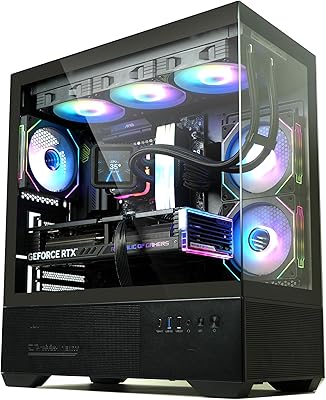
Zalman Chronix Mid Tower ATX PC Case
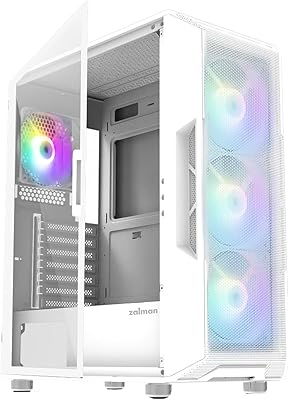
Zalman i3 NEO ATX Mid Tower PC Case
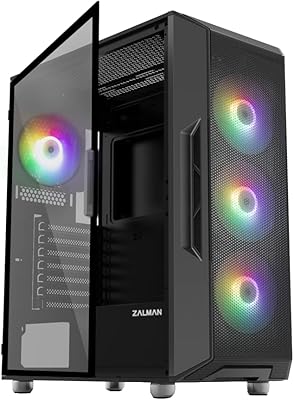
Zalman i3 Neo ATX Mid Tower PC Case
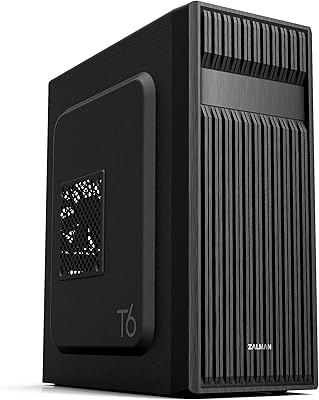
Zalman T6 ATX Mid Tower PC Case

KEDIERS K4 ATX Mid Tower PC Case

Vetroo AL800 Mid Tower ATX PC Case

SAMA S40 Mid Tower ATX PC Case
