Overview

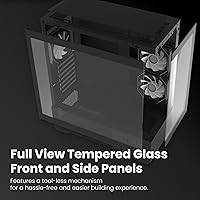
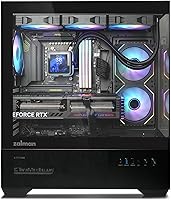
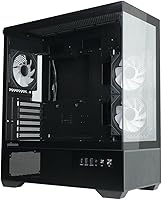
The Zalman Chronix Mid Tower ATX PC Case launched in January 2025 as Zalman's push into the value-oriented gaming case market, and it has made a reasonable impression early on. The design philosophy is clearly aesthetics-first: panoramic tempered glass covers both the front and side panels, giving your components full visibility from nearly every angle. It currently sits at #238 in Computer Cases on Amazon, which signals real buyer interest for a case that has only been on shelves a few months. Don't expect flagship-tier construction, but as a mid-range showcase platform, this Zalman case punches above its price point in the looks department.
Features & Benefits

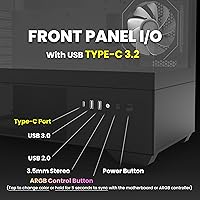
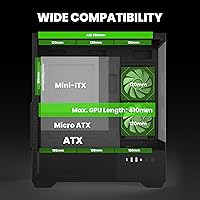
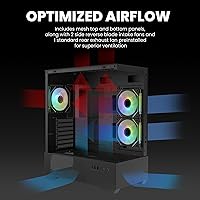
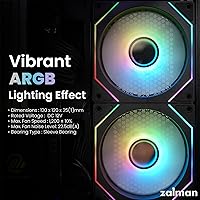
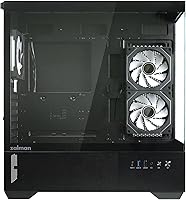
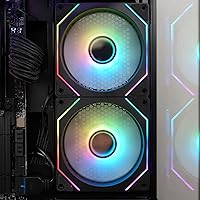
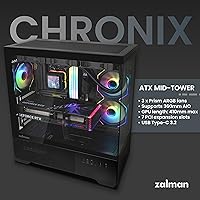
The Chronix ships with three Prism ARGB fans already installed, which saves you an immediate accessory purchase — though the configuration is worth understanding before you buy. Two fans use reverse blades and pull air in from the side panel, while a standard fan handles rear exhaust. It's an unconventional setup, but it works. On the cooling side, there's room for a 360mm radiator on top and a 240mm unit on the side, which is generous at this price tier. GPU clearance reaches 410mm and CPU cooler height tops out at 165mm, so most modern builds fit comfortably. Front I/O includes USB Type-C 3.2 alongside a standard USB-A port.

Best For

This mid tower is a natural fit for first-time PC builders who want their rig to look polished without spending heavily on extras. Because three ARGB fans come pre-installed, you're not scrambling to fill fan slots on day one. Builders planning an AIO liquid cooler will appreciate the 360mm top mount — that's a spec you don't always find at this price. The spacious interior also accommodates long graphics cards with headroom to spare, which matters when pairing a budget enclosure with a higher-end GPU. If you're on an ATX board and want a glass-panel showcase build, the Chronix is genuinely hard to overlook.

User Feedback

With 74 ratings and a 4.1-star average, early reception for this Zalman case is encouraging — though the sample size is still modest enough that a handful of vocal opinions can skew the picture. Buyers tend to praise the glass panel quality and the overall visual impact, noting the included ARGB fans look better than expected for the price. On the critical side, some users mention that cable management space behind the motherboard tray feels tighter than ideal, and panel alignment during assembly can require a little patience. Gigabyte motherboard owners should know about a reported quirk where fans keep spinning after shutdown — enabling the ErP option in BIOS resolves it.

Pros

  • Dual tempered glass panels offer full front and side build visibility, a rare feature at this price tier.
  • Three ARGB fans come pre-installed, so your build looks great before you spend a dollar on accessories.
  • Top 360mm radiator support puts serious liquid cooling within reach without upgrading to a larger case.
  • Fits GPUs up to 410mm long, covering nearly every high-end graphics card currently on the market.
  • USB Type-C 3.2 on the front panel is a genuinely modern convenience you do not always get here.
  • Up to nine 120mm fan slots give the Chronix strong long-term cooling upgrade headroom.
  • Supports CPU coolers up to 165mm tall, so most premium air coolers clear without modification.
  • Bottom-mounted PSU and seven PCIe slots make for a clean, conventional ATX build layout.
  • Early buyer ratings trend positive, with glass quality and included fans drawing consistent praise.
  • Side 240mm radiator support adds a secondary liquid cooling option for more ambitious thermal builds.

Cons

  • Cable management space behind the motherboard tray is tight, especially with non-modular power supplies.
  • The reverse-blade side intake fans confuse many builders; included instructions do not explain the setup clearly enough.
  • Plastic trim pieces feel noticeably lighter and cheaper than the steel chassis they are attached to.
  • Panel alignment during assembly requires patience and occasionally needs adjustment to sit flush.
  • Gigabyte motherboard users may encounter fans spinning after shutdown until the ErP BIOS fix is applied.
  • The open glass design amplifies fan noise under load compared to cases with solid panels.
  • Only a single USB-A port accompanies the Type-C connector, which feels limiting for everyday desk use.
  • The case is too new to have a strong long-term reliability track record, with fewer than 75 ratings so far.
  • Simultaneously using both radiator positions may create component clearance conflicts depending on your hardware.
  • Fingerprints and dust are highly visible on the glass panels, demanding more regular cleaning than average.

Ratings

The Zalman Chronix Mid Tower ATX PC Case has been scored by our AI system after analyzing verified buyer reviews from global markets, with spam, bot-generated, and incentivized feedback actively filtered out. The ratings below reflect an honest cross-section of real builder experiences — the genuine strengths and the friction points that matter when you're deciding where to house your next build. Both sides of the story are represented here without sugarcoating.
Aesthetic Design
88%
Buyers consistently single out the panoramic tempered glass on both the front and side as the standout feature. For builders who want their RGB components visible from multiple angles, the dual-glass layout delivers exactly that impression without requiring any modifications out of the box.
A handful of reviewers note that the glass panels, while visually striking, show fingerprints and dust accumulation quickly. Keeping the case looking sharp requires more frequent wiping than enclosed alternatives, which some found mildly frustrating over time.
Build Quality
74%
26%
Most buyers describe the overall construction as solid for the price tier, with the steel chassis feeling sturdier than competing cases in the same range. The panel fitment and frame rigidity left first-time builders feeling confident about long-term durability.
Some users point out that plastic trim pieces feel noticeably lighter and less premium than the metal body, and a few report minor panel alignment issues during assembly. It is not a deal-breaker, but it does remind you that this is a value-oriented enclosure.
Included ARGB Fans
83%
Getting three ARGB fans pre-installed is a meaningful advantage for budget-conscious builders who would otherwise need to purchase them separately. The lighting effect from the Prism fans is well-regarded, with reviewers describing the output as vibrant and consistent across fan speeds.
The reverse-blade configuration on the two side intake fans is unconventional and confused several buyers during installation. A clearer setup guide from Zalman would reduce the initial frustration, as the airflow direction is not immediately obvious without reading documentation carefully.
Cooling Potential
86%
Support for a 360mm radiator at the top and a 240mm unit on the side gives this mid tower genuine liquid cooling credentials that most competitors at this price do not offer. Builders running AIO coolers reported comfortable thermal headroom with no major layout compromises.
While the radiator support specs are generous on paper, a small number of users found that fitting a full 360mm AIO alongside thick fans required careful component sequencing during assembly. Clearance near the top is workable but not as generous as higher-end cases.
Internal Clearance
84%
Accommodating graphics cards up to 410mm in length means most current high-end GPUs fit without any obstruction, which is reassuring when pairing a budget case with a premium card. CPU cooler height allowance of 165mm similarly covers the vast majority of air coolers on the market.
A few builders with particularly wide GPU shrouds or chunky AIO pump heads noted that the fit was tighter than expected near the power supply shroud. Nothing that stops a build from working, but it does demand more patience during cable routing in those specific configurations.
Cable Management
61%
39%
The case includes standard cable routing cutouts and velcro tie points that are sufficient for a tidy build if you plan carefully. Builders working with modular power supplies found the process manageable when routing cables methodically before mounting components.
The space behind the motherboard tray is noticeably limited, and this was one of the more consistent complaints across reviews. Builders using non-modular PSUs or thicker cable sets reported real difficulty closing the back panel cleanly, which can be a significant frustration on a first build.
Front I/O & Connectivity
79%
21%
The inclusion of a USB Type-C 3.2 port on the front panel is genuinely useful for modern peripherals and external drives, and it is not a given at this price point. Reviewers appreciated not having to reach around to the back of the PC for everyday device connections.
There is only one USB-A port alongside the Type-C, which some users found limiting when they needed to connect multiple devices simultaneously during a session. An additional USB-A port would have made the front I/O feel more complete.
Storage Options
76%
24%
Two 3.5-inch HDD bays and three 2.5-inch SSD mounts give the Chronix enough storage flexibility for most mainstream gaming or workstation builds. Builders who still rely on mechanical drives for large game libraries appreciated having dedicated HDD mounts rather than adapter workarounds.
The drive mounting positions are functional but not particularly ergonomic to access during a build, with a few reviewers noting that installing 3.5-inch drives requires removing other components first depending on the build order chosen.
Fan Expansion
81%
19%
Nine total 120mm fan slots across the chassis give serious airflow enthusiasts real room to scale up the cooling configuration well beyond the three pre-installed units. This kind of headroom is uncommon in value-tier cases and gives the build longer-term upgrade flexibility.
Not all fan mounting positions are equally easy to access, particularly the upper top slots when a radiator is already installed. Builders planning a fully stacked cooling setup should think through the assembly sequence before starting.
Radiator Compatibility
82%
18%
The dual radiator support — 360mm on top, 240mm on the side — makes this mid tower a credible choice for water-cooling builds that would typically require a larger or more expensive enclosure. This spec alone sets the Chronix apart in its price segment.
Fitting both radiator positions simultaneously may create GPU or component clearance conflicts depending on the specific hardware combination. Most builders will only use one radiator location, so this is a niche concern, but worth checking against your specific parts list.
Assembly Experience
68%
32%
The overall layout is logical and the included hardware is complete, which first-time builders appreciated. Most reviews describe the process as straightforward once the fan configuration is understood and the cable routing plan is mapped out in advance.
The reverse-blade fans and somewhat tight rear panel fitment created a noticeable learning curve for builders unfamiliar with this type of airflow setup. Instructions in the box were described by several buyers as minimal, and Zalman's online documentation is not particularly comprehensive.
Motherboard Compatibility
85%
Full ATX support with seven PCIe slots and a standard bottom-mounted PSU layout means the Chronix works cleanly with a wide range of ATX motherboards without adapter plates or layout compromises. Most builders reported a straightforward fit with standard ATX boards from major brands.
Compatibility is confirmed for ATX but not for E-ATX boards, which limits options for enthusiasts running larger platform motherboards. This is an expected trade-off at the mid-tower form factor, but worth confirming before purchasing.
Noise Levels
71%
29%
At lower fan speeds, the three included ARGB fans operate at an acceptable noise level for a living room or bedroom gaming setup. Buyers running moderate workloads noted that the case was not noticeably louder than competing builds in the same class.
Under sustained load with fans ramped up, the noise output becomes more apparent — particularly given the open tempered glass design, which does not muffle sound the way solid panel cases do. Builders sensitive to fan noise may want to invest in quieter aftermarket fans.
Value for Money
83%
Considering the dual tempered glass panels, three pre-installed ARGB fans, USB Type-C front I/O, and 360mm radiator support, the price-to-feature ratio is genuinely competitive. Most reviewers felt the Chronix offered more visual and functional hardware than similarly priced alternatives.
A few buyers who compared the Chronix directly against established mid-range competitors felt that build material quality slightly lagged behind cases at a similar price from brands with longer track records. The value proposition is strong but not without trade-offs.
Brand Reliability
67%
33%
Zalman has a long enough history in PC cooling and cases that buyers approached the Chronix with reasonable confidence. Reviewers who had used Zalman products previously noted that the brand's quality consistency has improved in recent years.
The case is relatively new to market with under 75 ratings, so long-term reliability data is thin. The specific Gigabyte motherboard fan-spin-after-shutdown quirk — resolved by enabling ErP in BIOS — is the kind of post-purchase surprise that erodes confidence, even if the fix is straightforward.

Suitable for:

The Zalman Chronix Mid Tower ATX PC Case is an especially good fit for first-time builders who want their rig to look impressive without stretching their budget across both components and enclosure. If your priority is a visually open, glass-heavy build that shows off RGB lighting from multiple angles, this mid tower delivers that experience at a price where most competitors offer only a single glass side panel. Gamers planning to pair a long flagship GPU with an AIO liquid cooler will also find the internal clearances accommodating — 410mm GPU support and a top 360mm radiator mount cover the hardware combinations most enthusiasts are actually running. The three pre-installed ARGB fans mean you can power on and have a lit, functional cooling setup without an immediate accessory run, which is a real convenience for anyone putting together their first system. ATX builders who want a bottom-mounted PSU layout and a straightforward seven-slot expansion configuration will feel right at home here.
Not suitable for:

The Zalman Chronix Mid Tower ATX PC Case is not the right call if you place cable management at the top of your priority list, as the space behind the motherboard tray is tighter than ideal and non-modular power supply users in particular may struggle to close the back panel cleanly. Builders who run Gigabyte motherboards should be aware of a reported quirk where fans continue spinning after the system shuts down — it is fixable by enabling the ErP setting in BIOS, but it is the kind of unexpected post-build troubleshooting that can frustrate less experienced users. If you are sensitive to fan noise, the open tempered glass construction does nothing to muffle sound under load, and the included fans are not the quietest on the market. Builders chasing a genuinely premium feel in the plastic trim and panel tolerances should look at a higher budget bracket, as the value-tier materials are noticeable up close. Finally, anyone planning to run an E-ATX motherboard will need to look elsewhere entirely.
Specifications

  • Form Factor: ATX Mid Tower chassis designed to accommodate standard ATX, Micro-ATX, and Mini-ITX motherboards.
  • Dimensions: The case measures 17.17 x 8.46 x 19.17 inches (L x W x H), providing a mid-sized footprint suitable for most desk setups.
  • Weight: Unit weight is 13.42 pounds (6.1 kg) without components installed.
  • Panel Material: Both the front and side panels are constructed from tempered glass, offering full panoramic visibility of internal components.
  • Body Materials: The chassis frame combines alloy steel, metal, and plastic elements, with steel forming the primary structural skeleton.
  • Included Fans: Three Prism ARGB fans come pre-installed: two reverse-blade 120mm fans positioned as side intakes and one standard-blade 120mm fan at the rear exhaust.
  • Fan Support: The case supports up to nine 120mm fans in total across all available mounting positions.
  • Top Radiator: The top of the case supports radiators up to 360mm in length, compatible with 120mm, 240mm, and 360mm AIO configurations.
  • Side Radiator: The side panel position accommodates radiators up to 240mm, supporting 120mm and 240mm AIO or custom loop setups.
  • GPU Clearance: Graphics cards up to 410mm in length can be installed without obstruction or modification.
  • CPU Cooler Height: Air coolers and AIO pump heads up to 165mm tall are supported within the chassis.
  • Drive Bays: Storage capacity includes two 3.5-inch HDD bays and three 2.5-inch SSD mounting positions.
  • PCIe Slots: Seven PCIe expansion slots are available, supporting standard ATX multi-card and expansion card configurations.
  • Front I/O: The front panel includes one USB Type-C 3.2 Gen 1 (5Gb) port and one USB-A 3.0 port, along with audio in/out jacks.
  • PSU Mount: The power supply is bottom-mounted, keeping the PSU isolated from the main motherboard compartment for cleaner airflow routing.
  • Color: Available in black as the standard colorway across the chassis exterior and interior.
  • Motherboard Support: Officially compatible with ATX form factor motherboards; also physically fits Micro-ATX and Mini-ITX boards with standard standoff configurations.
  • Availability Date: The product was first made available for purchase in January 2025.

Related Reviews

Zalman S4 Mid-Tower ATX PC Case

81%
88%
Airflow and Cooling
80%
Build Quality and Materials
92%
Ease of Installation
60%
Acrylic Panel Durability
70%
Cable Management
More
Zalman S2 ATX Mid-Tower PC Case
83%
88%
Cooling Performance
80%
Build Quality
85%
Ease of Setup
70%
Cable Management
92%
Value for Money
More
Zalman S3 ATX Mid-Tower PC Case

74%
83%
Value for Money
71%
Build Quality
58%
Airflow & Cooling Performance
86%
Ease of Assembly
67%
Acrylic Side Panel
More
Zalman i3 NEO ATX Mid Tower PC Case
80%
72%
Build Quality
88%
Value for Money
68%
Airflow Performance
91%
Aesthetics & Design
83%
Ease of Assembly
More
Zalman i3 ARGB Vision ATX Mid Tower Gaming PC Case
87%
89%
Cooling Performance
94%
Design & Aesthetics
87%
Ease of Installation
72%
Cable Management
90%
Build Quality
More
SZSKYING ATX Mid-Tower PC Gaming Case
85%
92%
Cooling Performance
85%
Build Quality
88%
Aesthetic Design
74%
Cable Management
78%
Ease of Setup
More
SAMA S40 Mid Tower ATX PC Case
79%
88%
Airflow Performance
83%
Included Fan Quality
79%
Build Quality & Finish
92%
GPU Compatibility
61%
Cable Management
More
KEDIERS K4 ATX Mid Tower PC Case
80%
91%
Value for Money
93%
Aesthetic Design
74%
Build Quality
72%
Cooling Performance
84%
Ease of Assembly
More
darkFlash DS900 ATX Mid-Tower PC Case

84%
89%
Cooling Performance
88%
Build Quality
91%
Ease of Installation
85%
Design & Aesthetics
92%
Value for Money
More
Vetroo AL800 Mid Tower ATX PC Case
76%
78%
Build Quality
84%
Tempered Glass Panel
76%
Airflow Performance
61%
Fan Included & Expandability
69%
Cable Management
More

FAQ

It genuinely fits a 360mm radiator at the top, and several builders have confirmed this with real hardware. Just be mindful that using thick fans on the radiator can reduce clearance near the top of the motherboard, so check your specific AIO pump head height before finalizing the layout.

The two side-mounted fans use reverse-blade design, which means they draw air in through the side panel and push it across the motherboard and GPU — functioning as intake fans. The single rear fan is a standard blade and exhausts air out the back. It is an unconventional setup but works as an intake-heavy airflow configuration when positioned correctly.

Nothing is wrong with the case itself — this is a known behavior that affects some Gigabyte motherboard users due to how certain Gigabyte power designs handle fan headers after shutdown. The fix is straightforward: go into your BIOS and enable the ErP setting, which cuts power to the headers on shutdown. After that, the fans stop as expected.

Yes, standard ATX boards fit without any issues. The case is designed around the ATX form factor with appropriate standoff positions and PCIe slot alignment. Micro-ATX and Mini-ITX boards will also fit with standard mounting hardware.

GPU clearance maxes out at 410mm, which covers the RTX 4080 and most RTX 4090 models — though a small number of triple-fan 4090 variants exceed this length, so it is worth checking your specific card's dimensions before ordering. Most flagship GPUs from current generations will fit comfortably.

Honestly, the space behind the motherboard tray is on the tighter side, and non-modular PSUs with their full cable bundles make it noticeably harder to close the back panel cleanly. It is doable, but you will need to be deliberate about bundling and routing cables before mounting your components. If you have the option to use a modular or semi-modular PSU, this case will reward that choice.

The included Prism ARGB fans use a standard 5V 3-pin ARGB header, which is compatible with most modern motherboard ARGB sync headers from brands like ASUS, MSI, Gigabyte, and ASRock. You can control the lighting directly through your motherboard software without needing a separate controller.

It is a reasonable choice for a first build, particularly if aesthetics matter to you and you want ARGB lighting without buying fans separately. The internal layout follows standard ATX conventions, so assembly is not unusual. The main caveat is that the fan orientation and tighter cable routing space may require a bit more patience than a more beginner-oriented case with wider rear clearance.

At moderate speeds the fans are not particularly disruptive, but the panoramic glass panels do not dampen sound the way solid-panel cases do, so you will hear more of the mechanical noise. Under sustained high load with fans ramped up, the noise becomes noticeable. If you are building in a quiet room and are sensitive to fan sound, you may eventually want to swap in quieter fans.

The front tempered glass panel is removable, which some builders prefer for maximum airflow over aesthetics. Removing it does improve intake air access, though it obviously eliminates the panoramic glass look. If you are prioritizing temperatures over visuals during heavy workloads, it is a practical option without requiring any permanent modification.

Where to Buy