Overview

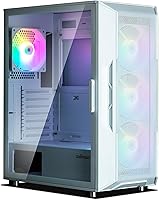
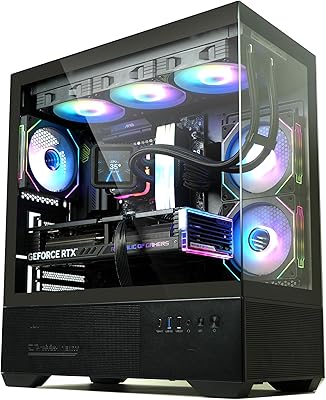
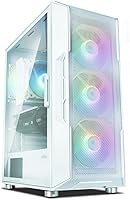
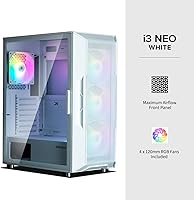
The Zalman i3 NEO ATX Mid Tower PC Case is a white mid-tower that punches above its weight in the looks department, offering dual tempered glass panels at a price point where most competitors give you one at best. Four RGB fans come pre-installed, so you're not staring at an empty, dark chassis the moment you power on. It holds a #209 Best Seller rank in Computer Cases, which speaks to genuine buyer confidence. That said, this is still an entry-level build — there are trade-offs worth knowing before you commit.
Features & Benefits

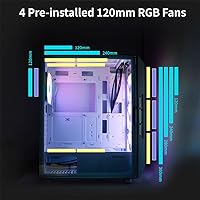
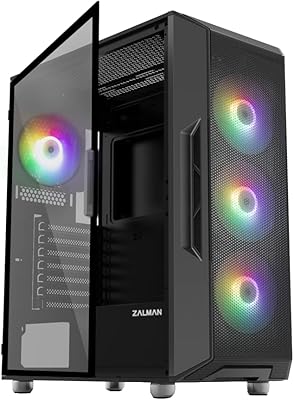
The standout detail is the hinged glass side panel — it swings open like a door rather than sliding off, which makes cable tidying and dust removal noticeably less frustrating during a build. The front panel layers tempered glass over a mesh backing, which helps airflow somewhat, though it won't match a purely mesh-front design. The four included 120mm fans are fixed RGB, meaning they cycle through a static rainbow pattern — not addressable ARGB, so don't expect them to sync with your motherboard's lighting software. Radiator support is genuinely impressive: 360mm up front, 240mm on top, and 120mm at the rear.

Best For

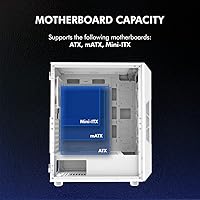
The i3 NEO is a strong fit for first-time builders who want a visually impressive result without a complicated build process. The hinged panel alone reduces frustration during that first awkward cable management session. Budget gamers building around a white aesthetic will appreciate that four fans are already included — that's real money saved. Motherboard compatibility covers ATX, mATX, and Mini-ITX, so you have flexibility on that front. If you're considering a liquid cooling loop down the road, this Zalman chassis handles it without requiring a case swap, which is a smarter long-term call than most cases at this price.

User Feedback

Across over 690 ratings averaging 4.5 out of 5, buyers consistently highlight the hinged glass door as a genuinely practical touch — not a gimmick. The included fans draw praise for their visual impact, particularly in darker rooms. The recurring criticism centers on two things: the plastic components feel lighter than the steel frame implies, and the cable management channel behind the motherboard tray is tighter than ideal for thicker cable runs. A few builders also wish the fans were ARGB-compatible for lighting sync. Minor frustrations overall, but worth factoring in if a clean build or ecosystem lighting control matters to you.

Pros

  • Four pre-installed RGB fans mean you get a light show from the very first boot, no extra spending required.
  • The hinged tempered glass side panel opens like a cabinet door, making mid-build access far less frustrating than sliding panels.
  • Front radiator support up to 360mm is unusually generous for a case at this price tier.
  • Dual tempered glass panels give the i3 NEO a premium showpiece look that most budget competitors cannot match.
  • Magnetic top dust filter and detachable bottom filter make routine maintenance quick and tool-free.
  • ATX, mATX, and Mini-ITX compatibility gives builders flexibility now and room to change direction later.
  • The white finish is clean and consistent, making it easy to build a cohesive white-themed system around.
  • Rubber-cushioned feet reduce desk vibration during normal operation, keeping noise levels manageable at moderate fan speeds.
  • A solid 4.5-star average across nearly 700 verified reviews reflects broad, real-world buyer satisfaction.

Cons

  • The included fans use fixed rainbow RGB only — no ARGB, no software sync, no color customization whatsoever.
  • Rear cable management space is tight enough to cause real difficulty when routing thick or sleeved cable bundles.
  • The tempered glass front panel restricts airflow noticeably compared to fully mesh-fronted cases at similar price points.
  • Plastic trim and interior accents feel lighter and cheaper than the steel frame leads you to expect at unboxing.
  • Only one USB 2.0 port on the top I/O feels dated for a case released in 2023.
  • The hinge and latch mechanism is plastic-based, raising durability questions for builders who open their case frequently.
  • No ARGB controller is included, so lighting cannot be adjusted without a separate motherboard header or controller purchase.
  • Top radiator mounting can conflict with certain PSU or RAM configurations, requiring careful component pre-planning.

Ratings

The Zalman i3 NEO ATX Mid Tower PC Case has been evaluated using AI-driven analysis of verified global buyer reviews, with spam, bot activity, and incentivized feedback actively filtered out. The scores below reflect a balanced picture — genuine strengths and real frustrations both — drawn from hundreds of hands-on builder experiences across skill levels and use cases.
Build Quality
72%
28%
The steel chassis feels solid and holds its shape well during assembly, giving the overall structure a reassuring rigidity. Builders report that the frame handles the weight of larger radiators and heavier GPUs without flexing noticeably.
The plastic accents and interior trims feel noticeably lighter and cheaper than the steel frame implies, which surprises some buyers at unboxing. A few users noted that clips and plastic tabs require careful handling to avoid stress marks during panel removal.
Value for Money
88%
Four pre-installed RGB fans, dual tempered glass panels, magnetic dust filters, and radiator support up to 360mm at this price tier is a genuinely competitive package. Most comparable cases at this price include two fans at best, making the included extras a real saving.
If you want addressable ARGB lighting that syncs with your motherboard ecosystem, you will need to budget for fan replacements, which cuts into the initial savings. Some buyers feel the plastic quality does not fully justify the price when compared to similarly priced competitors with better material consistency.
Airflow Performance
68%
32%
Three front intake fans paired with one rear exhaust create a reasonable positive-pressure airflow configuration out of the box. The mesh backing behind the front glass panel does allow some air movement, and the generous radiator support options mean thermal management can be meaningfully improved with a cooler upgrade.
The tempered glass front panel is a real restriction compared to fully mesh-fronted cases, and experienced builders will notice the difference under sustained loads. Users running high-TDP components reported needing to supplement with aftermarket fans or replace the front panel entirely to achieve adequate cooling.
Aesthetics & Design
91%
The all-white finish combined with dual tempered glass panels gives this chassis a clean, premium appearance that genuinely stands out on a desk. The rainbow RGB fans look striking in a darkened room, and the overall silhouette is modern without being overdone.
The fixed RGB fans cycle through a preset rainbow pattern with no ability to customize colors or sync to software like Armoury Crate or iCUE, which frustrates builders with existing RGB ecosystems. The aesthetic is consistent, but it is locked in — what you see is what you get.
Ease of Assembly
83%
The hinged tempered glass side panel is a standout quality-of-life feature — it opens like a cabinet door, eliminating the fumbling that comes with sliding panels. First-time builders particularly appreciated not having to hold the panel in place while trying to access components.
Cable management space behind the motherboard tray is noticeably tight, and builders with thicker or sleeved cables reported real difficulty routing them cleanly. A few users had to leave side panel cables slightly bowed to get the back panel to close fully.
Radiator & Cooling Support
89%
Support for a 360mm radiator in the front, 240mm on top, and 120mm at the rear is an unusually generous layout for a case at this price point. Builders planning a future liquid cooling upgrade can do so without switching to a more expensive chassis.
Fitting a 360mm front radiator alongside tall RAM sticks or a large CPU cooler can be tight depending on component choice, and a few users flagged clearance issues. Top radiator mounting can also conflict with certain PSU configurations, so pre-planning component layout is necessary.
Cable Management
61%
39%
Pre-routed cable channels and grommets are present and do help guide cables toward cleaner runs. The case offers enough anchor points for tie-downs, and the layout is logical for straightforward ATX builds.
The gap between the motherboard tray and the rear panel is slimmer than average, making it genuinely challenging to hide thick cable bundles or a modular PSU harness. Builders aiming for a tidy, show-quality interior often needed to invest time in careful routing or use thinner aftermarket cables.
Dust Filtration
81%
19%
The magnetic top filter is easy to pop off and rinse without tools, which is exactly the kind of low-friction maintenance feature that gets used regularly. The detachable bottom filter adds meaningful protection for PSU intake dust accumulation over time.
The front panel lacks a dedicated fine-mesh dust filter, which means dust can enter through the front over time despite the fans running. Long-term builders will want to clean the fan blades and front mesh more frequently than a case with full front filtration coverage.
Included Fans
74%
26%
Getting four 120mm RGB fans pre-installed at no extra cost is a tangible benefit, particularly for first builds where budget allocation is tight. The fans spin quietly at typical loads and the rainbow LED effect provides immediate visual reward right after the first power-on.
The fans use fixed RGB rather than addressable ARGB, which means no per-LED control and no compatibility with popular lighting sync platforms. Builders who prioritize a unified lighting theme across all components will likely replace these fans, negating some of the out-of-box value.
I/O Panel Usability
79%
21%
Two USB 3.0 ports on the top panel are fast enough for external drives and peripherals used during a session, and the combined headphone and mic jacks are correctly positioned for daily desktop use. The power and reset buttons have a firm, tactile click that feels reliable.
The inclusion of only one USB 2.0 port feels dated for a case released in 2023, especially since many peripherals — including some wireless dongles and AIO pump headers — still rely on USB 2.0 headers. A second USB 3.0 in place of the USB 2.0 would have been more practical.
Side Panel Quality
86%
The full edge-to-edge tempered glass side panel is genuinely thick and clear, delivering a showcase-quality view of internal components. The hinged mechanism feels smooth and secure, with no wobble or misalignment reported by the vast majority of reviewers.
The hinge pin and latch mechanism, while functional, is plastic-based, and a handful of users reported slight loosening after repeated open-close cycles over months of use. It is not a dealbreaker, but it is a long-term durability question mark for builders who access their case frequently.
Noise Levels
77%
23%
The rubber-cushioned metal feet do a reasonable job of absorbing vibration from the fans and PSU, keeping desk resonance minimal during typical gaming or work sessions. At moderate fan speeds the case runs quietly enough to be unobtrusive in a home office environment.
At full fan speed — particularly with all four RGB fans spinning at max RPM — the noise level increases noticeably and becomes distracting in a quiet room. There is no fan speed controller included, so noise management depends entirely on motherboard fan headers or a separate controller.
Motherboard Compatibility
92%
ATX, mATX, and Mini-ITX support in a single chassis gives builders genuine flexibility, whether they are starting with a compact mATX board or building out a full ATX platform. Standoff placement is clearly labeled, reducing the risk of installation errors for newer builders.
E-ATX motherboards are not supported, which is a non-issue for most buyers but worth noting for anyone planning a HEDT or workstation-class build. The interior layout is optimized around standard ATX sizing, so very large boards with extended VRM zones may have limited clearance near the top edge.
Packaging & Unboxing
78%
22%
The case arrives well-padded with foam inserts that adequately protect the glass panels during shipping, and the pre-installed fans are secured to avoid transit damage. The hardware bag is organized and includes the correct standoffs and screws for the supported form factors.
The manual is minimal and relies heavily on diagrams without detailed written guidance, which can be confusing for first-time builders during radiator or top-panel installation steps. A few buyers reported minor scuffs on the front panel frame suggesting that corner protection could be improved for longer-distance shipping routes.

Suitable for:

The Zalman i3 NEO ATX Mid Tower PC Case is a smart pick for first-time builders who want a visually rewarding result without spending significantly more than the bare minimum. If you are putting together a white-themed gaming or home office rig and want four RGB fans included from day one, this chassis saves you a meaningful separate purchase. It accommodates ATX, mATX, and Mini-ITX motherboards, so it works whether you are starting compact or going full-sized. Builders on a budget who are already eyeing a liquid cooler down the road will also appreciate that the front supports a 360mm radiator — that kind of future-proofing at this price is genuinely uncommon. The hinged glass panel makes it particularly friendly for less experienced builders who expect to be opening the case repeatedly during a first assembly.
Not suitable for:

The Zalman i3 NEO ATX Mid Tower PC Case is the wrong tool if airflow is your top priority — the tempered glass front panel restricts intake airflow compared to mesh-only alternatives, and high-TDP builds will feel that limitation under sustained workloads. Builders who have invested in an ARGB lighting ecosystem will find the included fans incompatible with software like iCUE, Armoury Crate, or MSI Mystic Light, since the fans use fixed-pattern RGB with no per-LED control. If cable management aesthetics matter deeply to you — the kind of clean, fully hidden runs you see in showcase builds — the tight rear clearance will test your patience and possibly your results. Those building workstation-class systems on E-ATX boards need to look elsewhere entirely, as this chassis does not support that form factor. Buyers who prioritize premium material feel throughout will likely be underwhelmed by the plastic accents once the case is in hand.
Specifications

  • Form Factor: ATX Mid Tower configuration supporting standard desktop builds with ample internal clearance for full-sized components.
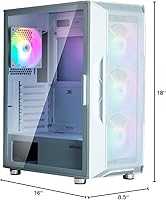
  • Dimensions: The case measures 16.61″ long x 8.62″ wide x 19.06″ tall, providing a substantial but desk-friendly footprint.
  • Weight: Fully assembled unit weighs approximately 11 pounds, reflecting its steel-and-glass construction without excessive bulk.
  • Motherboard Support: Compatible with ATX, mATX, and Mini-ITX motherboard form factors; E-ATX is not supported.
  • Included Fans: Four 120mm fixed RGB LED fans come pre-installed: three mounted at the front as intake and one at the rear as exhaust.
  • Fan Type: Fans use static rainbow RGB lighting and are not addressable ARGB; no per-LED control or software sync is available.
  • Front Radiator: The front panel supports radiators up to 360mm, accommodating dual or triple 120mm radiator configurations.
  • Top Radiator: The top of the chassis supports radiators up to 240mm for additional liquid cooling flexibility.
  • Rear Radiator: A single 120mm radiator or fan can be mounted at the rear exhaust position.
  • Side Panel: The left side panel is full tempered glass with a hinged swing-open design secured by a magnetic latch mechanism.
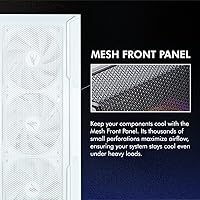
  • Front Panel: The front panel features a tempered glass outer layer over an internal mesh structure to balance aesthetics with airflow.
  • Dust Filters: A magnetic top dust filter allows tool-free removal for cleaning, and a detachable bottom filter protects the PSU intake.
  • Top I/O Ports: The top I/O panel includes two USB 3.0 ports, one USB 2.0 port, a 3.5mm headphone jack, and a microphone jack.
  • PSU Mounting: The power supply mounts at the top of the chassis in a standard ATX orientation.
  • Materials: Construction uses a combination of alloy steel for the frame, tempered glass for side and front panels, and plastic for trim and accents.
  • ARGB Controller: No ARGB controller is included; lighting control requires a compatible motherboard header or a separately purchased controller.
  • Color: Available in White with matching interior finish, designed to support cohesive white-themed builds.
  • GPU Clearance: The interior supports graphics cards up to approximately 380mm in length, accommodating most modern consumer GPUs.
  • CPU Cooler Height: Maximum CPU air cooler height clearance is approximately 155mm, suitable for most mid-range tower coolers.
  • Best Sellers Rank: Ranked #209 in the Computer Cases category on Amazon with an average rating of 4.5 out of 5 across 693 verified ratings.

Related Reviews
Zalman i3 ARGB Vision ATX Mid Tower Gaming PC Case
87%
89%
Cooling Performance
94%
Design & Aesthetics
87%
Ease of Installation
72%
Cable Management
90%
Build Quality
More
Zalman S4 Mid-Tower ATX PC Case
81%
88%
Airflow and Cooling
80%
Build Quality and Materials
92%
Ease of Installation
60%
Acrylic Panel Durability
70%
Cable Management
More
Zalman S3 ATX Mid-Tower PC Case
74%
83%
Value for Money
71%
Build Quality
58%
Airflow & Cooling Performance
86%
Ease of Assembly
67%
Acrylic Side Panel
More
Zalman S2 ATX Mid-Tower PC Case

83%
88%
Cooling Performance
80%
Build Quality
85%
Ease of Setup
70%
Cable Management
92%
Value for Money
More
Zalman Chronix Mid Tower ATX PC Case

78%
88%
Aesthetic Design
74%
Build Quality
83%
Included ARGB Fans
86%
Cooling Potential
84%
Internal Clearance
More
KEDIERS K4 ATX Mid Tower PC Case
80%
91%
Value for Money
93%
Aesthetic Design
74%
Build Quality
72%
Cooling Performance
84%
Ease of Assembly
More
SZSKYING ATX Mid-Tower PC Gaming Case
85%
92%
Cooling Performance
85%
Build Quality
88%
Aesthetic Design
74%
Cable Management
78%
Ease of Setup
More
Vetroo AL800 Mid Tower ATX PC Case
76%
78%
Build Quality
84%
Tempered Glass Panel
76%
Airflow Performance
61%
Fan Included & Expandability
69%
Cable Management
More
Zalman T6 ATX Mid Tower PC Case
71%
83%
Value for Money
67%
Build Quality
71%
Airflow & Cooling
79%
Interior Space & Layout
76%
Cable Management
More
darkFlash DS900 ATX Mid-Tower PC Case

84%
89%
Cooling Performance
88%
Build Quality
91%
Ease of Installation
85%
Design & Aesthetics
92%
Value for Money
More

FAQ

Unfortunately, no. The fans that come with the i3 NEO use fixed rainbow RGB — they cycle through a preset pattern on their own and are not addressable ARGB. That means they will not connect to or sync with software platforms like ASUS Armoury Crate, Corsair iCUE, or MSI Mystic Light. If lighting sync across your build matters to you, you would need to replace the included fans with ARGB-compatible ones.

Yes, and that is one of this chassis's genuine strengths at its price point. The front panel supports a 360mm radiator, which covers triple 120mm fan configurations. You can also fit a 240mm radiator on top or a 120mm at the rear if you prefer a different mounting position. Just double-check clearance with your specific RAM height and motherboard layout before committing to a top-mounted radiator.

It swings open on a hinge attached to the rear of the case, similar to a cabinet door, and closes with a magnetic latch at the front edge. Most users find it noticeably more convenient than sliding panels, especially mid-build when you are opening and closing the case repeatedly. The hinge itself is functional and holds well, though it is a plastic mechanism, so some users report minor loosening after many months of repeated use.

It is on the tighter side — the gap between the motherboard tray and the rear panel is narrower than what you would find in cases built specifically for showcase cable routing. For a first build with standard cables it is manageable, but if you are using a modular PSU with thick cable extensions or sleeved cables, you may have to work harder to get the rear panel to close cleanly. Thin aftermarket cables help significantly.

It supports ATX, mATX, and Mini-ITX motherboards. E-ATX is not compatible, so workstation or HEDT builds on larger boards will need a different chassis. Standoff positions are labeled inside the case, which helps a lot if you are building for the first time.

The front panel can be removed on most versions of this chassis, though it is not designed as a hot-swap feature. Some builders do remove it to improve intake airflow, since the glass-over-mesh front restricts air movement more than a purely open mesh design. If thermal performance is a top priority for your build, this is worth keeping in mind.

Yes, a hardware bag is included with the necessary standoffs and screws for supported motherboard form factors. The packaging also labels which hardware is for which purpose, which is useful if you are unfamiliar with the differences. Just double-check that the standoffs are installed in the correct positions for your specific motherboard size before mounting.

There are two filters: a magnetic top filter that simply lifts off without tools and a detachable bottom filter that slides out for the PSU intake area. Both are straightforward to rinse under water and reattach. The front panel does not have a dedicated fine-mesh filter, so the fan blades themselves will accumulate dust over time and will need occasional cleaning separately.

The case supports graphics cards up to around 380mm in length, which covers the majority of modern consumer GPUs including most RTX 4080 and RX 7900 variants. That said, GPU lengths vary by brand and model, so it is worth confirming your specific card's dimensions before purchasing. Clearance near the front fans is generally not an issue unless you are simultaneously installing a front 360mm radiator.

Fan speed can be controlled through your motherboard's fan headers using standard PWM or DC control, assuming you connect the fans to the appropriate headers. The RGB lighting, however, runs off its own fixed LED circuit and cannot be adjusted — there is no controller in the box and no software interface available. The fans will always display the same rainbow cycle unless you replace them with ARGB fans connected to a compatible controller or motherboard header.