Overview
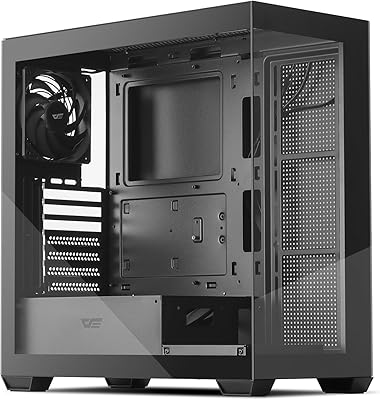
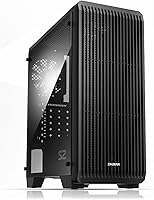
The Zalman S2 ATX Mid-Tower PC Case is Zalman's answer to a persistent question among budget-conscious builders: how much airflow can you realistically get without overspending? Positioned against entry-level offerings from Fractal Design and Cooler Master, this mid-tower competes on value rather than prestige. Its full mesh front panel is the first thing you notice, and it signals the design priority clearly — cooling first, flash second. With a 4.4-star rating across more than 2,400 verified purchases, the community reception is hard to dismiss. Just keep expectations calibrated: this is a capable workhorse, not a showpiece.
Features & Benefits
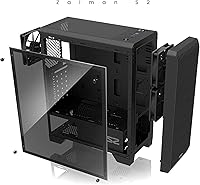
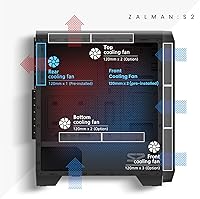
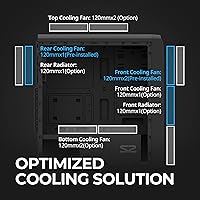
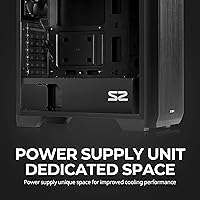
The mesh front panel does real work here — it keeps intake unrestricted, which matters when running a discrete GPU under sustained load. Three 120mm fans come pre-installed, though the actual breakdown is two up front and one at the rear, not three front-mounted as some listings loosely imply. The case supports up to eight fans total, so cooling headroom is genuinely there when you need it. A bottom-mounted PSU shroud tidies up the interior considerably, and magnetic dust filters on the top and bottom reduce the kind of maintenance most builders quietly dread. GPU clearance extends to 330mm, covering most mainstream cards without compromise.
Best For
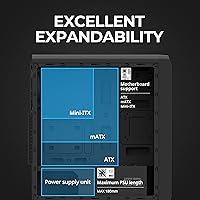
This budget case suits first-time builders who want room to work without the anxiety of a cramped chassis. The interior accommodates ATX, Micro-ATX, and Mini-ITX boards alike, removing one variable from an already involved build decision. If your priority is keeping temperatures manageable on a moderate budget rather than turning heads with RGB lighting, the Zalman S2 makes a strong argument. It also rewards builders who know they will want to add fans or storage later — four drive bays and expansion capacity for eight fans mean you are not locked into a fixed configuration from day one.
User Feedback
Across hundreds of reviews, airflow performance and assembly ease are the two themes that surface most reliably. New builders appreciate the straightforward interior layout, with several noting that cable routing went more smoothly than expected. On the downside, the side panel material draws consistent criticism — it feels noticeably thinner than what competing brands offer at a similar price. A recurring frustration involves the fan count: product copy can imply three pre-installed front fans, when the reality is two front and one rear. Noise is another honest caveat — acceptable for daytime use under typical workloads, but this case was never designed around silence.
Pros
- Full mesh front panel delivers genuinely strong airflow straight out of the box, no modifications needed.
- Three fans come pre-installed, so the build is functional on day one without extra spending.
- Supports up to eight 120mm fans, giving real upgrade headroom as cooling needs grow.
- Broad motherboard compatibility covers ATX, Micro-ATX, and Mini-ITX without adapters or workarounds.
- GPU clearance up to 330mm handles most mainstream and mid-range graphics cards without issue.
- Magnetic dust filters on the top and bottom are easy to remove, clean, and reattach.
- Bottom-mounted PSU shroud keeps cable clutter out of sight and makes the interior look considerably tidier.
- Four drive bays accommodate a reasonable mix of HDDs and SSDs for typical home or office storage needs.
- Assembly is straightforward enough that first-time builders report a smooth, frustration-free experience.
- A 4.4-star rating across more than 2,400 purchases points to consistently solid satisfaction at this price tier.
Cons
- The side panel feels noticeably thin and flexes more than competing cases at a similar price point.
- Product listings imply three front fans pre-installed, but the actual configuration is two front and one rear.
- Noise levels are acceptable but not low — buyers expecting near-silent operation will be disappointed.
- Front I/O offers only a single USB 3.0 port, which feels limiting for modern peripherals and fast storage.
- Interior finishing quality shows its budget origins up close, with rougher edges in places.
- Radiator support exists but is restricted enough to frustrate anyone planning a serious water-cooling loop.
- The minimalist exterior, while clean, offers no visual distinctiveness compared to rivals at the same price.
- Cable management routing options are functional but not as refined as what pricier mid-towers provide.
Ratings
The scores below reflect an AI-driven analysis of verified global buyer reviews for the Zalman S2 ATX Mid-Tower PC Case, with spam, bot-generated, and incentivized submissions actively filtered out to protect accuracy. Each category captures both the genuine strengths and the honest frustrations that real builders experienced — nothing is softened, and nothing is inflated. Whether this mid-tower earns a place in your build or falls short of your needs, the data tells the full story.
Airflow Performance
Build Quality
Value for Money
Ease of Assembly
Cooling Expandability
Noise Level
Dust Management
Cable Management
Storage Options
Front I/O Ports
Aesthetic Design
Compatibility Range
Packaging & Unboxing
Suitable for:
The Zalman S2 ATX Mid-Tower PC Case is a smart pick for anyone building their first desktop PC on a controlled budget and who does not want to immediately spend extra money on additional cooling hardware. It works particularly well for home office builds and light gaming rigs where sustained, reliable airflow matters more than visual flair or premium materials. Builders pairing a mainstream GPU — anything up to 330mm in length — will find the thermal headroom adequate without needing to add fans right away. The broad motherboard compatibility across ATX, Micro-ATX, and Mini-ITX also makes this mid-tower a practical choice for builders who have not yet finalized their component list and want flexibility. Anyone who appreciates a clean, understated aesthetic over RGB-heavy tempered glass designs will feel right at home here, and the expandable fan support means the case can grow alongside future upgrades without forcing a chassis swap.
Not suitable for:
The Zalman S2 ATX Mid-Tower PC Case is genuinely not the right fit for builders prioritizing build quality feel and premium materials, since the side panel and some interior finishing will feel noticeably thin compared to offerings from Fractal Design or be a Cooler Master case in the same price neighborhood. Enthusiast builders running high-TDP components — particularly power-hungry CPU and GPU combinations that demand aggressive cooling — may find the stock fan setup insufficient and will need to budget for additional fans immediately. This is also not the case for anyone who wants a near-silent workstation; the included fans keep noise at a workable daytime level, but they are not optimized for low-noise operation. If water cooling is part of your build plan, the radiator support, while present, is limited enough that a more cooling-focused chassis would serve you better. Finally, builders who care deeply about showcasing components through a large glass panel will find the Zalman S2 underwhelming in that department.
Specifications
- Form Factor: ATX Mid-Tower chassis compatible with full ATX, Micro-ATX, and Mini-ITX motherboards.
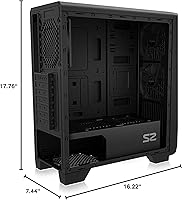
- Dimensions: The case measures 412 x 189 x 451 mm (L x W x H), offering a compact footprint without sacrificing internal workspace.
- Weight: Shipping weight is approximately 4 kg, which is typical for a steel-framed mid-tower at this price tier.
- Materials: Construction uses a combination of alloy steel, metal, and plastic, with the front panel featuring a dedicated mesh section.
- Pre-Installed Fans: Two 120mm fans are mounted at the front intake and one 120mm fan at the rear exhaust, all included at no additional cost.
- Fan Support: The chassis supports up to eight 120mm fans across front, rear, top, and bottom positions for extensive cooling flexibility.
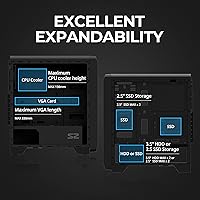
- GPU Clearance: Graphics cards up to 330mm in length are supported, covering the vast majority of current mainstream and mid-range GPUs.
- Drive Bays: Four universal bays accommodate either 3.5-inch HDDs or 2.5-inch SSDs, allowing flexible storage configurations.
- Expansion Slots: Seven PCI expansion slots provide ample room for multi-GPU setups, sound cards, or other add-in cards.
- Front Panel: A full mesh front panel is used to maximize unrestricted airflow into the case without requiring aftermarket modification.
- PSU Mount: The power supply is bottom-mounted behind a dedicated shroud, separating it from the main motherboard area for a cleaner layout.
- Dust Filters: Magnetic dust filters are fitted on both the top and bottom of the chassis, removable without tools for quick cleaning.
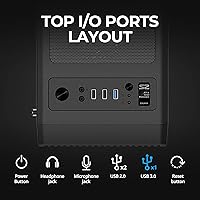
- USB Ports: The front I/O provides one USB 3.0 port and two USB 2.0 ports for everyday peripheral connectivity.
- Audio I/O: Dedicated 3.5mm headphone and microphone jacks are included on the front panel for direct audio device connection.
- Radiator Support: The front supports up to a 360mm radiator configuration (3 x 120mm), while the rear accommodates a single 120mm radiator.
- Cooling Method: Cooling is entirely air-based using the included and optional fans; liquid cooling is supported only through compatible radiator mounts.
- Front I/O Controls: The front panel includes dedicated power, reset, and LED control buttons alongside the USB and audio connectors.
Related Reviews

Zalman S4 Mid-Tower ATX PC Case

Zalman S3 ATX Mid-Tower PC Case
Zalman Chronix Mid Tower ATX PC Case
Zalman i3 NEO ATX Mid Tower PC Case
Zalman i3 Neo ATX Mid Tower PC Case
Zalman T6 ATX Mid Tower PC Case

KEDIERS K4 ATX Mid Tower PC Case

SAMA S40 Mid Tower ATX PC Case

Vetroo AL800 Mid Tower ATX PC Case