Overview

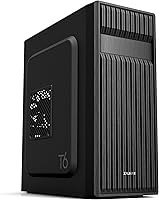
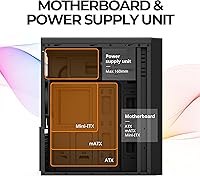
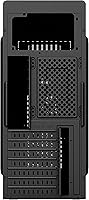
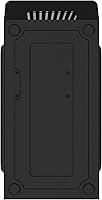
The Zalman T6 ATX Mid Tower PC Case is a straightforward, budget-oriented enclosure that targets first-time builders and anyone setting up a home office rig without overspending. It arrives looking tidier than the price suggests — the hairline-patterned mesh panels on the front and side give it a more modern appearance than most bare-bones cases at this tier. The steel chassis feels solid enough for everyday use. It supports ATX, mATX, and mini-ITX motherboards, covering most standard builds. One important caveat before you buy: if your ATX motherboard has side-facing SATA ports, they will physically conflict with the case interior, so check your board’s spec sheet carefully.

Features & Benefits

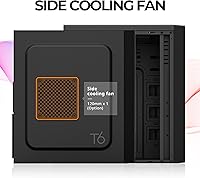
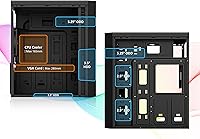
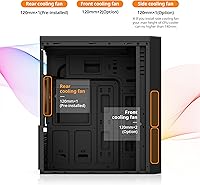
The T6 ships with one rear 120mm fan pre-installed, which means air is moving through the system from day one without extra cost. The mesh panels on the front and side aren’t purely decorative — they support passive airflow that helps that single fan do more. You can expand to four fans total, adding two up front and one on the side. The powder-coated steel chassis resists corrosion and holds its shape under heat. Storage flexibility is solid: two dedicated SSD bays, two combo 3.5/2.5-inch bays, and an optical drive bay. GPU clearance reaches 280mm and CPU coolers up to 165mm tall will clear without issue.

Best For

This mid-tower case makes the most sense for first-time PC builders who want room to work without a cramped interior. It’s particularly well-suited to home office and gaming setups built around standard ATX or mATX motherboards, where the extra interior space and airflow headroom actually pay off. If you still need an optical drive bay — increasingly rare at this price tier — the T6 is one of the few current options that still includes one. It’s also a solid pick for a secondary or budget spare build. Builders with GPUs longer than 280mm or ambitious cooling rigs will find the clearances limiting. Think of it as a capable starter enclosure, not a long-term flagship.

User Feedback

Buyers consistently praise the T6’s roomy interior, noting that cable management is easier than expected for a case in this category. The included rear fan works right out of the box, which earns goodwill with builders who don’t want to spend more immediately. On the downside, the single front USB 3.0 port gets regular complaints — most users expected at least two by now. A handful of reviewers flag the side panels as feeling thin under any real pressure. The SATA port conflict is the most frequently cited frustration: several buyers discovered the incompatibility only after completing a full build, which is an avoidable mistake with a quick spec check beforehand. Overall, this Zalman enclosure earns its reputation as a reliable first-build case, not a long-term keeper.

Pros

  • Broad motherboard compatibility covers ATX, mATX, and mini-ITX without any adapters or workarounds.
  • The included rear 120mm fan is functional right out of the box, saving you an immediate extra purchase.
  • Mesh front and side panels encourage passive airflow even before additional fans are installed.
  • Roomy interior makes cable routing and component installation noticeably easier for beginner builders.
  • Seven PCI expansion slots give plenty of flexibility for multi-card or expansion configurations.
  • An optical drive bay is included, which is increasingly hard to find in budget cases today.
  • The powder-coated steel chassis handles everyday heat and use without visible warping or rust concerns.
  • Four drive bays in total offer solid storage flexibility for a mix of SSDs and traditional hard drives.
  • At its price point, the T6 competes well against similar bare-bones enclosures from comparable brands.
  • Clean mesh aesthetic looks more modern than most cases in its budget category.

Cons

  • Only one front USB 3.0 port is included, which feels genuinely limiting for day-to-day desktop use.
  • ATX boards with side-facing SATA ports are physically incompatible, a dealbreaker that surprises too many buyers post-build.
  • Side panels feel noticeably thin and flex under light pressure, undermining confidence in long-term durability.
  • Maximum GPU clearance of 280mm rules out many popular high-performance graphics cards right out of the box.
  • No tempered glass panel option means there is no way to showcase internal components if that matters to you.
  • The stock rear fan is the only one included, so achieving balanced airflow requires buying additional fans separately.
  • Front I/O lacks a USB-C port entirely, which is an increasingly common omission that will age the case quickly.
  • PSU clearance tops out at 160mm, which may exclude some full-size power supplies from larger brands.
  • Build rigidity at stress points like corners and panel edges is modest compared to cases even slightly above this price tier.

Ratings

The scores below reflect an AI-driven analysis of verified global user reviews for the Zalman T6 ATX Mid Tower PC Case, with spam, bot-generated, and incentivized feedback actively filtered out before any scoring was applied. Ratings span both the strengths buyers consistently celebrate and the real frustrations that surfaced across thousands of honest accounts. Nothing has been smoothed over — if a category drew complaints, the score reflects it.

Value for Money
83%
For a budget-tier enclosure, buyers consistently feel they are getting more than they paid for. The combination of steel construction, mesh ventilation, a pre-installed fan, and broad motherboard support makes the T6 a genuinely competitive option when compared to similarly priced competitors that often ship without any included fans.
A few buyers noted that slightly stretching the budget opens up cases with better panel rigidity and more front USB ports, which makes the value argument feel less airtight for anyone who can afford to spend a little more.
Build Quality
67%
33%
The powder-coated steel chassis holds its shape well under normal desktop use and shows no signs of warping even after extended periods running warm components. Most buyers found the overall frame acceptably rigid for a case in this price bracket.
The side panels are a recurring complaint — they flex noticeably under light hand pressure and feel thinner than the frame itself. Several users described the panel fit as slightly loose at the edges, which becomes more noticeable over time with repeated removal.
Airflow & Cooling
71%
29%
The hairline-patterned mesh on both the front and side panels provides meaningful passive airflow that keeps baseline thermals reasonable even with just the stock fan running. Builders who added two front intake fans reported a solid temperature improvement without spending much.
The single included rear fan is not enough for any build running a mid-range or higher GPU under sustained load. Buyers expecting adequate cooling out of the box with demanding components were often disappointed, and the front mesh lacks a proper dust filter on some units.
Interior Space & Layout
79%
21%
First-time builders especially appreciate how roomy the interior feels relative to the case footprint. There is enough clearance around the motherboard tray to route cables without fighting for space, and the drive bay arrangement makes storage installation straightforward even for inexperienced hands.
The maximum GPU length of 280mm is a meaningful constraint that rules out several popular higher-end cards. Builders who later upgraded their GPU sometimes found themselves shopping for a new case sooner than expected because of this clearance ceiling.
Cable Management
76%
24%
Buyers regularly called out cable management as one of the more pleasant surprises about this enclosure. The routing channels and tie-off points are well-positioned for the price tier, and most builders reported achieving a cleaner result than they anticipated for a first build.
The cable management cutouts behind the motherboard tray are workable but not generous, and the rear channel depth is shallow enough that stuffing thicker cable bundles becomes awkward. Users doing high-count storage builds flagged this more often than those running minimal drives.
Compatibility
62%
38%
Supporting ATX, mATX, and mini-ITX motherboards in a single chassis is a genuine practical advantage, and most standard builds slot in without issue. The seven PCI expansion slots and flexible drive bay mix also mean most component combinations work without creative workarounds.
The side-facing SATA port incompatibility is a well-documented pain point that caught a meaningful number of buyers off guard after completing their builds. This is not a rare edge case — certain popular budget and mid-range ATX boards are affected, and discovering it post-assembly is genuinely frustrating.
Front I/O
54%
46%
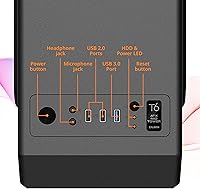
Having both a headphone and a dedicated microphone jack on the front panel is a small but appreciated touch that many competing budget cases skip entirely. The port placement is accessible and at a convenient height for desktop use.
A single USB 3.0 port on the front panel is the most cited complaint across all reviews, and it is hard to argue against. There is no USB-C, the two USB 2.0 ports feel like a throwback, and users who regularly plug in drives, headsets, or controllers at the front quickly find the I/O limiting.
Fan Support & Expansion
73%
27%
Supporting four 120mm fans across the front, rear, and side positions gives builders a reasonable upgrade path without needing to modify the case. The side panel fan slot in particular is an uncommon inclusion at this price level and helps with direct GPU cooling.
None of the fan mounting positions support 140mm fans, which limits options for buyers who prefer quieter, higher-volume airflow setups. The front fan mounts also lack any integrated dust filter, meaning dust accumulation on intake fans becomes a maintenance issue over time.
Ease of Assembly
81%
19%
The spacious interior and logical component layout make this one of the more approachable cases for someone building a PC for the first time. Standoff positions are clearly marked, and the drive bay system is simple enough that most builders completed their first install without consulting a manual.
The side panel can be fiddly to reinstall correctly after the build is done, with alignment requiring a bit of patience. A small number of buyers also noted that the included hardware bag was light on spare screws, which matters if any are dropped during assembly.
Aesthetics
69%
31%
The hairline mesh pattern gives the T6 a cleaner, more modern look than the plain perforated steel fronts common on similarly priced competitors. The all-black powder coat finish is consistently applied and looks presentable in a home office or on a desk.
Without a tempered glass option or any RGB support built in, the exterior is purely functional. Builders who want to showcase their components or add lighting effects will find the T6 limiting, and the mesh panels do not photograph as impressively as glass-paneled alternatives.
Noise Levels
74%
26%
With just the single stock fan running, the case is genuinely quiet during light tasks and idle periods. Several buyers who use their build as a home office workstation noted they rarely notice the fan noise during normal productivity use.
Because the mesh panels are open by design, there is no sound dampening material anywhere in the case. Once additional fans are added or a GPU fan spins up under load, noise levels rise faster than in cases with thicker or dampened panels.
Storage Options
77%
23%
The drive bay mix is thoughtfully laid out for a budget case, offering two SSD-only 2.5-inch bays, two combo bays that accept either 2.5-inch or 3.5-inch drives, and a full 5.25-inch optical bay that has become a rarity at this price point.
The 3.5-inch bays are mounted in a fixed cage without tool-free installation, which adds minor friction during drives swaps compared to cases with removable or modular bay systems. Builders running four or more drives may also find the layout less flexible than they would like.
Durability Over Time
65%
35%
The steel frame itself holds up reliably over extended use, and the powder coating shows no signs of chipping or peeling under normal handling conditions. Buyers using the T6 as a secondary build machine for two or more years generally reported no structural issues with the main chassis.
The thin side panels are the primary durability concern — repeated removal for upgrades or cleaning causes them to develop minor warping along the edges over time. Buyers who access their case interior frequently reported that panel alignment gets slightly worse with each reinstall.
Dust Management
58%
42%
The mesh side panel does allow some airflow to pass without restriction, and the rear fan position naturally exhausts warm air, which reduces overall dust settling on internal components compared to fully enclosed cases.
There is no integrated dust filter on the front intake positions, which is a noticeable omission. Fine dust accumulates on fan blades and heatsinks faster than in cases with filtered intakes, meaning buyers need to clean the interior more frequently to maintain airflow performance.

Suitable for:

The Zalman T6 ATX Mid Tower PC Case is a practical choice for first-time builders who want a spacious, forgiving interior without spending a lot on the enclosure itself. If your priority is getting a functional, airflow-friendly chassis that supports a wide range of standard ATX, mATX, or mini-ITX motherboards, this mid-tower case delivers exactly that without unnecessary extras. It works well for home office builds, light gaming rigs, and anyone assembling a secondary PC on a tight budget. Builders who still rely on an optical drive will appreciate that the T6 includes a 5.25-inch ODD bay, a feature that has quietly disappeared from most competing cases at this price tier. If you are pairing it with a mid-range GPU under 280mm and a standard tower cooler, the clearances are comfortable and the build process is straightforward.

Not suitable for:

The Zalman T6 ATX Mid Tower PC Case is not the right fit for builders who want a polished, long-term flagship enclosure. If your ATX motherboard has side-facing SATA ports, this Zalman enclosure will cause a physical conflict that no amount of cable creativity will fix, so board compatibility is a hard requirement to verify before purchasing. Enthusiast builders chasing high airflow with multiple large fans, 280mm-plus GPUs, or tall aftermarket coolers over 165mm will quickly run into the T6’s hardware limits. The single front USB 3.0 port is a real daily inconvenience for anyone who regularly transfers files or connects peripherals at the front panel. Those who value rigid panel construction or premium fit and finish should also look elsewhere, as the side panels draw consistent criticism for feeling thin under handling pressure.

Specifications

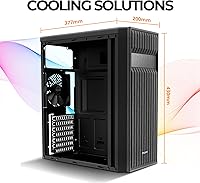
  • Form Factor: The T6 is a standard ATX Mid-Tower enclosure measuring 377mm deep, 200mm wide, and 430mm tall.
  • Weight: The chassis weighs approximately 2.82 kg (around 8 lbs) unloaded, which is typical for steel mid-tower cases in this category.
  • Motherboard Support: Compatible with ATX, mATX, and mini-ITX motherboards, though ATX boards with side-facing SATA ports will not physically fit.
  • Chassis Material: The entire frame is constructed from powder-coated steel, which provides corrosion resistance and structural stability under normal operating heat.
  • Panel Design: Both the front and side panels feature a hairline-patterned mesh design that promotes passive airflow without requiring fans to be spinning.
  • Included Fans: One 120mm fan comes pre-installed at the rear exhaust position, ready to use immediately after assembly.
  • Fan Support: The case supports up to four 120mm fans in total: two at the front intake, one at the rear exhaust, and one on the side panel.
  • GPU Clearance: Graphics cards up to 280mm in length are supported, which accommodates most mid-range but not high-end full-length GPUs.
  • CPU Cooler Height: Tower-style CPU coolers up to 165mm tall will fit inside the chassis without contacting the side panel.
  • PSU Clearance: Power supply units up to 160mm in length are supported; longer full-tower PSUs may not seat correctly.
  • Drive Bays: Storage options include two dedicated 2.5-inch SSD bays, two combo 3.5-inch or 2.5-inch bays, and one 5.25-inch optical drive bay.
  • Expansion Slots: Seven PCI expansion slots are available along the rear of the case, supporting multi-card and standard single-GPU configurations.
  • Front I/O Ports: The front panel provides one USB 3.0 port, two USB 2.0 ports, a dedicated headphone jack, and a separate microphone jack.
  • Color: The T6 is available in black only, with the powder-coat finish applied consistently across the full exterior chassis.
  • Product Age: This case was first made available in January 2019, giving it several years of real-world user reviews and community build logs to reference.

Related Reviews

Zalman S3 ATX Mid-Tower PC Case
74%
83%
Value for Money
71%
Build Quality
58%
Airflow & Cooling Performance
86%
Ease of Assembly
67%
Acrylic Side Panel
More
Zalman S2 ATX Mid-Tower PC Case

83%
88%
Cooling Performance
80%
Build Quality
85%
Ease of Setup
70%
Cable Management
92%
Value for Money
More
Zalman S4 Mid-Tower ATX PC Case
81%
88%
Airflow and Cooling
80%
Build Quality and Materials
92%
Ease of Installation
60%
Acrylic Panel Durability
70%
Cable Management
More
Zalman Chronix Mid Tower ATX PC Case
78%
88%
Aesthetic Design
74%
Build Quality
83%
Included ARGB Fans
86%
Cooling Potential
84%
Internal Clearance
More
Zalman i3 NEO ATX Mid Tower PC Case
80%
72%
Build Quality
88%
Value for Money
68%
Airflow Performance
91%
Aesthetics & Design
83%
Ease of Assembly
More
Zalman i3 ARGB Vision ATX Mid Tower Gaming PC Case
87%
89%
Cooling Performance
94%
Design & Aesthetics
87%
Ease of Installation
72%
Cable Management
90%
Build Quality
More
KEDIERS K4 ATX Mid Tower PC Case

80%
91%
Value for Money
93%
Aesthetic Design
74%
Build Quality
72%
Cooling Performance
84%
Ease of Assembly
More
Vetroo AL800 Mid Tower ATX PC Case

76%
78%
Build Quality
84%
Tempered Glass Panel
76%
Airflow Performance
61%
Fan Included & Expandability
69%
Cable Management
More
SZSKYING ATX Mid-Tower PC Gaming Case
85%
92%
Cooling Performance
85%
Build Quality
88%
Aesthetic Design
74%
Cable Management
78%
Ease of Setup
More
SAMA S40 Mid Tower ATX PC Case
79%
88%
Airflow Performance
83%
Included Fan Quality
79%
Build Quality & Finish
92%
GPU Compatibility
61%
Cable Management
More

FAQ

Most standard ATX boards will fit just fine, but there is one important exception: if your board has SATA ports that face sideways rather than upward, they will physically conflict with the interior of the case and prevent proper installation. Always check your motherboard’s spec sheet before ordering.

The Zalman T6 ATX Mid Tower PC Case supports up to four 120mm fans in total. The positions are two at the front for intake, one at the rear for exhaust (which comes pre-installed), and one on the side panel. You will need to purchase any additional fans separately, as only the rear unit is included.

The single rear fan provides baseline exhaust airflow, which is enough for a modest office or entry-level gaming build. For anything more demanding, like a mid-range GPU running under load for extended periods, adding at least one or two front intake fans is strongly recommended. Think of the stock fan as a starting point, not a complete thermal setup.

It depends on the specific model and brand. The maximum GPU length supported is 280mm, and many popular mid-range cards fall right around or below that limit. Before buying, check the exact length listed in your GPU’s specifications, not just the chip family, because different board partners often produce cards of varying lengths.

No, the side panel is a mesh steel panel, not tempered glass. If showing off your build’s internals is a priority, this mid-tower case is not the right pick. The mesh design does help with airflow, but there is no option to upgrade to a glass panel.

No, the front I/O does not include a USB-C port. You get one USB 3.0 and two USB 2.0 ports along with audio jacks. For a case first released in 2019, that was fairly standard, but it is worth knowing upfront if you regularly use USB-C peripherals.

Most first-time builders find the interior quite manageable. The chassis is roomy for its footprint, cable routing is straightforward, and there is enough clearance around the motherboard tray to work without feeling cramped. It is one of the reasons the T6 tends to show up on beginner build recommendation lists.

Yes, there is one 5.25-inch external bay that accepts a standard optical drive. This feature has become rare in budget cases, so if you still use disc media for software, backups, or media playback, this Zalman enclosure is one of the few current options that still accommodates it.

Yes, unfortunately that is a consistent observation from buyers. The powder-coated steel is functional and handles heat well, but the side panel thickness is on the lighter side compared to cases at slightly higher price points. It does not affect performance, but it is a noticeable trade-off for the budget price.

It is actually one of the more practical options for exactly that use case. The broad motherboard compatibility, included fan, and multiple drive bays mean you can repurpose older components without running into many compatibility walls. Most experienced builders who own one tend to use it as a secondary workhorse rather than a main rig.