Overview

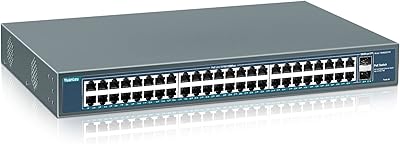
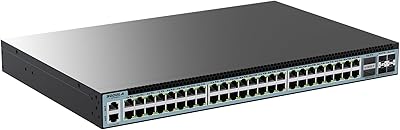
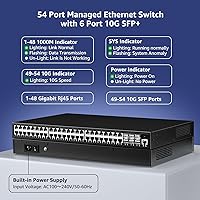
The YuanLey YS48060GSM 48-Port Managed Network Switch entered the market in late 2023 as a compelling budget alternative to established names like Cisco and Netgear for businesses that need real managed switching without the enterprise price tag. You get 48 Gigabit RJ45 ports alongside 6 SFP+ uplink slots running at 10G, which is a genuinely strong combination at this price point. The fanless metal chassis fits a standard 1U rack slot, making it practical for small server closets or quiet office environments where fan noise would be disruptive. It holds a solid rank in networking switch bestseller lists, which suggests steady adoption rather than hype.
Features & Benefits

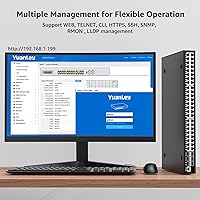
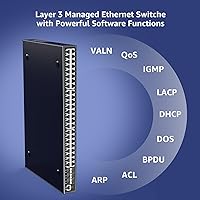
This 48-port L3 switch covers the management bases that actually matter for growing networks. VLAN segmentation via IEEE 802.1Q, QoS prioritization, and IGMP snooping let you shape traffic meaningfully across dozens of connected devices. The switching backplane handles the throughput you would expect from a fully loaded port count without becoming a bottleneck. Security features are notably thorough for the price tier, including 802.1X port authentication, ARP protection, IP source guard, and quadruple binding of IP, MAC, VLAN, and port. Spanning tree protocols cover STP, RSTP, and MSTP. Management access spans a Web GUI, CLI via Console or Telnet, and SNMP v1, v2, and v3, which accommodates both beginners and experienced network admins.

Best For

This YuanLey managed switch is a natural fit for SMB IT administrators who need genuine L3 functionality but cannot justify the cost of Cisco Catalyst or comparable Netgear hardware at this port count. Schools, hotels, and internet cafes will find the VLAN and multicast controls particularly useful for segmenting guest, staff, and internal traffic. Home lab users stepping up from unmanaged hardware will appreciate having real CLI access and SNMP support to practice on. The fanless design is a quiet but practical advantage for installations in open offices or small network closets. Network engineers connecting edge workgroups to a 10G core switch will also find the uplink slots put to good use.

User Feedback

Buyers consistently highlight the value-per-port ratio as the strongest argument for choosing the YS48060GSM over pricier alternatives, and the build quality of the metal chassis draws positive remarks given the price. The web interface gets mixed but generally favorable notes, with less experienced admins finding it approachable after a short learning curve. The recurring criticism, and it is worth taking seriously, is that the documentation is thin and the English-language support resources can feel inadequate when troubleshooting edge cases. Compatibility with Cisco and Netgear infrastructure has been reported as functional in most cases, though YuanLey is a lesser-known brand and long-term firmware support remains an open question.

Pros

  • 48 Gigabit ports plus six 10G SFP+ uplinks in a single 1U chassis is a strong combination at this price point.
  • Full L3 managed switching with VLAN, QoS, ACL, and IGMP snooping covers most SMB network requirements thoroughly.
  • The fanless design keeps the rack quiet, which matters in offices and small server closets where noise is a real issue.
  • 802.1X authentication, ARP protection, and IP source guard give this switch a security posture well above its price class.
  • Web GUI, CLI via console and Telnet, and SNMP v1, v2, and v3 support accommodate admins of varying skill levels.
  • STP, RSTP, and MSTP support alongside link aggregation provides meaningful redundancy options for growing networks.
  • IEEE 802.3az Energy Efficient Ethernet reduces idle power draw automatically, with no configuration required.
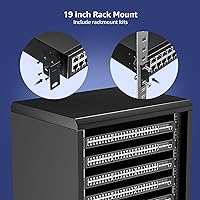
  • Solid all-metal chassis feels durable and installs cleanly into standard 19-inch racks with included mounting hardware.
  • Buyers consistently report the value-per-port ratio as difficult to beat when comparing against name-brand alternatives.

Cons

  • Documentation is thin and poorly translated, making complex configuration tasks harder than they need to be.
  • No SSH support for remote CLI access is a genuine security gap in compliance-sensitive environments.
  • CLI syntax is not Cisco IOS-compatible, which creates a real learning curve for admins coming from Cisco environments.
  • Long-term firmware support is unproven, and YuanLey has no meaningful public update history or community forum.
  • Third-party and older Cisco SFP transceivers occasionally fail to register correctly, limiting uplink flexibility.
  • The web interface has reported session timeout issues and inconsistent behavior when applying advanced configurations.
  • Passive cooling can become a concern under sustained full-port loads, particularly in warm or poorly ventilated spaces.
  • Inter-VLAN routing configuration through the GUI is unintuitive and often requires CLI workarounds to complete.
  • No dedicated vendor support channel or knowledge base means troubleshooting complex issues relies heavily on community forums.
  • Limited visibility into per-port energy and traffic data makes the switch poorly suited for detailed network auditing tasks.

Ratings

The scores below for the YuanLey YS48060GSM 48-Port Managed Network Switch were generated by AI after analyzing verified buyer reviews from multiple global marketplaces, with automated filtering applied to remove incentivized, bot-generated, and duplicate submissions. The result is an honest cross-section of real-world deployment experiences from SMB IT admins, home lab enthusiasts, and network engineers. Both the genuine strengths and the friction points buyers actually encountered are reflected without softening either side.
Value for Money
93%
Buyers repeatedly call this the strongest argument for choosing the YS48060GSM over Cisco or Netgear hardware at a comparable port count. Getting 48 Gigabit ports plus six 10G SFP+ uplinks with full L3 management at this price tier is genuinely difficult to match, and most purchasers felt they got more than they paid for.
A small number of buyers temper their enthusiasm by noting that the long-term cost calculation changes if firmware support stalls or hardware fails outside warranty, since YuanLey lacks the established service infrastructure of name-brand vendors. For mission-critical deployments, that residual uncertainty is real.
Port Density & Uplink Capacity
91%
The combination of 48 Gigabit access ports and six 10G SFP+ uplinks in a single 1U chassis is a practical win for network engineers connecting edge workgroups to a faster core switch. Users deploying this in schools or hotels appreciate not needing a second switch just to handle uplink bandwidth.
A few buyers noted that all six SFP+ slots being used simultaneously while the RJ45 ports run at full load can push the unit warm, which is more noticeable given the fanless design. Port spacing is workable but not generous if you are running thick patch cables in a dense rack.
L3 Routing & VLAN Support
86%
Users who needed proper VLAN segmentation for guest networks, staff systems, and IoT devices found the IEEE 802.1Q implementation reliable and flexible. IGMP snooping and multicast VLAN support are features that typically cost significantly more elsewhere, and admins running VoIP alongside data traffic appreciated the voice VLAN option.
A recurring complaint is that configuring inter-VLAN routing through the web interface is not as intuitive as it should be for users coming from Netgear ProSAFE or similar. Getting L3 routing fully operational often required consulting community forums rather than the included documentation.
Web Management Interface
74%
26%
The GUI is clean and reasonably organized for basic tasks like port configuration, VLAN setup, and monitoring. Non-specialist admins in small business environments generally found it accessible after a short familiarization period, and the visual layout avoids unnecessary complexity for day-to-day management.
Advanced configurations, particularly around ACLs and spanning tree, feel underdeveloped in the web UI and often require dropping into CLI to complete properly. Some users reported occasional session timeouts and inconsistent behavior when applying changes, which erodes confidence during initial setup.
Documentation & Support Resources
52%
48%
The included user manual covers the physical installation and basic configuration steps adequately for getting the switch online quickly. Users who stuck to standard use cases like simple VLAN deployment or basic QoS generally found enough guidance to proceed without external help.
This is the most consistent complaint across all buyer segments. The English-language documentation is thin, often translated awkwardly, and lacks the depth that managed switch configuration genuinely requires. YuanLey has no meaningful community forum or knowledge base, so buyers troubleshooting edge cases are largely on their own.
Build Quality & Chassis
83%
The all-metal chassis feels solid and appropriately heavy for a 1U rack unit, and buyers installing this in small server rooms noted it does not feel like a budget product once physically in hand. Rack mount hardware is included and the fit in standard 19-inch racks is reported as clean.
The port labeling is small and can be hard to read under typical rack lighting conditions. A couple of buyers flagged that the SFP+ cage tolerances feel slightly looser than name-brand equivalents, though no functional issues were attributed to this in the reviews examined.
Thermal Management & Noise
81%
19%
The fanless design is a genuine practical advantage for installations in open offices, reception areas, or small closets where fan noise would be intrusive. Under typical mixed loads, the chassis stays warm but not alarmingly hot, and buyers in moderate-temperature environments have not reported thermal shutdowns.
In warmer climates or high-density rack environments without active airflow, the passive cooling strategy becomes a concern. A handful of buyers in hotter regions reported the unit running noticeably hot under sustained full-port utilization, and long-term thermal wear on passive-cooled hardware is an open question.
Security Feature Set
84%
The inclusion of 802.1X port authentication, IP source guard, ARP protection, and quadruple binding gives this switch a security posture that punches above its price class. Network admins deploying this in schools or public-access environments found these controls meaningful for locking down unauthorized devices.
While the features are present, the configuration process for the security stack is not well-documented, and users who are not already familiar with enterprise switch security concepts may struggle to enable and verify them correctly. The gap between having a feature and using it confidently is wider here than on name-brand hardware.
CLI & SNMP Management
79%
21%
Network professionals and home lab users appreciated having real CLI access via console and Telnet, along with full SNMP v1, v2, and v3 support for integration into monitoring platforms like PRTG or LibreNMS. For those who prefer command-line workflows, the CLI feels more reliable than the web GUI for complex tasks.
The CLI command syntax is not Cisco IOS-compatible despite the product listing implying broad compatibility, which can trip up admins who default to muscle memory from Cisco environments. Telnet-only CLI access is also a security concern for anyone who would prefer SSH as the exclusive remote management method.
Spanning Tree & Link Aggregation
77%
23%
Support for STP, RSTP, and MSTP alongside both static and dynamic LACP aggregation is a meaningful feature set for building redundant small business networks. Users connecting this switch to existing infrastructure with redundant uplinks found the spanning tree implementation functional and stable after initial configuration.
Getting MSTP configured correctly across a mixed-vendor environment took more trial and error than buyers expected, and the documentation offers almost no guidance on multi-vendor spanning tree scenarios. Dynamic aggregation using LACP worked reliably in same-brand setups but required careful manual tuning when pairing with Cisco or Netgear gear.
Compatibility with Third-Party Hardware
72%
28%
Most buyers running this switch alongside Cisco or Netgear infrastructure reported that standard protocols like VLAN trunking, LACP, and RSTP interoperated without fundamental issues. For straightforward mixed-vendor environments, the YS48060GSM behaves as a standards-compliant device in the majority of reported use cases.
Edge cases involving advanced MSTP topologies or specific Cisco proprietary features exposed compatibility gaps that took significant troubleshooting to resolve. SFP module compatibility is also not universal, and buyers using third-party or older Cisco SFP transceivers occasionally reported detection issues.
Setup & Initial Configuration Experience
63%
37%
Getting the switch physically installed and connected to a network is straightforward, and basic functionality such as port connectivity and simple VLAN tagging can be achieved relatively quickly for users with prior managed switch experience. The web interface loads promptly and the initial login process is uncomplicated.
For buyers without prior experience on managed switches, the initial setup curve is steep and the documentation does not bridge that gap adequately. Several reviewers noted spending multiple hours on configuration tasks that should have taken thirty minutes if decent setup guides were available.
Energy Efficiency
82%
18%
IEEE 802.3az Energy Efficient Ethernet kicks in automatically on idle ports, which is a practical benefit in environments where many ports sit unused for extended periods. Buyers running this in offices that power down workstations overnight noticed the switch draws noticeably less power during off-peak hours without any manual intervention.
There is limited visibility into per-port power consumption data through the management interface, so buyers hoping to use this for detailed energy auditing will find the reporting too basic. The efficiency gains are real but not quantified in any granular way through the switch itself.
Brand Reliability & Longevity
61%
39%
Units purchased since the late 2023 launch have generally continued operating without reported hardware failures in the review base examined, which is an encouraging early track record. The metal chassis and passive cooling approach avoid the fan-failure failure mode that affects many competing budget switches.
YuanLey does not have the established reputation or warranty infrastructure that Cisco, Netgear, or even TP-Link carry, and there is genuine uncertainty about firmware update cadence and long-term technical support availability. Buyers running this in critical infrastructure should factor that risk into their decision honestly.

Suitable for:

The YuanLey YS48060GSM 48-Port Managed Network Switch is built for the kind of buyer who needs real enterprise-grade switching capability but is working within a budget that rules out Cisco Catalyst or Netgear M4300-class hardware. SMB IT administrators managing growing office networks will find the combination of 48 Gigabit access ports, six 10G SFP+ uplinks, and full L3 routing genuinely useful for building a structured, segmented network without purchasing multiple devices. Schools, hotels, and internet cafes that need to isolate guest traffic from internal systems using VLANs will get solid mileage out of the IGMP snooping and multicast controls. Home lab users and prosumers who want to learn managed switching hands-on, including CLI workflows and SNMP integration, will find this a far more capable training ground than any unmanaged or smart-managed alternative at this price. The fanless chassis is a quiet but meaningful advantage for anyone installing networking gear in a shared office space, a reception closet, or anywhere that fan noise creates a persistent irritation.
Not suitable for:

Anyone deploying the YuanLey YS48060GSM 48-Port Managed Network Switch into a mission-critical or high-availability environment should pause and think carefully before committing. YuanLey does not carry the established warranty infrastructure, firmware update track record, or global support network that comes with Cisco, Netgear, or even HPE Aruba gear, and that gap matters when a switch failure at 2am needs a vendor on the phone. Organizations with in-house network teams accustomed to Cisco IOS syntax will find the CLI behavior different enough to cause friction, and the lack of SSH support for remote CLI access is a real security concern in any environment with compliance obligations. Buyers in consistently warm climates or high-density rack environments without active airflow should also think twice, since the passive thermal design has a ceiling that more demanding deployments can push against. If you need robust English-language documentation, hands-on technical support, or guaranteed long-term firmware updates, this switch is likely to frustrate you regardless of how attractive the port count and price combination looks on paper.
Specifications

  • Access Ports: 48 x RJ45 ports supporting 10/100/1000 Mbps auto-negotiation for standard Gigabit Ethernet connections.
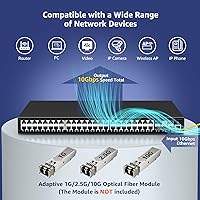
  • Uplink Slots: 6 x SFP+ slots supporting 10 Gbps fiber or DAC uplinks for high-speed connections to core or distribution switches.
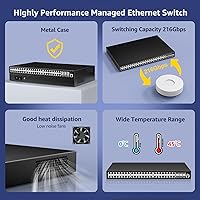
  • Switching Capacity: Non-blocking switching fabric rated at 216 Gbps, sufficient to run all 54 ports simultaneously at full line rate.
  • Forwarding Rate: Packet forwarding rate of 160.704 Mpps ensures low-latency throughput under heavy multi-device workloads.
  • MAC Address Table: Supports a 16K MAC address table, accommodating large numbers of unique network devices without table overflow.
  • Jumbo Frames: Jumbo frame support up to 10 KB enables efficient large-payload transfers for storage, backup, and virtualization traffic.
  • Management Layer: Layer 3 managed switch supporting static routing, inter-VLAN routing, and a full suite of enterprise-grade management protocols.
  • Management Access: Configurable via Web GUI, console CLI, Telnet CLI, and SNMP versions 1, 2, and 3 for flexible admin access options.
  • Supported Protocols: Supports IEEE 802.1Q VLAN, 802.1X authentication, 802.3az EEE, STP, RSTP, MSTP, IGMP v1/v2, QoS, and ACL.
  • Security Features: Includes 802.1X port authentication, ARP protection, IP source guard, port security, and quadruple IP/MAC/VLAN/port binding.
  • Thermal Design: Fully fanless passive cooling with real-time internal temperature monitoring, producing zero fan noise during operation.
  • Form Factor: 1U rackmount chassis compatible with standard 19″ racks; also supports desktop placement without additional hardware.
  • Dimensions: Chassis measures 440 x 290 x 44.5 mm (L x W x H), fitting a standard 1U rack slot with typical depth clearance.
  • Device Weight: The switch unit itself weighs 4 kg, with a packaged shipping weight of approximately 8.98 lbs including accessories.
  • Power Input: External AC power supply accepts 100–240V at 50–60Hz, making it compatible with standard power infrastructure worldwide.
  • Lightning Protection: Built-in 4KV lightning surge protection on RJ45 ports reduces the risk of damage from electrical transients on copper cabling.
  • Cable Support: RJ45 ports support Cat 3/4/5 for 10Base-T, Cat 5/5e for 100Base-TX, and Cat 5e/6 for 1000Base-T up to 100 m.
  • Chassis Material: Full metal construction throughout the outer chassis, providing structural rigidity and basic EMI shielding in rack environments.
  • Operating Environment: Rated for operating temperatures of 0–45°C and relative humidity of 10–90% non-condensing.
  • In-Box Contents: Package includes the managed switch, rackmount kit brackets and screws, and a printed user manual.

Related Reviews

YuanLey YS4802GS-P8 48-Port Gigabit PoE Switch
79%
91%
Value for Money
93%
Ease of Installation
84%
PoE Performance
86%
Build Quality
52%
Fan Noise
More
Sodola 48-Port 2.5GbE L3 Managed Switch
71%
94%
Port Density & Speed
91%
Value for Money
88%
Uplink Flexibility
86%
Layer 3 Feature Set
52%
Ease of Setup
More
YuanLey 28-Port Gigabit Managed Switch with 4x 10G SFP+
84%
89%
Performance
78%
Ease of Setup
92%
Value for Money
85%
Build Quality
91%
Energy Efficiency
More
TP-Link Festa FS328G 28-Port Gigabit Smart Managed Network Switch
84%
88%
Ease of Setup
85%
Performance and Reliability
91%
Cloud Management Features
80%
Build Quality
87%
Value for Money
More
QNAP QSW-M2116P-2T2S 20-Port 10GbE PoE++ Managed Network Switch
86%
93%
Performance & Speed
89%
PoE Support
91%
Ease of Setup
88%
Build Quality & Durability
90%
Management Interface (QSS)
More
HPE Instant On 1830 8-Port PoE Switch
82%
91%
Ease of Setup
74%
PoE Performance
88%
Build Quality
77%
Management Software
83%
Value for Money
More
YuanLey 26-Port PoE Switch
85%
92%
Value for Money
87%
Performance
90%
Power Delivery
93%
Ease of Setup
84%
Build Quality
More
YuLinca 8-Port 10G Managed Network Switch
79%
92%
Port Speed & Auto-Negotiation
89%
Throughput & Switching Performance
88%
Build Quality & Chassis
71%
Web Management Interface
86%
L2 Feature Set Depth
More
YuanLey 5-Port 10G PoE Switch
83%
91%
Ease of Use
88%
Performance & Speed
85%
Power over Ethernet (PoE) Functionality
75%
Build Quality
90%
Fanless Operation & Noise Level
More
Binardat 6-Port 10Gbps Managed Switch
85%
91%
Performance
88%
Ease of Setup
85%
Build Quality
93%
Speed Flexibility
89%
Network Management Features
More

FAQ

It is a legitimate L3 managed switch. The YuanLey YS48060GSM 48-Port Managed Network Switch supports static routing and inter-VLAN routing, which are the defining L3 capabilities. It is not a full-featured enterprise router, but for SMB use cases like routing between VLANs, it handles the job properly.
Many standard 10G SFP+ transceivers work fine, including common multimode and single-mode fiber modules. That said, this 48-port L3 switch does not have the same broad compatibility list that Cisco or Netgear publishes, and a small number of buyers have reported detection issues with certain older or off-brand transceivers. Stick with well-known brands like FS.com or 10Gtek if you want the least friction.

Unfortunately, SSH is not supported. Remote CLI access is limited to Telnet, which transmits credentials in plain text and is not suitable for environments with security or compliance requirements. Remote management options that are more secure include the Web GUI over HTTPS or SNMP with appropriate access controls. This is a real limitation worth knowing before you buy.

Under typical mixed loads in a reasonably ventilated space, the chassis runs warm to the touch but stays within safe operating range. In hot climates or poorly ventilated rack enclosures running all ports at sustained high utilization, it can get noticeably hot. If your rack runs warm already or you are in a region with consistently high ambient temperatures, make sure there is some airflow around the unit.

No, and this catches a lot of people off guard. The command syntax is similar in concept but different enough that Cisco admins cannot just type from muscle memory. Expect a learning curve if you are coming from a Cisco environment. The web GUI is actually easier for most common tasks, and for complex configurations the manual, thin as it is, at least maps out the command structure.

In most standard scenarios, yes. VLAN trunking, RSTP, and LACP interoperate fine with Cisco and Netgear gear because they follow open IEEE standards. Where things get complicated is advanced MSTP topologies or anything involving Cisco proprietary protocols. For straightforward mixed-vendor setups, the YS48060GSM behaves as a standard-compliant device without major issues.

It is approachable for basic tasks. Port configuration, simple VLAN setup, and monitoring are laid out clearly enough that someone with modest networking knowledge can work through them. Where it falls short is on advanced features like ACLs or spanning tree configuration, which are not well-guided in the interface. If you are new to managed switches, plan to spend some time on community forums alongside the included manual.

YuanLey offers a limited manufacturer warranty, but the support infrastructure is not comparable to Cisco or Netgear. Email-based support exists but response quality and speed vary. There is no dedicated knowledge base or community forum from the brand itself. For straightforward issues, Amazon seller support can sometimes be more responsive. This is one area where the lower price reflects a real trade-off.

Yes, both static link aggregation and dynamic LACP (802.3ad) are supported. Connecting two switches with a bonded uplink for added bandwidth or redundancy works as expected in same-brand setups. With Cisco or Netgear on the other end, LACP generally works but may require manual negotiation settings to avoid mismatches.

It depends on what you want to learn. If you are studying for networking certifications or want hands-on experience with VLAN segmentation, SNMP monitoring, spanning tree, and CLI management, this 48-port L3 switch is an excellent and cost-effective platform. The caveat is that the CLI is not IOS-compatible, so it is better suited as a general learning tool than as specific Cisco exam practice hardware.