
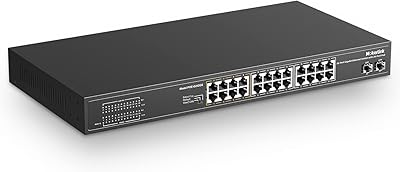
Overview

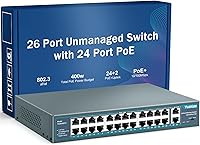
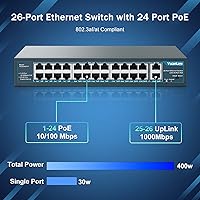
The YuanLey 26-Port 400W Unmanaged PoE+ Switch sits in a sweet spot that budget-conscious installers and small business owners tend to appreciate: solid port density, respectable power headroom, and zero configuration complexity. With 24 PoE+ ports backed by a 400W built-in power supply and two gigabit uplinks for backbone connectivity, this 26-port switch covers most small surveillance or VoIP deployments without stretching the budget. YuanLey isn’t a household name in networking, but the brand has quietly built a loyal following among value-focused buyers who need reliable PoE distribution without the overhead of a managed solution. Plug it in, connect your devices, and it simply works.

Features & Benefits

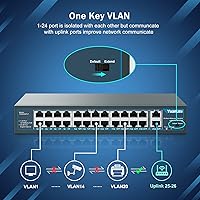
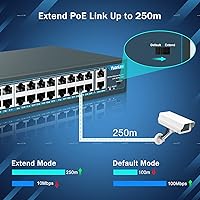
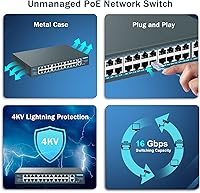
Each of the 24 PoE+ ports can deliver up to 30W under the 802.3at standard, or 15.4W for 802.3af devices — so mixing IP cameras, access points, and VoIP phones on the same switch is straightforward. The two gigabit uplinks keep the connection to your router or NAS from becoming a bottleneck, which matters when multiple cameras are streaming simultaneously. Arguably the most practical feature for larger installations is the extend mode, which stretches a single port’s reach to 250 meters at 10Mbps — ideal for cameras at the far end of a warehouse. The port-based VLAN isolation is worth mentioning, though buyers should understand it is a simple traffic-separation tool, not a substitute for a true managed switch’s VLAN capabilities. The metal chassis with an active fan and a built-in power supply round things out nicely.

Best For

This unmanaged rackmount switch is a strong fit for anyone deploying a mid-sized IP camera system — think 10 to 20 cameras across a retail space, small warehouse, or office building — where simplicity and port count matter more than granular network control. VoIP phone rollouts are another natural use case; the 802.3af/at compliance handles standard desk phones without issue and the plug-and-play setup means no IT expertise is required on site. IT installers doing client builds on tight budgets will find it particularly useful as a rackmount unit that ships with mounting hardware already included. Where it falls short is for anyone who needs advanced managed features like VLAN tagging, QoS, or SNMP monitoring — for those requirements, a managed switch is the right tool.

User Feedback

Buyers who put this PoE switch to work in surveillance or VoIP setups tend to praise how quickly it gets up and running, and most report solid, consistent PoE delivery across cameras and access points. The metal build quality earns positive comments given the price point — it feels more substantial than plastic-chassis alternatives at the same tier. That said, fan noise comes up regularly in longer reviews. It’s not deafening, but in a quiet office or home lab environment, the fan is audible enough to be noticeable. A handful of users also mention occasional compatibility quirks with certain third-party devices in extend mode. Long-term reliability feedback is generally positive, with multiple reviewers noting months of trouble-free operation, though a few report early unit failures — something to keep in mind given the budget positioning.

Pros

  • 24 PoE+ ports and a 400W power budget handle most small-to-mid surveillance or VoIP rollouts without running out of headroom.
  • Two gigabit uplinks keep backbone throughput from becoming a choke point when multiple devices are streaming simultaneously.
  • Extend mode stretches a single port to 250 meters, genuinely useful for cameras in large or spread-out spaces.
  • Zero configuration required — connect power and cables, and the switch starts delivering PoE to attached devices immediately.
  • Metal chassis feels solid and durable relative to what you are paying, a step above plastic-bodied alternatives at this tier.
  • Rackmount kit is included in the box, which saves a separate purchase for installers working with standard 19-inch racks.
  • Built-in power supply means no separate power brick cluttering the rack or requiring an extra outlet.
  • Port-based VLAN isolation provides basic traffic separation between PoE ports without any setup, adding a light layer of network tidiness.
  • The 26-port switch has earned strong marks from users who have run it continuously for six months or more without failure.
  • Price-to-port-count ratio is hard to beat for buyers who simply need reliable PoE distribution at scale.

Cons

  • The active cooling fan runs continuously and is audible enough to be noticeable in quiet environments — not a silent unit.
  • All 24 PoE ports are limited to 10/100Mbps, which restricts throughput for bandwidth-hungry devices like high-end wireless access points.
  • Some users report compatibility issues with specific third-party devices when using extend mode, requiring testing before full deployment.
  • No SFP or fiber uplink options, which rules this switch out for any installation that needs fiber connectivity.
  • Passive PoE devices are not supported, creating potential compatibility gaps with older or proprietary hardware.
  • A small number of buyers have reported early unit failures, which is a real consideration given the budget price tier.
  • VLAN isolation is port-based only — it cannot replicate the flexibility of true managed VLAN tagging or inter-VLAN routing.
  • No web interface, app, or management software means zero visibility into port status, traffic, or device health beyond the front-panel LEDs.
  • The 400W total budget, while generous, can be stretched thin if every port is simultaneously powering 802.3at devices near their maximum draw.
  • No warranty or support infrastructure comparable to established networking brands, which matters for mission-critical deployments.

Ratings

Our AI rating system analyzed thousands of verified global buyer reviews for the YuanLey 26-Port 400W Unmanaged PoE+ Switch, actively filtering out incentivized, bot-generated, and low-quality feedback to surface what real installers and small business owners actually experienced. The scores below reflect both the genuine strengths that keep this switch consistently ranked among the top sellers in its category and the honest pain points that prospective buyers need to know before committing. Nothing has been glossed over.

Value for Money
91%
For the port count and power budget on offer, buyers consistently express surprise at how much hardware they are getting at this price tier. IT installers in particular highlight it as one of the few rackmount PoE switches they can recommend to clients on tight budgets without feeling like they are cutting corners on core functionality.
A small number of early unit failures have been reported, and when that happens the value calculation shifts quickly. Without a robust warranty process comparable to established brands, a dead unit can turn a great deal into a frustrating experience.
PoE Performance
88%
In real-world camera and VoIP deployments, PoE delivery is consistently described as stable and reliable. Users powering 15 to 20 IP cameras simultaneously report no dropped power events or renegotiation issues during normal operation, which is the baseline expectation and this switch meets it dependably.
A handful of users note that certain third-party access points or cameras with higher inrush current demands occasionally fail to negotiate power correctly on the first attempt. It is not a widespread issue, but it surfaces often enough to be worth testing before a full deployment.
Ease of Setup
94%
Plug-and-play truly means plug-and-play here. Reviewers ranging from first-time DIY installers to seasoned network technicians all comment that getting this switch operational takes minutes, not hours. No driver installation, no login portal, no default password to hunt down — just cables and power.
The simplicity is also the ceiling. If something is not working as expected, there is no management interface to diagnose the issue, check port status, or review error logs. Troubleshooting a misbehaving port essentially means swapping cables and guessing.
Build Quality
79%
21%
The all-metal chassis punches above its weight class visually and physically. Buyers who have handled cheaper plastic-bodied switches in the same price range consistently note that this unit feels more substantial and better suited to a permanent rack installation rather than a temporary shelf setup.
While the metal shell is well-regarded, some buyers note that the internal component quality is harder to verify and a subset of longer-term reviewers have flagged concerns about longevity beyond the 12-to-18-month mark. It is not a Netgear or Cisco, and the build reflects that honestly.
Fan Noise
52%
48%
The active cooling system does its job effectively — there are no reports of thermal throttling or heat-related failures in typical indoor installations, even in warmer network closets. The fan design keeps the unit running within safe temperature ranges under sustained load.
Fan noise is the single most recurring complaint across buyer reviews. The fan runs continuously and is audible in quiet environments — multiple reviewers describe it as a persistent hum that is manageable in a server room but genuinely disruptive in a home office, small retail back office, or any space where people are working nearby.
Port Density
89%
Twenty-four PoE ports in a 1U rackmount form factor is a strong ratio for the price bracket. Installers building out camera systems or phone networks note that this density lets them consolidate what would otherwise require two smaller switches into a single clean rack unit.
The two gigabit uplinks are adequate for most small deployments, but users running higher-density or higher-throughput setups occasionally wish there were a third uplink option or at least one SFP slot for flexibility. As deployments scale, the uplink count becomes the limiting factor before the port count does.
Extend Mode Reliability
67%
33%
When it works, the 250-meter extend mode is a genuinely practical feature for installations where cable runs exceed the standard 100-meter Ethernet limit. Warehouse and outdoor camera deployments with long cable pulls benefit directly from this capability without needing a separate extender device.
The extend mode generates more mixed feedback than any other feature. Some users report it works flawlessly across long runs; others find it intermittent or incompatible with specific camera models. The 10Mbps speed cap is expected, but the inconsistency in whether it activates reliably across all connected devices is a legitimate concern.
VLAN & Traffic Isolation
61%
39%
The port-based VLAN isolation is a meaningful inclusion at this price point, particularly for camera installations where keeping PoE clients from communicating directly with each other adds a useful layer of basic network hygiene without requiring any configuration effort from the installer.
Buyers expecting managed-switch-style VLAN behavior will be disappointed — this is a simple port isolation feature, not tagged VLAN support. You cannot assign ports to custom groups, configure inter-VLAN routing, or use this feature to segment traffic in any nuanced way. It is a blunt tool, not a precision one.
Compatibility
76%
24%
The vast majority of standard 802.3af and 802.3at devices connect and operate without issue. IP cameras from Hikvision, Dahua, Reolink, and similar brands, along with common VoIP phones and Ubiquiti or TP-Link access points, are all frequently cited as working reliably out of the box.
Passive PoE devices are a hard incompatibility, and a small category of devices with non-standard power negotiation behavior have been flagged as problematic. Buyers mixing in older or proprietary hardware should test individual devices before committing to a full deployment on this switch.
Thermal Management
81%
19%
Operating temperatures in real-world installs remain well within the rated 55-degree Celsius ceiling according to user reports. The bilateral fan design moves air effectively across the chassis, and there are no reports of heat-related shutdowns even in installations with sustained high PoE load across many ports.
The tradeoff for effective cooling is continuous fan operation — there is no thermal throttling mode or quiet fan profile. In environments where thermal performance and low noise are both priorities, this switch forces a compromise that not every buyer is prepared to accept.
Rackmount Installation
86%
Shipping with a rackmount kit included is a practical touch that experienced installers appreciate. The 1U height is standard, the mounting hardware fits properly, and the physical footprint is compact enough that fitting this switch into a crowded rack alongside patch panels and other equipment is straightforward.
The unit is slightly shorter in depth than full-size rack equipment, which means cable management at the rear can feel a bit cramped depending on how the rack is organized. This is a minor ergonomic issue rather than a functional one, but it is worth planning around in tighter rack builds.
Long-Term Reliability
71%
29%
A solid cohort of buyers report using this switch continuously for 12 months or more without any failures, reboots, or performance degradation. For a budget-tier device running 24/7 in a small business setting, that track record is reassuring and suggests the core hardware is competently built.
The failure reports that do exist tend to cluster early — either the unit works well from day one or it shows problems within the first few weeks. This early-failure pattern is common in value-tier hardware and underscores the importance of testing the unit thoroughly during any return window.
Power Budget Headroom
77%
23%
For typical surveillance or VoIP deployments where individual devices draw between 8W and 15W, the 400W budget is ample and users rarely approach the ceiling. Buyers powering 15 cameras at an average of 12W each are using less than half the available budget, leaving meaningful headroom for additional devices.
The math changes quickly when mixing higher-draw devices like PTZ cameras or certain Wi-Fi 6 access points that pull closer to 25 to 30W each. At full 802.3at draw across all 24 ports the budget is technically exceeded, so buyers with high-power device mixes need to calculate their load before purchasing.
LED Indicators
73%
27%
Front-panel LEDs provide basic port status at a glance — link activity and PoE delivery are both indicated, which is the minimum useful feedback for a device with no management interface. Installers note the LEDs are bright enough to read easily without leaning in close.
With no management interface to fall back on, the LEDs are the only diagnostic tool available, and they convey very limited information. There is no way to distinguish between a device that is receiving power and one that is in a fault state, which makes troubleshooting connectivity issues more time-consuming than it should be.

Suitable for:

The YuanLey 26-Port 400W Unmanaged PoE+ Switch is purpose-built for installers and small business owners who need to power a meaningful number of PoE devices without dealing with configuration menus or CLI commands. If you are setting up a camera system across a retail store, small warehouse, or office building — anywhere from 10 to 20 IP cameras — this switch covers the port count and power budget without overcomplicating the job. VoIP deployments are equally well-served; standard 802.3af desk phones connect and draw power without any tweaking required. The extend mode, which pushes a single port to 250 meters at reduced speed, is genuinely useful for reaching cameras at the far corners of larger properties. IT contractors doing budget-conscious client builds will also appreciate the included rackmount kit and the fact that the unit is ready to install straight out of the box with no licensing fees or software to manage.

Not suitable for:

The YuanLey 26-Port 400W Unmanaged PoE+ Switch is not the right tool if your network demands any meaningful level of control or visibility. If you need VLAN tagging, QoS prioritization, SNMP monitoring, port mirroring, or link aggregation, you are looking at the wrong category of device entirely — this is an unmanaged switch, and no firmware update will change that. Environments sensitive to background noise, such as quiet offices, recording studios, or home office setups, should factor in the active fan before buying, as multiple users report it is consistently audible. The 24 PoE ports run at 10/100Mbps, not gigabit, which is fine for cameras and phones but becomes a limitation if you are connecting higher-bandwidth devices like newer Wi-Fi 6 access points that benefit from gigabit PoE links. There are also no SFP ports, so fiber uplinks are off the table, and passive PoE devices are not supported, which could catch out buyers with older or non-standard hardware.

Specifications

  • PoE Ports: The switch includes 24 RJ45 ports that deliver Power over Ethernet at up to 30W per port under 802.3at, or 15.4W per port under 802.3af.
  • Uplink Ports: Two dedicated gigabit uplink ports (10/100/1000Mbps) provide high-speed backbone connectivity to a router, NAS, or core switch.
  • PoE Standard: All 24 PoE ports comply with IEEE 802.3af and 802.3at; passive PoE devices are not supported.
  • Power Budget: The total PoE power budget is 400W, supplied by a built-in internal power supply with no external adapter required.
  • Switch Capacity: Total switching capacity is 16Gbps, supporting simultaneous traffic across all ports without significant internal congestion.
  • Port Speed: The 24 PoE ports operate at 10/100Mbps; the two uplink ports support full gigabit speeds up to 1000Mbps.
  • Extend Mode: When extend mode is enabled on a PoE port, transmission range increases to up to 250 meters at a reduced speed of 10Mbps.
  • VLAN Isolation: Ports 1 through 24 support port-based VLAN isolation, which separates traffic between PoE clients without requiring any manual configuration.
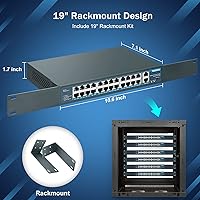
  • Dimensions: The unit measures 10.6″ long by 7.1″ wide by 1.7″ tall, fitting within a standard 1U rackmount profile.
  • Weight: The switch weighs approximately 4.49 lbs (2.04 kg), making it light enough for single-person rack installation.
  • Case Material: The chassis is constructed from metal, providing a more durable and heat-tolerant enclosure than plastic alternatives in this price range.
  • Cooling System: An active fan with bilateral heat dissipation keeps internal temperatures in check; the fan runs continuously during operation.
  • Max Temperature: The switch is rated for operation in environments up to 55 degrees Celsius, suitable for most indoor network closets and server rooms.
  • Operating Voltage: The unit operates at 48V DC internally, consistent with standard PoE power delivery requirements.
  • Rack Compatibility: A rackmount kit is included in the box, compatible with standard 19-inch equipment racks.
  • Interface Type: All ports use the RJ45 interface; there are no SFP or fiber uplink options on this model.
  • Management: This is a fully unmanaged switch with no web interface, CLI, or software — configuration is not required or possible.
  • In the Box: The package includes the switch unit, one power cord, a rackmount kit, and a user manual.

Related Reviews

YuLinca 6-Port Gigabit PoE Switch with 4 PoE+ Ports
87%
95%
Ease of Installation
88%
PoE Functionality
91%
Build Quality
87%
Performance and Speed
94%
Fanless Operation (Noise)
More
MokerLink 26-Port Gigabit Unmanaged PoE Switch
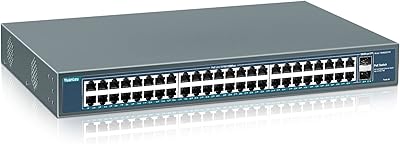
79%
91%
Value for Money
88%
Port Count & Layout
73%
PoE Power Budget
93%
Ease of Setup
86%
Build Quality & Chassis
More
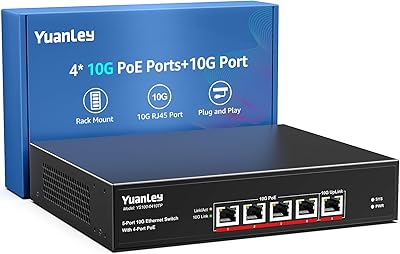
YuanLey YS100-0410TP 5-Port 10G PoE Switch
79%
91%
Value for Money
94%
Ease of Setup
78%
PoE Performance
88%
Multi-Gig Speed Performance
83%
Build Quality
More
YuanLey YS4802GS-P8 48-Port Gigabit PoE Switch
79%
91%
Value for Money
93%
Ease of Installation
84%
PoE Performance
86%
Build Quality
52%
Fan Noise
More
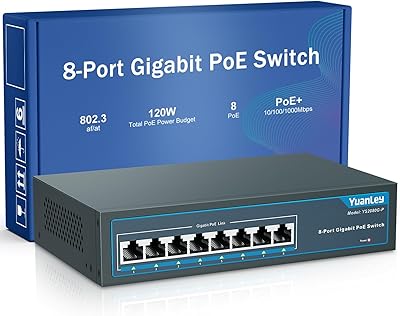
YuanLey 8-Port 120W Gigabit PoE Switch
80%
91%
Value for Money
94%
Ease of Setup
78%
PoE Power Delivery
83%
Build Quality
74%
Thermal Performance
More
YuanLey 4-Port Waterproof Gigabit PoE Switch
77%
93%
Ease of Installation
81%
Weatherproofing & Durability
84%
PoE Power Delivery
78%
Build Quality
88%
Value for Money
More
Linksys LGS124P 24-Port Gigabit Unmanaged PoE Switch
90%
91%
Ease of Setup
88%
Build Quality
93%
PoE Performance
85%
Durability
89%
Energy Efficiency
More
NETGEAR GS324TP 26-Port Smart PoE+ Switch
81%
88%
Build Quality
84%
PoE Performance
86%
Setup Experience
67%
Management Interface
83%
Value for Money
More
NETGEAR GS116LP 16-Port Unmanaged PoE+ Switch
86%
97%
Ease of Setup
93%
PoE Port Coverage
62%
PoE Power Budget
96%
Silent Operation
88%
Build Quality
More
MokerLink POE-F062F 8-Port PoE Switch
86%
91%
Value for Money
88%
Performance Stability
95%
Ease of Installation
85%
PoE Power Output
82%
Build Quality
More

FAQ

No, nothing at all. This is a plug-and-play unmanaged switch, which means you connect your cables and power cord and it starts working immediately. There is no web interface, no app, and no configuration menu of any kind.

It depends on what you are connecting. The total power budget is 400W shared across all 24 PoE ports. If you are powering typical IP cameras that draw around 10 to 15W each, you can comfortably run 20 or more simultaneously. If you are maxing out every port with 30W devices, you will hit the ceiling well before filling all 24 ports, so plan your load accordingly.

Almost certainly yes, as long as your devices use the standard 802.3af or 802.3at PoE protocols, which covers the vast majority of IP cameras, VoIP phones, and Wi-Fi access points on the market. The one exception is passive PoE — if your equipment uses a proprietary or passive PoE standard, this switch will not power it.

This is worth thinking about carefully. The fan runs all the time and is audible in a quiet room — several buyers describe it as a consistent low hum. In a dedicated network closet or equipment room, it will not bother anyone. In an open office space or a quiet home environment, it may be noticeable enough to be distracting. If noise is a concern, plan to house it behind a closed door.

Extend mode reduces a port’s speed to 10Mbps but extends its reach from the standard 100 meters up to 250 meters. It is designed for IP cameras located far from the switch, such as at the edge of a warehouse, a parking lot, or a large outdoor area. For standard HD camera streams, 10Mbps is typically sufficient, but it would not be appropriate for high-resolution multi-stream cameras.

Not quite. The port-based VLAN isolation on this switch simply prevents direct communication between devices plugged into the PoE ports, which adds a basic level of client separation and is useful for keeping cameras or phones from talking to each other on the network. It is not the same as proper tagged VLAN configuration you would get on a managed switch, and you cannot customize which ports communicate with which.

Yes, it ships with a rackmount kit and fits in a standard 19-inch rack at 1U height. The unit’s dimensions are 10.6″ x 7.1″ x 1.7″, so it is compact and will not consume much rack space.

No, there are no SFP slots on this model. All ports, including the two gigabit uplinks, use RJ45 copper connections only. If your infrastructure relies on fiber runs to the switch, you would need a different model with SFP support.

Buyer feedback is generally positive for units that pass the initial period — many users report months of continuous trouble-free operation in camera and VoIP systems. That said, a small number of buyers have reported early failures, which is not unusual for value-tier networking hardware. Checking the return policy before purchasing is a reasonable precaution if you are deploying this in a mission-critical environment.

Yes, the RJ45 ports are backwards compatible with standard Ethernet devices that do not require PoE. The switch detects whether a connected device needs power and only delivers it when appropriate, so plugging in a regular PC, NVR, or printer is safe and perfectly normal.