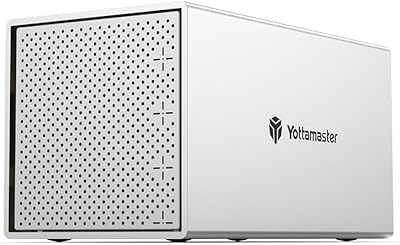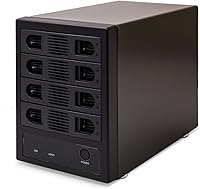
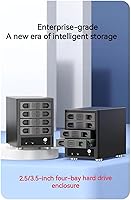
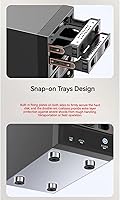
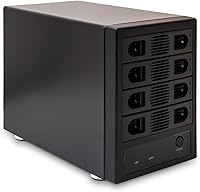
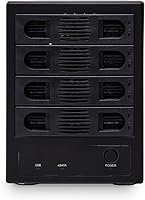
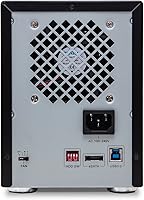
Overview

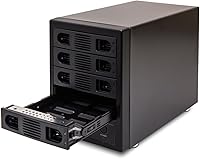
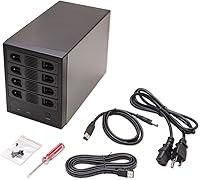
The Syba SY-ENC50104 4-Bay 3.5-inch HDD Enclosure comes from IO CREST's Syba lineup, and it's been quietly doing its job since late 2017, which says something about how well-built it actually is. Rather than trying to be a full network-attached storage box with all the complexity that entails, this enclosure sticks to a simpler mission: give you four separate bays for 3.5-inch SATA drives and let you manage them individually instead of pooling everything into a RAID array. That non-RAID approach means a single failed drive won't take your other three down with it. With around 500 reviews and a 4.1-star average, it's clearly earned a loyal following among people who just want straightforward, expandable storage without NAS-level pricing or setup headaches.

Features & Benefits

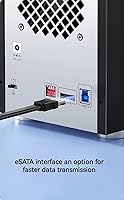
Pop the drives in, and each one shows up on your system as its own independent volume, thanks to the Port-Multiplier mode this 4-bay drive unit runs in—no RAID striping, no shared point of failure, just clean separation. You get the choice of USB 3.0 or eSATA depending on what your motherboard or laptop offers, which is handy if you're moving between machines. The cooling setup deserves credit too: a three-speed fan (low, high, auto) paired with forced-air convection keeps four spinning drives from baking themselves during long backup or editing sessions. There's no bulky AC brick either, since it runs off direct DC power. And with support for drives up to 24TB per bay, this enclosure isn't going to feel cramped anytime soon.

Best For

This kind of setup makes the most sense for home users who've accumulated a handful of spare drives over the years and want one tidy box to keep them all accessible instead of juggling separate external drives scattered across a desk. Photo and video editors who need fast bulk storage for project files but don't want to pay NAS prices will find this 4-bay drive unit a practical middle ground. It also fits small office backup routines where someone needs to swap drives in and out individually rather than treating them as one combined pool. If your priority is eSATA-level speed with a USB fallback for older machines, it covers both bases. That said, anyone specifically shopping for RAID redundancy or automatic mirroring should look elsewhere, since this hardware intentionally keeps each drive on its own.

User Feedback

Owners give this HDD enclosure a 4.1 out of 5 average across roughly 499 ratings, and the feedback pattern lines up with what you'd expect from a no-frills, reliable workhorse rather than a flashy showpiece. The main complaint that comes up is fan noise, particularly when it's left running on the high setting for extended stretches—worth knowing if you're sensitive to background hum in a quiet room. On the positive side, the metal housing tends to hold up well over years of regular use, and people running it across Windows, macOS, and Linux machines generally report smooth recognition without driver headaches. Given that this unit has been on the market since 2017, its track record speaks for itself: it's not glamorous, but it does its job reliably year after year.

Pros

  • Holds four 3.5-inch drives at once, cutting down on cable and adapter clutter.
  • Supports drives up to 24TB each, leaving plenty of room to upgrade later.
  • Sturdy metal construction feels more durable than typical plastic enclosures at this price.
  • Adjustable fan speeds let you balance cooling needs against noise depending on workload.
  • No external power brick needed, since it runs directly off DC power.
  • Works across Windows, macOS, Linux, and Chrome OS without extra drivers in most cases.
  • Most buyers describe setup as quick and straightforward right out of the box.
  • Each drive mounts independently, making it easy to add, remove, or swap drives individually.

Cons

  • Fan noise becomes noticeable once you push past the low or auto setting.
  • Full functionality depends on having a port-multiplier-capable controller, which not every system has.
  • Lacks RAID support, so it will not provide redundancy if a drive fails.
  • No bundled backup or management software, so you will rely on your own tools.
  • Metal housing is functional but plain, with little attention paid to aesthetics.
  • At roughly 7 pounds empty, it is not the most portable option once loaded with drives.
  • Real-world transfer speeds may fall short of the rated maximum depending on your interface.

Ratings

The IO Crest SY-ENC50104 4-Bay HDD Enclosure has been evaluated here using AI-driven analysis of verified buyer reviews collected from marketplaces worldwide, with spam, bot activity, and incentivized feedback actively filtered out before scoring. The categories below reflect a transparent mix of what owners genuinely praised and where this storage enclosure fell short during real-world, day-to-day use.

Build Quality
84%
Owners frequently mention that the metal housing feels noticeably sturdier than plastic competitors in the same price bracket, especially once it is loaded with four heavy drives. The chassis holds up well to being moved between a desk and a shelf without flexing or rattling.
A handful of buyers note the exterior finish is purely functional, with visible seams and a basic industrial look rather than a polished aesthetic. Some also wish the drive trays felt slightly more refined given the metal construction elsewhere.
Cooling Performance
81%
19%
The forced-air cooling design genuinely keeps drive temperatures stable during extended backup or archiving sessions, which matters when four mechanical drives are spinning simultaneously in an enclosed metal box. Users running the fan on auto report consistently cool drives even after hours of continuous transfers.
A few owners running all four bays at full capacity for long periods say the fan has to work harder than expected, pushing it toward the higher speed settings more often than they would like. This trade-off between thermal performance and quiet operation is not unique to this unit, but it is noticeable here.
Noise Level
67%
33%
On the low or auto setting, most users describe the fan as unobtrusive enough to sit near a desk during work hours without becoming a distraction. It blends into typical home office or living room background noise reasonably well.
Several reviewers specifically call out the fan as noticeably louder once switched to high, especially in quiet bedrooms or late-night work sessions. This is the most consistently repeated complaint across feedback, and anyone sensitive to ambient noise should weigh it carefully.
Setup & Ease of Use
88%
Most buyers describe getting this 4-bay enclosure running as a genuinely simple process, often just sliding drives into the trays, connecting a single cable, and powering on. There is little fiddling involved compared to building a dedicated NAS from scratch.
A small subset of users found themselves confused initially about why only some drives appeared on their system, before realizing their controller did not support port-multiplier mode. That learning curve is more about user hardware than the enclosure itself, but it still trips people up.
Connectivity & Compatibility
79%
21%
Having both USB 3.0 and eSATA options gives buyers real flexibility depending on what their motherboard or existing setup already supports, and broad operating system support across Windows, macOS, Linux, and Chrome OS means most households will not hit a wall.
Full four-drive recognition depends entirely on having port-multiplier-capable hardware, which not every PC or laptop has built in. Buyers using older systems or basic USB controllers sometimes only see partial drive detection until they upgrade their setup.
Drive Capacity Support
90%
Supporting drives up to 24TB per bay gives this HDD dock substantial future-proofing, letting users gradually upgrade individual drives over the years without needing a new enclosure. Hobbyists managing growing media libraries appreciate not hitting a capacity ceiling anytime soon.
Since there is no RAID pooling, that high per-drive capacity does not translate into one large combined volume, so users managing very large datasets still need to think about file organization across four separate drives manually.
Power Convenience
86%
Running directly off DC power without a bulky external A/C adapter brick is a small but appreciated detail, cutting down on cable clutter behind a desk or in a server closet. It is one less thing to lose or misplace compared to other enclosures.
A few users mention the included power cable length feels a bit short for setups where the enclosure sits farther from an outlet, requiring an extension or different cable arrangement in tighter spaces.
RAID Functionality
58%
42%
For users who specifically want each drive treated as its own independent volume, the non-RAID, port-multiplier approach is actually a benefit, since it avoids the complexity and failure risk associated with RAID arrays. Recovering data from a single drive is straightforward when nothing is striped together.
Buyers expecting any form of redundancy or automatic mirroring will be disappointed, since a single drive failure here simply means losing that one drive's data with no built-in backup mechanism. This is a deliberate design limitation rather than a flaw, but it catches some shoppers off guard.
OS Compatibility
89%
Cross-platform support spanning Windows, macOS, Linux, and Chrome OS means this storage enclosure fits into mixed-device households or small offices without forcing everyone onto the same operating system. Switching the enclosure between a Windows desktop and a Mac laptop tends to work without extra driver hunting.
Some older or more obscure Linux distributions occasionally require manual driver tweaks to fully recognize all four drives, according to a small number of more technical users. This is not common, but it is worth checking compatibility notes if running a niche setup.
Value for Money
83%
Compared to building a dedicated NAS system, this 4-bay enclosure delivers most of the practical multi-drive convenience at a noticeably lower upfront cost, which resonates strongly with home users and small offices working with a tighter budget.
Buyers who specifically need RAID redundancy may end up spending more later on a different solution anyway, making the initial savings less meaningful for that particular use case. The value proposition narrows considerably for anyone who outgrows non-RAID storage.
Data Transfer Speed
75%
25%
When paired with a compatible USB 3.0 or eSATA connection, transfer speeds are fast enough for smooth large file backups and media library transfers without becoming a bottleneck during everyday use.
The rated 5000MB/s ceiling reflects the interface limit rather than what any individual mechanical hard drive can realistically deliver, so some buyers expecting that figure as a real-world benchmark end up mildly disappointed once actual transfer speeds settle closer to typical hard drive limits.
Long-Term Reliability
80%
20%
Many long-term owners report the enclosure continuing to run reliably well after the initial setup period, with cooling and build quality holding up under regular, sustained use for archiving and backup tasks.
A smaller number of reviewers mention fan wear or reduced cooling effectiveness becoming noticeable after extended heavy use, suggesting the fan component may be the first part to show its age compared to the rest of the metal housing.

Suitable for:

The IO Crest SY-ENC50104 4-Bay HDD Enclosure makes the most sense for someone who has accumulated several loose hard drives over the years and just wants them organized and accessible again. Home users sitting on old backup drives or family photo archives can plug everything into one box instead of juggling individual USB adapters. Small offices that need quick access to a handful of drives, but do not want the cost or complexity of a RAID-based NAS, fit well here too. Hobbyists and media collectors managing large video or photo libraries across multiple high-capacity drives will appreciate having all four bays in one place. It is also a sensible pick for anyone who wants NAS-like convenience without committing to NAS-level spending or setup.

Not suitable for:

Buyers who specifically need RAID redundancy or striping should look elsewhere, since this enclosure deliberately runs each drive as its own separate volume rather than combining them. Anyone working in a quiet home office or bedroom setup might find the cooling fan noticeable once it ramps up past the lowest speed setting. Users without a controller card or motherboard that supports port-multiplier mode may run into compatibility headaches and limited functionality. People wanting a sleek, ultra-compact desk accessory will find the metal housing more utilitarian than stylish. Finally, anyone expecting automatic backup software or built-in data redundancy features will be disappointed, since this is purely a drive-housing solution.

Specifications

  • Drive Bays: The enclosure has four bays designed for 3.5-inch SATA hard drives.
  • Drive Capacity: Each bay supports drives with capacities of up to 24TB.
  • Connectivity: It connects to a computer via either USB 3.0 or eSATA.
  • RAID Support: The unit operates in non-RAID, port-multiplier mode, presenting each drive separately to the host system.
  • Cooling System: A forced convection cooling design circulates air to keep drives and internal components at a stable temperature.
  • Fan Speed Settings: The cooling fan offers three adjustable speed settings: low, high, and auto.
  • Power Input: It runs on direct DC power and does not require an external A/C adapter.
  • Build Material: The housing is constructed from metal rather than plastic.
  • Weight: The unit weighs approximately 7 pounds.
  • Dimensions: The enclosure measures 10.25 by 5.25 by 8 inches.
  • Data Transfer Rate: Rated data transfer speed reaches up to 5000MB/s depending on the interface used.
  • OS Compatibility: It is compatible with Windows, macOS, Linux, and Chrome OS.
  • Hardware Platform: The product is designed for use with PC systems.
  • Model Number: The item model number is SY-ENC50104.

Related Reviews
IO CREST SY-ENC50129 8-Bay USB4 40Gbps SATA Enclosure
76%
88%
Build Quality
83%
Drive Compatibility
86%
USB4 Interface & Compatibility
71%
Real-World Transfer Speed
74%
Fan Noise & Thermal Management
More
IO CREST SY-ENC50127 USB 3.2 Type-C Dual Bay HDD + M.2 NVMe External Enclosure
83%
88%
Performance
93%
Ease of Setup
91%
Build Quality
87%
Data Transfer Speed
90%
Cooling/Heat Management
More
IO CREST SY-ENC50119 8-Bay External HDD Enclosure
75%
83%
Build Quality
79%
Drive Compatibility
76%
Thermal Management
68%
Fan Noise
71%
USB 3.0 Transfer Performance
More
IO CREST SY-ENC50125 8-Bay Hard Drive Enclosure
78%
84%
Build Quality
88%
Hot-Swap Usability
79%
Thermal Management
61%
Fan Noise
86%
Connectivity & Stability
More
Syba SY-ENC50122 5-Bay RAID Enclosure
71%
83%
Build Quality
78%
RAID Functionality
86%
Drive Compatibility
71%
USB 3.0 Performance
54%
eSATA Usability
More
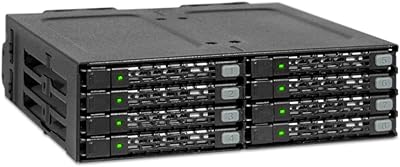
ICY DOCK ToughArmor MB604SPO-B 4-Bay Enclosure
78%
91%
Build Quality
88%
SAS Compatibility
63%
Installation Experience
71%
Fan Noise
74%
Drive Compatibility
More
ICY DOCK ToughArmor MB998SP-B 8-Bay 2.5” SATA/SAS HDD/SSD Mobile Rack Enclosure for 5.25″ Bay
87%
91%
Performance
88%
Cooling Efficiency
89%
Build Quality
93%
Ease of Installation
72%
Noise Level
More
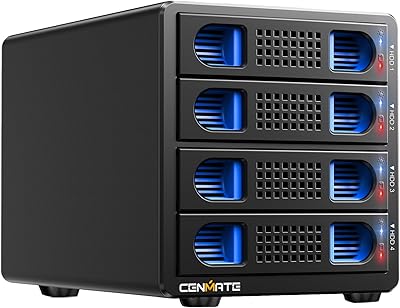
Cenmate 4-Bay RAID Enclosure 80TB
73%
83%
Build Quality
78%
RAID Functionality
71%
Cooling & Thermal Management
47%
Mac Compatibility
89%
Windows Compatibility
More
Yottamaster PS400C3 4-Bay External Hard Drive Enclosure
73%
83%
Build Quality
78%
Thermal Management
66%
Transfer Speed
88%
Drive Compatibility
63%
Ease of Setup
More
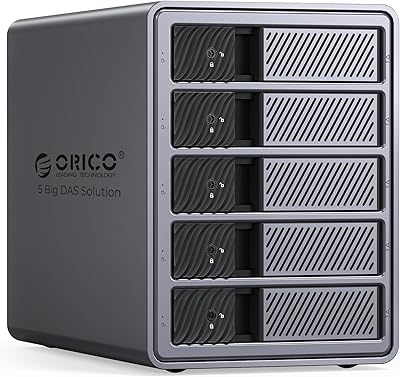
ORICO 9858RU3 5-Bay RAID HDD Enclosure
75%
88%
Build Quality
84%
Ease of Setup
81%
RAID Mode Flexibility
67%
Transfer Speed
74%
Thermal Management
More

FAQ

Yes, since each bay operates independently in non-RAID mode, you can mix and match drive capacities freely. One bay could have a 2TB drive and another a 12TB drive with no issue. The system just sees them as four separate drives.

No, this unit runs strictly in non-RAID, port-multiplier mode. Each drive shows up on your computer as its own separate volume, so there is no built-in mirroring or striping. If you need true RAID redundancy, you would want a different type of enclosure.

At the low or auto setting it is usually pretty quiet and blends into normal background noise. Push it to high, though, and you will notice it, especially in a quiet room. Most people find a middle ground that balances cooling and noise tolerance.

To get full port-multiplier functionality, your motherboard, controller card, or interface needs to specifically support port-multiplier mode. Without that support, you may only see one or two drives instead of all four. It is worth checking your system's specs before buying.

It runs on direct DC power and is designed without needing a bulky external A/C adapter brick. You should not need to source a separate adapter for normal operation.

This largely depends on your operating system and how your specific controller handles port-multiplier connections, since the enclosure itself does not advertise hot-swap as a guaranteed feature. Many users report success swapping drives carefully, but it is safer to shut down or properly eject drives first if you want to avoid any data loss risk.

Yes, this storage enclosure is compatible with macOS versions 10.6 and newer, in addition to Windows, Linux, and Chrome OS. Just make sure your Mac's USB or eSATA port matches what the enclosure offers.

The enclosure itself weighs about 7 pounds empty, so once you add four 3.5-inch drives, expect the total weight to climb noticeably, often somewhere in the 10 to 12 pound range depending on the drives you use. It is sturdy, but not something you will want to move around constantly.

In terms of giving you organized, accessible storage for multiple drives, yes, the IO Crest SY-ENC50104 4-Bay HDD Enclosure fills a similar role at a lower price point. The trade-off is that it lacks NAS features like network access, RAID redundancy, and remote management software.

The rated maximum is up to 5000MB/s, but that number reflects the interface ceiling rather than what any single hard drive can actually deliver. In practice, your real-world speed will be limited by the drives themselves and your cable or port type, so expect typical mechanical hard drive speeds rather than that maximum figure.