Overview

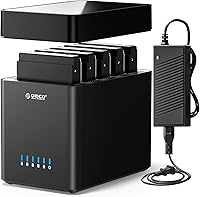
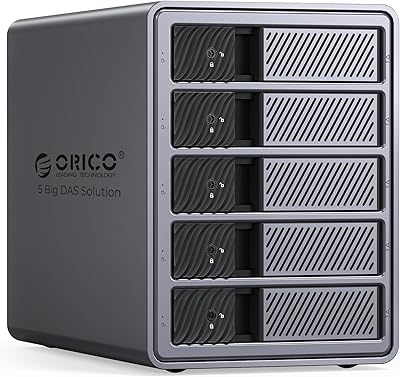
The ORICO DS500U3 5-Bay 3.5″ HDD Enclosure is a straightforward, no-fuss solution for anyone who has accumulated a stack of 3.5-inch SATA drives and needs somewhere sensible to house them all. It supports up to 90TB across five independent bays, connects via USB 3.0 Type-B, and requires zero driver installation — plug it in and your system picks it up almost immediately. The magnetic tool-free design means swapping drives takes seconds rather than minutes. It is not a RAID device, so each drive stays independent, which keeps things simple. For mid-range money, this 5-bay enclosure offers real value for home archiving or light office storage needs.
Features & Benefits

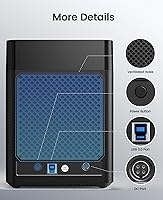
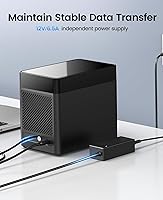
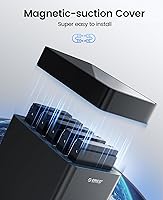
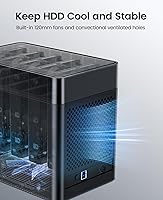
The magnetic bay cover is one of those small design decisions that actually matters in daily use — drives slot in and are recognized in a matter of seconds with no tools required. Data moves over USB 3.0 at up to 5Gbps in theory, though real-world transfers will land noticeably below that ceiling depending on your drives and cable quality. A 60mm double-ball bearing fan runs continuously to keep temperatures manageable across all five bays, backed by honeycomb ventilation cut into the rear panel. Four LED indicators let you see at a glance which drives are active. The bundled 12V/6.5A adapter handles simultaneous power to all five bays without strain.

Best For

This multi-drive dock fits home users who want one central place to store photos, home videos, or movie backups spread across multiple drives they already own. It works equally well for a small office needing basic storage expansion without the complexity of a RAID setup — each drive is fully independent, so a failure on one does not affect the others, but there is also no built-in redundancy. Windows and macOS users will have the smoothest experience here. Linux users, take note: the dock can only read one drive at a time on that platform, which is a genuine functional limitation worth knowing well before you purchase.

User Feedback

Across more than 500 ratings, the ORICO dock holds a solid four-star average, which reflects broadly positive real-world use. The most consistent praise is around how quickly drives are detected and how painless initial setup is. On the other side, fan noise comes up repeatedly in critical reviews — in a quiet room, the continuous hum is noticeable and can wear on you over time. A smaller group of buyers report intermittent drive detection problems after sleep cycles or extended continuous use, which is worth keeping in mind if you plan to rely on this for anything important. Not a dealbreaker for most, but worth monitoring.

Pros

  • Magnetic tool-free bays let you swap drives in seconds with no screwdriver needed.
  • Plug-and-play setup works reliably on Windows and macOS with no driver installation.
  • Supports up to 90TB of raw storage across five independent 3.5-inch SATA drives.
  • Drive recognition happens in roughly three seconds after insertion — fast and satisfying.
  • The bundled power adapter handles all five bays simultaneously without instability.
  • Four LED indicators make it easy to see at a glance which drives are active or idle.
  • Built-in protections against overvoltage, overheating, and short-circuits add peace of mind.
  • Mid-range pricing makes the five-bay capacity genuinely accessible for home users.
  • The ORICO dock works well as a unified home for an existing collection of spare drives.

Cons

  • The fan runs at a constant fixed speed — there is no quiet mode or manual speed control.
  • Drive detection can become unreliable after sleep and wake cycles, requiring a power cycle to fix.
  • Linux users can only access one drive at a time, making multi-bay functionality essentially unusable.
  • Real-world USB 3.0 transfer speeds fall well short of the advertised 5Gbps theoretical maximum.
  • The ABS plastic build feels lightweight and shows wear — bay covers can warp with extended use.
  • The proprietary power adapter is difficult to replace if it fails outside of warranty.
  • No RAID support means zero built-in redundancy; a failed drive means data loss with no safety net.
  • With five bays and only four LEDs, the indicator layout can cause minor confusion about drive mapping.

Ratings

The ORICO DS500U3 5-Bay 3.5″ HDD Enclosure has been evaluated by our AI rating system after analyzing hundreds of verified global purchases, with spam, bot-generated, and incentivized reviews actively filtered out. Scores reflect a honest cross-section of real buyer experiences — including where this multi-drive dock genuinely delivers and where it falls short. Both the strengths that keep buyers satisfied and the frustrations that surface over time are transparently baked into every number below.
Ease of Setup
93%
Buyers consistently describe unboxing to fully operational in under ten minutes. The plug-and-play behavior is genuine — Windows and macOS machines recognize the dock and individual drives without any driver hunting, which is a real relief for home users who are not technically confident.
A small number of buyers on older Windows machines report needing to manually assign drive letters before drives show up properly in Explorer. It is not a frequent issue, but it does break the otherwise smooth out-of-box experience for those affected.
Drive Installation & Swap
91%
The magnetic tool-free bay system is genuinely one of the most praised aspects across all reviews. Slides open, drop the drive in, close — the dock recognizes it within a few seconds. For anyone who rotates backup drives regularly, this design saves real time and eliminates the fiddly screws found on cheaper enclosures.
A handful of users note the magnetic covers feel lighter than expected and occasionally do not seat drives at quite the right angle on the first try. It is a minor learning curve rather than a structural flaw, but it can catch first-time users off guard.
Drive Detection Reliability
67%
33%
Under normal daily conditions — fresh boot, continuous operation — most buyers report all five drives detected consistently and quickly. The roughly three-second recognition window is accurate and appreciated by users who swap drives in and out as part of a regular workflow.
This is where the dock draws its most serious criticism. After sleep and wake cycles, or following extended periods of inactivity, some users find one or more drives drop off and require a full power cycle to reappear. For a backup device, that kind of intermittent behavior is genuinely concerning and has cost this category a significant number of points.
Transfer Speed
72%
28%
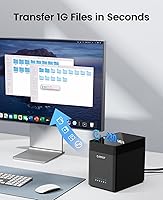
For typical home archiving tasks — copying large video files or photo libraries — the USB 3.0 connection provides throughput that feels fast and responsive compared to older USB 2.0 setups. Moving several gigabytes of family footage takes minutes rather than the better part of an hour.
Real-world speeds fall noticeably below the 5Gbps ceiling advertised. Practical transfers land much closer to what the connected drives themselves are capable of, not the interface maximum. Users expecting network-attached-storage-class performance will be disappointed; this is a USB dock, not a high-throughput workstation array.
Cooling & Thermal Management
74%
26%
Running all five bays loaded with drives for several hours, most users report drive temperatures staying within acceptable ranges. The combination of the 60mm fan and rear honeycomb venting does its job, and there are very few reports of thermal shutdowns or heat-related drive errors during sustained operation.
The fan runs at a fixed speed regardless of drive activity, which means it never truly quiets down even when drives are idle. In a home office or bedroom setup, that constant mechanical hum becomes a background presence users either learn to ignore or find persistently irritating.
Noise Level
54%
46%
For users who place the dock in a dedicated storage area, a server closet, or any room where ambient noise is not a concern, fan noise is essentially a non-issue. Those buyers rarely mention it at all, which tells you the volume level is not extreme in absolute terms.
Fan noise is the single most recurring complaint in critical reviews of this dock. In a quiet home office or a bedroom editing setup, the 60mm fan produces an audible and constant hum that several buyers describe as difficult to tune out. There is no speed control or silent mode, so there is no workaround short of relocating the unit.
Build Quality & Materials
69%
31%
The overall structure feels sturdy enough for stationary desktop use, and the ABS plastic body does a reasonable job of absorbing minor vibration from spinning drives. The unit does not flex or creak when drives are inserted, which gives a decent first impression of durability.
The plastic finish shows fingerprints easily and the drive bay covers feel noticeably lightweight. Compared to aluminum-bodied alternatives at similar price points, the tactile quality gap is apparent. A few long-term users also report scuffs and minor warping of the bay covers after a year or more of regular use.
Value for Money
82%
18%
For buyers who already own several 3.5-inch SATA drives and want a single enclosure to house them all without spending heavily, this multi-drive dock hits a price point that is difficult to argue with. The five-bay capacity at this tier is genuinely hard to beat when considering the alternatives.
If you factor in the fan noise limitations and the occasional sleep-wake detection issues, the value calculation becomes less clear-cut. Buyers who need rock-solid reliability for critical backups may find the extra cost of a more premium enclosure is money well spent in the long run.
Compatibility — Windows & macOS
88%
Both Windows and macOS users report a smooth experience across a wide range of system generations, from older laptops to current desktops. The broad OS support means this dock works without special configuration in the vast majority of home setups buyers are actually running.
Older macOS versions occasionally require a reformat of drives to work without errors, which can catch users off guard if they are migrating drives from a Windows environment. The issue is not dock-specific, but it comes up often enough in reviews to be worth noting.
Linux Compatibility
31%
69%
The dock does technically connect and function on Linux systems, which means it is not completely unusable for Linux users who understand the constraints going in. For single-drive reading tasks in a Linux environment, it works as a basic connection point.
The limitation here is severe and poorly communicated at point of sale: Linux can only read one drive at a time from this dock. For anyone expecting full five-bay access on a Linux machine, this is a dealbreaker. It is the most commonly cited negative surprise in one-star reviews from Linux users.
Power Supply & Stability
79%
21%
The bundled 12V/6.5A adapter handles a full five-drive load without the voltage instability that plagues some third-party enclosures shipping with undersized power bricks. Buyers running five drives simultaneously report no unusual shutdowns or power-related errors during normal operation.
A small number of users have reported the power adapter failing within the first year, leaving the entire dock unusable until a replacement is sourced. The adapter is a proprietary form factor, so finding a compatible replacement requires going back to ORICO directly or locating the exact spec online.
LED Status Indicators
83%
The four activity LEDs are a practical touch that home users genuinely appreciate. Being able to glance at the front of the dock and immediately see which drives are active — or spot a drive that has gone dark unexpectedly — adds a useful layer of visibility without requiring any software.
With five bays and only four LEDs, the indicator layout can create minor confusion about which light corresponds to which drive, particularly for new users. The indicators also lack differentiation between read and write activity, so they tell you a drive is busy but not what it is doing.
Portability & Footprint
61%
39%
The enclosure is reasonably compact given that it houses five full-size 3.5-inch drives, and it sits stably on a desk without taking over the workspace. Its dimensions make it feasible to move between rooms or pack for an office relocation without major hassle.
At nearly five pounds fully unloaded, this is not a device you pick up and carry casually, especially once five drives are inside. The power brick adds additional bulk to the travel footprint, and the unit is strictly a desktop stationary device in practical terms.
Long-Term Durability
63%
37%
Many buyers who have owned the dock for one to two years report it still functioning without major issues, particularly when used in stable temperature environments with consistent power. The ball-bearing fan is a design choice that should support longer operational life than sleeve-bearing alternatives.
Durability concerns tend to emerge around the 12 to 18-month mark in reviews, with bay cover wear, intermittent detection issues, and occasional fan bearing noise increasing over time. The ABS construction does not inspire confidence for buyers expecting a five-plus year lifespan under heavy daily use.

Suitable for:

The ORICO DS500U3 5-Bay 3.5″ HDD Enclosure is an excellent match for home users who have accumulated a pile of 3.5-inch SATA drives and want one tidy place to house them all. If your primary use case is archiving family photos, home video libraries, or large movie collections across multiple drives, this dock handles that workload without requiring any technical setup or configuration. Small office environments that need simple storage expansion — think a shared media server or a rotating backup drive system — will also find it well-suited, provided nobody on the team is running Linux as their main OS. The tool-free magnetic bay design makes it especially practical for anyone who rotates drives in and out regularly, since swapping a drive takes seconds rather than requiring a screwdriver and patience. Windows and macOS users on current hardware will have the smoothest experience, with reliable plug-and-play behavior covering the vast majority of everyday storage tasks.

Not suitable for:

If you need built-in data redundancy or drive mirroring, the ORICO DS500U3 5-Bay 3.5″ HDD Enclosure is not the right tool — it is a straightforward JBOD enclosure, meaning each drive is fully independent and a single drive failure takes only that drive's data with it, with no automatic protection. Anyone relying on this as the sole backup destination for irreplaceable files should think carefully about that architecture before committing. Linux users should treat this dock as essentially incompatible with their workflow, since the platform limitation restricts access to only one drive at a time — a constraint that defeats the purpose of a five-bay enclosure almost entirely. Users working in quiet home office or bedroom environments may also find the constant fan noise more disruptive than expected, and since there is no speed control, there is no way to reduce it short of moving the unit out of earshot. Finally, buyers expecting enterprise-class reliability or planning to run this in a high-demand environment for several years should consider investing in a more robust alternative.
Specifications

  • Number of Bays: The enclosure provides 5 independent bays, each accepting one 3.5″ SATA hard drive simultaneously.
  • Drive Format: Compatible exclusively with 3.5″ SATA I, II, and III hard drives; SSDs and 2.5″ drives are not supported.
  • Max Capacity: Total storage capacity reaches up to 90TB when five 18TB drives are installed across all bays.
  • Interface: Connects to a host computer via a single USB 3.0 Type-B port on the rear of the enclosure.
  • Transfer Rate: The USB 3.0 interface supports a theoretical maximum transfer rate of 5Gbps under ideal conditions.
  • Power Adapter: Ships with a dedicated 12V / 6.5A AC power adapter designed to supply sufficient wattage for all five drives running simultaneously.
  • Cooling System: A 60mm double-ball bearing fan runs continuously to manage heat generated by active drives during operation.
  • Ventilation: The rear panel features a honeycomb-pattern perforation layout to support passive airflow alongside the active fan cooling.
  • Status Indicators: Four LED lights on the front panel display real-time read and write activity for the installed drives.
  • Drive Mode: Operates exclusively in JBOD (Just a Bunch of Disks) mode; no RAID configurations of any kind are supported.
  • OS Support: Compatible with Windows XP and later, macOS X 10.2 and later, and Linux with a single-drive-at-a-time read restriction.
  • Enclosure Material: The outer shell and bay cover components are constructed from ABS plastic.
  • Dimensions: The enclosure measures 7.48″ long by 5.51″ wide by 8.66″ tall when fully assembled.
  • Weight: The unit weighs approximately 4.84 pounds without drives installed.
  • Drive Installation: Drives are secured using a magnetic chip cover mechanism that requires no screws or tools for installation or removal.
  • Protection Features: Built-in circuit protection covers overvoltage, overcurrent, overheating, short-circuit, and leakage scenarios to safeguard connected drives.
  • Recognition Speed: The dock is designed to detect and mount a newly inserted drive within approximately 3 seconds of bay closure.
  • Plug and Play: No driver installation is required on supported Windows and macOS operating systems; the enclosure is recognized automatically by the host OS.

Related Reviews

Syba 5 Bay 2.5″/3.5″ SATA HDD External RAID Enclosure SY-ENC50122
85%
87%
Performance
91%
Ease of Use
89%
Build Quality
85%
Data Transfer Speed
90%
RAID Flexibility
More
ICY DOCK flexiDOCK MB830SP-B 3-Bay 3.5 Inch SATA/SAS HDD Docking Enclosure
83%
93%
Ease of Installation
88%
Build Quality
87%
Performance & Speed
79%
Cooling Efficiency
65%
Noise Levels
More
ikuai 3.5″ USB 3.0 Hard Drive Enclosure
80%
93%
Ease of Setup
71%
Build Quality
62%
Cable Quality & Reliability
88%
Drive Compatibility
74%
Data Transfer Speed
More
ORICO 9858RU3 5-Bay RAID HDD Enclosure 110TB
88%
94%
Build Quality
91%
Cooling Efficiency
89%
RAID Performance
88%
Ease of Installation
85%
Data Transfer Speed
More
Cenmate 5-Bay Hybrid HDD/NVMe Enclosure
73%
83%
Build Quality
78%
Thermal Management
71%
Transfer Speed
69%
RAID Functionality
76%
Drive Compatibility
More
Syba SY-ENC50104 4-Bay 3.5” SATA III HDD Enclosure
85%
88%
Build Quality & Durability
91%
Ease of Setup & Installation
83%
Cooling Efficiency
72%
Noise Level
89%
Storage Capacity & Expansion
More
ICY DOCK ToughArmor MB998SP-B 8-Bay 2.5” SATA/SAS HDD/SSD Mobile Rack Enclosure for 5.25″ Bay
87%
91%
Performance
88%
Cooling Efficiency
89%
Build Quality
93%
Ease of Installation
72%
Noise Level
More
Vantec NexStar JX NST-358SU3-BK USB 3.2 Gen 1 eSATA 3.5″/2.5″ SATA III HDD/SSD Enclosure
86%
92%
Performance & Data Transfer Speeds
90%
Ease of Setup
87%
Build Quality & Durability
78%
System Compatibility
85%
Thermals & Cooling
More
ORICO 3.5″ External Hard Drive Enclosure SATA III to USB 3.1 Type C
84%
92%
Ease of Setup
90%
Data Transfer Speed
85%
Build Quality
88%
Compatibility with OS
87%
Shock Protection
More
Vantec NST-371C31-BK NexStar Gx USB 3.1 Gen 2 Type-C 3.5″ SATA HDD/SSD Enclosure
84%
89%
Performance
94%
Ease of Setup
85%
Build Quality
92%
Compatibility with Systems
88%
Data Transfer Speed
More

FAQ

No, you do not. On Windows and macOS it is genuine plug-and-play — connect the USB cable, power it on, and your operating system will recognize the drives automatically. No disc, no download required.

Technically yes, but with a significant catch. The ORICO DS500U3 5-Bay 3.5″ HDD Enclosure can only read one drive at a time under Linux — not all five simultaneously. If you are running Linux as your primary OS and need full multi-bay access, this dock will not meet your needs as described.
It does not support RAID in any form. Each drive operates completely independently, which means there is no automatic mirroring or redundancy built in. If one drive fails, only the data on that drive is lost. For proper redundancy you would need a dedicated RAID enclosure.

This is genuinely the most common concern in user reviews, so it is worth being direct: the fan is audible. It runs at a constant fixed speed whether drives are active or idle, producing a continuous mechanical hum. In a quiet room it is noticeable. There is no way to reduce the speed or switch it off, so if fan noise is a dealbreaker for your setup, factor that in carefully.

All five drives can run simultaneously without any issue. The bundled power adapter is rated specifically to handle a full five-drive load, so you do not need to worry about power instability when all bays are occupied.

Usually yes, but this is an area where some users have experienced problems. A subset of buyers report that one or more drives disappear from the system after a sleep and wake cycle, requiring a full power cycle of the dock to recover them. It does not happen to everyone, but it is common enough to be worth knowing about if you rely on this for critical storage.

No. The dock is designed exclusively for 3.5-inch SATA hard drives. Attempting to fit a 2.5-inch drive or SSD without an adapter bracket will not work physically, and even with an adapter the dock is not officially rated for those form factors.

Expect something meaningfully lower than the 5Gbps theoretical ceiling. In practice, USB 3.0 transfers are limited by the drives themselves, cable quality, and host controller overhead. For typical large file copies — video archives, photo libraries — you will see speeds in the range your specific drives support, not the interface maximum.

The four LEDs on the front panel indicate drive activity, but with five bays and only four lights the mapping is not perfectly one-to-one. The positioning follows the drive bay order from left to right, but the layout can cause minor confusion initially. A quick check of the included documentation will clarify the exact mapping for your specific unit.

The magnetic bay design makes physical insertion and removal fast, but whether true hot-swapping is safe depends on your operating system. On Windows, you should use the safely-remove-hardware process before pulling a drive to avoid data corruption. macOS users should eject the drive through Finder first. Physically the dock accommodates frequent swaps well; the OS-level precautions still apply.