Overview

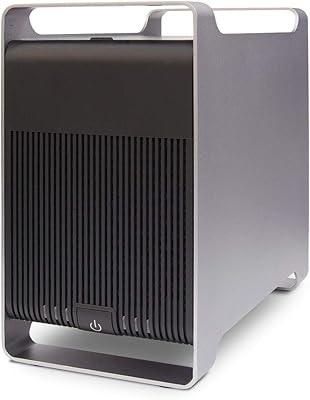
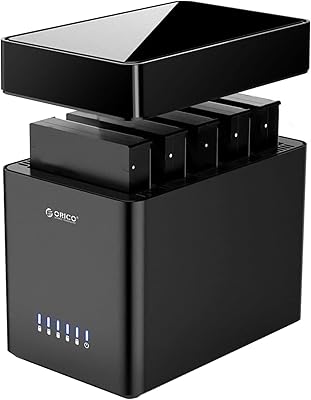
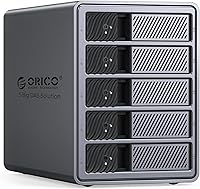
The ORICO 9858RU3 5-Bay RAID HDD Enclosure sits in an interesting spot — aimed at home office builders and small creative studios who've outgrown single-drive external storage but don't want the complexity of a full network-attached storage system. What separates it from plastic-bodied rivals is the all-aluminum chassis and a built-in 150W power supply, which eliminates the external brick that clutters most competing units. Released in late 2024, it's still relatively new, so long-term reliability data is limited. One honest caveat worth setting upfront: the USB 3.0 interface is practical and broadly compatible, but it's not the fastest option available at this storage tier.
Features & Benefits

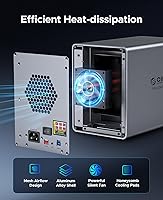
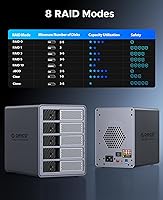
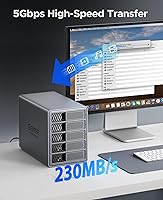
With eight RAID modes on offer — including RAID 0, 1, 5, and JBOD — this 5-bay enclosure covers most real-world storage scenarios without requiring separate software configuration. RAID 5 is the practical sweet spot for most users, balancing speed, capacity, and single-drive fault tolerance. The unit can house enough storage to manage years of 4K or 8K footage comfortably. Transfer speeds top out around 235MB/s under USB 3.0, which handles everyday backup and file transfers well — but if you're running RAID 0 expecting combined drive throughput, the interface becomes the bottleneck. The tool-free drive installation and individual locking mechanism make swapping drives quick and secure, while the 80mm cooling fan keeps things quiet during extended workloads.

Best For

This RAID storage box makes the most sense for users who want organized, redundant storage tied directly to one machine — videographers juggling terabytes of raw footage, or photographers maintaining large archives with data redundancy built in. IT hobbyists who already own a collection of 3.5-inch SATA drives will find it a cost-effective way to consolidate them. It also suits small teams or home offices that need centralized backup storage without the overhead of a networked system. That said, buyers should be clear-eyed: this is direct-attached storage only. There's no network sharing, no remote access, no app ecosystem — if any of those features matter, a proper NAS is the right tool instead.

User Feedback

Early buyers of the ORICO enclosure generally respond well to how straightforward the initial setup is — most report having drives recognized and RAID configured within minutes. The build quality earns consistent praise, and the fan stays impressively quiet under normal workloads. The friction comes elsewhere. Switching RAID modes completely wipes all data, and this isn't prominently communicated out of the box — a frustrating discovery for anyone who skipped the fine print. Documentation is thin overall. A handful of users also noted that certain drive brands required a power cycle before being detected properly. Given this unit launched in late 2024, the feedback pool is still growing, and long-term durability under sustained heavy workloads remains an open question.

Pros

  • All-aluminum chassis feels far more premium and durable than plastic-bodied rivals at a similar price point.
  • Eight hardware RAID modes give experienced users meaningful flexibility without any software configuration on the host machine.
  • Tool-free, bracket-free drive installation makes swapping or adding drives quick and genuinely hassle-free.
  • Built-in 150W power supply keeps the desktop tidy — no external adapter brick to manage or misplace.
  • Quiet 80mm cooling fan stays unobtrusive during normal workloads, even in open home office environments.
  • Broad plug-and-play compatibility across Windows, macOS, and Linux with no driver installation required.
  • Individual drive locking mechanism prevents accidental ejection, adding a practical layer of data security.
  • Five bays provide enough raw capacity headroom to support large video archives, RAW photo libraries, and long-term data growth.

Cons

  • Switching RAID modes completely erases all array data with no on-device warning or confirmation prompt.
  • USB 3.0 interface caps real-world throughput, making RAID 0 or RAID 10 speed gains largely theoretical.
  • Included documentation is too thin to guide buyers unfamiliar with RAID through meaningful configuration decisions.
  • Some drive brands require a full power cycle before being properly recognized after initial insertion.
  • No RAID health monitoring or meaningful status alerts beyond basic per-bay activity LEDs.
  • The internal PSU design means a power supply failure requires servicing the whole unit, not swapping an adapter.
  • Fan noise noticeably increases under heavy sustained workloads, which can be distracting in quiet environments.
  • Long-term durability data does not yet exist — the product launched in late 2024 and has a limited reliability track record.
  • Linux users may encounter kernel-level compatibility issues that require manual configuration with no official documentation support.

Ratings

The scores below reflect an AI-driven analysis of verified global user reviews for the ORICO 9858RU3 5-Bay RAID HDD Enclosure, with spam, bot-generated, and incentivized feedback actively filtered out to preserve accuracy. Ratings are drawn from real-world usage patterns across home offices, creative studios, and IT hobbyist setups worldwide. Both the strengths that keep buyers satisfied and the friction points that generate returns or complaints are represented transparently in every category.

Build Quality
88%
The aluminum alloy chassis feels noticeably more substantial than comparably priced plastic-bodied rivals from Mediasonic or Sabrent. Users repeatedly mention that the unit does not flex, rattle, or feel hollow — a meaningful reassurance when it houses drives holding years of irreplaceable work.
A few buyers noted that the front drive bay covers, while functional, have a slightly cheaper finish than the main enclosure body. At this weight and price, minor cosmetic inconsistencies stand out more than they might on a budget unit.
Ease of Setup
84%
Most users report having all five drives seated, RAID mode selected, and the array recognized by their OS within under fifteen minutes — no drivers, no software installation required. The tool-free, bracket-free slot design makes physical installation genuinely quick, even for first-timers.
The included documentation is thin to the point of being unhelpful for anyone unfamiliar with RAID concepts. Users trying to decide between RAID 5 and RAID 10 for their specific workload are largely left to figure it out through online research rather than anything in the box.
RAID Mode Flexibility
81%
19%
Eight hardware RAID modes is a genuinely wide selection for a direct-attached enclosure at this price tier. Having RAID 3, CLONE, and CLEAR available alongside the standard options gives more experienced users meaningful flexibility without requiring software RAID configuration on the host machine.
Switching between RAID modes wipes all data on the array without prominent warning — this has caught multiple buyers off guard and led to data loss. The mode-switching process also lacks any confirmation step or on-device indicator, which feels like an oversight given how consequential that action is.
Transfer Speed
67%
33%
For backup-oriented workflows — copying large video project folders overnight, archiving raw photo shoots — the USB 3.0 interface delivers consistent real-world throughput that handles the job without obvious frustration. Day-to-day file management feels responsive for most users.
The USB 3.0 ceiling becomes a real limitation when running RAID 0 or RAID 10, where the combined drive performance is simply capped by the interface rather than the drives themselves. Users who compared this against Thunderbolt-based enclosures consistently flagged the speed gap as a meaningful trade-off.
Thermal Management
74%
26%
During typical workloads — sequential reads, incremental backups, mixed file transfers — the 80mm fan and front-to-rear airflow design keeps drive temperatures in a healthy range. Users running the enclosure in open desktop environments report no thermal concerns under normal usage patterns.
Under sustained heavy write workloads, such as multi-hour video renders writing continuously to the array, a handful of users observed drive temperatures creeping higher than expected. Enclosed rack or cabinet placement appears to amplify this effect, suggesting the cooling design depends on adequate ambient airflow.
Noise Level
83%
The 80mm fan operates quietly enough that users in home office environments consistently describe it as unobtrusive. Several buyers specifically mentioned placing the enclosure on their desk without it becoming a distraction during calls or focused work sessions.
Under sustained load, the fan audibly ramps up, and in quieter rooms this becomes noticeable. A small number of users also reported a faint vibration hum from certain drive combinations that resonates through the aluminum chassis more than it would through a dampened plastic housing.
Drive Compatibility
76%
24%
The enclosure works reliably with a wide range of 3.5-inch SATA drives from Western Digital, Seagate, and Toshiba. Users repurposing older drives from previous builds report broad recognition without needing firmware updates or workarounds in most cases.
A recurring complaint involves certain drive brands — particularly some older WD Red models — requiring a full power cycle before being detected after initial insertion. There are also isolated reports of the enclosure not cleanly recognizing very high-capacity drives on first connection, requiring a reboot to resolve.
Power Supply Integration
86%
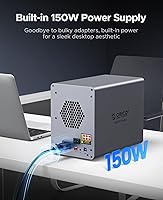
Having a 150W power supply built directly into the chassis is a genuine quality-of-life improvement over enclosures that require an external brick. Users with already-busy desks consistently mention this as one of the first things they appreciate after setup.
Because the PSU is internal, a failure down the line means the entire unit needs service rather than a simple adapter swap. A few technically minded buyers flagged this as a long-term serviceability concern, though no widespread PSU failure reports have surfaced given the product's short time on market.
OS Compatibility
82%
18%
Plug-and-play functionality across Windows, macOS, and Linux works as advertised for the vast majority of users. macOS users in particular noted clean mounting behavior without any third-party driver requirements, which is not a given for hardware RAID enclosures.
A small but consistent group of Linux users report that certain kernel versions require manual configuration steps before the array is properly recognized. Documentation for non-Windows environments is essentially absent, leaving those users reliant on community forums.
Drive Installation Mechanism
79%
21%
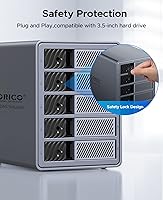
The tool-free, bracket-free design is a practical advantage for anyone who regularly rotates drives in and out. The individual locking mechanism adds a sense of security that prevents accidental ejection, which matters when the enclosure is in an area with foot traffic or vibration.
The locking tabs on some units feel slightly stiff out of the box, requiring more force than expected for first-time insertion. While this likely improves with use, a few buyers expressed concern about the long-term durability of plastic locking components on an otherwise metal-bodied enclosure.
Value for Money
77%
23%
For buyers who want hardware RAID in a five-bay aluminum enclosure with a built-in power supply, the pricing sits in a reasonable position relative to what Yottamaster and similar brands charge for comparable specifications. The feature-to-cost ratio is solid for home and small studio use cases.
Buyers comparing this against software RAID solutions — using a budget NAS or a spare PC — may find the value case less compelling once they account for the USB 3.0 throughput ceiling. The lack of network access also limits long-term flexibility compared to investing a similar amount in a basic NAS.
Documentation & Support
51%
49%
ORICO's customer support response rate is generally described as acceptable, and the company appears willing to assist with compatibility questions when contacted directly. For users who already understand RAID fundamentals, setup is self-explanatory enough that documentation gaps rarely cause problems.
The included manual is minimal and does not explain RAID mode trade-offs, data wipe behavior during mode changes, or drive compatibility nuances in any useful depth. Users without prior RAID experience frequently turn to third-party guides just to understand what they purchased, which is a notable gap at this price.
Long-Term Reliability
63%
37%
Early user reports suggest the hardware holds up well through the first several months of regular use, with no widespread component failure patterns emerging. The aluminum build and active cooling give a reasonable foundation for durability in typical workloads.
This unit only entered the market in late 2024, which means the reliability picture beyond six to twelve months remains genuinely unknown. Buyers making long-term storage commitments should factor in this uncertainty — there simply is not enough accumulated real-world data yet to rate this confidently.
Indicator Lights & Status Feedback
58%
42%
Per-bay activity LEDs allow users to confirm which drives are active during reads and writes, providing basic at-a-glance feedback that is helpful when diagnosing whether a specific bay is responding correctly after a hot swap.
The status indication system offers no RAID health monitoring, no failed-drive alert beyond a basic light change, and no way to distinguish between a degraded array and a healthy one at a glance. Users accustomed to NAS-level status reporting will find this feedback loop frustratingly minimal.

Suitable for:

The ORICO 9858RU3 5-Bay RAID HDD Enclosure is a strong fit for videographers, photographers, and small creative studios that have accumulated enough footage or raw files to outgrow single-drive external storage and need a redundant, organized solution attached directly to one workstation. RAID 5 users in particular get a practical balance of usable capacity and fault tolerance without needing to learn NAS administration or set up a home network. IT hobbyists who already own a collection of 3.5-inch SATA drives from older builds will find this an efficient and cost-effective way to consolidate them into a single managed array. Home office workers who want a set-and-forget centralized backup volume — one that works quietly in the background and does not require ongoing maintenance — will also feel at home with this setup. If your priority is plug-and-play simplicity, broad OS compatibility, and a tidy desk without a power brick taking up space, this enclosure checks those boxes reliably.
Not suitable for:

The ORICO 9858RU3 5-Bay RAID HDD Enclosure is the wrong choice for anyone who needs shared network storage — it is a direct-attached device only, meaning only the machine it is physically connected to can access the drives. Users who need remote access, multi-user simultaneous access, or any form of networked file sharing should look at a proper NAS instead. Content creators or professionals whose workflows depend on the fastest possible sustained throughput — such as real-time 8K editing from the array — will run into the ceiling imposed by USB 3.0, regardless of how fast the drives themselves are. This is also not the right buy for anyone planning to deploy it in a production or enterprise environment where long-term reliability data and vendor support guarantees matter; the product only entered the market in late 2024, and that track record simply does not exist yet. Finally, users who are not already familiar with RAID concepts should be prepared to do independent research, since the included documentation provides little guidance for making informed configuration decisions.
Specifications

  • Model Number: The unit is officially designated as the 9858RU3, manufactured by Shenzhen ORICO Technologies Co., Ltd.
  • Drive Bays: This enclosure accommodates up to five 3.5-inch SATA hard disk drives simultaneously.
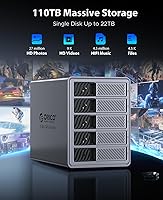
  • Max Capacity: Using five high-capacity drives, the enclosure can support a combined raw storage pool of up to 110TB.
  • Single Drive Max: Each individual bay supports drives up to 22TB, covering the largest mainstream 3.5-inch SATA HDDs currently available.
  • Interface: The host connection uses USB 3.0 (5Gbps), delivering real-world sequential transfer speeds of up to approximately 235MB/s.
  • RAID Modes: Eight hardware RAID configurations are supported: RAID 0, 1, 3, 5, 10, JBOD, CLONE, and CLEAR, all managed via a physical mode switch.
  • Chassis Material: The outer enclosure is constructed from aluminum alloy, providing passive heat dissipation and a more rigid structure than plastic alternatives.
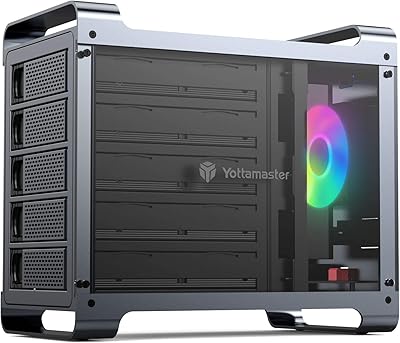
  • Cooling System: An 80mm fan with front and rear ventilation slots provides active airflow across the drive bays during operation.
  • Power Supply: A 150W power supply is built directly into the chassis, eliminating the need for an external AC adapter.
  • Drive Installation: Drives are installed using a tool-free, bracket-free system with an individual locking mechanism on each bay to prevent accidental ejection.
  • Dimensions: The unit measures 10.2 x 5.75 x 7.72 inches, making it a compact but substantial desktop footprint for a five-bay enclosure.
  • Weight: The enclosure weighs 10.41 pounds without drives installed, reflecting the density of its aluminum construction and internal PSU.
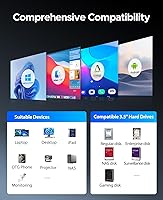
  • OS Compatibility: The enclosure is plug-and-play compatible with Windows, macOS, and Linux operating systems without requiring proprietary driver installation.
  • Drive Type: Only 3.5-inch SATA HDDs are supported; the unit is not designed for SSDs, NVMe drives, or 2.5-inch form factor drives.
  • Connectivity Type: This is a direct-attached storage device only — it connects to a single host computer via USB and does not support network or multi-user access.
  • Release Date: The product became commercially available in September 2024, making it a relatively recent addition to ORICO's enclosure lineup.
  • Best Sellers Rank: As of available data, the unit holds a rank of #169 in the Amazon Enclosures category, reflecting solid early market traction.

Related Reviews

Syba 5 Bay 2.5″/3.5″ SATA HDD External RAID Enclosure SY-ENC50122
85%
87%
Performance
91%
Ease of Use
89%
Build Quality
85%
Data Transfer Speed
90%
RAID Flexibility
More
ORICO DS500U3 5-Bay 3.5″ HDD Enclosure
72%
93%
Ease of Setup
91%
Drive Installation & Swap
67%
Drive Detection Reliability
72%
Transfer Speed
74%
Cooling & Thermal Management
More
ICY DOCK ToughArmor MB998SP-B 8-Bay 2.5” SATA/SAS HDD/SSD Mobile Rack Enclosure for 5.25″ Bay
87%
91%
Performance
88%
Cooling Efficiency
89%
Build Quality
93%
Ease of Installation
72%
Noise Level
More
Yottamaster DF5RU3 5-Bay RAID Hard Drive Enclosure, 90TB Capacity
85%
94%
Storage Capacity
90%
RAID Flexibility
85%
Cooling Efficiency
88%
Build Quality
91%
Ease of Setup
More
Syba SY-ENC50104 4-Bay 3.5” SATA III HDD Enclosure
85%
88%
Build Quality & Durability
91%
Ease of Setup & Installation
83%
Cooling Efficiency
72%
Noise Level
89%
Storage Capacity & Expansion
More
GODO 2.5″ Dual Bay RAID Enclosure
75%
88%
Value for Money
91%
Ease of Setup
83%
Build Quality
79%
Thermal Management
67%
Transfer Performance
More
Vantec Nexstar GX USB 3.0 Dual 2.5″ SATA SSD/HDD RAID Enclosure
84%
88%
Performance
92%
Build Quality
78%
Ease of Setup
90%
Transfer Speed
85%
RAID Functionality
More
ICY DOCK flexiDOCK MB830SP-B 3-Bay 3.5 Inch SATA/SAS HDD Docking Enclosure
83%
93%
Ease of Installation
88%
Build Quality
87%
Performance & Speed
79%
Cooling Efficiency
65%
Noise Levels
More
ICY DOCK ToughArmor MB604SPO-B 4 Bay 2.5 SSD/HDD & Optical Disk Drive Enclosure
85%
88%
Build Quality
85%
Cooling Performance
91%
Ease of Installation
87%
Value for Money
89%
Compatibility with Drives
More
ICY DOCK ToughArmor MB924IP-B 24-Bay 2.5″ SAS/SATA HDD/SSD Mobile Rack Enclosure
85%
93%
Storage Capacity
88%
Build Quality
85%
Cooling Performance
80%
Ease of Setup
91%
Connectivity & Compatibility
More

FAQ

No, the ORICO 9858RU3 5-Bay RAID HDD Enclosure is fully plug-and-play on Windows, macOS, and Linux. Once you connect it via USB and select your RAID mode using the physical switch, your operating system should recognize the array automatically without any additional software.
Yes, and this is something buyers often discover too late. Changing the RAID mode via the hardware switch completely wipes the entire array. Always back up everything on the drives before touching the mode selector, regardless of which mode you are switching from or to.

You can mix drive capacities in JBOD mode, where each drive appears as an independent volume. However, in most RAID modes the array capacity is determined by the smallest drive, so mismatched sizes will leave usable space on your larger drives inaccessible. For RAID 5 or RAID 1, using identical drives is strongly recommended.

No, this is a direct-attached storage device, which is a meaningful distinction. It connects to one computer via USB, and only that machine can access the drives. There is no built-in network interface, no remote access capability, and no app or web portal. If you need shared or remote access, a NAS device is what you are looking for instead.

For most home and small studio users, RAID 5 is the practical sweet spot. It distributes parity data across all drives, meaning you can lose one drive without losing any data, while still using the majority of your total raw capacity as usable storage. RAID 1 offers stronger redundancy but cuts your usable capacity in half, while RAID 0 maximizes space and speed at the cost of zero fault tolerance.

Under typical workloads, most users describe the fan as quiet enough to sit on a desk without being distracting. It does ramp up audibly during sustained heavy writes or long sequential transfers, so if you are working in a very quiet room, you will notice it. For a home office or studio environment with ambient noise, it generally blends in fine.

No. This enclosure is designed specifically for 3.5-inch SATA hard disk drives. It does not support 2.5-inch drives, SATA SSDs, or NVMe storage of any kind. If your drives do not match that form factor, they will not physically fit or function correctly in the bays.

For most editing workflows involving 1080p or even standard 4K footage, the real-world throughput is adequate for day-to-day use. Where it starts to show its limits is in high-bitrate 4K or 8K multi-stream workflows, or when running RAID 0 expecting combined drive speeds — the USB 3.0 interface becomes the bottleneck before the drives do. If maximum throughput is critical to your work, a Thunderbolt-based enclosure would serve you better.

You can start with fewer than five drives, but keep in mind that expanding an existing RAID array after the fact is not straightforward on hardware RAID enclosures. Changing the number of drives in most RAID modes requires reconfiguring the array from scratch, which wipes your data. JBOD mode is the most flexible for adding drives incrementally since each drive functions as a separate volume.

The main differentiators for this 5-bay enclosure are the all-aluminum chassis and the built-in power supply, both of which are less common at this price tier where plastic bodies and external adapters tend to be the norm. Mediasonic units are often praised for reliability based on a longer track record, while Yottamaster offers similar aluminum builds at comparable prices. Since this ORICO model only launched in late 2024, it lacks the multi-year user history those alternatives have accumulated, which is worth factoring in if long-term durability is a top priority.