Overview

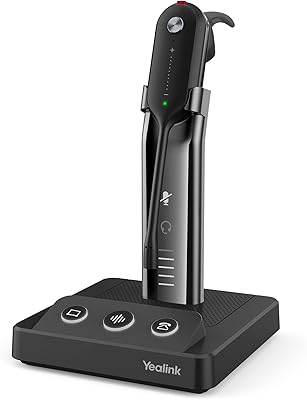
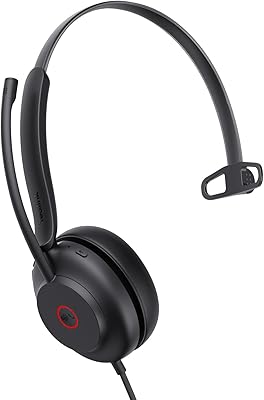
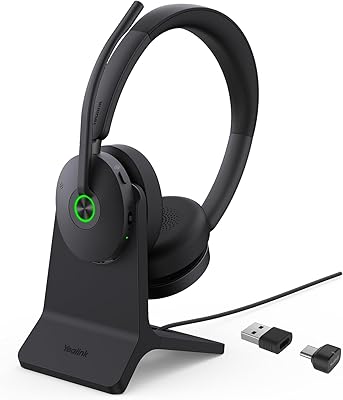
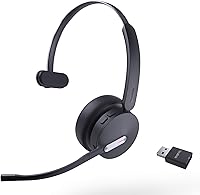
The Yealink WH64 Hybrid Mono Wireless Headset was built for a specific kind of worker: someone who splits their day between a desk, a conference room, and maybe a phone call on the way to lunch. Released in late 2024, it sits in the mid-to-premium tier of business headsets, targeting remote workers, call center agents, and office professionals who need reliable communication hardware without wrestling with complicated setup. It carries Microsoft Teams and UC certification, which matters more than people often realize — certified hardware means fewer dropped calls and compatibility headaches. The mono, on-ear design is a deliberate choice for a call-focused audience, not an oversight.
Features & Benefits

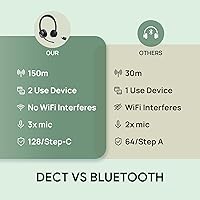
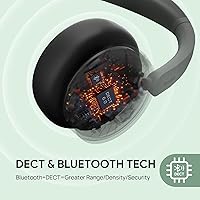
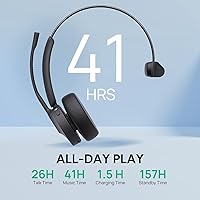
The standout spec is the 492-foot DECT range — and in practice, that kind of coverage genuinely changes how freely you can move around an open office or warehouse floor without losing your call. The WDD60 DECT dongle is plug-and-play, meaning no driver installation drama on most Windows machines. On the audio side, a three-microphone array backed by Acoustic Shield Technology 2.0 does a solid job filtering out keyboard clatter and HVAC noise — it won't perform miracles in a loud café, but on a busy office floor it holds up well. Battery life is genuinely strong: 26 hours of talk time, recharged in roughly 90 minutes.

Best For

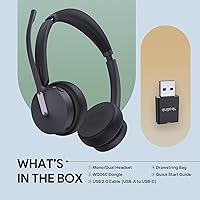
This hybrid office headset makes the most sense for people tethered to a desk phone part of the day and a laptop for the rest. The dual DECT-plus-Bluetooth setup lets you keep a PC connection live while staying paired to your smartphone — a real convenience when client calls come in on your mobile. Hot-deskers will appreciate the included drawstring bag and compact dongle, which make relocating to another workstation genuinely painless. Worth noting too is the desk phone compatibility list, which spans a wide range of Yealink, Poly, and Cisco models — handy if your office runs a mixed hardware environment.

User Feedback

Buyers consistently highlight call clarity and DECT range as the two strongest points, with several noting the mic handles background noise better than expected at this price tier. Comfort gets a more mixed response — most find the on-ear fit acceptable for a full workday, but people with larger ears or sensitivity to on-ear pressure may want to try it before committing long-term. A few reviewers mention wanting a stereo option for music, which is fair — the WH64 was designed around calls, not media consumption, and that trade-off is baked in by design. Feedback on the companion app and firmware updates is sparse, suggesting most users simply plug in and get to work.

Pros

  • The 492-foot DECT range is genuinely useful in large offices, warehouses, and multi-room home setups.
  • Battery life of 26 hours talk time makes daily charging a non-issue for most professionals.
  • Plug-and-play DECT dongle works on most Windows PCs without any driver installation.
  • Simultaneous DECT and Bluetooth pairing keeps your PC and smartphone connected at the same time.
  • Microsoft Teams certification means call controls and busy status sync natively without manual configuration.
  • The three-microphone array handles typical open-office background noise better than many rivals in this tier.
  • The pull-up mic mute is fast and instinctive — easy to develop as a daily habit within hours.
  • A 90-minute charge returning full battery is a practical safety net for mornings when you forget overnight.
  • The included drawstring bag and compact dongle make this one of the easier business headsets to carry daily.
  • Wide desk phone compatibility spanning Yealink, Poly, and Cisco models suits mixed enterprise hardware environments.

Cons

  • Mono audio makes the WH64 a poor fit for music, media, or any stereo-dependent listening.
  • On-ear pressure becomes noticeable during sessions longer than five or six continuous hours.
  • The plastic headband construction feels a step below what the price point might suggest.
  • Bluetooth range is a standard 50 meters — a significant drop from the flagship 492-foot DECT figure.
  • Firmware updates and the companion app behave inconsistently on some Windows versions and on macOS.
  • Losing the DECT dongle is a real problem, as it is not easy to source as a standalone replacement.
  • Buyers outside the Windows and Teams ecosystem will encounter a more friction-heavy setup experience.
  • The busylight indicator is not bright enough to be reliably visible in well-lit open-plan offices.
  • Early wear on ear cushion stitching has been reported by some users after several months of heavy daily use.
  • Those who do not need DECT range or desk phone integration may find the value case harder to justify.

Ratings

The Yealink WH64 Hybrid Mono Wireless Headset has been scored by our AI system after analyzing verified buyer reviews from global markets, with spam, bot-generated, and incentivized feedback actively filtered out. Scores reflect the full spectrum of real-world experience — where this DECT Bluetooth headset genuinely delivers and where it falls short for certain users. Both strengths and recurring pain points are transparently represented in each category below.
Call Audio Clarity
88%
Reviewers working in busy open-plan offices consistently report that call recipients rarely notice background noise — keyboard clicks, HVAC hum, and nearby conversation get noticeably reduced. The three-microphone setup with Acoustic Shield Technology 2.0 performs above expectations for a headset in this class.
In loud environments like factory floors or crowded co-working spaces, the noise filtering can struggle, occasionally picking up sudden sharp sounds. A small number of users also noted slight voice thinning on their end during longer calls.
Wireless Range (DECT)
91%
The 492-foot DECT range is one of the most praised aspects across reviews, with warehouse workers and large-office professionals specifically calling it out. Users report walking to a printer, break room, or adjacent meeting space without dropping audio — a meaningful daily convenience.
The impressive range applies only to the DECT connection via dongle. Bluetooth tops out around 50 meters, which is standard but can surprise buyers who assumed both modes shared the same range. Walls and interference can reduce effective DECT range in older buildings.
Battery Life
93%
Twenty-six hours of talk time in mono mode is a genuine all-day-and-then-some figure that holds up in real use. Call center agents pulling long shifts report charging every couple of days rather than daily, which reduces friction considerably.
A small subset of users noted battery performance dipping slightly after several months of heavy daily use, which is typical for lithium-ion cells but worth flagging for high-volume call center deployments. The dual-mode 32-hour figure requires specific usage conditions to achieve.
Charging Speed
86%
Roughly 90 minutes to a full charge is genuinely fast for a headset with this battery capacity. Users who forgot to charge overnight report that a short morning charge while getting settled at their desk was enough to carry them through the day.
The USB-A to USB-C cable is functional but a couple of reviewers mentioned they would have preferred a USB-C to USB-C option for compatibility with modern laptop hubs. The cable is proprietary in connector pairing, so losing it requires sourcing a specific size.
Multi-Device Connectivity
83%
The ability to stay paired to both a PC via DECT dongle and a smartphone via Bluetooth simultaneously is a practical feature that hybrid workers genuinely use. Switching between an incoming mobile call and a Teams meeting mid-session works without needing to re-pair.
A handful of users reported occasional lag or brief audio dropout when switching between active connections, particularly when both devices were busy. The pairing process between the dongle and headset can also be finicky to reset if the connection is lost.
Noise Cancellation (Mic)
79%
21%
For typical office environments — open-plan desks, home offices with ambient noise — the microphone noise cancellation does solid work. Colleagues on the other end of calls in quiet-to-moderate settings rarely report hearing intrusive background sounds.
Expectations need to be calibrated: this is not studio-grade isolation, and buyers hoping for near-perfect noise suppression in loud call centers or public spaces may find it falls short. It handles sustained background noise better than sudden loud sounds nearby.
Comfort & Fit
71%
29%
The lightweight plastic-and-leather build keeps fatigue manageable during several hours of continuous wear. Most reviewers with average head sizes report the adjustable headband finding a comfortable position without much fuss.
On-ear designs inherently create pressure on the ear cartilage over time, and users wearing the headset for six-plus hours in a row mention noticeable discomfort. People with larger ears or those sensitive to clamping pressure are more likely to find extended wear tiring.
Build Quality
74%
26%
The headset feels appropriately solid for a business-grade device — not fragile, and the headband flexes without feeling like it will crack. The included drawstring bag adds a layer of protection for daily transport that budget competitors rarely include.
The all-plastic headband construction looks and feels a step below premium competitors at similar price points. A few buyers noted the ear cushion stitching showing early wear after a few months, suggesting durability over a multi-year lifespan may vary.
Ease of Setup
89%
Plug-and-play via the WDD60 DECT dongle is genuinely straightforward on most Windows machines — no driver installation required in the majority of reported cases. Teams users with certified setups noted immediate recognition without any additional configuration.
Firmware updates are not universally smooth, with a small number of users reporting the companion app behaving inconsistently on certain Windows versions. Mac users have noted more friction during initial setup compared to Windows environments.
Microsoft Teams Integration
87%
Teams certification is not just a marketing badge here — users report that call controls, mute sync, and busy status indicators work natively within the Teams interface. The busylight activating automatically during calls is a small but appreciated feature in shared office spaces.
Integration is strongest on Windows. A subset of Mac-based Teams users reported that some call control functions did not map correctly without additional setup steps. Non-Teams UC platforms work but with fewer native integration features available out of the box.
Desk Phone Compatibility
77%
23%
The compatibility list covers a wide range of Yealink desk phones as well as popular third-party models from Poly and Cisco, which is genuinely useful in mixed-hardware enterprise environments. Users with legacy VoIP setups praised being able to consolidate to one headset.
Compatibility is not universal, and buyers using less common or older SIP phones outside the listed models report inconsistent results. Verifying your specific desk phone model against the published compatibility list before purchasing is strongly recommended.
Portability
82%
18%
The compact DECT dongle and the included drawstring bag make this one of the more travel-friendly business headsets in its class. Hot-deskers moving between floors or buildings find the pack-up-and-go experience noticeably easier than with bulkier alternatives.
At around 9 ounces, it is not the lightest headset available, and the dongle — while small — is an additional item to track. Users who have lost or misplaced the dongle report it is not the easiest accessory to source as a standalone replacement.
Mono Audio Trade-off
68%
32%
For call-heavy professionals, mono audio is simply the right tool — it keeps one ear free for in-person conversations and ambient awareness, which many office workers and call center agents actively prefer over stereo isolation.
Buyers who expected to use the WH64 for music, video calls with rich audio, or media consumption during breaks will find the mono output limiting. This is a deliberate design decision, but it catches some buyers off guard who did not read the spec sheet carefully.
Value for Money
76%
24%
The combination of DECT range, dual-mode connectivity, Teams certification, and long battery life represents a reasonable package at this price tier. For professionals whose daily work revolves around calls, the feature set justifies the investment over cheaper alternatives.
Buyers comparing it against stereo competitors at similar prices may feel the mono form factor and plastic build do not fully support the mid-to-premium price positioning. Those who do not need DECT range or desk phone integration may find better value elsewhere.
Busylight & Call Controls
81%
19%
The integrated busylight is a practical touch in open offices where visual do-not-disturb signals matter. The pull-up mic mute is intuitive and quick — experienced users report it becoming a natural reflex within the first day of use.
The busylight is visible from the front but not particularly bright in well-lit rooms, limiting its effectiveness as a signal to passing colleagues. Button layout takes a short adjustment period, and a couple of users noted accidentally triggering controls when adjusting the headset.

Suitable for:

The Yealink WH64 Hybrid Mono Wireless Headset was built for professionals whose workday revolves around calls, not content — and it shows. It makes the most sense for office workers who spend their days moving between a desk, a meeting room, and a break area, since the 492-foot DECT range means you are not tethered to your desk the moment a call comes in. Call center agents will particularly appreciate the combination of long battery life and capable mic noise filtering, which removes the daily stress of mid-shift charging runs or distracted-sounding audio. Remote workers embedded in the Microsoft Teams ecosystem get genuine value from the UC certification, as native call controls and busy status sync without any configuration gymnastics. The dual DECT-plus-Bluetooth setup also suits anyone juggling a desk phone or PC alongside a personal smartphone — keeping both connected simultaneously is a practical convenience that adds up quickly across a full workweek. Hot-deskers and frequent office travelers will find the included drawstring bag and compact dongle make relocating between workstations genuinely low-effort.

Not suitable for:

The Yealink WH64 Hybrid Mono Wireless Headset is the wrong tool if you are looking for a headset that pulls double duty across calls and media consumption. The mono on-ear design is a deliberate engineering choice for communication-first use, but it means music, podcasts, or video content sound flat compared to any stereo alternative at a similar price. People who wear a headset continuously for six hours or more may find the on-ear fit uncomfortable by the afternoon, particularly if they are sensitive to ear pressure — this is not a cushioned over-ear design. Mac users or those on niche UC platforms should temper expectations around how smoothly call controls integrate out of the box, as the experience is most polished on Windows and Teams-certified environments. Buyers who do not need DECT range — say, someone working exclusively at a fixed home desk within a few feet of their laptop — are paying for a capability they will never use, and could find a stereo alternative with better audio quality for less money. Finally, anyone whose desk phone is outside the published compatibility list should verify carefully before purchasing, as the connection may not function as expected.
Specifications

  • Connectivity: The headset connects via a plug-and-play WDD60 DECT dongle (USB-A) for PC use and Bluetooth 5.2 for pairing with smartphones or other Bluetooth-enabled devices simultaneously.
  • DECT Range: Wireless range via DECT reaches up to 492 feet (150 meters) in open-space conditions, providing significantly more coverage than standard Bluetooth connections.
  • Bluetooth Range: Bluetooth connectivity supports a range of up to 50 meters (approximately 164 feet), which is standard for Bluetooth 5.2 class devices.
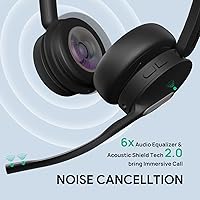
  • Microphones: A three-microphone array paired with Acoustic Shield Technology 2.0 handles noise filtering and delivers clearer voice pickup during calls.
  • Talk Time: The headset provides up to 26 hours of talk time in mono mode and up to 32 hours in dual-mode operation on a full charge.
  • Music Playback: Music and audio playback lasts up to 41 hours per charge, though this figure applies to lower-power audio streaming rather than active call use.
  • Charge Time: A full charge is achieved in approximately 1.5 hours using the included USB-A to USB-C cable.
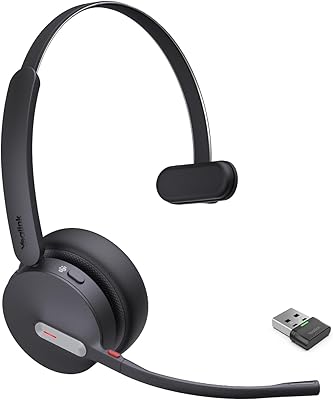
  • Form Factor: The headset uses a mono on-ear design with a single earcup, keeping one ear free for ambient awareness during calls.
  • Weight: Total headset weight is approximately 9 ounces (around 255 grams), inclusive of the headband and earcup assembly.
  • Audio Driver: Sound is delivered via a dynamic driver with a 32 Ohm impedance rating and a frequency response reaching up to 20,000 Hz.
  • Materials: The earcup is finished in leather for comfort against the skin, while the headband and structural housing are constructed from plastic.
  • Controls: Physical controls include button-based call management, a pull-up mic mute function, and an integrated visual busylight indicator for in-use status signaling.
  • Certifications: The headset holds Microsoft Teams certification and broader UC (Unified Communications) certification, confirming native compatibility with major business communication platforms.
  • Compatible Devices: Supported devices include laptops, desktop PCs, IP phones, desk phones, cellphones, and UC platforms; a published compatibility list covers specific Yealink, Poly, and Cisco desk phone models.
  • Included Accessories: Each unit ships with the WDD60 DECT dongle, a USB-A to USB-C charging cable, a drawstring carry bag, and a user manual.
  • Bluetooth Version: Bluetooth 5.2 is supported, offering improved connection stability and lower energy consumption compared to earlier Bluetooth generations.
  • Battery Type: The headset is powered by a built-in rechargeable lithium-ion battery, which is included and non-removable.
  • Dimensions: Product dimensions measure approximately 8.15 x 2.09 x 6.97 inches, reflecting the compact on-ear mono form factor.
  • Warranty: Yealink provides a 2-year limited warranty on this headset, backed by dedicated technical support and customer service teams.
  • Water Resistance: The headset carries no official water resistance rating and is not designed for use in wet or high-humidity environments.

Related Reviews

Yealink BH70 Mono Wireless Bluetooth Headset
86%
92%
Comfort for Long Wear
89%
Noise Cancellation Performance
75%
Bluetooth Connectivity
91%
Battery Life
88%
Sound Quality for Calls
More
Yealink WH66 DECT Wireless Headset
77%
91%
Call Audio Clarity
88%
DECT Wireless Range
79%
Battery Life
74%
Touch Screen Usability
83%
Comfort During Extended Wear
More
Yealink WH67 Wireless DECT Headset
85%
91%
Comfort for Long Calls
88%
Audio Quality (Call Clarity)
85%
Noise-Canceling Microphone
68%
Bluetooth Connectivity
80%
Battery Life
More
Yealink WH63 DECT Wireless Office Headset
75%
88%
Call Audio Clarity
76%
Microphone Noise Cancellation
91%
Wireless Range & Reliability
69%
Battery Life
73%
Comfort & Wearing Styles
More
Yealink UH35 USB Headset
80%
83%
Microphone Clarity
88%
Wearing Comfort
79%
Build Quality
63%
Ear Pad Durability
93%
Plug-and-Play Setup
More
Yealink BH70 Dual Wireless Bluetooth Headset
77%
86%
Microphone Quality
83%
Comfort & Wearability
91%
Battery Life
88%
Microsoft Teams Integration
57%
Noise Cancellation (Listener-Side)
More
Jabra PRO 920 Mono Wireless Desk Headset
79%
91%
Wireless Range & Stability
88%
Microphone Clarity
72%
Comfort & Wearability
84%
Call Audio Quality
89%
Peak Stop & Hearing Protection
More
Jabra Engage 65 Mono Wireless Headset
82%
88%
Wireless Range & Stability
91%
Microphone Clarity
93%
Battery Life
74%
Comfort Over Long Shifts
67%
Value for Money
More
Yealink BH71 Pro Wireless Bluetooth Headset
80%
91%
Microphone & Call Clarity
88%
Battery Life
67%
Comfort & Fit
83%
Noise Cancellation
86%
Connectivity & Dongle Reliability
More
Yealink WH62 Dual UC DECT Wireless Headset
82%
92%
Wireless Range & Stability
88%
Call Audio Clarity
79%
Microphone Noise Cancellation
81%
Comfort & Wearability
87%
Battery Life
More

FAQ

In most cases, no. The WDD60 DECT dongle is plug-and-play on Windows, so you can simply insert it into a USB-A port and the headset pairs automatically. Some advanced features or firmware updates may require the Yealink USB Connect app, but for basic call use you should be up and running without touching any software.

Yes, that is one of the more practical features of this DECT Bluetooth headset. The dongle keeps the PC connection active over DECT while Bluetooth 5.2 simultaneously maintains a link to your smartphone. If a mobile call comes in while you are on a PC call, you can manage both without re-pairing anything.

That figure applies specifically to the DECT connection via the dongle, measured in open space without walls or interference. In a typical office with partitions and walls, the effective range will be lower, but it is still notably better than Bluetooth, which maxes out around 50 meters under similar conditions. For moving between a desk and a nearby meeting room or break area, the range holds up well in practice.

For most people, yes — the lightweight build and adjustable headband make several hours of wear manageable. That said, on-ear designs put pressure directly on the ear cartilage, so users who are particularly sensitive to that kind of contact, or who need to wear a headset continuously without breaks, may find discomfort creeping in after five or six hours. It is worth being realistic about your wear patterns before committing.

It depends on the specific model. The published compatibility list includes several Poly and Cisco VVX-series phones alongside a range of Yealink models, so there is a reasonable chance your phone is covered. Check your exact desk phone model number against the compatibility list before purchasing — if it is not listed, pairing may not function as expected.

It works, with realistic caveats. In a standard open-plan office or home setup, the three-mic array does a solid job filtering out keyboard noise, air conditioning hum, and low-level ambient sound. In genuinely loud environments — a noisy call center floor or a crowded café — it reduces background noise but will not eliminate it entirely. Think of it as noticeably better than average, not studio-grade isolation.

Yes, the Yealink WH64 Hybrid Mono Wireless Headset is officially Teams-certified, which means call controls like mute, answer, and end sync natively within the Teams interface on Windows. The busylight also activates automatically based on your Teams status. The experience is most complete on Windows; Mac-based Teams users may encounter a more limited feature set.
Technically yes, but it is not what this headset was designed for. The mono audio output means music will sound flat compared to any stereo headset, and there is no immersive or spatial quality to the listening experience. If you need a headset that doubles as a media device, this is not the right fit — but for calls, it does exactly what it is meant to do.

The dongle is an essential component for PC connectivity, and losing it does create a problem. It is not the easiest part to source as a standalone replacement through standard retail channels. Your best option is to contact Yealink support directly to arrange a replacement. In the meantime, Bluetooth to a PC is an option on supported machines, though you lose the extended DECT range.

Yealink offers a 2-year limited warranty on this headset, which covers manufacturing defects under normal use conditions. Accidental damage, physical wear, or issues caused by unauthorized firmware modifications are typically excluded. Yealink has a dedicated support team, and most buyers report reasonable response times when raising warranty claims through official channels.

Where to Buy