Overview

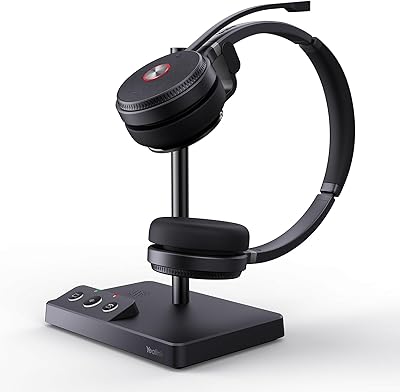
The Yealink WH63 DECT Wireless Office Headset is a solid mid-range option for hybrid and office workers who prioritize reliable call quality over multimedia versatility. Yealink has built a serious reputation in business communications, and this DECT headset reflects that focus — it is engineered for calls, not casual listening. What genuinely differentiates it from the crowded Bluetooth headset market is its use of DECT wireless technology, which operates on a dedicated frequency band, making it far less susceptible to interference from Wi-Fi routers, smartphones, or neighboring devices. Sitting at #18 in Telephone Headsets on Amazon, it has earned early traction, though expectations should be calibrated: this is a professional call tool, not an all-purpose audio headset.
Features & Benefits

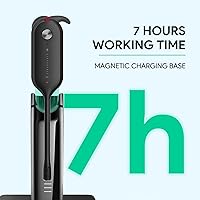
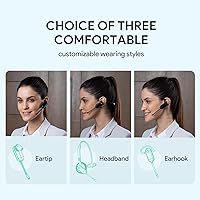
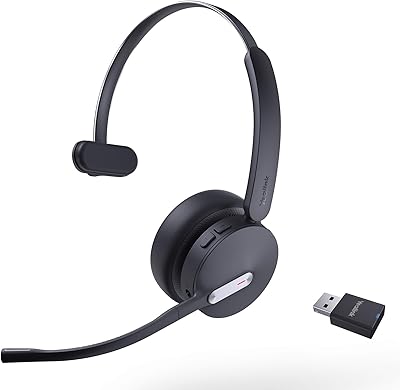
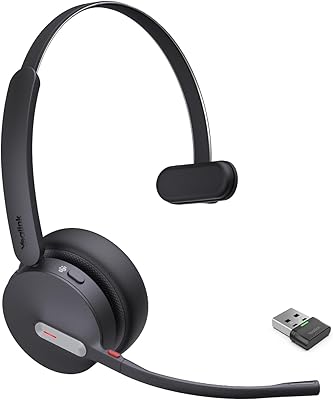
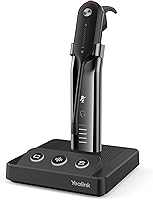
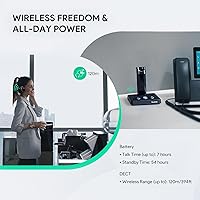
One of the WH63's more practical touches is the choice of three wearing styles — earpiece, ear hook, and headband — so you can adapt based on shift length or personal comfort. The headband option tends to suit extended wear best, while the ear hook can feel less secure over time. The dual noise-canceling microphones handle moderate background noise well, though in a genuinely loud open-plan environment, some ambient sound will still come through. The 394-foot wireless range is legitimately useful — stepping away from your desk mid-call is no longer a concern. Battery life tops out at seven hours of talk time, covering most workdays. Non-Yealink desk phones require an EHS35 adapter, sold separately, which is worth factoring in before purchasing.

Best For

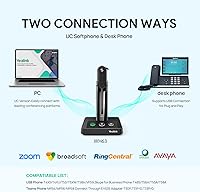
This wireless office headset is a strong fit for people who split their workday between a desk phone and a computer — particularly those already using Yealink VoIP hardware, where integration is tightest. Call center agents and customer-facing professionals in moderately noisy offices will appreciate the mic performance and the freedom to move without being tethered to a cord. IT teams managing Yealink deployments will value the certified compatibility with Zoom, Teams, RingCentral, and Cisco. Remote workers juggling multiple UC platforms will find the single-base setup refreshingly simple. It is less suited for anyone who primarily wants a headset for music or media playback — this one is built around the demands of business calls.

User Feedback

The WH63 only launched in mid-2024, so the review pool is still developing and patterns should be interpreted with that in mind. Early buyers frequently cite call audio clarity as a standout strength, with several noting the DECT connection feels considerably more dependable than Bluetooth alternatives they had used before. On the downside, heavy users logging six or more hours of calls daily find the battery just barely sufficient — there is little margin if meetings run long. Comfort feedback on the ear hook is divided; some users adapt quickly, others migrate to the headband within days. A handful have reported pairing difficulties with third-party desk phones, reinforcing that the EHS35 adapter path requires some setup patience upfront.

Pros

  • DECT wireless delivers consistently stable call connections with far less interference than Bluetooth in busy office environments.
  • Up to 394 feet of range means you can move freely around your workspace without dropping a call.
  • Three convertible wearing styles let you choose what actually works for your head and shift length.
  • Certified for Zoom, Teams, RingCentral, and Cisco — call controls work reliably without extra configuration.
  • Dual noise-canceling microphones handle moderate background noise well, keeping your voice clear to callers.
  • Plug-and-play USB-A base station setup requires no driver installation on modern operating systems.
  • DECT technology provides inherent call encryption, a meaningful plus for security-conscious workplaces.
  • The WH63 integrates directly with a broad range of Yealink desk phones without any adapter.
  • Lightweight plastic construction prevents ear and neck fatigue during long stretches of wear.
  • Physical button controls give tactile confirmation of actions — answering or muting without looking at the device.

Cons

  • Seven-hour battery life leaves little margin for heavy call users who log five or more hours of talk daily.
  • No quick-charge capability means a fully drained battery requires a full wait before returning to use.
  • Connecting non-Yealink desk phones requires the EHS35 adapter, sold separately and not always easy to configure.
  • The ear hook wearing style divides users sharply — many find it uncomfortable after an hour or two.
  • No included carrying case makes this a poor choice for hybrid workers who commute with their headset.
  • The companion app feels underdeveloped compared to rivals, with occasional instability on Windows 11 reported.
  • Audio quality feels slightly compressed on softphone calls compared to wired alternatives at a similar price.
  • Noise cancellation noticeably struggles in genuinely loud environments like busy call centers with high agent density.
  • The all-plastic finish attracts scuffs over time and feels utilitarian compared to competing options in this price range.
  • Firmware updates require manual steps and are not always surfaced clearly through the app.

Ratings

Our scores for the Yealink WH63 DECT Wireless Office Headset are generated by AI after systematically analyzing verified buyer reviews from multiple global markets, with spam, incentivized, and bot-flagged submissions actively filtered out. The ratings reflect the full spectrum of real-world experiences — where this wireless office headset consistently impresses and where it falls short of expectations. Both strengths and friction points are weighted honestly so you can make a confident, informed decision.
Call Audio Clarity
88%
Users consistently describe incoming call audio as crisp and stable, with DECT's dedicated frequency band delivering noticeably fewer dropouts than Bluetooth alternatives. Several buyers running back-to-back client calls throughout the day report that the connection holds firm even when moving around their office floor.
A smaller subset of users noted that audio quality can feel slightly compressed on softphone calls compared to wired headsets at a similar price point. Those with high-end VoIP setups occasionally expected richer sound reproduction than this headset provides.
Microphone Noise Cancellation
76%
24%
In moderately noisy environments — think an open-plan office with background chatter or an HVAC hum — the dual-mic setup handles ambient sound reasonably well. Call recipients on the other end regularly report that the speaker sounds clear without obvious room noise bleeding through.
In genuinely loud settings, such as busy call centers with multiple agents speaking simultaneously, the noise cancellation shows its limits and background sound does creep in. It is not a substitute for acoustic isolation, and buyers expecting studio-grade mic performance at this price will likely feel let down.
Wireless Range & Reliability
91%
The 394-foot DECT range is one of the WH63's most praised real-world advantages. Users frequently highlight the ability to walk to a printer, grab coffee from a shared kitchen, or step into a hallway without the call dropping — a practical benefit that Bluetooth headsets in this category simply cannot match consistently.
Range figures are measured in open space, and in offices with thick concrete walls or dense building materials, the effective range narrows noticeably. A handful of users in multi-story offices reported signal degradation when moving between floors, which is a known DECT limitation rather than a product defect.
Battery Life
69%
31%
For a standard eight-hour workday with a reasonable mix of calls and idle time, the seven-hour talk time is generally sufficient. Users in roles with moderate call volume — two to four hours of active calls daily — rarely find themselves scrambling to charge mid-shift.
Power users logging five or more hours of consecutive calls, common in customer support and telesales roles, regularly hit the battery ceiling before the end of their shift. There is no quick-charge feature, so a depleted battery means waiting, not a ten-minute top-up. This is the most frequently cited frustration in negative reviews.
Comfort & Wearing Styles
73%
27%
Having three distinct wearing configurations in one unit is a genuine differentiator for an office headset at this price. The headband style in particular draws consistent praise for all-day wearability, and the lightweight plastic construction means it does not cause neck or ear fatigue during long stretches.
The ear hook option divides users sharply — some find it secure and unobtrusive, while others report it slips or digs into the outer ear within an hour. The earpiece style, while compact, is the least comfortable for extended wear according to buyer feedback, and the ear tip materials feel basic rather than premium.
Desk Phone Compatibility & Setup
67%
33%
For users already in a Yealink ecosystem — T-series VoIP phones, MP-series Teams phones — the USB connection is genuinely plug-and-play. IT administrators managing standardized Yealink deployments appreciate the straightforward provisioning without needing additional drivers or configuration steps.
Connecting to non-Yealink desk phones requires the EHS35 adapter, which is sold separately and adds to the total cost. Several buyers were caught off guard by this requirement after purchase, and a subset reported compatibility issues or unclear instructions when pairing with Poly or SNOM phones via the adapter.
PC & Softphone Integration
83%
The USB-A base station makes PC connection straightforward, and the platform certifications for Zoom, Teams, RingCentral, and Cisco translate to reliable call control — answer, hang up, mute — directly from the headset buttons without needing to fumble with on-screen controls. Remote workers using multiple platforms day-to-day find this particularly useful.
The companion app, while functional, is not as polished as those offered by competitors like Jabra or Poly at a comparable tier. Some users noted that firmware updates require manual intervention and that call control behavior occasionally needed re-mapping after software updates on the PC side.
Build Quality & Durability
71%
29%
The WH63 feels solid enough for daily professional use, and the rotating/folding mechanisms on the convertible components hold up well after repeated adjustments. Users who have owned the headset for several months report no structural failures or degradation in connection quality.
The all-plastic construction does feel utilitarian rather than refined, which some buyers find underwhelming at this price point. The headband padding, while adequate, uses materials that feel noticeably less premium than what competing brands offer, and the overall finish attracts minor scuffs over time.
DECT Security & Interference Resistance
89%
Operating on the 1.9GHz DECT band rather than the congested 2.4GHz Wi-Fi spectrum means the WH63 holds up in environments dense with wireless devices — something that noticeably plagues Bluetooth headsets in busy offices. Users in IT-sensitive environments also appreciate the inherent call encryption that DECT provides.
The dedicated DECT band, while less congested, still faces interference in facilities with many simultaneous DECT devices in close proximity, such as large call centers running dozens of DECT headsets. This is a category-wide limitation, but buyers in very high-density wireless environments should be aware of it.
Ease of Use & Controls
82%
18%
Button placement on the headset is logical and quickly becomes second nature after a day or two of use. Answering, ending, and muting calls without looking at the device is straightforward, and the physical buttons give tactile confirmation that the action registered — something touch-sensitive controls often fail to do reliably.
The button labeling on the unit is small and can be difficult to read without adequate lighting, which creates a brief learning curve. Users who switch between wearing styles frequently occasionally report that button orientation feels different depending on the configuration, requiring a small mental adjustment.
Value for Money
74%
26%
For buyers already invested in the Yealink phone ecosystem, the WH63 offers a coherent, well-integrated wireless headset without stretching into enterprise-tier pricing. The DECT range and multi-wearing-style flexibility justify the cost for users who genuinely need both features.
Buyers coming from a purely PC-centric setup may find they are paying for desk phone integration capabilities they will never use. At this price, competitors from Jabra and Poly offer comparable audio performance with more refined build quality and better companion apps, making value perception highly dependent on use case.
Initial Setup & Pairing
72%
28%
Pairing the headset to the USB base for PC use is quick and requires no driver installation on modern operating systems. Users who set it up for the first time with a compatible Yealink desk phone generally report being operational within minutes.
Pairing with third-party devices via the EHS35 adapter introduces more complexity, and the included documentation does not always address edge cases clearly. A portion of reviewers mention needing to consult online forums or Yealink support to resolve initial pairing issues, which is a friction point that should not exist at this tier.
Portability & Storage
58%
42%
The headset is lightweight enough that some users do carry it between a home office and an office desk, and the protective packaging it ships in doubles as basic storage for transport.
There is no dedicated carrying case included, which is a meaningful omission for hybrid workers who commute. The base station is not compact enough to casually toss into a laptop bag, and without a case, the headset itself is vulnerable to cable and component damage during transit.
Companion App Experience
61%
39%
The app does offer useful controls like equalizer adjustments and firmware management, which technically-inclined users and IT administrators will find worthwhile for fleet-wide management across multiple units.
Casual users often report finding the app interface unintuitive and lacking the polish they expect from a mid-range business device. Update notifications are inconsistent, and some users have noted that the app is not always stable on Windows 11, occasionally requiring a reinstall to restore full functionality.

Suitable for:

The Yealink WH63 DECT Wireless Office Headset is built for professionals whose workday revolves around calls — not casual audio consumption. It fits best in the hands of office workers and call center agents who switch between a desk phone and a PC throughout the day, particularly those already running Yealink VoIP hardware where the integration is tightest. The 394-foot wireless range is a genuine productivity asset for anyone in a larger workspace — think open-plan floors, shared office suites, or home offices where moving freely during a call is a daily reality rather than an occasional need. Remote workers juggling multiple UC platforms like Zoom, Teams, and RingCentral will appreciate that certified compatibility means call controls actually work without fiddling with settings each time. IT administrators managing standardized Yealink deployments will find procurement and provisioning straightforward across a team.

Not suitable for:

The Yealink WH63 DECT Wireless Office Headset is not the right tool for buyers whose primary need is music playback, podcast listening, or any form of media consumption — it is engineered for voice calls, and the audio tuning reflects that narrowly. Anyone expecting seven-plus hours of uninterrupted talk time on a heavy call day will likely run short; users in telesales or high-volume support roles may need a charging opportunity mid-shift or a backup solution. If your desk phone is not from Yealink — for example, a Poly VVX or SNOM unit — be aware that you will need to purchase the EHS35 adapter separately, which adds cost and a layer of setup complexity that not everyone finds straightforward. Hybrid workers who regularly commute with their headset should also note there is no included carrying case, making transport less practical than it could be. Finally, buyers prioritizing premium build materials or a polished companion app experience will find competitors at a similar price tier offer more in both areas.
Specifications

  • Connectivity: Uses DECT wireless technology operating on the 1.9GHz band, which avoids the congested 2.4GHz Wi-Fi spectrum for more stable, interference-resistant connections.
  • Wireless Range: Rated for up to 394ft (120m) of range in open space between the headset and its base station.
  • Battery Life: Delivers up to 7 hours of continuous talk time on a full charge, with no quick-charge capability specified.
  • Microphones: Equipped with two noise-canceling microphones featuring acoustic shield technology to reduce background noise during calls.
  • Wearing Styles: Ships with three convertible wearing configurations: over-ear headband, ear hook, and in-ear earpiece, all included in the box.
  • PC Connection: Connects to computers via a USB-A base station; no driver installation is required on modern operating systems.
  • Desk Phone Connection: Connects directly via USB to compatible Yealink desk phones; connection to non-Yealink phones (Poly, SNOM) requires the separately sold EHS35 adapter.
  • Certifications: Officially certified for Zoom, Microsoft Teams, RingCentral, Cisco, and Skype for Business platforms.
  • Audio Driver: Uses a dynamic driver tuned for voice call clarity rather than broadband music or media reproduction.
  • Ear Placement: Classified as an on-ear headset, with the earpiece resting against rather than fully enclosing the ear.
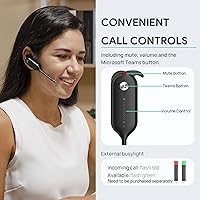
  • Controls: All call functions — answer, end, mute, volume — are managed via physical buttons located on the headset body.
  • Companion App: A companion app is available for additional configuration including EQ adjustments, firmware updates, and call control remapping.
  • Material: Headset body and frame are constructed primarily from plastic, keeping overall weight low for extended wear comfort.
  • Package Weight: The complete package including the headset and base station weighs approximately 1.3 pounds (0.59 kg).
  • Package Dimensions: Retail box measures approximately 7.87 x 7.2 x 4.09 inches, sized to accommodate the base station and all included accessories.
  • In the Box: Includes the WH63 headset, DECT base station, two 1m USB 3.0 cables, earhook, eartips, headband, power adapter, and user manual.
  • Water Resistance: No water or moisture resistance rating is assigned; the headset should be kept away from liquids.
  • Compatible Phones: Directly compatible via USB with Yealink T4XS, T4XU, T53, T5XW, T58A, VP59, MP54, MP56, MP58, T48S, T56A, T55A, and select Skype for Business models.
  • Model Number: Sold under the model designation WH63 UC-2, with UC indicating optimization for unified communications platforms.
  • Availability: First made available in July 2024, making this a relatively recent addition to Yealink's DECT headset lineup.

Related Reviews
Yealink WH67 Wireless DECT Headset
85%
91%
Comfort for Long Calls
88%
Audio Quality (Call Clarity)
85%
Noise-Canceling Microphone
68%
Bluetooth Connectivity
80%
Battery Life
More
Plantronics Savi 8220 Wireless DECT Office Headset
81%
93%
Wireless Connectivity Stability
91%
Microphone Clarity
88%
Active Noise Cancellation
89%
Battery Life
84%
Multi-Device Switching
More
Yealink WH64 Hybrid Mono Wireless Headset
82%
88%
Call Audio Clarity
91%
Wireless Range (DECT)
93%
Battery Life
86%
Charging Speed
83%
Multi-Device Connectivity
More
Yealink WH62 Dual UC DECT Wireless Headset
82%
92%
Wireless Range & Stability
88%
Call Audio Clarity
79%
Microphone Noise Cancellation
81%
Comfort & Wearability
87%
Battery Life
More
Cisco Headset 561 Wireless On-Ear DECT Headset
75%
91%
Wireless Range & Reliability
84%
Call Audio Clarity
93%
Cisco Ecosystem Integration
82%
Battery Life
67%
Comfort During Extended Wear
More
Plantronics CS540 Wireless DECT Headset
85%
92%
Comfort & Wearability
91%
Range & Connectivity
89%
Noise Cancellation
88%
Ease of Setup
85%
Battery Life
More
Sennheiser OfficeRunner Convertible Wireless Office Headset
81%
91%
Wireless Range & Reliability
83%
Wearing Comfort
88%
Microphone Quality
79%
Battery Life
86%
Fit Customization
More
Yealink BH70 Mono Wireless Bluetooth Headset
86%
92%
Comfort for Long Wear
89%
Noise Cancellation Performance
75%
Bluetooth Connectivity
91%
Battery Life
88%
Sound Quality for Calls
More
Yealink BH70 Dual Wireless Bluetooth Headset
77%
86%
Microphone Quality
83%
Comfort & Wearability
91%
Battery Life
88%
Microsoft Teams Integration
57%
Noise Cancellation (Listener-Side)
More
Yealink WH66 DECT Wireless Headset
77%
91%
Call Audio Clarity
88%
DECT Wireless Range
79%
Battery Life
74%
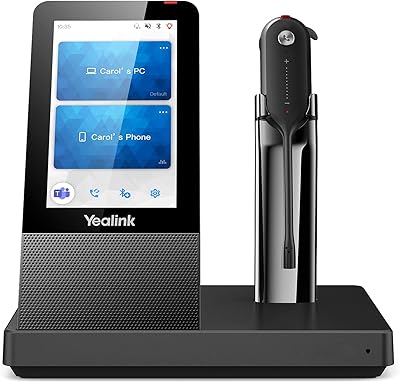
Touch Screen Usability
83%
Comfort During Extended Wear
More

FAQ

Yes, but not out of the box. You will need the Yealink EHS35 adapter, which is sold separately. It supports specific Poly VVX models (250, 350, 401, 411, 450, 501) and SNOM phones (D385, D735, D765), but check the compatibility list carefully before ordering the adapter to avoid surprises.

For most office workers it will, as long as you are not on calls continuously from the moment you sit down. If you routinely log five or more hours of active call time daily — common in sales or customer support roles — you may find yourself running short near the end of a shift. There is no quick-charge feature, so planning a charging window during lunch is a smart habit if your call volume is high.

For dedicated voice calls in an office environment, DECT has real practical advantages. It operates on a separate frequency band from your Wi-Fi and most other wireless devices, so it is far less prone to connection drops or audio glitches in congested wireless environments. It also provides built-in call encryption, which matters in workplaces handling sensitive conversations. The trade-off is that DECT is not universally portable the way Bluetooth is — it pairs to its base station, not directly to your phone.

Not directly. This headset connects via its DECT base station over USB-A, so it is designed for desk phones and computers, not smartphones. If you need a headset that also works with a mobile phone, you would be better served by a Bluetooth headset or one that includes a Bluetooth module.

The headband style gets the most consistent positive feedback for extended wear — it distributes weight evenly and stays secure without pressure on the ear. The ear hook is more divisive; some people find it fine for hours, others find it uncomfortable within the first hour. The earpiece style works well for shorter calls but is generally considered the least comfortable option for a full shift. Try the headband first.

No driver installation is needed on Windows 10, Windows 11, or macOS — the USB base station is recognized as a standard audio device automatically. The companion app is optional and only necessary if you want to adjust EQ settings, remap call controls, or manage firmware updates.

It handles moderate ambient noise well — keyboard clatter, HVAC hum, distant conversations. Callers on the other end consistently report hearing you clearly in those conditions. In genuinely loud environments, like a busy call center floor with many agents speaking simultaneously, some background noise will still bleed through. It is a solid business-grade mic, but it is not studio-level isolation.

You do not need to re-pair. The headset connects to your computer through the USB base station, and once it is recognized by your operating system, it works as the audio device for whichever platform you open — Zoom, Teams, RingCentral, or others. The platform certifications mean that call controls like answer, mute, and hang up function correctly within each app without extra configuration.

Like all wireless range specs, 394 feet is measured in open space without walls or obstructions. In a typical office with interior walls, partitions, and other wireless devices, the effective range will be shorter — though most users find it comfortably covers an entire floor or large open-plan space. Moving between floors or through thick concrete walls will reduce range more noticeably.

No, there is no carrying case included in the box. The headset ships in protective retail packaging, but there is nothing purpose-built for daily transport. If you regularly commute with it, investing in a small padded pouch or case is worth considering, especially to protect the base station and cables.

Where to Buy