

Overview

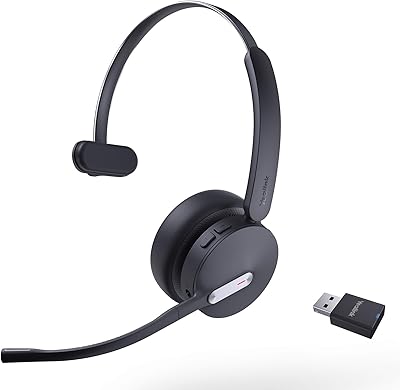
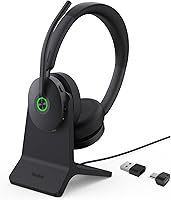
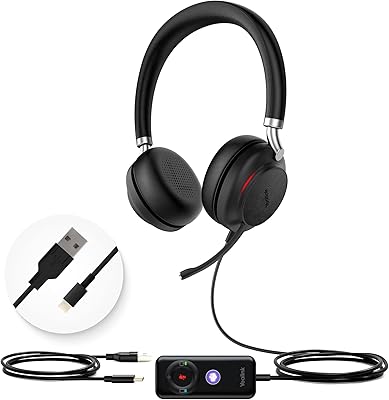
The Yealink BH74 Wireless Bluetooth Headset is built with one job in mind: making hybrid work calls less stressful. It is not trying to be a music headphone that happens to take calls. Everything about it, from the included charging stand to the bundled USB dongle and protective case, points toward office use rather than weekend listening. The black, Teams-branded look makes it clear at a glance that this is a workplace tool, the kind of headset IT departments hand out rather than something you would pick up for casual streaming. If you spend most of your day on video calls, that focus shows up immediately, and it sets expectations for everything else in this review.

Features & Benefits

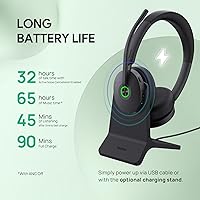
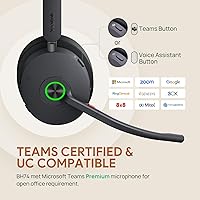
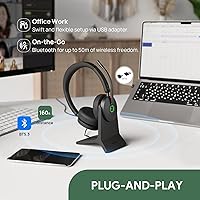
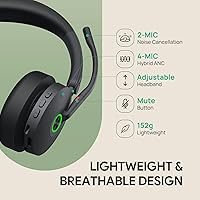
Where this Yealink headset earns its price is in how it handles noise during calls. The hybrid ANC setup combines feedforward and feedback microphones, and you get four modes to choose from, including an Immersive setting strong enough for genuinely loud environments like a busy kitchen or shared coworking space. A six-mic array does the heavy lifting on voice pickup, which matters more than raw noise cancellation when you are the one talking. Add Microsoft Teams Premium and Zoom certification, and joining meetings becomes a single click rather than a fumbling process. Battery life is the other headline here: 32 hours of talk time and 65 hours of music playback mean you are rarely thinking about the charger, and the plug-and-play dongle skips driver installs entirely.

Best For

This headset makes the most sense for people whose calls happen in unpredictable noise. Remote workers dealing with barking dogs, kids, or noisy neighbors will likely appreciate the Immersive ANC mode the most, while open-office employees fighting chatter from nearby desks get a similar benefit without needing to crank volume to compensate. Teams-heavy users benefit from the dongle-based setup since it avoids the usual Bluetooth pairing headaches in shared meeting rooms. Frequent travelers also stand to gain, since the long battery life means a multi-day trip rarely requires packing a charger. If your calls happen in a quiet home office already, though, some of these strengths matter less.

User Feedback

Feedback on this wireless headset tends to circle back to two things: noise handling and battery life. Buyers consistently mention that calls sound clearer in busy environments, with background chatter fading noticeably once ANC kicks in. Battery performance also draws real praise, with many users going several days without needing to recharge. Comfort gets mixed reactions, since the on-ear design suits some people for all-day wear but feels tighter than over-ear alternatives for others, especially during long shifts. A smaller complaint involves the companion app, which some find necessary a bit too often for switching ANC modes or platforms, adding a step that feels unnecessary for a device otherwise built around simplicity.

Pros

  • Hybrid ANC noticeably reduces background chatter during calls in busy spaces
  • Six-mic array keeps your voice clear without picking up surrounding noise
  • Battery life routinely lasts several days between charges for heavy callers
  • Plug-and-play USB dongle skips driver installs and manual Bluetooth pairing
  • One-click joining for Teams and Zoom meetings saves real time daily
  • Immersive ANC mode handles genuinely loud environments better than typical headsets
  • Charging stand needs no power adapter, simplifying desk setup considerably
  • Bundled protective case makes the Yealink BH74 Wireless Bluetooth Headset travel-friendly

Cons

  • On-ear design feels tighter than over-ear styles during long wear sessions
  • Companion app is required a bit too often for basic mode switching
  • Not built for music listening, so audio quality feels secondary to calls
  • Non-Teams users may find setup less seamless than the marketing suggests
  • 524 grams feels noticeably heavier than lighter consumer headsets on the market
  • Switching between ANC modes mid-call can briefly interrupt audio flow
  • Charging stand offers no playback controls, limiting its everyday usefulness
  • Premium positioning means casual users may be paying for unused features

Ratings

Our scores for the Yealink BH74 Wireless Bluetooth Headset are generated by AI after analyzing verified user reviews from buyers worldwide, with spam, bot activity, and incentivized feedback filtered out before any number is calculated. Each category below reflects what real users actually experienced during daily work calls, not marketing claims. We've kept both the strong points and the genuine pain points visible, so you can judge fit for your own setup rather than take a single overall score at face value.

Call Noise Cancellation
88%
Users in shared apartments and busy households consistently mention that the Immersive ANC mode makes a real difference, cutting out dog barks, traffic, and roommate chatter mid-call. People who previously struggled with coworkers hearing background noise report fewer interruptions and follow-up questions during meetings.
A handful of reviewers note that ANC works best at moderate noise levels and can feel less effective against sudden, sharp sounds like a slamming door. Some also wish the strongest mode were easier to trigger quickly without holding a button for two seconds.
Battery Life
93%
This is the single most praised aspect across reviews, with frequent travelers and heavy meeting-goers reporting they go three or four days without touching a charger. The gap between rated specs and real-world performance feels unusually small compared to competing headsets.
A small number of users mention the battery indicator isn't always precise, leading to occasional surprise low-battery warnings mid-call. Others note that with ANC running constantly in Immersive mode, runtime drops noticeably faster than the advertised 32-hour figure.
Comfort & Fit
71%
29%
Many users wearing the headset for full eight-hour shifts say the on-ear cups stay comfortable longer than expected, with lightweight padding that doesn't trap heat during back-to-back calls. The headband distributes pressure reasonably well for medium head sizes.
Reviewers with larger ears or a preference for over-ear styles report noticeable pressure points after two or three hours of continuous wear. A few mention needing to remove the headset periodically during long meeting days, which undercuts the all-day-wear positioning.
Microsoft Teams Integration
91%
Teams-heavy office workers consistently highlight the one-click join feature as a genuine time-saver, especially in shared meeting rooms where multiple people switch headsets throughout the day. The Premium Open Office certification shows up in practice as fewer connection hiccups during scheduled calls.
A minority of users on smaller or hybrid Microsoft 365 plans mention some Premium features feel tied to subscription tiers they don't have access to. Non-Teams users occasionally find the default platform setting requires an extra app step to switch over.
Build Quality
84%
The plastic and silicone construction feels sturdier than typical consumer headsets in this price range, with hinges and the headband holding up well after months of daily desk use. The included protective case also gets mentioned as a thoughtful touch for travel.
A few reviewers note the all-plastic exterior feels slightly less premium than metal-accented competitors at a similar price point. Some also mention the ear cushions show early wear signs after several months of frequent use.
Microphone Voice Pickup
86%
The six-mic array gets specific praise from users working in open offices, who say coworkers on the other end of calls confirm their voice comes through clearly even with nearby chatter. This matters more to daily users than raw ANC strength.
A small subset of reviewers in extremely loud environments, like construction-adjacent home offices, say voice clarity dips slightly under sustained heavy noise. Wind or strong airflow near the mic also occasionally causes minor pickup issues.
Setup & Pairing
89%
The plug-and-play USB dongle is repeatedly called out as refreshingly simple, with users plugging it in and joining calls within seconds on new laptops or loaner machines. IT-managed office environments seem to appreciate this most.
Some reviewers mention losing or misplacing the small dongle when traveling between desks, which temporarily limits functionality until they locate it again. A few also note initial Bluetooth pairing without the dongle took more attempts than expected.
App Reliability
62%
38%
Users who take the time to use the companion app appreciate the granular control over ANC modes and platform switching, especially when juggling Teams and Zoom on the same day. It adds flexibility beyond what physical buttons alone could offer.
This is the most consistently mentioned pain point, with several reviewers describing the app as a necessary extra step for features that feel like they should work without it. A few mention occasional sync delays between the app and headset settings.
Audio Quality for Music
68%
32%
Casual listeners say the sound is perfectly fine for background music or podcasts during work breaks, with clear mids that suit spoken-word content well. It's a reasonable secondary use case for a device not designed around music.
Reviewers who care about music quality describe the bass and overall soundstage as noticeably flat compared to dedicated listening headphones. Several note they wouldn't choose this headset if music playback were their primary use.
Bluetooth Range & Stability
85%
Users who step away from their desk during calls, whether grabbing coffee or pacing during a long meeting, report the connection holding steady well within typical office and home layouts. The 50-meter range covers most realistic scenarios.
A few reviewers in larger homes or offices with thick walls mention occasional dropouts near the edge of the stated range. Multiple Bluetooth devices nearby also seem to cause minor interference for a small number of users.
Charging Stand Usefulness
74%
26%
Users like that the stand needs no separate power adapter and charges fully in about 90 minutes, making it a tidy desk accessory that doubles as a stand when the headset isn't in use.
Several reviewers point out the stand offers no playback or call controls, which feels like a missed opportunity given the price point. Some also wish it included a USB pass-through for charging other devices.
Value for Money
79%
21%
Buyers comparing this wireless headset against pricier UC-certified competitors generally feel they're getting comparable call quality and battery life for less money, especially when the bundled dongle and case are factored in.
Budget-conscious reviewers who only take occasional calls feel they're paying for ANC sophistication and certifications they don't fully use. Those expecting premium materials throughout sometimes feel the plastic build doesn't quite match the price tag.

Suitable for:

The Yealink BH74 Wireless Bluetooth Headset fits best with people whose workday revolves around back-to-back video calls in less-than-quiet conditions. Remote workers juggling household noise, barking dogs, or shared living spaces will get real use out of the stronger ANC modes. Open-office employees who need their voice to cut through nearby chatter benefit from the multi-mic pickup, since clarity matters more than music quality here. Teams-heavy teams that want a certified, dongle-based connection without IT headaches are squarely the target audience. Frequent travelers who hate hunting for chargers will appreciate not having to think about battery life for days at a stretch. Anyone replacing an aging call headset with frequent dropouts or weak mic pickup will notice the upgrade immediately.

Not suitable for:

Anyone expecting rich, immersive sound for music or movies should look elsewhere, since the Yealink BH74 Wireless Bluetooth Headset is tuned for voice clarity, not audio fidelity. People who strongly prefer over-ear cushioning may find the on-ear fit less comfortable across a full eight-hour shift. Buyers who want everything controlled from the headset itself might be frustrated by how often the companion app gets involved for switching modes or platforms. Casual users who only take the occasional call and don't deal with much background noise are paying for ANC sophistication they won't really use. Non-Microsoft, non-Zoom users should also confirm their platform works well through the dongle before assuming a smooth experience. If budget is the main concern, cheaper call-focused headsets may cover the basics just fine.

Specifications

  • Form Factor: This is an on-ear wireless headset designed primarily for desk and office use rather than gym or outdoor activity.
  • Noise Cancellation: Hybrid ANC combines feedforward and feedback microphones across four selectable modes, including Immersive, Comfort, Ambient Sound, and Off.
  • Microphone Array: Six microphones work together to isolate your voice from surrounding background noise during calls.
  • Platform Certification: The headset is certified for Microsoft Teams Premium Open Office and Zoom, with broader compatibility across other UC platforms via the included dongle.
  • Battery Life: Talk time reaches up to 32 hours, while continuous music playback can last up to 65 hours on a full charge.
  • Charging Time: A full charge takes roughly 90 minutes when using the included charging stand or a USB cable.
  • Connectivity: The headset connects via Bluetooth 5.3 with an effective range of up to 50 meters from the paired device.
  • USB Dongle: A USB-C to A dongle (BT51) enables plug-and-play pairing with laptops and PCs without manual setup or driver installation.
  • Charging Stand: The included BHC74 stand charges the headset only and requires no separate power adapter, but it has no playback or call controls.
  • Weight: The headset weighs 524 grams, or about 1.16 pounds, including its on-ear cups and headband.
  • Dimensions: Packaged dimensions measure approximately 8.81 x 7.99 x 3.3 inches.
  • Frequency Range: The audio driver supports a frequency range of 20Hz to 20,000Hz.
  • Materials: The headset is constructed primarily from plastic and silicone components for the ear cushions and headband.
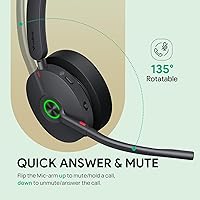
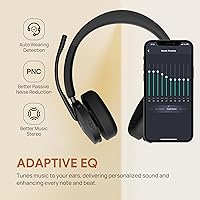
  • Controls: Some settings, including ANC mode switching and platform selection, are managed through a companion app.
  • Included Components: The package includes the headset, charging stand, USB-C to A dongle, a cable, and a protective carrying case.
  • Power Source: The headset uses one built-in lithium-ion battery and does not require disposable batteries.

Related Reviews
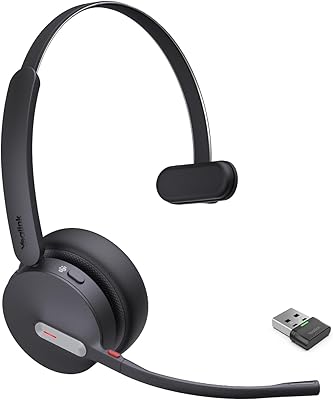
Yealink BH71 Pro Wireless Bluetooth Headset
80%
91%
Microphone & Call Clarity
88%
Battery Life
67%
Comfort & Fit
83%
Noise Cancellation
86%
Connectivity & Dongle Reliability
More
Yealink BH70 Mono Wireless Bluetooth Headset
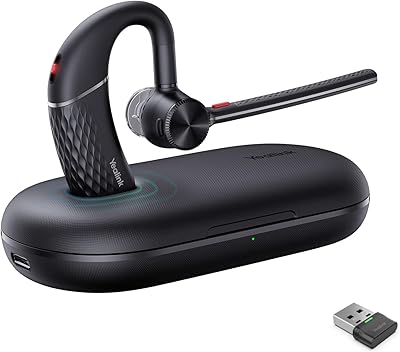
77%
88%
Microphone Quality
93%
Battery Life
84%
Comfort & Wearability
79%
Teams Integration
86%
Wireless Connectivity
More
Yealink WH64 Hybrid Mono Wireless Headset
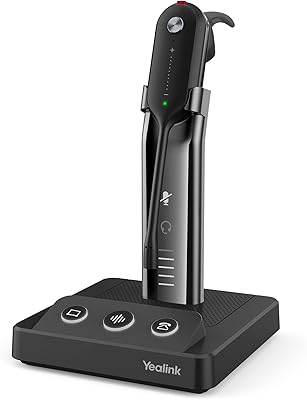
82%
88%
Call Audio Clarity
91%
Wireless Range (DECT)
93%
Battery Life
86%
Charging Speed
83%
Multi-Device Connectivity
More
Yealink WH67 Wireless DECT Office Headset
79%
91%
Call Audio Clarity
87%
Noise Cancellation
84%
Wireless Range
83%
Comfort & Wearability
81%
Multi-Device Connectivity
More
Yealink BH76 Plus Bluetooth Headset
80%
91%
Microphone Clarity
78%
Active Noise Cancellation
84%
All-Day Comfort
88%
Teams Integration
89%
Battery Life
More
Yealink WH63 DECT Wireless Office Headset
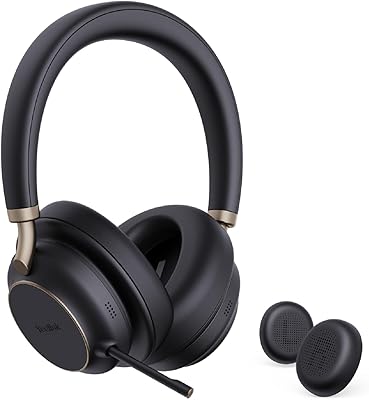
75%
88%
Call Audio Clarity
76%
Microphone Noise Cancellation
91%
Wireless Range & Reliability
69%
Battery Life
73%
Comfort & Wearing Styles
More
Corsair HS65 Wireless
80%
88%
Wireless Connectivity
86%
Comfort & Fit
78%
Audio Quality
61%
Microphone Quality
91%
Battery Life
More
Beebang 890 Pro Wireless Headset
79%
82%
Microphone Clarity
91%
Battery Life
78%
Bluetooth Connectivity
71%
Comfort & Fit
67%
Build Quality
More
COOSII SGH300-07 Wireless Bluetooth Headset
76%
83%
Comfort & Fit
78%
Microphone Quality
81%
Battery Life
86%
Connectivity & Pairing
63%
Sound Quality
More
Logitech Zone 300 Wireless Bluetooth Headset
78%
84%
Microphone Quality
78%
Comfort & Wearability
88%
Battery Life
86%
Call Clarity
61%
Audio Quality (Music & Media)
More

FAQ

It performs noticeably well in everyday noisy environments like a shared home office or an open floor plan. The Immersive ANC mode is the strongest setting and is genuinely useful in louder spaces, while Comfort mode works better for moderate background chatter. It is not soundproofing in the literal sense, but it does a solid job keeping distractions from interrupting your calls.

You can pair directly via Bluetooth from your phone or laptop, but the bundled USB-C to A dongle makes the process plug-and-play with no manual pairing steps. Many buyers prefer the dongle for desktop setups since it avoids reconnecting every time the laptop restarts. Either option works, so it really comes down to convenience.

Yes, this wireless headset is officially certified for both Microsoft Teams Premium and Zoom, so one-click meeting joins work on either platform. It also supports other mainstream UC platforms through the dongle, though Teams and Zoom get the most polished integration. If your workplace uses a less common platform, it's worth checking compatibility beforehand.

Most users report getting through several full workdays of calls before needing to recharge, which lines up with the rated 32 hours of talk time. Music playback can stretch even further, up to 65 hours, though most buyers use this primarily for calls rather than listening. Charging takes about 90 minutes when you do need a top-up.

The charging stand is purely functional. It charges the headset without needing a separate power adapter, but it has no buttons or call controls of its own. If you'd rather just plug in a USB cable directly, that works too, so the stand is more of a convenience than a requirement.

This is one of the more mixed points in user feedback. Many people find it comfortable for extended sessions, but those who prefer over-ear cushioning sometimes notice more pressure during back-to-back meetings. If you've struggled with on-ear headsets before, it's worth trying this one in shorter sessions first to see how your ears adjust.

Yes, switching between ANC modes and certain platform settings typically requires the companion app rather than physical buttons alone. Basic call functions like answering and ending calls work fine without it, but you'll want the app installed if you plan to fine-tune the ANC behavior. Some buyers find this extra step slightly inconvenient.

The Bluetooth 5.3 connection has an effective range of up to 50 meters, which is generous enough to step away from your desk for a quick errand without losing the call. Walls and interference can shorten that range somewhat in practice, but most home and office layouts shouldn't be an issue.

It's built primarily for voice clarity on calls rather than rich music playback, so audiophiles looking for deep bass or detailed soundstage may be underwhelmed. That said, the Yealink BH74 Wireless Bluetooth Headset is perfectly listenable for casual background music between meetings, just don't expect it to compete with dedicated music headphones.

You get the headset, a charging stand, the USB-C to A dongle, a charging cable, and a protective carrying case. That's a fairly complete setup out of the box, so you shouldn't need to buy any extra accessories to get started right away.