Overview

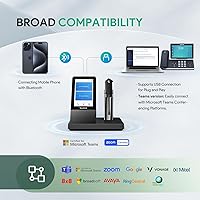
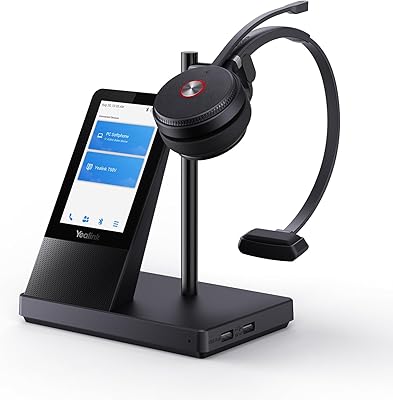
The Yealink WH67 Wireless DECT Office Headset sits in the mid-to-upper tier of the enterprise headset market, aimed at office and hybrid workers who regularly juggle a desk phone, a laptop, and a personal smartphone. Yealink has spent years building UC hardware for business environments, and this headset reflects that depth of experience. The base unit connects to all three device types — desk phone, PC via USB cable, and smartphone via Bluetooth — and doubles as a full-duplex speakerphone when you want to step back from wearing it. Worth stating upfront: this is a mono headset, built for call clarity, not stereo media.
Features & Benefits

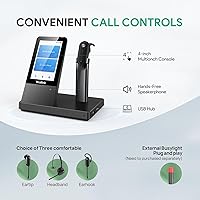
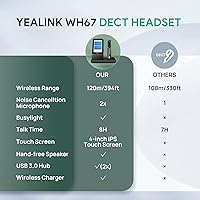
What separates the WH67 from cheaper wireless alternatives is how well each feature translates into daily use. The dual-mic noise cancellation with Acoustic Shield Technology is not just a label — in a busy open-plan office, it meaningfully reduces the ambient noise your callers hear, even with colleagues talking nearby. The DECT range stretches up to 394 ft through solid walls, meaning you can grab a coffee or collect a printout without putting a call on hold. At only 18g, the headset ships with three wearing styles — earpiece, earhook, and neckband — making all-day comfort realistic. On-device call controls and both Zoom and Teams certification mean you rarely need to touch your computer mid-call.

Best For

This DECT office headset is a particularly strong fit for anyone whose work is fundamentally call-heavy. Call center agents and customer-facing reps who spend most of their shift on the phone will appreciate the 8-hour talk time, which covers a full workday on a single charge. Hybrid workers who alternate between a desk phone and a laptop will find the multi-device connectivity genuinely practical rather than a novelty. The noise cancellation also makes it a solid pick for open-plan offices where ambient chatter is constant. Organizations already running Yealink T-series or Poly VVX desk phones will get the smoothest out-of-box experience with minimal configuration needed.

User Feedback

Buyers generally respond well to this Yealink wireless headset, with many reporting that callers rarely detect background noise even in lively offices — a real-world nod to the microphone's effectiveness. The lightweight build and multiple wearing styles earn consistent praise from users on long shifts. That said, the mono-only audio is a recurring sticking point for anyone who hoped to use it for video content or music between calls — if stereo matters to you, this is a genuine limitation worth weighing. A handful of reviewers mention a short learning curve with the touchscreen base, though most settle in quickly. Compatibility with phones outside the supported list can be hit-or-miss, so verifying your specific model beforehand is a smart step.

Pros

  • Dual-mic noise cancellation performs well in real open-office environments, not just in controlled demos.
  • Up to 394 ft of DECT range lets you move freely around the office without dropping a call.
  • At only 18g, the headset is light enough that many users forget they are wearing it after a few hours.
  • Three interchangeable wearing styles — earpiece, earhook, and neckband — accommodate different comfort preferences.
  • The base unit doubles as a full-duplex speakerphone, adding genuine utility to the workstation setup.
  • Certified for both Zoom and Microsoft Teams, with on-device call controls that reduce constant mouse-grabbing.
  • Multi-device connectivity covers desk phones, PCs via USB, and smartphones via Bluetooth from a single base.
  • 54-hour standby means you can leave it docked over a long weekend and return to a ready headset on Monday.
  • Plug-and-play setup with Yealink and Poly desk phones keeps IT deployment time to a minimum.

Cons

  • Mono-only audio makes the WH67 a poor choice for anyone who wants stereo sound for music or video between calls.
  • Compatibility with desk phones outside the official supported list is unreliable and poorly documented.
  • The touchscreen on the base unit has a short but noticeable learning curve for first-time users.
  • Some reviewers report that the Bluetooth smartphone pairing occasionally requires re-linking after the base restarts.
  • The base unit has a relatively large physical footprint that can feel bulky on a small or cluttered desk.
  • No option for a two-ear (binaural) configuration, which some call-heavy workers prefer for better audio isolation.
  • Teams noise reduction filter settings require manual adjustment that is not immediately obvious out of the box.
  • Build quality is functional but not exceptional — the plastic construction feels less premium than the price suggests.

Ratings

The scores below reflect an AI-driven analysis of verified global user reviews for the Yealink WH67 Wireless DECT Office Headset, with spam, bot-submitted, and incentivized feedback actively filtered out before any score was calculated. The methodology weighs both enthusiasm and frustration equally, so what you see here is an honest cross-section of real-world buyer experience — not a curated highlight reel. Strengths are credited where earned, and recurring pain points are reflected without softening.

Call Audio Clarity
91%
Users consistently report that their callers cannot detect background noise even in busy open-plan offices, which is the single most important metric for a professional call headset. The dual-mic Acoustic Shield system earns genuine praise from customer-facing workers who rely on sounding composed and professional regardless of their surroundings.
A small but vocal group of reviewers notes occasional voice thinning at higher volume levels, particularly during long calls in warmer environments. The mono format also means audio immersion is inherently limited compared to binaural headsets, which some users find fatiguing during extended listening.
Noise Cancellation
87%
The Acoustic Shield Technology genuinely earns its billing in moderate office noise conditions — keyboard clatter, HVAC hum, and nearby conversations are largely scrubbed from the outgoing audio signal. Call center agents and help desk workers in particular frequently cite this as the primary reason they recommend the WH67 to colleagues.
In exceptionally loud environments — busy trading floors, manufacturing-adjacent offices, or open spaces with hard reflective surfaces — some noise bleed-through is noticeable to callers. The Teams-specific noise reduction filter requires a manual settings adjustment that is not immediately obvious, which means some users never fully enable it.
Wireless Range
84%
The DECT radio technology handles wall penetration significantly better than Bluetooth alternatives, and most office users find they can walk freely within a typical single-floor office space — kitchen runs, printer trips, short corridor walks — without the call dropping or degrading. This freedom is consistently cited as a practical daily advantage.
Real-world usable range in concrete and steel office buildings lands closer to 150 to 200 ft rather than the advertised 394 ft, which is standard for DECT claims but worth knowing in advance. Users in multi-floor environments report that floor-to-floor range is noticeably reduced, sometimes dropping calls if the base is more than one level away.
Comfort & Wearability
83%
At just 18g, the headset unit is light enough that many long-shift workers genuinely forget they are wearing it after the first hour. The neckband option receives particularly strong feedback from users who experience ear fatigue with traditional over-ear or earhook designs, offering a practical alternative that few competitors include at this tier.
The earhook style receives more mixed feedback, with some users reporting that the fit loosens over a long shift and requires periodic adjustment. Buyers with larger or smaller ear profiles occasionally find the earpiece fit less secure than expected, and the wearing style conversion process, while not difficult, takes a few minutes of fiddling the first time.
Multi-Device Connectivity
81%
19%
The ability to maintain simultaneous connections to a desk phone, a PC via USB, and a smartphone via Bluetooth from a single base is a genuine practical advantage for hybrid workers who field calls across all three. Switching between active connections via the base touchscreen works reliably in day-to-day use without requiring re-pairing.
Some reviewers report that the Bluetooth smartphone connection occasionally drops after the base is power-cycled, requiring a manual re-pair. The transition between active call sources can also introduce a brief audio delay that is noticeable in quick back-to-back call handoffs.
Battery Performance
86%
Eight hours of continuous talk time is enough to carry most professionals through a full working day without touching the charger, which removes battery anxiety as a daily concern. The 54-hour standby rating means a headset left docked over a long weekend is still ready on Monday morning without any intervention.
Battery capacity naturally degrades over time, and some users who have owned the unit for more than 18 months report talk time dropping noticeably below the rated figure. There is no user-replaceable battery option, so eventual degradation means replacing the entire headset rather than just a battery cell.
Software & Platform Integration
78%
22%
Zoom and Teams certification translates into reliable call controls — mute, answer, and reject — working directly from the headset without requiring a mouse or keyboard interaction. For organizations standardized on either platform, this out-of-box integration is a genuine time-saver that reduces friction during high-volume call days.
The Teams noise reduction filter setting is buried within a configuration menu that is not well sign-posted in the quick-start documentation, meaning many users miss it entirely. Non-Teams UC platforms like RingCentral and 8x8 receive less polished integration, with some call control functions not mapping correctly without additional software configuration.
Base Unit Usability
74%
26%
The touchscreen base consolidates device switching, call controls, and volume management into one central hub, which most users find more convenient than managing multiple interfaces. The speakerphone mode on the base is a legitimately useful feature that lets you step back from wearing the headset during lighter call periods.
The touchscreen responsiveness receives mixed feedback — a meaningful portion of reviewers describe it as sluggish or requiring deliberate hard presses rather than light taps. The physical footprint of the base is also a recurring complaint from users with compact desks, as it occupies more surface area than competing base units at a similar price point.
Desk Phone Compatibility
72%
28%
For users already operating within the Yealink T4/T5 ecosystem or on Poly VVX desk phones, the plug-and-play experience is close to effortless, with call controls working correctly from the moment the cable is connected. Snom D-series compatibility is similarly reliable, making this a low-friction choice for IT teams managing standardized hardware fleets.
Compatibility outside the officially supported phone list is genuinely unreliable, and Yealink's documentation does not do a thorough job of clarifying edge cases. Users with older Avaya or Cisco desk phone models report inconsistent results, and some experience audio signal issues that require EHS adapter troubleshooting that is not covered in the included materials.
Speakerphone Quality
69%
31%
The built-in full-duplex speakerphone on the base unit is a genuine differentiator — most competing DECT headsets in this category ship with a passive charging cradle and nothing more. For solo desk calls or informal one-on-one conversations, the audio output is clear enough to be a practical daily alternative to wearing the headset.
The speakerphone falls short for group calls or any scenario where multiple people need to hear and be heard from the same desk, as the pickup range and volume ceiling are modest by speakerphone standards. A few users also report that the speakerphone audio introduces a slight echo on the caller-side that does not occur when using the headset directly.
Build Quality
67%
33%
The physical construction is solid enough for standard office use, and most users report no significant durability issues over the first year of daily use. The headset unit in particular feels well-balanced for its weight class, and the wearing style accessories attach and detach with confidence rather than feeling fragile.
The plastic housing on both the headset and base feels utilitarian rather than premium, which is a noticeable contrast given the price positioning. Several long-term owners report cosmetic wear — scuffing and finish dullness — appearing faster than expected, and the base unit hinge and cable management points feel like the most likely failure areas over time.
Setup & Initial Configuration
76%
24%
For users on supported desk phones and standard PC setups, the initial setup is straightforward — connect the USB cable, dock the headset, and the base handles the DECT pairing automatically. IT administrators deploying across multiple workstations consistently report that the out-of-box configuration time is competitive with other enterprise DECT systems.
Smartphone Bluetooth pairing requires navigating the base touchscreen menus, which is less intuitive than the PC setup and catches some first-time users off guard. The included documentation is functional but thin, and users who encounter any non-standard configuration scenario — mixed phone ecosystems, third-party UC platforms — often need to rely on online resources rather than the included guide.
Value for Money
73%
27%
For call-heavy professionals who genuinely use all three connection modes, the multi-device capability alongside the noise cancellation performance represents a reasonable return on investment relative to purchasing separate solutions. Organizations buying in volume for a call center or help desk environment tend to report stronger satisfaction with the price-to-performance balance.
Individual buyers who primarily need a single-device wireless headset may find the price difficult to justify against competitive mono DECT alternatives that offer similar call audio quality at a lower price point. The mono-only audio format also makes the value case weaker for anyone hoping to use the headset for media consumption alongside calls.

Suitable for:

The Yealink WH67 Wireless DECT Office Headset is purpose-built for professionals whose workday revolves around calls — think customer success managers, help desk agents, or inside sales reps who are on the phone for five or more hours a day. The 8-hour talk time means the battery will outlast most shifts without a mid-day scramble to recharge, and the 394 ft wireless range gives you genuine freedom to step away from your desk without putting a caller on hold. If your setup already includes a Yealink T-series or Poly VVX desk phone, the integration is close to effortless — plug in the base, pair the headset, and you are running. Hybrid workers who split time between a softphone on a laptop and a physical desk phone will also find the multi-device switching genuinely useful day-to-day. The dual-mic noise cancellation is a real asset in open-plan offices where ambient chatter is unavoidable and call professionalism still matters.

Not suitable for:

If you are looking for a headset to handle both calls and media — background music during focused work, video content, or stereo conference playback — the Yealink WH67 Wireless DECT Office Headset will disappoint, as mono audio is a hard limitation by design. Buyers whose desk phones fall outside the supported compatibility list (Yealink T4/T5 series, Poly VVX, Snom D-series) should verify their specific model carefully before purchasing, since pairing with unlisted hardware is inconsistent at best. This is also not the right pick for someone primarily working from a smartphone or a tablet without a desk phone in the picture, where a lighter Bluetooth-only option would serve better and cost less. Budget-focused buyers may also find the price point harder to justify if noise cancellation or multi-device connectivity are not genuine daily requirements.

Specifications

  • Model Number: This headset is sold under the model designation WH67 UC, identifying it as the unified communications variant of the WH67 family.
  • Audio Type: The headset delivers mono (single-ear) audio, optimized for voice call clarity rather than stereo music or media playback.
  • Connectivity: The base unit supports three simultaneous connection types: DECT wireless to the headset, USB to a PC, and Bluetooth to a paired smartphone.
  • Wireless Range: DECT technology provides a rated wireless range of up to 394 ft, which remains functional through standard brick and metal office walls.
  • Talk Time: On a full charge, the headset supports up to 8 hours of continuous talk time, sufficient to cover a standard full-day work shift.
  • Standby Time: When docked and idle, the headset can remain on standby for up to 54 hours before requiring a recharge.
  • Headset Weight: The wearable headset unit weighs just 18g, making extended all-day use comfortable across all three included wearing styles.
  • Wearing Styles: Three interchangeable wearing configurations are included in the box: over-ear earpiece, earhook, and neckband.
  • Noise Cancellation: A dual-microphone array with Acoustic Shield Technology filters ambient background noise from the caller-side audio signal during calls.
  • Speakerphone: The base unit includes a built-in full-duplex speakerphone, allowing hands-free desk calls without wearing the headset.
  • Certifications: The WH67 is officially certified for both Zoom and Microsoft Teams, with native call control support for both platforms.
  • Phone Compatibility: Supported desk phones include Yealink T4 and T5 series, Poly VVX 250/350/450/401/501, and Snom D735/D765/D385 models.
  • PC Connection: A USB cable is included in the box for connecting the base unit directly to a PC or Mac without requiring additional drivers for basic operation.
  • Battery Type: The headset uses a built-in Lithium Polymer battery, which is included and pre-installed at the time of purchase.
  • Base Dimensions: The charging and connection base measures 5.91 x 7.09 x 3.94 inches, requiring a moderate footprint on a standard office desk.
  • Package Weight: The complete boxed unit, including base and accessories, weighs 363g (approximately 12.8 oz).
  • Base Controls: The base unit features a touchscreen interface for answering, ending, and muting calls directly without interacting with a connected device.
  • Color: The headset and base are finished in matte black, consistent with standard enterprise office hardware aesthetics.

Related Reviews
Yealink WH63 DECT Wireless Office Headset
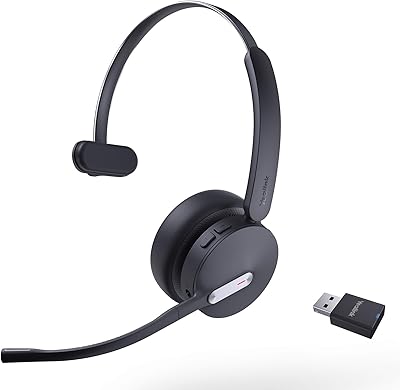
75%
88%
Call Audio Clarity
76%
Microphone Noise Cancellation
91%
Wireless Range & Reliability
69%
Battery Life
73%
Comfort & Wearing Styles
More
Yealink WH62 Dual UC DECT Wireless Headset
82%
92%
Wireless Range & Stability
88%
Call Audio Clarity
79%
Microphone Noise Cancellation
81%
Comfort & Wearability
87%
Battery Life
More
Plantronics Savi 8220 Wireless DECT Office Headset
81%
93%
Wireless Connectivity Stability
91%
Microphone Clarity
88%
Active Noise Cancellation
89%
Battery Life
84%
Multi-Device Switching
More
Yealink WH64 Hybrid Mono Wireless Headset
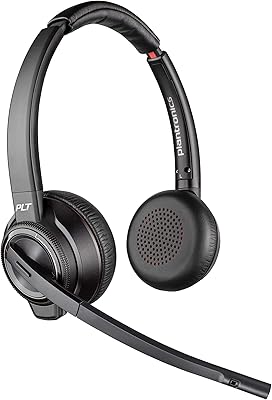
82%
88%
Call Audio Clarity
91%
Wireless Range (DECT)
93%
Battery Life
86%
Charging Speed
83%
Multi-Device Connectivity
More
Cisco Headset 561 Wireless On-Ear DECT Headset
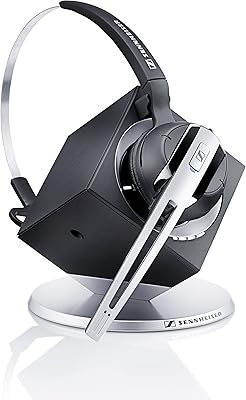
75%
91%
Wireless Range & Reliability
84%
Call Audio Clarity
93%
Cisco Ecosystem Integration
82%
Battery Life
67%
Comfort During Extended Wear
More
Sennheiser OfficeRunner Convertible Wireless Office Headset
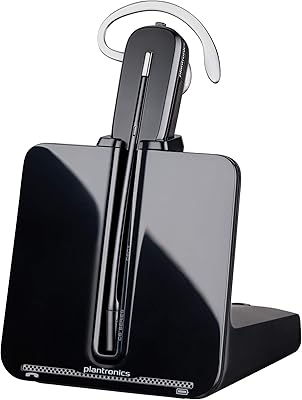
81%
91%
Wireless Range & Reliability
83%
Wearing Comfort
88%
Microphone Quality
79%
Battery Life
86%
Fit Customization
More
Poly CS540 Wireless DECT Headset
74%
84%
Call Audio Quality
91%
Microphone Performance
69%
Wireless Range
73%
Battery Life
71%
Wearing Comfort
More
Yealink BH71 Pro Wireless Bluetooth Headset
80%
91%
Microphone & Call Clarity
88%
Battery Life
67%
Comfort & Fit
83%
Noise Cancellation
86%
Connectivity & Dongle Reliability
More
Yealink BH70 Dual Wireless Bluetooth Headset
77%
86%
Microphone Quality
83%
Comfort & Wearability
91%
Battery Life
88%
Microsoft Teams Integration
57%
Noise Cancellation (Listener-Side)
More
Yealink WH66 DECT Wireless Headset
77%
91%
Call Audio Clarity
88%
DECT Wireless Range
79%
Battery Life
74%
Touch Screen Usability
83%
Comfort During Extended Wear
More

FAQ

You can have both connected simultaneously through the base unit. The desk phone connects via a dedicated cable port and your PC connects via the included USB cable. You switch between them using the controls on the base, so there is no re-pairing required when you jump from a softphone call to a desk phone call.

The certification is functional, not just a badge. The WH67 gives you native call controls — answer, end, mute — directly from the headset or the base touchscreen while Teams is running on your PC. The Teams noise reduction filter is also accessible through the headset settings, which is a detail that makes a real difference in busy offices.

For most open-office noise — background conversations, keyboard clatter, HVAC hum — the dual-mic Acoustic Shield system does a solid job of keeping your audio channel clean. Many users report that their callers are unaware of the surrounding noise. That said, no microphone system eliminates every sound in genuinely loud environments, so expectations should remain realistic.

It depends on how the phone handles external headset connections. Some phones outside the supported list work fine, while others have issues with call control signaling or audio handoff. The safest move is to verify with Yealink support before buying, since compatibility outside the official list is inconsistent enough that it is not a safe assumption.

Like most DECT range claims, 394 ft reflects open-air conditions. In a real office with walls and interference, you will likely see closer to 150 to 200 ft of reliable range — still more than enough to walk to a nearby kitchen, printer room, or restroom without dropping a call. DECT also handles wall penetration better than standard Bluetooth, which helps in typical office layouts.

At 18g, the headset itself is genuinely lightweight, and the three wearing style options help here. The neckband style tends to get the most positive feedback from users who wear it all day, since it removes any pressure on the ear cartilage during long sessions. Comfort is largely personal, but the weight alone puts this on the better end of the all-day wearability scale.

It is genuinely useful for desk-based calls when you need a break from wearing the headset. The full-duplex design means both sides of the conversation can speak naturally without cutting each other off. Audio quality is clear enough for speech, though it is not a replacement for a dedicated conference speakerphone in a group meeting setting.

Yes, this is one of the more practical aspects of the WH67. You pair your smartphone via Bluetooth to the base, and personal calls come through the same headset as your work calls. The base manages the audio routing, so you are not manually switching cables or devices each time your personal phone rings.

Yealink does not publish an exact charge time in their specifications, but based on the Lithium Polymer battery capacity and the 8-hour talk time rating, most users report a full charge taking approximately 2 hours when docked in the base. Docking the headset overnight ensures it is always ready at the start of the day.

Most users get comfortable with the base touchscreen within the first day or two. Basic call controls are straightforward — answer, mute, hang up. Where some buyers run into a slight learning curve is with the settings menus, particularly when adjusting Teams noise reduction filters or pairing a new Bluetooth device. Nothing requires advanced technical knowledge, but it is worth spending 20 minutes with the quick-start guide before jumping into a client call.

Where to Buy