Overview

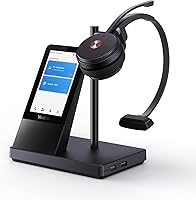
The Yealink WH66 DECT Wireless Headset sits firmly in the premium tier of office audio, and it earns that positioning with a feature set that goes well beyond a typical wireless headset. The clearest differentiator is the 4″ touch screen base station — something you won't find on most competitors at any price. Paired with dual-mode DECT and Bluetooth connectivity and certifications for Teams and Zoom, this office headset is built for professionals who spend the majority of their workday on calls. It's not a casual purchase, but for the right buyer, the investment is easy to justify.
Features & Benefits

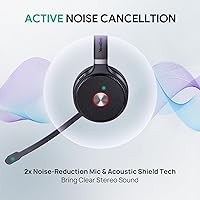
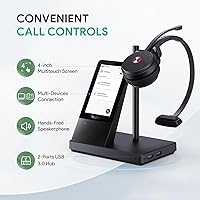
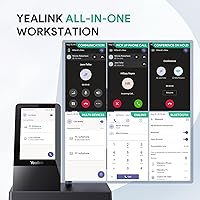
The 525-foot DECT range is one of the WH66's most practical advantages — walk to the printer, the break room, or a colleague's desk without losing a call or fumbling with your phone. The 4″ touch screen base simplifies call management considerably: answer, transfer, and switch between your PC and mobile with a tap rather than hunting through software menus. Two noise-canceling microphones with Acoustic Shield technology handle open-plan office noise well, keeping your voice clear even when colleagues are talking nearby. A built-in full-duplex speakerphone handles conference mode without extra hardware, and the 13-to-14-hour battery means you'll rarely stop mid-day to recharge.

Best For

This DECT headset makes the most sense for call-heavy professionals — account managers, support leads, consultants — who are on the phone for hours at a stretch and need freedom of movement throughout their workspace. It's also a strong fit for call center or open-plan team environments where DECT's interference resistance outperforms standard Wi-Fi-based audio. If you're already using Yealink desk phones, the native compatibility is a genuine bonus. That said, those chasing a minimal desk setup may find the base station bulkier than expected, and casual or light users are unlikely to extract full value from this office headset.

User Feedback

The WH66 holds a 3.9-star average — solid, but not without legitimate gripes. Users consistently praise call audio clarity, the reliability of the DECT connection across real office distances, and the comfort of the memory foam cushions during long sessions. The touch screen draws mixed reactions: some find it intuitive, while others feel it adds unnecessary bulk to an already substantial base unit. Setup complexity surfaces as a recurring complaint, particularly when pairing with non-Yealink desk phones via the EHS35 adapter. Battery life generally holds up in practice, though intensive dual-headset use reportedly lands closer to 11 hours rather than the advertised ceiling.

Pros

  • DECT range holds up reliably across real office distances, not just in ideal lab conditions.
  • Dual noise-canceling mics keep your voice clean even in open-plan or noisy home office environments.
  • Teams and Zoom certification means call controls and mute sync work natively without workarounds.
  • The touch screen base genuinely speeds up device switching for users juggling a PC and a desk phone.
  • Memory foam ear cushions hold up well through 6-plus hour call days without significant discomfort.
  • Battery comfortably covers a standard workday, with a 2.5-hour charge time as a practical backup.
  • The built-in full-duplex speakerphone removes the need for a separate conference device on most desks.
  • Busylight indicator reduces workplace interruptions without requiring any extra accessories.
  • Broad UC compatibility extends beyond Teams and Zoom to AVAYA, SNOM, POLY, and Google Meet.
  • Yealink ecosystem users get plug-and-play desk phone integration with zero additional configuration.

Cons

  • Real-world dual-headset battery life falls noticeably short of the advertised ceiling under continuous use.
  • Setup with third-party desk phones via the EHS35 adapter is poorly documented and frustrating for new users.
  • The base station footprint is substantial — small or minimalist desks will feel the impact immediately.
  • Touch screen responsiveness drops slightly with dry fingertips, which is a small but recurring annoyance.
  • The speakerphone volume is adequate for private offices but underwhelming in any room with ambient noise.
  • Plastic build quality does not match the premium price impression, and headband padding shows wear over months.
  • Google Meet integration works at a basic audio level only — full call controls are not supported.
  • The system is not portable in any practical sense, limiting flexibility for hybrid workers across multiple locations.
  • Noise suppression occasionally over-processes audio in unusually loud environments, introducing voice artifacts.
  • Users unfamiliar with DECT office systems face a steeper learning curve than the product marketing suggests.

Ratings

The Yealink WH66 DECT Wireless Headset earns a nuanced scorecard — strong in the areas that matter most to call-heavy professionals, but with real trade-offs worth understanding before committing at this price point. These scores were generated by AI after analyzing verified buyer reviews from multiple global markets, with spam, incentivized posts, and bot-pattern feedback actively filtered out. Both what users love and where frustrations consistently emerge are reflected honestly below.
Call Audio Clarity
91%
Buyers repeatedly describe the microphone quality as one of the best they have used in a wireless office headset. In open-plan environments and home offices with background noise, the dual noise-canceling mics and Acoustic Shield technology kept voices clean and intelligible on the receiving end without requiring any manual adjustments.
A small segment of reviewers noted that in very loud environments — think busy contact centers with multiple concurrent conversations — the noise suppression occasionally over-processes the voice, introducing a slightly hollow or clipped quality at peak noise levels.
DECT Wireless Range
88%
The real-world range impressed most buyers, with many confirming consistent audio while moving freely around mid-sized offices, walking down hallways, and even stepping into adjacent rooms. For professionals who frequently leave their desk during calls, this reliability is a practical daily benefit.
A handful of users in densely built or heavily RF-saturated office environments reported occasional brief dropouts beyond 100 meters. These were infrequent rather than persistent, but worth noting for buyers in larger enterprise layouts with thick concrete walls.
Battery Life
79%
21%
For most users logging standard 8-hour workdays, the battery comfortably gets through the day without an afternoon charge. The 2.5-hour charge time means a lunch break top-up is a reasonable fallback if needed, and the mono configuration holds up closer to the advertised ceiling than the dual setup.
Real-world dual-headset battery life lands noticeably short of the marketed figures, with several reviewers reporting closer to 11 hours under continuous use. Those running back-to-back calls from morning through late afternoon will want to monitor the charge level rather than rely on the rated maximum.
Touch Screen Usability
74%
26%
Users who embraced the 4″ touch screen base found one-touch call answering, device switching, and volume control genuinely faster than navigating desktop softphones. For anyone juggling a desk phone and a PC simultaneously, the centralized control panel reduces friction during handoffs between devices.
The touch screen divides opinion more than almost any other feature. Users with minimalist desk setups found the base station visibly bulky, and a few reported the screen being slightly less responsive when touched with dry fingertips. It is a feature that adds value only if you actively engage with it.
Comfort During Extended Wear
83%
The memory foam ear cushions and adjustable headband earned consistent praise from users wearing the headset for 6 or more hours per day. Most described it as light enough to forget about during long calls, with no significant ear fatigue or headband pressure reported in the first several hours.
A minority of users with larger head sizes found the headband adjustment range slightly limiting after extended wear, leading to mild pressure points. The on-ear form factor, rather than over-ear, also means some ambient sound bleeds in, which a few buyers found distracting in noisy environments.
Setup & Installation
61%
39%
For users connecting via USB to a modern PC running Teams or Zoom, the plug-and-play setup worked as advertised — drivers installed automatically and the headset was recognized within minutes. Yealink veterans pairing with compatible T-series or MP-series phones also reported a smooth, intuitive process.
Connecting to third-party desk phones via the EHS35 adapter was a recurring pain point, with multiple reviewers describing the pairing process as unnecessarily confusing and poorly documented. Users without prior experience with DECT office headsets found the initial configuration more involved than expected for a premium product.
UC Platform Compatibility
86%
Teams and Zoom certification is not cosmetic here — call controls, status sync, and mute toggling all function natively without workarounds. Users across AVAYA, SNOM, and POLY environments also confirmed stable integration, making this one of the more versatile headsets in its class for mixed-platform offices.
Google Meet compatibility, while listed, works at a basic audio level rather than with full call control integration. A few users on non-certified UCaaS platforms reported that button functions occasionally failed to map correctly, requiring manual configuration through the platform's audio settings.
Microphone Noise Cancellation
82%
18%
In real-world testing by reviewers working from busy home offices and shared workspaces, background keyboard noise, HVAC hum, and nearby conversations were substantially reduced without the caller needing to raise their voice. The dual-mic design picks up voice directionally rather than capturing the full room.
Aggressive noise suppression can become a liability in environments with unusual ambient sounds — some reviewers noted the processing occasionally triggered on certain voice frequencies, causing brief interruptions. It is effective enough for most office scenarios but not infallible in extreme acoustic conditions.
Speakerphone Quality
72%
28%
Having a full-duplex speakerphone integrated into the base station is a genuine convenience for users who want to step away from the headset momentarily during a team call. Audio reproduction through the speaker was described as clear enough for conference use in private offices or quiet rooms.
The speakerphone volume ceiling is adequate but not impressive, and in any room with moderate ambient noise it struggles to project clearly. Users looking to run a full team meeting through the base speaker alone will likely find it underwhelming compared to a dedicated conference speaker.
Build Quality
77%
23%
The headset itself feels solid and professionally finished, with the adjustable headband showing no reports of early cracking or joint weakness even with daily use. The base station has a stable footprint and does not feel like it will slide around a desk under normal conditions.
The overall aesthetic is functional rather than refined — the plastic construction, while durable, does not project the premium feel that the price tag might suggest. A couple of reviewers noted that the headband padding showed visible wear after several months of daily use.
Value for Money
67%
33%
For buyers who fully utilize the DECT range, the touch screen base, and the multi-device connectivity, the WH66 consolidates several separate tools into one, which softens the cost-per-feature calculation considerably. Teams-certified DECT headsets at this feature level are not significantly cheaper from competing brands.
Buyers who primarily need reliable audio for PC calls and rarely move from their desk will struggle to justify the premium over capable mid-range alternatives priced significantly lower. The value proposition is closely tied to how many of the advanced features a buyer will actually use daily.
Busylight Indicator
81%
19%
The integrated busylight was appreciated by users in shared or open-plan offices where signaling availability matters. It activates automatically during calls and was noted as a simple but effective way to reduce interruptions without requiring any additional desk accessories.
The busylight visibility is adequate for nearby colleagues but not bright enough to be seen across a large open floor. Users working in private offices or fully remote settings will find it irrelevant, and there is no option to customize the indicator color for different call states.
Charging Convenience
78%
22%
Dropping the headset onto the base station to charge is effortless and becomes a natural end-of-day habit for most users. The 2.5-hour full charge time is competitive, and the USB-powered base means no dedicated wall outlet is required if a powered USB hub is available.
There is no wireless or fast-charge option, and the base must remain connected to power at all times for charging to work — which limits flexibility for users who want a fully portable setup. A few users also noted the charging contacts on the headset showed minor wear after extended use.
Headset Weight & Portability
63%
37%
The headset unit itself, worn independently of the base, is reasonably light for an on-ear DECT model and does not cause noticeable neck strain during calls. Users who store the base at their desk and only wear the headset during calls reported no comfort issues related to weight.
The full system — base station, cables, and power adapter — is not portable in any practical sense. The package dimensions and combined weight make this a desk-only solution; anyone hoping to use it across multiple workspaces or travel with it will find it cumbersome compared to Bluetooth-only alternatives.

Suitable for:

The Yealink WH66 DECT Wireless Headset is purpose-built for professionals whose workday revolves around calls — account managers, customer success leads, support supervisors, and remote workers who spend five or more hours daily on the phone. The 525-foot DECT range pays real dividends if your job involves moving between your desk, a printer, a kitchen, or a colleague's workspace without putting a call on hold. It also makes strong sense for call center teams and open-plan offices where DECT's interference resistance keeps audio stable in environments packed with competing wireless signals. If you are already running Yealink desk phones, the native compatibility turns what would otherwise be a complex integration into a straightforward connection. Professionals who want to consolidate their speakerphone, headset, and device switcher into a single hub will find the touch screen base genuinely useful rather than gimmicky — provided they are willing to engage with it daily.
Not suitable for:

The Yealink WH66 DECT Wireless Headset is a harder sell for buyers who primarily need a clean, simple audio solution for PC-based calls and rarely leave their desk. The base station is bulky, and anyone with a minimalist workspace will feel the footprint immediately. Fully remote workers who move between home, coffee shops, and coworking spaces will find the system impractical to pack up and carry — this is a desk-anchored solution, not a portable one. Budget-conscious buyers or those who only join a handful of calls per week will struggle to justify the premium when capable Bluetooth alternatives exist at a significantly lower price point. Users on non-Yealink desk phones connecting via the EHS35 adapter should also be prepared for a more involved setup process than the packaging implies.

Specifications

  • Wireless Technology: The headset uses DECT 6.0, a dedicated wireless standard that operates independently of Wi-Fi and offers stronger interference resistance than Bluetooth-only office headsets.
  • Bluetooth Version: Bluetooth 4.2 is built into the base station for pairing a mobile phone as a secondary connected device alongside the primary USB or desk phone connection.
  • Wireless Range: DECT range extends up to 160 meters (approximately 525 feet) in open-space conditions, covering most mid-to-large office floor plans without signal degradation.
  • Talk Time: Battery delivers up to 13 hours of continuous talk time in mono configuration and up to 14 hours in dual-headset mode on a full charge.
  • Charging Time: The headset charges fully in approximately 2.5 hours when seated on the base station, which itself must remain connected to power via USB or the included adapter.
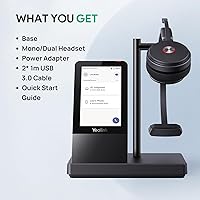
  • Touch Screen: The base station features a 4″ capacitive touch display for managing calls, switching connected devices, and adjusting settings without opening any desktop software.
  • Microphones: Two noise-canceling microphones with Yealink Acoustic Shield technology work together to suppress background noise and improve voice pickup directionally during calls.
  • Certifications: The WH66 is officially certified for Microsoft Teams and Zoom, enabling native call control integration including mute sync, answer, and end-call button functions.
  • UC Compatibility: Beyond certified platforms, the headset is compatible with Skype, Google Meet, AVAYA, SNOM, POLY, and other major UC platforms at varying levels of call control support.
  • Speaker Mode: The base station includes a full-duplex speakerphone, allowing hands-free conference participation without needing a separate speakerphone device on the desk.
  • Form Factor: The headset is an on-ear design with an adjustable headband, available in both mono (single-ear) and dual (both ears) configurations depending on the variant purchased.
  • Ear Cushions: Ear cushions are constructed from soft memory foam wrapped in a leather-finish material, designed to reduce pressure during extended all-day wear.
  • Busylight: An integrated busylight on the headset activates automatically during active calls to signal availability to nearby colleagues in shared office environments.
  • Connectivity: The base station connects to a PC or compatible IP desk phone via USB (plug and play, no driver installation required) and to a mobile phone via Bluetooth.
  • Battery Type: The headset uses a built-in rechargeable battery that is not user-replaceable and charges exclusively through the base station cradle.
  • Package Weight: The complete package, including the base station, headset, cables, and accessories, weighs approximately 2.33 pounds.
  • In the Box: Package includes the base station, mono and/or dual headset, two 1-meter USB 3.0 cables, a power adapter, and a printed user manual.
  • Warranty: Yealink provides a 2-year manufacturer guarantee covering defects in materials and workmanship, backed by a dedicated customer service and technical support team.

Related Reviews
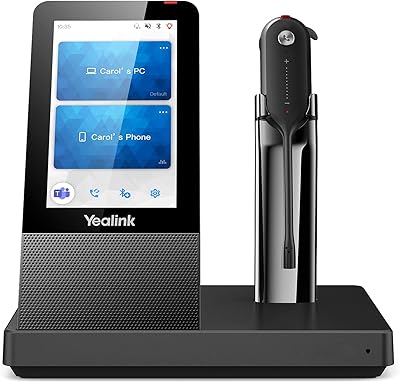
Yealink WH63 DECT Wireless Office Headset
75%
88%
Call Audio Clarity
76%
Microphone Noise Cancellation
91%
Wireless Range & Reliability
69%
Battery Life
73%
Comfort & Wearing Styles
More
Yealink WH67 Wireless DECT Headset
85%
91%
Comfort for Long Calls
88%
Audio Quality (Call Clarity)
85%
Noise-Canceling Microphone
68%
Bluetooth Connectivity
80%
Battery Life
More
Yealink WH64 Hybrid Mono Wireless Headset
82%
88%
Call Audio Clarity
91%
Wireless Range (DECT)
93%
Battery Life
86%
Charging Speed
83%
Multi-Device Connectivity
More
Yealink WH62 Dual UC DECT Wireless Headset
82%
92%
Wireless Range & Stability
88%
Call Audio Clarity
79%
Microphone Noise Cancellation
81%
Comfort & Wearability
87%
Battery Life
More
Cisco Headset 561 Wireless On-Ear DECT Headset
75%
91%
Wireless Range & Reliability
84%
Call Audio Clarity
93%
Cisco Ecosystem Integration
82%
Battery Life
67%
Comfort During Extended Wear
More
Plantronics CS540 Wireless DECT Headset
85%
92%
Comfort & Wearability
91%
Range & Connectivity
89%
Noise Cancellation
88%
Ease of Setup
85%
Battery Life
More
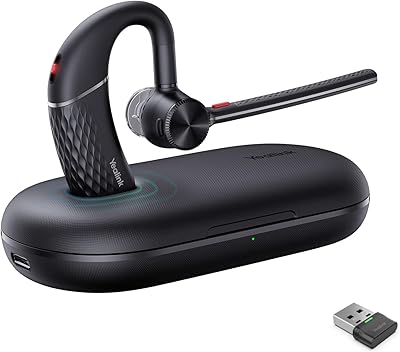
Yealink BH70 Dual Wireless Bluetooth Headset
77%
86%
Microphone Quality
83%
Comfort & Wearability
91%
Battery Life
88%
Microsoft Teams Integration
57%
Noise Cancellation (Listener-Side)
More
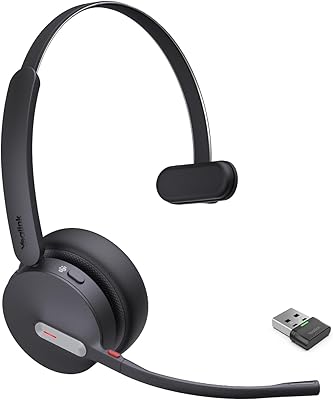
Yealink BH71 Pro Wireless Bluetooth Headset
80%
91%
Microphone & Call Clarity
88%
Battery Life
67%
Comfort & Fit
83%
Noise Cancellation
86%
Connectivity & Dongle Reliability
More
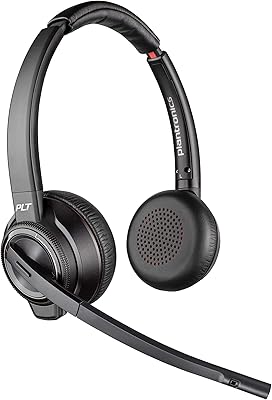
Yealink BH70 Mono Wireless Bluetooth Headset
86%
92%
Comfort for Long Wear
89%
Noise Cancellation Performance
75%
Bluetooth Connectivity
91%
Battery Life
88%
Sound Quality for Calls
More
Plantronics Savi 8220 Wireless DECT Office Headset
81%
93%
Wireless Connectivity Stability
91%
Microphone Clarity
88%
Active Noise Cancellation
89%
Battery Life
84%
Multi-Device Switching
More

FAQ

It works with both. The base connects to a PC via USB and to many IP desk phones directly or through the EHS35 adapter. Yealink publishes a detailed compatibility list covering T-series, MP-series, POLY, and SNOM phone models, so it is worth checking your specific phone model before purchasing.

Yes, it connects to a Mac via USB and is Zoom certified, so call controls like mute and answer work natively. Most users report it is recognized immediately without any additional driver installation on macOS.

DECT operates on a dedicated radio frequency separate from Wi-Fi and other Bluetooth devices, which means it is considerably more stable in dense wireless environments like busy offices or coworking spaces. You are far less likely to experience the audio dropouts or congestion issues that can affect Bluetooth headsets in crowded RF environments.

It depends entirely on how you work. If you regularly switch between a desk phone and a PC during calls, or want to manage volume and call transfers without touching your computer, the touch screen is genuinely convenient. If you only ever connect to one device and rarely leave your desk, it adds bulk without much payoff.

Yes. The base station connects to your PC or desk phone via DECT and to your mobile phone simultaneously via Bluetooth, so you can receive and manage calls from both sources without disconnecting and reconnecting.

In mono mode, most users report real-world battery life that aligns reasonably well with the 13-hour rating during a standard 8-hour call-heavy day. Dual-headset configurations tend to land closer to 11 hours under continuous use, so if you are running back-to-back calls all day in dual mode, keeping an eye on the charge level is wise.

For PC-based use with Teams or Zoom, setup is genuinely straightforward — plug the base into a USB port, seat the headset on the cradle, and the system is typically recognized within a minute or two. The more involved scenarios involve pairing with a non-Yealink desk phone via the EHS35 adapter, which requires following additional steps that some users find the documentation does not explain well.

Most users with average head sizes find it comfortable for extended wear, crediting the memory foam cushions and relatively even headband pressure distribution. A smaller number of users with larger head sizes have noted some pressure after several hours, so if that is a concern, trying the headset before committing to long sessions is advisable.

The WH66 supports a dual-headset configuration, meaning a second headset can be connected to the same base for training or shared-call scenarios. The dual configuration draws slightly more battery than running a single headset, which is reflected in the slightly different rated talk times between the two modes.

For the majority of typical office noise — keyboard sounds, HVAC, nearby conversations — the dual-mic Acoustic Shield system performs well and keeps your voice clear to the person on the other end. In extremely noisy environments, like a very loud contact center floor, the suppression handles most of it but is not perfect, and some users have noted occasional voice processing artifacts under peak noise conditions.

Where to Buy