Overview

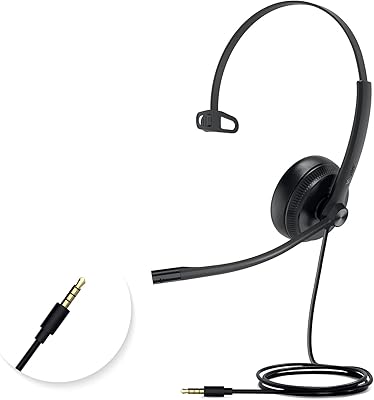
The Yealink UH35 USB Headset comes from a brand with serious roots in professional communications — VoIP systems, desk phones, conference hardware — so this isn't a consumer audio company trying its hand at office gear. The UH35 occupies a sensible spot in the mid-range: not the cheapest option on the shelf, but priced where reliability starts to matter more than cutting corners. It's a single-ear mono design, which is worth noting upfront — that's a deliberate choice for people who need to stay tuned into their physical environment during calls. Plug it into any USB-A port and it just works, with Microsoft Teams certification giving it extra standing in corporate and hybrid setups.

Features & Benefits

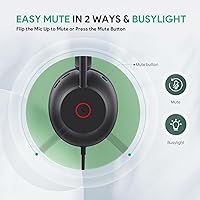
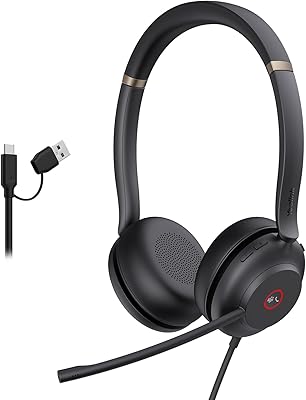
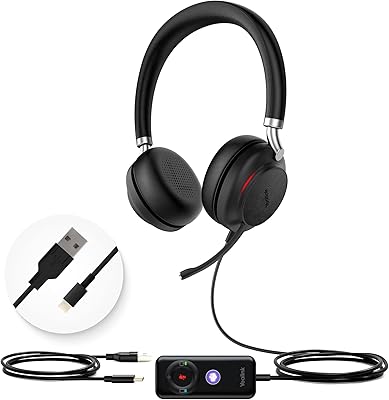
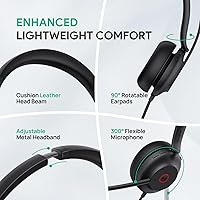
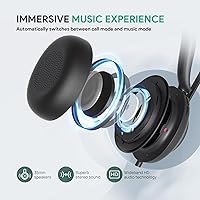
The office headset's dual noise-cancelling microphones are the headline feature, and they do a reasonable job reducing ambient hum — enough to keep your voice clear in a busy home office or open-plan workspace without sounding overly processed. The 35mm dynamic driver handles audio well across both call and music scenarios, switching modes automatically so you're not manually adjusting anything mid-day. Volume and mute controls sit right on the headset shell, which sounds minor until you realize how often you reach for them. The adjustable metal headband with leather ear cushions holds up across long shifts, and the built-in busylight is a small but genuinely useful signal for shared workspaces.

Best For

This mono headset is a strong fit for anyone logging serious hours on calls — remote workers, support staff, call center agents — where comfort and mic reliability matter more than audiophile sound quality. The single-ear format suits people who need to catch a knock at the door or a colleague's question mid-call. Teams and Zoom users will get the most out of the certification, since it means the on-headset controls map correctly to call functions without extra configuration. It's also a practical pick for open-office environments where a full over-ear headset feels too isolating. Anyone prioritizing music listening quality should look elsewhere.

User Feedback

Buyer sentiment for the UH35 sits at 4.2 out of 5, which reflects a product that performs reliably without wowing everyone. The most repeated praise centers on comfort during long workdays and how cleanly the mic captures voice in noisy spaces. Plug-and-play setup gets frequent mentions — people genuinely appreciate not dealing with driver installs. Criticism tends to focus on ear pad longevity over extended use, and some buyers find the cable length restrictive depending on their desk layout. The mono format is a real dividing line: half the audience loves it, the other half wishes it were stereo. No serious complaints around Teams functionality specifically.

Pros

  • Plug-and-play USB-A setup works instantly — no drivers, no configuration, no IT ticket needed.
  • Microsoft Teams controls map natively, so answering and muting calls from the headset actually works as expected.
  • Dual noise-cancelling mics keep voice clear in moderately noisy home offices and shared workspaces.
  • Lightweight build with a metal headband makes all-day wearing noticeably less fatiguing than bulkier alternatives.
  • The built-in busylight signals availability automatically during active calls, reducing interruptions without any manual action.
  • On-headset volume and mute controls reduce the need to touch your keyboard or screen mid-conversation.
  • Dynamic EQ switches audio modes between calls and music automatically, with no manual input required.
  • Broad compatibility with Zoom, Skype for Business, and standard VoIP platforms beyond its primary Teams use case.
  • The mono design lets wearers stay aware of their surroundings — a real practical benefit in busy or shared environments.
  • At its price point, the UH35 offers a certified, branded option that noticeably outperforms generic alternatives in mic quality.

Cons

  • Ear pad material has a documented history of peeling or cracking with heavy daily use over time.
  • Cable length is a recurring complaint for users with larger desk setups or floor-standing PC towers.
  • No companion software means there is no way to adjust EQ, mic sensitivity, or customize button behavior.
  • On-headset call controls work reliably only within Teams — other platforms get inconsistent or partial functionality.
  • No carrying case or protective pouch is included, which is a real gap for hybrid workers who commute with it.
  • The busylight is difficult to notice in brightly lit offices, limiting its usefulness as a visual signal.
  • Button tactile feedback requires a firmer press than most users expect, which can be awkward mid-call.
  • Long-term value perception takes a hit when ear pad wear means factoring in potential replacement costs down the line.

Ratings

The Yealink UH35 USB Headset has been evaluated by our AI system after analyzing verified buyer reviews from multiple global markets, with spam, bot-generated, and incentivized feedback actively filtered out. Scores reflect the honest distribution of real user experiences — where this office headset genuinely shines and where it falls short. Both strengths and recurring frustrations are weighted into every number you see below.
Microphone Clarity
83%
Users consistently report that voice pickup is clean and focused during calls, even in moderately noisy home offices. The dual-mic setup does a solid job isolating the speaker's voice without introducing that hollow, over-processed tone some noise-cancelling mics are known for.
In particularly loud environments — construction nearby, a busy household — the noise reduction starts to show its limits. A handful of reviewers noted that distant background sounds occasionally bleed through, which can be distracting for call participants.
Wearing Comfort
88%
Long-session comfort is one of the most praised aspects of this mono headset. The leather ear pad sits gently on the ear rather than clamping around it, and the metal headband distributes weight evenly enough that most users forget they have it on after the first hour.
A small number of buyers with larger head sizes found the headband adjustment range slightly limiting. After several months of daily use, a few users also mentioned the leather cushion loses some of its softness, though this appears to vary by individual.
Build Quality
79%
21%
The metal headband gives the UH35 a noticeably sturdier feel compared to all-plastic competitors in this price range. It does not flex or creak during adjustment, which signals decent manufacturing standards for a mid-range office peripheral.
The ear pad material, while comfortable initially, has drawn some durability concerns over extended use. The plastic housing around the ear cup feels less premium than the headband itself, creating a slight inconsistency in overall build perception.
Ear Pad Durability
63%
37%
Out of the box, the soft leather pads feel genuinely comfortable and hold their shape well during initial months of use. Users who rotate the headset with other equipment tend to report better longevity.
This is a recurring pain point in longer-term reviews. Daily heavy users report that the leather-style coating begins to peel or crack within six to twelve months, which is a real frustration at this price point and a consistent theme across negative feedback.
Plug-and-Play Setup
93%
Reviewers almost universally praise how simple the setup is — plug into a USB-A port and the system recognizes it instantly. No driver downloads, no configuration menus, no pairing sequences. For IT-managed environments, this is a meaningful advantage.
A very small number of users on non-Windows systems or older hardware reported recognition delays, though these cases appear to be outliers. There is no companion software for those who want to fine-tune EQ or mic sensitivity settings.
Microsoft Teams Integration
86%
The Teams certification means the on-headset controls — answer, end call, mute — work natively within the Teams interface without any manual mapping. For organizations standardized on Teams, this removes a common daily friction point.
Users running Zoom or other platforms report that while audio quality holds up, the call control buttons do not always map as cleanly. The certification benefit is genuinely Teams-specific, so buyers on other platforms should factor that in.
Audio Quality for Calls
81%
19%
Incoming audio during calls is clear and well-balanced, with enough volume range to comfortably use in a quiet room or a noisier shared space. The dynamic EQ switching between call and music modes works reliably in practice.
It is not a headset that will satisfy anyone using it for music or media as a primary use case. The mono driver, while clear, lacks the depth and soundstage that even budget stereo headsets can deliver for entertainment listening.
Cable & Connectivity
71%
29%
The USB-A wired connection means zero latency, no Bluetooth dropout, and no charging to worry about. For call center agents or desk-based workers, this kind of reliability is often preferred over wireless alternatives.
Cable length is a noted complaint among buyers with larger desk setups or PC towers placed further away. Some users also found the retractable cable mechanism less robust over time, though outright failures appear to be uncommon.
Busylight Functionality
77%
23%
The integrated busylight is a feature that gets genuinely appreciated in reviews from open-office or co-working users. It lights up automatically during calls, reducing interruptions without requiring any manual action from the wearer.
In bright office environments, the light can be harder to spot from a distance, limiting its practical effectiveness as an availability signal. It also cannot be triggered manually when you need focus time outside of an active call.
Mono Design Suitability
74%
26%
For its target audience — call center agents, support staff, hybrid workers who need situational awareness — the single-ear format is exactly right. Users in these roles frequently cite the ability to hear their immediate environment as a genuine daily benefit.
Buyers who did not fully register the mono spec before purchasing are often disappointed, making this the most polarizing design choice in the reviews. Anyone expecting stereo coverage for music or video will find it frustrating regardless of how good the single driver sounds.
Value for Money
78%
22%
Against no-name USB headsets, the UH35 offers a noticeable step up in build materials, mic performance, and platform certification. For buyers in Teams-centric workplaces, the added integration value makes the pricing feel justified.
When compared directly to a handful of similarly priced stereo alternatives, the mono format means some buyers feel they are getting less hardware for the same outlay. The durability questions around ear pads also chip away at the long-term value perception.
On-Headset Controls
82%
18%
Volume adjustment and mic mute are handled directly from the headset shell, which is more useful than it sounds during back-to-back meetings. Not having to switch windows or hunt for a software mute button saves real time across a full workday.
The button placement takes a short adjustment period to locate by feel alone, particularly the mute toggle. A few users also noted that the buttons require a firmer press than expected, which can feel slightly awkward mid-conversation.
Weight & Portability
84%
At just under nine ounces, the UH35 is light enough that most users stop noticing it after a few minutes. It sits flat and compact when not in use, making it easy to stow in a laptop bag for hybrid workers moving between locations.
There is no carrying case or pouch included, which is a minor omission for commuters. The retractable cable helps manage tangling, but without a dedicated storage option, the headset can pick up minor scuffs during daily transport.
Compatibility Breadth
76%
24%
Beyond Teams, the UH35 functions reliably with Zoom, Skype for Business, and standard VoIP softphones. The USB-A interface means it connects to virtually any laptop or desktop without hardware limitations getting in the way.
The deeper integration features — on-headset call controls, status sync — work most reliably within the Teams ecosystem. On other platforms, buyers essentially get solid audio hardware without the certified control experience they may have expected.

Suitable for:

The Yealink UH35 USB Headset is built for professionals who spend a serious portion of their workday on calls and need a headset that holds up without becoming a distraction. Remote workers, customer support agents, and call center staff will get the most out of it — particularly those embedded in Microsoft Teams environments where the native certification means controls just work without any setup fuss. The single-ear design is a genuine asset for anyone who needs to stay partially present in their physical environment: catching a delivery at the door, responding to a colleague nearby, or monitoring a child in the background. Open-plan office workers will also appreciate the busylight, which takes the social awkwardness out of signaling availability without requiring any extra hardware. If your priority is reliable, clear voice communication across long shifts and you are not looking to double this up as a music or media headset, this mono headset fits the brief well.

Not suitable for:

Buyers expecting a stereo listening experience should look elsewhere — the Yealink UH35 USB Headset is a mono, single-ear device by design, and no amount of audio tuning changes that fundamental reality. If you plan to use your headset equally for music, video content, or gaming alongside calls, this office headset will feel like a poor compromise in those non-call moments. Users on platforms other than Microsoft Teams should also temper their expectations around the certified controls, since button mapping to Zoom or other softphones is inconsistent at best. Anyone who frequently moves their workstation or uses a desktop tower placed far from their desk may find the cable length frustrating. Finally, buyers who need long-term durability from ear pad materials — particularly in humid climates or with extended daily use — have raised enough concerns that it is worth factoring into the decision if you are expecting this headset to last several years without part replacements.
Specifications

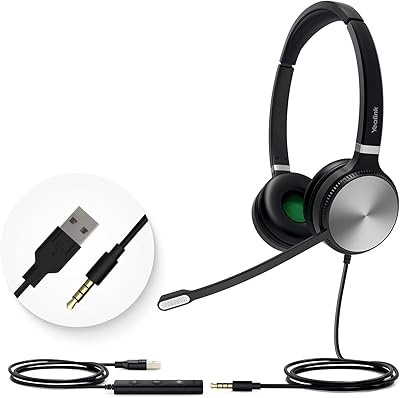
  • Connectivity: Connects via USB-A wired interface, compatible with standard USB-A ports on Windows laptops and desktop computers.
  • Ear Style: Single-ear (mono) on-ear design, intended for users who need one ear free to remain aware of their surroundings.
  • Driver Size: 35mm dynamic audio driver delivers sound in both call and music modes via automatic dynamic EQ switching.
  • Microphones: Dual built-in noise-cancelling microphones work in tandem to reduce ambient background noise during calls.
  • Headband: Adjustable metal headband construction allows the fit to be customized across a range of head sizes.
  • Ear Pad Material: Soft leather ear cushion sits on-ear and is designed to reduce pressure and fatigue during extended wear.
  • Controls: Volume adjustment and microphone mute buttons are integrated directly into the headset shell for quick access.
  • Certification: Microsoft Teams certified, meaning on-headset call controls map natively to Teams call functions without additional configuration.
  • Busylight: Built-in visual busylight indicator activates automatically during active calls to signal availability status to nearby colleagues.
  • Compatibility: Works with Microsoft Teams, Zoom, Skype for Business, and standard VoIP softphone platforms via USB-A connection.
  • Cable: Features a retractable cable design to help manage cord length and reduce desk clutter.
  • Item Weight: Complete headset weighs 8.8 ounces, keeping it light enough for all-day wear without significant neck or head fatigue.
  • Package Size: Ships in packaging measuring 8.58 x 6.18 x 2.09 inches, suitable for standard office supply deliveries.
  • Audio Modes: Dynamic EQ automatically switches audio profile between call mode (voice-optimized) and music mode (higher fidelity) based on use.
  • Model Number: Official model designation is UH35 Mono Teams NA, identifying the single-ear, Teams-certified North American variant.
  • Input Interface: USB input interface requires no driver installation on most modern Windows systems, enabling true plug-and-play use.
  • Form Factor: On-ear headphone form factor positions the driver against the ear rather than fully enclosing it.
  • Manufacturer: Designed and manufactured by Yealink, a company specializing in professional unified communications and VoIP hardware.
  • Availability: First made available for purchase in March 2024, placing it among Yealink's more recently released headset offerings.
  • Best Sellers Rank: Ranked #130 in the Computer Headsets category on Amazon, reflecting a solid mid-tier standing among competing products.

Related Reviews

Yealink UH37
Yealink UH37
79%
86%
Microphone Clarity
63%
Noise Cancellation
74%
Comfort for Extended Use
81%
Build Quality
91%
USB Compatibility
More
Yealink UH36
Yealink UH36
79%
84%
Microphone Quality
67%
Comfort & Fit
88%
Call Performance
63%
Build Quality
71%
Sound Quality for Music
More
Yealink UH38 Bluetooth USB Wired Headset
87%
93%
Dual Connectivity
88%
Noise Cancellation
91%
Comfort for Long Sessions
90%
Teams Integration
85%
Microphone Performance
More
Yealink YHS33 Headset
87%
91%
Comfort for Extended Use
88%
Sound Quality
85%
Noise Cancellation Effectiveness
83%
Build Quality
90%
Ease of Use / Setup
More
Callez C500U2 USB Headset
79%
84%
Microphone Clarity
88%
Wearing Comfort
63%
Build Quality & Durability
71%
Audio Playback Quality
54%
Noise Cancellation (Listener Side)
More
Logitech H570e USB Headset
84%
87%
Audio Quality
91%
Comfort for Long Sessions
88%
Noise-Canceling Microphone Performance
94%
Ease of Setup
82%
Build Quality
More
Yealink UH34 Wired Headset
85%
89%
Comfort for Long Use
84%
Noise Cancellation Performance
88%
Audio Quality
75%
Compatibility with Devices
86%
Build Quality and Durability
More
Logitech H390 USB Computer Headset
83%
86%
Microphone Voice Clarity
93%
Value for Money
97%
Ease of Setup
68%
Long-Term Comfort
82%
In-Line Control Tactility
More
Logitech H540
Logitech H540
78%
83%
Microphone Clarity
78%
Comfort & Fit
74%
Audio Quality
61%
Build Quality & Durability
94%
Plug-and-Play Convenience
More
KEMEILE KML02DUSB USB Headset
85%
88%
Audio Quality
91%
Comfort for Long Use
85%
Noise-Cancelling Performance
84%
Microphone Clarity
72%
Build Quality
More

FAQ

The Yealink UH35 USB Headset is certified for Microsoft Teams, but it works fine with Zoom and other platforms for basic audio. The caveat is that the on-headset controls — answering calls, muting — may not map as cleanly in Zoom as they do in Teams. You will still get full audio functionality either way; you just lose some of the button integration outside of Teams.

No, there is no software required. Plug it into a USB-A port and your computer should recognize it within seconds. There is no companion app for EQ adjustments or button customization, which keeps setup simple but does limit how much you can tune the experience.

That is by design. This mono headset covers one ear so you can hear what is happening around you — a delivery at the door, a colleague asking a question, background sounds in a shared office. If you specifically need both ears covered, you would want to look at a stereo model instead.

It does a reasonable job filtering out moderate ambient noise like air conditioning, light traffic, or general household hum. In louder situations — a toddler in the same room, a dog barking — you will likely still have some bleed-through. It is solid for most home office conditions but is not in the same league as professional broadcast or studio-grade noise rejection.

It means the headset buttons — answer call, end call, mute — are recognized natively by Teams without any manual setup. When a call comes in, you can pick it up directly from the headset, and your mute status syncs with the Teams interface. For heavy Teams users, this is a small convenience that adds up across dozens of calls a week.

This is probably the most honest concern to flag. With heavy daily use, several long-term buyers have reported the leather-style coating beginning to wear, crack, or peel within six to twelve months. If you use it a few hours a day the durability is better, but intensive daily users should be aware this is a known weak point.

The USB-A connection will work physically, and basic audio input and output should function on both platforms. However, the Teams certification and full control button functionality are primarily validated for Windows environments, so your experience on macOS or ChromeOS may vary depending on the platform and Teams version you are running.

It activates automatically when you are on an active call, so there is nothing to remember or toggle. The limitation is that you cannot trigger it manually when you just need focus time — it only responds to an active call state, not a general do-not-disturb mode.

This is a recurring complaint worth taking seriously. The cable length works fine for laptops or monitors with USB ports at desk level, but users with floor-standing desktop towers have found it comes up short. If your USB port is more than a couple of feet away from where you sit, you may want a USB extension cable.

Yealink typically offers a one-year limited warranty on their headset products, though you should verify current warranty terms directly with the retailer or Yealink support at the time of purchase. As a recognized professional communications brand, their support infrastructure is more established than most no-name alternatives in this price range.