Overview

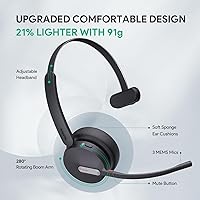
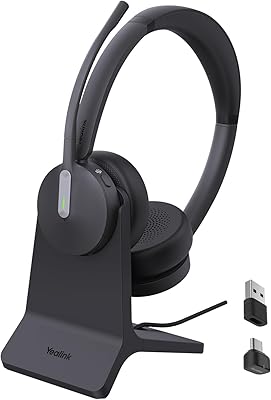
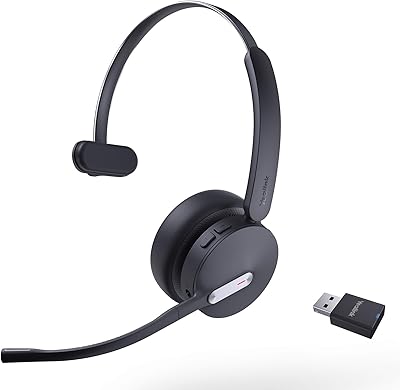
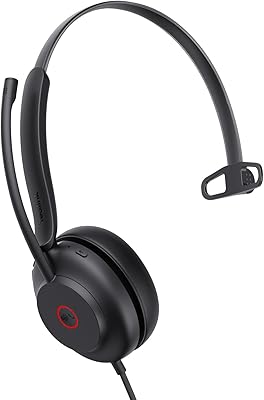
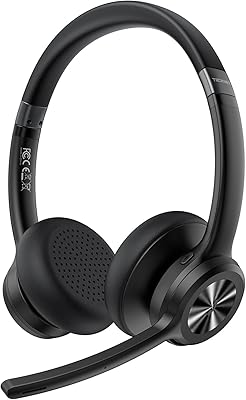
The Yealink BH70 Mono Wireless Bluetooth Headset is a mid-range business headset built for professionals who spend a large portion of their day on Microsoft Teams calls. Yealink has strong enterprise communication credentials, and this headset reflects that focus clearly — it's designed to support professional communication, not to impress audiophiles. The mono single-ear design is a deliberate choice: it keeps one ear open to your surroundings, which many office workers actually prefer. At 91 grams, it sits on your head without much presence at all, even over long sessions. Treat it as a communication tool with a specific purpose and you won't be disappointed. Expect hi-fi audio performance and you'll be looking elsewhere.
Features & Benefits

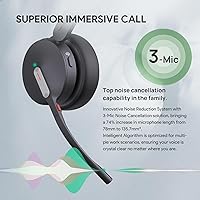
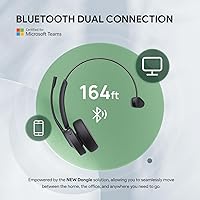
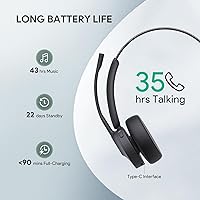
The BH70 Mono's most practical feature for Teams users is its Microsoft Teams certification — but there's a catch worth knowing upfront. That one-click meeting join and Teams button functionality only works when connected through the included BT51 USB-A dongle, not via standard Bluetooth pairing. Once that's sorted, the experience is genuinely smooth. The three-microphone array does solid work suppressing background noise on the sending side — think keyboard clatter, HVAC hum, or a nearby conversation. It's not eliminating sound coming into your ear; it's cleaning up what others hear from you. Battery life is a real highlight: 35 hours of talk time, rechargeable in 90 minutes. The 50-meter range gives you real freedom to move mid-call.

Best For

This Yealink headset is a natural fit for anyone who lives in Microsoft Teams and needs a reliable, all-day wearable without the bulk or weight of over-ear models. Open-plan office workers benefit most from the microphone noise suppression — it handles ambient chatter so your voice comes through clearly on calls. The mono design suits people who need situational awareness: managers, customer-facing staff, or anyone who can't fully disconnect from their environment. IT admins standardizing equipment for Teams-heavy organizations will also appreciate the certification and its consistent cross-device experience. It's less suited to people wanting stereo sound, music listening, or passive noise isolation in the ear.

User Feedback

With a 4.2-star average across more than 300 ratings, the BH70 Mono lands in comfortable but not exceptional territory. Buyers consistently praise microphone clarity and comfort during long wear — several mention putting it on in the morning and forgetting about it by afternoon. Battery life earns similar appreciation. The criticism that surfaces most often is dongle dependency: users who expected full Teams integration over native Bluetooth come away frustrated. Some note the plastic build feels modest relative to the price. The mono format polarizes buyers — those who know what they want love it, while those assuming stereo feel let down. It rewards buyers who go in with the right expectations.

Pros

  • Extremely light at 91 grams, making it comfortable to wear through a full workday without ear or neck fatigue.
  • Microsoft Teams certified with a dedicated Teams button for one-click meeting access.
  • The three-microphone setup does a solid job suppressing background noise on the sending side during calls.
  • 35 hours of talk time is genuinely outstanding and covers even the heaviest meeting schedules.
  • A full recharge in 90 minutes means a short break can restore most of the battery.
  • Bluetooth 5.3 with a 50-meter range gives real freedom of movement around a home or office.
  • The busy light indicator is a small but practical feature that reduces interruptions from nearby coworkers.
  • The BH70 Mono works with both PCs and mobile phones, adding flexibility beyond the desk.
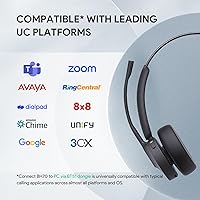
  • UC switchable platform support means it is not permanently locked to Teams environments.

Cons

  • Full Microsoft Teams integration requires the BT51 USB-A dongle — native Bluetooth alone will not activate Teams features.
  • The mono-only format will frustrate any buyer who assumed stereo audio without checking the specs first.
  • The plastic construction feels functional but uninspiring, especially at this price point.
  • There is no passive noise isolation — ambient sound in your environment comes through the open ear fully.
  • Losing or forgetting the dongle effectively disables the core Teams functionality the headset is marketed around.
  • USB-A dongle dependency can be a problem on modern ultrabooks and MacBooks that only carry USB-C ports.
  • Music listening is technically supported but the audio quality is not competitive with headsets designed for that purpose.
  • At this price, some buyers feel the build quality should be more premium given what comparable rivals offer.

Ratings

The scores below reflect our AI-driven analysis of verified global buyer reviews for the Yealink BH70 Mono Wireless Bluetooth Headset, with spam, bot-generated, and incentivized feedback actively filtered out before scoring. Each category captures both what real users genuinely praised and the recurring frustrations they reported — nothing is glossed over. The result is an honest, balanced picture of where this Teams-certified headset earns its place and where it falls short.

Microphone Quality
88%
Users consistently report that their voice comes through clearly on Teams calls even in noisy open-plan offices. The three-microphone array does a strong job cleaning up outgoing audio — coworkers often can't tell whether someone is calling from a quiet home office or a busy shared workspace.
A handful of users note that in very loud environments, like a cafe or construction-adjacent space, the noise suppression reaches its limits and some background bleed comes through. It handles moderate office noise well but is not infallible under extreme conditions.
Battery Life
93%
Thirty-five hours of talk time is a genuine differentiator in this category, and buyers frequently call it out as one of the main reasons they chose this headset. Heavy meeting schedules spanning multiple days without a charge are common in the positive feedback.
A small number of users report that battery performance degrades noticeably after extended months of daily use, which is fairly typical for lithium-ion cells but worth factoring into long-term ownership. The 90-minute charge time is fast, though some wished for wireless charging support.
Comfort & Wearability
84%
The 91-gram weight is regularly singled out by buyers who switched from heavier over-ear headsets and noticed the difference within the first hour. Many users describe wearing it for six or more hours without the ear fatigue or neck strain they experienced with bulkier alternatives.
The on-ear fit, while light, does create mild pressure for some users with sensitive ears after the three or four hour mark. A few buyers note the ear cushion could use more padding depth for truly extended sessions.
Teams Integration
79%
21%
For buyers who set it up correctly with the BT51 dongle, the Teams certification delivers a noticeably smoother experience — one-click meeting join works reliably, and the dedicated Teams button reduces the friction of managing calls from the headset itself.
The dongle dependency genuinely catches buyers off guard, and it accounts for a meaningful share of negative reviews. Users who assumed Bluetooth alone would unlock full Teams controls find the experience incomplete, and those with USB-C-only laptops face an added adapter step not mentioned clearly at point of sale.
Wireless Connectivity
86%
Bluetooth 5.3 delivers a stable, consistent connection across typical office distances, and the 50-meter range holds up well for moving around a home or open workspace during calls. Users rarely report dropouts or audio stuttering under normal conditions.
A small subset of users in environments with heavy wireless interference — dense apartment buildings or offices with many competing Bluetooth devices — report occasional brief disconnections. The dongle-based connection is generally reported as slightly more stable than native Bluetooth pairing.
Build Quality
63%
37%
The plastic construction does serve its primary purpose: keeping weight low and maintaining structural integrity for everyday desk use. Most buyers who treat it as an office headset rather than a travel or field device report no durability issues over months of use.
The premium feel simply is not there at this price point, and buyers upgrading from more expensive headsets notice it immediately. The hinges and adjustment mechanisms feel adequate but not confidence-inspiring, and the overall tactile impression reads as functional rather than refined.
Value for Money
74%
26%
For a Microsoft Teams-certified headset with strong battery life and solid microphone performance, the price sits in a reasonable range relative to comparable certified options from larger brands. Teams admins standardizing equipment across teams find the per-unit cost justifiable given the integration reliability.
Individual buyers making a personal purchase sometimes feel the plastic build and dongle dependency do not quite justify the cost when stereo headsets with richer audio exist nearby in price. The value proposition is strongest for Teams-heavy professional use and weakens outside that specific context.
Noise Cancellation (Mic-Side)
81%
19%
In standard open-office conditions — keyboard noise, HVAC hum, moderate background conversation — the acoustic shield performs well and gets positive mentions in reviews specifically from users in shared workspaces. Call recipients frequently comment on audio clarity without knowing the caller's environment.
It is worth emphasizing that this is outgoing noise cancellation only; there is nothing reducing ambient sound in your own ear. Buyers expecting to feel isolated from their surroundings will be disappointed, as the mono open-ear design means your environment is fully audible at all times.
Ease of Setup
77%
23%
For most Windows PC users already in a Teams environment, plugging in the BT51 dongle and pairing the headset is a straightforward process that takes only a few minutes. IT admins report smooth deployment across multiple devices without complex configuration steps.
First-time setup trips up a subset of users who try to configure it without the dongle first and then struggle to understand why Teams features are not appearing. The setup instructions included in the box could do more to highlight the dongle requirement upfront.
Audio Playback Quality
58%
42%
The dynamic EQ music mode adds some warmth and range beyond flat call audio, and casual listeners using it for background music during focused work generally find it adequate for that secondary purpose.
Anyone who cares about music quality will find this headset underwhelming as a listening device. The mono driver, on-ear design, and lack of acoustic isolation mean the audio experience for entertainment is noticeably behind consumer headphones at a similar price point.
Call Controls
82%
18%
The physical push-button controls are well-positioned and easy to operate without looking, which matters when you are mid-call and need to mute quickly or adjust volume. Users appreciate having tactile control rather than relying on software interfaces.
The button layout takes a day or two to memorize, and a few users report accidentally triggering the wrong function early on. There is no touchpad or gesture control, which feels dated compared to some rivals in this segment.
Busy Light Indicator
78%
22%
For anyone working in a shared physical space, the automatic red LED during calls is a genuinely practical feature. Colleagues and family members quickly learn to recognize the signal, reducing mid-call interruptions without any extra effort from the wearer.
The indicator is not user-configurable, so those who find it distracting or prefer a more discreet appearance during calls have no way to disable it. It is also only visible from certain angles, limiting its effectiveness in some room layouts.
Portability
71%
29%
At under 100 grams, the BH70 Mono is easy to toss in a laptop bag and forget about until needed. Remote workers who move between home, office, and coworking spaces mention it as an unobtrusive travel companion.
There is no included carrying pouch or case, which leaves the headset vulnerable to scratches and minor damage in transit. The dongle also introduces a small but real risk of being lost during travel, which would significantly impact Teams functionality.
Platform Versatility
69%
31%
The UC switchable platform support means the headset is not permanently locked into a single ecosystem, and buyers who occasionally need Zoom or Google Meet compatibility report it works without issue for basic call audio.
The headset is fundamentally optimized for Microsoft Teams, and using it outside that environment feels like leaving features on the table. The dedicated Teams controls add no value on other platforms, making the certification feel like a narrower benefit for mixed-platform users.

Suitable for:

The Yealink BH70 Mono Wireless Bluetooth Headset is purpose-built for professionals who spend the bulk of their workday on Microsoft Teams calls and need a headset that keeps up without getting in the way. Remote workers who juggle back-to-back virtual meetings will appreciate the all-day battery and the freedom to step away from the desk mid-call without dropping the connection. It suits open-plan office environments particularly well, where the three-microphone array helps ensure your voice comes through clearly even when the room around you is loud. The mono design makes it a smart pick for anyone who needs to stay partially tuned in to their physical surroundings — supervisors, reception staff, or collaborative workspace regulars who can't afford to be fully isolated. IT managers looking to deploy a standardized, certified headset across a Teams-heavy organization will find the consistent platform integration and straightforward setup genuinely useful.
Not suitable for:

The Yealink BH70 Mono Wireless Bluetooth Headset is not the right tool for buyers expecting stereo sound, passive ear isolation, or a headset they can also use seriously for music. If you were hoping to plug in via standard Bluetooth and get the full Teams button and one-click join experience, you will be disappointed — that functionality requires the BT51 USB-A dongle, which means you need an available USB-A port and the dongle physically on hand. People working in very quiet, private environments who want the microphone noise cancellation to also block incoming sound around them will find that this headset does not do that — it cleans up your outgoing audio, not your listening environment. Those sensitive to plastic build quality or who associate lightweight construction with fragility may also find the feel of the BH70 Mono underwhelming compared to pricier rivals in the market.
Specifications

  • Weight: The headset weighs 91 grams, making it one of the lighter options in the business mono headset category.
  • Battery Life: Rated for up to 35 hours of continuous talk time on a full charge under typical usage conditions.
  • Charge Time: A fully depleted battery reaches a complete charge in approximately 90 minutes via the included USB-C to USB-A cable.
  • Bluetooth Version: Uses Bluetooth 5.3, offering stable wireless connectivity with improved efficiency over older Bluetooth standards.
  • Wireless Range: Supports a wireless operating range of up to 50 meters in open, unobstructed environments.
  • Microphone: Equipped with three MEMS microphones paired with Yealink acoustic shield technology to suppress background noise on the outgoing audio signal.
  • Driver Size: Features a 35mm dynamic audio driver for voice call reproduction and secondary music listening use.
  • Ear Placement: On-ear, mono design covering a single ear, leaving the opposite ear fully open to ambient sound.
  • Connectivity: Connects via Bluetooth 5.3 or through the included BT51 USB-A dongle, which is required for full Microsoft Teams button functionality.
  • Teams Certified: Holds official Microsoft Teams certification, enabling native Teams controls including one-click meeting join when used with the BT51 dongle.
  • Busy Light: Integrated LED indicator glows red automatically during active calls to signal occupancy to nearby colleagues.
  • Platform Support: Default platform is Microsoft Teams, with UC switchable compatibility for other unified communications environments.
  • Compatible Devices: Works with PCs, laptops, and mobile phones via Bluetooth; full Teams integration is limited to PC use with the dongle.
  • Box Contents: Package includes the BH70 Mono headset, one BT51 USB-A Bluetooth dongle, and a 1.2m USB-C to USB-A charging cable.
  • Material: Primary construction uses plastic, contributing to the lightweight overall build at the expense of a premium tactile feel.
  • Noise Control: Microphone-side noise cancellation cleans outgoing audio; there is no active noise cancellation or passive isolation for incoming sound in the ear.
  • Dimensions: Product dimensions are approximately 7.87 x 1.97 x 6.69 inches as listed by the manufacturer.
  • Audio EQ: Includes a dynamic EQ mode for music listening that adjusts frequency response to suit different audio content.
  • Control Method: Operated via physical push buttons and an on-headset remote for call control, volume, and platform functions.
  • Bluetooth Range: Bluetooth input interface supports both wireless Bluetooth pairing and wired USB connection via the BT51 dongle for enhanced platform integration.

Related Reviews

Yealink BH70 Dual Wireless Bluetooth Headset
77%
86%
Microphone Quality
83%
Comfort & Wearability
91%
Battery Life
88%
Microsoft Teams Integration
57%
Noise Cancellation (Listener-Side)
More
Yealink BH71 Pro Wireless Bluetooth Headset
80%
91%
Microphone & Call Clarity
88%
Battery Life
67%
Comfort & Fit
83%
Noise Cancellation
86%
Connectivity & Dongle Reliability
More
Yealink WH66 DECT Wireless Headset
77%
91%
Call Audio Clarity
88%
DECT Wireless Range
79%
Battery Life
74%
Touch Screen Usability
83%
Comfort During Extended Wear
More
Yealink WH64 Hybrid Mono Wireless Headset
82%
88%
Call Audio Clarity
91%
Wireless Range (DECT)
93%
Battery Life
86%
Charging Speed
83%
Multi-Device Connectivity
More
Yealink BH74 with Stand ANC Wireless Bluetooth Headset
86%
85%
Comfort & Fit
91%
Active Noise Cancellation (ANC) Effectiveness
88%
Battery Life
83%
Build Quality
84%
Sound Quality
More
Yealink WH67 Wireless DECT Office Headset
79%
91%
Call Audio Clarity
87%
Noise Cancellation
84%
Wireless Range
83%
Comfort & Wearability
81%
Multi-Device Connectivity
More
Yealink WH63 DECT Wireless Office Headset
75%
88%
Call Audio Clarity
76%
Microphone Noise Cancellation
91%
Wireless Range & Reliability
69%
Battery Life
73%
Comfort & Wearing Styles
More
Yealink BH76 Plus Bluetooth Headset
80%
91%
Microphone Clarity
78%
Active Noise Cancellation
84%
All-Day Comfort
88%
Teams Integration
89%
Battery Life
More
Yealink UH35 USB Headset
80%
83%
Microphone Clarity
88%
Wearing Comfort
79%
Build Quality
63%
Ear Pad Durability
93%
Plug-and-Play Setup
More
Yealink UH38 Bluetooth USB Wired Headset
87%
93%
Dual Connectivity
88%
Noise Cancellation
91%
Comfort for Long Sessions
90%
Teams Integration
85%
Microphone Performance
More

FAQ

You can pair the BH70 Mono over standard Bluetooth for basic audio, but if you want the Microsoft Teams button to work — one-click meeting join, call controls within Teams — you need the BT51 USB-A dongle plugged into your computer. It is a real limitation worth knowing before you buy, especially if your laptop only has USB-C ports.

It covers one ear only. The Yealink BH70 Mono Wireless Bluetooth Headset is a true mono design, meaning one earcup on one side, with your other ear completely open. This is intentional and suits many professional environments, but if you were expecting stereo, this is not the right headset for you.

It is microphone-side only. The three-mic array with acoustic shield works to clean up what other people hear from you — cutting out keyboard noise, office chatter, and background hum. It does not reduce or block ambient sound reaching your own ear. There is no active noise cancellation on the listening side.

For most users, the real-world battery life lands comfortably close to that figure during normal call usage. Heavy users running back-to-back calls all day report needing a charge every couple of days, which is consistent with the spec. The 90-minute recharge time means even if you do run it low, a lunch break largely restores it.

The included BT51 dongle is USB-A, so you would need a USB-A to USB-C adapter to use it on a modern ultrabook or MacBook. That adapter is not included in the box. Alternatively, you can pair the headset over Bluetooth, but you lose the dedicated Teams button functionality in that mode.

Yes, the BH70 Mono pairs over Bluetooth and works with mobile phones for standard calls. The Teams-specific features will not carry over to your phone, but for regular voice calls it functions as any other Bluetooth headset. It is primarily designed around PC use, though.

At 91 grams, it is genuinely light and most users report no significant discomfort through a full workday. The on-ear fit is not as deeply cushioned as over-ear options, so people with sensitivity around the ear may want to try it before committing to extended wear. Generally though, the lightweight build is one of its most consistently praised traits.

The red busy light is designed to activate automatically when you are on a call. Yealink does not advertise a manual on-off toggle for it in the standard feature set. If visual indicators bother you, that is worth factoring into your decision.

The headset is UC switchable, meaning it can work with other platforms including Zoom, Google Meet, and standard softphones. The Microsoft Teams certification and dedicated Teams controls are the primary integration focus, but for general Bluetooth audio on any platform it will function without issue.

The plastic construction is functional and keeps weight low, but it does not feel particularly rugged. For desk-based daily use in a standard office or home setup, it should hold up fine with normal care. If you are looking for something with a metal frame or more premium material feel, this headset sits in a different tier. Most user feedback points to reliability rather than fragility, which is encouraging.

Where to Buy