Overview

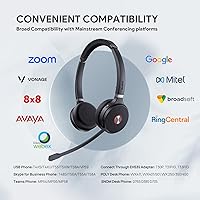
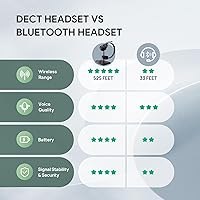
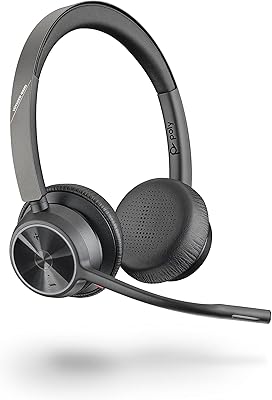
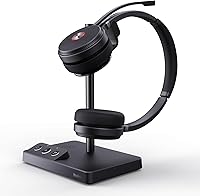
The Yealink WH62 Dual UC DECT Wireless Headset sits firmly in the mid-to-premium tier of business headsets, built for professionals who need reliable, all-day communication tools rather than casual listening gear. Unlike Bluetooth office headsets, it runs on DECT 6.0 technology, which offers a more stable, interference-resistant connection — a meaningful difference in dense offices with many wireless devices competing for signal. The dual-ear design works with both your computer and desk phone simultaneously, and setup is refreshingly straightforward out of the box. It's certified for Microsoft Teams and Skype for Business, so integration requires minimal configuration. Just know going in: this is a professional communication tool, not a hi-fi headphone.
Features & Benefits

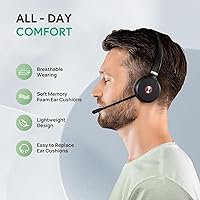
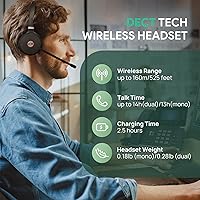
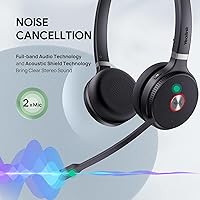
The standout here is range. With 525 feet of coverage, you can walk to the printer, grab coffee, or step briefly into a side room without dropping your call — that's practical freedom most Bluetooth headsets simply can't match. The dual noise-canceling microphones handle moderately busy environments well, filtering out keyboard noise and ambient chatter, though they're not engineered for genuinely loud spaces like factory floors. Battery life lands at 14 hours in dual-ear mode — enough for a full workday with room to spare. The busylight and mic-raise mute function are small features that matter a lot in open-plan offices. And at 0.28 lb with memory foam cushions, it wears comfortably across long sessions.

Best For

This DECT headset makes the most sense for people who live on calls. Hybrid workers who toggle between video meetings on a laptop and calls on a desk phone will appreciate the dual-device connectivity without fussing with cables. It's also a natural fit for call center environments where long wear time, reliable audio, and visible busy indicators matter every hour. IT teams managing Yealink or Microsoft Teams-certified phone systems will find deployment straightforward. If you're still tethered to a corded headset, the jump to DECT wireless is notable — no pairing headaches, no dropouts from crowded Wi-Fi. This office wireless headset isn't built for casual use; it's built for professional communication workflows.

User Feedback

With a 4.3-star average across 63 reviews, the WH62 Dual earns solid marks — though it's worth noting the review pool is still relatively small, so patterns aren't as definitive as products with hundreds of ratings. Buyers consistently praise call clarity and how quickly the headset connects out of the box. The wireless range holds up well in real-world use, according to multiple reviewers. On the downside, a handful of users have raised questions about long-term cushion durability, and a few found the base unit setup mildly fussy. Comfort over multi-hour sessions is mostly reported as positive, with some caveats for users with larger heads. The 2-year warranty adds a meaningful layer of confidence at this price tier.

Pros

  • DECT 6.0 delivers a stable, interference-resistant connection that Bluetooth office headsets consistently fail to match.
  • Real wireless freedom — walk to the printer or kitchen mid-call without worrying about signal drop.
  • Dual-device connectivity lets you switch between a laptop and desk phone without replugging anything.
  • Native Microsoft Teams and Skype for Business certification means call controls work without workarounds.
  • At 0.28 lb with memory foam cushions, the WH62 Dual sits comfortably through long call-heavy workdays.
  • 14-hour battery life in dual-ear mode outlasts virtually any standard office shift.
  • The busylight and mic-raise mute make open-plan office etiquette genuinely easier to manage.
  • Setup is straightforward — most users are up and running without software installs or IT intervention.
  • Broad IP phone compatibility covers Yealink, Poly, and SNOM, fitting into most existing office ecosystems.
  • The 2-year manufacturer warranty provides meaningful long-term coverage for a business-grade investment.

Cons

  • Ear cushions show signs of wear and compression faster than expected at this price tier.
  • No Bluetooth or 3.5mm jack means zero compatibility with smartphones or non-USB devices.
  • Advanced settings and firmware updates require Yealink's desktop software, which users describe as clunky.
  • Clamping pressure becomes noticeable for users with larger heads after two to three hours of wear.
  • The busylight LED is subtle — not easily visible across a large or brightly lit open-plan floor.
  • EHS35 adapter setup for non-certified desk phones can involve trial and error.
  • Included USB cables are short, limiting flexibility in where you can position the base unit.
  • Call control features behave inconsistently on platforms outside the certified UC ecosystem.
  • With only 63 ratings to date, long-term reliability data is thinner than more established competitors.
  • No carrying case included, which is a practical gap for users who move the headset between desks or locations.

Ratings

The Yealink WH62 Dual UC DECT Wireless Headset has been scored by our AI system after analyzing verified buyer reviews from global markets, with spam, bot-generated, and incentivized feedback actively filtered out. Across 63 confirmed ratings, we identified consistent patterns in both what works and what frustrates real users. The scores below reflect that full picture — strengths and shortcomings included, without bias toward either end.
Wireless Range & Stability
92%
The DECT 6.0 connection is one of the most consistently praised aspects across reviews. Users working in mid-sized offices report walking freely — to a kitchen, a printer room, even a brief hallway conversation — without the call dropping or degrading. That kind of reliability is genuinely rare at this price tier.
A small number of users noted that range can diminish in buildings with thick concrete walls or heavy structural interference. While 525 feet is the ceiling under ideal conditions, real-world performance in dense office buildings may fall somewhat short of that figure.
Call Audio Clarity
88%
Call recipients consistently describe voices coming through as clean and natural, with minimal distortion even during back-to-back hours of calls. For Teams or Skype-based workflows, this matters enormously — muddied audio on a six-call day is exhausting for everyone involved.
A few users observed that audio quality can fluctuate slightly depending on the UC platform and USB driver configuration. It is not a widespread complaint, but buyers using less common softphone platforms should verify compatibility before assuming plug-and-play perfection.
Microphone Noise Cancellation
79%
21%
In typical open-plan offices — keyboard clicks, nearby conversations, HVAC hum — the dual-mic setup does a respectable job of keeping your voice front and center. Colleagues on the other end of calls rarely complain about background intrusion in moderate environments.
Expectations need calibrating here. This is not industrial-grade noise suppression. Users in genuinely loud environments, like busy customer-facing areas or shared call floors with no acoustic treatment, report that background noise still bleeds through noticeably at times.
Comfort & Wearability
81%
19%
At just 0.28 lb for the dual configuration, the headset sits lightly on the head across long sessions. The memory foam cushions receive consistent praise from users who wear it five-plus hours daily, with most describing it as something they eventually stop noticing during calls.
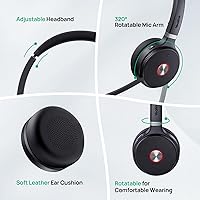
Users with larger head sizes or wider ear spacing have flagged that the clamping pressure becomes uncomfortable after two to three hours. The headband is adjustable, but the range of adjustment may not accommodate everyone, and a few reviewers wished the ear cups had more swivel range.
Battery Life
87%
Fourteen hours of talk time in dual-ear mode is more than enough to outlast even the longest workday without reaching for the charging base. Users on back-to-back call schedules specifically appreciate not having to babysit battery levels between meetings.
There is no hot-swap battery option, so when the headset finally does need charging, it is out of commission until it recovers. For high-volume call center environments running extended shifts or covering multiple users across rotations, this is a practical limitation worth considering.
Ease of Setup
84%
Most reviewers describe the initial setup as genuinely straightforward — plug in the base, connect via USB, and the headset pairs without requiring software installs or complex driver hunting. For IT teams rolling out units across an office, this simplicity is a real time-saver.
A subset of users encountered minor friction when connecting to non-Yealink desk phones via the EHS35 adapter, or when configuring the headset across certain UC platforms outside the certified list. The out-of-box experience is strong, but edge cases exist.
UC Platform Compatibility
86%
Certification for Microsoft Teams and Skype for Business means call controls — answer, end, mute — work natively without workarounds. For IT-managed Teams environments, this is a significant operational advantage that cuts down on support tickets and user frustration.
Compatibility is narrower outside the certified platforms. Users on Google Meet, Zoom, or niche VoIP systems report that some call control functions either do not register or require manual configuration. The headset works as an audio device universally, but the smart integration is platform-specific.
Build Quality & Durability
74%
26%
The overall construction feels appropriately solid for a business-grade product — not flimsy, not flashy. The headband mechanism and connection points hold up well under daily use, and most reviewers report no structural issues after months of regular wear.
The ear cushion material is a common point of concern in longer-term reviews. Several users noted that the foam begins to degrade or flatten with heavy daily use over several months, and replacement cushions are not the easiest to source. The plastic body, while functional, does not feel especially premium.
Desk Phone Integration
83%
Broad compatibility across Yealink, Poly, and SNOM IP phone lines means this headset fits naturally into most business phone ecosystems without requiring a hardware overhaul. Users already invested in Yealink desk phones get the tightest native integration.
Connecting to older or less common desk phone models via EHS35 requires an additional adapter and a bit more patience during setup. Users outside the supported compatibility list may find the experience inconsistent, and Yealink's documentation for edge cases is not always thorough.
Busylight & Mute Controls
85%
In open offices where visual availability signals matter, the built-in busylight is a practical feature that reduces interruptions without requiring a separate accessory. The mic-raise mute gesture is intuitive once habituated, and colleagues pick up on the visual cues quickly.
The busylight is only visible from certain angles and at moderate distances — it is not a high-visibility LED strip. A few users working in very bright or large open spaces felt the indicator was too subtle to serve as a reliable do-not-disturb signal for people farther away.
Value for Money
76%
24%
For buyers who need certified UC integration, DECT stability, and genuine all-day wearability in a single package, the pricing makes reasonable sense relative to comparable units from Jabra or Poly. The 2-year warranty adds a layer of confidence that helps justify the investment.
At this price point, buyers may reasonably expect more premium materials and longer-lasting ear cushions. Competitors at a similar tier offer comparable audio performance with arguably better physical build quality, which makes the value calculation less clear-cut than Yealink might like.
Weight & Ergonomics
82%
18%
The lightweight dual configuration is one of the more underrated aspects of this headset. Users transitioning from heavier corded office headsets consistently notice the difference, particularly during long afternoons of continuous calls where fatigue compounds quickly.
The on-ear design, rather than over-ear, means pressure is applied directly to the ear rather than around it. For some users this becomes uncomfortable during very long sessions, and those accustomed to circumaural (over-ear) headsets may find the fit adjustment takes time.
Software & Firmware
68%
32%
For straightforward plug-and-play use, no software is technically required, which is a genuine advantage for non-technical users and quick IT deployments. The base unit handles most configuration without app dependency in standard use cases.
Users who want to adjust advanced settings — EQ, busylight behavior, firmware updates — are pushed toward Yealink's desktop management software, which several reviewers described as clunky and infrequently updated. It works, but it does not match the polish of the hardware itself.
Packaging & Included Accessories
77%
23%
The box includes everything needed to get started: DECT base, USB cables, power adapter, and a user manual that covers the most common setup scenarios without being overwhelming. There are no immediately obvious missing accessories for typical office deployments.
The included USB cables are functional but short, which can limit base placement flexibility depending on desk layout. There is no carrying case or travel pouch included, which is a minor but noticeable omission for users who need to move the headset between workstations or take it home.

Suitable for:

The Yealink WH62 Dual UC DECT Wireless Headset is purpose-built for professionals whose workday revolves around calls — not occasional ones, but the kind where you're on a headset for five, six, or more hours straight. Hybrid workers who bounce between laptop-based Teams meetings and a desk phone will get immediate value from the dual-device connectivity, eliminating the cable-swapping friction that plagues most single-connection headsets. Call center agents and customer service staff benefit from the lightweight build and memory foam cushions during marathon shifts, and the busylight is a genuinely useful signal in open-plan floors where interruptions are constant. IT administrators managing Yealink or Microsoft Teams-certified phone ecosystems will find deployment and call control integration refreshingly uncomplicated. Anyone currently tied to a corded headset who works in a mid-sized office will also feel the difference that 525 feet of DECT wireless range makes — the freedom to step away from your desk without disconnecting from a live call is something you quickly take for granted.
Not suitable for:

The Yealink WH62 Dual UC DECT Wireless Headset is not the right call for buyers looking for a versatile personal audio device that doubles as a work headset. There is no music-optimized audio profile, no Bluetooth pairing for mobile phones, and no 3.5mm jack — if you want one headset that handles both your playlist and your meetings, look elsewhere. Users in genuinely noisy environments, like loud warehouse floors or high-traffic customer-facing spaces, should also temper expectations around the noise cancellation; it handles moderate office backgrounds well, but it is not engineered for industrial-level ambient noise. Buyers with larger heads or a strong preference for over-ear cushioning may find long sessions uncomfortable, as the on-ear design and clamping pressure are a recurring friction point in user feedback. Those who rely heavily on non-certified platforms — Google Meet, Zoom, or niche VoIP systems — may find that smart call controls work inconsistently, reducing the headset to a basic audio device rather than an integrated communication tool. Finally, buyers who prioritize premium build materials or frequently travel between workstations should note that there is no included carrying case and the ear cushions show wear faster than the price point might suggest.
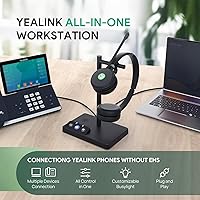
Specifications

  • Wireless Technology: This headset uses DECT 6.0, a dedicated wireless protocol that operates on the 1.9 GHz band, separate from Wi-Fi and Bluetooth signals.
  • Wireless Range: Maximum wireless range extends up to 525 ft (160 m) under open, unobstructed conditions.
  • Talk Time: Battery supports up to 14 hours of continuous talk time in dual-ear mode and up to 13 hours in mono mode.
  • Microphone: Dual noise-canceling microphones with Acoustic Shield Technology are designed to reduce background noise during calls in moderate office environments.
  • Ear Style: On-ear design available in both dual-ear and mono (single-ear) configurations, depending on user preference or task requirements.
  • Weight: The dual-ear configuration weighs 0.28 lb; the single-ear (mono) configuration weighs 0.18 lb.
  • Ear Cushions: Memory foam ear cushions with a breathable fabric covering are included for extended wear comfort.
  • Connectivity: Connects to computers via USB and to compatible desk phones via EHS35 adapter (adapter may be sold separately depending on phone model).
  • UC Certification: Certified for Microsoft Teams and Skype for Business, enabling native call control integration on those platforms.
  • Call Controls: Includes an integrated busylight indicator and supports mute via either a dedicated button or a mic-raise gesture.
  • Phone Compatibility: Compatible with Yealink, Poly (VVX series), and SNOM IP desk phones; a full compatibility list is available in the product documentation.
  • Audio Driver: Dynamic driver type is used for speaker output across both ear configurations.
  • Battery Type: Built-in rechargeable battery; the headset charges via the included DECT base station.
  • Base Station: The included DECT base station connects to the host device via USB and also serves as the headset charging dock.
  • In the Box: Package includes the DECT base station, mono or dual headset unit, two USB 2.0 cables, a power adapter, and a user manual.
  • Package Dimensions: Retail packaging measures approximately 10.28 x 8.11 x 4.29 inches.
  • Item Weight: Total packaged item weight is 1.72 pounds including all included accessories.
  • Warranty: Yealink provides a 2-year manufacturer guarantee backed by a dedicated customer service and technical support team.
  • Water Resistance: This headset carries no official water or dust resistance rating and should be kept away from liquids.
  • Release Date: This product was first made available for purchase on May 14, 2024.

Related Reviews
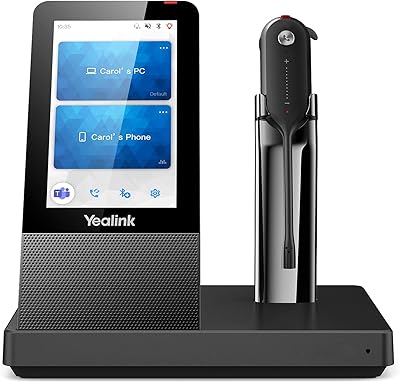
Yealink WH63 DECT Wireless Office Headset
75%
88%
Call Audio Clarity
76%
Microphone Noise Cancellation
91%
Wireless Range & Reliability
69%
Battery Life
73%
Comfort & Wearing Styles
More
Yealink WH67 Wireless DECT Headset
85%
91%
Comfort for Long Calls
88%
Audio Quality (Call Clarity)
85%
Noise-Canceling Microphone
68%
Bluetooth Connectivity
80%
Battery Life
More
Yealink WH66 DECT Wireless Headset
77%
91%
Call Audio Clarity
88%
DECT Wireless Range
79%
Battery Life
74%
Touch Screen Usability
83%
Comfort During Extended Wear
More
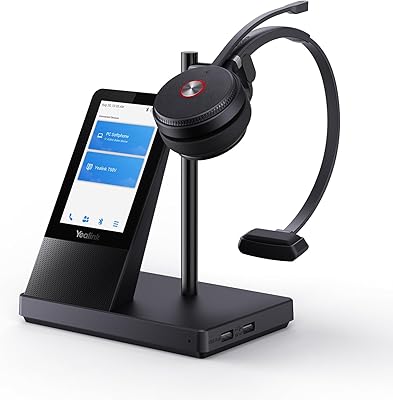
Yealink BH70 Dual Wireless Bluetooth Headset
77%
86%
Microphone Quality
83%
Comfort & Wearability
91%
Battery Life
88%
Microsoft Teams Integration
57%
Noise Cancellation (Listener-Side)
More
Yealink WH64 Hybrid Mono Wireless Headset
82%
88%
Call Audio Clarity
91%
Wireless Range (DECT)
93%
Battery Life
86%
Charging Speed
83%
Multi-Device Connectivity
More
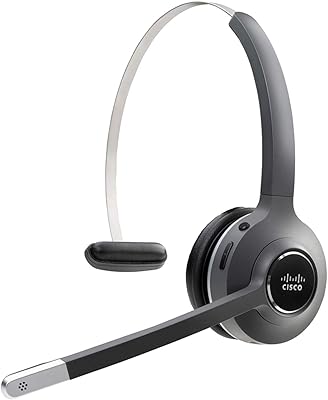
Cisco Headset 561 Wireless On-Ear DECT Headset
75%
91%
Wireless Range & Reliability
84%
Call Audio Clarity
93%
Cisco Ecosystem Integration
82%
Battery Life
67%
Comfort During Extended Wear
More
Plantronics CS540 Wireless DECT Headset
85%
92%
Comfort & Wearability
91%
Range & Connectivity
89%
Noise Cancellation
88%
Ease of Setup
85%
Battery Life
More
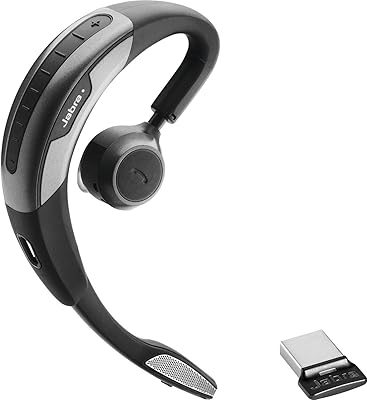
Jabra Motion UC Wireless Headset
84%
92%
Comfort and Fit
88%
Sound Quality and Clarity
85%
Battery Life
90%
Noise Cancellation Performance
80%
Connectivity and Integration
More
Yealink BH71 Pro Wireless Bluetooth Headset
80%
91%
Microphone & Call Clarity
88%
Battery Life
67%
Comfort & Fit
83%
Noise Cancellation
86%
Connectivity & Dongle Reliability
More
Poly Voyager 4320 UC Wireless Headset
86%
88%
Audio Quality
85%
Comfort for Long Use
90%
Noise Cancellation
91%
Battery Life
87%
Connectivity and Range
More

FAQ

It will function as an audio device on Zoom and Google Meet without any issues — you will hear and be heard clearly. However, the smart call controls, like answering or ending a call directly from the headset, are officially certified only for Microsoft Teams and Skype for Business. On other platforms, those button functions may work partially or not at all, depending on the software.

Yes, that is one of the stronger practical features of this headset. The base station connects to your computer via USB and to a compatible desk phone through a separate connection, and you can take calls from either device without physically switching anything. It is designed specifically for hybrid workers who use both a softphone and a physical desk phone throughout the day.

For a typical open-plan environment — background conversations, keyboard noise, HVAC hum — the dual-mic setup handles things reasonably well. People on the other end of your calls are unlikely to complain about ambient noise in those conditions. That said, if your office is genuinely loud, like a busy call floor with no acoustic separation, some background noise will still bleed through. It is solid for moderate environments, not industrial ones.

A full charge via the base station typically takes around 2 hours, though this can vary slightly based on how depleted the battery is. Yealink recommends docking the headset on the base whenever it is not in use to keep it topped up, which is a sensible habit given there is no hot-swap battery option.

Yes, it is listed as compatible with several Poly VVX models including the VVX 401, 411, 250, 350, and 450. You will likely need to use an EHS35 adapter to connect to the desk phone side, which may or may not be included depending on where you purchase the headset. It is worth confirming your specific VVX model against the compatibility list before ordering.

Most call center users prefer the dual-ear configuration because it blocks out more ambient noise and reduces listener fatigue during long shifts. The mono option makes sense if you need to stay aware of your physical surroundings while on calls — for example, in a role where you also need to hear colleagues or announcements in the room. Both versions share the same wireless and audio hardware.

The busylight is a useful indicator for immediate neighbors and anyone within a few feet, but it is not a high-visibility beacon. In a bright office or a larger open floor, people further away may not notice it reliably. If your main goal is preventing interruptions from colleagues across a large room, you may want to supplement it with a physical desk indicator.

For basic use — audio in and out, plug-and-play connectivity, Teams call controls — yes, you can use it without installing anything on most modern computers. The base station handles the core pairing without software dependency. However, if you want to adjust settings like EQ, update firmware, or customize the busylight behavior, you will need to install Yealink's desktop management software, which users have described as functional but not particularly polished.

The 525 ft figure is a best-case number measured in open space with no walls or interference. In a real office with drywall partitions, you can expect very solid range across most floor plans. In buildings with thick concrete walls or dense structural materials, the signal will attenuate more noticeably. Most users in standard office environments report the range as more than sufficient for moving around their immediate workspace.

Replacement cushions are technically available, but sourcing them can take some effort — they are not always stocked by major retailers and may need to be ordered directly through Yealink or specialist headset suppliers. Given that cushion wear is one of the more common long-term complaints about this office wireless headset, it is worth factoring that into your decision, especially if you are buying for multiple users in a call center context.

Where to Buy