Overview

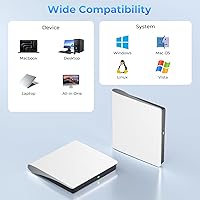
The Yaeonku 50GB External Blu-ray Drive is a compact, budget-friendly optical drive that landed in mid-2025 and has already climbed to #7 in its Amazon category. This Blu-ray burner handles dual-layer 50GB Blu-ray discs alongside standard DVDs and CDs, making it genuinely versatile for everyday disc work. It plays nicely with Windows XP all the way through Windows 11, Linux, and every version of macOS — broad compatibility that is harder to find at this price tier. One thing worth stating clearly upfront: 3D playback is supported, but this drive will not play 4K Ultra HD discs. That distinction trips up a lot of buyers, so keep it in mind before purchasing.
Features & Benefits

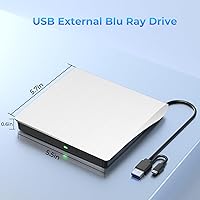
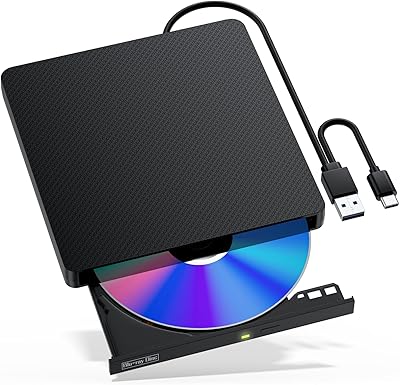
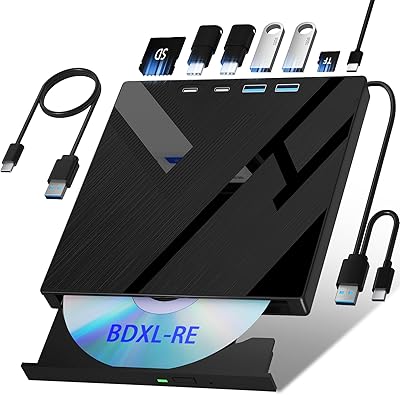
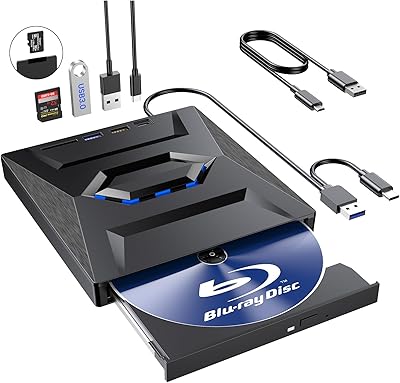
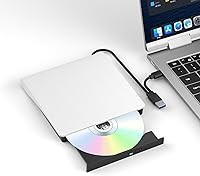
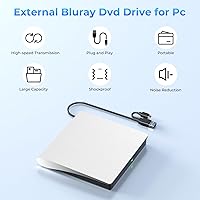
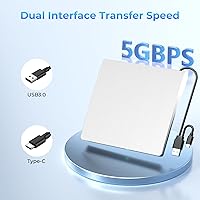
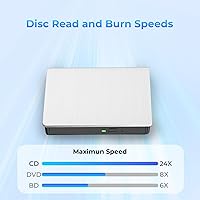
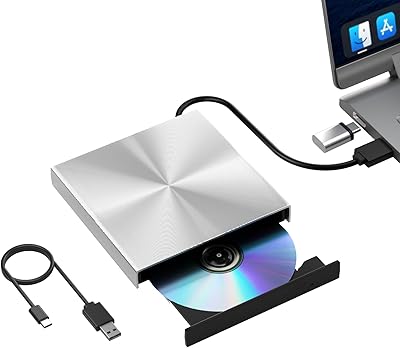
The most practical detail here is the dual-cable design — one unit ships with both a USB 3.0 cable and a USB Type-C cable already attached, so you can plug directly into older ports or newer laptops without hunting for an adapter. Read and write speeds reach 24x on CDs, 8x on DVDs, and 6x for Blu-ray discs, which is standard for this class of drive and fast enough for routine burning sessions. The anti-slip rubber base keeps it planted on your desk, and the recessed cable housing means tidy storage when it is not in use. Setup is plug-and-play with no driver installation needed. Just know that playback software is not included and must be sourced and installed separately before the drive will play movies.

Best For

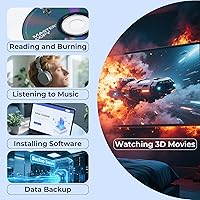
This external optical drive is a practical pick for anyone whose laptop lacks a built-in disc slot and needs occasional Blu-ray access — whether that means ripping a movie, burning a backup, or archiving files onto a 50GB dual-layer disc. Mac and Windows users who just need something that works without a steep learning curve will find it refreshingly straightforward. It is also a reasonable option for home media fans who want to explore 3D Blu-ray playback without spending a lot. That said, it is worth being direct about who this is not for: if your goal is 4K UHD playback, this drive cannot deliver it. Tablet users, TV setups, and smartphone connections are all off the table too.

User Feedback

With a 3.9-star average across over 1,400 ratings, the Yaeonku drive sits in honest-but-imperfect territory. Most satisfied buyers point to reliable plug-and-play performance on Windows 10, Windows 11, and recent macOS versions — it connects and gets recognized quickly, which is genuinely all many people need. The frustration that comes up most often is not really a hardware problem: buyers expecting to pop in a Blu-ray movie and watch it immediately hit a wall when they realize no playback software comes in the box. A few users also note that the plastic chassis feels lighter than expected, and some report that older or scuffed discs do not always read cleanly. Solid for burning and archiving; less polished as a turnkey movie-watching setup.

Pros

  • Connects instantly to both USB-C and USB 3.0 ports with no adapter needed, thanks to the built-in dual-cable design.
  • Plug-and-play on Windows 10, Windows 11, and recent macOS versions — recognized immediately without any driver installation.
  • Reads and burns 50GB dual-layer Blu-ray discs, making it useful for serious data archiving and media work.
  • 3D Blu-ray playback is supported with compatible third-party software, a feature rarely found at this price.
  • Anti-slip rubber base keeps the drive stable on a desk during disc burning sessions.
  • Broad OS compatibility covers everything from Windows XP to Linux to all macOS versions.
  • Compact and light enough to carry daily in a laptop bag without adding noticeable weight.
  • Handles CD, DVD, and Blu-ray formats in one device, reducing the need for multiple legacy drives.
  • Recessed cable design makes storage tidy and prevents the annoyance of a tangled loose cable.

Cons

  • No playback software is included — buyers must find, install, and potentially pay for a compatible Blu-ray player app before watching any movies.
  • 4K Ultra HD Blu-ray discs are not supported, despite marketing language that can easily mislead shoppers.
  • Read performance on older, worn, or lightly scratched discs is inconsistent and sometimes requires multiple retries.
  • The plastic chassis feels noticeably lightweight and does not inspire confidence for users who travel frequently with their gear.
  • Permanently attached cables mean a damaged cord cannot be swapped out without replacing the entire drive.
  • Extended burn sessions cause the unit to heat up noticeably, which may contribute to occasional mid-burn errors.
  • No protective carrying pouch or sleeve is included, which feels like an oversight for a device marketed as portable.
  • Compatibility with tablets, smart TVs, and smartphones is entirely absent, limiting its use to traditional computers only.

Ratings

The Yaeonku 50GB External Blu-ray Drive has been scored by our AI system after analyzing verified buyer reviews from global markets, with spam, bot-generated, and incentivized feedback actively filtered out. The ratings below reflect an honest cross-section of real-world experiences — where this external optical drive genuinely delivers and where it falls short. Both strengths and frustrations are represented transparently so you can make a confident, informed decision.
Plug-and-Play Setup
86%
Most buyers on Windows 10, 11, and recent macOS versions report that the drive is recognized instantly after plugging in — no driver downloads, no configuration headaches. For someone who just needs occasional disc access without IT support, that kind of friction-free setup is exactly what they are paying for.
A handful of users on older operating systems like Windows 7 or certain Linux distributions report the drive is not always detected reliably on first connection. Unplugging and re-plugging often resolves it, but it is an inconsistency that should not exist at this price point.
Blu-ray Read & Burn Performance
78%
22%
For everyday burning tasks — archiving files to BD-R discs, ripping personal Blu-ray content, or creating backups on 50GB dual-layer media — the drive handles the workload competently at its rated 6x Blu-ray speed. Users archiving home video collections specifically praise its reliability on fresh, quality discs.
Inconsistency creeps in with older or slightly scratched Blu-ray discs, where some users report read errors or stalled transfers that require multiple retries. The drive appears less forgiving than pricier competitors when disc quality is less than perfect.
Dual-Interface Connectivity
89%
The integrated USB 3.0 and Type-C dual-cable design is one of the most practically useful features on this drive. Users with modern USB-C-only laptops appreciate being able to connect without carrying a separate adapter, and the cable is long enough to sit comfortably beside a laptop on a desk.
The cables are permanently attached rather than detachable, which means if either cable is damaged over time, there is no simple fix. A few users also note the cable feels slightly stiff, making it a bit awkward to route neatly in cramped laptop setups.
Software & Playback Experience
41%
59%
The hardware itself is capable of 3D Blu-ray playback when paired with compatible third-party software. Users who took the time to install Cyberlink PowerDVD or a similar application reported a functional and reasonably smooth playback experience for standard Blu-ray titles.
No playback software is included, and this catches a disproportionate number of buyers off guard — it is the single most common source of negative reviews. Buyers expecting to insert a Blu-ray movie and watch it immediately will be stuck until they source, purchase, and configure compatible software on their own.
Compatibility Across Operating Systems
83%
The range of supported systems is genuinely impressive for a drive in this category — Windows XP through 11, all macOS versions, and Linux are all on the list. Mac users in particular express pleasant surprise that it works without any manual driver installation on recent Apple Silicon and Intel machines alike.
Compatibility with tablets, Surface devices, iPads, and smart TVs is explicitly not supported, and some buyers only discover this after purchase. The Amazon listing does state these exclusions, but they are easy to overlook, leading to avoidable returns.
CD & DVD Performance
84%
At 24x for CDs and 8x for DVDs, this external optical drive handles legacy disc formats with speed and consistency that most users find more than adequate. People digitizing old CD collections or burning DVD backups report clean, error-free results in a reasonable timeframe.
The drive does occasionally struggle with finicky pressed DVD discs from certain regions or very old CD-ROMs, producing read errors that require software-level retries. Nothing catastrophic, but users with large libraries of older media should be aware it is not universally reliable.
Build Quality & Materials
62%
38%
The white plastic chassis is clean-looking and compact enough to slip into a bag without taking up much room. The anti-slip rubber pad on the base is a thoughtful addition that keeps the unit from skidding around on smooth desk surfaces during disc spinning.
The all-plastic construction feels noticeably light — lighter than many buyers expect for a drive rated to handle Blu-ray media. Several reviewers describe it as feeling fragile, and there is a general sense that the chassis would not hold up well to drops or rough handling during travel.
Portability & Form Factor
81%
19%
At just under 13 ounces and with a flat, square profile, this external optical drive is easy to throw into a backpack or laptop bag. The recessed cable storage design means you are not fighting a tangle of loose wire every time you pack it away, which adds up as a real convenience over time.
The fixed dual-cable design, while clever for connectivity, does add slight bulk compared to drives that ship with a single detachable cable. It is a minor gripe, but worth noting for users who are especially weight or space conscious when traveling.
Noise & Vibration
71%
29%
Under normal operating conditions — reading or burning at standard speeds — the drive runs at an acceptable noise level. Users working in quiet home office environments generally describe the disc-spinning hum as unobtrusive and comparable to other drives in this class.
At peak speeds, particularly during sustained Blu-ray burns, some users report a noticeable vibration and a louder whirring than expected. It is not a dealbreaker, but those sensitive to ambient noise while working or watching content nearby may find it distracting.
4K UHD Disc Support
12%
88%
There is not much positive to say here for users specifically seeking 4K playback — and that honesty is itself useful information. The drive is transparent in its specifications about supporting standard Blu-ray and 3D Blu-ray formats, which is exactly what the target buyer needs.
This drive cannot play 4K Ultra HD Blu-ray discs, full stop. The confusion stems partly from marketing language referencing 4K-like clarity for 3D playback, which misleads buyers shopping specifically for a 4K UHD-capable drive. If 4K disc playback is your goal, this is simply the wrong product.
Value for Money
74%
26%
For burning, archiving, and occasional disc reading on a modest budget, the drive delivers a reasonable return on investment. Users who understand its capabilities upfront — particularly the software requirement — tend to feel it is fairly priced for what it does well.
Buyers who expected a complete out-of-the-box movie-watching solution end up feeling underserved, which skews perceived value negatively. The missing playback software effectively adds an unannounced additional cost for a core use case, which reasonably frustrates budget-conscious shoppers.
Disc Format Versatility
82%
18%
Support for BD-R, BD-RE, DVD±R, DVD±RW, CD-R, and CD-RW gives this burner a wide enough format range to cover most practical home and professional burning scenarios in one device. Users consolidating multiple ageing drives into one unit appreciate not having to worry about format gaps.
The lack of M-DISC support is an occasional complaint from archival-focused users who want long-term data preservation on specialty media. It is a niche need, but professionals choosing this drive specifically for archival durability should factor that in.
Heat Management
68%
32%
During shorter burning sessions and light reading tasks, the drive stays cool enough to handle comfortably and does not cause any concern about heat-related performance degradation. Casual users are unlikely to encounter heat as a noticeable issue.
Extended use — particularly multi-disc burn sessions — causes the chassis to warm up more than some users are comfortable with. A few reviewers note that sustained heat appears to correlate with occasional mid-burn errors, suggesting thermal throttling may be a factor under heavy workloads.
Packaging & Unboxing Experience
66%
34%
The drive arrives well-protected and the included user manual covers basic setup steps clearly enough for non-technical buyers. The package is compact and does not include unnecessary filler, which keeps things tidy.
Beyond the drive and manual, there is nothing else in the box — no disc, no software download card, no carrying pouch. For a portable device marketed at on-the-go users, the absence of even a basic protective sleeve feels like a missed opportunity at this price level.

Suitable for:

The Yaeonku 50GB External Blu-ray Drive is a smart pick for anyone whose laptop or desktop no longer includes a built-in optical drive but still has a genuine need to work with disc media. That covers a wider range of people than you might expect — someone digitizing a personal Blu-ray collection, a freelancer burning project archives onto dual-layer discs, or a professional who needs to deliver client files on physical media. Mac users will find it particularly convenient, since it works across all macOS versions without any manual driver wrangling. The dual USB 3.0 and Type-C cable setup means it connects cleanly to both older workstations and modern thin laptops without requiring a separate hub or adapter. Home media fans on a modest budget who want to explore 3D Blu-ray playback will also find this external optical drive delivers on that front, provided they are willing to set up compatible third-party software before settling in for a movie night.
Not suitable for:

The Yaeonku 50GB External Blu-ray Drive is the wrong purchase for anyone whose primary goal is playing 4K Ultra HD Blu-ray discs — it simply does not support that format, and no software workaround will change that. Buyers expecting a ready-to-watch movie experience straight out of the box will also hit an immediate wall, since no Blu-ray playback software is included and the drive will not play films until a compatible application is sourced, purchased, and installed separately. Anyone planning to connect this drive to a tablet, iPad, Surface device, smartphone, or television should look elsewhere, as none of those connections are supported. Users who handle a lot of older, scratched, or pressed disc media may find the read reliability frustrating compared to more forgiving drives at higher price points. Finally, those who need something built to withstand rough daily travel should note that the all-plastic chassis, while compact, does not inspire much confidence against knocks or drops.
Specifications

  • Brand: Manufactured and sold under the Yaeonku brand.
  • Color: Available in white with a clean, matte plastic finish.
  • Interface: Equipped with both a USB 3.0 cable and a USB Type-C cable, permanently integrated into a single dual-cable unit.
  • Disc Capacity: Supports reading and writing Blu-ray discs up to 50GB on dual-layer BD-R and BD-RE media.
  • BD Speed: Blu-ray read and write speed is rated at 6x for standard Blu-ray disc formats.
  • DVD Speed: DVD read and write speed reaches up to 8x for DVD±R and DVD±RW media.
  • CD Speed: CD read and write speed is rated at up to 24x for CD-R and CD-RW media.
  • Disc Formats: Compatible disc types include BD-R, BD-RE, DVD±R, DVD±RW, CD-R, and CD-RW.
  • 3D Playback: Supports 3D Blu-ray disc playback when used with compatible third-party software installed on the host computer.
  • 4K UHD Support: Does not support 4K Ultra HD Blu-ray disc playback under any configuration.
  • Operating Systems: Compatible with Windows XP, Vista, 7, 8, 10, and 11, all versions of macOS, and Linux distributions.
  • Incompatible Devices: Not compatible with iPad tablets, Surface tablets, Android or iOS smartphones, smart TVs, projectors, or in-car entertainment systems.
  • Driver Requirement: Operates as a plug-and-play device requiring no manual driver installation on supported operating systems.
  • Weight: The unit weighs 12.6 ounces, making it light enough for regular transport in a laptop bag.
  • Dimensions: Package measures 6.06 × 6.06 × 1.1 inches, giving it a compact, square footprint suitable for desk or bag use.
  • Anti-Slip Base: Includes an integrated rubber pad on the underside to prevent movement on smooth desk surfaces during operation.
  • Cable Storage: Features a recessed cable channel design that keeps the integrated dual cable tidy and contained when the drive is stored.
  • Playback Software: No Blu-ray playback software is included; users must independently install a compatible application such as Cyberlink PowerDVD.
  • Package Contents: Box includes one USB 3.0 and Type-C Blu-ray drive unit and one printed user manual.
  • BSR Ranking: Ranked #7 in the External Blu-ray Drives category on Amazon, with an average rating of 3.9 out of 5 from 1,444 verified ratings.

Related Reviews

Wintale Portable External Blu-ray Drive

72%
91%
Ease of Setup
72%
Read Performance
69%
Write & Burn Reliability
44%
Software & Out-of-Box Readiness
61%
Build Quality
More
NOLYTH Portable External Blu-ray Drive
71%
91%
Portability & Form Factor
88%
Plug-and-Play Setup
44%
Blu-ray Playback Software Experience
71%
Disc Read & Write Performance
67%
Build Quality & Materials
More
Cloudtale Portable Slim External Blu-ray Drive
71%
91%
Ease of Setup
61%
Mac Compatibility
78%
Build Quality
74%
Read Performance
88%
Portability
More
VSVABEFV External USB Blu-Ray Drive
82%
93%
Ease of Use
90%
Portability
65%
Write Speed
78%
Software Compatibility
88%
Compatibility with Operating Systems
More
LG WP50NB40 External Blu-ray Writer
78%
93%
Portability & Form Factor
91%
Bus-Powered Convenience
89%
Plug-and-Play Setup
86%
Burn Quality & Reliability
78%
Blu-ray Playback Performance
More
NVOPERANG BD015 External Blu-ray Drive
72%
78%
Plug-and-Play Ease
61%
Blu-ray Playback Experience
84%
CD & DVD Performance
67%
Build Quality & Durability
81%
Connectivity & Compatibility
More
Alphami USB-C External Blu-ray Drive
65%
78%
Ease of Setup
67%
Blu-ray Playback Quality
59%
Compatibility
54%
Portability
56%
Build Quality
More
Pioneer BDR-XD08B Portable External Blu-ray Drive
77%
88%
Build Quality
91%
Portability & Size
86%
Disc Read Accuracy
72%
Software & Compatibility (Windows)
61%
Mac Compatibility
More
Wbacon 5-in-1 External Blu-ray Drive
66%
88%
Ease of Setup
54%
Disc Read Reliability
51%
Blu-ray Playback Experience
73%
DVD & CD Burning
18%
Blu-ray Disc Burning
More
BPAKDU B21-Y External Blu-ray Drive
71%
71%
Disc Read Reliability
58%
Blu-ray Playback Experience
62%
Mac Compatibility
88%
Integrated USB Hub & Card Slots
74%
Portability & Form Factor
More

FAQ

Yes, it connects without any driver installation on all macOS versions, including recent releases on both Intel and Apple Silicon Macs. You can use it immediately for burning and reading discs. Just keep in mind that if you want to watch Blu-ray movies, you will need to install third-party playback software separately, since macOS does not include native Blu-ray support.

No, and this is probably the most important thing to know before buying. This external optical drive does not support 4K UHD Blu-ray playback — that format requires a specific Ultra HD drive and a compatible system. It handles standard Blu-ray and 3D Blu-ray just fine, but 4K UHD discs are simply not in its wheelhouse.

No playback software is included in the box, which catches a lot of buyers off guard. To watch Blu-ray films, you will need to install a compatible application on your computer — Cyberlink PowerDVD is one of the most widely recommended options. Yaeonku suggests downloading the free Cyberlink BD and 3D Advisor tool first to check whether your system meets the requirements before purchasing playback software.

Yes, Windows 10 and 11 are among the best-supported platforms for this drive. Most users on these systems report instant recognition and reliable performance for burning and reading tasks. It is genuinely plug-and-play on those operating systems.

Linux is listed as a supported operating system, and basic disc reading and burning functions generally work with common Linux distributions using built-in or open-source optical disc tools. However, Blu-ray movie playback on Linux involves additional complexity due to disc encryption, and results can vary depending on your specific distribution and software setup.

Unfortunately, no. This drive is designed exclusively for traditional computers — laptops and desktops running Windows, macOS, or Linux. It is not compatible with iPads, Android tablets, Surface tablets, smart TVs, projectors, or smartphones. If that is your intended use case, you will need a different type of device entirely.

Both cables — one USB 3.0 and one USB Type-C — are permanently attached to the drive and exit from the same point, bundled together. You simply plug whichever cable matches your computer port and leave the other one loose. It is a practical solution that eliminates the need for a separate adapter, though the permanently fixed cables do mean you cannot swap one out if it gets damaged.

For fresh, quality Blu-ray media, most users report consistent and reliable burn results at the rated 6x speed. Where things get less predictable is with older or worn discs — the drive is less forgiving than higher-end models when media quality is not perfect. For regular archiving onto new blank BD-R discs, it is a capable and practical tool.

At normal operating speeds it produces a quiet hum that most users find acceptable in a home office or quiet room. During sustained high-speed burns, the noise and vibration level increases noticeably — it is not silent, but it is not disruptively loud either. Users who are particularly sensitive to ambient noise during work or media playback may want to factor this in.

The plastic chassis is compact and light enough to slip into any laptop bag without issue, but it does feel lighter than some buyers expect for an optical drive. It is fine for occasional transport and careful daily use, but it is not built to handle drops or rough handling. If you are frequently on the move and tend to be hard on your gear, a sturdier carrying case or sleeve would be a worthwhile addition since none is included in the box.