
Overview

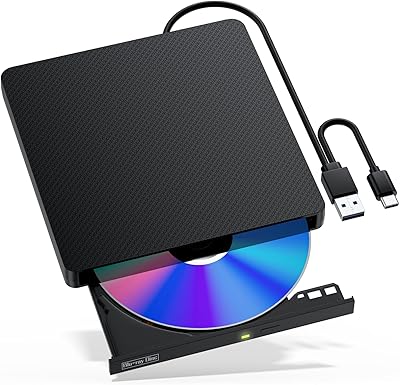
The Alphami USB-C External Blu-ray Drive is a slim, dual-interface optical drive aimed at laptop and desktop users who no longer have a built-in disc slot. It handles Blu-ray playback alongside CD and DVD reading and burning, covering most everyday disc needs without requiring a dedicated standalone player. With both USB-A 3.0 and USB-C ports included, it works with a wide range of older and newer machines out of the box. At its accessible price point, it seems like a straightforward buy — but a 3.7-star rating from 62 buyers suggests the experience isn't uniformly smooth, and that's worth understanding before committing.

Features & Benefits

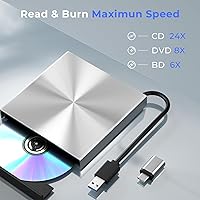
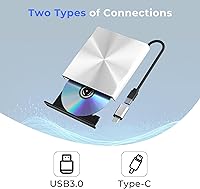
This optical drive ships with both a USB-A 3.0 and a USB-C cable, so you can plug it into a modern MacBook or a traditional desktop without hunting for an adapter. Read speeds top out at 6x for Blu-ray, 8x for DVD, and a reasonably quick 24x for CDs, while burn support covers dual-layer DVDs up to 8.5GB. Setup is plug-and-play for CDs and DVDs on most systems, but Blu-ray playback is a different story — you'll need to install third-party software separately before it works. One practical caveat: the drive requires an external power cable for stable operation, which limits how truly portable it actually is day to day.

Best For

This external Blu-ray burner makes the most sense for MacBook or ultrabook owners who occasionally need disc access but don't want a bulky standalone player occupying desk space. It's also a practical pick for anyone working through a backlog of old CDs, DVDs, or Blu-rays they want to rip or archive at home. Students and office workers dealing with legacy disc-based media will find it handles the basics without much fuss. Mac users, however, should note carefully that listed compatibility stops at macOS 10 or below — anyone running a more recent version of macOS may run into real friction getting this drive to function properly.

User Feedback

Buyers tend to appreciate the dual-port convenience, noting it removes the friction of carrying adapters, and the setup experience for standard CDs and DVDs draws consistent praise. Where things get more mixed is Blu-ray playback — a notable share of reviewers appear caught off-guard by the need to install separate software before it functions. The power cable dependency also surfaces as a real-world frustration for those expecting a fully portable solution. Build quality comments lean toward the drive feeling lightweight, which some interpret as portable and others describe as flimsy. A handful of users also flagged read speeds falling short of advertised maximums under actual use conditions.

Pros

  • Both USB-A 3.0 and USB-C cables are included, so no adapter hunting on day one.
  • Plug-and-play for CDs and DVDs means most Windows and Linux users can get started instantly.
  • Burns dual-layer DVDs up to 8.5GB, covering most home archiving and backup needs.
  • Slim profile at under half an inch thick makes it easy to slip into a bag.
  • Supports 3D disc playback, a feature rarely found at this price tier.
  • Data transfer speeds up to 5Gbps keep file transfers and rips moving at a decent pace.
  • Compatible with a wide range of Windows versions from XP all the way through Windows 11.
  • The drive handles CD, DVD, and Blu-ray formats in a single unit, reducing the need for multiple devices.

Cons

  • Blu-ray playback requires a separately installed third-party software player — nothing works out of the box.
  • An external power cable is required for stable operation, making truly portable use impractical.
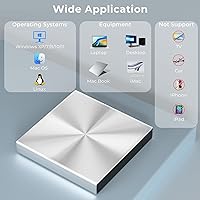
  • Mac compatibility is officially capped at macOS 10 or below, leaving most modern Mac users unsupported.
  • Build quality feels lightweight in a way that raises durability concerns for regular heavy use.
  • Real-world read and burn speeds have been reported to fall below the advertised maximums.
  • The 3.7-star average rating reflects a notably mixed ownership experience across verified buyers.
  • No 4K Ultra HD Blu-ray support, which is an increasingly relevant gap as disc libraries grow.
  • At 14.9 ounces, it is heavier than it looks for a drive marketed on portability.

Ratings

The scores below for the Alphami USB-C External Blu-ray Drive were generated by our AI review engine after analyzing verified buyer feedback from multiple global markets, with spam, bot-submitted, and incentivized reviews actively filtered out before scoring. Each category reflects the honest distribution of praise and frustration found across real ownership experiences — nothing is softened to make the product look better than it is.

Ease of Setup
78%
22%
For CD and DVD use, buyers consistently describe the setup as immediate and painless — plug it in, and the computer recognizes it within seconds. Windows and Linux users in particular appreciated not having to hunt for drivers or go through any configuration steps.
Blu-ray playback breaks that simplicity entirely. Users who expected the same plug-and-play experience were often caught off guard by the need to find, install, and configure a third-party software player before a single Blu-ray disc would respond.
Blu-ray Playback Quality
67%
33%
When the software side is sorted out, the actual Blu-ray picture quality draws favorable comments from casual home viewers. The near-4K output is noticeably sharper than standard DVD, and for watching a movie on a laptop screen, most users found the result satisfying enough.
The absence of 4K Ultra HD support is a real ceiling for buyers who have started building a UHD disc library. A few users also noted that the drive occasionally struggled to maintain smooth playback on older machines with limited processing headroom.
Compatibility
59%
41%
Windows users from XP all the way through Windows 11 are genuinely well-covered, and Linux recognition is solid across mainstream distributions. The dual-cable approach means most modern and legacy machines can connect without any extra hardware.
Mac compatibility is the most divisive issue in the review pool. The official cap at macOS 10 or below leaves the majority of current MacBook owners in uncertain territory, and several users running newer macOS versions reported the drive simply not functioning as expected.
Portability
54%
46%
The slim 0.39-inch profile and relatively compact footprint make this optical drive easy to slip into a laptop bag alongside other accessories. For desk use or occasional travel where a power outlet is accessible, it moves around without much hassle.
The external power cable requirement is the single biggest hit to portability. Buyers who purchased this expecting a truly mobile, single-cable solution found themselves tethered to a wall, which defeats the purpose for use cases like working at a coffee shop or a client site.
Build Quality
56%
44%
The drive does not feel poorly assembled in terms of functional tolerances — the disc tray moves smoothly and the unit sits flat without rocking. For occasional desk use, the construction holds up adequately across normal operating conditions.
The lightweight plastic shell draws repeated comments about feeling insubstantial or cheap relative to the price. Users who have handled more established optical drive brands tend to notice the quality gap, and there are scattered reports of the housing showing wear faster than expected.
Read Speed Consistency
62%
38%
Under favorable conditions — clean discs, adequate power supply connected, moderate ambient temperature — the drive performs reasonably close to its rated speeds for CDs and standard DVDs. Short read tasks like opening software from disc or copying a single file feel responsive.
Real-world Blu-ray and high-density DVD read speeds were flagged as inconsistent by a meaningful share of users. When conditions are less than ideal, or when the drive is used for extended ripping sessions, speeds can drop noticeably below the advertised maximums.
Burning Reliability
66%
34%
Standard CD and DVD burning operations, including dual-layer DVDs up to 8.5GB, work reliably for most users under normal conditions. Home archiving tasks and one-off data disc creation are where this drive performs most predictably.
Some users reported occasional burn errors or coasters when pushing the drive through longer or repeated burning sessions. The power cable dependency becomes especially relevant here — burns attempted without it connected are more prone to failure mid-write.
Software Experience
44%
56%
The hardware itself does not impose any software friction for CD and DVD tasks, and Alphami points users toward CyberLink tools for Blu-ray testing. Once a capable player is installed and configured, the software experience becomes the player's responsibility rather than the drive's.
No playback software is included in the box whatsoever, and the path to getting Blu-ray working requires research and often a paid application. For less technical buyers, this gap between product expectation and actual out-of-box experience is a genuine source of dissatisfaction.
Value for Money
71%
29%
For straightforward CD and DVD reading and burning on Windows, the pricing feels fair given the dual-interface convenience and the breadth of disc formats supported. Buyers who understand what they are getting tend to feel reasonably satisfied with the cost-to-function ratio.
Once Mac compatibility issues or the Blu-ray software requirement enter the picture, the value perception drops sharply. Buyers who purchased primarily for Blu-ray on a modern Mac and then hit a wall tend to feel the price was not justified by the outcome.
Dual Interface Design
83%
Having both USB-C and USB-A cables in the box was one of the most consistently praised practical touches in the review pool. It removes an annoying real-world friction point, especially for users who regularly switch between a newer ultrabook and an older desktop machine.
The cables included are functional but not particularly long, which can create awkward desk setups depending on where USB ports are positioned. A small number of users also noted that the USB-C connection felt slightly less secure in the port than the USB-A side.
Noise Level
69%
31%
For day-to-day tasks like reading a DVD or copying files from a CD, the drive operates at a background hum that most users find easy to tune out. It is not significantly louder than comparable drives in its class.
Blu-ray disc spin-up produces a more noticeable whirring sound that some users found distracting in quiet environments. The noise is not alarming, but it is present enough to be mentioned across multiple independent reviews.
Physical Footprint
77%
23%
The square form factor and thin profile mean it does not dominate a desk surface or take up meaningful bag space. Users who keep it as a secondary drive that comes out only when needed appreciated how little it intrudes on their workspace.
At 14.9 ounces, it is heavier than its slim appearance suggests, and the square shape is slightly less bag-friendly than more rectangular competitors. A few users noted it felt oddly dense for how thin it is.
After-Sales Support
58%
42%
Alphami explicitly commits to customer support in their product documentation, and some buyers reported receiving helpful responses when they reached out with setup questions. The brand does appear to be responsive in at least a portion of reported cases.
The support experience appears inconsistent based on feedback patterns — not all users who contacted the brand felt their issues were resolved satisfactorily, particularly around Mac compatibility problems where the hardware limitation is fundamental rather than fixable.

Suitable for:

The Alphami USB-C External Blu-ray Drive is a reasonable fit for casual users who need occasional access to physical discs but don't want to invest in a dedicated standalone player. MacBook and ultrabook owners will appreciate getting both a USB-C and USB-A cable in the box, eliminating the need for a separate adapter. It works well for home users who want to rip or archive a personal disc collection, or for students and office workers who still encounter CD and DVD media in their day-to-day workflows. Windows and Linux users running modern operating systems will likely have the smoothest experience overall, with plug-and-play functionality covering standard CD and DVD tasks right away. Budget-conscious buyers who primarily need basic Blu-ray playback at home and are comfortable installing a third-party software player will also find this optical drive gets the job done without a significant outlay.

Not suitable for:

The Alphami USB-C External Blu-ray Drive is a poor match for anyone expecting a fully portable, cable-free solution — the required external power cable is a real constraint that undermines on-the-go use significantly. Mac users running anything newer than macOS 10 should be especially cautious, as compatibility is not guaranteed and the gap between listed support and current macOS versions is substantial. Anyone hoping to play 4K Ultra HD Blu-ray discs will need to look elsewhere entirely, since this drive does not support that format. Power users who need consistent, reliable burn speeds for large archiving projects may find the real-world performance falls short of the advertised maximums. And buyers who expect Blu-ray to work immediately out of the box, without any additional software setup, are likely to find the experience frustrating from the start.

Specifications

  • Brand: This optical drive is manufactured and sold under the Alphami brand.
  • Interfaces: The drive includes both a USB 3.0 Type-A and a USB-C interface for broad device compatibility.
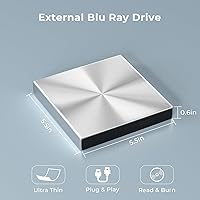
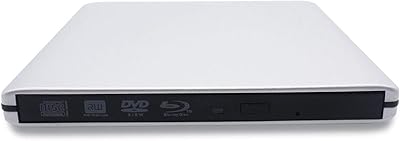
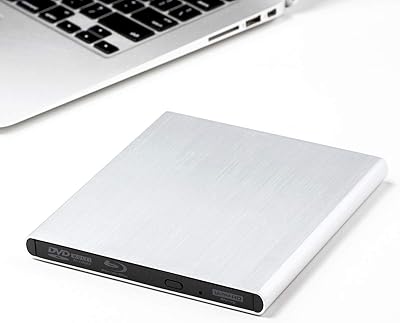
  • Dimensions: The unit measures 5.5 x 5.5 x 0.39 inches, making it one of the slimmer external optical drives available.
  • Weight: The drive weighs 14.9 ounces, which is moderate for its size category.
  • Blu-ray Read Speed: Blu-ray discs are read at speeds of up to 6x under optimal conditions.
  • DVD Read Speed: DVD discs are read at speeds of up to 8x.
  • CD Read Speed: CD discs are read at speeds of up to 24x, which is among the faster rates for this drive class.
  • Write Speed: The drive burns CDs and DVDs at up to 8x, including dual-layer DVD discs up to 8.5GB.
  • Transfer Speed: Data transfer operates at up to 5Gbps via the USB 3.0 and USB-C interfaces.
  • OS Compatibility: Supported operating systems include Windows XP through Windows 11, Linux, and macOS 10 or below.
  • Power Requirement: An external power cable must be connected for stable operation; bus power alone is insufficient for consistent performance.
  • 3D Disc Support: The drive supports playback of 3D Blu-ray discs when used with compatible software and display hardware.
  • 4K UHD Support: The drive does not support 4K Ultra HD Blu-ray disc playback.
  • Setup: The drive is plug-and-play for CD and DVD use on most systems, requiring no manual driver installation.
  • Blu-ray Software: Blu-ray playback requires a separately installed third-party software application; none is bundled with the hardware.
  • Max Disc Capacity: The largest disc format supported for burning is a dual-layer DVD at 8.5GB.
  • In the Box: The package includes the drive unit, one USB 3.0 cable, one USB-C cable, and a printed user manual.
  • USB Backward Compat.: The USB 3.0 interface is backward compatible with USB 2.0 and USB 1.0 ports.

Related Reviews

VSVABEFV External USB Blu-Ray Drive
82%
93%
Ease of Use
90%
Portability
65%
Write Speed
78%
Software Compatibility
88%
Compatibility with Operating Systems
More
Tengertang gasrqy-832 External Blu-ray Drive
64%
83%
Ease of Setup
67%
Blu-ray Read Reliability
51%
Blu-ray Burn Reliability
74%
Build Quality
88%
Portability
More
Archgon UHD 4K External Blu-Ray Writer

78%
93%
Build Quality
89%
PC Compatibility
61%
Mac Compatibility
88%
Ease of Setup
78%
UHD 4K Performance
More
G-Technology 4TB G-DRIVE Mobile USB-C Portable External Hard Drive
88%
88%
Performance
94%
Portability
91%
Build Quality
89%
Compatibility
95%
Setup & Installation
More
G-Technology 2TB G-DRIVE Mobile USB-C Portable External Hard Drive
88%
91%
Portability
88%
Transfer Speed
89%
Build Quality
94%
Ease of Use (Plug-and-Play)
92%
Compatibility (Mac/Windows)
More
WAVLINK WL-ST334UA Dual-Bay USB 3.0 Hard Drive Docking Station

72%
83%
Offline Cloning Reliability
74%
Transfer Speed
79%
Build Quality
91%
Ease of Setup
38%
Mac Compatibility
More
Wintale Portable External Blu-ray Drive
72%
91%
Ease of Setup
72%
Read Performance
69%
Write & Burn Reliability
44%
Software & Out-of-Box Readiness
61%
Build Quality
More
NOLYTH Portable External Blu-ray Drive

71%
91%
Portability & Form Factor
88%
Plug-and-Play Setup
44%
Blu-ray Playback Software Experience
71%
Disc Read & Write Performance
67%
Build Quality & Materials
More
Yaeonku 50GB External Blu-ray Drive
70%
86%
Plug-and-Play Setup
78%
Blu-ray Read & Burn Performance
89%
Dual-Interface Connectivity
41%
Software & Playback Experience
83%
Compatibility Across Operating Systems
More
Cloudtale Portable Slim External Blu-ray Drive
71%
91%
Ease of Setup
61%
Mac Compatibility
78%
Build Quality
74%
Read Performance
88%
Portability
More

FAQ

Not quite. For CDs and DVDs, yes — most computers recognize the drive instantly with no extra steps. But Blu-ray playback requires a third-party software player installed on your computer before anything will actually play. The drive itself does not come with any bundled playback software, so factor that into your setup time.

For reliable operation, yes. The drive can technically connect via USB alone, but without the power cable you risk read errors, slow performance, or the disc not spinning at all. If you were hoping to use this as a grab-and-go solution with just a single cable, that's not really how it works in practice.

This is an important one to check carefully. The Alphami USB-C External Blu-ray Drive officially lists compatibility only with macOS 10 or below. If you're running macOS 11 (Big Sur) or any later version — which most current MacBooks are — compatibility is not guaranteed, and you may run into issues that have no easy fix. Verify your macOS version before purchasing.

Burning is limited to CDs and DVDs only, including dual-layer DVDs up to 8.5GB. The drive can read Blu-ray discs, but it cannot write to them. If Blu-ray burning is a requirement for you, this drive will not cover that need.

Alphami suggests downloading CyberLink BD and 3D Advisor as a starting point to check whether your PC is capable of Blu-ray playback. For actual playback, CyberLink PowerDVD is widely used, though it is a paid application. There are free alternatives, but Blu-ray playback on PC tends to work most reliably with a reputable paid player due to licensing restrictions on the format.

Yes, Windows 11 is listed as a supported operating system. The plug-and-play setup should work without needing to manually install drivers for standard CD and DVD use. For Blu-ray playback, you will still need to install compatible software separately regardless of which Windows version you are running.

External optical drives of this type are generally audible during disc spinning, and this one is no exception. Expect a low hum and occasional spin-up noise during reads, particularly with Blu-ray discs. It is not disruptively loud, but in a quiet room you will notice it.

Linux is listed as a compatible platform, and the drive should be recognized by most modern Linux distributions without additional drivers. However, Blu-ray playback on Linux comes with its own set of software and licensing hurdles that are separate from the drive itself, so plan to do some additional configuration if Blu-ray is the goal.

Yes, the drive does support 3D Blu-ray disc reading. Keep in mind that actually watching 3D content also requires a 3D-capable display and compatible playback software — the drive is just one piece of that setup.

A number of buyers have noted the same thing — this optical drive has a lightweight feel that can come across as less sturdy than expected. For occasional home or office use it should hold up fine, but if you're planning to travel with it regularly or use it heavily, treat it with reasonable care. It is not built to the same standards as a premium drive, and the price reflects that trade-off honestly.