Overview

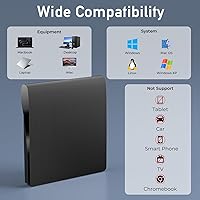
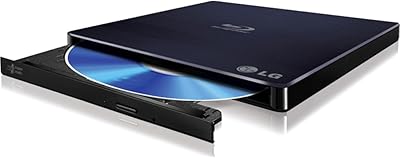
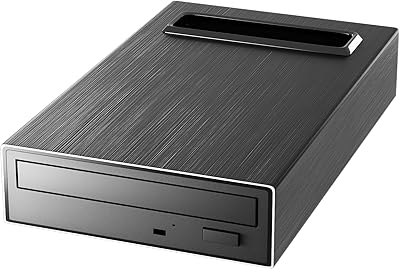
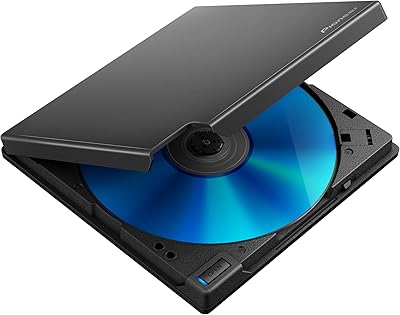
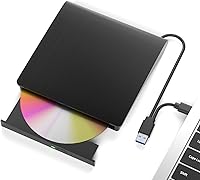
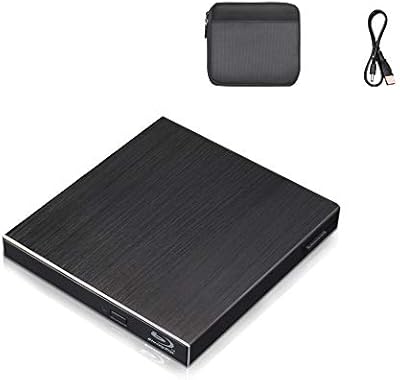
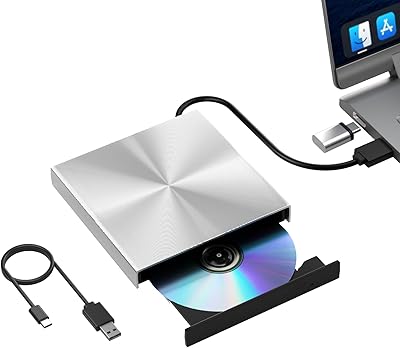
The Wintale Portable External Blu-ray Drive is a compact optical drive that handles Blu-ray, DVD, and CD reading and writing — all without requiring driver installation. Plug it into any USB port and it gets to work. The design is slim enough to toss in a laptop bag without a second thought, and it plays nicely with Windows (XP through 11), Mac OS, and Linux. One thing worth knowing upfront: no playback software is included. If you want to watch Blu-ray movies, you will need to buy something like PowerDVD or use a free option like VLC separately. That is not a dealbreaker, but it is worth budgeting for.
Features & Benefits

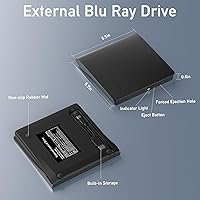
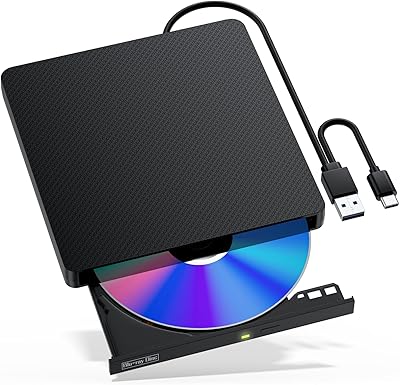
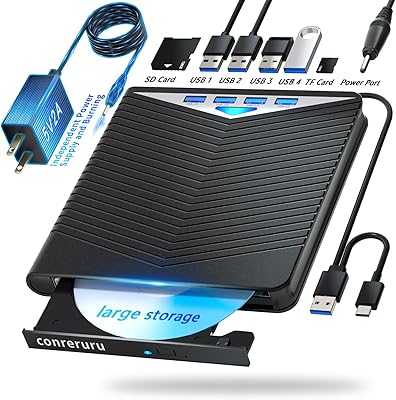
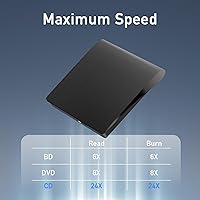
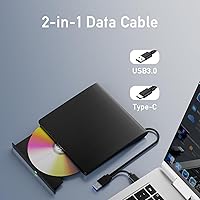
The USB 3.0 interface is one of the stronger selling points here — at up to 5Gbps, it is considerably faster than older USB 2.0 drives, which means ripping a DVD takes minutes rather than an eternity. Blu-ray read speeds top out at 6x, DVDs at 8x, and CDs at 24x, which is adequate for most backup or archiving tasks. It supports 50GB dual-layer discs, handy if you are backing up large amounts of data. The physical eject button is a small but welcome touch. Both USB-A and USB Type-C connections are covered, and at roughly 6 × 10 inches and under a pound, this USB optical drive is genuinely easy to carry.

Best For

This external Blu-ray drive makes the most sense for laptop users whose machines no longer ship with an optical drive — which, at this point, is most of them. It is a practical pick for anyone digitizing an old DVD or Blu-ray collection, or for professionals who need to archive large project files onto high-capacity discs. Mac users will appreciate that it requires no special drivers. Budget-conscious buyers looking for functional Blu-ray capability without spending on a brand-name alternative will find the value reasonable. Linux users can make it work too, though expect to spend a few minutes on manual configuration before everything runs smoothly.

User Feedback

Across over 800 ratings, this portable disc burner holds a solid 4-star average, and the most common praise is how effortlessly it sets up — plug in, and it works. Reviewers on both Windows and Mac report consistent performance for everyday disc tasks. On the flip side, older or scratched discs occasionally give the drive trouble, with a handful of users noting read errors. The missing software situation catches people off guard more than it should — quite a few buyers expected playback to work out of the box. Build quality gets a neutral response; the plastic casing feels adequate rather than sturdy, which is fair at this price tier.

Pros

  • Plug-and-play setup works immediately on Windows and Mac with zero driver installation required.
  • USB 3.0 speeds make ripping DVDs and burning data discs noticeably faster than older USB 2.0 drives.
  • Slim, lightweight build fits easily into a laptop bag without adding meaningful bulk.
  • Supports both USB-A and USB-C connections, covering virtually any modern laptop or desktop.
  • Handles Blu-ray, DVD, and CD formats in a single device — no need for multiple drives.
  • Dual-layer Blu-ray disc support allows backing up up to 50GB of data per disc.
  • No external power brick required — bus-powered directly from the USB port.
  • Broad OS support covers everything from legacy Windows XP machines to current Mac OS versions.
  • Physical eject button makes loading and removing discs straightforward without software workarounds.
  • Competitive value for buyers who need basic Blu-ray capability without a premium brand price tag.

Cons

  • No playback software is included — watching commercial Blu-ray movies requires a separate paid application.
  • Read performance on scratched or aging discs is inconsistent and can result in errors or failed rips.
  • The plastic casing feels lightweight in a fragile rather than portable-friendly sense — handle with care.
  • Linux users may need to manually configure the drive before it operates reliably on their system.
  • The included cable is short enough to create awkward desk setups depending on port placement.
  • Dual-layer disc burn reliability varies noticeably depending on the brand of blank media used.
  • No support for 4K Ultra HD Blu-ray, which rules it out for newer high-resolution film collections.
  • The instruction sheet provides almost no guidance on software setup or troubleshooting steps.
  • Prolonged heavy use sessions can cause the unit to run warm, suggesting it is built for occasional rather than sustained workloads.
  • Motor noise and minor vibration increase at higher speeds, which can be distracting in quiet environments.

Ratings

The Wintale Portable External Blu-ray Drive has been scored by our AI system after analyzing hundreds of verified global buyer reviews, with spam, incentivized, and bot-generated feedback actively filtered out. The result is a balanced picture that reflects both what this USB optical drive genuinely does well and where it falls short for real users. Strengths around ease of setup and portability are weighed honestly against consistent pain points like missing software and inconsistent disc compatibility.
Ease of Setup
91%
The plug-and-play experience is the standout praise across most reviews. Windows and Mac users consistently report that the drive is recognized immediately with zero driver hunting — just plug it in and start loading discs. For non-technical users, this frictionless first experience matters a lot.
Linux users are the notable exception, with several reporting that automatic detection does not always happen and some manual terminal configuration may be needed. It is workable, but not quite the same out-of-the-box experience Windows and Mac users get.
Read Performance
72%
28%
For standard, clean discs, read speeds are respectable — DVDs rip at a reasonable pace, and Blu-ray backups complete without excessive waiting. USB 3.0 bandwidth means the drive itself is rarely the bottleneck when working with modern discs in good condition.
Performance drops noticeably with older or lightly scratched discs. Several buyers reported repeated read errors or sluggish ripping on discs that other drives handled without issue. It is not a deal-breaker for a fresh collection, but for archiving aging media it can be frustrating.
Write & Burn Reliability
69%
31%
For basic burning tasks — data backups, archiving files to BD-R discs, creating DVD copies — most users found this portable disc burner performed reliably enough. Burning a full 25GB Blu-ray disc completed without reported failures for the majority of users under normal conditions.
A smaller but vocal group reported failed burns, particularly on dual-layer discs or at higher write speeds. Disc brand compatibility also seems to play a role, with some off-brand media causing issues that name-brand discs avoided.
Software & Out-of-Box Readiness
44%
56%
The hardware itself is ready the moment you plug it in. For users who already own Blu-ray playback software like PowerDVD, or who plan to use the drive purely for data backup, the missing software is a non-issue and the drive works exactly as expected.
For buyers expecting to watch Blu-ray movies right away, the lack of bundled software is a genuine frustration. Free options like VLC have inconsistent Blu-ray support due to DRM restrictions, meaning some users had to spend extra on a playback app just to use the core feature they bought the drive for.
Build Quality
61%
39%
The slim profile and relatively light weight make this USB optical drive feel considered in its design. It does not rattle, the disc tray operates smoothly, and the physical eject button works consistently without any reported mechanical failures in typical use.
The all-plastic construction feels utilitarian rather than durable. Users who travel frequently noted it feels like something you would want to keep in a protective sleeve, as the casing flexes slightly under light pressure and does not inspire confidence if dropped.
Portability & Form Factor
88%
At under 14 ounces and roughly the size of a slim paperback, this is genuinely easy to carry. Road warriors and students appreciate being able to drop it into a laptop bag without dedicating a special compartment to it. The flat profile makes packing straightforward.
The included cable is short enough that placement can be awkward on some desk setups, particularly if USB ports are on the back of a desktop or on the far side of a laptop. A slightly longer cable would have improved the experience for desk users.
Multi-OS Compatibility
78%
22%
Windows and Mac compatibility is broad and well-documented, covering everything from older Windows XP machines to current Mac OS versions. Mac users in particular appreciated not needing to hunt for third-party drivers, which is a common annoyance with budget peripherals.
Linux support, while technically present, carries an asterisk. Casual Linux users may find the setup straightforward, but those on less common distributions reported inconsistent behavior and a need to manually configure device mounting before the drive worked reliably.
Disc Format Compatibility
74%
26%
The range of supported formats is solid for the price tier — BD-R, BD-RE, DVD±R, DVD±RW, CD-R, and CD-RW are all covered. For users with mixed collections spanning different disc types and eras, this drive handles the variety well without needing a second device.
Some users noted issues with certain BD-R DL (dual-layer) disc brands not being recognized cleanly. There is also no support for 4K Ultra HD Blu-ray, which is expected at this price point but worth flagging for anyone hoping to play newer film releases in 4K.
USB Connectivity & Cable
76%
24%
Having both USB-A and USB-C covered means this external Blu-ray drive works with virtually any modern laptop or desktop without needing an adapter. The USB 3.0 speeds make a real difference when transferring large files compared to older drives lingering on USB 2.0.
The drive ships with a single cable that has a Y-connector for additional power draw if needed. A few desktop users found the cable management slightly awkward, and the connector feels less robust than the rest of the drive under repeated plug-unplug cycles.
Value for Money
82%
18%
At its price point, this is one of the more capable external optical drives available, and the Blu-ray support alone puts it ahead of cheaper DVD-only alternatives. For infrequent users who just need occasional disc access, the cost-to-utility ratio is genuinely strong.
Once you factor in the cost of playback software — which is effectively required for Blu-ray video — the total investment rises. Users who went in expecting a complete out-of-box movie-watching solution felt the overall value was slightly misrepresented by the listing.
Noise & Vibration
71%
29%
During normal disc reading, the drive operates at a reasonable volume — noticeably quieter than older internal optical drives. For casual home use or a quiet office environment, the sound level is unlikely to be a distraction during typical tasks.
At higher read and write speeds, the motor noise increases and some vibration is noticeable on a hard desk surface. A few users mentioned the drive walking slightly on smooth surfaces while spinning at full speed, which required placing something underneath it.
Heat Management
78%
22%
For the type of light-to-moderate workloads this drive is designed for, heat is not a practical concern. Extended data backups and ripping sessions of a couple of hours did not produce any alarming warmth in reported user experiences.
Some users running the drive continuously for very long burn sessions mentioned it got noticeably warm to the touch. There is no active cooling, so in hot ambient environments or during back-to-back disc operations it is worth giving it a short rest between tasks.
Reliability Over Time
63%
37%
For users with modest usage patterns — occasional disc ripping, periodic backups, holiday movie sessions — the drive holds up adequately over a period of months. Units used a few times a month tend to generate positive long-term feedback.
A subset of reviews from users who used the drive more intensively reported degraded read reliability after six to twelve months of regular use. The mechanism feels built for occasional use rather than daily high-volume operation, which is worth keeping in mind for power users.
Packaging & Unboxing
67%
33%
The drive arrives in decent protective packaging with no damage reported by the majority of buyers. The presentation is clean and functional, and the included accessories — cable and a brief instruction sheet — are right on top without any unnecessary unwrapping.
The instruction sheet is minimal to the point of being nearly useless, with no guidance on software recommendations or troubleshooting. First-time Blu-ray drive users who needed a nudge toward compatible playback apps were left searching online on their own.

Suitable for:

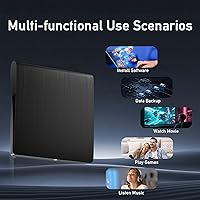
The Wintale Portable External Blu-ray Drive is a practical pick for laptop users whose machines shipped without an optical drive and who occasionally need to access discs — whether that is ripping a DVD, burning a data backup, or reading an old software disc. Home users sitting on a shelf full of Blu-ray or DVD movies who want to digitize their collection will find it capable enough for that kind of patient, weekend project. Students and professionals who back up large files to Blu-ray media will appreciate the dual-layer disc support, which allows up to 50GB per disc. Mac users who have historically struggled to find drivers for budget optical drives will be relieved that this one works without any setup headaches. If you already own Blu-ray playback software or plan to use the drive purely for data tasks, the missing bundled software becomes a complete non-issue and the overall value proposition holds up well.

Not suitable for:

The Wintale Portable External Blu-ray Drive is not the right tool for anyone who wants to sit down and watch a Blu-ray movie straight out of the box — the drive ships without playback software, and getting one that actually handles the copy protection on commercial Blu-ray discs typically means an additional purchase. Users with large collections of older or well-worn discs should also temper expectations, as read reliability on scratched or degraded media is a noted weak point. Anyone who needs a drive for heavy daily use — think frequent burns, back-to-back ripping sessions, or a production workflow — will likely find the build quality and long-term mechanical durability fall short of what that kind of load demands. 4K Ultra HD Blu-ray enthusiasts should look elsewhere entirely, as this drive does not support that format. Linux power users who need a truly seamless experience may also find the occasional need for manual configuration more trouble than it is worth on an already budget-constrained purchase.
Specifications

  • Brand: Manufactured and sold under the Wintale brand.
  • Interface: Connects via USB 3.0 Type-C, with backward compatibility for standard USB-A ports through the included cable.
  • Transfer Speed: Supports a maximum data transfer rate of 5Gbps over USB 3.0, roughly ten times faster than USB 2.0.
  • Blu-ray Read Speed: Reads Blu-ray discs at up to 6x speed, suitable for ripping or accessing BD content at a reasonable pace.
  • DVD Read Speed: Reads DVD discs at up to 8x speed, allowing a standard single-layer DVD to be ripped in roughly 10 to 15 minutes.
  • CD Read Speed: Reads CD media at up to 24x speed, making audio CD ripping and data disc access quick and efficient.
  • Write Speed: Rated at up to 8x write speed for optical disc burning across supported disc formats.
  • Disc Capacity: Supports single-layer (25GB) and dual-layer (50GB) Blu-ray discs for high-capacity data archiving and backups.
  • Disc Formats: Compatible with BD-R, BD-RE, DVD±R, DVD±RW, DVD-RAM, CD-R, and CD-RW disc types.
  • Dimensions: Measures 5.98 × 1.06 × 10.24 inches (approximately 15.2 × 2.7 × 26 cm), keeping a slim, flat profile.
  • Weight: Weighs 13.4 oz (approximately 380g), light enough to carry in a laptop bag without noticeable added bulk.
  • OS Compatibility: Compatible with Windows XP, 7, 8, 10, and 11, as well as Mac OS and Linux operating systems.
  • Power Source: Bus-powered directly via USB — no external power adapter or separate power cable is required.
  • Eject Mechanism: Features a dedicated physical eject button on the drive body for manual disc insertion and removal.
  • Plug & Play: Operates as a plug-and-play device on Windows and Mac, requiring no manual driver installation in standard configurations.
  • Playback Software: No Blu-ray playback software is included; users must source and install a compatible third-party application separately.
  • 4K UHD Support: Does not support 4K Ultra HD Blu-ray playback or burning; limited to standard Blu-ray (BD) formats only.
  • ASIN: Amazon Standard Identification Number for this product is B0BX93ZRLK.
  • Availability Date: First made available for purchase on March 2, 2023.
  • User Rating: Holds a 4.0 out of 5 star average rating based on 805 verified ratings, ranking #23 in the External Blu-ray Drives category.

Related Reviews

NOLYTH Portable External Blu-ray Drive

71%
91%
Portability & Form Factor
88%
Plug-and-Play Setup
44%
Blu-ray Playback Software Experience
71%
Disc Read & Write Performance
67%
Build Quality & Materials
More
Yaeonku 50GB External Blu-ray Drive
70%
86%
Plug-and-Play Setup
78%
Blu-ray Read & Burn Performance
89%
Dual-Interface Connectivity
41%
Software & Playback Experience
83%
Compatibility Across Operating Systems
More
VSVABEFV External USB Blu-Ray Drive
82%
93%
Ease of Use
90%
Portability
65%
Write Speed
78%
Software Compatibility
88%
Compatibility with Operating Systems
More
NVOPERANG BD015 External Blu-ray Drive
72%
78%
Plug-and-Play Ease
61%
Blu-ray Playback Experience
84%
CD & DVD Performance
67%
Build Quality & Durability
81%
Connectivity & Compatibility
More
Alphami USB-C External Blu-ray Drive
65%
78%
Ease of Setup
67%
Blu-ray Playback Quality
59%
Compatibility
54%
Portability
56%
Build Quality
More
Cloudtale Portable Slim External Blu-ray Drive
71%
91%
Ease of Setup
61%
Mac Compatibility
78%
Build Quality
74%
Read Performance
88%
Portability
More
LG WP50NB40 External Blu-ray Writer
78%
93%
Portability & Form Factor
91%
Bus-Powered Convenience
89%
Plug-and-Play Setup
86%
Burn Quality & Reliability
78%
Blu-ray Playback Performance
More
Pioneer BDR-XD08B Portable External Blu-ray Drive
77%
88%
Build Quality
91%
Portability & Size
86%
Disc Read Accuracy
72%
Software & Compatibility (Windows)
61%
Mac Compatibility
More
BPAKDU B21-Y External Blu-ray Drive
71%
71%
Disc Read Reliability
58%
Blu-ray Playback Experience
62%
Mac Compatibility
88%
Integrated USB Hub & Card Slots
74%
Portability & Form Factor
More
Wbacon 5-in-1 External Blu-ray Drive
66%
88%
Ease of Setup
54%
Disc Read Reliability
51%
Blu-ray Playback Experience
73%
DVD & CD Burning
18%
Blu-ray Disc Burning
More

FAQ

On Windows 8 and above, and on modern Mac OS versions, it is genuinely plug-and-play — connect the cable, and the drive shows up ready to use within seconds. Windows 7 and XP users may occasionally need to point the system toward a generic USB storage driver, but that is rare. Linux users should be prepared for a bit more manual setup depending on their distribution.

The drive itself can read Blu-ray discs without any problem, but the software needed to actually play back the video is not included. Commercial Blu-ray discs use copy protection that free players like VLC handle inconsistently, so for reliable movie playback you will most likely need to purchase a dedicated application such as PowerDVD or Leawo Blu-ray Player. Factor that additional cost into your budget before buying.

Yes, it is compatible with Mac OS and requires no driver installation. Both USB-A and USB-C connections are supported, so you can connect it directly if your MacBook has a USB-C port, or use the USB-A end with an adapter if needed. Users across various Mac OS versions report straightforward, hassle-free recognition.

It draws power entirely through the USB connection — no separate power brick or wall adapter required. On most laptops this works fine, but if you run into disc read errors or the drive seems sluggish, the cable includes a secondary USB connector for additional power draw from a second port, which typically resolves any underpowering issues.

It supports both reading and writing across Blu-ray, DVD, and CD formats. You can burn data backups to BD-R or BD-RE discs, including dual-layer discs that hold up to 50GB, which makes it practical for archiving large project files or media collections. You will need burning software installed — something like ImgBurn for data discs works well and is free.

A standard single-layer DVD typically rips in roughly 10 to 15 minutes at 8x speed, depending on disc condition and the software you use. A 25GB single-layer Blu-ray disc takes noticeably longer — usually somewhere in the range of 30 to 50 minutes at 6x. Dual-layer Blu-ray discs will push that estimate higher. These are ballpark figures; heavily scratched or degraded discs will take longer and may require retries.

Honestly, this is one of the weaker areas. Clean, well-maintained discs read reliably, but older or scratched media is where this portable disc burner shows its budget-tier nature. If your goal is to archive a collection of aging or handled discs, expect some trial and error — not every disc will cooperate, and some may produce errors that a higher-end drive would push through more successfully.

There is some motor noise, particularly at higher speeds during ripping or burning. In a quiet room it is audible but not distracting in the way an older desktop optical drive would be. Vibration on a hard desk surface can amplify the sound slightly, so placing a small pad or soft surface underneath can help if noise is a concern.

No, it does not. This USB optical drive is limited to standard Blu-ray formats. If you have a collection of 4K UHD Blu-ray titles and want to play or rip them, you will need a drive specifically designed for that format, which sits in a higher price tier entirely.

For data burning on Windows, ImgBurn is a reliable free option that works well with this type of drive. On Mac, the built-in Finder burning feature handles data discs, and third-party apps like Burn cover more advanced needs. For Blu-ray specifically, CyberLink Power2Go or Ashampoo Burning Studio are paid options with strong BD support. The drive itself is compatible with any software that recognizes a standard optical drive — it is not locked to any proprietary application.