Overview

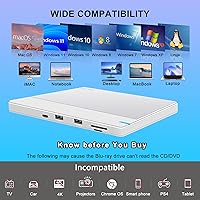
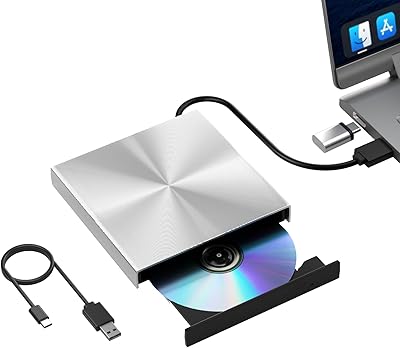
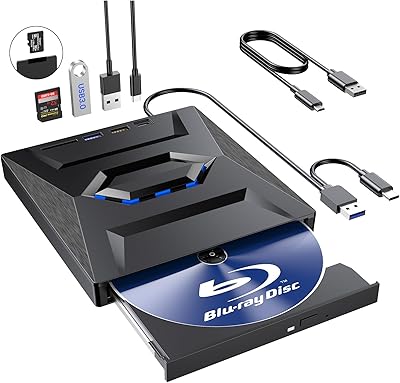
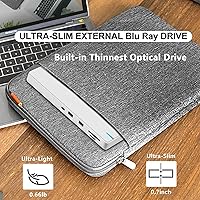
The NOLYTH Portable External Blu-ray Drive arrived in early 2024 as a practical answer for laptop users whose machines simply don't have an optical slot anymore. At just 0.7 inches thick and under a pound, it's genuinely easy to toss in a bag without thinking twice. What makes it more interesting than a plain disc reader is the built-in USB hub and card reader functionality — this compact disc burner pulls double duty as a peripheral hub. It works with macOS, Windows, and Linux right out of the box, no driver hunting required. An included power cable handles laptops that can't supply enough juice through a single USB port. The warranty package — one year of coverage plus a 60-day return window and lifetime technical support — adds reasonable peace of mind.
Features & Benefits

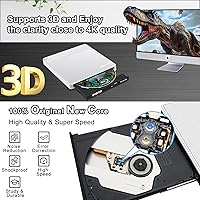
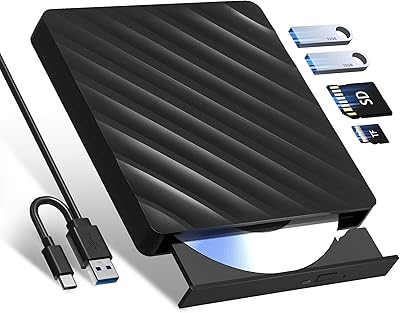
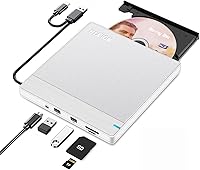
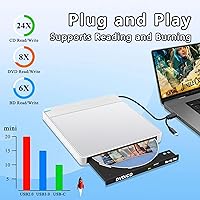
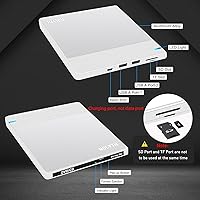
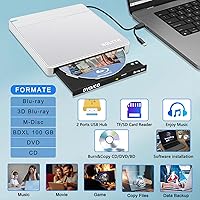
This portable optical drive handles the full spectrum of disc formats — BD-ROM, BD-R, BD-RE, DVD±RW, CD-RW, and more — so whether you're backing up old DVDs or burning a fresh Blu-ray, it covers the bases. Speeds top out at 6X for Blu-ray and 8X for DVD, which is practical rather than blazing, but more than adequate for home use. The two extra USB 3.0 ports are a welcome addition, as are the SD and TF card slots, though note that SD and TF slots cannot be used simultaneously. It also supports 3D Blu-ray playback when paired with compatible third-party software. One firm limitation worth knowing upfront: this drive does not handle 4K Ultra HD Blu-ray discs, full stop.

Best For

If you own a MacBook, an ultrabook, or any slim laptop that dropped the disc drive years ago, this external Blu-ray drive fills that gap without adding bulk. It's also a natural fit for home movie collectors who want to digitize or back up a Blu-ray library at their own pace. Photographers and videographers will appreciate the built-in card slots for quick SD transfers — no separate dongle required. If your desk setup is perpetually short on USB ports, the two additional USB 3.0 connections make this more than just a disc reader. It also works as a thoughtful practical gift for anyone who still invests in physical media and could use a little extra connectivity.

User Feedback

Across more than 700 ratings, this compact disc burner sits at 3.8 out of 5 stars — a score that signals a divided audience rather than a unanimous recommendation. Buyers who are satisfied tend to praise the compact size, the immediate plug-and-play setup, and the bonus hub ports. The frustrations, though, are worth taking seriously. A recurring sticking point involves Blu-ray playback: no software ships in the box, and free Mac-compatible options are genuinely limited, which catches buyers off guard. Some users also report occasional disc recognition hiccups and power delivery issues on certain machines. It's a capable drive when expectations are calibrated correctly, but the missing software situation is where many of the lower ratings seem to originate.

Pros

  • Slim 0.7-inch profile and sub-pound weight make it easy to carry in any laptop bag.
  • Plug-and-play on Windows, macOS, and Linux — no driver installation needed for basic disc tasks.
  • Handles a wide range of formats including BD-R, BD-RE, DVD±RW, DVD-RAM, CD-RW, and M-Disc.
  • Two bonus USB 3.0 ports help stretch a port-starved ultrabook setup without an extra hub.
  • Built-in SD card slot is a convenient time-saver for photographers offloading camera media.
  • The included auxiliary power cable prevents the disc recognition issues that plague single-cable optical drives.
  • 1-year warranty plus a 60-day money-back window gives reasonable protection for a mid-range peripheral.
  • 3D Blu-ray playback support is a rare bonus at this price tier for users with compatible software.
  • CD burning at up to 24X is genuinely quick for audio projects or small data discs.
  • Lifetime technical support from the manufacturer is an uncommon commitment for a drive in this category.

Cons

  • No Blu-ray playback software is included — buyers must source and often pay for a compatible app separately.
  • Mac users face a fragmented software landscape; reliable Blu-ray playback on Apple Silicon is not straightforward.
  • 4K Ultra HD Blu-ray is completely unsupported, which is a dealbreaker for modern home theater disc collections.
  • SD and TF card slots cannot be used at the same time, limiting utility for dual-format media workflows.
  • Blu-ray read and write speeds top out at 6X, making large disc rips noticeably time-consuming.
  • Some users report inconsistent disc recognition that requires unplugging and reconnecting before the drive responds.
  • The white plastic chassis picks up fingerprints and scuffs visibly with regular handling.
  • Extra USB ports on the hub feel less solidly constructed than the primary drive connection.
  • Disc spinning is louder than expected during Blu-ray reads, which can be distracting in quiet environments.
  • Power delivery through the hub ports is passive, so high-draw USB devices may behave unpredictably when connected.

Ratings

The NOLYTH Portable External Blu-ray Drive has been rated using an AI-driven analysis of verified global buyer reviews, with spam, bot-generated, and incentivized submissions actively filtered out to ensure the scores reflect genuine experiences. The result is a transparent scorecard that captures both what this compact disc burner gets right and where it leaves some buyers frustrated. Strengths and shortcomings are weighted equally so you can make an informed call before purchasing.
Portability & Form Factor
91%
At just 0.7 inches thick and under a pound, this portable optical drive is genuinely easy to slip into a laptop bag without rethinking your load. Buyers who travel frequently or move between workspaces consistently praise how little space it takes up on a desk or in transit.
A small number of users note that the white plastic chassis picks up scuffs and fingerprints more visibly than darker alternatives, which can make the unit look worn faster than expected with daily handling.
Plug-and-Play Setup
88%
The driver-free experience on Windows, macOS, and Linux is a genuine strong point — most users report being up and running within seconds of plugging in. This is especially appreciated by less technical buyers who dreaded a complicated installation process.
A subset of Mac users, particularly those on newer Apple Silicon machines, report that while the drive is recognized, getting Blu-ray discs to actually play requires sourcing compatible third-party software independently, which is not as frictionless as the hardware setup itself.
Blu-ray Playback Software Experience
44%
56%
The hardware itself is capable of reading Blu-ray discs without issue in most cases, and buyers who came prepared with their own playback software — such as paid options like PowerDVD — report a solid experience with good image quality from standard Blu-ray titles.
No playback software is included in the box, and this blindsides a meaningful portion of buyers. Free Blu-ray playback software options are scarce and often unreliable on macOS, leading to real frustration among users who expected to watch a disc immediately after unboxing.
Disc Read & Write Performance
71%
29%
For everyday home use — ripping a DVD collection, burning data backups, or archiving home movies to BD-R — the drive performs at a pace that gets the job done without feeling painfully slow. CD burning at up to 24X is particularly quick for audio or data projects.
Blu-ray read and write speeds top out at 6X, which means large BD rips can take noticeably longer than premium drives. A portion of reviewers also flag occasional inconsistent read speeds with certain disc brands, requiring a retry or two before the drive settles.
Build Quality & Materials
67%
33%
The combination of a white plastic body and a silver aluminum top panel gives this compact disc burner a clean, modern look that pairs well with silver or space gray laptops. It feels reasonably solid in hand for its price tier and weight class.
The overall construction leans more toward lightweight plastic than premium hardware, and some buyers note flex in the chassis when handling it. It is functional rather than durable, and probably not the right choice for users who need something to withstand rough or frequent travel.
Multi-Format Disc Compatibility
86%
Support for BD-ROM, BD-R, BD-RE, DVD±RW, DVD-RAM, CD-R, CD-RW, and M-Disc is genuinely comprehensive for a drive at this tier. Archivists and collectors who work across a wide variety of disc formats find that this external Blu-ray drive handles their libraries without format-related surprises.
The absence of 4K Ultra HD Blu-ray support is the one glaring gap in the format list, and it is a dealbreaker for home theater enthusiasts who have invested in a UHD disc library. This limitation is not always obvious from the product listing, leading to disappointed returns.
USB Hub Functionality
79%
21%
The two additional USB 3.0 ports are a legitimately useful bonus, especially for ultrabook users who are constantly juggling a single port between charging, peripherals, and storage. Having a mouse and a flash drive connected simultaneously while the drive is in use is a common and appreciated use case.
The hub functionality is passive and does not add dedicated power, so power-hungry devices plugged into the extra ports may behave inconsistently. A few users also note that the ports feel slightly loose compared to the main connection, suggesting they are not built to the same standard as the primary interface.
SD & TF Card Reader
63%
37%
For photographers who need to offload a memory card while working at a desk with a slim laptop, the built-in SD slot is a convenient touch that saves carrying a separate card reader. Transfer speeds are adequate for typical photo files and light video work.
The inability to use the SD and TF slots at the same time is a real limitation that catches users off guard. Video shooters juggling both card formats simultaneously will find this genuinely inconvenient, and the card reader's transfer speed is not fast enough for heavy 4K video workflows.
Mac Compatibility
58%
42%
The drive connects and is recognized on macOS without any driver installation, and burning CDs or DVDs through Finder works reliably for most users. MacBook owners doing basic disc tasks report a generally smooth experience for those specific functions.
Blu-ray playback on macOS remains a consistent pain point. Apple Silicon compatibility with third-party Blu-ray software is fragmented, and several reviewers specifically mention that this was the source of their lower star ratings — the hardware works, but the software ecosystem on Mac does not cooperate easily.
Power Delivery & Stability
72%
28%
The included auxiliary power cable is a practical solution for laptops that cannot supply sufficient power through a single USB port, and users who connect both cables report stable, consistent operation even during extended burn sessions.
The need for a second cable connection to maintain stable operation is an inconvenience that some users did not anticipate. On certain older laptops, even the dual-cable setup produces occasional disc recognition errors, suggesting power regulation inside the unit could be more robust.
3D Blu-ray Support
61%
39%
For users who have a 3D display and compatible playback software already in their setup, the 3D Blu-ray support is a bonus that few drives at this price point offer. It broadens the appeal for home cinema enthusiasts with older 3D disc collections.
3D playback depends entirely on the user sourcing suitable software and hardware independently, which is a significant setup burden. In practice, very few buyers end up using this feature successfully, and it is more of a spec-sheet talking point than a reliably accessible function for most.
Value for Money
74%
26%
When evaluated as a multi-function peripheral — optical drive, USB hub, and card reader combined — the pricing feels reasonable for the package being offered. Buyers who use all three functions regularly find they are getting more utility per dollar than a basic disc-only drive would provide.
Buyers who purchase it purely for Blu-ray movie playback and then discover the missing software situation often feel the value proposition collapses. If you factor in the cost of a paid Blu-ray playback application, the total spend climbs noticeably for what is supposed to be a budget-friendly option.
Noise & Vibration During Use
69%
31%
For DVD and CD playback, the drive operates at a volume that most users would describe as unobtrusive in a quiet home office. Disc spinning noise is present but not distracting during typical tasks.
During Blu-ray reads, the drive produces a more noticeable whirring that a handful of reviewers describe as louder than expected for such a slim unit. At higher spin speeds, some vibration is detectable on hard desk surfaces, which can become mildly irritating during long sessions.
Warranty & Customer Support
77%
23%
A one-year hardware warranty, 60-day money-back window, and lifetime technical support is a generous commitment compared to many competitors in this category. Several buyers mention positive experiences resolving issues through the support channel without major friction.
Lifetime support is only as reliable as the brand's longevity, and NOLYTH is a relatively new entrant in the market. A small number of reviewers report slower-than-expected response times when contacting support for more technical Blu-ray software-related issues.

Suitable for:

The NOLYTH Portable External Blu-ray Drive is a practical pick for anyone who owns a slim modern laptop — a MacBook, an ultrabook, or any machine that quietly dropped the optical drive years ago — and occasionally needs to access physical discs without committing to a bulky standalone unit. It works particularly well for home movie collectors who want to rip a Blu-ray library at a relaxed pace, burn data backups to archival M-Disc media, or revisit a box of old DVDs that have been sitting in a closet. Photographers and videographers on the go will also appreciate the built-in SD card slot, which removes the need to carry a separate reader when offloading footage. If your desk setup is perpetually short on USB ports, the two additional USB 3.0 connections genuinely extend your workspace without adding another power brick. Windows users who do straightforward disc tasks — burning, ripping, installing software — will find this portable optical drive especially frictionless, since driver-free plug-and-play works reliably across Windows versions.
Not suitable for:

The NOLYTH Portable External Blu-ray Drive is a hard pass for anyone whose primary goal is watching 4K Ultra HD Blu-ray titles — that format is simply not supported, and no workaround exists. Home theater enthusiasts who have invested in a UHD disc collection should look elsewhere rather than discover this limitation after unboxing. Mac users specifically should go in with clear expectations: while the drive connects without issue, Blu-ray movie playback on macOS requires sourcing a compatible third-party application independently, and free options that work reliably on Apple Silicon are genuinely scarce — meaning additional software cost is likely. This compact disc burner is also not built for heavy professional workloads; if you need to burn dozens of discs daily or work with high-volume duplication, the 6X Blu-ray speed and passive USB hub will feel like bottlenecks quickly. Finally, buyers who need to read both an SD and TF card simultaneously will find the single-slot-at-a-time limitation a recurring inconvenience.
Specifications

  • Dimensions: The drive measures 5.97 x 5.93 x 0.7 inches, keeping it compact enough to sit beside a laptop without crowding a typical desk setup.
  • Weight: At 0.66 lb (approximately 14.4 oz), this portable optical drive is light enough to carry daily in a laptop bag without adding meaningful bulk.
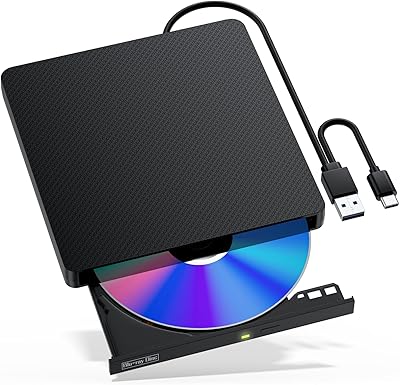
  • Interface: It connects via USB 3.0 and USB 3.0 Type-C, giving it broad compatibility with both older and newer laptop port configurations.
  • BD Speed: Blu-ray read and write speeds reach up to 6X, which is adequate for home ripping and burning tasks but not suited to high-volume disc production.
  • DVD Speed: DVD read and write performance tops out at 8X, covering standard data backup, movie ripping, and software installation use cases comfortably.
  • CD Speed: CD read and write speeds reach up to 24X, making audio disc burning and small data CD creation noticeably quick.
  • Disc Formats: Supported formats include BD-ROM, BD-R, BD-RE, DVD±RW, DVD±R DL, DVD-RAM, CD-R, CD-RW, and CD-ROM, along with M-Disc for archival use.
  • 4K UHD Support: 4K Ultra HD Blu-ray playback is not supported; the drive is limited to standard Blu-ray and HD content only.
  • 3D Blu-ray: 3D Blu-ray disc playback is supported when used in conjunction with compatible third-party software installed on the host computer.
  • Extra USB Ports: Two additional USB 3.0 ports are built into the unit, functioning as a passive hub to expand connectivity on port-limited laptops.
  • Card Slots: One SD card slot and one TF (microSD) card slot are included, though only one can be actively used at a time.
  • OS Compatibility: The drive works with macOS, Windows (all modern versions), and Linux without requiring any additional driver installation for basic disc functions.
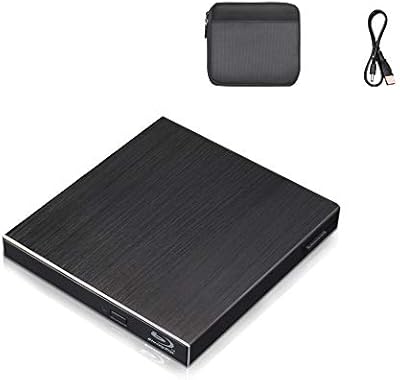
  • Power Supply: An auxiliary power cable is included in the box to provide supplemental power when a single USB port cannot supply sufficient current for stable operation.
  • Color & Finish: The unit ships in a white and silver colorway, combining a white plastic lower body with a silver aluminum top panel.
  • Warranty: NOLYTH covers this drive with a 1-year hardware warranty, a 60-day money-back guarantee, and lifetime technical support through their customer service team.
  • Playback Software: No Blu-ray playback or burning software is included; users must source and install compatible third-party software independently before playing Blu-ray movie titles.
  • Plug & Play: The drive operates as a plug-and-play device on all supported operating systems, requiring no manual driver installation for disc reading and burning tasks.
  • M-Disc Support: M-Disc archival media is supported, allowing users to burn data to long-term storage discs rated for significantly extended shelf life compared to standard BD-R.

Related Reviews

Wintale Portable External Blu-ray Drive
72%
91%
Ease of Setup
72%
Read Performance
69%
Write & Burn Reliability
44%
Software & Out-of-Box Readiness
61%
Build Quality
More
Yaeonku 50GB External Blu-ray Drive
70%
86%
Plug-and-Play Setup
78%
Blu-ray Read & Burn Performance
89%
Dual-Interface Connectivity
41%
Software & Playback Experience
83%
Compatibility Across Operating Systems
More
VSVABEFV External USB Blu-Ray Drive
82%
93%
Ease of Use
90%
Portability
65%
Write Speed
78%
Software Compatibility
88%
Compatibility with Operating Systems
More
LG WP50NB40 External Blu-ray Writer
78%
93%
Portability & Form Factor
91%
Bus-Powered Convenience
89%
Plug-and-Play Setup
86%
Burn Quality & Reliability
78%
Blu-ray Playback Performance
More
NVOPERANG BD015 External Blu-ray Drive
72%
78%
Plug-and-Play Ease
61%
Blu-ray Playback Experience
84%
CD & DVD Performance
67%
Build Quality & Durability
81%
Connectivity & Compatibility
More
Alphami USB-C External Blu-ray Drive
65%
78%
Ease of Setup
67%
Blu-ray Playback Quality
59%
Compatibility
54%
Portability
56%
Build Quality
More
Cloudtale Portable Slim External Blu-ray Drive
71%
91%
Ease of Setup
61%
Mac Compatibility
78%
Build Quality
74%
Read Performance
88%
Portability
More
MthsTec 4-in-1 External Blu-ray Drive
69%
83%
Optical Read Performance
76%
Blu-ray Burn Quality
79%
HDD Enclosure Functionality
72%
USB Hub Usability
54%
Fast-Charging Effectiveness
More
Xglysmyc USB 2.0 External Blu-ray Drive
64%
88%
Ease of Setup
57%
Blu-ray Playback
79%
CD and DVD Burning
21%
Blu-ray Burning
61%
Build Quality
More
Wbacon 5-in-1 External Blu-ray Drive
66%
88%
Ease of Setup
54%
Disc Read Reliability
51%
Blu-ray Playback Experience
73%
DVD & CD Burning
18%
Blu-ray Disc Burning
More

FAQ

No, it does not. The NOLYTH Portable External Blu-ray Drive is hardware only — no playback or burning software is included in the box. You will need to install a compatible third-party application before you can watch Blu-ray movie titles. On Windows, options like PowerDVD or Leawo Blu-ray Player are commonly used. On macOS, the choices are more limited and some require a paid license.
The drive will be recognized by your Mac without any driver installation, and basic disc burning and ripping functions generally work fine. The complication on Apple Silicon Macs is specifically Blu-ray movie playback, since most compatible software has inconsistent support for the M1 and M2 chip architecture. If you only need to burn DVDs or CDs on your MacBook, you should be fine — but for watching Blu-ray films, research your software options carefully before purchasing.

No, it cannot. This portable optical drive does not support the 4K Ultra HD Blu-ray format at all, and there is no workaround. If you own a UHD disc collection and want to watch those titles on your laptop, you will need a drive that explicitly lists 4K UHD support.

Not always, but it is worth keeping the auxiliary power cable handy. Most modern laptops supply enough power through a single USB port for standard DVD and CD tasks. However, Blu-ray reads and writes are more power-intensive, and on some machines — particularly older laptops or those with lower-output USB ports — you may notice disc recognition issues or mid-burn failures without the second cable connected.

Unfortunately, no. Only one card slot can be active at a time. If you need to transfer files from both an SD card and a microSD card simultaneously, you will need to do them in separate sessions or use a separate card reader alongside this drive.

The format list is quite broad for a drive at this price point. It covers BD-ROM, BD-R, BD-RE, DVD±RW, DVD±R DL, DVD-RAM, CD-R, CD-RW, CD-ROM, and M-Disc. That covers virtually every standard consumer optical format except 4K Ultra HD Blu-ray. M-Disc support is a particularly useful bonus if you are archiving important data for long-term storage.

Yes, basic plug-and-play functionality works on Linux without manual driver installation, much like it does on Windows and macOS. For Blu-ray movie playback on Linux, you would need to set up a compatible player with the appropriate decryption libraries, which requires a bit of technical comfort — but the hardware itself is not the barrier.

It is noticeable. During Blu-ray reads, the disc spin produces a moderate whirring sound that is louder than most users expect from such a slim unit. In a quiet home office or a library, it would be audible. For DVD and CD tasks, the noise level is considerably lower and most people find it unobtrusive.

Yes, and this is one of the more practical everyday uses for those bonus ports. The two USB 3.0 ports on the drive work as a passive hub, so you can run a mouse, keyboard, or flash drive from them simultaneously. Just keep in mind that the hub is passive, meaning it draws from your laptop's power rather than a dedicated supply — so very high-draw USB devices like portable hard drives may behave less reliably.

You get a 60-day money-back window from the date of purchase if the drive does not meet your expectations, along with a 1-year hardware warranty covering manufacturing defects. NOLYTH also advertises lifetime technical support, which means you can contact them with setup or compatibility questions beyond the warranty period. Response times from customer support appear to vary based on user feedback, so it is worth reaching out through the correct channel listed on your purchase documentation.