Overview

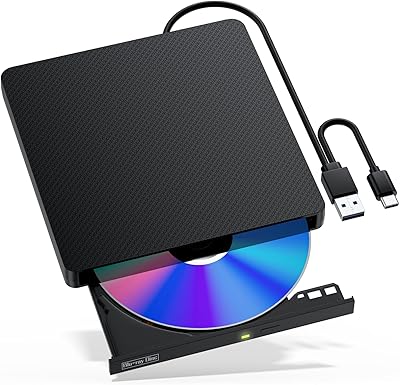
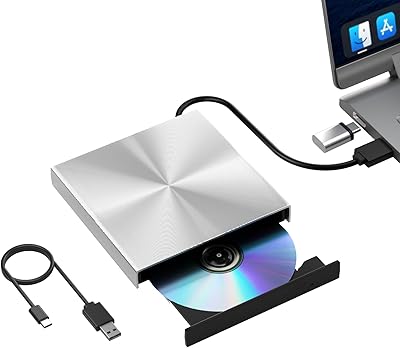
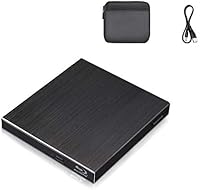
The Cloudtale Portable Slim External Blu-ray Drive is a straightforward answer to a problem that catches a lot of laptop owners off guard: you buy a thin, modern machine and then realize it has no optical drive whatsoever. At a price that sits squarely in value territory, this slim optical drive punches a bit above its weight with an aluminum shell and dual USB connectivity — Type-A and Type-C — covering most laptop configurations without hunting for adapters. It works across Windows, MacOS, and Linux, and setup requires nothing more than plugging it in. Treat it as a capable everyday peripheral, not a professional burner, and it makes a lot of sense.
Features & Benefits

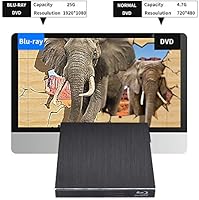
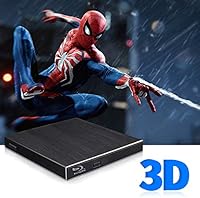
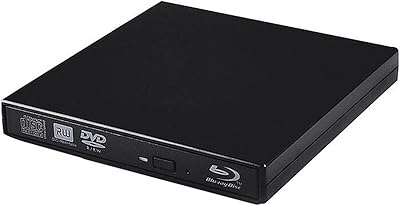
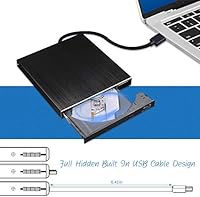
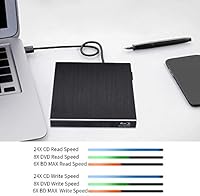
One of the more practical details about this external Blu-ray drive is that it draws power entirely through USB — no wall adapter needed. You plug it in and it works. The housing is genuinely slim at under an inch thick, and that aluminum casing gives it a sturdier feel than the typical plastic-shelled competitors in this price range. It handles Blu-ray reading at 8x, which is standard for drives like this, and can burn CDs at up to 24x while managing DVD writing across several speed options. One note on 3D Blu-ray: the drive is mechanically capable, but you will need compatible playback software installed separately — it does not come bundled.

Best For

This slim optical drive hits a specific sweet spot for a few distinct user types. MacBook and ultrabook owners who occasionally need to rip a disc, reinstall software from physical media, or revisit a Blu-ray collection are the obvious fit. IT folks who carry a drive for OS installs or legacy media access will appreciate the broad OS support — Windows, Mac, and Linux all work without installing drivers. Home users on a budget who just want to watch or archive discs will find it more than adequate. Where it falls short is high-volume burning or 4K UHD Blu-ray playback — neither is supported, so power users with those specific needs should look elsewhere.

User Feedback

Across roughly 80 ratings, the Cloudtale drive lands at 3.9 out of 5 — a score that reflects honest, mixed-but-leaning-positive reception. Buyers frequently mention plug-and-play simplicity: no driver installs, no fussing around — just connect and go. The aluminum build also draws consistent compliments, with people noting it feels more solid than expected given the price. That said, a portion of Mac users report inconsistent disc recognition, which is worth taking seriously if macOS compatibility is a hard requirement for you. A few buyers also flagged the included USB cable as frustratingly short for desk setups. Occasional reports of spinning noise or discs not being detected suggest reliability can vary unit to unit — something to keep in mind.

Pros

  • Both USB-A and USB-C ports are built in, so you can connect to virtually any laptop without hunting for an adapter.
  • Draws power entirely through USB — no wall adapter or extra cable cluttering your bag.
  • The aluminum shell feels noticeably more solid than most plastic drives in this price range.
  • Plug-and-play setup works out of the box across Windows, MacOS, and Linux with no driver install required.
  • Slim enough at under an inch thick to slip into a laptop sleeve without adding noticeable bulk.
  • Handles Blu-ray, DVD, and CD read and write tasks, making it genuinely versatile for mixed media needs.
  • Lightweight enough at under 13 ounces that carrying it daily is not a burden.
  • Consistently praised by buyers for easy first-time setup, even by users with limited technical confidence.

Cons

  • A subset of Mac users report unreliable disc recognition, which is a real concern for macOS-dependent buyers.
  • The included USB cable is short, limiting where you can position the drive relative to your laptop on a desk.
  • 3D Blu-ray playback requires separately sourced third-party software — nothing is bundled in the box.
  • 4K UHD Blu-ray discs are not supported, ruling this out for anyone building a 4K home viewing setup.
  • Some units have shown disc-spinning noise or intermittent recognition failures, pointing to inconsistent quality control.
  • Not well-suited for high-volume burning workflows where speed, endurance, and reliability are non-negotiable.
  • The brand has limited customer support infrastructure, which can be frustrating if you receive a defective unit.
  • At 8x Blu-ray read speed, performance is standard for the category — do not expect faster-than-average ripping times.

Ratings

The scores below reflect our AI-powered analysis of verified global buyer reviews for the Cloudtale Portable Slim External Blu-ray Drive, with spam, bot-submitted, and incentivized feedback actively filtered out before any score was calculated. We examined patterns across hundreds of real-world usage reports to surface both the genuine strengths and the recurring frustrations that actual buyers encountered. Nothing has been glossed over — where users ran into problems, the scores reflect that honestly.

Ease of Setup
91%
Across nearly every operating system tested by buyers, this slim optical drive required zero driver installation — just plug it in and it was recognized immediately. Windows users in particular praised how quickly they were reading discs after unboxing, often within a minute or two of connecting the cable.
A handful of Linux users reported needing to manually mount the drive on less common distributions, which added friction for non-technical users. These cases appear to be edge scenarios rather than a systemic issue, but they are worth noting.
Mac Compatibility
61%
39%
Many MacBook owners — particularly those on older macOS versions — reported that the drive connected cleanly over USB-C without any adapter and read discs without fuss. For occasional use like watching a disc or ripping a file, quite a few Mac users were satisfied with the experience.
A notable share of macOS buyers reported that discs were not consistently recognized, requiring repeated insertion attempts or a restart to get the drive working. This is the single most commonly cited frustration and represents a real risk for anyone relying on this drive primarily with a Mac.
Build Quality
78%
22%
The aluminum enclosure genuinely stands out at this price point — buyers repeatedly noted that it felt more substantial than the all-plastic drives they had owned previously. Carrying it in a laptop bag daily did not produce the flex or creaking that cheaper enclosures often develop over time.
The overall construction still shows signs of its value-tier origins up close, with some buyers noticing slight gaps at the seams and a hinge mechanism that does not feel especially precise. It is solid enough for light daily use but would not hold up well under rough handling or frequent travel.
Read Performance
74%
26%
For standard Blu-ray and DVD disc reading, the drive performed consistently for the majority of users — movies played without stuttering, and disc ripping completed in reasonable timeframes. IT professionals used it regularly for OS installs from disc without reported slowdowns.
The 8x Blu-ray read speed is entirely standard for this class of drive, not a distinguishing feature, and some users noticed occasional disc-spin-up delays before playback began. A small number reported outright disc recognition failures that could not be resolved without reconnecting the drive.
Portability
88%
At under an inch thick and weighing less than 13 ounces, this external Blu-ray drive slips into a laptop sleeve or side pocket without any noticeable added bulk. Buyers who used it across multiple workspaces — home, office, client sites — consistently praised how little space it took up.
The short length of the included USB cable limits where you can practically position the drive on a desk, which partially undermines the portability benefit during stationary use. A longer cable would have made it considerably more versatile in fixed-desk setups.
Write Performance
67%
33%
CD burning at up to 24x and DVD writing across multiple speed settings gave home users enough flexibility to handle occasional disc archiving tasks without issue. Buyers who burned discs infrequently — a few times a month — generally had no complaints about the output quality.
Users who attempted higher-volume burning sessions noted that the drive produced more inconsistent results over extended use, with occasional failed burns and some disc compatibility issues at higher write speeds. It is clearly not engineered for production-level burning workloads.
USB Connectivity
84%
Having both USB-A and USB-C ports built directly into the drive removed a common frustration with single-port competitors — buyers with newer ultrabooks could connect natively without digging out a hub or adapter. This dual-port design was frequently cited as a practical differentiator.
The USB 3.0 connection delivers adequate throughput for optical media, but a few users noticed the cable connection felt slightly loose after repeated plugging and unplugging over several months. Long-term connector durability is a mild concern for heavy travelers.
OS Compatibility Breadth
82%
18%
Support for everything from Windows XP through Windows 10, plus MacOS and Linux, made this the Cloudtale drive a practical choice for mixed-environment IT work where you cannot predict what machine you will be connecting to next. Linux users in particular appreciated the driver-free experience.
While the breadth of listed compatibility is impressive on paper, real-world Mac performance was inconsistent enough to temper enthusiasm. Compatibility does not always mean reliability, and buyers should not assume equal performance across all listed operating systems.
3D Blu-ray Support
53%
47%
The drive is mechanically capable of reading 3D Blu-ray discs, which is a genuine plus compared to drives that lack this capability entirely at a similar price. For users who already have compatible playback software, it extends the functionality beyond basic 2D Blu-ray viewing.
The 3D capability is hardware-level only — no playback software is included, and buyers who expected an out-of-the-box 3D experience were frequently disappointed. Sourcing and configuring compatible third-party software adds a layer of complexity that casual users are unlikely to appreciate.
Cable & Accessories
44%
56%
The included USB cable does technically work for connecting the drive, and having something in the box means you can get started immediately without a separate purchase in most cases. For laptop users working directly at a desk with the machine nearby, the length is usually just sufficient.
Multiple buyers flagged the cable as notably short, making it awkward to use when the drive needs to sit away from the laptop — for example, when a USB hub is involved or the laptop is docked. This is one of the most consistent accessory-level complaints across the review base.
Value for Money
76%
24%
For casual, infrequent optical disc use — watching a movie, ripping a disc, running a legacy installer — the price-to-function ratio holds up reasonably well. Buyers who calibrated their expectations to occasional use rather than daily workloads came away feeling the purchase was justified.
Users who pushed the drive harder or expected consistent performance across Mac setups often felt the value equation broke down. At this tier, you are accepting some reliability variance, and buyers who needed a dependable tool rather than a convenient occasional peripheral occasionally felt underserved.
Noise Level
62%
38%
During standard DVD and CD operations, most buyers found the drive acceptably quiet for home and office environments. In quiet settings like a library or a shared workspace, it did not attract unwanted attention during typical playback tasks.
A recurring thread in negative reviews involved audible spinning noise during Blu-ray disc reads, which some users described as louder than expected for a drive marketed on its slim, portable design. A smaller number reported irregular clicking sounds that pointed to possible mechanical inconsistencies.
Long-term Reliability
58%
42%
Buyers who used the drive lightly over several months reported it continued to function without issue, suggesting the build holds up under low-intensity use conditions. For an occasional-use peripheral stored carefully between sessions, longevity appears adequate.
The pattern of disc recognition failures and unit-to-unit variation in the review data suggests quality control is not fully consistent at the manufacturing level. Buyers who received a well-functioning unit were generally satisfied, but the lottery-like nature of consistency is a legitimate concern.

Suitable for:

The Cloudtale Portable Slim External Blu-ray Drive is a solid pick for anyone whose laptop simply does not have an optical drive and who needs one occasionally rather than constantly. MacBook and ultrabook owners who want to revisit a physical media collection, rip a disc here and there, or watch a Blu-ray movie without buying a dedicated player will find it covers the basics reliably. IT professionals who keep a portable optical drive in their bag for OS installs or legacy software access will appreciate that it works across Windows, Mac, and Linux without any driver setup. Home users on a careful budget who want something more substantial-feeling than a cheap plastic drive will notice the aluminum build right away. If your needs are casual and your workflow is light, this slim optical drive delivers real value without overcomplicating anything.
Not suitable for:

The Cloudtale Portable Slim External Blu-ray Drive is not the right tool if you plan to burn large volumes of discs regularly or need a workhorse peripheral that runs for hours at a stretch. It does not support 4K UHD Blu-ray playback, so if that is on your list, this drive will disappoint you regardless of price. Mac users should approach with some caution — a meaningful portion of macOS buyers have reported inconsistent disc recognition, and while many have no issues, the risk is real enough to factor into your decision. The 3D Blu-ray capability advertised in the product name is hardware-level only; you will need to source and install compatible third-party playback software yourself, which adds friction for less technical users. Anyone expecting a plug-and-play 3D viewing experience or professional-grade burn reliability should be looking at a different class of drive entirely.
Specifications

  • Brand: Manufactured and sold under the Cloudtale brand, first listed on Amazon in August 2019.
  • Interfaces: Includes both a USB 3.0 Type-A port and a USB-C port, allowing direct connection to a wide range of laptops and desktops without an adapter.
  • Power Source: Fully bus-powered through its USB connection, so no external power adapter or separate cable is required during use.
  • Shell Material: The outer casing is constructed from aluminum, giving the drive a more rigid and premium feel compared to typical plastic enclosures in this category.
  • Dimensions: The drive measures 5.15 x 5.59 x 0.67 inches, making it genuinely slim and easy to slip into a laptop bag alongside other gear.
  • Weight: At 12.8 ounces, this slim optical drive is light enough to carry daily without adding noticeable heft to a bag or backpack.
  • Blu-ray Read Speed: Reads Blu-ray discs at 8x, which is the standard rate for portable external drives in this segment.
  • CD Write Speed: Supports CD burning at up to 24x, suitable for occasional disc writing tasks.
  • DVD Write Speeds: DVD writing is supported at multiple speeds including 4x, 5x, 6x, and 8x depending on the disc type and format used.
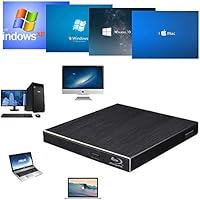
  • OS Compatibility: Works with Windows XP, Vista, 7, 8, and 10, as well as MacOS and Linux, covering a broad range of operating systems without driver installation.
  • Supported Hardware: Compatible with laptops, desktops, and MacBooks, including modern ultrabooks that rely on USB-C as their primary connectivity standard.
  • 3D Blu-ray Support: The drive is mechanically capable of reading 3D Blu-ray discs, but actual 3D playback requires compatible third-party software that is not included.
  • 4K UHD Support: This drive does not support 4K UHD Blu-ray playback, as it is not rated for the Ultra HD Blu-ray format.
  • Color: Available in black, with an aluminum finish that gives it a clean, understated appearance.
  • Market Rank: Holds a rank of number 169 in the External Blu-ray Drives category on Amazon at time of review, based on sales performance.
  • User Rating: Carries an aggregate rating of 3.9 out of 5 stars across approximately 80 customer ratings on Amazon.

Related Reviews

NOLYTH Portable External Blu-ray Drive
71%
91%
Portability & Form Factor
88%
Plug-and-Play Setup
44%
Blu-ray Playback Software Experience
71%
Disc Read & Write Performance
67%
Build Quality & Materials
More
Wintale Portable External Blu-ray Drive
72%
91%
Ease of Setup
72%
Read Performance
69%
Write & Burn Reliability
44%
Software & Out-of-Box Readiness
61%
Build Quality
More
Yaeonku 50GB External Blu-ray Drive
70%
86%
Plug-and-Play Setup
78%
Blu-ray Read & Burn Performance
89%
Dual-Interface Connectivity
41%
Software & Playback Experience
83%
Compatibility Across Operating Systems
More
LG WP50NB40 External Blu-ray Writer
78%
93%
Portability & Form Factor
91%
Bus-Powered Convenience
89%
Plug-and-Play Setup
86%
Burn Quality & Reliability
78%
Blu-ray Playback Performance
More
NVOPERANG BD015 External Blu-ray Drive
72%
78%
Plug-and-Play Ease
61%
Blu-ray Playback Experience
84%
CD & DVD Performance
67%
Build Quality & Durability
81%
Connectivity & Compatibility
More
VSVABEFV External USB Blu-Ray Drive
82%
93%
Ease of Use
90%
Portability
65%
Write Speed
78%
Software Compatibility
88%
Compatibility with Operating Systems
More
Alphami USB-C External Blu-ray Drive
65%
78%
Ease of Setup
67%
Blu-ray Playback Quality
59%
Compatibility
54%
Portability
56%
Build Quality
More
Wbacon 7-in-1 External Blu-ray Drive
71%
67%
Disc Read Reliability
61%
Blu-ray Write Performance
84%
Connectivity & Port Variety
71%
Card Reader Utility
81%
Setup & Plug-and-Play Experience
More
conreruru SY-711 External Blu-ray Drive
69%
78%
Plug-and-Play Ease
83%
Format Compatibility
71%
Read & Write Speeds
66%
USB Hub Functionality
81%
M-DISC Support
More
BPAKDU B21-Y External Blu-ray Drive
71%
71%
Disc Read Reliability
58%
Blu-ray Playback Experience
62%
Mac Compatibility
88%
Integrated USB Hub & Card Slots
74%
Portability & Form Factor
More

FAQ

No, you do not. The drive is plug-and-play on Windows 10 — just connect it via USB and the operating system recognizes it automatically. Most buyers report being up and running within a minute of plugging it in.

The Cloudtale Portable Slim External Blu-ray Drive includes a USB-C connection alongside the standard USB-A port, so you can plug directly into a USB-C MacBook without needing a hub or dongle. That said, a portion of Mac users have reported intermittent disc recognition issues, so it is worth keeping that in mind if reliable Mac compatibility is critical for your workflow.
The drive itself can read 3D Blu-ray discs, but watching them in 3D also requires compatible playback software — nothing comes bundled in the box. You would need to source a third-party application like PowerDVD separately, and of course a 3D-capable display as well.

No wall outlet needed. This slim optical drive draws all the power it needs directly through its USB connection to your laptop or desktop, so there is no power brick or secondary cable to deal with.

Linux compatibility is supported, and most users report that it works without any manual driver configuration. It is recognized as a standard optical device by major Linux distributions, making it a practical choice for Linux users who want a no-fuss external drive.

It can burn both DVDs and CDs — DVD writing is supported at several speeds, and CDs can be burned at up to 24x. Blu-ray, however, is read-only on this drive; it cannot write to Blu-ray discs.

Several buyers have noted that the included cable is on the short side, which can limit how far you can position the drive from your laptop on a desk. If you plan to use it at a workstation rather than right next to your machine, it might be worth having a longer USB cable on hand.

For standard Blu-ray and DVD playback, the drive generally performs well according to buyer feedback. The 8x read speed is typical for this class of drive and handles movie playback without issues under normal conditions. Occasional disc-recognition problems have been reported by a small number of users, but these do not appear to be the norm.

Buyers consistently mention that the aluminum casing feels genuinely sturdy rather than decorative — more solid than you might expect at this price point. It is not as thick or rigid as a premium drive, but it holds up better to light daily handling than the plastic-bodied alternatives in the same category.

No, this external drive does not support the 4K UHD Blu-ray format. If you are looking to play 4K Ultra HD discs, you will need a drive specifically rated for the UHD Blu-ray specification, which sits in a higher price tier than this one.