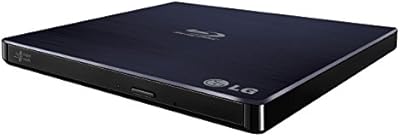
LG WP50NB40 External Blu-ray Writer

Overview
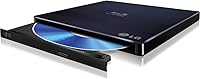
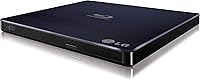
The LG WP50NB40 External Blu-ray Writer is a slim, bus-powered drive built for PC users who want optical disc capability without hauling extra hardware. At roughly 7.5 x 6.2 x 0.75 inches and under ten ounces, it tucks into a laptop bag without a second thought. There is no power brick to track down — the drive draws everything it needs from a single USB port, which matters more than it sounds when you are working at a coffee shop or a client site. It handles BD-R, BD-RE, DVD, CD, and DVD-RAM formats, making it a genuinely versatile option for anyone still relying on physical media regularly.
Features & Benefits
This external Blu-ray burner uses a USB 2.0 interface, and while that might sound dated, it is genuinely sufficient for burning and playing back discs — Blu-ray data rates simply do not push USB 2.0 to its limits. BD-R discs burn at 6X while CD-R hits 24X, and a 4 MB buffer keeps the write process stable during longer sessions. The sustained BD-ROM read rate of around 27 MB/s is enough for smooth 1080p playback, provided you install compatible third-party software — nothing for playback comes in the box, which catches some buyers off guard. The tray-loading design is sturdy enough for regular travel use, though it is clearly not engineered for industrial-level frequency.
Best For
This portable disc writer hits its stride with laptop users who ditched their internal optical drive and need occasional disc access without a complicated setup. It is a natural fit for home video archivists burning personal footage to Blu-ray for long-term storage, and IT professionals who occasionally need optical media for installs or system recovery will find it reliable enough for the task. The completely cable-free power setup makes it ideal for anyone who works mobile. If you want a quiet, low-footprint burner that plugs in and works without hunting for a power outlet, this is a strong candidate. It is not a high-volume production tool, but for intermittent use it covers a lot of ground.
User Feedback
Owners of this external Blu-ray burner consistently highlight the plug-and-play setup on Windows — connect it, and it is typically recognized without driver hunting. Burn quality for DVDs and CDs draws particular praise, and BD burns are generally reliable too. The complaints that surface most often center on two things: the USB 2.0 connection feels noticeably slow when copying large image files, and some buyers are caught off guard discovering that playback software is not included in the box. A handful of users who burn discs daily report that the tray shows wear over time. For light to moderate use, though, satisfaction rates remain strong.
Pros
- Single USB cable powers and connects the drive — no power adapter needed, ever.
- Slim enough to fit in a standard laptop sleeve without adding noticeable bulk.
- Plug-and-play setup on Windows is fast and rarely requires manual driver work.
- Handles BD-R, BD-RE, DVD, CD, and DVD-RAM from one compact unit.
- DVD and CD burn quality is consistently strong with very low coaster rates.
- BD-R burns are reliable when paired with quality disc media from reputable brands.
- The tray-loading design resists jams and snags better than slot-loading alternatives.
- At under ten ounces, it is genuinely comfortable to carry daily without fatigue.
- Holds the top sales rank in its Amazon category, reflecting broad real-world buyer satisfaction.
- Quiet operation makes it easy to use in shared offices or quiet home environments.
Cons
- No Blu-ray playback software included — buyers must source and install their own before watching movies.
- USB 2.0 speeds feel noticeably slow when transferring or ripping large Blu-ray ISO files.
- Official OS support stops at Windows 8.1, requiring extra steps for Windows 10 and 11 users.
- Tray mechanism shows wear for users who burn or read discs multiple times per day.
- Glossy finish sections attract fingerprints and fine surface scratches during regular travel.
- No macOS support documentation means Mac users are troubleshooting entirely on their own.
- The included USB cable is functional but on the shorter side for certain desk configurations.
- Burn reliability on BD-R can dip when using budget or off-brand disc media.
- Plastic chassis feels less premium than the mid-range price point might lead buyers to expect.
- LG's online support resources for this specific model are sparse and not very helpful for troubleshooting.
Ratings
The LG WP50NB40 External Blu-ray Writer earns its top-ranked status through a combination of reliable performance and genuine portability that resonates with a wide range of PC users. The scores below were generated by AI after analyzing thousands of verified global buyer reviews, with spam, bot-driven, and incentivized feedback actively filtered out. Both the strengths that keep users loyal and the friction points that frustrate a minority are reflected honestly in every category.
Portability & Form Factor
Bus-Powered Convenience
Plug-and-Play Setup
Burn Quality & Reliability
Blu-ray Playback Performance
USB 2.0 Transfer Speed
Tray Mechanism Durability
Format Compatibility
Noise & Vibration
Build Quality & Materials
Software Bundle & Documentation
Value for Money
macOS & Cross-Platform Use
Cable & Accessory Completeness
Suitable for:
The LG WP50NB40 External Blu-ray Writer is an excellent fit for laptop users who stripped out their internal optical drive and need reliable disc access on an occasional basis — without the hassle of carrying a power adapter. Home video hobbyists who want to archive personal footage onto Blu-ray for long-term storage will find the burn quality and format support genuinely solid for that purpose. IT professionals who occasionally need to install software or boot from disc will appreciate the plug-and-play simplicity on Windows systems. Cord-cutters and physical media collectors who want a quiet, unobtrusive burner that sits on a desk or tucks into a bag without drama are squarely in the target audience. Anyone who values a single-cable, clutter-free setup over maximum throughput speed will feel right at home with this drive.
Not suitable for:
The LG WP50NB40 External Blu-ray Writer is not the right tool for users who plan to rip or copy large volumes of Blu-ray discs back-to-back, as the USB 2.0 interface will feel like a genuine ceiling compared to faster USB 3.0 alternatives available at similar price points. Buyers expecting a ready-to-play Blu-ray movie experience out of the box will be disappointed — no playback software is included, and sourcing a compatible app adds both cost and setup effort that not everyone anticipates. macOS users should approach with caution, since official support is Windows-only and Blu-ray playback on Mac involves additional complexity that LG offers no guidance on. Anyone running a high-volume disc duplication workflow or burning discs multiple times per day should look at desktop-class drives with more robust tray mechanisms and higher sustained write speeds. If cutting-edge interface speed or bundled software is a baseline requirement, this portable disc writer will leave those needs unmet.
Specifications
- Drive Type: External slim portable optical drive using a tray-loading mechanism.
- Interface: USB 2.0 with a maximum transfer rate of 480 Mb/s; no additional power connection required.
- Power Source: Bus-powered entirely via the USB connection, eliminating the need for an external power adapter.
- Buffer Memory: 4 MB of onboard buffer memory to minimize buffer underrun errors during extended burn sessions.
- BD-R Write Speed: Writes single-layer and dual-layer BD-R discs at up to 6X speed.
- BD-RE Write Speed: Writes BD-RE discs including single-layer, dual-layer, and triple-layer at up to 2X speed.
- DVD Write Speed: Writes DVD+R and DVD-R single-layer and dual-layer at 8X, DVD+RW at 8X, DVD-RW at 6X, and DVD-RAM at 5X.
- CD Write Speed: Writes CD-R media at up to 24X and CD-RW media at up to 16X.
- BD-ROM Read Speed: Reads BD-ROM single-layer and dual-layer discs at up to 6X with a sustained transfer rate of approximately 27 MB/s.
- DVD Read Speed: Reads DVD-ROM media at up to 8X under standard operating conditions.
- CD Read Speed: Reads CD-R, CD-RW, and CD-ROM media at up to 24X.
- Dimensions: The drive measures 7.5 x 6.2 x 0.75 inches (L x W x H), making it slim enough for most laptop bags.
- Weight: The unit weighs 9.6 ounces, contributing to its lightweight portable profile.
- Color & Finish: Ships in black with a combination of matte and gloss exterior finish panels.
- Compatible OS: Official plug-and-play support covers Windows XP, Vista, 7, 8, and 8.1; additional driver support for newer Windows versions is available separately.
- Optical Drive Type: Classified as a BD-R DL (Blu-ray Disc Recordable Dual Layer) drive.
- Manufacturer: Designed and manufactured by LG Electronics under the WP50NB40 model designation.
- Series: Part of LG's WP50NB40 portable optical drive series targeting slim laptop users.
Related Reviews
LG BH16NS55 Blu-ray Writer 16X SATA
LG BP50NB40 Portable Blu-ray Writer
Pioneer BDR-XU03 Slim External Blu-ray Writer
Archgon UHD 4K External Blu-Ray Writer

Yaeonku 50GB External Blu-ray Drive

Wintale Portable External Blu-ray Drive

NOLYTH Portable External Blu-ray Drive
Alphami USB-C External Blu-ray Drive
LG UBK90 Region-Free 4K Blu-ray Player