
Overview

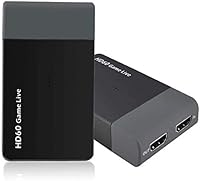
The Y&H ezcap261 USB 3.0 HDMI Capture Card enters a crowded field as a no-frills, budget-conscious option for console streamers who want to start recording without a steep learning curve. Plug it in, open OBS, and you are essentially ready to go — no driver installation, no external power brick. It supports HDMI input from a wide range of hardware, including Nintendo Switch, PS5, PS4, and the Xbox family. The compact dongle-style build makes it easy to tuck into a laptop bag. For anyone taking their first steps into streaming, the appeal is clear: low cost, minimal setup friction, and broad console compatibility right out of the box.

Features & Benefits

This capture card handles up to 4K at 30fps on both input and capture, and includes a pass-through so your display stays lag-free while you record. For most users, the practical sweet spot is 1080p at 60fps, which runs reliably without overtaxing your PC. Hitting 1080p at 120fps or capturing at 4K demands a genuinely powerful machine — an i7 processor and dedicated GPU are not optional at those settings. The 3.5mm TRS Line-In port is a welcome addition for live commentary, though it only accepts TRS plugs, meaning a standard headset mic with a TRRS connector will not work without an adapter. Bus-powered and driver-free, the setup process is refreshingly simple.

Best For

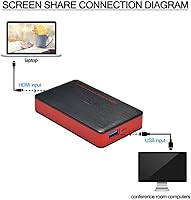
The ezcap261 is well-suited to casual console streamers — people going live on Twitch, YouTube, or Facebook who are happy at 1080p and do not need broadcast-grade hardware. It also works well for educators and students who need a quick way to capture and share screen content for remote sessions. Retro gamers will appreciate the broad console compatibility, which stretches back to older Xbox and PlayStation hardware. If you are already running OBS or VLC, this streaming dongle slots in without any configuration headaches. It is not built for professional productions where frame-perfect capture matters, but for budget-first creators, it covers the everyday basics reliably.

User Feedback

Buyer reactions to this capture card are genuinely mixed, which is about what you would expect at this price tier. Many users highlight instant OBS recognition and clean 1080p 60fps output as the real strengths — the device just works for standard streaming without fuss. Build quality draws more criticism; the plastic casing feels light, and a few buyers found it less durable than expected. The advertised 4K and 120fps specs also attract skepticism: achieving either requires significant PC horsepower, and some users report dropped frames when their hardware cannot keep up. On the support side, Y&H earns credit for responsiveness, which softens some frustration around the higher-resolution limitations.

Pros

  • No driver installation needed — plug it in and OBS or VLC recognizes it almost immediately.
  • Works across a wide range of consoles including PS5, Xbox Series X, Nintendo Switch, and older hardware.
  • Bus-powered design means one USB cable is all you need — no separate power adapter required.
  • The 4K 30Hz pass-through keeps your display lag-free while recording simultaneously.
  • Broad software compatibility spans Windows, macOS, and Linux without extra configuration.
  • The 3.5mm Line-In port lets you add live commentary directly into your recording setup.
  • Compact dongle form factor fits easily in a laptop bag for portable recording sessions.
  • At 1080p 60fps, this capture card delivers consistent, reliable output for everyday streaming.
  • The LED indicator gives instant visual confirmation the device is active and connected.
  • Y&H customer support is more responsive than typical for a brand at this price level.

Cons

  • Real-world 4K capture requires high-end PC hardware most budget buyers are unlikely to own.
  • The plastic casing feels noticeably thin and shows wear faster than expected with regular use.
  • The 3.5mm port is TRS only, so standard TRRS headset mics will not work without an adapter.
  • Advertised 1080p 120fps performance is hardware-dependent and rarely achievable on mid-range PCs.
  • HDCP-protected content from PS5 and PS4 cannot be captured without an additional splitter.
  • USB connector fit can loosen over time, causing intermittent signal drops mid-stream.
  • No official manufacturer documentation covers advanced software configurations or troubleshooting.
  • 4K pass-through is limited to 30Hz, which rules out high-refresh-rate display users.
  • On locked-down or enterprise Windows environments, the device may not be recognized at all.
  • Color banding in darker scenes has been noted by users recording at 1080p under heavier load.

Ratings

The Y&H ezcap261 USB 3.0 HDMI Capture Card has been scored by our AI system after analyzing verified global buyer reviews, with bot-driven and incentivized feedback actively filtered out to reflect genuine user experiences. Scores are calibrated to surface both where this streaming dongle genuinely delivers and where real-world frustrations tend to pile up. The result is a transparent, balanced picture for anyone weighing whether this capture card fits their specific setup and budget.

Ease of Setup
88%
Buyers consistently highlight how quickly this capture card gets recognized by OBS Studio and VLC without any driver installation. For beginners who have never used a capture device before, the plug-and-play experience removes one of the most common early barriers to streaming.
A small but vocal group of users on Linux and older macOS builds report occasional recognition hiccups that required forum-hunting to resolve. The experience is not universally instant, especially on less common operating system configurations.
1080p Streaming Performance
82%
18%
At 1080p 60fps, the ezcap261 handles its primary use case well. Streamers going live on Twitch or YouTube in standard HD report clean, consistent output with no major artifacting, making it a reliable workhorse for everyday sessions.
Some users notice minor color banding in darker scenes, and a handful report occasional frame stutters during extended sessions when the host PC is under heavier CPU load from the game itself. It is not the sharpest image at this resolution class.
4K Capture Viability
41%
59%
The hardware technically accepts a 4K input signal and can pass it through to a display without issue, which is useful for gamers who want to play on a 4K screen while recording in a lower resolution simultaneously.
Actual 4K capture in practice is heavily constrained. You need a high-end desktop with a current-generation CPU and discrete GPU to avoid dropped frames, which is an expensive pairing for a budget card. Many buyers feel the 4K marketing overpromises what the device realistically delivers for most users.
Pass-Through Quality
76%
24%
The 4K 30Hz pass-through works cleanly for console gaming. Players using a PS5 or Nintendo Switch report no noticeable lag on their display during recording, which is one of the more practical strengths of this streaming dongle in daily use.
The pass-through caps at 30Hz for 4K, which means competitive gamers relying on high-refresh displays at 4K will not get that benefit. For 1080p at higher refresh rates, pass-through performance is considerably more satisfying.
Build Quality
53%
47%
The compact form factor is genuinely convenient for people who move their setup around or record at different locations. It is light enough to forget it is plugged in, and the LED status indicator gives quick visual confirmation that it is active.
The plastic shell draws consistent criticism for feeling thin and inexpensive. A few buyers report the USB connector fitting loosely after months of regular use, which introduces intermittent signal drops — a real frustration for mid-stream failures.
Audio Input Functionality
67%
33%
Having a dedicated 3.5mm Line-In port for live commentary is a useful inclusion at this price point. Podcasters and educators recording voiceover narration directly into OBS find it a practical way to avoid routing through a separate audio interface.
The port is TRS only, which catches buyers off guard when their standard headset mic — which uses a TRRS plug — simply does not register. This is a compatibility limitation that the product listing does not make prominent enough, leading to avoidable returns.
Software Compatibility
79%
21%
The ezcap261 works across a genuinely broad range of software including OBS, VLC, Potplayer, Wirecast, and vMix. Cross-platform support across Windows, macOS, and Linux is broader than many competing cards at similar price points.
None of this compatibility is officially certified or supported by the manufacturer in documentation. Users relying on less common software sometimes encounter format mismatches, and troubleshooting falls entirely on community forums rather than official guidance.
Console Compatibility
83%
Coverage across Switch, PS5, PS4, Xbox Series X and S, Xbox One, Xbox 360, and Wii U is strong for a single device. Retro and multi-console households appreciate not needing separate adapters or splitters for most common setups.
Compatibility with certain HDCP-enabled content remains an issue, as the card cannot capture copy-protected signals without a splitter — a workaround the listing technically advises against. This limits use with some PS5 and PS4 game titles.
Value for Money
74%
26%
For a first-time streamer who just wants to get footage off a console and onto Twitch without spending heavily, the price-to-functionality ratio is genuinely reasonable. It handles the core job without asking for a larger investment upfront.
As soon as buyers start pushing toward the higher-end specs advertised on the box, the value proposition weakens. Chasing 4K capture or 1080p 120fps often leads to discovering the necessary PC hardware costs far more than the card itself.
Low-Latency Capture
71%
29%
For standard HD streaming, latency in the capture preview window is low enough that it does not disrupt the workflow in OBS. Content creators using it for recording tutorials or educational screen shares find the delay negligible in practice.
Preview latency becomes more noticeable at higher resolutions or when running demanding games simultaneously. Users expecting near-zero latency monitoring during competitive gameplay may find the pass-through more useful than the preview feed.
Driver-Free Operation
86%
The absence of any required driver is a genuine quality-of-life win. On Windows 10 and 11 especially, the device is recognized as a standard UVC-compliant capture device within seconds, requiring no system restarts or installation wizards.
Driver-free operation relies on the host OS recognizing UVC devices natively. On some enterprise or locked-down Windows environments, this assumption does not hold, and users without admin rights have reported the device going unrecognized entirely.
Portability
81%
19%
The dongle format and bus-powered design make this capture card genuinely portable. Streamers who bring a laptop to LAN events or educators moving between classrooms can toss it in a bag alongside a single USB cable and be fully operational.
The lightweight build that aids portability also contributes to the fragility concerns noted elsewhere. Without a carrying case or protective sleeve, the exposed USB connector is vulnerable during transport, and wear can accumulate faster than expected.
Customer Support
69%
31%
Y&H earns above-average marks for responsiveness relative to other budget brands in this category. Several buyers report receiving helpful replies within a reasonable timeframe when troubleshooting compatibility or setup issues directly with the brand.
Support quality appears inconsistent depending on the complexity of the issue. Technical queries about specific software configurations or hardware pairings tend to receive generic responses, leaving users to rely on community threads for deeper troubleshooting.

Suitable for:

The Y&H ezcap261 USB 3.0 HDMI Capture Card is a solid match for beginner streamers who want to get footage from a Nintendo Switch, PS4, or Xbox onto Twitch or YouTube without a complicated setup process. If your target output is 1080p 60fps and you are already running OBS Studio or VLC, this streaming dongle slots in almost instantly — no driver installation, no power adapter, no fuss. Students and educators who need a reliable way to capture and share screen content for remote learning or online presentations will also find it practical and easy to manage. Multi-console households benefit from the broad HDMI compatibility, which covers both current-generation and older hardware under a single device. For anyone taking their first step into content creation on a tight budget, the ezcap261 offers a low-risk entry point that covers the everyday essentials without demanding a large upfront commitment.

Not suitable for:

The Y&H ezcap261 USB 3.0 HDMI Capture Card is not the right tool for creators who take the advertised 4K capture at face value — achieving it in practice demands a high-end desktop with a powerful CPU and discrete GPU, which is an expensive pairing that undermines the budget appeal entirely. Competitive streamers who rely on high frame rates and crystal-clear capture for professional-quality broadcasts will likely find the image output and build quality fall short of their standards. Anyone planning to record commentary using a standard headset microphone will run into an immediate compatibility wall, since the 3.5mm port is TRS only and will not recognize the TRRS plugs most consumer headsets use. Content creators who need to capture HDCP-protected game content directly will also hit a hard limitation, as the card cannot handle copy-protected signals without a splitter workaround. If you are streaming or recording at a semi-professional level and need consistent, reliable performance across varied and demanding conditions, investing in a more capable card is the smarter long-term move.

Specifications

  • Model: This device carries the model designation ezcap261, manufactured and sold under the Y&H brand.
  • Interface: Connects to the host computer via USB 3.0, delivering data transfer speeds in the range of 300–500 MB/s.
  • Video Input: Accepts HDMI input from consoles, cameras, TV boxes, and any other device with a standard HDMI output port.
  • Audio Input: Features a 3.5mm TRS Line-In port for external audio or live commentary; TRRS plugs are not compatible.
  • Max Capture Res: Supports video capture up to 4K at 30fps, with 1080p capture available at up to 120fps.
  • Pass-Through Res: Offers HDMI pass-through at up to 4K 30Hz, allowing lag-free display output while recording simultaneously.
  • Output Formats: Captured video can be output in YUY2, NV12, and RGB formats to suit different editing and streaming workflows.
  • Driver Requirement: No driver installation is required; the device operates as a plug-and-play UVC-compliant capture card on supported systems.
  • Power Source: Fully bus-powered through the USB connection, requiring no external power supply or separate power adapter.
  • Compatible OS: Supports Windows 7, 8, and 10; macOS 10.9 or later; Linux; and Android operating systems.
  • Software Support: Compatible with OBS Studio, VLC, Potplayer, Wirecast, vMix, and other DirectShow- or V4L2-compliant applications.
  • Input Resolutions: Accepts HDMI input resolutions ranging from 480p up to 4K 30Hz, including 720p, 1080i, and multiple 1080p frame rate variants.
  • LED Indicator: An integrated LED status light illuminates when the device is successfully connected via USB 3.0 to a host computer.
  • Weight: The device weighs 7.5 ounces, making it light enough for portable use alongside a laptop.
  • Package Dimensions: The retail package measures 6.97 x 5.24 x 1.89 inches, suitable for storage in a compact travel bag or drawer.
  • PC Requirement: Minimum recommended PC spec is an Intel Core i5-3400 paired with an NVIDIA GT630 or equivalent discrete GPU.
  • 4K PC Requirement: Capturing at 4K resolution requires at minimum an Intel Core i7-3770 with an NVIDIA GTX 650 or AMD Radeon R7 250X and 4 GB RAM.
  • Mac Requirement: Mac users need at minimum an i5 quad-core processor, a VGA card supporting DirectX 10, and 4 GB of RAM.
  • Console Support: Officially compatible with Nintendo Switch, PS5, PS4, PS3, Xbox Series X/S, Xbox One, Xbox 360, and Wii U.
  • Date Available: This capture card was first made available for purchase on July 12, 2017, and has not been discontinued by the manufacturer.

Related Reviews
UNISHEEN UC2500H USB 3.0 Game Capture Card
86%
91%
Video Capture Quality
88%
Ease of Setup
85%
Compatibility with Platforms
93%
HDMI Loop-Through Performance
80%
Software Integration
More
StarTech 3 Port PCIe USB 3.0 Card + Gigabit Ethernet
84%
94%
Installation Ease
88%
Connectivity & Performance
90%
Compatibility
78%
Power Stability
85%
Build Quality
More
AILVLVNG HDMI KVM Switch 2 Monitors 3 Computers 4K@60Hz USB 3.0
84%
91%
Ease of Setup
88%
Dual Monitor Functionality
87%
USB Port Performance
84%
Display Consistency (EDID Emulator)
80%
Switching Speed (Button vs Remote)
More
ikuai 3.5″ USB 3.0 Hard Drive Enclosure
80%
93%
Ease of Setup
71%
Build Quality
62%
Cable Quality & Reliability
88%
Drive Compatibility
74%
Data Transfer Speed
More
Anker USB 3.0 HDMI KVM Switch
84%
88%
Ease of Use
91%
Video Quality (4K@60Hz)
87%
Data Transfer Speed (USB 3.0)
83%
Build Quality
79%
Compatibility with Devices
More
StarTech 7-Port PCIe USB 3.0 Card
85%
88%
Installation Ease
91%
Data Transfer Speed
76%
Power Supply Consistency
83%
Compatibility with Older Devices
85%
Durability and Build Quality
More
KCEVE USB 3.0 KVM Switch 3 Monitors 3 Computers
85%
94%
Ease of Setup
92%
Video Quality
88%
Build Quality
85%
Switching Speed
91%
Compatibility
More
Camgeet USB 3.0 HDMI KVM Switch for 2 Computers
84%
88%
Value for Money
91%
Ease of Setup
90%
Display Quality
82%
Build Quality
85%
Switching Speed
More
Steetek 4-Port USB 3.0 HDMI KVM Switch
85%
91%
Performance (4K Resolution & Switching)
89%
Ease of Installation
85%
Build Quality
92%
Compatibility
88%
Data Transfer Speed (USB 3.0)
More
Scyniney USB 3.0 Three Monitor HDMI KVM Switch 4-Port
83%
88%
Overall Performance
92%
Image Quality (4K Support)
85%
Build Quality & Durability
78%
Ease of Use / Switching
91%
Compatibility with Operating Systems
More

FAQ

Yes, it works with the Nintendo Switch via HDMI without any special configuration. Just connect the Switch dock to the card and open OBS or VLC on your PC — it should be recognized automatically. Keep in mind the Switch needs to be docked to output HDMI.

No drivers are needed. The ezcap261 is a UVC-compliant device, so Windows, macOS, and Linux all recognize it natively as soon as you plug it in. On most modern systems you can open OBS within seconds of connecting it.

It can technically capture at 4K 30fps, but doing so in practice requires a high-end desktop PC — we are talking an Intel Core i7-3770 or better, a dedicated GPU like an NVIDIA GTX 650 or above, and at least 4 GB of RAM. On a mid-range or budget machine, you are likely to see dropped frames at 4K. For most users, 1080p 60fps is the realistic and reliable target.

Probably not, if it uses a standard TRRS connector (the type with four sections on the plug). The port on this streaming dongle is TRS only, which is a three-section plug typically used for line-level audio sources like a mixer or dedicated microphone. Most gaming headsets with a combined headphone and mic connector use TRRS, so you would need a TRS-to-TRRS adapter or a separate audio interface for that to work.

The device will accept HDMI input from a PS5, but there is an important caveat: the PS5 enables HDCP copy protection by default, which blocks HDMI capture devices from recording. You need to go into the PS5 settings and disable HDCP before the capture card can grab the signal. Once that is done, it works fine at 1080p.

The Y&H ezcap261 USB 3.0 HDMI Capture Card works with a broad range of software including OBS Studio, VLC, Potplayer, Wirecast, and vMix across Windows, macOS, and Linux. It registers as a standard DirectShow device on Windows and a V4L2 device on Linux, so any software that supports those interfaces should work. There is no proprietary app required or included.

Yes, macOS 10.9 and later is supported. For standard 1080p capture it works reasonably well, though for higher resolutions you will want at least an i5 quad-core Mac with dedicated graphics and 4 GB of RAM. It is recognized natively through QuickTime and OBS on Mac without any driver setup.

Yes, since it appears as a standard webcam-style video input device on your computer, you can select it as a camera source in Zoom, Microsoft Teams, Google Meet, or any other conferencing platform. It is a practical option for educators or remote workers who want to share a console screen or external camera feed during a call.

There is an LED status indicator built into the device that lights up when it is successfully connected via USB 3.0. If the light is on and you open OBS or VLC, the device should appear as an available video capture source in the input settings. If the LED does not illuminate, try a different USB 3.0 port directly on the motherboard rather than a hub.

It is functional but not particularly robust. The plastic casing is lightweight, which some users appreciate for portability, but others find it feels a bit fragile for everyday handling. The USB connector in particular can loosen over time with frequent plugging and unplugging. If you plan to use it daily for months on end, handling it with reasonable care and not yanking the cable will extend its lifespan meaningfully.