Overview

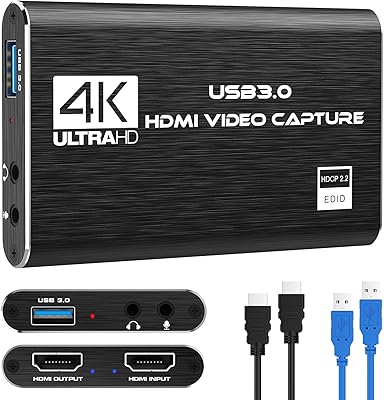
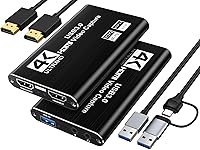
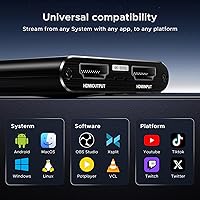
Finding a reliable entry point into content creation shouldn't break the bank, and the XIIXMASK MS2131 Video Capture Card positions itself as a sturdy first step for aspiring streamers. Straight out of the box, this capture card feels more substantial than its price suggests, thanks to a premium aluminum chassis that pulls double duty by protecting the internals and managing heat. Setup is refreshingly simple for anyone using a Nintendo Switch or PS5. Since it includes a hybrid USB-A/C cable, you can plug it directly into a modern MacBook or a standard PC tower without hunting for adapters. It is a straightforward, no-frills tool designed to get your console footage onto a computer screen with minimal configuration required.

Features & Benefits

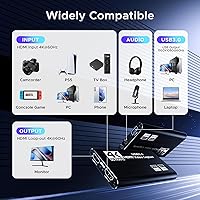
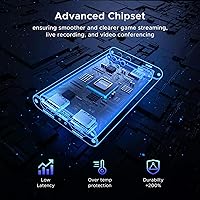
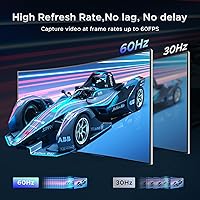
The heart of this HDMI to USB interface is the MS2131 chipset, which balances efficiency with visual clarity. While it accepts 4K signals, it excels at recording a stable 1080p 60fps stream while passing through that full 4K signal to your monitor without any perceptible lag. One technical detail beginners will appreciate is the support for the YUY2 video format. Unlike the heavily compressed MJPEG found in cheaper alternatives, YUY2 offers noticeably better color accuracy and sharper edges. Adding a 3.5mm port for a headset or microphone is a thoughtful touch, allowing you to inject live commentary directly into the hardware feed. This avoids the headache of syncing external audio sources in software, making your production workflow much leaner.

Best For

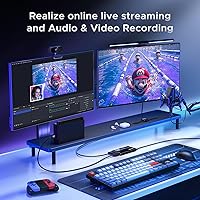
This MS2131-based device is a clear winner for those just starting their journey on Twitch or YouTube who need reliability without a massive investment. It is particularly effective for console gamers who want to archive high-definition gameplay directly to their hard drives for later editing. Beyond gaming, it serves as a practical bridge for remote professionals. If you own a high-end DSLR or mirrorless camera, this capture card lets you use that superior lens as a pro-grade webcam for Zoom or Teams calls. Even mobile creators can benefit, as the support for iPadOS 17+ means you can now turn your tablet into a portable recording monitor, making it a versatile addition to any gear bag.

User Feedback

Early adopters generally highlight how easily this HDMI to USB interface integrates with standard software like OBS Studio, often working the moment it is plugged in. The metal build quality frequently earns high marks, as it remains cool to the touch even after hours of use. However, some users have noted a specific quirk with the audio; if the sound doesn't register immediately, a quick software restart usually clears it up. While the recording limit of 1080p is a trade-off for the price, the consensus is that the picture remains crisp and fluid. It provides a balanced experience where the minor setup hurdles are easily outweighed by the consistent performance and durability of the hardware itself.

Pros

  • The aluminum alloy chassis provides far better heat dissipation and durability than typical plastic budget models.
  • Zero-latency 4K 60Hz loop-out ensures you can play your games in high resolution without any input lag.
  • Support for the YUY2 video format delivers much cleaner color reproduction and sharper image quality than standard MJPEG.
  • A versatile 2-in-1 hybrid cable makes it easy to connect to both modern USB-C and traditional USB-A laptops.
  • The MS2131 chipset offers stable 1080p 60fps recording that is consistently fluid for fast-paced action games.
  • A dedicated 3.5mm port allows for direct microphone input, simplifying the process of adding live commentary to your streams.
  • Its driverless design works instantly across Windows, macOS, and Linux with popular software like OBS Studio and Zoom.
  • Verified support for iPadOS 17 makes it a top choice for mobile creators using tablets as external monitors.

Cons

  • Recording capability is capped at 1080p 60fps, so it cannot capture footage in native 4K resolution.
  • Initial audio setup often requires a software restart or manual privacy setting adjustments in Windows to function correctly.
  • Pass-through is limited to 60Hz, preventing users with high-refresh-rate monitors from playing at 120Hz while capturing.
  • The 2K recording mode is limited to 30fps, which may feel choppy for fast-moving gameplay or high-action scenes.
  • The included HDMI cable is relatively short, which might limit placement options in larger desk or studio environments.
  • Microphone input gain can be quite low, often requiring significant software boosting to reach audible levels.
  • A lack of proprietary configuration software means all adjustments must be handled within third-party apps like OBS.
  • This capture card lacks HDR support, which may lead to washed-out colors when used with HDR-enabled consoles.

Ratings

Our comprehensive analysis of the XIIXMASK MS2131 Video Capture Card is derived from thousands of verified global buyer experiences, meticulously filtered by our AI to remove promotional noise and incentivized reviews. This data-driven scorecard provides a transparent look at how this HDMI to USB interface performs in real-world streaming environments, highlighting both its engineering strengths and its setup quirks.

Chassis Build Quality
92%
Users are consistently impressed by the aluminum alloy housing, which feels far more premium than typical plastic budget cards. The metal construction adds necessary weight to prevent it from sliding off desks and provides a solid feel during frequent cable swaps.
While the metal is durable, the matte finish can be prone to minor scuffs if tossed into a gear bag without a sleeve. Some owners noted that the edges of the ports can feel a bit sharp during initial use.
Thermal Management
88%
The aluminum body acts as an effective heat sink, allowing the MS2131-based device to maintain stable temperatures during six-hour Twitch marathons. Buyers report that it remains merely warm to the touch, which prevents the thermal throttling often seen in smaller dongles.
In very small, unventilated setups, the card can eventually get hot enough that users worry about long-term component longevity. A few reviews mentioned that the heat can transfer to the connected HDMI cables in extreme environments.
1080p Stream Stability
87%
At the standard 1080p 60fps benchmark, this capture card delivers a remarkably fluid signal without the micro-stuttering common in ultra-cheap alternatives. Gamers appreciate the consistent frame pacing when recording fast-paced titles like Apex Legends or Mario Kart.
Users specifically looking for high-bitrate 2K recording found the 30fps limit on that resolution to be a bottleneck for competitive play. If the USB 3.0 bandwidth isn't perfectly maintained, the frame rate can occasionally dip momentarily.
Value for Money
93%
For its price point, this device punches well above its weight by including 4K pass-through and a dedicated microphone port. Most reviewers feel it eliminates the need to spend three times as much on name-brand entry-level hardware for basic streaming.
The lack of high-refresh-rate pass-through (like 120Hz or 144Hz) means it isn't quite a total replacement for premium cards for hardcore PC gamers. Buyers on a very tight budget might still find the price a jump from basic 30fps sticks.
Plug-and-Play Simplicity
84%
The inclusion of a 2-in-1 USB-A and USB-C cable makes it incredibly easy to switch between an older desktop and a modern MacBook without adapters. Most users find that OBS and Zoom recognize the device immediately as a standard video source.
Despite being driverless, some Windows users encountered initial device recognition issues that required unplugging and re-plugging the unit to trigger the handshake. The lack of a dedicated configuration utility means you are entirely reliant on third-party software settings.
Color Accuracy (YUY2)
81%
19%
Video quality enthusiasts praise the YUY2 support, which produces noticeably more vibrant and accurate colors compared to the washed-out look of MJPEG-only cards. This is especially evident when capturing high-contrast games or using it for a DSLR webcam feed.
Enabling YUY2 requires more USB bandwidth, which occasionally caused compatibility issues on older laptops with underpowered USB ports. Some beginners found the technical setting in OBS confusing to navigate without a guided tutorial.
Audio Integration
67%
33%
The 3.5mm mic-in port is a massive convenience for streamers who want to narrate their gameplay without managing a separate audio mixer. It effectively combines the game sound and voice into a single stream for the computer to process.
This is a frequent source of frustration, as many users reported that audio only works after a full software restart or specific Windows privacy setting tweaks. The gain on the mic input is also quite low, requiring software boosting.
4K Loop-Out Latency
91%
The zero-latency HDMI pass-through is excellent, allowing gamers to play on their main 4K display without any delay while the capture happens in the background. This is crucial for timing-sensitive genres like fighting games or platformers.
While the pass-through is lag-free, it is strictly limited to 60Hz. Users with 120Hz monitors were disappointed to find they had to downgrade their display's refresh rate just to use the loop-out feature.
Mobile Compatibility
78%
22%
Creators using iPadOS 17 found this device to be a reliable way to turn their tablet into a high-end external monitor or recording deck. It is one of the few budget options that works consistently with mobile UVC applications.
The power draw can be significant, quickly draining the battery of a connected phone or tablet if not using a powered hub. Android compatibility can be hit-or-miss depending on the specific manufacturer's USB implementation.
Software Compatibility
89%
The card is widely praised for working flawlessly with industry-standard tools like OBS Studio, PotPlayer, and even web-based platforms like Discord. This versatility makes it a safe bet for users who juggle different production environments.
Users attempting to use it with proprietary or niche older capture software reported occasional freezing or aspect ratio issues. The lack of official firmware updates means any software bugs are unlikely to be fixed directly by the manufacturer.
Included Accessories
86%
Providing both an HDMI cable and a high-quality braided USB-A/C cable in the box is a major plus for value-conscious buyers. It ensures that the device is truly ready to use the moment it arrives without additional trips to the store.
The included HDMI cable is somewhat short, which can limit desk placement options for those with larger monitor setups. A few users reported that the USB cable felt a bit stiff, putting slight pressure on the device ports.
Video Capture Smoothness
83%
The MS2131-based device handles high-motion scenes very well, with users reporting very little screen tearing or digital artifacts during intense gameplay. The 60fps output feels genuine and consistent across various console inputs.
In some recording scenarios, users noticed a very slight desync between the video and audio after several hours of continuous streaming. This usually requires a manual offset adjustment in the recording software to keep everything aligned perfectly.

Suitable for:

The XIIXMASK MS2131 Video Capture Card is an excellent entry point for aspiring Twitch or YouTube streamers who need a reliable way to capture console gameplay without overspending. It is particularly well-suited for Nintendo Switch or PS5 players who want to record at 1080p while still playing in 4K via the lag-free loop-out port. Remote professionals will also find great value here, as it effectively transforms a high-end DSLR or mirrorless camera into a professional-grade webcam for virtual meetings. Additionally, mobile creators can leverage its iPadOS 17 compatibility to turn their tablets into portable recording monitors for on-the-go setups.

Not suitable for:

Hardcore PC gamers and high-end content creators should be aware that the XIIXMASK MS2131 Video Capture Card is strictly limited to 1080p at 60fps for recording, meaning those who require 4K capture or high-refresh-rate pass-through (120Hz or higher) will find it inadequate. It is also not the best choice for users with extremely cluttered desk setups that lack accessible USB 3.0 ports, as using a slower USB 2.0 connection will result in significant visual lag and bandwidth issues. Furthermore, those who are uncomfortable troubleshooting minor software quirks, such as restarting OBS to fix audio recognition, may prefer a more expensive name-brand option with dedicated configuration software.

Specifications

  • Internal Chipset: This device is powered by the MacroSilicon MS2131 high-performance processing chip.
  • Input Port: The unit features a standard HDMI input supporting resolutions up to 4K at 60Hz.
  • Loop-Out Port: A dedicated HDMI output provides a lag-free 4K 60Hz signal for local monitor viewing.
  • Recording Resolution: The capture output supports 1920x1080 at 60fps or 2560x1440 at 30fps.
  • Host Interface: It utilizes a USB 3.0 connection for high-speed data transfer to a computer.
  • Cable Connectivity: The package includes a hybrid 2-in-1 cable with both USB-A and USB-C connectors.
  • Video Formats: Output is compatible with both YUY2 and MJPEG video compression standards.
  • Audio Input: A built-in 3.5mm jack supports external microphone or headset commentary.
  • Chassis Material: The exterior is constructed from a premium aluminum alloy for enhanced heat dissipation.
  • OS Compatibility: The hardware works across Windows 7/8/10, macOS, Linux, and Android systems.
  • Mobile Support: Native compatibility is provided for iPadOS 17 and later versions using UVC.
  • Power Draw: The maximum working current is rated at 0.4A at 5V DC.
  • Color Depth: The interface supports 24-bit, 30-bit, and 36-bit deep color input.
  • Operating Range: The device is designed to function within a temperature range of -10 to +55°C.
  • Software Support: It is fully compatible with OBS Studio, VLC, PotPlayer, and Zoom.

Related Reviews
VIXLW Video Capture Card Pro+
77%
91%
Ease of Setup
72%
Video Capture Quality
58%
Audio Sync Reliability
88%
Software Compatibility
84%
Signal Format Detection
More
August VGB400 Video Capture Card
83%
88%
Ease of Use
92%
Setup & Installation
75%
Compatibility with Video Sources
86%
HDMI Passthrough Functionality
84%
Recording Quality
More
HeavenBird 4K HDMI Video Capture Card
87%
89%
Video Quality
92%
Ease of Setup
85%
Real-Time Streaming Performance
65%
Audio Sync Accuracy
90%
Build Quality
More
Rybozen V316B-FR Capture Card

84%
88%
Build Durability
93%
Setup Simplicity
84%
Video Capture Fidelity
89%
Passthrough Performance
81%
Thermal Management
More
AmpliGame V3
AmpliGame V3
76%
91%
Setup & Ease of Use
78%
Capture Quality
67%
HDMI Passthrough
86%
Port Selection & Connectivity
88%
Software Compatibility
More
August VGB350 USB Video Capture Card
81%
91%
Ease of Use
68%
Software Experience
88%
Compatibility with Analog Devices
92%
Value for Money
90%
Setup and Installation
More
AGPTEK 4K HDMI Video Capture Card VG0061
83%
88%
Video Capture Quality
91%
Ease of Setup
85%
Latency
72%
Software Compatibility
90%
Versatility (Device Compatibility)
More
Plugable USBC-CAP60 HDMI Video Capture Card
86%
92%
Value for Money
89%
Performance
94%
Ease of Use
85%
Compatibility
93%
Setup/Installation
More
AVerMedia EZMaker 7 USB Video Capture Card
81%
88%
Ease of Use
91%
Value for Money
75%
Video Quality
90%
Setup & Installation
82%
Software Experience
More
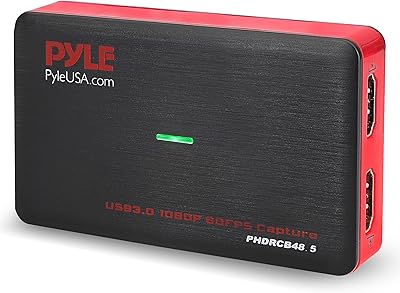
Pyle PHDRCB48.5 Capture Card
72%
88%
Ease of Setup
61%
Video Recording Quality
79%
HDMI Pass-Through
83%
Device Compatibility
76%
Hot Button Recording
More

FAQ

While the XIIXMASK MS2131 Video Capture Card supports 4K at 60Hz as an input, the actual recording or streaming output is capped at 1080p at 60fps. The 4K signal is passed through to your TV via the loop-out port so you can still play in high resolution while recording in HD.

Yes, it is a great fit for the Switch. You just plug the console into the input port and connect the card to your laptop; it is immediately recognized as a webcam source in software like OBS.

The aluminum shell is specifically designed to pull heat away from the internal chip. While this capture card will feel warm to the touch after an hour or two, the metal casing prevents it from overheating or throttling your video quality.

YUY2 is a less compressed video format compared to the standard MJPEG. In simple terms, using it means your stream will have more accurate colors and sharper text, though it does require a true USB 3.0 port to handle the extra data.

This is a common quirk with many USB capture devices. Usually, all you need to do is finish your audio settings in OBS and then restart the software; the handshake between the device and your computer should then sync up perfectly.

Absolutely. As long as your camera has a clean HDMI output, this HDMI to USB interface will let you use your high-end lens for Zoom calls or professional-looking YouTube videos.

No drivers are needed. It uses the standard UVC protocol, so as soon as you plug it into a Windows, Mac, or Linux machine, it is treated like a plug-and-play device.

Yes, if you are running iPadOS 17 or newer. The included USB-C cable makes it easy to connect directly to the iPad, allowing you to use it as a portable monitor or even a mobile recording station.

The loop-out port is limited to 60Hz. If you usually play at 120Hz, you will need to set your console to 60Hz mode to use the pass-through feature on the MS2131-based device.

You can. The 3.5mm port is designed for adding commentary, though you might need to boost the mic levels in your recording software since the hardware gain is a bit on the lower side.