
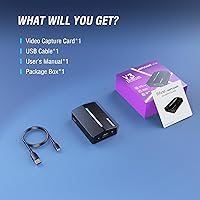
Overview

The AmpliGame V3 is a compact USB 3.0 capture card from Fifine's gaming sub-brand, released in mid-2024 and aimed squarely at beginner-to-intermediate streamers who don't want to spend a fortune getting started. It sits at #17 in its Amazon category with a 3.9 out of 5 rating across 176 reviews — respectable, but not the kind of score that suggests it's without rough edges. What it does well is lower the entry barrier considerably: no driver installation, no complicated software configuration, just plug in and start capturing. For anyone stepping into content creation for the first time, that friction-free setup genuinely matters.

Features & Benefits

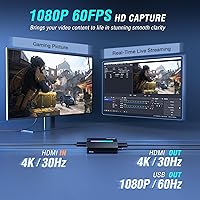
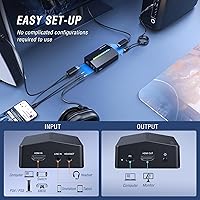
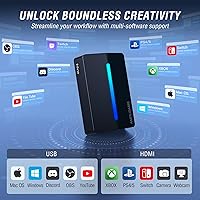
On the spec side, this capture card records at 1080p at 60fps, which is plenty for smooth, sharp streaming footage. The HDMI loop-out supports 4K at 30fps — worth clarifying that 4K applies only to passthrough, not to what actually gets captured, so adjust expectations accordingly. The USB 3.0 Type-A connection handles bandwidth without issue, and the extra ports are a genuine differentiator at this price: HDMI output, a Line In jack, and a 3.5mm headset port that lets you talk to teammates without a separate audio device. It also works with OBS, Twitch, YouTube, and Discord straight away, across both Windows and macOS.

Best For

This streaming device hits its stride with a fairly specific audience. Console gamers — PS4, PS5, Xbox, or Switch users — just starting to stream will find the plug-and-play setup a real relief. Educators and online course creators who need dependable screen capture without wrestling with drivers will also get solid mileage out of it. The built-in headset port means you can skip buying a separate audio interface if your needs are basic. At its price point, it competes well for anyone wanting 1080p quality without the premium cost of an Elgato or Razer equivalent. Mac and Windows users alike can be up and running within minutes.

User Feedback

Among verified buyers, the most consistent praise goes to the easy initial setup and the clarity of the 1080p output. The headset port earns specific mentions from streamers who expected to buy additional hardware. On the flip side, a handful of users ran into USB connectivity hiccups — sticking with the included cable rather than a third-party substitute resolves this for most. The RGB lighting divides opinion cleanly: some appreciate the desk aesthetics, others find it unnecessary. A recurring frustration is the 4K loop-out cap at 30fps; buyers who assumed that meant full 4K capture were let down. The 3.9-star average reflects a device that delivers well within its intended scope, but falls short for anyone pushing beyond it.

Pros

  • Plug-and-play setup works out of the box — no drivers, no configuration headaches.
  • Captures clean, fluid 1080p footage at 60fps suitable for most streaming and recording needs.
  • Built-in headset port lets you chat with teammates without buying a separate audio interface.
  • Works across PS4, PS5, Xbox, and Switch without any per-console reconfiguration.
  • Fully compatible with OBS, Twitch, YouTube, and Discord from the first connection.
  • HDMI loop-out lets you play on your monitor in full resolution while capturing simultaneously.
  • Supports both Windows and macOS equally well, which is a genuine advantage at this price tier.
  • Compact and light enough to pack for LAN parties or on-the-go content creation.
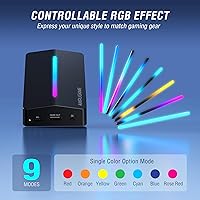
  • Nine RGB lighting modes add desk aesthetics without getting in the way of functionality.

Cons

  • The HDMI passthrough is capped at 4K/30fps, not 60fps — a common source of buyer disappointment.
  • Third-party USB cables often cause detection issues; you are effectively locked into using the included one.
  • No companion app means RGB lighting can only be cycled through a physical button, not controlled via software.
  • Capture quality noticeably lags behind pricier rivals in high-contrast or low-light gaming scenes.
  • An HDMI cable is not included, despite the device requiring one to function at all.
  • Running this capture card through a USB hub rather than a direct port frequently causes dropped frames.
  • Audio input lacks any gain control, making mic monitoring unreliable in untreated or noisy rooms.
  • No firmware update pathway means hardware quirks present at launch are effectively permanent.
  • PS5 users must manually set console output to 1080p or risk a blank capture feed — easy to miss.

Ratings

The AmpliGame V3 earns a measured but genuine recommendation in the budget capture card space — our AI-driven scoring system analyzed verified global buyer reviews, actively filtering out incentivized, bot-generated, and low-quality feedback to surface what real users actually experience. Scores reflect both where this streaming device punches above its weight and where it shows the limitations you'd expect at this price tier. Strengths and frustrations are represented equally, so you can make an informed call before buying.

Setup & Ease of Use
91%
Buyers consistently describe a refreshingly fast first-time setup — plug in the USB cable, connect HDMI, and OBS or Twitch picks it up almost immediately with no driver hunting required. For someone nervous about hardware configuration, this plug-and-play approach removes a real barrier.
A recurring caveat in user reports is that the original included cable must be used for reliable detection; swapping in a third-party USB cable sometimes causes the device to go unrecognized, which can feel frustrating when you're mid-setup and grabbing whatever cable is nearby.
Capture Quality
78%
22%
At 1080p and 60 frames per second, footage looks clean and fluid for everyday streaming and recording — fast-paced gameplay on Switch or PS5 holds up well without obvious compression artifacts during normal broadcast conditions. For the target audience, this is genuinely sufficient quality.
Users with discerning eyes note the output doesn't match pricier hardware in low-light or high-contrast scenes. Color accuracy is competent rather than impressive, and those coming from an Elgato HD60 X may notice a modest but real step down in overall image sharpness.
HDMI Passthrough
67%
33%
Having a dedicated HDMI loop-out means you can keep your game running on a monitor at full resolution while simultaneously feeding footage to your capture software — a workflow that many entry-level cards skip entirely, and buyers appreciate not having to choose between the two.
The passthrough tops out at 4K and 30fps, not 60fps, which trips up a meaningful number of buyers who assumed 4K passthrough meant 4K at full frame rate. If your monitor and console support 4K/60fps natively, the downgrade in passthrough fluidity is noticeable during fast gameplay.
Port Selection & Connectivity
86%
Packing a headset jack, Line In, and HDMI output into a device this compact is genuinely unusual at the budget tier. Streamers who want to hear game audio and chat with teammates without buying a separate audio interface find real, practical value in having all of that built in.
The Line In port is basic — it handles a direct audio feed but lacks any onboard gain control or monitoring mix, so users doing more nuanced audio work will still need an external interface. The headset port also lacks software-level control over mic monitoring volume.
Software Compatibility
88%
Out-of-the-box recognition across OBS, Twitch Studio, YouTube Live, and Discord is consistently reported as smooth. Both Windows and macOS users describe no meaningful configuration friction, which is especially appreciated by Mac users who often find budget peripherals poorly supported on Apple hardware.
There is no proprietary companion app, so any advanced settings — scene transitions, audio mixing, overlay management — depend entirely on third-party software. Absolute beginners who expected a bundled streaming dashboard may feel a little under-guided on their first session.
Console Compatibility
84%
PS4, PS5, Xbox Series X and S, and Nintendo Switch all work without any specialized setup steps. Cross-console households find it particularly convenient to share a single capture device between multiple systems without reconfiguring anything each time they switch.
PS5 users capturing at higher resolutions need to ensure their console output settings are manually adjusted to 1080p, since the card cannot downscale a 4K signal on its own. Missing that step leads to a blank capture feed, which generates avoidable confusion for newcomers.
Build Quality & Form Factor
72%
28%
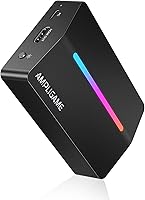
At just 3.36 ounces and small enough to tuck behind a monitor, this capture card doesn't add clutter to a desk setup. The matte black plastic shell feels clean and unobtrusive, and the compact size makes it easy to pack for LAN events or travel content creation.
The chassis is all plastic with no metal reinforcement, and the port connections feel marginally loose compared to more expensive units. Long-term durability is a mild concern for users who plug and unplug cables frequently — a few reviews mention connector wobble after extended use.
RGB Lighting
61%
39%
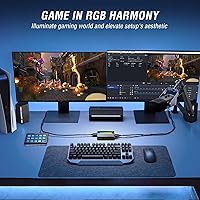
Nine lighting modes give enough variety to match most desk aesthetics, and the glow is diffuse enough not to create on-camera glare. Streamers who care about the visual presentation of their background will appreciate having something that doesn't look purely utilitarian sitting on their desk.
RGB on a capture card divides opinion sharply. Buyers who prioritize function over form see it as a pointless addition that likely contributes to the unit's cost. There is no software control over the lighting — only a physical button cycle — making fine-tuned customization impossible.
Value for Money
83%
Against rivals in the same price bracket, the combination of 1080p/60fps capture, 4K passthrough, a headset port, and broad OS support represents a strong feature-to-cost ratio. First-time streamers who would otherwise spend more on separate audio hardware find the all-in-one connectivity particularly cost-effective.
Buyers who stretch their expectations — hoping for pro-grade capture quality, 4K/60fps passthrough, or robust software support — will feel the limitations quickly. The value proposition is real, but only if your expectations are calibrated to what a budget device can genuinely deliver.
Latency & Performance Stability
74%
26%
For streaming and recording purposes, latency is low enough that it never becomes a practical problem — viewers watching a Twitch or YouTube stream see no meaningful lag. The USB 3.0 interface provides enough headroom to sustain stable capture throughput during extended sessions.
A small subset of users report occasional dropped frames or brief signal interruptions, almost always traced back to USB cable quality or an overloaded USB hub. Using the card on a direct motherboard port rather than a hub resolves this for most, but it adds a constraint worth knowing upfront.
Audio Capture Quality
69%
31%
Game audio captured through the HDMI input comes through clearly with no obvious hiss or distortion under normal conditions. The Line In port handles a direct feed from a mixer or secondary audio source cleanly enough for casual streamers who aren't running a full production setup.
Audiophiles and podcasters will find the audio capture underwhelming compared to even a basic dedicated audio interface. There is no independent gain adjustment, and mic input through the headset port can pick up background noise more readily than users expect in an untreated room.
Driver & Update Support
70%
30%
Because the device is fully driver-free, there are no firmware update headaches, no software conflicts after OS updates, and no dependency on a manufacturer portal staying active. For buyers burned by discontinued driver support on older capture cards, this is a quietly meaningful advantage.
The flip side of having no driver ecosystem is that there is no pathway for Fifine to push performance improvements or fix hardware-level issues via software updates. Whatever quirks ship with the unit are effectively permanent, which is a mild long-term concern as OS versions evolve.
Packaging & Included Accessories
65%
35%
The included USB cable is adequate for the task it is designed for, and the packaging is compact and well-organized without wasteful filler. Buyers who open the box expecting to start immediately generally can, assuming they already have an HDMI cable on hand.
An HDMI cable is not included, which is a common complaint given that the device fundamentally requires one to function. For a buyer who picks this up as their first streaming accessory, discovering that omission after unboxing is a minor but unnecessary friction point.

Suitable for:

The AmpliGame V3 is built for people who are just finding their footing in streaming or content creation and don't want to spend hours troubleshooting hardware before going live. Console gamers on PS4, PS5, Xbox, or Switch who want to start broadcasting on Twitch or YouTube without buying a pile of accessories will find the all-in-one port selection — headset jack included — a genuinely practical package. Educators and online course creators who need clean, reliable 1080p screen capture for recorded tutorials or video conferences will also get solid daily use out of this streaming device. It suits Mac and Windows users equally well, which is rarer than it should be at this price point. If your goal is to capture 1080p footage at 60fps, chat with teammates through the same device, and get everything recognized by OBS within five minutes of unboxing, this capture card checks those boxes without overcomplicating things.

Not suitable for:

Anyone expecting professional-grade capture performance or full 4K recording at 60fps will hit the ceiling of what this streaming device can do fairly quickly — it captures at 1080p, full stop, and the 4K spec only applies to the HDMI passthrough output at a capped 30fps. Dedicated streamers who have already outgrown entry-level hardware and are looking to upgrade to something like an Elgato HD60 X should look elsewhere; the AmpliGame V3 is a starting point, not a stepping stone for serious production setups. Buyers who need precise audio monitoring, onboard gain control, or multi-source audio mixing will find the basic Line In and headset port fall short of what a proper audio interface provides. It also won't suit anyone who plans to run it through a USB hub rather than a direct port — doing so introduces instability that can be hard to diagnose if you don't already know to expect it. Power users who want companion software for scene management, lighting control from a desktop app, or firmware-level performance tuning will find the driver-free design limiting rather than liberating.

Specifications

  • Capture Resolution: Records video at up to 1080p at 60fps for smooth, high-definition streaming and local recording.
  • HDMI Loop-Out: Passes through video to a connected monitor at up to 4K resolution, capped at 30fps.
  • USB Interface: Connects to a host computer via USB 3.0 Type-A, providing sufficient bandwidth for stable HD capture throughput.
  • Additional Ports: Includes a dedicated HDMI output, a Line In audio input, and a 3.5mm headset jack for combined audio monitoring and communication.
  • Driver Requirement: Fully plug-and-play with no driver installation required on supported operating systems.
  • Compatible Consoles: Supports video capture from PlayStation 4, PlayStation 5, Xbox Series X and S, and Nintendo Switch.
  • Operating Systems: Compatible with Windows and macOS; no Linux support is officially documented.
  • Supported Software: Works out of the box with OBS Studio, Twitch Studio, YouTube Live, and Discord video streaming.
  • RGB Lighting: Features onboard RGB lighting with 9 selectable modes, cycled via a physical button on the unit.
  • Dimensions: Measures 4.24 inches long by 2.8 inches wide by 1.21 inches tall, making it compact enough to sit behind a monitor.
  • Weight: Weighs 3.36 ounces, light enough for portable use at LAN events or on-location recording setups.
  • Color: Available in matte black as the standard colorway for this model.
  • Brand & Series: Produced under the AmpliGame sub-brand by Fifine, a peripheral manufacturer known for budget-friendly audio and streaming hardware.
  • Model Identifier: Officially designated as the V3, serving as the model series name used in product documentation and packaging.
  • Release Date: First made available for purchase in July 2024 on the Amazon marketplace.
  • HDMI Cable Included: An HDMI cable is not included in the box; only a USB cable is provided alongside the unit.
  • Amazon Ranking: Holds a Best Sellers Rank of number 17 in the Internal TV Tuner and Video Capture Cards category on Amazon.
  • User Rating: Carries an average rating of 3.9 out of 5 stars based on 176 verified buyer ratings at time of analysis.

Related Reviews
Wyze Cam v3
Wyze Cam v3
84%
91%
Value for Money
88%
Night Vision Performance
85%
Setup and Installation
84%
Build Quality
87%
Smart Home Integration
More
TP-Link EAP110-Outdoor V3
87%
89%
Wi-Fi Range
94%
Ease of Setup
92%
Weatherproofing
85%
Speed & Stability
80%
App & Cloud Management
More
Razer Seiren V3 Chroma Microphone
84%
88%
Sound Clarity
85%
Noise Cancellation
91%
RGB Lighting Features
93%
Ease of Use
80%
Microphone Durability
More
WANDRD PRVKE 31L V3 Backpack
87%
94%
Build Quality
93%
Weather Resistance
89%
Storage Capacity
90%
Side Access for Gear
85%
Ease of Use
More
WANDRD PRVKE 41L V3 Backpack
86%
93%
Build Quality & Durability
91%
Weather Resistance
85%
Comfort & Ergonomics
89%
Storage Capacity & Organization
88%
Ease of Access
More
FIFINE AmpliGame A8
FIFINE AmpliGame A8
78%
78%
Sound Clarity
67%
Noise Rejection
61%
Build Quality
94%
Ease of Setup
86%
On-Mic Controls
More
FIFINE AmpliGame A20
77%
91%
Value for Money
78%
Audio Clarity
54%
Bass Performance
88%
RGB Lighting
93%
Ease of Setup
More
FIFINE AmpliGame AM6
76%
83%
Voice Clarity
67%
Noise Cancellation
88%
Game/Chat Balance Control
91%
Ease of Setup
61%
Build Quality
More
Fosi Audio V3 Stereo Amplifier
81%
93%
Value for Money
91%
Audio Clarity & Noise Floor
67%
Real-World Power Output
74%
Build Quality & Finish
88%
Thermal Management
More
WANDRD PRVKE 21L V3 Backpack
84%
91%
Durability & Build Quality
89%
Weather Resistance
85%
Expandability (Rolltop Feature)
87%
Laptop & Gear Protection
90%
Ease of Access & Organization
More

FAQ

No, this capture card is fully plug-and-play. Just connect it via USB to your computer and it should be recognized automatically by Windows or macOS without any driver download or installation step. Once connected, open OBS or whichever streaming software you prefer and the device will appear as a video capture source.

The 4K spec applies only to the HDMI loop-out passthrough, not to capture. What gets recorded or streamed to your software is capped at 1080p and 60fps. The 4K passthrough also runs at 30fps, not 60fps, so keep that in mind if you use a 4K monitor and expect full-frame-rate display output while recording.

It works with PS5, but you do need to manually set your PS5 video output to 1080p in the console settings before connecting. The AmpliGame V3 cannot downscale a 4K signal on its own, so if your PS5 is outputting 4K by default, the capture feed will appear blank until you lower the output resolution.

Mac support works well in practice. The device is recognized by macOS without drivers, and OBS on Mac picks it up as a standard capture source. Both Intel and Apple Silicon Macs have been reported to work without issues by users in the community.

The 3.5mm headset port lets you plug in a headset directly into the capture card to monitor audio and communicate with teammates, rather than routing everything through your computer's audio output. It is a combined headset jack, so a headset with a single 3.5mm connector works best. It is a practical inclusion that saves you from needing a separate audio splitter or interface for basic chat needs.

The most common cause is using a third-party USB cable instead of the one included in the box. This capture card is notably sensitive to cable quality, and many connectivity issues reported by buyers were resolved simply by switching back to the original cable. Also make sure you are plugging directly into a motherboard USB port rather than a USB hub, as hubs can cause unstable connections.

It can handle a direct audio feed from a mixer or secondary audio source, which works fine for basic setups. However, there is no onboard gain control, so you cannot adjust input levels from the device itself. For anything beyond a straightforward line-level signal, a dedicated external audio interface will give you significantly more control.

For a first-time streamer on a budget, this capture card holds its own well — the plug-and-play setup, 1080p/60fps capture, and built-in headset jack cover most beginner needs at a lower price. The Elgato HD60 X offers better image processing, software integration, and 4K/60fps passthrough, but at a noticeably higher cost. If you are testing the waters with streaming and not ready to invest heavily, this streaming device is a sensible starting point.

RGB control is button-only — there is no software or app that lets you manage the lighting modes from your PC or Mac. You cycle through the 9 available modes by pressing a physical button on the unit itself. If matching your RGB to the rest of your setup via software is important to you, that level of control is not available here.

Yes, it works well for non-gaming use cases like recording tutorials, online courses, or screen capture for video conferences. As long as you are capturing a standard HDMI video signal, the device does not care whether the source is a game console or a laptop output. The clean 1080p capture and broad software compatibility make it a practical low-cost tool for educators and remote workers who need reliable screen recording.