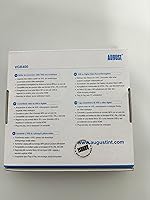
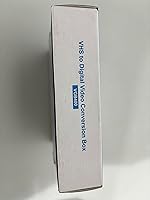
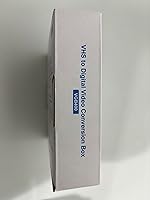
Overview

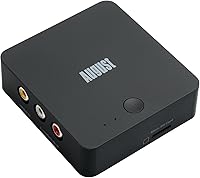
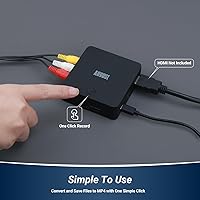
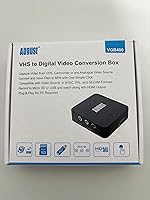
The August VGB400 Video Capture Card is a compact standalone device built for anyone who wants to convert old tapes to digital files without touching a computer. No software to install, no drivers to track down — you plug it in, press a button, and it records. It fits in the palm of your hand and accepts legacy connections via RCA composite and a bundled SCART adapter. At its price point, this is clearly a convenience-first tool, not a professional archiving solution. Manage your expectations accordingly and it has a solid chance of doing exactly what you need.

Features & Benefits

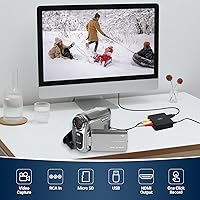
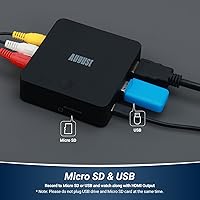
The VGB400 records directly to a USB stick or Micro SD card as a standard MP4 file — no intermediate steps, no computer involved at any point. Storage maxes out at 64GB, and your drive must be formatted as FAT32 or NTFS, which is worth verifying before you start. An HDMI passthrough port lets you watch what is being recorded on a TV or monitor in real time — handy for keeping track of where you are on a tape. It handles both PAL and NTSC signals, covering tapes from the US, UK, and Europe. Power runs through a standard USB-C cable, which most people already own.

Best For

This no-PC digitizer is genuinely well-suited to a specific kind of buyer: someone with a box of VHS or Hi8 tapes who wants them saved as digital files without any technical fuss. It works particularly well for older family members who are not comfortable installing software, or anyone without a Windows PC who has no interest in setting one up just for this. Occasional digitizers will appreciate the simplicity — if you are archiving a few dozen tapes rather than hundreds, the one-button workflow is a real practical advantage. Built-in PAL/NTSC support also makes it a decent pick for those working with tapes recorded in different countries.

User Feedback

With a 3.4-star average across 151 reviews, this capture device sits in genuinely mixed territory — worth understanding before buying. Buyers expecting a simple, foolproof experience tend to leave satisfied; easy setup and straightforward operation draw consistent praise. On the other side, a noticeable share of reviewers found output quality underwhelming. Analog footage will never look sharp regardless of what captures it, but some felt the MP4 files came out softer than expected. USB recognition issues also surface regularly — drives not formatted correctly simply will not work, and that FAT32 requirement catches people off guard. A missing HDMI cable also surprised buyers who assumed one was included.

Pros

  • No PC, software, or drivers needed — the entire setup takes just a few minutes for most people.
  • Records directly to a USB stick or Micro SD card as a standard MP4 file anyone can play.
  • Supports both PAL and NTSC signals, covering tapes from the US, UK, and across Europe.
  • The HDMI passthrough lets you watch playback on a TV while recording, so you always know where you are on a tape.
  • Compact enough to store in a drawer and pull out only when needed.
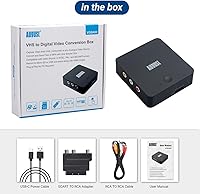
  • Accepts RCA composite input and includes a SCART adapter, covering the widest range of older devices.
  • Powered by a USB-C cable, so no proprietary charger or wall adapter is required.
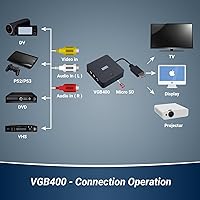
  • Works with VHS, Hi8, Mini DV, DVD players, and camcorders — broad legacy format coverage.
  • Saves files in MP4, which opens on virtually any phone, tablet, smart TV, or laptop without extra software.

Cons

  • Output quality is limited by the analog source, and some users find the captured footage looks noticeably soft or over-compressed.
  • USB drives must be formatted as FAT32 or NTFS before use — incompatible drives simply will not be recognized, with no clear error message.
  • Storage is capped at 64GB, which may not be enough for large tape collections without swapping drives frequently.
  • No HDMI cable is included in the box, despite the HDMI passthrough being a highlighted feature.
  • The 3.4-star average across over 150 reviews signals a meaningful share of buyers walked away disappointed.
  • No fine control over encoding quality, bitrate, or resolution — what you get is what you get.
  • Not designed for bulk or batch archiving; processing a large tape library one tape at a time is slow going.
  • Customer support experiences have been inconsistent, based on reviews flagging issues with unrecognized drives or recording failures.

Ratings

Our editorial team used AI to analyze verified buyer reviews for the August VGB400 Video Capture Card from multiple global markets, actively filtering out incentivized, bot-generated, and spam submissions to surface what real users actually experienced. The resulting scores reflect both the genuine strengths and the recurring frustrations that shaped the product's 3.4-star average. Nothing has been softened — if a category underdelivers, the score says so.

Ease of Setup
88%
This is the area where the VGB400 earns its most consistent praise. Buyers repeatedly describe getting up and running in under five minutes — plug in the RCA cables, insert a USB stick, press the button. For non-technical users and older adults, that friction-free start is the whole reason they chose this device over a PC-based alternative.
A meaningful subset of users hit an immediate wall when their USB drive was not recognized, usually because it was not formatted as FAT32 or NTFS. There is no on-screen error message to guide you, so first-timers can spend a frustrating amount of time troubleshooting what turns out to be a simple formatting issue.
Video Output Quality
52%
48%
For buyers who simply want watchable, shareable copies of old family tapes, the output is adequate. The footage is recognizable, plays back smoothly on any modern device, and the MP4 format means no conversion headaches afterward. If your source tapes are in decent condition, the results are genuinely usable.
A large share of critical reviews focus specifically on soft, compressed-looking footage that falls short of even modest expectations. The device does not enhance the analog signal in any meaningful way, and the compression applied during recording can make already-imperfect VHS footage look noticeably worse than it does playing directly through a TV.
Compatibility
81%
19%
PAL and NTSC support in a single compact device is a real practical advantage for households with tapes recorded across different decades and countries. The bundled SCART adapter also extends compatibility to older European equipment, which avoids a separate purchase for many UK buyers.
Compatibility with storage media is the weak link. The 64GB cap and strict FAT32 or NTSC formatting requirement exclude a number of commonly owned drives out of the box. Users with newer, larger-capacity drives formatted as exFAT frequently report failed recordings with no clear indication of what went wrong.
Value for Money
61%
39%
For buyers who need a dead-simple, no-PC digitizer and understand what analog-sourced footage realistically looks like, the price feels fair. The device does eliminate the need for a computer entirely, which is a genuine convenience that justifies part of the cost for the right buyer.
At this price point, competing PC-based capture cards offer significantly more control over encoding quality and are available for considerably less. Buyers who end up disappointed by the output quality or USB compatibility issues tend to feel the device does not justify its cost, especially when a cheaper alternative might have served them better.
Build Quality
67%
33%
The VGB400 feels solid enough for occasional home use. It is compact and light, which makes it easy to move between a TV room and a storage shelf without any concern. The port placement is practical and the unit sits stably on a surface next to a VHS deck.
The plastic casing does not inspire confidence in long-term durability, and some users note the RCA ports feel slightly loose after repeated use. For a device that most people will store and retrieve repeatedly over months, the construction feels more budget than the price suggests.
HDMI Passthrough
73%
27%
Being able to watch your tape play out on a TV in real time while it records is genuinely useful — you can monitor for tracking issues, fast-forward to the right spot, and know exactly when a tape ends. It works reliably and makes the archiving process feel less like guesswork.
The HDMI cable is not included, which catches a surprising number of buyers off guard at the point of setup. The passthrough does not upscale or enhance the signal — it simply mirrors the analog input — so do not expect the image on your TV to look any better than the original tape.
Storage Flexibility
58%
42%
The option to record to either USB sticks or Micro SD cards gives buyers a degree of flexibility depending on what storage they have on hand. MP4 files can be transferred directly to a computer, phone, or smart TV once recording is complete, requiring no additional conversion step.
The 64GB maximum per device is a genuine limitation for anyone digitizing a large tape collection in one sitting. Swapping and reformatting drives mid-session is inconvenient, and the strict formatting requirements mean not every drive in your drawer will work without preparation.
Legacy Input Support
84%
RCA composite connections are the standard for virtually every analog video source from the VHS era, and the inclusion of a SCART adapter means European users do not need a separate dongle. This single device covers the vast majority of legacy sources most households are likely to encounter.
There is no S-Video input, which means users with higher-quality VHS or Hi8 equipment that supports S-Video cannot take advantage of that marginally better signal path. For most users this is a non-issue, but it is a gap for anyone who cares about extracting the best possible quality from their tapes.
Recording Controls
76%
24%
The one-button record operation is exactly right for the intended audience. There is no menu to navigate, no settings to configure, and no risk of accidentally changing something important mid-recording. Buyers who want a start-and-forget experience find this genuinely satisfying.
That same simplicity becomes a limitation if you want any control over what you are capturing. There is no way to set recording quality, adjust bitrate, skip segments, or pause and resume without splitting the file. Users who realize too late that they recorded an hour of blank tape with no way to trim it tend to feel let down.
Power Convenience
86%
USB-C power is a small but appreciated detail. Most buyers already have USB-C cables from phones or tablets, so there is no need to track down a proprietary charger or source a wall adapter. You can power the device from a TV USB port, a power bank, or a standard USB charger.
The device does not include a USB-C power adapter in the box, only the cable. While most people have a suitable adapter already, it is one more thing to have ready before your first use — and buyers who did not read the box carefully occasionally report being caught short at setup.
Portability
82%
18%
At under three inches in each direction and well under three ounces, this capture device is about as compact as a standalone digitizer can get. It can be tucked into a bag or a drawer between uses and carried easily to a family member's house to digitize their tapes as well.
Portability only matters if compatibility travels with you, and the USB formatting requirement means borrowing someone else's storage at the last minute often does not work. The compact design also means the ports are closely grouped, which can be awkward with bulkier RCA plugs or thick cables.
Software Independence
91%
Requiring zero software or drivers is the defining feature of this no-PC digitizer, and it delivers on that promise completely. Mac users, tablet-only households, and anyone allergic to driver installations can use this device without compromise. The MP4 output opens on everything, so sharing footage afterward is equally friction-free.
The trade-off for that independence is a total absence of post-processing options. You cannot adjust color, trim clips, or improve audio at the point of capture. Everything is fixed at the hardware level, which suits simple preservation tasks but leaves nothing for users who want even basic editing capability built in.

Suitable for:

The August VGB400 Video Capture Card is a strong fit for anyone who wants to rescue old home videos from VHS, Hi8, or Mini DV tapes without dealing with software installs or a computer setup. It is particularly well-suited to older adults or less tech-savvy family members who need a genuinely simple workflow — plug in the tape deck, plug in a USB stick, press record, done. Families who have a modest collection of tapes sitting in a box and just want them saved as watchable digital files will find this capture device does exactly that without drama. It also works well for people who only have a Mac or a tablet and have no way to run traditional PC-based capture software. The built-in PAL and NTSC support makes it a practical choice for households with tapes recorded across different countries over the years.

Not suitable for:

The August VGB400 Video Capture Card is not the right tool if you care deeply about output quality or plan to edit, restore, or share footage professionally. The MP4 files it produces reflect the limitations of the original analog source, and some users find the compression adds further softness to an already imperfect signal. If you are digitizing a large archive of tapes and need efficient batch processing or fine control over encoding settings, this no-PC digitizer will frustrate you — it is built for simplicity, not throughput or flexibility. Anyone expecting to plug in any USB drive and have it work immediately should also be aware that drives must be formatted as FAT32 or NTFS and capped at 64GB, which has tripped up a meaningful number of buyers. Finally, if you were planning to connect your setup to an HDMI display right out of the box, note that an HDMI cable is not included.

Specifications

  • Brand: Manufactured by August, a UK-based consumer electronics brand known for budget-friendly audio and video accessories.
  • Model: The device is sold under the series designation VGB400.
  • Dimensions: The unit measures 2.99 x 3.19 x 0.98 inches, making it compact enough to sit beside a VHS deck without taking up meaningful space.
  • Weight: At 2.58 ounces, this capture device is light enough to move between rooms or setups without any hassle.
  • Color: Available in black only.
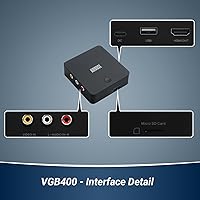
  • Video Inputs: Accepts analog video via standard RCA composite connectors (Red, White, Yellow) and includes a SCART adapter for European devices.
  • HDMI Output: Features an HDMI passthrough port for real-time monitoring on a TV or monitor during recording; an HDMI cable is not included in the box.
  • Storage Support: Records to USB sticks or Micro SD cards with a maximum supported capacity of 64GB per device.
  • File System: Storage media must be formatted as FAT32 or NTFS for the device to recognize and write to it correctly.
  • Output Format: All recordings are saved as MP4 files, which are compatible with the vast majority of modern playback devices and platforms.
  • Video Standards: Supports both PAL and NTSC encoded video signals, covering tapes and devices from the UK, Europe, and the USA.
  • Resolution: Capable of capturing and passing through video at up to 720p and 1080p resolution output via HDMI.
  • Compatible Sources: Works with VHS players, Hi8 camcorders, Mini DV camcorders, DVD players, and other analog video sources with RCA or SCART output.
  • Power Supply: Powered via a standard USB to USB-C cable, so no proprietary wall adapter is needed.
  • PC Requirement: No computer, software installation, or drivers are required at any stage of setup or recording.
  • Interface: Connects to storage and power via USB, and to a display via HDMI.
  • USB Ports: Includes one USB 2.0 port for connecting a USB storage device directly to the unit.
  • First Available: This product was first listed for sale in October 2023.

Related Reviews
August VGB350 USB Video Capture Card

81%
91%
Ease of Use
68%
Software Experience
88%
Compatibility with Analog Devices
92%
Value for Money
90%
Setup and Installation
More
XIIXMASK MS2131 Video Capture Card
85%
92%
Chassis Build Quality
88%
Thermal Management
87%
1080p Stream Stability
93%
Value for Money
84%
Plug-and-Play Simplicity
More
VIXLW Video Capture Card Pro+
77%
91%
Ease of Setup
72%
Video Capture Quality
58%
Audio Sync Reliability
88%
Software Compatibility
84%
Signal Format Detection
More
Rybozen V316B-FR Capture Card
84%
88%
Build Durability
93%
Setup Simplicity
84%
Video Capture Fidelity
89%
Passthrough Performance
81%
Thermal Management
More
AmpliGame V3
AmpliGame V3
76%
91%
Setup & Ease of Use
78%
Capture Quality
67%
HDMI Passthrough
86%
Port Selection & Connectivity
88%
Software Compatibility
More
HeavenBird 4K HDMI Video Capture Card
75%
91%
Ease of Setup
78%
Video Output Quality
74%
4K Passthrough Performance
69%
Audio Functionality
82%
Build Quality
More
AVerMedia EZMaker 7 USB Video Capture Card
81%
88%
Ease of Use
91%
Value for Money
75%
Video Quality
90%
Setup & Installation
82%
Software Experience
More
AGPTEK VG0061 HDMI Capture Card
71%
88%
Ease of Setup
83%
1080p Capture Quality
47%
4K Capture Performance
79%
Value for Money
38%
Software Experience
More
Plugable USBC-CAP60 HDMI Video Capture Card
86%
92%
Value for Money
89%
Performance
94%
Ease of Use
85%
Compatibility
93%
Setup/Installation
More
Pyle PHDRCB48.5 Capture Card
72%
88%
Ease of Setup
61%
Video Recording Quality
79%
HDMI Pass-Through
83%
Device Compatibility
76%
Hot Button Recording
More

FAQ

Correct — that is the whole point of this device. You plug your VHS player into the VGB400 using the RCA cables, insert a USB stick or Micro SD card, and press the record button. The footage saves directly to the storage device as an MP4 file. No laptop, no software, no drivers involved at any step.

The VGB400 supports USB sticks up to 64GB in capacity, but they must be formatted as FAT32 or NTFS before use. If your drive is formatted as exFAT — which many larger drives are out of the box — the device will not recognize it. You can reformat a drive on a computer or phone fairly easily, but it is worth checking before you sit down to start recording.

Yes, it handles PAL signals natively, so UK and European VHS tapes work without any adjustments. The included SCART adapter also means you can connect older European devices that do not have standard RCA outputs directly.

Yes, there is an HDMI output port that lets you connect the capture device to a TV or monitor so you can see the footage playing in real time while it records. Just keep in mind that an HDMI cable is not included in the box, so you will need to have one on hand.

This is where expectations matter quite a bit. The output quality is fundamentally limited by the original VHS or analog tape, which was never a high-resolution format to begin with. The August VGB400 Video Capture Card does a reasonable job of capturing what is there, but do not expect crisp or sharp footage — some users find the MP4 files look slightly soft or compressed compared to what plays back through the TV directly. It is fine for preserving memories, not ideal for anything that needs to look polished.

The device works with any source that outputs a standard analog signal through RCA composite or SCART connections. That covers VHS players, Hi8 camcorders, Mini DV camcorders, DVD players, and most older video equipment. If your device has the red, white, and yellow RCA plugs or a SCART socket, you are good to go.

That depends on the drive size and the length of your tapes, but the device supports drives up to 64GB. A typical VHS tape running at two hours will produce an MP4 file somewhere in the range of a few gigabytes, so a 32GB or 64GB stick should comfortably hold a substantial number of tapes. Just make sure the drive is properly formatted before you start.

Because this no-PC digitizer does not connect to a computer at all, your operating system is completely irrelevant. Mac, Windows, Linux, or no computer whatsoever — it makes no difference. The device records independently to USB or Micro SD storage, and you can then copy those MP4 files onto whichever computer or device you prefer afterward.

The SCART adapter is included in the box, which is a nice touch for UK and European buyers whose VHS players or older TV equipment use SCART connectors rather than standard RCA outputs.

It is worth understanding what is driving those mixed reviews before deciding. A lot of the negative feedback comes from buyers who expected sharper video output or who ran into USB formatting issues. Buyers who understood the device was a simple, convenience-focused digitizer and came in with realistic expectations tend to rate it much more favorably. If your goal is to preserve watchable copies of old family tapes without technical fuss, this capture device delivers on that. If you want higher quality control or faster bulk archiving, it may not be the right fit.