Overview

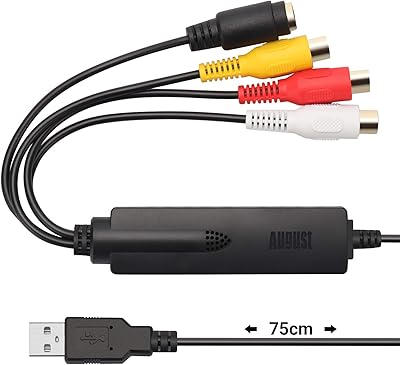
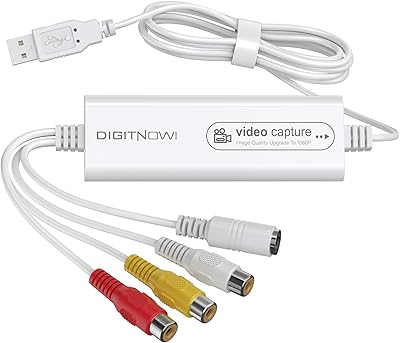
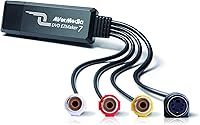
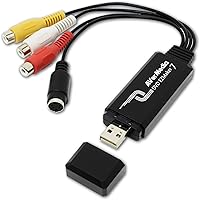
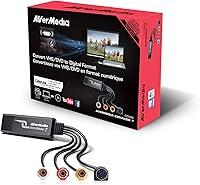
The AVerMedia EZMaker 7 USB Video Capture Card offers an affordable way to convert analog video sources to digital formats. This compact device allows users to capture video from sources like VHS, VCR, and Hi8 tapes, converting them into digital files. With support for both RCA Composite and S-Video inputs, it provides versatility for a range of video devices. The device connects via USB and works seamlessly with both Windows 10 and older versions of Mac OS. It’s a great choice for those looking to preserve and share their home videos without requiring expensive professional gear.

Features & Benefits

This video capture card excels in converting analog video footage into digital formats like DVD and VCD. It works with a variety of video sources, including VHS, VCR, MiniDV, and Hi8 tapes. The device’s plug-and-play functionality makes it easy to set up without technical expertise, while the included CyberLink PowerDirector software offers basic video editing tools. Compatible with Windows 10 and older Mac OS versions (up to 10.12), it is an ideal option for users looking for a cost-effective solution to preserve old footage.

Best For

The AVerMedia EZMaker 7 is perfect for home users wanting to digitize old video tapes and create digital backups of their favorite memories. It’s especially suited for content creators who need a straightforward method to convert analog footage into a digital format for editing or sharing. VHS enthusiasts and collectors will also appreciate the card’s ability to preserve old tapes for modern viewing. Casual video editors looking for basic capture and editing tools will find this device sufficient for everyday tasks without the need for advanced software.

User Feedback

Users generally appreciate the ease of use and plug-and-play functionality of this video capture card. It’s a popular choice for those who want to digitize their home video collections without complications. However, some users have reported compatibility issues with newer versions of Mac OS (10.13+). While it offers good value for converting VHS tapes, the resolution is limited to 480p, which may not meet the needs of those seeking higher-quality output. The bundled CyberLink software is generally well-received, though more advanced editors may find it too basic.

Pros

  • This device offers a simple plug-and-play setup, making it ideal for users without technical expertise.
  • It supports both RCA Composite and S-Video inputs, giving users flexibility with various video sources.
  • The bundled CyberLink PowerDirector software provides an easy-to-use option for basic video editing.
  • It’s an affordable solution for preserving old video tapes, especially for casual users on a budget.
  • The compact size makes this USB capture device highly portable, fitting into small workspaces or travel setups.
  • Perfect for home users looking to convert VHS, VCR, or Hi8 tapes into digital formats for personal use.

Cons

  • Video quality is limited to 480p resolution, which may be insufficient for users seeking high-definition conversions.
  • Some users report compatibility issues with newer Mac OS versions (10.13 and above), restricting use on updated systems.
  • Advanced video editors may find the included software basic and lacking in professional-grade features.
  • The device requires an older USB 2.0 interface, which could slow down transfers compared to modern USB standards.
  • The capture quality may not meet the expectations of serious videographers or those converting rare, important footage.
  • Not ideal for those who need to capture or convert videos in higher resolutions or for professional video projects.

Ratings

The scores for the AVerMedia EZMaker 7 USB Video Capture Card were derived from analyzing verified user feedback from multiple platforms worldwide, including reviews in various languages. Only high-quality, authentic reviews were considered, with spam, duplicate, and incentivized responses filtered out. Both strengths and weaknesses were taken into account, reflecting the overall performance and user satisfaction with this device. Buyers will find insights into ease of use, compatibility, software, and more, helping guide their purchasing decisions based on real-world feedback.

Ease of Use
88%
Many users appreciate the simple plug-and-play functionality of this video capture card, which makes it ideal for those without technical expertise. The installation is quick and hassle-free, allowing even novice users to start digitizing old video tapes without a steep learning curve.
However, some users point out that while it’s easy to use, the overall setup can be a bit limiting for those seeking more advanced features. A few have mentioned that the device doesn't support certain newer Mac OS versions, which can be a deal-breaker for some users with updated systems.
Value for Money
91%
Buyers consistently feel that this analog-to-digital converter offers excellent value, especially considering its affordable price point. It provides an effective way to preserve home videos and old tapes without the need for expensive professional equipment or services.
While most agree it delivers good value, some users wish for a higher resolution than 480p for more demanding projects. Those working on high-quality video productions may find this resolution insufficient for their needs.
Video Quality
75%
25%
For casual users, the video quality is adequate for digitizing old tapes and converting them into digital formats for archiving or sharing. It serves well for home video use and casual content creation, delivering clear enough footage for less professional applications.
However, many users express dissatisfaction with the 480p resolution, noting that it’s a limitation when working with videos that require higher detail or clarity. Serious video editors and those wanting higher resolution for restoration projects may find the quality underwhelming.
Setup & Installation
90%
Users often praise the quick and easy installation process. The device is truly plug-and-play, requiring little technical knowledge, making it accessible even for beginners. The setup process is generally smooth, and most systems automatically recognize the capture card without the need for extra steps.
Although the installation is generally hassle-free, some users report that the software bundle, while helpful, could be more intuitive. A few people also mention that while the device is recognized instantly, they would have preferred better instructions for troubleshooting during setup.
Software Experience
82%
18%
The inclusion of CyberLink PowerDirector is a positive aspect for most users, as it enables basic video editing and DVD creation without the need for additional purchases. It’s especially helpful for those who want a straightforward tool to edit their captured footage before sharing or archiving.
That said, some users find the software to be too basic for their needs. Advanced video editors may feel limited by its lack of professional-grade features, and a few users have mentioned that they prefer more powerful editing software for their workflows.
Compatibility with Windows 10
92%
This device works flawlessly with Windows 10, making it an excellent choice for most PC users. The plug-and-play functionality ensures that it integrates seamlessly with modern Windows systems, without the need for additional drivers or complicated configurations.
However, some users have noted minor issues with drivers when using the device with certain Windows 10 configurations. While not widespread, this can cause some frustration for users trying to set it up on specific PC models.
Compatibility with Mac OS
60%
40%
The video capture card works well with older Mac OS versions (up to 10.12), offering solid performance for those with compatible systems. For users with older Mac devices, this device presents a reliable solution to digitize old tapes.
Unfortunately, many users with newer Mac OS versions (10.13 and up) report compatibility issues. This can be a significant drawback for those who’ve updated their systems, making this device less versatile for users who rely on the latest Mac software.
Build Quality
80%
20%
The build quality of this device is generally considered sturdy for its compact size. It’s lightweight, easy to handle, and the black design offers a sleek, unobtrusive look that fits well with most setups, whether on a desk or tucked away with other equipment.
Some users feel that the build could be more durable, especially when compared to higher-end models. A few buyers mentioned that the plastic construction feels a bit flimsy, which may raise concerns about longevity for long-term use.
Software Features (CyberLink PowerDirector)
77%
23%
The bundled software is appreciated by users for its simplicity and basic features. It offers an easy way to edit, cut, and organize footage captured from analog sources, making it perfect for casual editors who just need a straightforward tool to polish their content.
However, some advanced users found the editing software limited in functionality. They mention that it lacks more robust features needed for serious video projects, which might prompt them to seek out other, more complex video editing solutions.
Portability
86%
The compact design of this capture device makes it highly portable, which is ideal for users who need a lightweight solution to digitize old tapes on the go. Whether traveling for work or simply moving from one room to another, it’s easy to pack and carry around.
That said, some users feel that its small size can limit its connectivity options. For example, the USB 2.0 connection may feel slower for certain uses, especially when transferring large video files or working with higher-resolution sources.
Customer Support
70%
30%
Some users reported positive experiences with customer support, particularly when seeking help with installation issues. A few buyers noted that the staff is responsive and helpful in resolving common problems, especially with device setup or software installation.
On the other hand, some customers were disappointed with the quality and speed of support. A few users mentioned slow response times or unresolved issues when contacting customer service, which can be frustrating when trying to troubleshoot technical problems.
Long-Term Durability
78%
22%
The device seems to hold up well under normal use, with many buyers noting that it continues to function reliably after extended periods. The compact design ensures it doesn’t take up much space, making it easy to store when not in use.
However, some users have expressed concerns about the long-term durability of the device. A few have reported occasional issues with the connection ports or performance degradation over time, suggesting that it may not be as robust as some other, higher-end models.

Suitable for:

The AVerMedia EZMaker 7 USB Video Capture Card is ideal for home users, casual video editors, and content creators who need a simple and affordable way to digitize old video footage. For example, users who have VHS, VCR, Hi8, or MiniDV tapes lying around and want to preserve or share them digitally will find this device especially useful. With its plug-and-play functionality, this device is a great choice for individuals who don’t want to deal with complicated setups. The included software, CyberLink PowerDirector, also offers a straightforward video editing option for basic projects, making it a solid option for those without professional-grade needs or editing skills.

Not suitable for:

This video capture device may not be the best option for users looking for high-definition video quality or advanced editing capabilities. The 480p output resolution limits its effectiveness for more professional or high-quality projects, making it less suitable for videographers or content creators who require superior resolution for digital archiving or high-end editing. Additionally, users with newer Mac OS versions (10.13 and up) may face compatibility issues, limiting its use for those with updated Mac systems. If you are seeking more advanced features, such as 4K support or professional-grade software, this device might not meet your expectations.

Specifications

  • Product Type: USB video capture card designed for converting analog video signals into digital formats.
  • Inputs: Supports RCA Composite and S-Video inputs for versatile video source compatibility.
  • Resolution: Captures video at 480p resolution, suitable for standard home video digitization.
  • Compatibility: Compatible with Windows 10 and older Mac OS versions (up to 10.12).
  • Included Software: Includes CyberLink PowerDirector 14 for video editing and PowerProducer 5 DVD for DVD creation.
  • Connectivity: Connects to the computer via USB 2.0 interface for data transfer.
  • Device Dimensions: Compact design with dimensions of 3.2 x 1.1 x 0.5 inches.
  • Device Weight: Weighs 1.7 ounces, making it portable and easy to store.
  • Supported Formats: Supports DVD and VCD formats for output video storage.
  • Video Sources: Can digitize video from VHS, VCR, Hi8, and MiniDV tapes.
  • Power Requirements: Requires 1.5 volts of power for operation.
  • Output Format: Converts analog video to digital files that can be saved to your computer or burned to DVDs.
  • Editing Features: CyberLink PowerDirector provides basic video editing tools, including trimming and adding effects.
  • Video Capture Speed: Video capture is real-time, meaning the process takes as long as the duration of the video being captured.
  • Plug-and-Play: The device supports plug-and-play functionality for easy installation without additional software or drivers.
  • System Requirements: Requires at least 1 GB of RAM and 1.5 GB of hard disk space for proper operation.
  • Video Editing Software: The bundled CyberLink software includes both video editing and DVD authoring tools.
  • Color: Comes in a black color for a sleek and professional look.
  • Hardware Interface: Uses a USB 2.0 interface for easy connection to a computer.

FAQ

This device is designed to convert analog video signals from sources like VHS, Hi8, MiniDV, and VCR tapes into digital formats. It's especially useful for digitizing old video footage, such as home videos, and transferring them to a PC or DVD.

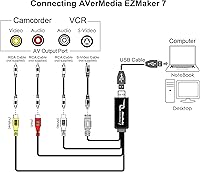
Setting up the device is straightforward. Simply plug it into a USB 2.0 port on your computer, connect your video source (like a VHS player) to the card using RCA or S-Video cables, and install the included software for capturing and editing. No additional drivers are needed for most systems.

Yes, this device is compatible with both Windows 10 and older Mac OS versions (up to OS 10.12). However, some users have reported compatibility issues with newer Mac OS versions (10.13 and beyond). It's best to check your system version before purchasing.

The device comes with CyberLink PowerDirector 14 for video editing and DVD creation, as well as PowerProducer 5 for burning DVDs. These programs provide a basic but complete solution for capturing, editing, and sharing your digital footage.

The AVerMedia EZMaker 7 captures video at 480p resolution, which is adequate for standard home video projects and converting VHS tapes. However, it's not suitable for high-definition video needs, so users seeking HD quality may need to consider a higher-end capture solution.

While the device supports analog sources like VHS, VCR, Hi8, and MiniDV, it does not support direct video input from a DVD player. It can only capture analog video signals, so if your DVD player uses digital outputs, this device will not be compatible.

The time it takes to digitize a VHS tape depends on the length of the tape itself. Generally, the process will take as long as the tape runs, so a standard 2-hour VHS tape will take roughly 2 hours to convert to a digital format. The device works in real-time during the capture process.

The AVerMedia EZMaker 7 is primarily designed for home users and casual video editors. While it provides a reliable and cost-effective way to digitize old tapes, its 480p resolution and bundled software may not meet the needs of professionals requiring high-quality video or advanced editing features.

Some users report compatibility issues with newer Mac OS versions (10.13+), and the image quality may not be ideal for those expecting HD results. Additionally, advanced video editors may find the included editing software too basic for complex projects.

The AVerMedia EZMaker 7 is not designed for live streaming or real-time video capture. It's best used for converting pre-recorded video sources like VHS tapes to digital formats. For live streaming, you'll need a different type of capture card with lower latency.