Overview

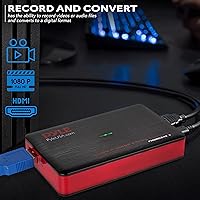
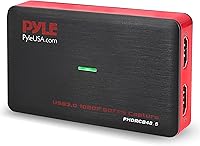
The Pyle PHDRCB48.5 Capture Card is a compact, no-frills USB device built for casual gamers and beginner streamers who want to start recording without spending a fortune or wrestling with complicated software. It supports full HD 1080p video recording and includes HDMI pass-through, so your TV picture stays unaffected while footage is captured to your computer. What stands out right away is the plug-and-play setup — no drivers to hunt down, no installation headaches across Windows, macOS, or Linux. For anyone who has been putting off starting a gaming channel because the tech felt overwhelming, this streaming device lowers the barrier considerably.
Features & Benefits

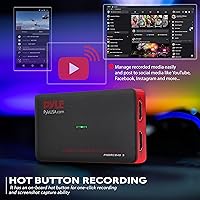
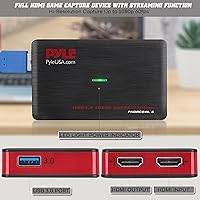
The one-click hot button is probably the feature most users notice first — press it and you are recording or grabbing a screenshot instantly, no software menus required. The Pyle recorder also lets you play and capture at the same time, so there is no need to stop your session just to save a clip. The built-in software adds voice commentary support and handles multiple languages, which is a nice touch for international users. At just over 2 ounces and barely 4 inches long, this capture card is genuinely pocket-sized, and the broad device compatibility — covering everything from PS4 and Xbox One down to older PS3 and Xbox 360 hardware — is a real practical advantage.

Best For

This streaming device makes the most sense for people just getting started — think a teenager wanting to post their first console clips online, or a hobbyist looking to preserve footage from older hardware like a Wii U or PS3 before it collects more dust. The cross-platform support for Windows, macOS, and Linux is genuinely useful for people who do not want to be locked into a specific ecosystem. If your priority is a clean, professional streaming setup with advanced encoding options, you will likely outgrow the Pyle recorder quickly. But for budget-friendly simplicity, it fills a real gap — especially for anyone who just wants to hit record and deal with the editing later.

User Feedback

Buyer sentiment around this capture card is mixed but instructive. Those who love it consistently point to how quickly they got up and running — zero driver frustration and a straightforward setup that actually lives up to the plug-and-play promise. The complaints, though, are worth taking seriously: some users report that real-world video quality falls short of the 1080p marketing, with softness or compression artifacts visible in captured footage. A handful of verified buyers also noted software hiccups on certain system configurations. With under 60 reviews and a 3.9-star average, the sample size is small enough that individual experiences vary quite a bit, so treat those ratings as a reasonable directional signal rather than a definitive verdict.

Pros

  • Truly plug-and-play setup — most users are recording within minutes of unboxing, no drivers needed.
  • Works across Windows, macOS, and Linux without separate installs for each operating system.
  • The physical hot button lets you start recording instantly without interrupting your gaming session.
  • HDMI pass-through keeps your TV picture clean while footage saves to your computer simultaneously.
  • Broad compatibility covers legacy consoles like PS3, Xbox 360, and Wii U alongside current hardware.
  • Weighs just over 2 ounces and fits in a pocket, making it easy to move between setups.
  • Voice commentary overlay support is built in, useful for beginners who want to narrate gameplay.
  • For casual social media clips and first YouTube uploads, the output quality is genuinely adequate.
  • Multi-language support makes this streaming device accessible to international users without workarounds.

Cons

  • Real-world video quality often falls short of the advertised 1080p spec, especially in fast-action scenes.
  • Bundled software is prone to crashes and offers limited control over recording parameters.
  • Audio sync drift and background hiss have been reported during longer recording sessions.
  • At its price point, more capable competing devices exist and are worth comparing before buying.
  • Hot button can register accidental double presses in tight cable setups during active use.
  • HDMI pass-through occasionally causes flickering or signal delays on certain TV models at first connection.
  • Screenshot organization options are minimal, with no burst mode or customizable file naming.
  • The plastic housing raises durability concerns for users who plug and unplug the device frequently.
  • Overall review volume is still modest, so the current rating should be treated as a directional signal only.

Ratings

The Pyle PHDRCB48.5 Capture Card has been scored by our AI system after analyzing verified buyer reviews from across the globe, with spam, bot-generated, and incentivized submissions actively filtered out before any scoring was applied. The results reflect an honest cross-section of real user experiences — where this streaming device genuinely delivers and where it falls short. Both strengths and frustrations are weighted equally so you can make an informed decision.
Ease of Setup
88%
The plug-and-play experience is where this capture card earns its strongest praise. Buyers consistently report being up and recording within minutes of unboxing, with no driver downloads or software installations required across Windows, macOS, and Linux systems.
A small number of users on less common Linux distributions or older macOS versions encountered recognition issues, suggesting the truly driverless experience is not universally guaranteed. Having a fallback plan if the device does not auto-detect is wise.
Video Recording Quality
61%
39%
For casual clips destined for social media or YouTube, the output is adequate — most beginners found the footage watchable and acceptable for their first channel uploads without any post-processing tweaks needed.
This is where the gap between marketing and reality shows up most clearly. Several verified buyers noted visible softness, compression artifacts, and inconsistent frame handling, especially in fast-action gameplay scenes. Calling it true broadcast-quality 1080p would be a stretch.
HDMI Pass-Through
79%
21%
Gamers appreciated being able to play on their TV at full quality while the capture card simultaneously saved footage to their computer. It removes the annoying choice between a good play experience and a decent recording.
Some users flagged a slight signal delay or occasional flicker when first connecting the pass-through on certain TV models. It is not a dealbreaker, but it can be jarring until you identify the source and reseat the cable.
Device Compatibility
83%
The breadth of supported hardware is a genuine selling point here. Buyers with older consoles — PS3, Xbox 360, Wii U — were particularly happy to find a capture solution that did not require them to buy a newer system first.
A handful of users reported inconsistent results with certain DVR boxes and third-party set-top devices not on Pyle's official compatibility list. Sticking to the listed consoles and PC sources appears to be the safer route.
Hot Button Recording
76%
24%
The one-click physical recording button is a practical feature that casual users genuinely appreciate. Not having to tab out of a game or navigate software menus mid-session makes spontaneous clip saving much more realistic in practice.
A few buyers found the button placement slightly awkward when the device is connected in a tight cable setup, and there were occasional reports of the button registering double presses. Nothing critical, but worth noting for heavy daily use.
Build Quality & Portability
71%
29%
At just over 2 ounces and barely 4 inches long, this streaming device is genuinely pocketable. Buyers who travel or switch between gaming setups found its compact size a consistent advantage over bulkier competing devices.
The plastic housing feels lightweight in a way that some users described as flimsy rather than portable. A few buyers expressed concern about long-term durability, particularly around the USB and HDMI ports after repeated plugging and unplugging.
Software & Voice Commentary
58%
42%
The bundled software does cover the basics — voice commentary overlay and multi-language support are useful additions for international users and anyone wanting to narrate their gameplay without purchasing a separate application.
Software stability was a recurring complaint among verified purchasers, with some reporting crashes, laggy interfaces, and limited control over recording parameters. Several users ultimately abandoned the included software in favor of OBS or similar third-party tools.
Live Streaming Performance
63%
37%
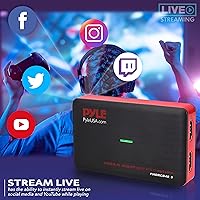
For beginners streaming to YouTube or social media for the first time, the Pyle recorder provides a workable starting point. The simultaneous play-and-stream capability means you are not sacrificing your session just to go live.
More experienced streamers expecting tight bitrate control, low-latency preview monitoring, or advanced encoder settings will find the live streaming functionality quite limited. It is basic by design, which suits its target audience but frustrates anyone looking to grow past entry level.
Value for Money
67%
33%
If this capture card is evaluated purely as a first step into game recording — especially for someone digitizing older console content — the price-to-function ratio is defensible. The wide device compatibility adds tangible value for legacy hardware owners.
At its current price point, buyers are in competitive territory where more capable alternatives exist. Several reviewers felt the real-world performance did not quite justify the cost, particularly given the software issues and video quality limitations that surface with regular use.
Cross-Platform OS Support
81%
19%
Supporting Windows, macOS, and Linux without requiring separate drivers for each is a meaningful differentiator. Mac and Linux users especially tend to struggle finding affordable capture cards with genuine cross-platform functionality, and this device delivers on that front.
Deeper OS-level testing by some technically minded buyers revealed that advanced features like hot button recording behaved inconsistently on certain Linux kernel versions. Basic recording worked, but the full feature set was not always accessible outside of Windows.
Audio Capture Quality
64%
36%
For spoken commentary and basic in-game audio, the capture card handles audio input at a level that beginners will find sufficient. Voice overlays synced reasonably well with video in standard recording scenarios tested by buyers.
Audio quality drew some criticism in more demanding setups — users noticed background hiss, slight sync drift during longer recordings, and limited control over input audio levels. Audiophiles or anyone serious about sound production should manage expectations here.
Screenshot Capture
74%
26%
The one-click screenshot function was a pleasant surprise for buyers who wanted a quick way to grab game moments without interrupting play. Images captured were generally clean and usable for social media sharing without additional editing.
There is no burst or timed capture mode, and the file naming and storage destination options are minimal. Power users who want organized, automated screenshot workflows will find the feature functional but not particularly thoughtful in its implementation.
Multi-Language Support
77%
23%
International buyers flagged multi-language support as a genuine quality-of-life feature that is often absent on budget capture devices. Users in non-English speaking regions appreciated being able to navigate the interface in their native language without workarounds.
The language options, while present, are not exhaustive, and some users noted that certain UI elements reverted to English regardless of the selected language setting. It is a reasonable effort for an entry-level device but not a polished implementation.

Suitable for:

The Pyle PHDRCB48.5 Capture Card is a solid fit for anyone taking their first real steps into game recording or live streaming without wanting to spend hours reading setup guides. It particularly suits teenagers and college students who want to post console clips to YouTube or social media and just need something that works out of the box. If you have a drawer full of older hardware — a PS3, an Xbox 360, a Wii U — and you want to digitize footage before those consoles finally give up, this streaming device covers that use case well. Mac and Linux users on a budget will also appreciate finding a capture card that does not require them to hunt down third-party drivers or wade through compatibility forums. Essentially, if your benchmark for success is hitting record and getting watchable footage online without a technical headache, this capture card meets that bar honestly.
Not suitable for:

If you are serious about streaming quality, channel growth, or professional content production, the Pyle PHDRCB48.5 Capture Card is likely to become a frustration before long. The real-world video output does not always live up to the 1080p headline, and once you start caring about crisp motion, consistent bitrates, or clean audio levels, the limitations become hard to ignore. The bundled software has drawn enough complaints about stability and limited controls that many users end up abandoning it for OBS — which raises the question of whether you need more capable hardware to go alongside it. Streamers who want reliable low-latency preview monitoring, advanced encoder settings, or tight integration with broadcasting platforms will find this Pyle recorder underpowered for those demands. If your budget allows for a step up, the investment in a more capable device will pay off quickly for anyone with even moderate production ambitions.
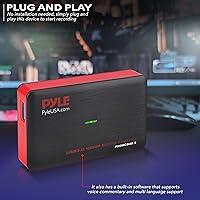
Specifications

  • Brand: Manufactured by Sound Around under the Pyle product line.
  • Model Number: The exact model designation for this unit is PHDRCB48.5.
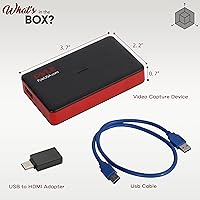
  • Dimensions: The device measures 0.67 x 2.21 x 3.75 inches (L x W x H), making it highly compact.
  • Weight: At 2.08 ounces, this capture card is light enough to carry in a jacket pocket or small bag.
  • Interface: Connects to a host computer via USB, requiring no separate power adapter for operation.
  • Video Resolution: Supports up to 1080p Full HD video capture resolution through its HDMI input.
  • HDMI Pass-Through: Includes HDMI pass-through so the source signal is simultaneously displayed on your TV during capture.
  • Driver Requirement: No driver installation is required; the device is recognized automatically as plug-and-play on supported operating systems.
  • Supported OS: Compatible with Windows, macOS, and Linux operating systems without separate driver packages for each platform.
  • Hot Button: Features a physical on-board hot button for one-click recording start and stop, as well as screenshot capture.
  • Voice Commentary: The bundled software supports live voice commentary overlay during recording sessions.
  • Language Support: Built-in software offers multi-language support for international users navigating the interface.
  • Live Streaming: Capable of streaming live to platforms such as YouTube and social media simultaneously while recording locally.
  • Compatible Devices: Works with PS4, PS3, Xbox One, Xbox 360, Wii U, PC, Blu-ray players, DVR units, and Set-top boxes via HDMI output.
  • File Output: Captured footage is converted into a standard digital file format suitable for editing and sharing.
  • Simultaneous Recording: Supports play-and-record simultaneously, so gameplay is not interrupted when capturing footage.
  • Date Available: This product was first made available for purchase on July 10, 2018.
  • Discontinued Status: As of the latest available information, this product has not been discontinued by the manufacturer.

Related Reviews

XIIXMASK MS2131 Video Capture Card
85%
92%
Chassis Build Quality
88%
Thermal Management
87%
1080p Stream Stability
93%
Value for Money
84%
Plug-and-Play Simplicity
More
Razer Ripsaw X Capture Card
86%
91%
Video Capture Quality
94%
Latency
85%
Ease of Setup
88%
Software Compatibility
82%
Build Quality
More
VIXLW Video Capture Card Pro+
77%
91%
Ease of Setup
72%
Video Capture Quality
58%
Audio Sync Reliability
88%
Software Compatibility
84%
Signal Format Detection
More
Qonakism Dual HDMI Capture Card
83%
91%
Video Quality
88%
Ease of Use
94%
Setup/Installation
89%
Latency
84%
Build Quality
More
Bytebridges 4K HDMI Capture Card (affd05f3)
88%
94%
Ease of Setup
88%
Build Quality
91%
Video Fluidity
87%
Input Latency
83%
Audio Versatility
More
VANGREE VC-003 Capture Card
86%
88%
Performance
94%
Ease of Setup
90%
Latency
85%
Video Quality
92%
Compatibility with Consoles
More
EVGA XR1 Lite (141-U1-CB20-LR)
88%
92%
Initial Setup & Configuration
89%
4K Pass-Through Performance
84%
Recording Video Quality
91%
Audio Sync & Latency
93%
Value for Money
More
ORIVISION 4K Capture Card U923
86%
88%
Performance
92%
Ease of Use
89%
Compatibility
91%
Video Quality
85%
Audio Quality
More
August VGB400 Video Capture Card
83%
88%
Ease of Use
92%
Setup & Installation
75%
Compatibility with Video Sources
86%
HDMI Passthrough Functionality
84%
Recording Quality
More
Narvitech NJ300
Narvitech NJ300
85%
94%
Initial Setup Ease
88%
Recording Stability
92%
Passthrough Latency
86%
Party Chat Integration
67%
Thermal Management
More

FAQ

No, the device is genuinely plug-and-play. Just connect it via USB and your computer should recognize it automatically on Windows, macOS, or Linux. You can start recording without downloading anything, though the bundled software is available if you want voice commentary or additional controls.

You will need a computer in the loop — the device captures footage to a connected PC or Mac via USB. It is not a standalone recorder. That said, the setup is straightforward: your console connects via HDMI in, the pass-through goes to your TV, and the USB goes to your computer.

The HDMI pass-through is designed specifically to prevent that. Your TV receives the full signal from your console as normal, while the capture card records the footage to your computer at the same time. Some users have reported an occasional flicker when first connecting, but it typically settles once everything is seated properly.

Yes, and this is one of the more practical reasons to consider the Pyle PHDRCB48.5 Capture Card. Legacy console support is a genuine strength here. As long as your older console has an HDMI output, you should be in good shape. Just note that the original PS3 fat model shipped without HDMI on early hardware revisions, so check your specific unit first.

This is worth being honest about. The device is rated for 1080p capture, but real-world results vary. For casual clips and basic YouTube uploads, most beginners find the footage acceptable. However, users who scrutinize their recordings closely have noted softness and compression artifacts, particularly in fast-moving scenes. Manage expectations accordingly if output quality is a priority.

Many users do exactly that, especially after finding the bundled software limiting or unstable. This streaming device is recognized as a standard USB capture source, so it should appear as an input option in OBS and similar tools. Results can vary depending on your system configuration, but this workaround is fairly common among buyers who want more control.

It will stop or start a recording depending on its current state, which can be annoying if you are mid-session. A few buyers have mentioned accidental presses, particularly when the device is in a tight cable setup. There is no confirmation prompt, so just be mindful of where the device is positioned relative to your other cables and peripherals.

Basic recording does genuinely work on Linux for most users without any manual driver setup. That said, some technically minded buyers on specific kernel versions found that advanced features like the hot button did not behave consistently. If you are on a mainstream Linux distribution and just need straightforward capture, you should be fine.

Honestly, the bundled software has a mixed track record based on user feedback. It works for many people in basic scenarios, but crashes and interface lag have been reported often enough that it is worth having OBS installed as a backup from day one. Think of the included software as a starting point rather than a long-term solution.

At its price tier, this Pyle recorder makes sense if you are just starting out and want low commitment. If you find yourself wanting better video quality, more encoding control, or rock-solid software stability, you will likely hit the ceiling of what this device offers within a few months. It is a reasonable first step, not a long-term production tool.