HeavenBird 4K HDMI Video Capture Card
Overview
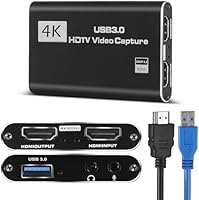
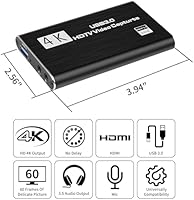
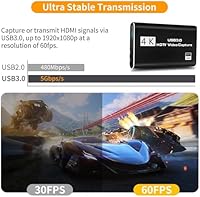
The HeavenBird 4K HDMI Video Capture Card positions itself as a no-nonsense entry point for anyone getting into streaming or game recording without spending a fortune. At this price tier, you'd normally expect a flimsy plastic shell, but this capture card comes wrapped in an aluminum alloy housing that feels noticeably more solid than rivals in the same range. It handles 4K HDMI input and outputs up to 1080p at 60fps over USB 3.0 — a combination that covers most beginner needs cleanly. Setup takes seconds: plug it in, open OBS or VLC, and you're recording. No drivers, no configuration headaches.
Features & Benefits
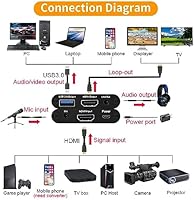
The standout feature here is the 4K HDMI passthrough — your TV still gets a full-resolution signal while the USB feed handles the recording side at 1080p/60fps. That's a practical arrangement you don't always find at this price. The built-in 3.5mm ports for both mic input and headphone output mean you can add live commentary without buying a separate audio interface. The device also draws minimal CPU resources, which matters when you're already running OBS, a browser, and Discord simultaneously. It's compact enough to toss in a laptop bag, and it recognizes PS4 consoles, DSLRs, and webcams with no fuss.
Best For
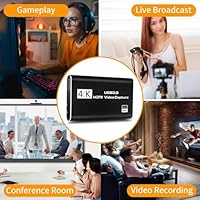
This USB capture device is a natural fit for first-time streamers who want to get something working on Twitch or YouTube without overthinking their gear. If you're a console gamer tired of borrowing setups or sitting through hour-long driver installations, this card removes both problems at once. It also works surprisingly well in non-gaming contexts — educators capturing HDMI output for recorded lessons, remote workers mirroring presentations, or photographers doing basic DSLR capture will all find it functional. It isn't built for pros managing complex 4K pipelines, but for anyone starting out on a modest budget, it punches well above its weight.
User Feedback
Across 161 ratings, the HeavenBird card holds a 4.2-star average, and the split between positive and critical reviews tells a predictable story for entry-level gear. Most buyers praise plug-and-play reliability — the card is recognized instantly by OBS, and many report it working right out of the box with PS4 without any extra steps. On the downside, some users mention occasional audio sync drift during longer sessions, and a handful have hit compatibility snags on older Windows 7 builds or specific Linux distributions. A recurring note in negative reviews: the 4K label covers passthrough only, not recorded output, which catches some buyers off guard. Most still consider the trade-offs reasonable given the price point.
Pros
- Plug-and-play setup works on Windows, Mac, and Linux with zero driver installation required.
- 4K HDMI passthrough keeps your TV feed clean and full-resolution while recording runs separately.
- The aluminum alloy shell feels noticeably more durable than plastic rivals in the same price bracket.
- OBS, VLC, and Potplayer all recognize the device instantly — no manual source configuration needed.
- Built-in 3.5mm mic and headphone ports remove the need for a separate audio interface for basic commentary.
- Low CPU overhead means mid-range machines can stream, record, and run chat software simultaneously without strain.
- Compact enough to carry in a laptop bag, making it practical for multi-location creators and educators.
- Works with PS4, DSLRs, webcams, and standard cameras — not locked to one device type.
- At its price point, the feature-to-cost ratio is difficult to match among direct competitors.
Cons
- Audio sync drift has been reported during extended recording sessions and requires manual compensation in OBS.
- The USB output is capped at 1080p — actual 4K recording is not possible despite the 4K branding.
- No documentation, troubleshooting guide, or support portal is included in the box.
- Brand support response times are inconsistent and there is no clear warranty process to rely on.
- PS5 compatibility is unreliable, with inconsistent signal detection reported by multiple users.
- The USB port connection can loosen over time with frequent daily plugging and unplugging.
- No hardware configuration utility exists — all adjustments must be handled entirely through third-party software.
- Works poorly through USB-C hubs and docks; direct port connection is effectively required for stability.
- Users on older dual-core hardware may experience more system strain than the low-CPU-usage claim suggests.
Ratings
The HeavenBird 4K HDMI Video Capture Card has been evaluated by our AI system after processing verified buyer reviews from global marketplaces, with spam, bot-generated, and incentivized submissions actively filtered out. The scores below reflect a realistic picture of how this entry-level capture card performs across real-world use cases — from bedroom streaming setups to classroom recordings. Strengths and friction points are both represented without sugarcoating.
Ease of Setup
Video Output Quality
4K Passthrough Performance
Audio Functionality
Build Quality
Compatibility
Software Compatibility
CPU Usage
Portability
Value for Money
Latency During Passthrough
Driver-Free Operation
Instruction & Documentation
Brand Support & Warranty
Suitable for:
The HeavenBird 4K HDMI Video Capture Card is an honest match for anyone taking their first real steps into streaming or game recording without wanting to spend serious money before they know if it sticks. Console gamers — particularly PS4 owners — who want to broadcast on Twitch or YouTube without a complicated rig will find the setup process refreshingly painless. It also serves educators and remote professionals well: if you need to capture HDMI output from a laptop or presentation device for recorded lessons or video calls, this card handles that task without demanding any technical configuration. Hobbyist photographers doing basic DSLR capture for behind-the-scenes content or product videos will get functional results without needing a dedicated interface. Essentially, if your priority is getting something working quickly, across multiple platforms, at a price that doesn't sting if your streaming ambitions evolve, this USB capture device sits in a genuinely useful spot in the market.
Not suitable for:
The HeavenBird 4K HDMI Video Capture Card is not the right tool for anyone expecting to record actual 4K footage — the USB output caps at 1080p, full stop, and buyers who miss that distinction tend to feel burned. Competitive console players who are sensitive to any signal delay in their display should also look elsewhere, since the passthrough introduces a measurable, if small, latency that casual players won't notice but precision gamers will. Content creators who plan on running long recording sessions will likely encounter the audio sync drift that shows up repeatedly in user feedback, which becomes a real workflow problem in post-production. If you rely on Linux daily or are still running Windows 7, compatibility is genuinely uncertain and not something the brand provides meaningful support to resolve. Anyone building a semi-professional streaming setup who expects responsive customer support, clear warranty terms, or a configuration utility to fine-tune hardware-level settings will find this capture card frustrating on all three counts.
Specifications
- Brand: Manufactured and sold under the HeavenBird brand, released on the market in July 2023.
- Model Name: 4K HDMI Video Capture Card, also referenced by the same string as its item model number.
- Dimensions: The device measures 5.87″ x 4.92″ x 1.42″, making it compact enough for travel or desktop use.
- Weight: The unit weighs 6.3 ounces, light enough to carry in a laptop bag without adding meaningful bulk.
- Shell Material: The outer housing is constructed from aluminum alloy, offering better rigidity and heat dissipation than plastic alternatives at this price tier.
- HDMI Input: Accepts HDMI input signals at up to 4K resolution at 30fps, compatible with consoles, DSLRs, webcams, and standard cameras.
- HDMI Output: Passes the HDMI signal through to a connected display at up to 4K at 30fps with no perceptible lag during normal use.
- USB Output: Streams captured video to a connected computer via USB 3.0 at up to 1080p resolution at 60fps.
- USB Interface: Uses a USB 3.0 connection for data transfer; no external power supply is required as the device is bus-powered.
- Audio Ports: Equipped with one 3.5mm microphone input and one 3.5mm headphone output for live commentary and audio monitoring.
- OS Compatibility: Compatible with Windows 7, Windows 8, Windows 10, Mac OS X 10.9 and above, and Linux operating systems.
- Device Compatibility: Works with PS4, standard cameras, DSLRs, webcams, and any HDMI-output source device without additional configuration.
- Software Support: Recognized natively by OBS Studio, VLC, Potplayer, XSplit, and streaming platforms including Twitch and YouTube.
- Driver Requirement: No driver installation is required; the device is identified automatically by the operating system upon connection.
- CPU Load: Designed to operate with low CPU overhead, allowing simultaneous recording and streaming on mid-range computer hardware.
- Plug & Play: The capture card activates automatically when connected, detecting input source and adjusting output settings without manual intervention.
- Amazon Ranking: Ranked number 11 in the Internal TV Tuner and Video Capture Cards category on Amazon at time of listing.
- User Rating: Holds an average rating of 4.2 out of 5 stars based on 161 verified ratings across Amazon's global marketplace.
Related Reviews
AGPTEK VG0061 HDMI Capture Card
AVerMedia BU113 Live Streamer Cap 4K

Bytebridges 4K HDMI Capture Card (affd05f3)
NearStream CCD10 HDMI Capture Card
Rybozen V316B-FR Capture Card
PACOXI Capture Card
Plugable USBC-CAP60 HDMI Video Capture Card
MYPIN MYPIN-4K60-AVGC Capture Card

XIIXMASK MS2131 Video Capture Card