Overview

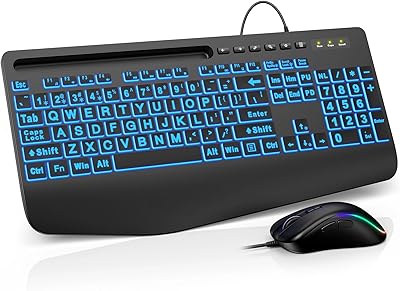
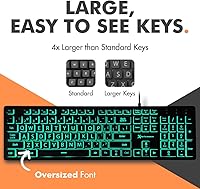
The X9 Performance X9BLKEYLP7CB Wired Keyboard and Mouse Combo is a practical, affordable accessibility-focused peripheral set built with low-vision and elderly users squarely in mind. Unlike standard keyboards where the tiny legends blend into the keycaps, this large-print keyboard combo features oversized, high-contrast characters that are genuinely easier to read at a glance. The backlit keys add another layer of visibility, especially useful in dimly lit rooms. Setup could not be simpler — plug the USB-A cable into any available port and you are ready to type. No software, no drivers, no fuss. At its price point, it is a realistic option for caregivers shopping on a sensible budget.
Features & Benefits

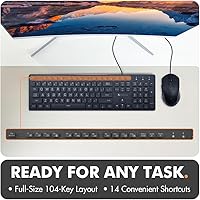
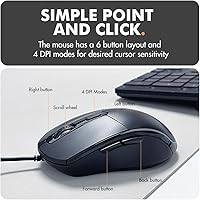
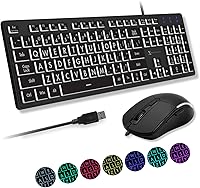
This backlit keyboard for seniors packs more utility into a straightforward design than the price might suggest. The keyboard offers a full 104-key layout alongside 14 shortcut keys for media and volume controls, so everyday tasks stay within easy reach. Both the keyboard and mouse support 7 LED color options and three brightness levels, making it simple to find a comfortable setting for any room or time of day. The mouse includes four DPI sensitivity levels, allowing users to slow the cursor down if precise clicking is a challenge. A five-foot USB cable covers most desk setups, and the whole thing runs off USB power — no batteries to manage.

Best For

This accessibility keyboard and mouse set is a strong match for older adults who have started struggling with the small, faded legends on standard keyboards. It is equally suited to anyone with a diagnosed visual impairment who needs a low-effort, plug-and-play solution they can hand to a family member with minimal instruction. Caregivers will appreciate that there is nothing to configure — just plug it in and walk away. It also works well in dim environments like bedrooms or living rooms where overhead lighting is limited. If you use a Windows PC or Chromebook and want a reliable, no-batteries-required setup, this fits the bill without stretching the budget.

User Feedback

Buyers have responded warmly to this large-print keyboard combo overall, and it holds a solid rating across a meaningful number of reviews. The most consistent praise focuses on key readability, particularly in darker rooms where the backlight genuinely earns its place. On the downside, several users with larger hands find the mouse a bit compact, and the keyboard's light construction leads some to question its long-term durability. One concern worth flagging is that the backlight cannot be fully disabled — only dimmed — which is a genuine inconvenience if the device sits near a bed or shared sleeping area. The colorful glow gets mixed reactions too: fun for some, simply distracting for others.

Pros

  • Oversized, high-contrast key legends make a real difference for low-vision users and reduce typing errors noticeably.
  • Seven backlight colors and three brightness levels give genuine flexibility for different rooms and lighting conditions.
  • Plug-and-play setup works instantly on Windows and Chrome OS — no drivers, no configuration, no frustration.
  • The ambidextrous mouse design works equally well for left- and right-handed users, which is rarely a given at this price.
  • Four adjustable DPI levels let users slow the cursor to a pace that suits limited motor control or hand tremors.
  • A five-foot cable comfortably reaches floor-placed PC towers without needing a USB extension.
  • Both keyboard and mouse are USB bus-powered, so there are no batteries to buy, charge, or replace.
  • At its price point, this large-print keyboard combo offers accessibility features that specialized peripherals often charge much more for.
  • The full 104-key layout with 14 shortcut keys keeps everyday tasks like volume and media control within easy reach.

Cons

  • The backlight cannot be completely switched off, only dimmed, which is disruptive in shared or dark sleeping spaces.
  • Keyboard chassis has a noticeable flex under firm pressure, raising questions about durability over years of daily use.
  • The mouse is compact enough that users with larger hands report discomfort during extended sessions.
  • Shortcut key labels are visibly smaller than the main keys, which partially undermines the large-print benefit for that row.
  • No wireless option is available, so users who prefer a cable-free desk have no flexibility here.
  • DPI adjustment button is easy to press accidentally, with no visual indicator showing which sensitivity level is currently active.
  • Mac OS compatibility is not officially supported, and several shortcut keys are reported as non-functional on Apple devices.
  • Mouse click sound and feel are thin and hollow, which some users find unpleasant during repetitive clicking tasks.
  • The colorful backlight modes can cycle accidentally, which confuses users who just want a single consistent setting.

Ratings

The X9 Performance X9BLKEYLP7CB Wired Keyboard and Mouse Combo has been scored by our AI system after a thorough analysis of verified global buyer reviews, with spam, bot-generated, and incentivized submissions actively filtered out. These ratings reflect the honest, real-world experiences of everyday users — from elderly individuals managing daily computer tasks to caregivers setting up workstations for loved ones. Both the genuine strengths and the recurring frustrations are transparently represented in every score below.
Key Readability
88%
The oversized, high-contrast legends are the single most praised aspect of this set. Users with macular degeneration, cataracts, or general age-related vision decline report being able to type with noticeably fewer errors and less squinting, particularly during evening use when overhead lighting is reduced.
A small number of users with very severe vision impairments noted that the print, while larger than standard keyboards, could still benefit from even bolder contrast on certain keys. Under very bright ambient light, the legends can lose some of their pop without the backlight active.
Backlight Effectiveness
83%
Having seven color options and three brightness levels gives users genuine flexibility rather than a fixed glow that works in only one scenario. Several buyers mention setting a warm amber or soft white tone for nighttime use, which makes the keys readable without straining the eyes in a dark room.
The inability to fully switch off the backlight is a recurring complaint, particularly from users who share a bedroom and use the computer late at night. Even at the lowest brightness setting, the glow is visible enough to be disruptive in a completely dark space.
Ease of Setup
94%
Plug-and-play functionality is exactly as described — buyers consistently report that the keyboard and mouse work instantly on both Windows PCs and Chromebooks with zero driver installation or menu navigation. For elderly users or caregivers who are not technically confident, this straightforward setup is genuinely valuable.
A handful of users experienced brief recognition delays on older USB ports, though these resolved without any action required. There are no wireless or Bluetooth options for those who prefer a cable-free desk, which is a trade-off worth knowing about upfront.
Mouse Comfort
71%
29%
The ambidextrous shape and lightweight feel make the mouse comfortable for shorter typing sessions, and left-handed users particularly appreciate that it is not designed exclusively for right-hand use. The adjustable DPI is a thoughtful inclusion for users who need a slower, more deliberate cursor for precise clicking.
Users with larger hands find the mouse noticeably compact, describing it as feeling slightly cramped during extended use. It is sized more like a travel mouse than a full desktop mouse, which is fine for casual browsing but less ideal for anyone spending several hours at a computer.
Build Quality
62%
38%
For the price tier this set occupies, the keyboard covers the basics reliably. Keys register consistently, and early buyers report no issues with letters fading or keys sticking after several months of regular daily use by an elderly family member.
The overall construction feels lightweight in a way that raises questions about longevity — the chassis has a slight flex when pressed firmly, and the mouse buttons produce a thin click sound that does not inspire confidence. This is a budget device, and the materials reflect that honestly.
Value for Money
86%
For a specialized accessibility peripheral that solves a specific, real problem — helping low-vision users type more accurately — the price is hard to argue with. Comparable large-print keyboards sold individually often cost more, making this combo an efficient purchase for caregivers on a fixed budget.
Buyers expecting build quality on par with mainstream peripherals at a similar price will likely be disappointed. The value equation works well specifically because of the accessibility features; if those are not a priority, there are sturdier standard combos available for a similar outlay.
Shortcut Key Utility
74%
26%
The 14 dedicated shortcut keys for volume, media playback, and other common functions are a practical addition that reduces the need to navigate menus or memorize key combinations. Elderly users who primarily browse the web and stream video find these shortcuts particularly useful in daily routines.
The shortcut keys are not customizable, which limits their appeal for users with more specific workflow needs. A few buyers also note that the shortcut key labels are slightly smaller than the main alphanumeric keys, which partially undermines the large-print purpose for that row.
Cable Length & Desk Fit
81%
19%
The five-foot USB cable is long enough to reach tower PCs placed on the floor beside a desk, which is a common setup for older home computers. Buyers appreciate not having to rearrange their workspace or purchase a USB extension just to get the combo connected.
The cable is not braided or reinforced at the connector ends, so users who frequently plug and unplug the set may see wear over time. Those with a tidy desk setup may find cable management slightly awkward given the fixed cord length.
Backlight Color Variety
67%
33%
The seven color modes add a layer of personalization that some users genuinely enjoy, particularly grandchildren who help set up the keyboard for an older relative and appreciate the visual variety. The color cycling option is smooth and does not flicker.
For the core target audience of low-vision seniors, the rainbow of color options is largely irrelevant and can cause confusion when the mode accidentally changes. Several users expressed a preference for a simpler single-color version without the cycling modes to reduce unnecessary complexity.
Mouse DPI Adjustability
76%
24%
Four DPI levels give meaningful control over cursor speed, which matters significantly for users with tremors or limited fine motor control. Being able to slow the cursor down to a deliberate pace reduces accidental clicks and missed targets during everyday tasks like opening files or clicking links.
The DPI button is small and positioned in a way that some users accidentally press it while repositioning their grip. There is no on-screen indicator showing which DPI level is active, so users have to guess or test the cursor speed after each accidental press.
Compatibility
83%
Confirmed working on Windows and Chrome OS without any setup friction, which covers the vast majority of home computers used by the target demographic. Several buyers confirm it works across multiple Windows versions without needing any system updates or driver downloads.
Mac OS compatibility is not officially listed, and a small number of users report partial functionality on macOS with certain shortcut keys not registering correctly. Linux compatibility is untested and unconfirmed, limiting options for users on alternative operating systems.
Key Travel & Typing Feel
69%
31%
The key travel is moderate and the actuation feels responsive enough for everyday typing tasks like composing emails, filling out forms, or browsing. Users transitioning from older membrane keyboards report the feel is familiar and not jarring.
Enthusiasts or faster typists will find the keyboard feedback soft and imprecise compared to any mechanical alternative. The keys produce a muffled sound that some describe as slightly mushy, which is typical for this budget membrane category but worth knowing if tactile feedback matters.
Mouse Tracking Accuracy
73%
27%
On standard desk surfaces and most mouse pads, tracking is consistent and reliable for the browsing and document-editing tasks this combo is designed to support. Low-vision users report that the responsive tracking helps them locate the cursor quickly without repeated large movements.
On glossy or very dark surfaces, the optical sensor occasionally skips or loses position briefly. This is a common limitation of entry-level optical mice and is unlikely to affect users on typical fabric mouse pads or wooden desks, but worth noting for unconventional setups.

Suitable for:

The X9 Performance X9BLKEYLP7CB Wired Keyboard and Mouse Combo is purpose-built for a specific audience, and within that audience it genuinely delivers. If you are an older adult whose eyesight has declined to the point where standard keyboard legends are difficult to read, this set addresses that problem directly and affordably. It is equally well-suited for caregivers or adult children setting up a computer for an elderly parent — the plug-and-play design means you can hand it over without writing a single instruction. People with diagnosed low vision conditions, including macular degeneration or glaucoma, will appreciate the combination of oversized legends and adjustable backlighting, which together make key identification far less taxing. It also works well for anyone who simply uses their computer in a dim room and wants a keyboard that remains legible without turning on every light in the house. If your priority is accessibility and ease of use over premium build quality, this accessibility keyboard and mouse set hits the mark.

Not suitable for:

The X9 Performance X9BLKEYLP7CB Wired Keyboard and Mouse Combo is not the right choice for everyone, and it is worth being honest about where it falls short. If you are a fast typist or someone who uses a keyboard heavily for extended work sessions, the soft membrane keys and lightweight construction will likely feel underwhelming compared to even a modestly priced mechanical alternative. Users with large hands may find the mouse cramped and fatiguing during longer sessions, as it is closer in size to a travel mouse than a full desktop peripheral. Anyone hoping to use this set in a shared sleeping space should know that the backlight cannot be fully turned off — only dimmed — which is a genuine inconvenience that several real buyers have flagged. Mac users should also be cautious, as the set is optimized for Windows and Chrome OS, with some shortcut keys reported as non-functional on macOS. Finally, if build longevity is a priority, this backlit keyboard for seniors is a budget-tier device and should be treated as such — it is a practical solution, not a long-term investment.
Specifications

  • Connection Type: Both the keyboard and mouse connect via a single USB-A wired interface with no wireless or Bluetooth option available.
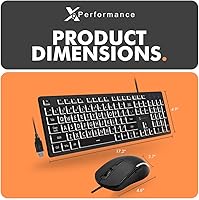
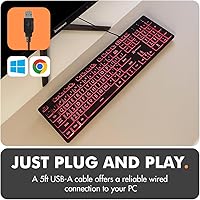
  • Cable Length: The attached USB cable measures 5 feet, providing enough reach for most standard desk setups including floor-placed tower PCs.
  • Keyboard Layout: The keyboard uses a full 104-key layout supplemented by 14 dedicated shortcut keys for functions such as volume control and media playback.
  • Key Feature: Keys use oversized, high-contrast printed legends specifically designed to improve readability for low-vision and elderly users.
  • Backlight Colors: Both the keyboard and mouse offer 7 selectable LED backlight color modes, including static and cycling options.
  • Brightness Levels: The keyboard backlight supports 3 distinct brightness levels to accommodate different ambient lighting environments.
  • Mouse DPI Levels: The mouse provides 4 adjustable DPI sensitivity levels, allowing cursor speed to be tuned for users with varying degrees of motor control.
  • Mouse Design: The mouse uses an ambidextrous form factor, making it equally functional for left-handed and right-handed users.
  • Mouse Backlight: The mouse independently supports 7 color backlight modes to match or complement the keyboard lighting selection.
  • Power Source: The entire combo is USB bus-powered, drawing all necessary power from the host computer with no batteries or external adapters required.
  • Plug and Play: No drivers or software installation are required; the combo is recognized and operational immediately upon connecting to a compatible device.
  • Compatible OS: The combo is officially compatible with Windows PC and Chrome OS; Mac OS compatibility is not officially supported.
  • Package Dimensions: The retail package measures 17.8 x 11.65 x 2.44 inches, accommodating both peripherals together in a single box.
  • Item Weight: The combined packaged weight of the keyboard and mouse is 1.74 pounds.
  • Backlight Off Option: The backlight can be dimmed to its lowest setting but cannot be fully disabled; some residual glow remains at minimum brightness.
  • Shortcut Keys: The 14 shortcut keys are pre-assigned to common system functions and are not user-customizable through any bundled software.
  • User Rating: The combo holds an average rating of 4.3 out of 5 stars based on 218 verified global ratings at time of publication.
  • Manufacturer: This combo is manufactured and sold by X9 Performance, a brand focused on accessible and value-oriented computer peripherals.

Related Reviews

SABLUTE KM21Pro Keyboard Mouse Combo
76%
91%
Key Legibility
93%
Ease of Setup
84%
Wrist Rest Comfort
72%
Backlight Quality
74%
Mouse Ergonomics
More
X9 Quiet Wireless Keyboard and Mouse Combo
87%
89%
Ergonomics & Comfort
91%
Connectivity & Multi-Device Support
86%
Quiet Typing Experience
84%
Mouse Precision & DPI Adjustability
82%
Build Quality & Durability
More
Logitech MK850 Performance Wireless Keyboard and Mouse Combo
86%
88%
Comfort and Ergonomics
91%
Battery Life
85%
Connectivity Options
82%
Build Quality
74%
Mouse Size and Comfort
More
Lenovo 310 USB-A Wired Keyboard Mouse Combo
86%
91%
Overall Value for Money
95%
Ease of Setup
88%
Build Quality
84%
Typing Comfort
89%
Mouse Precision
More
X9 Performance X9ERGOKEY Ergonomic Split Keyboard
77%
83%
Ergonomic Comfort
67%
Wrist Rest Quality
61%
Key Feel & Typing Experience
58%
Build Quality & Durability
88%
Layout & Key Coverage
More
MPTOG S801AG Wireless Keyboard and Mouse Combo
75%
88%
Aesthetic Design
93%
Ease of Setup
78%
Typing Feel
61%
Mouse Tracking Accuracy
82%
Wireless Reliability
More
MOFII Wireless Keyboard and Mouse Combo
84%
94%
Ease of Setup
85%
Ergonomics and Comfort
90%
Wireless Connectivity
88%
Design and Aesthetics
83%
Battery Life
More
VEILZOR UK418 Wireless Keyboard and Mouse Combo
81%
91%
Value for Money
84%
Typing Comfort
89%
Noise Level
82%
Wireless Reliability
76%
Mouse Ergonomics
More
ULSOU Wireless Keyboard and Mouse Combo
85%
88%
Ergonomics and Comfort
92%
Battery Life
84%
Typing Experience
87%
Wireless Connectivity
80%
Mouse Performance
More
Arteck Bluetooth Keyboard and Mouse Combo
84%
89%
Battery Life
92%
Ergonomics and Comfort
67%
Bluetooth Connectivity
83%
Build Quality
90%
Portability and Design
More

FAQ

It works immediately out of the box. Just plug the USB-A cable into any available port on your Windows PC or Chromebook and it is ready to use within seconds. There is nothing to install, no discs, no driver downloads, and no account setup required.

Unfortunately, no. The backlight can be dimmed to its lowest brightness level, but it cannot be switched off entirely. If you are setting this up in a bedroom or any space where a faint glow at night would be a problem, that is worth factoring into your decision before purchasing.

Many buyers with macular degeneration report it being genuinely helpful, particularly because of the large-print legends and the option to add backlight contrast. That said, the degree of benefit will depend on individual vision levels. If someone has very advanced vision loss, pairing this with screen magnification software on the computer itself would likely give the best results.

It is not officially supported on macOS. Some basic typing functions may work, but several of the shortcut keys have been reported as non-functional on Apple devices. If you are buying this for a Mac user, it would be safer to look for a combo that explicitly lists macOS compatibility.

Yes, the mouse has a symmetrical ambidextrous design, so it is equally comfortable to use in either hand. It is not shaped exclusively for right-hand use, which makes it a practical choice for households where multiple people share the setup.

The key legends are noticeably larger than those found on standard keyboards, and the high-contrast printing makes them stand out clearly against the keycap surface. When the backlight is active, the letters illuminate through the legend, making them even easier to identify in dim conditions.

It can genuinely make a difference. The lowest DPI setting slows the cursor down considerably, which means smaller, unintended hand movements translate into less dramatic cursor jumps on screen. It is not a perfect solution for severe tremors, but many caregivers have found it reduces frustrating misclicks during everyday tasks like clicking links or opening files.

No, a mouse pad is not included. The optical sensor performs reliably on most standard desk surfaces and fabric mouse pads, but it can occasionally skip on very glossy or dark surfaces, so a basic mouse pad is worth having on hand.

The X9 Performance X9BLKEYLP7CB Wired Keyboard and Mouse Combo is a budget-tier device, and the build reflects that honestly. Keys and tracking have held up well for casual daily use based on buyer reports, but the lightweight chassis and thin mouse clicks suggest it is not designed for heavy, years-long professional use. For light to moderate daily home use, most buyers find it perfectly adequate.
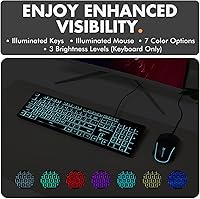
You can cycle through seven different color options on both the keyboard and mouse using a dedicated key. The color modes include individual static colors as well as a cycling mode that rotates through the full spectrum. The only limitation is that you cannot create custom colors or program specific keys to light up in different shades.