Overview

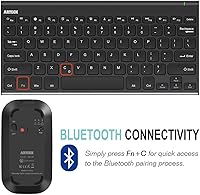
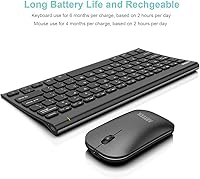
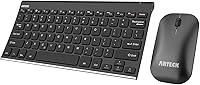
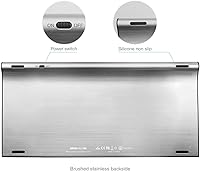
The Arteck HB086 Bluetooth Keyboard Mouse Combo is a practical, no-frills wireless pairing built for everyday home and office use — and it punches above its weight in one specific area: the keyboard's stainless steel top plate. At this price point, most competitors offer plain plastic all around, so the brushed metal finish genuinely stands out. There is no USB dongle to lose or occupy a port; it connects purely over Bluetooth, keeping your desk tidy. Battery life is another headline advantage — the keyboard reportedly lasts months on a single charge, making it a low-maintenance option for users who dislike constant recharging rituals.
Features & Benefits

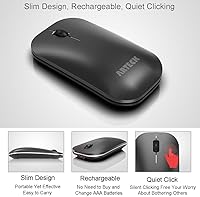
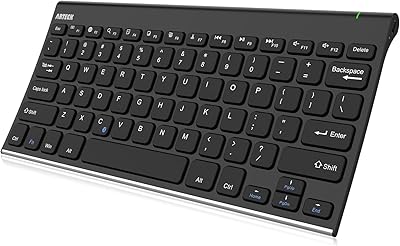
The keyboard is full-size with low-profile membrane keys — a layout that should feel immediately familiar to anyone accustomed to laptop-style typing. The stainless steel plate adds a sense of solidity unusual at this price tier. Bluetooth range extends to around 10 meters, and since no USB receiver is involved, you keep every port free. Both the keyboard and mouse pack built-in rechargeable lithium-ion batteries; charge via the included USB cable and you are done — no hunting for AAs. The mouse follows a standard right-handed shape with a modest ergonomic curve, and the whole package works across Windows, Mac, and Android without any driver installation.

Best For

This Bluetooth combo is a natural fit for home office and student setups where a cable-free desk matters more than premium tactile feel. It is particularly useful for people who toggle between a Windows laptop and an Android tablet, since Bluetooth handles both without awkward input switching. Light typists who prefer the shallow travel of laptop-style keys will feel right at home; heavy typists or anyone craving mechanical feedback should look elsewhere. The rechargeable batteries make this a strong pick for users tired of AA replacement cycles. It also works well as a laid-back secondary setup for a media center or TV PC.

User Feedback

With a 4.4-star average across nearly 2,000 ratings, the Arteck keyboard-and-mouse set has earned a loyal following. Buyers consistently note that the keyboard looks more expensive than it is — the metal finish does a lot of that work. Battery longevity also gets genuine praise, with many users reporting months between charges under normal daily use. That said, the mouse draws more mixed reactions: several reviewers find it feels noticeably lighter and cheaper compared to the keyboard, and the ergonomic shape offers limited support during longer sessions. A handful of users have also flagged occasional pairing hiccups on certain Android devices, though most find initial setup refreshingly straightforward.

Pros

  • The stainless steel keyboard top plate looks and feels noticeably more premium than most rivals at this price point.
  • Pure Bluetooth connectivity means no USB dongle to lose and no ports sacrificed.
  • Keyboard battery life holds up impressively in daily use — most owners charge it only a handful of times a year.
  • Full-size layout with a familiar low-profile key feel makes switching from a laptop keyboard effortless.
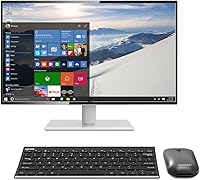
  • Works across Windows, Mac OS, and Android without installing any drivers.
  • The mouse battery also lasts months per charge, reducing the low-battery interruptions common with cheaper combos.
  • A 24-month warranty offers reasonable peace of mind for a budget peripheral.
  • Slim, lightweight build makes this wireless desk combo easy to pack for travel or hot-desking.
  • Bluetooth range of around 10 meters gives enough flexibility for living room or media center setups.
  • Strong overall rating across a large number of real buyers signals reliable consistency in quality.

Cons

  • The mouse feels noticeably lighter and cheaper in hand compared to the well-built keyboard.
  • Entry-level ergonomic shaping on the mouse offers minimal wrist support during long sessions.
  • Some users report intermittent pairing issues, particularly with certain Android devices.
  • No multi-device Bluetooth pairing — you cannot quickly switch between two computers or a phone.
  • Membrane keys lack the tactile feedback that faster or more experienced typists tend to prefer.
  • The mouse has no DPI adjustment, limiting precision customization for detail-oriented tasks.
  • White colorway shows smudges and grime more readily than darker alternatives.
  • No dedicated media keys or shortcuts, which some users consider a noticeable omission on a full-size layout.
  • Charging requires a separate USB cable session — there is no pass-through or wireless charging option.
  • Mac compatibility works but pairing and function-key behavior can require extra setup compared to Windows.

Ratings

The scores below reflect an AI-driven analysis of verified global buyer reviews for the Arteck HB086 Bluetooth Keyboard Mouse Combo, with spam, incentivized, and bot-generated feedback actively filtered out to ensure accuracy. Ratings capture both the genuine strengths that keep buyers recommending this combo and the recurring frustrations that prevent a perfect score. Nothing here is sugar-coated — real trade-offs are reflected alongside real praise.

Build Quality
78%
22%
The stainless steel top plate on the keyboard consistently surprises buyers who expect all-plastic construction at this price point. Several reviewers noted it holds up well after months of daily desk use without visible warping or key wobble developing over time.
The mouse tells a different story — most buyers notice immediately that it feels hollow and light compared to the keyboard. The plastic housing flexes slightly under firm grip, which erodes confidence in long-term durability for the mouse specifically.
Keyboard Typing Feel
74%
26%
Low-profile membrane keys land well for users transitioning from a laptop keyboard, since the travel distance and resistance feel immediately familiar. Light typists handling emails, spreadsheets, and general browsing report a comfortable and quiet typing experience throughout the day.
Anyone accustomed to mechanical switches or even higher-end membrane boards will find the feedback noticeably mushy. A few users mentioned that extended writing sessions left them fatigued due to the lack of tactile confirmation with each keystroke.
Battery Life
88%
Battery longevity is one of the most praised aspects across buyer reviews — many users report going weeks or even a couple of months without needing to reach for the charging cable under typical office use. It removes the low-battery anxiety that plagues cheaper combos with disposable cells.
Battery life is strongly dependent on usage habits, and heavier users charging daily find the rated figures optimistic. A small number of buyers also noted that the battery indicator gives little warning before the device cuts out unexpectedly.
Bluetooth Connectivity
71%
29%
For most users on Windows and Mac, pairing is straightforward and the connection holds stable across a normal desk distance. The absence of a USB dongle is genuinely appreciated by laptop users who run short on ports.
A recurring thread in negative reviews involves pairing inconsistencies — particularly with certain Android devices and some older Bluetooth stacks. Re-pairing after a device restart is an occasional annoyance that a subset of buyers encounters more frequently than expected.
Mouse Comfort
61%
39%
For short to medium work sessions, the mouse covers basic needs without causing immediate discomfort for average-sized hands. The shape is inoffensive and the buttons respond with a satisfying enough click for everyday document navigation.
The ergonomic claim does not hold up well under scrutiny from buyers who work long hours. The shallow curvature offers minimal palm or wrist support, and users with larger hands or existing wrist sensitivity frequently flagged it as inadequate for sustained use.
Value for Money
83%
At its price point, getting a rechargeable keyboard with a metal top plate alongside a wireless mouse represents strong overall value. Buyers shopping for a functional, cable-free home office setup on a budget consistently rate it as one of the better options available in its category.
The value equation works best if you think of the mouse as a bonus rather than a centerpiece. Buyers who evaluate both devices equally tend to feel the pricing only truly justifies the keyboard half of the deal.
OS Compatibility
81%
19%
Cross-platform Bluetooth support means users who split time between a Windows laptop and an Android tablet can pair either device without any driver downloads or software configuration. Mac users also report basic functionality working out of the box.
Some function key behaviors differ on Mac, requiring workarounds that are not documented in the included guide. iOS and iPadOS support is not officially listed, and real-world results from users attempting those pairings have been inconsistent.
Setup & Pairing Ease
77%
23%
The initial pairing process is clean and fast for the majority of buyers — turn on the device, open Bluetooth settings, and connect within a minute or two. No drivers, no app, no account creation required.
Occasional drop-and-reconnect behavior has been reported after the device enters sleep mode, requiring a button press or re-pair in some cases. The included welcome guide is thin on troubleshooting steps when issues do arise.
Keyboard Aesthetics
86%
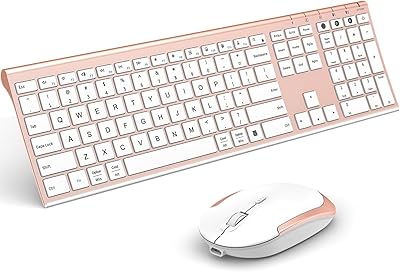
The white colorway combined with the brushed stainless steel surface gives the keyboard a look that photographs and presents well on a tidy desk. Multiple buyers specifically mentioned receiving compliments on how it looks in a home office setup.
White surfaces show finger smudges, dust, and light staining faster than darker alternatives, which requires more frequent wiping to maintain the clean appearance. The aesthetic appeal fades quickly without regular upkeep.
Mouse Precision
57%
43%
For standard pointer tasks — clicking links, navigating menus, scrolling documents — the mouse performs adequately without noticeable lag or cursor jumping at close range. It suits light office use reliably enough.
There is no DPI adjustment, which limits precision for detail work like photo editing or design tasks. At maximum sensitivity the cursor can feel slightly jerky on certain surfaces, and there is no dedicated surface sensor optimization.
Portability
79%
21%
The slim keyboard profile and lightweight mouse make this wireless desk combo easy to slide into a bag alongside a laptop for commuters or students moving between locations. No dongle means one less small accessory to track.
The full-size layout, while practical for desk use, is longer than compact travel keyboards and takes up meaningful bag space. Buyers specifically seeking a travel-optimized board may prefer a tenkeyless or 75 percent alternative.
Noise Level
82%
18%
The membrane key mechanism produces very little noise during typing, which buyers in shared office spaces or open-plan environments particularly appreciate. It will not disturb a partner, roommate, or co-worker during late-night or early-morning sessions.
The near-silent keystroke comes at the cost of feedback, and some users find the quiet actuation harder to adapt to when touch-typing at speed. The mouse click is slightly louder than the keyboard and stands out by comparison.
Warranty & Support
72%
28%
A 24-month warranty is meaningfully longer than the one-year coverage typical of budget peripherals in this category. Buyers who encountered defective units generally report that Arteck support responded and resolved issues without excessive friction.
Customer service response times and resolution quality appear inconsistent based on buyer reports — some describe quick replacements while others report slower follow-through. The support experience seems to vary depending on when and how contact is made.

Suitable for:

The Arteck HB086 Bluetooth Keyboard Mouse Combo is a genuinely smart pick for anyone building a clean, low-maintenance desk setup without spending heavily on peripherals. Students and home office workers who spend a few hours a day on emails, documents, and light browsing will find it handles those tasks without complaint. The pure Bluetooth connection — no USB dongle needed — makes it especially appealing for laptop users who guard their ports, or for anyone pairing a keyboard with an Android tablet for on-the-go productivity. If you frequently switch between a Windows machine and an Android device, the broad OS compatibility removes a real headache. The rechargeable batteries are also a quiet but meaningful quality-of-life improvement over budget combos that still run on disposables — you plug in, top up occasionally, and forget about it.
Not suitable for:

The Arteck HB086 Bluetooth Keyboard Mouse Combo is not the right tool for demanding users who need precision, speed, or tactile confidence from their peripherals. Dedicated typists, writers who log thousands of words daily, and anyone who prefers mechanical key feedback will likely find the low-profile membrane keys unsatisfying over time. Gamers should look elsewhere entirely — the mouse offers no adjustable DPI, no polling rate customization, and the basic ergonomic shape is not built for fast, precise movements. Mac power users expecting a polished, tight integration experience may run into occasional pairing friction. The mouse in particular feels noticeably lighter and less refined than the keyboard, so buyers expecting a fully balanced premium feel across both devices will be disappointed.
Specifications

  • Keyboard Model: The keyboard unit carries the model designation HB086.
  • Mouse Model: The included mouse is the MB158, sold exclusively as part of this combo.
  • Connectivity: Both devices connect via Bluetooth and require no USB receiver or wireless dongle.
  • Wireless Range: Bluetooth signal is rated for reliable operation up to 10 meters from the paired device.
  • Keyboard Battery: The built-in lithium-ion keyboard battery is rated for up to 6 months of use based on approximately 2 hours of daily typing.
  • Mouse Battery: The mouse carries its own built-in lithium-ion battery, rated for up to 4 months under similar daily usage conditions.
  • Battery Type: Both devices use integrated rechargeable lithium-ion cells; neither accepts replaceable AA or AAA batteries.
  • Charging: A USB charging cable is included and used to recharge both the keyboard and mouse independently.
  • Key Type: The keyboard uses low-profile membrane keys designed to replicate the shallow travel feel common on slim laptops.
  • Keyboard Material: The top surface of the keyboard features a stainless steel plate, with the remainder of the housing in plastic.
  • Layout: The keyboard is full-size with a standard QWERTY layout, including a dedicated number pad on the right side.
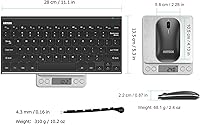
  • Dimensions: The full package measures 15.27 x 5.51 x 1.14 inches, making the keyboard relatively compact for a full-size layout.
  • OS Compatibility: The combo supports Windows 10, 8, and 7, Mac OS, and Android — no proprietary driver installation required.
  • Color: The combo ships in White only; no alternative colorways are currently offered for this model.
  • Warranty: Arteck includes a 24-month warranty backed by their customer support team.
  • In the Box: The package includes the HB086 keyboard, MB158 mouse, a USB charging cable, and a printed welcome guide.
  • User Rating: The combo holds an average rating of 4.4 out of 5 stars across nearly 2,000 verified buyer ratings on Amazon.
  • Best Sellers Rank: It ranks among the top 600 products in the Computer Keyboard and Mouse Combos category on Amazon.

Related Reviews
Arteck Bluetooth Keyboard HB086
86%
93%
Portability & Size
94%
Battery Life
83%
Ergonomics & Comfort
90%
Ease of Use & Setup
88%
Multi-Device Compatibility
More
ASLDPUO Bluetooth Keyboard and Mouse Combo
86%
92%
Value for Money
90%
Connectivity & Compatibility
85%
Ergonomics & Comfort
88%
Battery Life
84%
Design & Portability
More
VssoPlor Bluetooth Keyboard Mouse Combo

78%
88%
Value for Money
83%
Multi-Device Switching
79%
Typing Feel
66%
Bluetooth Stability
71%
Build Quality
More
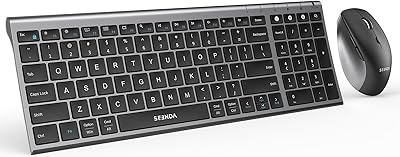
seenda COE200 Bluetooth Keyboard and Mouse Combo
80%
88%
Wireless Connectivity
86%
Multi-Device Switching
83%
Typing Comfort & Wrist Rest
63%
Mouse Ergonomics
91%
Noise Level
More
seenda COE401 Bluetooth Keyboard and Mouse Combo
82%
83%
Multi-Device Switching
88%
Typing Experience
86%
Build Quality
91%
Battery Life
74%
Mouse Performance
More
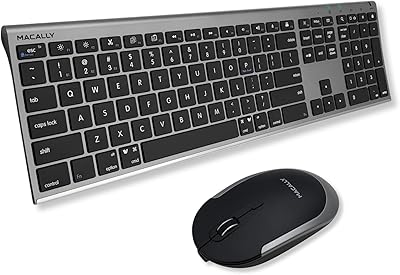
Macally Premium Bluetooth Keyboard and Mouse Combo

87%
88%
Ease of Use
83%
Ergonomics/Comfort
90%
Design & Aesthetics
87%
Typing Experience
85%
Battery Life
More
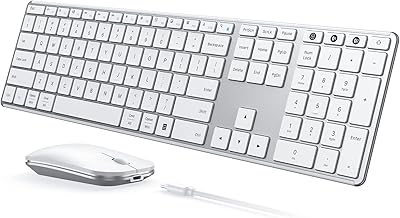
ULSOU KM599 Wireless Keyboard and Mouse Combo
78%
88%
Value for Money
79%
Keyboard Typing Feel
72%
Mouse Performance
74%
Bluetooth Connectivity
68%
Battery Life
More
Logitech MK250
Logitech MK250
75%
91%
Value for Money
78%
Bluetooth Connectivity
69%
Keyboard Typing Feel
61%
Mouse Comfort & Fit
88%
Battery Life
More
Arteck HW192 Wireless Keyboard and Mouse Combo
78%
78%
Build Quality
72%
Typing Experience
63%
Mouse Comfort & Ergonomics
81%
Battery Life
69%
Wireless Connectivity
More
seenda SKM64-3 Wireless Bluetooth Keyboard and Mouse Combo
87%
94%
Battery Life
90%
Connectivity and Compatibility
87%
Typing Experience
89%
Ergonomics and Comfort
85%
Design and Build Quality
More

FAQ

No, it does not. Both the keyboard and mouse pair directly over Bluetooth, so you do not need to plug anything into your USB ports. That makes it a solid choice if you are already short on available ports on a laptop.

It works with Android tablets without any issues. iPad and iOS compatibility is less clear-cut — Arteck lists Windows, Mac OS, and Android as the supported platforms, so if you are pairing with an iPad, results may vary and it is worth testing before committing.

The official rating is up to 6 months for the keyboard and 4 months for the mouse, based on about 2 hours of use per day. In practice, many buyers report charging the keyboard only a few times a year under light to moderate use, so the battery life tends to hold up well. Heavier users will charge more frequently, but it is rarely a daily concern.

The official spec lists Windows 10, 8, and 7, but since it connects over standard Bluetooth without any proprietary driver, it works with Windows 11 in practice. Multiple buyers have confirmed this without any setup issues.

Setup is straightforward — turn on the keyboard, press the pairing button, and add it through your device's Bluetooth settings the same way you would add any other Bluetooth peripheral. The mouse follows the same process separately. There is no software to install.

It has a mild ergonomic curve, but it is worth being realistic about expectations — this is a budget-tier mouse, not a dedicated ergonomic device. For an hour or two of general use it is fine, but if you work long hours and have wrist sensitivity, a more purpose-built ergonomic mouse would serve you better.

They pair independently to your device, so yes, you can use just the keyboard or just the mouse on its own. They are sold together but they are not electronically locked to each other.

It can work with Smart TVs and streaming devices that support Bluetooth HID (human interface device) profiles, but compatibility varies a lot by TV brand and firmware. It is not officially listed as a supported platform, so treat it as a bonus if it works rather than a guaranteed feature.

This is honestly the most common observation from buyers — the keyboard looks and feels noticeably more premium than the mouse. The stainless steel plate on the keyboard does a lot of heavy lifting, while the mouse is fairly lightweight plastic. It functions fine for everyday use, but the two do not feel like they come from the same tier.

The most reliable fix is to delete the device from your Bluetooth settings and re-pair from scratch. Some users have found that proximity to other wireless devices causes occasional drops, so keeping the paired device within a few meters helps. If pairing issues persist, Arteck offers a 24-month warranty and customer support to assist.