

Overview
The SABLUTE KM21Pro Keyboard Mouse Combo enters a crowded budget peripheral market with a clear purpose: make typing more accessible. Launched in late 2023, it targets users who struggle with standard keyboards — seniors, students, and anyone dealing with visual fatigue. With over 845 ratings and a 4.4-star average, it has earned genuine traction since release. Setup is as straightforward as it gets: plug the 5.2ft USB cable in and you are typing within seconds. No drivers required, no configuration screens, no fuss. For a combo sitting comfortably in the budget tier, it punches with purpose rather than just filling a price point.
Features & Benefits
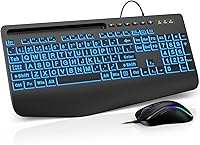
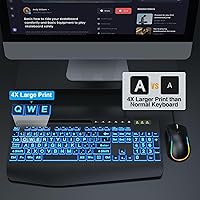
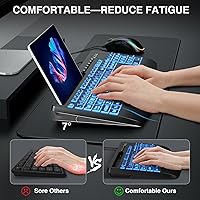
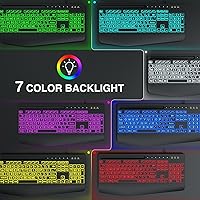
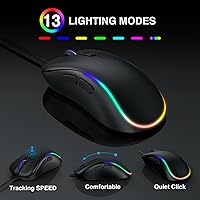
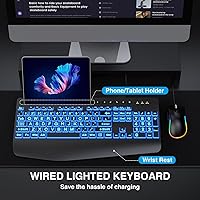
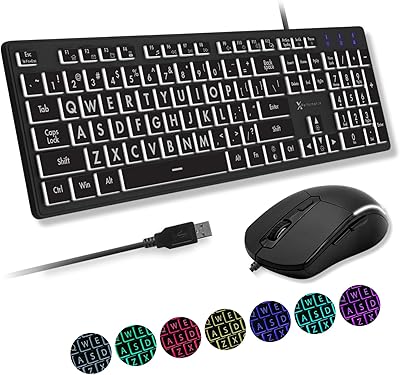
The most immediately noticeable feature is the oversized key lettering. The characters on each keycap are genuinely larger than on standard keyboards — a real difference for anyone who has ever squinted at faded labels. The built-in wrist rest runs the full width of the board, providing solid palm support during extended typing sessions. Backlight options cover seven colors across four display modes, and brightness can be dimmed or switched off entirely. One honest caveat worth knowing upfront: the lighting does not remember your setting after a restart. Every power cycle means manually resetting your preferred mode. The anti-slip mouse base keeps things steady on most desk surfaces.
Best For
This keyboard combo clicks best with a specific kind of buyer. If you are setting up a computer for a parent or grandparent who struggles with tiny key labels, this large-print keyboard and mouse delivers immediate practical value. Students on a tight budget will appreciate getting a full ergonomic setup without overspending. It also suits home office users who type long hours and want wrist support without paying premium prices. One clear caveat: Mac users who depend on multimedia function keys will run into compatibility gaps. This is a Windows-first peripheral, and it performs most reliably in that environment.
User Feedback
Buyers consistently highlight two things: key visibility and easy setup. Many report that the large lettering made an immediate difference for family members with declining eyesight, and the single-cable installation earns repeat praise for its simplicity. The wrist rest draws positive mentions from users who type for hours at a stretch. On the flip side, the backlight reset issue surfaces regularly in reviews — it is a genuine friction point for anyone who uses the lighting daily. A handful of buyers have noted the mouse feels slightly light in hand, raising questions about long-term build quality. Overall, the value-to-price ratio is what keeps this set's ratings consistently strong.
Pros
- Oversized keycap font makes a genuine, immediate difference for users with visual difficulty.
- Plug-and-play USB setup means no drivers, no configuration — working in under a minute.
- Built-in full-width wrist rest removes the need to buy ergonomic accessories separately.
- Seven backlight colors with adjustable brightness add practical value in low-light environments.
- The 5.2ft cable length comfortably reaches floor-level tower PCs without straining.
- Anti-slip mouse base keeps the cursor stable and reduces accidental misclicks on most surfaces.
- Full-size layout with number pad suits data entry, spreadsheets, and everyday document work well.
- Verified buyers consistently praise the value-to-cost ratio as exceeding expectations for this price tier.
- Lightweight combo weight makes it practical for students who occasionally move their setup.
- Compatible with Windows, Vista, and Chrome OS, covering the vast majority of everyday computing environments.
Cons
- Backlight resets to default every time the keyboard loses power — users must manually reconfigure each session.
- Multimedia function keys do not work correctly on macOS, making it a poor fit for Mac-primary users.
- Mouse feels noticeably light in hand, raising durability questions after several months of regular use.
- Key legends on heavily used keys have been reported to fade over time with daily typing.
- Tracking performance drops on textured or glass surfaces, limiting mouse reliability beyond standard desk setups.
- Two separate USB ports required — one for the keyboard, one for the mouse — which can strain limited-port laptops.
- Fixed wrist rest cannot be removed or repositioned, which may not suit all hand sizes or typing angles.
- The spacebar produces a sharper, hollow sound on impact that stands out during fast or quiet-environment typing.
- No tenkeyless or compact variant exists for users who prefer a smaller footprint on tight desk setups.
Ratings
The SABLUTE KM21Pro Keyboard Mouse Combo has been evaluated by our AI rating system after deep analysis of verified global buyer reviews, with spam, bot-submitted, and incentivized feedback actively filtered out. Scores reflect the honest consensus of real-world users — from seniors setting up their first home computer to students grinding through late-night assignments. Both the standout strengths and the genuine frustrations are transparently baked into every number you see below.
Key Legibility
Ease of Setup
Wrist Rest Comfort
Backlight Quality
Mouse Ergonomics
Build Quality
Typing Feel
macOS Compatibility
Cable & Connectivity
Value for Money
Backlight Usability
Mouse Accuracy
Noise Level
Size & Layout
Suitable for:
The SABLUTE KM21Pro Keyboard Mouse Combo is purpose-built for buyers where accessibility and ease of use matter more than premium specs. It is an especially strong fit for seniors or individuals with visual impairments who find standard keycap labels too small to read comfortably — the oversized font addresses that friction directly without requiring any workarounds. Students setting up a home study station on a tight budget will also find it covers every practical base: full-size layout, wrist support, and a functional mouse included out of the box. Home office workers who type for long stretches and want built-in ergonomic support without spending on separate accessories will appreciate the integrated palm rest. It is equally well-suited as a thoughtful, practical gift — one that a family member can unbox, plug in, and use immediately without any technical assistance.
Not suitable for:
Buyers who depend heavily on macOS multimedia and function key shortcuts should look elsewhere — the SABLUTE KM21Pro Keyboard Mouse Combo has openly acknowledged compatibility gaps on Mac systems, and those missing shortcuts will become a daily annoyance rather than an occasional edge case. Anyone who types with precision-heavy workflows — graphic design, coding with complex key bindings, or audio production — will find both the keyboard feel and mouse tracking too basic for professional demands. Users who prefer a compact or tenkeyless layout have no option here; the full-size footprint is fixed. If long-term build durability is a primary concern, the lightweight plastic construction and reports of key legend wear over time suggest this set is better suited to light-to-moderate daily use rather than high-volume professional environments. Mechanical keyboard converts or anyone who has moved on from membrane typing will likely find the tactile feedback underwhelming.
Specifications
- Model Number: This combo is manufactured under the model designation KM21Pro by SABLUTE.
- Connectivity: Both the keyboard and mouse connect via wired USB, requiring no wireless receiver or Bluetooth pairing.
- Cable Length: The attached USB cable measures 5.2 feet, providing comfortable reach for most standard desk configurations.
- Keyboard Dimensions: The keyboard measures 17 x 8.5 x 1.25 inches, following a full-size layout that includes a dedicated numeric keypad.
- Combo Weight: The full keyboard and mouse combo weighs approximately 2.23 lbs combined.
- Key Font Style: Keycaps feature an oversized large-print font design intended to improve legibility for users with visual difficulty.
- Wrist Rest: An integrated full-width palm rest is built directly into the keyboard base and cannot be detached.
- Backlight Colors: The keyboard backlight supports seven selectable RGB colors across four distinct lighting display modes.
- Brightness Control: Backlight brightness is fully adjustable and can be switched off entirely for use in bright environments.
- Backlight Memory: The keyboard does not store the selected backlight setting; the lighting mode must be manually reset after each power cycle.
- Mouse Features: The included mouse uses an ergonomic grip form factor and features an anti-slip rubberized base to reduce unintended movement.
- DPI Settings: The mouse offers 6 adjustable DPI levels to accommodate a range of cursor speed preferences.
- Mouse Backlight: The mouse includes a built-in backlight to aid visibility in low-light environments.
- OS Compatibility: The combo is compatible with Windows (including Vista), Chrome OS, and macOS, though multimedia function keys have limited support on macOS.
- Driver Requirement: No driver installation is required; the combo operates as a plug-and-play USB device on all supported operating systems.
- USB Ports Required: The keyboard and mouse each use a separate USB port, meaning two available USB-A ports are required to run the full combo.
- Brand: This combo is produced by SABLUTE, a peripheral brand focused on budget-accessible input devices.
- Release Date: The KM21Pro combo was first made available for purchase in October 2023.
Related Reviews

SABLUTE Wireless Backlit Keyboard and Mouse Combo
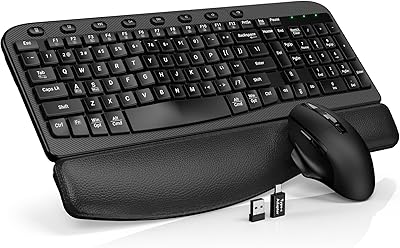
SABLUTE KC15 Wireless Ergonomic Keyboard Mouse Combo
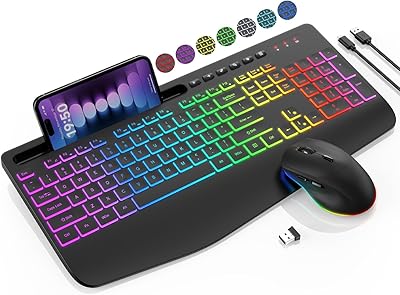
SABLUTE KL3 Pro

MPTOG S801AG Wireless Keyboard and Mouse Combo

TKVPJYYI Wireless Retro Typewriter Keyboard and Mouse Combo

QUASIO Wireless Keyboard and Mouse Combo

UBOTIE Wireless Keyboard and Mouse Combo

Trueque Wireless Keyboard and Mouse Combo
X9 Performance X9BLKEYLP7CB Wired Keyboard and Mouse Combo
