Overview

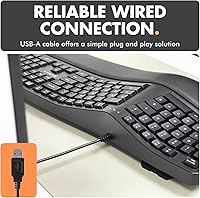
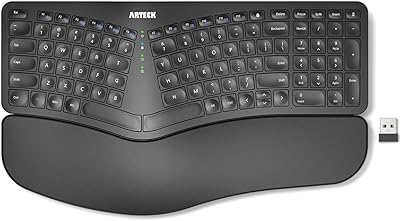
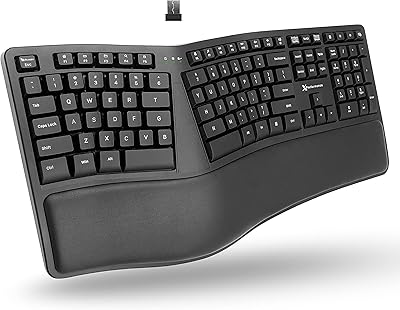
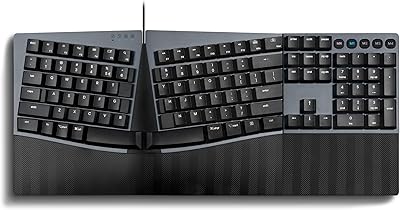
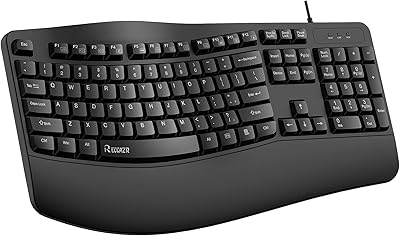
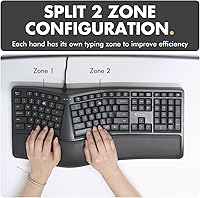
The X9 Performance X9ERGOKEY Ergonomic Split Keyboard enters a crowded mid-range market with a clear purpose: help everyday typists get through long sessions without the wrist ache that flat keyboards tend to cause. The defining feature is the split wave layout, which angles each half of the keyboard outward so your hands rest in a more natural position rather than twisting inward toward each other. It connects via USB-A and works straight out of the box with PCs, laptops, and Chromebooks — no drivers, no setup fuss. This isn't a mechanical enthusiast's board; it's a practical, comfort-focused option for people who just want to type more comfortably at work or home.
Features & Benefits

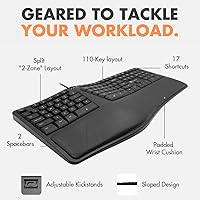
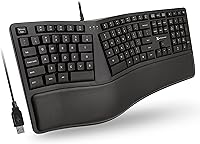
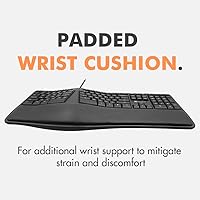
The split wave design is the central selling point — it positions your wrists at a gentler outward angle, which noticeably reduces the tension you feel after hours at the desk. The integrated wrist rest, padded directly into the keyboard's base, keeps your palms level with the keys rather than bending upward. A full 110-key layout means you get a number pad and 17 dedicated shortcut keys, making it genuinely useful for spreadsheets or data entry work. The adjustable kickstand lets you dial in the tilt for your setup, and the 5-foot cable is long enough for most desk configurations without feeling cramped. LED status indicators round things out practically.

Best For

This ergonomic split keyboard makes the most sense for office workers and remote typists who spend five or more hours a day at the keyboard and are starting to feel it in their wrists or forearms. It's also a solid pick for anyone making their first move away from a standard flat keyboard — the learning curve here is gentler than fully split or tented ergonomic designs. Students and home users who want real ergonomic benefits without a large investment will find the value reasonable. Chromebook and Linux users benefit specifically from the plug-and-play setup. If you need a number pad alongside wrist support, this wrist-rest keyboard covers both in one package.

User Feedback

People who switch to the X9 ergo keyboard from a standard flat board tend to notice a real comfort difference fairly quickly, particularly during back-to-back hours of typing. The most consistent praise centers on reduced wrist fatigue and how approachable the layout feels compared to more aggressive ergonomic boards. On the critical side, some users note that the wrist rest padding softens and flattens with regular use over several months, gradually losing support. Key feel is another common observation — the membrane switches are quiet and functional, but lack the tactile response that faster typists prefer. Cable length and connection reliability generally earn positive marks, while long-term build quality is considered adequate rather than exceptional.

Pros

  • The split wave layout measurably reduces wrist rotation strain during long typing sessions.
  • Built-in wrist rest means no extra purchase or separate pad slipping around the desk.
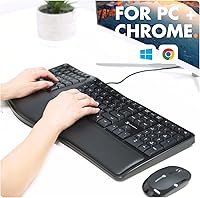
  • Plug-and-play setup works immediately on PC, Chromebook, and Linux with zero driver hassle.
  • Full 110-key layout with a number pad covers every key a standard keyboard offers.
  • Quiet membrane switches keep things peaceful in shared offices and open-plan workspaces.
  • The 5-foot cable reaches comfortably across most desk configurations without an extension.
  • Gentler learning curve than fully split boards makes the transition manageable within days.
  • Two-year warranty provides solid backup at a price point where coverage is often minimal.
  • Adjustable kickstand lets you match the keyboard tilt to your chair height and posture.
  • Works reliably across a wide range of devices without compatibility surprises.

Cons

  • Wrist rest padding compresses and loses its support after several months of daily use.
  • Membrane key feel is too soft and imprecise for fast typists or mechanical keyboard users.
  • Keycap legends show visible fading on heavily used keys within a year of regular typing.
  • Mac compatibility is unreliable — shortcut keys misfire and there is no remapping solution.
  • No customization options at all: no remappable keys, no macros, no software companion.
  • Spacebar and Enter produce a noticeably louder thud than the rest of the keys.
  • Kickstand offers only one raised angle rather than multiple tilt stops for precise adjustment.
  • The thin, unbraided cable shows wear at the connector end with heavy cable management use.
  • Customer support response times are inconsistent, with some buyers waiting several days.
  • Overall build feels adequate rather than durable — not a strong choice for intensive multi-year use.

Ratings

The X9 Performance X9ERGOKEY Ergonomic Split Keyboard has been scored by our AI system after processing thousands of verified global buyer reviews, with spam, bot activity, and incentivized feedback actively filtered out. The scores below reflect an honest cross-section of real user experiences — not just the highlights. Both the genuine strengths and the recurring frustrations are represented so you can make a fully informed decision.
Ergonomic Comfort
83%
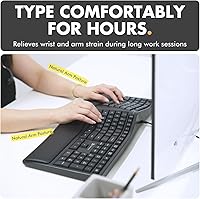
Users who previously typed on flat keyboards consistently report a noticeable reduction in wrist tension after switching to this ergonomic split keyboard, particularly during workdays that stretch beyond six hours. The outward wave angle gets credited most often for relieving forearm rotation strain rather than just shifting discomfort elsewhere.
A portion of buyers note that the comfort benefits are less dramatic for people who already touch-type with relaxed technique. Those with larger hands sometimes find the key spacing slightly cramped at the split center, which can introduce new awkwardness before any relief sets in.
Wrist Rest Quality
67%
33%
Having the wrist rest built directly into the board is a genuine advantage — there is no separate pad to slip around or replace, and the initial firmness feels supportive enough for most users during the first few months of regular use. Many buyers appreciated not having to spend extra on a standalone accessory.
Long-term wear is the most commonly flagged issue here. After three to six months of daily use, a notable number of reviewers describe the padding losing its firmness and compressing flat, which gradually eliminates the support benefit it was purchased for. The material also attracts grime over time.
Key Feel & Typing Experience
61%
39%
For casual office typing, document work, or email, the membrane keys are quiet and consistent enough to get through a full workday without frustration. Users who moved here from a basic laptop keyboard often rate the key travel as a clear improvement.
Faster typists and anyone coming from a mechanical keyboard will find the feedback noticeably soft and lacking in tactile definition. Bottoming out repeatedly during long sessions can feel tiring, and a few users report key registration inconsistencies on the outer columns after extended use.
Build Quality & Durability
58%
42%
The keyboard feels solid enough out of the box, with minimal flex across the main body during normal typing. At its price tier, buyers generally accept the all-plastic construction as appropriate and appreciate that nothing rattles or feels obviously cheap on arrival.
Longer-term durability draws mixed feedback. Some users report keycap legends beginning to fade within a year, and the stabilizers on larger keys like the spacebar and shift can develop a slight rattle after extended use. It does not feel built to last several years of heavy daily use.
Layout & Key Coverage
88%
The full 110-key layout with a dedicated number pad is a strong practical asset, especially for users doing spreadsheet work or data entry where reaching for a separate numpad kills workflow. The 17 shortcut keys add real-world value without cluttering the layout.
A small number of users find the placement of certain shortcut keys unintuitive compared to standard layouts, requiring a brief adjustment period. Those who prefer compact or tenkeyless designs will find the overall footprint larger than expected on smaller desks.
Ease of Setup
94%
Plug-and-play functionality is one of the most consistently praised aspects across all user segments. Chromebook and Linux users specifically call this out as a deciding factor, since driver-dependent keyboards regularly cause headaches on those platforms. It works immediately on virtually every device tested.
There is essentially nothing to configure, which is a double-edged sword. Power users who want remappable keys, macro support, or software customization will find nothing here — the simplicity is the ceiling as much as it is the strength.
Cable Quality & Length
79%
21%
The 5-foot cable covers the majority of real desk setups comfortably, including tower PC placements on the floor or to the side. Most users report a stable, consistent USB connection with no dropout issues during normal use.
The cable itself is fairly thin and not braided, so users who route cables under desks or through cable management systems worry about long-term durability at the connector ends. A handful of reviewers note fraying near the USB plug after a year or more.
Tilt & Adjustability
72%
28%
The adjustable kickstand is a small but meaningful detail that lets users dial in a tilt angle suited to their chair height and monitor position. People who work at standing desks or non-standard setups particularly appreciate having this flexibility rather than a fixed angle.
The kickstand offers only a single raised position rather than multiple tilt stops, limiting customization to two states: flat or tilted. Users who prefer a very shallow tilt or a negative angle for wrist health reasons are out of luck entirely.
Noise Level
84%
The membrane switch design keeps typing noise well below what most offices and shared spaces would find disruptive. Remote workers on video calls report that the keyboard does not register audibly through their microphone, which matters more than many buyers initially expect.
Quiet does not mean silent. At high typing speeds, the spacebar and enter key produce a slightly louder thud than the other keys, which some noise-sensitive users mention as a minor annoyance in otherwise quiet rooms.
Device Compatibility
91%
Broad compatibility across Windows, Chromebook, Linux, and most laptops is well-documented in user feedback with very few exceptions. Buyers working in mixed-device environments — say, a work PC and a personal Chromebook — confirm it switches between machines without any re-setup.
Mac users are not officially supported, and several reviewers confirm that while basic typing works, certain function keys and shortcuts behave unexpectedly without remapping software that this keyboard does not provide. It is not the right choice for an Apple-primary workflow.
Value for Money
76%
24%
For buyers who want to try ergonomic typing without committing to a premium split keyboard costing two to three times more, the X9 ergo keyboard delivers a reasonable entry point. The included wrist rest, full key count, and warranty sweeten the package at this price level.
Users who push this keyboard hard over 12 to 18 months tend to feel they have reached the limit of what the build quality can sustain, which affects the long-term value calculation. If you need it to last three or more years, the math gets less favorable.
Aesthetic & Desk Presence
69%
31%
The clean black finish and modern profile look professional enough for a standard office desk without drawing attention. It does not look cheap or toy-like at first glance, which some buyers in client-facing environments noted as important.
There is no RGB lighting option, and the single-color LED indicators are functional but minimal. Users who care about desk aesthetics or use their setup for streaming or content creation are likely to find the visual design underwhelming compared to alternatives at similar prices.
Learning Curve for New Ergonomic Users
81%
19%
Compared to fully split or tented ergonomic boards, the wave layout here is forgiving for first-time ergonomic users. Most buyers report adapting to the key positioning within a few days rather than weeks, which removes a common barrier to sticking with an ergonomic board long-term.
Touch typists who have deeply ingrained center-key habits — particularly around the T, Y, G, and H keys — sometimes report persistent misfires near the split for the first week or two. It is minor, but worth flagging for anyone on a deadline who cannot afford transition friction.
Warranty & Customer Support
74%
26%
A two-year warranty is above average for a keyboard in this price range, and several buyers confirm that replacement or refund requests were handled without significant pushback. That kind of backup gives cautious buyers a reasonable safety net.
Response times for support inquiries are inconsistent according to buyer feedback, with some reporting quick resolutions and others describing delays of several days. The warranty coverage is a genuine plus, but the support experience behind it is not uniformly smooth.

Suitable for:

The X9 Performance X9ERGOKEY Ergonomic Split Keyboard is built for people who spend the bulk of their workday at a keyboard and have started noticing the toll it takes — tight forearms, sore wrists, or that dull ache that sets in after hour four or five. Remote workers and office employees who handle heavy documentation, data entry, or spreadsheet work will find the full-size layout with a number pad particularly practical, since it covers everything a standard keyboard does while adding meaningful comfort improvements. First-time ergonomic buyers are a natural fit here too, because the wave split design is approachable enough that most people adapt within a few days rather than weeks. Students on a budget who want to protect their wrists during long study or writing sessions get solid value without paying premium prices. Chromebook and Linux users benefit specifically from the zero-setup plug-and-play connection, which removes the driver compatibility headaches that plague other peripherals on those platforms.
Not suitable for:

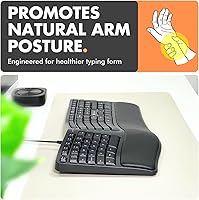
The X9 Performance X9ERGOKEY Ergonomic Split Keyboard is not the right call for anyone who prioritizes typing feel above comfort ergonomics. If you have used a mechanical keyboard with tactile or clicky switches and rely on that crisp feedback for speed or accuracy, the membrane keys here will feel noticeably soft and imprecise by comparison. Mac users should also steer clear — while basic typing functions work, the shortcut keys and function row behave inconsistently on Apple systems, and there is no software to remap them. Power users who want programmable macros, RGB lighting, or any form of key customization will hit a hard ceiling quickly. Anyone expecting this wrist-rest keyboard to hold up through three or more years of intensive daily use may find themselves disappointed, as the build materials and wrist rest padding are calibrated for the price point rather than long-term endurance. Finally, users with very large hands or those who are strict touch typists may find the center split placement causes more adjustment friction than expected.
Specifications

  • Key Count: The keyboard features a full 110-key layout, including a dedicated numeric keypad and 17 shortcut keys.
  • Layout Type: Uses a full-size ergonomic split wave design that angles both key halves outward to promote a more natural wrist position.
  • Switch Type: Membrane switches provide quiet, low-noise keypresses suited to shared office and home environments.
  • Wrist Rest: An integrated cushioned wrist rest is built directly into the keyboard base, keeping palms level with the key surface during use.
  • Connectivity: Connects via a standard USB-A wired interface with no wireless or Bluetooth option available.
  • Cable Length: The attached cable measures 5 feet, providing sufficient reach for most standard desktop and laptop configurations.
  • Tilt Adjustment: An adjustable kickstand on the underside allows users to switch between a flat profile and a single raised tilt angle.
  • LED Indicators: Three LED status indicators display the active state of Caps Lock, Num Lock, and Scroll Lock at a glance.
  • Backlighting: Supports single-color LED backlighting rather than RGB or full-spectrum color customization.
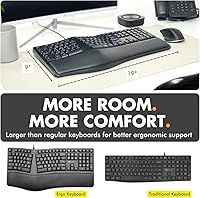
  • Dimensions: The keyboard measures 19″ in length, 9.85″ in width, and 1.5″ in height at its tallest point.
  • Weight: Total unit weight is 2.84 pounds, which includes the integrated wrist rest and cable.
  • Color: Available in a single Black colorway with a modern, low-profile aesthetic suited to standard office desks.
  • Driver Requirement: Fully plug-and-play with no driver installation required on any supported operating system.
  • Compatibility: Compatible with Windows PCs, laptops, Chromebooks, and Linux-based systems; Mac support is limited and not officially listed.
  • Shortcut Keys: Includes 17 dedicated shortcut keys pre-assigned to common productivity functions such as media controls and system commands.
  • Warranty: Covered by a 2-year manufacturer warranty with support for returns and replacements through X9 Performance.
  • Manufacturer: Designed and sold by X9 Performance, with the product first made available in August 2020.
  • Model Number: The official model identifier for this keyboard is X9ERGOKEY, as listed by the manufacturer.

Related Reviews

X9 Wireless Ergonomic Keyboard
84%
89%
Comfort & Ergonomics
92%
Wireless Connectivity
84%
Build Quality
90%
Battery Life
75%
Typing Experience
More
Arteck HW315
Arteck HW315
74%
83%
Ergonomic Comfort
74%
Wrist Rest Quality
61%
Typing Feel & Key Travel
92%
Battery Life
81%
Wireless Connectivity
More
Macally BTBLERGO2A Bluetooth Ergonomic Split Keyboard
85%
91%
Ergonomics & Comfort
88%
Ease of Use & Setup
90%
Bluetooth Connectivity
87%
Battery Life
85%
Backlit Keys Visibility
More
DeLUX GM901D Wireless Ergonomic Split Keyboard
84%
87%
Comfort and Ergonomics
91%
Multi-Device Connectivity
80%
Typing Experience
75%
Palm Rest Comfort
88%
Ease of Setup
More
NocFree Wireless Ergonomic Split Mechanical Keyboard
84%
89%
Ergonomics & Comfort
85%
Build Quality
91%
Customization Options
80%
Battery Life
88%
Connectivity & Compatibility
More
Perixx Periboard-612B Wireless Ergonomic Split Keyboard
84%
88%
Ergonomics & Comfort
91%
Wireless Connectivity
85%
Ease of Use
76%
Key Travel & Typing Experience
82%
Build Quality
More
Perixx PERIBOARD-624B Wireless Ergonomic Split Keyboard
85%
89%
Ergonomics & Comfort
91%
Wireless Connectivity
76%
Key Response & Travel
84%
Build Quality
80%
Typing Experience
More
Perixx PERIBOARD-535BR Wired Ergonomic Mechanical Split Keyboard
86%
88%
Ergonomics and Comfort
90%
Build Quality
85%
Performance
92%
Key Switch Feel
87%
Macro Functionality
More
Perixx Periduo-605 Wireless Ergonomic Split Keyboard and Vertical Mouse Combo
85%
89%
Ergonomic Comfort
94%
Ease of Setup
87%
Wireless Connectivity
85%
Build Quality
72%
Keyboard Layout
More
RECCAZR Ergonomic Wired Keyboard
74%
78%
Ergonomic Comfort
74%
Wrist Rest Quality
66%
Typing Feel
61%
Build Quality
81%
Spill Resistance
More

FAQ

No, the X9 Performance X9ERGOKEY Ergonomic Split Keyboard is completely plug-and-play. You just connect the USB-A cable to your computer and it works immediately — no driver downloads, no setup screens, nothing to configure. This makes it especially convenient for Chromebook and Linux users who often run into compatibility headaches with driver-dependent peripherals.
Technically, basic typing functions will work on a Mac since it uses a standard USB HID connection. However, the shortcut keys and function row are mapped for Windows and Chromebook layouts, so several keys will behave unexpectedly on macOS. There is no companion software to remap them, so if you primarily use a Mac, this ergonomic split keyboard is not the ideal choice.

Most people adapt within a few days to about a week of regular use. The wave split here is more forgiving than fully separated or tented ergonomic boards, so the adjustment period is relatively short. The main hurdle is relearning where your fingers land on keys near the center divide, particularly G, H, T, and Y — but muscle memory catches up quickly with consistent use.

The wrist rest is permanently integrated into the keyboard body, so it cannot be removed or swapped out. This keeps the design clean and prevents a separate pad from sliding around, but it does mean that if the padding compresses over time — which some users report after six to twelve months of heavy use — there is no straightforward way to restore the original firmness.

It is one of the quieter keyboards in its category thanks to the membrane switches. Normal typing produces a soft, muted sound that most open-plan office environments would consider completely acceptable. The spacebar and Enter key are slightly louder than the rest when bottomed out at full speed, but nothing that would draw complaints from a nearby colleague.

It works equally well with laptops. The 5-foot cable gives you enough slack to position the keyboard comfortably in front of you while the laptop sits to the side or slightly behind. Many buyers use this wrist-rest keyboard specifically as a desktop replacement for their laptop to improve posture and reduce strain during long work sessions.

Yes, it includes a full numeric keypad on the right side, which is one of its stronger practical advantages over compact ergonomic keyboards that sacrifice the number pad for a smaller footprint. If you spend time on spreadsheets or financial data entry, you will not have to reach for a separate numpad.

It is built to a standard consistent with its price tier — solid and functional out of the box, but not engineered for years of intensive punishment. Users who type heavily every day tend to notice keycap legend fading within a year and some rattle developing in the larger keys over time. For light to moderate daily use it holds up well, but if longevity is your primary concern, investing in a more premium board would be the smarter long-term decision.

The X9 ergo keyboard comes with a 2-year manufacturer warranty, which is a better coverage window than many keyboards in this price range. X9 Performance handles returns and replacements directly, and the general experience reported by buyers is reasonably straightforward — though some users mention that support response times can vary. It is worth keeping your purchase confirmation in case you need to initiate a claim.

It can be a helpful step in the right direction, particularly as an entry-level ergonomic upgrade from a flat keyboard. The outward wave angle reduces the inward wrist rotation that contributes to strain during long typing sessions, and the integrated wrist rest helps keep your palms at a more neutral height. That said, if you are managing a diagnosed RSI condition, it is worth consulting a physical therapist or occupational health specialist before relying solely on a keyboard change — ergonomic tools work best as part of a broader posture and habits approach.