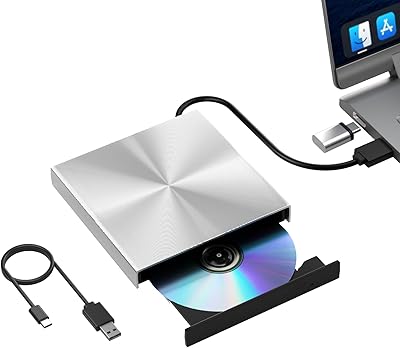
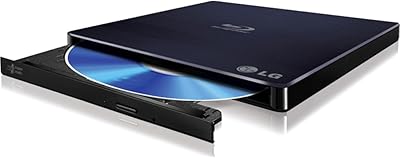
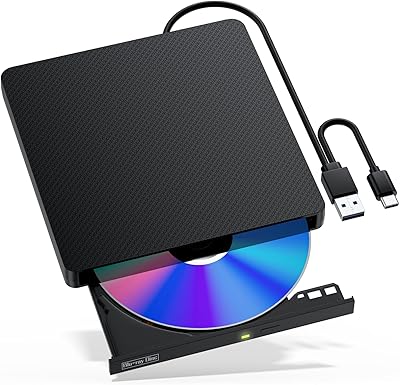
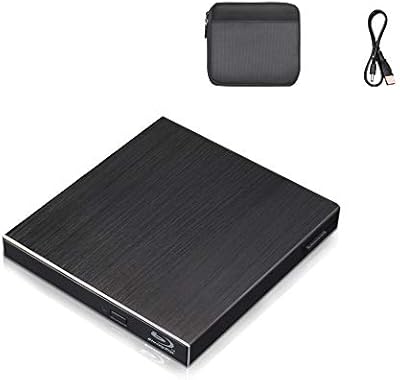
Overview

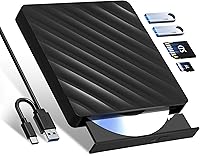
The Wbacon 5-in-1 External Blu-ray Drive is a compact optical drive built for laptops and desktops that no longer ship with a built-in disc slot — think slim ultrabooks, modern MacBooks, and stripped-down mini PCs. It reads Blu-ray, DVD, and CD discs and can burn DVDs and CDs, but be clear-eyed about one thing upfront: it cannot burn Blu-ray discs. If that is what you need, this is not the right purchase. The dual-interface cable covers both USB 3.0 and Type-C connections, so you will not need a separate adapter on newer machines. Launched in late 2023 by a lesser-known brand, it sits firmly in the budget tier rather than the professional or prosumer space.
Features & Benefits

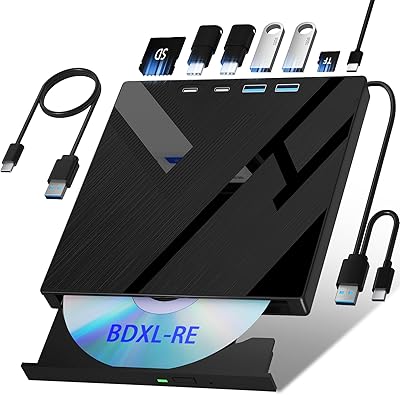
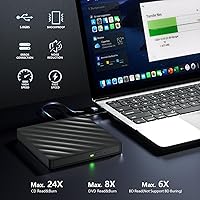
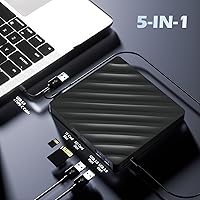
The all-in-one concept is where this 5-in-1 optical drive genuinely pulls its weight. Alongside disc playback, you get an SD card slot, a TF card slot, and two USB 3.0 passthrough ports, effectively turning it into a lightweight hub for port-limited laptops. One practical catch: the SD and TF slots cannot run simultaneously — you pick one at a time. Read speeds land at 6x for Blu-ray, 8x for DVD, and 24x for CD, which is adequate for casual archiving and media playback. Setup is painless; plug it in and the OS recognizes it immediately, no driver needed. At roughly 5.75 by 5.55 inches and under an inch thick, it slips into a bag without complaint.

Best For

This external Blu-ray drive is best matched to occasional disc users — someone who wants to revisit a Blu-ray film collection, rip older DVDs, or install disc-based software every now and then without committing to a dedicated burner. Students dealing with disc-distributed course materials, or remote workers who occasionally encounter a CD-ROM installer, will appreciate having something this portable on hand. The bundled card reader and USB hub also make it a reasonable choice for anyone trying to reduce the number of separate adapters they carry. If you need high-frequency, reliable use or intend to author original Blu-ray content, this 5-in-1 optical drive is not the right fit.

User Feedback

Sitting at 3.5 stars across 156 ratings, the Wbacon drive divides buyers fairly cleanly. Those who are happy tend to highlight easy setup and appreciate getting card slots and USB ports alongside the drive. The problems surface quickly for others, though. A meaningful share of reviewers report that the drive fails to recognize certain Blu-ray discs — not a minor inconvenience if reliable playback is the whole point. Mac users also face a hidden cost: Blu-ray playback software is not included and must be bought separately, since macOS has no native support. A few buyers also raise durability concerns, describing the plastic housing as thinner and lighter than expected. Solid for light, occasional use; inconsistent under anything heavier.

Pros

  • Plug-and-play setup works immediately on both Mac and Windows with no driver installation required.
  • The dual USB 3.0 and Type-C cable means no adapter is needed on modern MacBooks or ultrabooks.
  • SD and TF card slots add real value for photographers and content creators who move files frequently.
  • Two live USB 3.0 passthrough ports are a genuine bonus for port-limited thin-and-light laptops.
  • DVD and CD burning is reliable for occasional home archiving and data backup tasks.
  • Slim, lightweight profile makes it easy to pack alongside a laptop without adding noticeable bulk.
  • Broad OS support covers everything from Windows XP through current macOS versions, including Linux.
  • At its price tier, the combination of disc drive, card reader, and USB hub in one unit is hard to beat.

Cons

  • Blu-ray disc burning is completely unsupported — a critical omission not always obvious from the product name.
  • Blu-ray playback software is not included, adding a hidden cost that catches many Mac users off guard.
  • Disc recognition is inconsistent, with some Blu-ray titles failing to load or intermittently detected.
  • The plastic housing feels noticeably thin and has drawn durability complaints from regular users.
  • SD and TF card slots cannot be used at the same time, limiting simultaneous multi-format workflows.
  • The built-in cable cannot be replaced, so fraying or damage means the entire drive becomes unusable.
  • Blu-ray read speed of 6x is on the slower end and makes full-length HD film transfers feel sluggish.
  • Some Mac users report needing to manually adjust security permissions before the drive mounts correctly.

Ratings

The Wbacon 5-in-1 External Blu-ray Drive has been scored by our AI system after analyzing verified global buyer reviews, with spam, bot-submitted, and incentivized feedback actively filtered out. The ratings below reflect both the genuine strengths users praise and the recurring frustrations that hold this drive back for more demanding tasks. Nothing has been softened — the scores tell the full picture.
Ease of Setup
88%
Plug-and-play behavior is one of this drive's clearest wins. Buyers consistently report that connecting it to both Windows and Mac machines requires zero driver installation — just plug in the cable and the OS picks it up within seconds, which matters a lot when you are traveling or working on a deadline.
A small number of users found that certain older Windows versions needed a system restart before the drive was recognized correctly. While rare, it is worth noting that truly frictionless setup is not universal across every machine configuration.
Disc Read Reliability
54%
46%
For standard DVDs and CDs, most users report consistent and accurate reads without needing to clean the disc or retry. Archiving an old DVD collection or installing legacy software from a CD-ROM tends to go smoothly, which covers a large portion of the everyday use cases buyers bring to this drive.
Blu-ray disc recognition is where reliability takes a noticeable hit. A significant portion of reviewers report that certain Blu-ray titles simply fail to load or are intermittently detected, which is a serious problem for anyone buying this primarily for Blu-ray playback. The inconsistency feels tied to disc age and pressing region.
Blu-ray Playback Experience
51%
49%
When a Blu-ray disc is recognized and a compatible third-party player is installed, the actual playback experience is generally smooth at the supported 6x read speed. Users watching standard Blu-ray films in a home setting report stable playback without skipping, provided the software side is configured properly.
The hidden cost here is real — no playback software is included, and macOS has zero native Blu-ray support, meaning Mac users must purchase a paid app like PowerDVD or Macgo before watching a single disc. This surprises a notable number of buyers who expected an out-of-the-box experience.
DVD & CD Burning
73%
27%
Burning standard DVDs and CDs works reliably for most users. Whether backing up home videos, creating data discs, or archiving documents, the write performance at up to 8x for DVD and 24x for CD is adequate for occasional use without errors or failed burns being a common complaint.
Heavy or frequent burning sessions sometimes expose inconsistencies in write quality, with a small share of users reporting coaster discs after extended sessions. The drive is not built for production or repeated daily burning, and treating it as such will likely shorten its lifespan.
Blu-ray Disc Burning
18%
82%
There is essentially no positive to offer in this category for Blu-ray burning specifically — this drive is physically incapable of burning BD discs, and users who need that feature should look elsewhere without hesitation.
The inability to burn Blu-ray discs is the single most important limitation of this device, and it is not always obvious at first glance from the product name or packaging. Buyers who purchased expecting full Blu-ray read-and-write capability express significant frustration upon discovering this restriction.
Build Quality & Durability
57%
43%
The slim form factor is genuinely useful for portability, and the footprint is small enough to sit beside a laptop without getting in the way. Users who treat it carefully and use it occasionally report no structural issues after several months of light ownership.
The plastic housing is described by multiple reviewers as noticeably thin and hollow-feeling, lacking the reassurance of more established brand drives. A few buyers reported the casing cracking or the tray mechanism feeling loose after modest regular use, which is a concern for anyone planning daily reliance on this drive.
Portability & Form Factor
84%
At roughly 5.75 by 5.55 inches and under an inch thick, this 5-in-1 optical drive fits easily into a laptop bag or even a large jacket pocket. The dual-cable design means you carry one accessory that handles both USB-A and Type-C connections, removing a small but real logistical headache from travel.
At 14.4 ounces, it is not featherweight for a portable drive, and users comparing it against slimmer single-function rivals note the extra mass. The cable, while versatile, is a fixed length and a few users found it slightly short depending on their desk or bag setup.
Hub & Card Reader Utility
71%
29%
Having two live USB 3.0 passthrough ports is a meaningful bonus for ultrabook users who routinely run out of ports. Plugging in a USB drive and a mouse simultaneously through the drive while archiving a disc is a practical workflow that buyers with port-limited laptops genuinely appreciate.
The SD and TF card slots cannot be used at the same time, which limits the card reader's utility in workflows involving both formats simultaneously. Transfer speeds through the hub ports are functional but not exceptional — users moving large files notice they are not getting peak USB 3.0 throughput in all scenarios.
Mac Compatibility
58%
42%
The drive is physically recognized by macOS without issues, and for DVD and CD tasks it integrates reasonably well on modern MacBooks via the Type-C cable. Mac users who only need to read data discs or burn standard DVDs tend to have a workable experience overall.
Blu-ray playback on Mac requires purchasing and configuring third-party software, which is a recurring surprise for new buyers. Some users also report that macOS security settings occasionally block the drive from mounting properly until permissions are manually adjusted — a non-trivial hurdle for less technical users.
Windows Compatibility
79%
21%
On Windows 7 through 10, this external Blu-ray drive performs at its most consistent. DVD and CD functions work reliably, and with software like PowerDVD installed, Blu-ray playback holds up well for most standard titles. The broad Windows support list including XP is a genuine plus for legacy system users.
A handful of users on Windows 11 report occasional detection hiccups, suggesting the OS compatibility list may not be fully current. Blu-ray playback inconsistencies still appear on Windows too, especially with region-locked or older disc pressings, so the platform advantage is mostly about setup ease rather than flawless performance.
Value for Money
67%
33%
As a budget-tier all-in-one peripheral, the price point is reasonable if your needs are modest — occasional DVD playback, light disc archiving, and a bit of extra port utility. For a student or a user who revisits physical media a few times a month, the cost-per-feature ratio holds up.
When you factor in the cost of Blu-ray playback software, which is required but not included, the effective price climbs meaningfully. Buyers who expected a complete plug-and-play Blu-ray solution for the base price feel the value proposition weakens considerably once that hidden expense surfaces.
Noise & Vibration
72%
28%
Under normal DVD and CD operation, the drive runs quietly enough that most users do not notice it in a quiet home or office setting. Spinning up a disc takes only a few seconds and the mechanical noise is low-pitched and unobtrusive for casual use.
At higher read speeds, particularly with Blu-ray discs, some users notice a faint but perceptible vibration transferred through the desk surface. It is not disruptive but it is noticeable in silent environments, and a small number of buyers found it more pronounced than expected for a drive marketed as portable and compact.
Cable & Connectivity Design
76%
24%
The integrated dual-interface cable — one body splitting into USB-A and Type-C heads — is a clever practical solution that eliminates the need to pack separate adapters. Users switching between a Type-C MacBook and a USB-A Windows desktop genuinely appreciate not needing to swap cables.
Because the cable is built in and not detachable, a damaged cable means the entire drive is compromised. A few users report fraying at the cable junction after extended use, and the fixed cable length, while adequate for most setups, occasionally proves restrictive depending on port placement.
Speed Performance
69%
31%
For everyday tasks — reading a DVD, burning a data CD, pulling files off an SD card — the speed is perfectly acceptable. The 24x CD read and 8x DVD write speeds get the job done in a reasonable timeframe for home archiving or light media work without long waits.
Blu-ray read speed tops out at 6x, which is on the slower end even for budget optical drives, and the real-world throughput can feel sluggish when working with a full-length high-definition film. Power users accustomed to faster drives will notice the performance ceiling fairly quickly.

Suitable for:

The Wbacon 5-in-1 External Blu-ray Drive is a practical match for casual users who occasionally need to interact with physical discs but do not want to invest in a dedicated single-function burner. Students who receive course materials on disc, remote workers who encounter the odd CD-ROM installer, and home users looking to digitize an aging DVD collection will find it covers their bases without overcomplicating things. The all-in-one angle also appeals to anyone using a modern ultrabook with limited ports — having disc access, two extra USB 3.0 slots, and an SD or TF card reader in one small device genuinely reduces bag clutter. Mac users who primarily need DVD and CD functionality, and are comfortable purchasing a separate Blu-ray playback app, will also find this a workable solution. For light, infrequent use across a range of file and disc tasks, this 5-in-1 optical drive hits a reasonable value point.

Not suitable for:

The Wbacon 5-in-1 External Blu-ray Drive is the wrong tool for anyone who needs to burn Blu-ray discs — that capability is simply absent, and no firmware or software update will change that. Buyers expecting a complete out-of-the-box Blu-ray viewing experience should also factor in the cost of third-party playback software, which is required on both Mac and Windows and is not included in the box. Users who rely on an optical drive daily for work or production purposes will likely find the plastic build and inconsistent disc recognition frustrating over time. Content creators, home theater enthusiasts building a proper BD library, and anyone who frequently switches between SD and TF cards simultaneously will hit the device's limits quickly. If reliable, high-frequency Blu-ray performance is what you need, this 5-in-1 optical drive is not the right foundation to build on.
Specifications

  • Brand: Manufactured and sold under the Wbacon brand, with ASIN B0CKQT5412, first listed in October 2023.
  • Interfaces: Features a built-in dual-head cable that supports both USB 3.0 Type-A and USB Type-C connections in a single integrated cord.
  • Dimensions: The drive measures 5.75 × 5.55 × 0.71 inches, making it slim enough to slip into most laptop sleeves or bags.
  • Weight: Weighs 14.4 oz, which is light enough for portable use but slightly heavier than single-function slim optical drives.
  • Blu-ray Read Speed: Reads Blu-ray discs at up to 6x speed, suitable for casual playback and data extraction tasks.
  • DVD Speed: Reads and writes DVD discs at up to 8x, supporting both single-layer 4.7GB and dual-layer 8.5GB disc formats.
  • CD Speed: Reads and writes standard 700MB CD discs at up to 24x speed for fast audio ripping and data archiving.
  • Blu-ray Burning: Blu-ray disc burning is not supported; this drive can only read BD discs, not write or author them.
  • Card Slots: Includes one SD card slot and one TF (microSD) card slot, though both cannot be used simultaneously.
  • USB Passthrough: Provides two USB 3.0 passthrough ports for connecting external peripherals such as flash drives, mice, or charging devices.
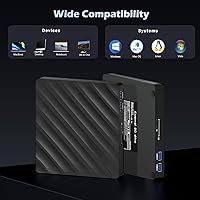
  • OS Support: Compatible with Windows XP, Vista, 7, 8, and 10, all macOS versions, and a broad range of Linux distributions.
  • Driver Requirement: No driver installation is required; the drive operates as a plug-and-play device powered entirely through its USB connection.
  • Playback Software: No Blu-ray playback software is included; users must separately obtain a compatible third-party application such as PowerDVD or Macgo.
  • Power Source: Bus-powered via a single USB cable connection, requiring no external power adapter under normal operating conditions.
  • Disc Compatibility: Supports reading BD-ROM, DVD-ROM, DVD-R, DVD+R, DVD-RW, DVD+RW, CD-ROM, CD-R, and CD-RW disc formats.
  • Incompatible Devices: Not compatible with tablet iPads, Microsoft Surface tablets, smart TVs, projectors, smartphones, BD recorders, or in-car entertainment systems.

Related Reviews

Wbacon 7-in-1 External Blu-ray Drive
71%
67%
Disc Read Reliability
61%
Blu-ray Write Performance
84%
Connectivity & Port Variety
71%
Card Reader Utility
81%
Setup & Plug-and-Play Experience
More
MthsTec 4-in-1 External Blu-ray Drive
69%
83%
Optical Read Performance
76%
Blu-ray Burn Quality
79%
HDD Enclosure Functionality
72%
USB Hub Usability
54%
Fast-Charging Effectiveness
More
NOLYTH Portable External Blu-ray Drive
71%
91%
Portability & Form Factor
88%
Plug-and-Play Setup
44%
Blu-ray Playback Software Experience
71%
Disc Read & Write Performance
67%
Build Quality & Materials
More
Yaeonku 50GB External Blu-ray Drive
70%
86%
Plug-and-Play Setup
78%
Blu-ray Read & Burn Performance
89%
Dual-Interface Connectivity
41%
Software & Playback Experience
83%
Compatibility Across Operating Systems
More
Wintale Portable External Blu-ray Drive
72%
91%
Ease of Setup
72%
Read Performance
69%
Write & Burn Reliability
44%
Software & Out-of-Box Readiness
61%
Build Quality
More
LG WP50NB40 External Blu-ray Writer
78%
93%
Portability & Form Factor
91%
Bus-Powered Convenience
89%
Plug-and-Play Setup
86%
Burn Quality & Reliability
78%
Blu-ray Playback Performance
More
NVOPERANG BD015 External Blu-ray Drive
72%
78%
Plug-and-Play Ease
61%
Blu-ray Playback Experience
84%
CD & DVD Performance
67%
Build Quality & Durability
81%
Connectivity & Compatibility
More
VSVABEFV External USB Blu-Ray Drive
82%
93%
Ease of Use
90%
Portability
65%
Write Speed
78%
Software Compatibility
88%
Compatibility with Operating Systems
More
Cloudtale Portable Slim External Blu-ray Drive
71%
91%
Ease of Setup
61%
Mac Compatibility
78%
Build Quality
74%
Read Performance
88%
Portability
More
Alphami USB-C External Blu-ray Drive
65%
78%
Ease of Setup
67%
Blu-ray Playback Quality
59%
Compatibility
54%
Portability
56%
Build Quality
More

FAQ

No, you do not. It works as a plug-and-play device on both Windows and macOS — just connect the cable and your computer should recognize it within a few seconds. No disc, no download, no setup wizard required.

No, and this is the most important thing to understand before buying. The Wbacon 5-in-1 External Blu-ray Drive can read Blu-ray discs but cannot write or burn them under any circumstances. If Blu-ray burning is your primary goal, you will need a different drive entirely.
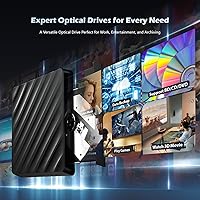
It does not, and this catches a lot of buyers off guard. To watch Blu-ray films, you will need to purchase a compatible third-party player — PowerDVD and Macgo Blu-ray Player are the most commonly recommended options. On Mac especially, there is no free built-in solution, so factor that extra cost into your decision.

Yes, the integrated cable has both a USB Type-A and a USB Type-C connector built into one cord, so you can plug directly into a Type-C port without needing an adapter. That said, Blu-ray playback on Mac still requires a paid third-party application.

Unfortunately, no. You can only use one card slot at a time — either the SD slot or the TF slot, not both simultaneously. The two USB passthrough ports, however, can both be active at the same time without any conflict.

This is an area where user experiences vary noticeably. Lightly used discs in good condition generally read without issue, but several buyers report that certain Blu-ray titles — particularly older or region-specific pressings — are not reliably recognized. If you have a large library of aged or worn discs, reliability may be a concern.

The officially listed compatibility stops at Windows 10, and a handful of users on Windows 11 have reported occasional detection issues. It may work in most cases, but Wbacon has not confirmed full Windows 11 support, so proceed with that in mind if your machine runs the newer OS.

For DVDs and CDs, the noise level is fairly unobtrusive — a low hum that most people would not find distracting in a home or office. At higher speeds with Blu-ray discs, some users notice a slightly more pronounced vibration and spin-up noise, though it is not generally described as loud.

The two USB 3.0 passthrough ports do support charging as well as data transfer, so yes, you can charge a device through them. Keep in mind that all power is drawn from your laptop's USB connection, so running the disc drive and charging simultaneously may be noticeable on older or underpowered machines.

It is portable and slim enough to travel well, but several buyers have flagged that the plastic casing feels thinner and lighter than expected. It is not a drive you would want to toss loosely into a bag without protection. If you are a frequent traveler who plans to use it daily, a small protective pouch would be a smart precaution.